ignition JEEP WAGONEER 2023 User Guide
[x] Cancel search | Manufacturer: JEEP, Model Year: 2023, Model line: WAGONEER, Model: JEEP WAGONEER 2023Pages: 396, PDF Size: 15.17 MB
Page 29 of 396
GETTING TO KNOW YOUR VEHICLE27
NOTE:
The emergency lock lever is only accessible when the
door is open.
Manually locking the vehicle will not arm the Vehicle
Security system.
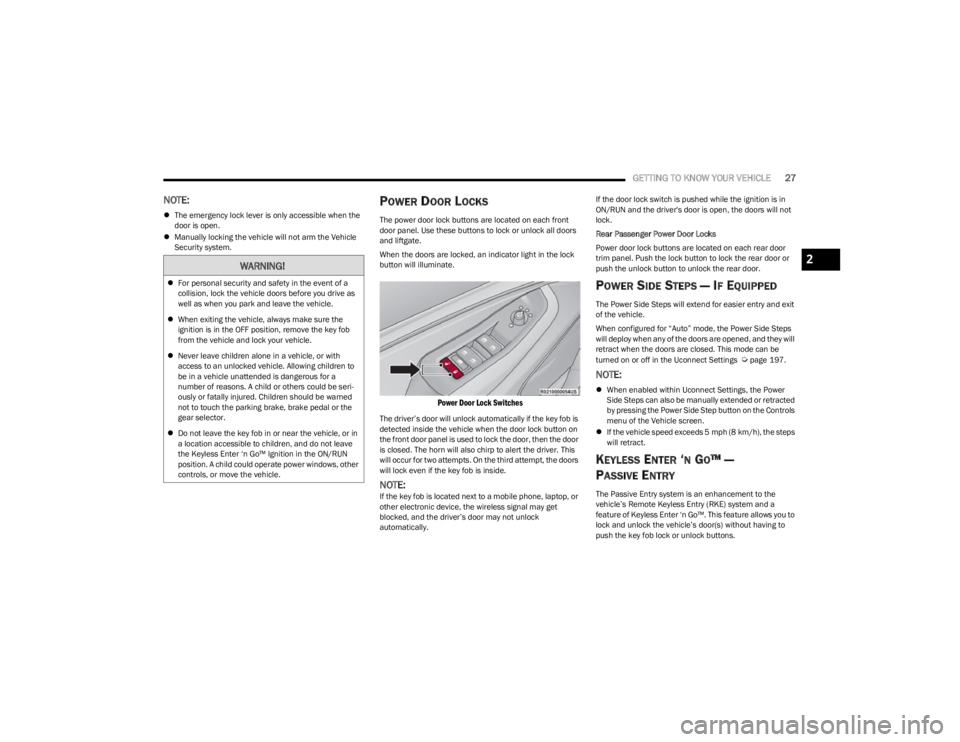
POWER DOOR LOCKS
The power door lock buttons are located on each front
door panel. Use these buttons to lock or unlock all doors
and liftgate.
When the doors are locked, an indicator light in the lock
button will illuminate.
Power Door Lock Switches
The driver’s door will unlock automatically if the key fob is
detected inside the vehicle when the door lock button on
the front door panel is used to lock the door, then the door
is closed. The horn will also chirp to alert the driver. This
will occur for two attempts. On the third attempt, the doors
will lock even if the key fob is inside.
NOTE:If the key fob is located next to a mobile phone, laptop, or
other electronic device, the wireless signal may get
blocked, and the driver’s door may not unlock
automatically. If the door lock switch is pushed while the ignition is in
ON/RUN and the driver's door is open, the doors will not
lock.
Rear Passenger Power Door Locks
Power door lock buttons are located on each rear door
trim panel. Push the lock button to lock the rear door or
push the unlock button to unlock the rear door.
POWER SIDE STEPS — IF EQUIPPED
The Power Side Steps will extend for easier entry and exit
of the vehicle.
When configured for “Auto” mode, the Power Side Steps
will deploy when any of the doors are opened, and they will
retract when the doors are closed. This mode can be
turned on or off in the Uconnect Settings
Úpage 197.
NOTE:
When enabled within Uconnect Settings, the Power
Side Steps can also be manually extended or retracted
by pressing the Power Side Step button on the Controls
menu of the Vehicle screen.
If the vehicle speed exceeds 5 mph (8 km/h), the steps
will retract.
KEYLESS ENTER ‘N GO™ —
P
ASSIVE ENTRY
The Passive Entry system is an enhancement to the
vehicle’s Remote Keyless Entry (RKE) system and a
feature of Keyless Enter ‘n Go™. This feature allows you to
lock and unlock the vehicle’s door(s) without having to
push the key fob lock or unlock buttons.
WARNING!
For personal security and safety in the event of a
collision, lock the vehicle doors before you drive as
well as when you park and leave the vehicle.
When exiting the vehicle, always make sure the
ignition is in the OFF position, remove the key fob
from the vehicle and lock your vehicle.
Never leave children alone in a vehicle, or with
access to an unlocked vehicle. Allowing children to
be in a vehicle unattended is dangerous for a
number of reasons. A child or others could be seri -
ously or fatally injured. Children should be warned
not to touch the parking brake, brake pedal or the
gear selector.
Do not leave the key fob in or near the vehicle, or in
a location accessible to children, and do not leave
the Keyless Enter ‘n Go™ Ignition in the ON/RUN
position. A child could operate power windows, other
controls, or move the vehicle.
2
23_WS_OM_EN_USC_t.book Page 27
Page 30 of 396
28GETTING TO KNOW YOUR VEHICLE
If equipped, the rear doors will also have Passive Entry
capabilities.
NOTE:
Passive Entry may be programmed on/off through
Uconnect Settings Úpage 197.
The key fob may not be detected by the vehicle Passive
Entry system if it is located next to a mobile phone,
laptop or other electronic device; these devices may
block the key fob's wireless signal and prevent the
Passive Entry handle from locking/unlocking the
vehicle.
Passive Entry Unlock initiates illuminated approach
(low beams, license plate lamp, parking lights, door
handle pocket lights [if equipped]) for whichever dura -
tion is set between 0, 30, 60 or 90 seconds. Passive
Entry Unlock also initiates two flashes of the turn
signals.
If wearing gloves, if it has been raining/snowing, or if
there is salt/dirt covering the Passive Entry door
handle, the unlock and lock sensitivity can be affected,
resulting in a slower response time.
The doors may lock and unlock when water is sprayed
on the Passive Entry door handles, if the key fob is
located outside of the vehicle within 5 ft (1.5 m) of the
handle.
Passive Entry lock initiates one horn chirp and one
flash of turn signals. These settings can be
programmed on/off within Uconnect Settings
Úpage 197.
If the vehicle is unlocked by Passive Entry and no door
is opened within 60 seconds, the vehicle will relock and
will arm the Vehicle Security system (if equipped). To Unlock From The Driver Or Passenger Side
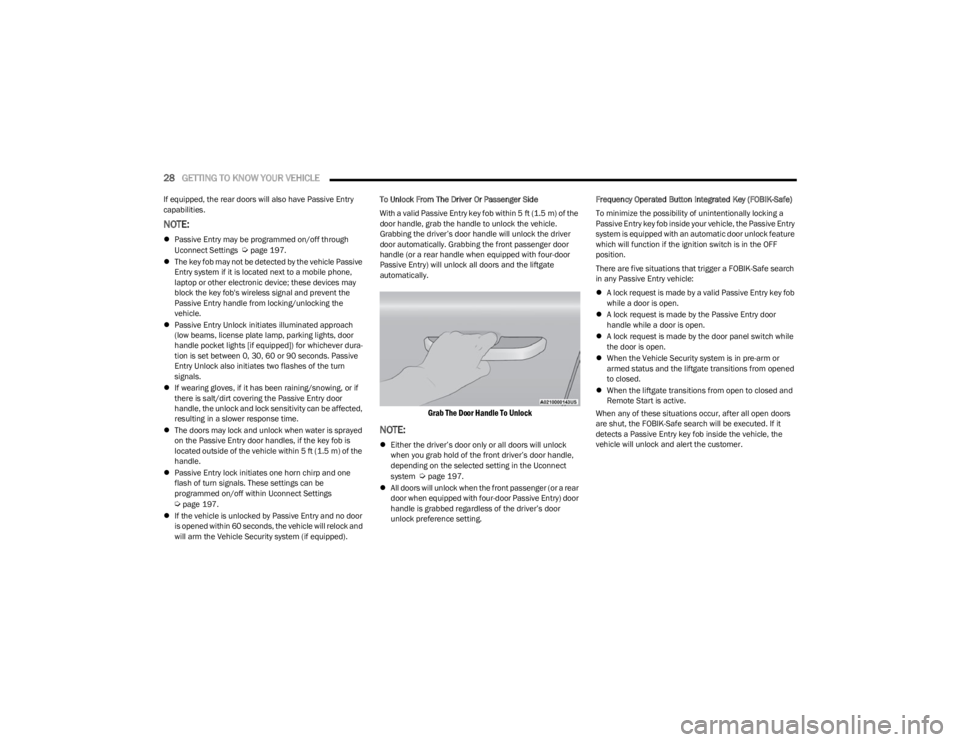
With a valid Passive Entry key fob within 5 ft (1.5 m) of the
door handle, grab the handle to unlock the vehicle.
Grabbing the driver’s door handle will unlock the driver
door automatically. Grabbing the front passenger door
handle (or a rear handle when equipped with four-door
Passive Entry) will unlock all doors and the liftgate
automatically.
Grab The Door Handle To Unlock
NOTE:
Either the driver’s door only or all doors will unlock
when you grab hold of the front driver’s door handle,
depending on the selected setting in the Uconnect
system
Úpage 197.
All doors will unlock when the front passenger (or a rear
door when equipped with four-door Passive Entry) door
handle is grabbed regardless of the driver’s door
unlock preference setting. Frequency Operated Button Integrated Key (FOBIK-Safe)
To minimize the possibility of unintentionally locking a
Passive Entry key fob inside your vehicle, the Passive Entry
system is equipped with an automatic door unlock feature
which will function if the ignition switch is in the OFF
position.
There are five situations that trigger a FOBIK-Safe search
in any Passive Entry vehicle:
A lock request is made by a valid Passive Entry key fob
while a door is open.
A lock request is made by the Passive Entry door
handle while a door is open.
A lock request is made by the door panel switch while
the door is open.
When the Vehicle Security system is in pre-arm or
armed status and the liftgate transitions from opened
to closed.
When the liftgate transitions from open to closed and
Remote Start is active.
When any of these situations occur, after all open doors
are shut, the FOBIK-Safe search will be executed. If it
detects a Passive Entry key fob inside the vehicle, the
vehicle will unlock and alert the customer.
23_WS_OM_EN_USC_t.book Page 28
Page 34 of 396
32GETTING TO KNOW YOUR VEHICLE
Passenger’s Side (If Equipped)
Seat position
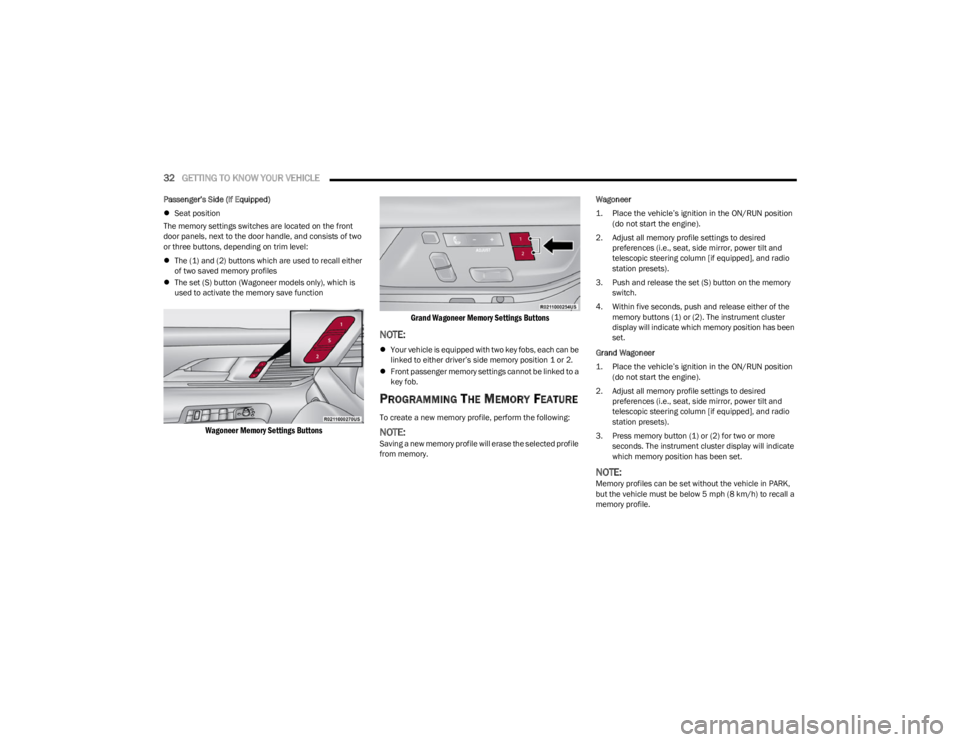
The memory settings switches are located on the front
door panels, next to the door handle, and consists of two
or three buttons, depending on trim level:
The (1) and (2) buttons which are used to recall either
of two saved memory profiles
The set (S) button (Wagoneer models only), which is
used to activate the memory save function
Wagoneer Memory Settings Buttons Grand Wagoneer Memory Settings Buttons
NOTE:
Your vehicle is equipped with two key fobs, each can be
linked to either driver’s side memory position 1 or 2.
Front passenger memory settings cannot be linked to a
key fob.
PROGRAMMING THE MEMORY FEATURE
To create a new memory profile, perform the following:
NOTE:Saving a new memory profile will erase the selected profile
from memory. Wagoneer
1. Place the vehicle’s ignition in the ON/RUN position
(do not start the engine).
2. Adjust all memory profile settings to desired preferences (i.e., seat, side mirror, power tilt and
telescopic steering column [if equipped], and radio
station presets).
3. Push and release the set (S) button on the memory switch.
4. Within five seconds, push and release either of the memory buttons (1) or (2). The instrument cluster
display will indicate which memory position has been
set.
Grand Wagoneer
1. Place the vehicle’s ignition in the ON/RUN position (do not start the engine).
2. Adjust all memory profile settings to desired preferences (i.e., seat, side mirror, power tilt and
telescopic steering column [if equipped], and radio
station presets).
3. Press memory button (1) or (2) for two or more seconds. The instrument cluster display will indicate
which memory position has been set.
NOTE:Memory profiles can be set without the vehicle in PARK,
but the vehicle must be below 5 mph (8 km/h) to recall a
memory profile.
23_WS_OM_EN_USC_t.book Page 32
Page 35 of 396
GETTING TO KNOW YOUR VEHICLE33
LINKING AND UNLINKING THE KEY FOB
T
O MEMORY
Your key fobs can be programmed to recall one of two
saved driver’s side memory profiles.
NOTE:Before programming your key fobs you must select the
“Personal Settings Linked To Key Fob” feature through the
Uconnect Settings
Úpage 197.
To program your key fobs, perform the following:
Wagoneer
1. Place the vehicle’s ignition in the OFF position.
2. Select a desired driver’s side memory profile, 1 or 2.
3. Once the profile has been recalled, push and release the set (S) button on the memory switch.
4. Within five seconds, push and release button (1) or (2) accordingly. “Memory Profile Set” (1 or 2) will
display in the instrument cluster.
5. Push and release the lock button on the key fob within 10 seconds.
NOTE:Your key fobs can be unlinked from your driver’s side
memory settings by pushing the set (S) button, and within
10 seconds, pushing the unlock button on the key fob.
Grand Wagoneer
1. Place the vehicle’s ignition in the OFF position.
2. Recall the desired memory profile (1 or 2). 3. Press the memory button (1) or (2) (according to the
previous selection) for two seconds or more, and
release.
4. Push and hold the lock button on the key fob within 10 seconds.
NOTE:Your key fobs can be unlinked from your driver’s side
memory settings by pushing the memory button (1) or (2)
for two seconds or more and releasing, and then within 10
seconds, pushing and holding the unlock button on the
key fob.
MEMORY POSITION RECALL
NOTE:Memory Recall is available when not in PARK, if the
vehicle speed is below 5 mph (8 km/h).
To recall a memory settings using the memory
switches, push memory button (1) or (2) on the
memory switch.
To recall the driver’s side memory settings using the
key fob, push the unlock button on the key fob linked
to memory position 1 or 2.
A recall can be canceled by pushing any of the memory
buttons during a recall, or by pushing any of the seat
adjustment switches. When a recall is canceled, the seat
and power tilt/telescopic steering column will stop
moving. A delay of one second will occur before another
recall can be selected.
SEATS
Seats are a part of the Occupant Restraint system of the
vehicle.
MANUAL ADJUSTMENT (REAR SEATS)
NOTE:You may experience deformation in the seat cushion from
the seat belt buckles if the seats are left folded for an
extended period of time. This is normal and by simply
unfolding the seats to the open position, over time the
seat cushion will return to its normal shape.
WARNING!
It is dangerous to ride in a cargo area, inside or
outside of a vehicle. In a collision, people riding in
these areas are more likely to be seriously injured or
killed.
Do not allow people to ride in any area of your vehicle
that is not equipped with seats and seat belts. In a
collision, people riding in these areas are more likely
to be seriously injured or killed.
Be sure everyone in your vehicle is in a seat and
using a seat belt properly.
WARNING!
Do not pile luggage or cargo higher than the top of the
seatback. This could impair visibility or become a
dangerous projectile in a sudden stop or collision.
2
23_WS_OM_EN_USC_t.book Page 33
Page 42 of 396
40GETTING TO KNOW YOUR VEHICLE
When either the (+) or the (–) switch is pushed, the Front
Comfort And Convenience Display Úpage 64 will change
to the Seat menu. The last selected seat item of lumbar
in/out, lumbar up/down, back bolster, or thigh bolster will
be retained. Select the desired adjustment type, and then
press the (+) or (–) switch to adjust.
NOTE:If the Front Comfort And Convenience Display is in the
stowed position, the Seat menu will appear in the main
Uconnect display.
Cushion Extender — If Equipped
In Grand Wagoneer models, the cushion can be extended
forward a couple inches (centimeters) to increase thigh
support. Push the cushion extender switch forward or
rearward to extend or retract the cushion. Release the
switch when the desired position has been reached.
Power Lumbar — If Equipped
The front driver and passenger seats may be equipped
with power lumbar adjustment.
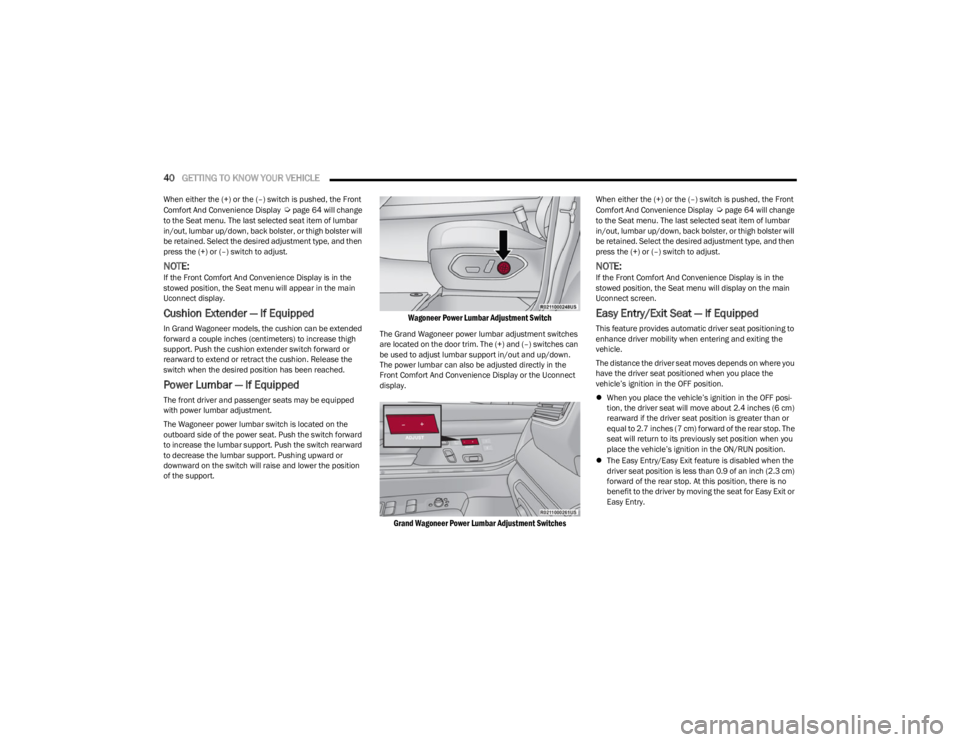
The Wagoneer power lumbar switch is located on the
outboard side of the power seat. Push the switch forward
to increase the lumbar support. Push the switch rearward
to decrease the lumbar support. Pushing upward or
downward on the switch will raise and lower the position
of the support.
Wagoneer Power Lumbar Adjustment Switch
The Grand Wagoneer power lumbar adjustment switches
are located on the door trim. The (+) and (–) switches can
be used to adjust lumbar support in/out and up/down.
The power lumbar can also be adjusted directly in the
Front Comfort And Convenience Display or the Uconnect
display.
Grand Wagoneer Power Lumbar Adjustment Switches
When either the (+) or the (–) switch is pushed, the Front
Comfort And Convenience Display Úpage 64 will change
to the Seat menu. The last selected seat item of lumbar
in/out, lumbar up/down, back bolster, or thigh bolster will
be retained. Select the desired adjustment type, and then
press the (+) or (–) switch to adjust.
NOTE:If the Front Comfort And Convenience Display is in the
stowed position, the Seat menu will display on the main
Uconnect screen.
Easy Entry/Exit Seat — If Equipped
This feature provides automatic driver seat positioning to
enhance driver mobility when entering and exiting the
vehicle.
The distance the driver seat moves depends on where you
have the driver seat positioned when you place the
vehicle’s ignition in the OFF position.
When you place the vehicle’s ignition in the OFF posi -
tion, the driver seat will move about 2.4 inches (6 cm)
rearward if the driver seat position is greater than or
equal to 2.7 inches (7 cm) forward of the rear stop. The
seat will return to its previously set position when you
place the vehicle’s ignition in the ON/RUN position.
The Easy Entry/Easy Exit feature is disabled when the
driver seat position is less than 0.9 of an inch (2.3 cm)
forward of the rear stop. At this position, there is no
benefit to the driver by moving the seat for Easy Exit or
Easy Entry.
23_WS_OM_EN_USC_t.book Page 40
Page 51 of 396
GETTING TO KNOW YOUR VEHICLE49
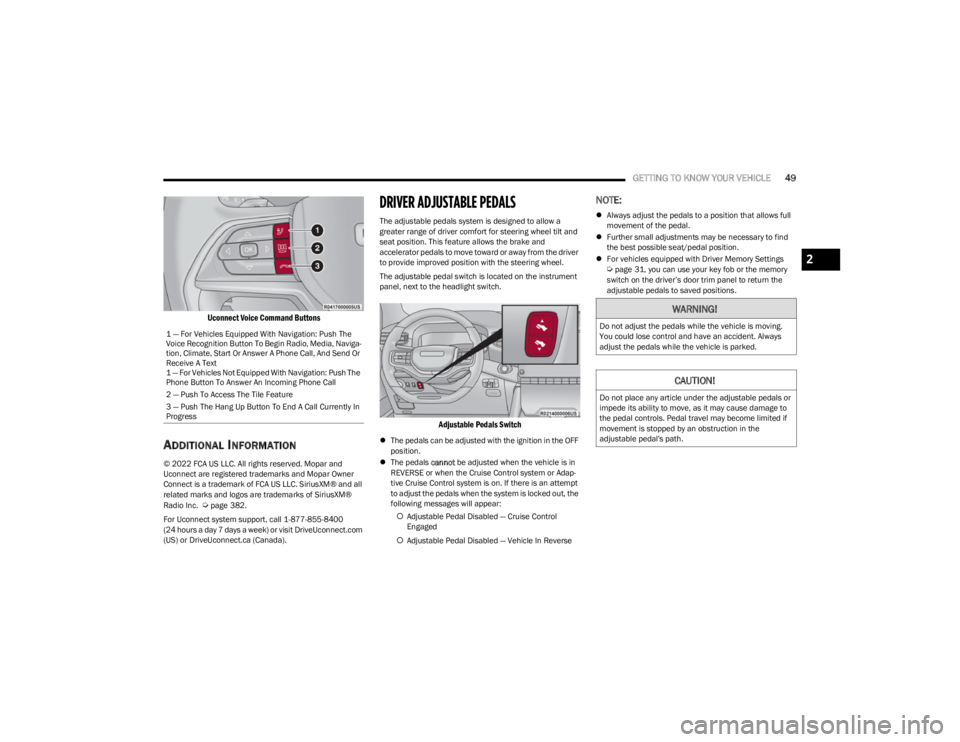
Uconnect Voice Command Buttons
ADDITIONAL INFORMATION
© 2022 FCA US LLC. All rights reserved. Mopar and
Uconnect are registered trademarks and Mopar Owner
Connect is a trademark of FCA US LLC. SiriusXM® and all
related marks and logos are trademarks of SiriusXM®
Radio Inc.
Úpage 382.
For Uconnect system support, call 1-877-855-8400
(24 hours a day 7 days a week) or visit DriveUconnect.com
(US) or DriveUconnect.ca (Canada).
DRIVER ADJUSTABLE PEDALS
The adjustable pedals system is designed to allow a
greater range of driver comfort for steering wheel tilt and
seat position. This feature allows the brake and
accelerator pedals to move toward or away from the driver
to provide improved position with the steering wheel.
The adjustable pedal switch is located on the instrument
panel, next to the headlight switch.
Adjustable Pedals Switch
The pedals can be adjusted with the ignition in the OFF
position.
The pedals cannot be adjusted when the vehicle is in
REVERSE or when the Cruise Control system or Adap -
tive Cruise Control system is on. If there is an attempt
to adjust the pedals when the system is locked out, the
following messages will appear:
Adjustable Pedal Disabled — Cruise Control
Engaged
Adjustable Pedal Disabled — Vehicle In Reverse
NOTE:
Always adjust the pedals to a position that allows full
movement of the pedal.
Further small adjustments may be necessary to find
the best possible seat/pedal position.
For vehicles equipped with Driver Memory Settings
Úpage 31, you can use your key fob or the memory
switch on the driver’s door trim panel to return the
adjustable pedals to saved positions.
1 — For Vehicles Equipped With Navigation: Push The
Voice Recognition Button To Begin Radio, Media, Naviga -
tion, Climate, Start Or Answer A Phone Call, And Send Or
Receive A Text
1 — For Vehicles Not Equipped With Navigation: Push The
Phone Button To Answer An Incoming Phone Call
2 — Push To Access The Tile Feature
3 — Push The Hang Up Button To End A Call Currently In
Progress
WARNING!
Do not adjust the pedals while the vehicle is moving.
You could lose control and have an accident. Always
adjust the pedals while the vehicle is parked.
CAUTION!
Do not place any article under the adjustable pedals or
impede its ability to move, as it may cause damage to
the pedal controls. Pedal travel may become limited if
movement is stopped by an obstruction in the
adjustable pedal's path.
2
23_WS_OM_EN_USC_t.book Page 49
Page 53 of 396
GETTING TO KNOW YOUR VEHICLE51
Sun Visor Slide-On-Rod Feature —
If Equipped
The sun visor Slide-On-Rod feature allows for additional
flexibility in positioning the sun visor to block out the sun.
1. Fold down the sun visor.
2. Unclip the visor from the center clip.
3. Pivot the sun visor toward the side window.
4. Extend the sun visor blade for additional sun
blockage.
NOTE:The sun visor blade can also be extended while the sun
visor is against the windshield for additional sun blockage
through the front of the vehicle.
OUTSIDE MIRRORS
To receive maximum benefit, adjust the outside mirror(s)
to center on the adjacent lane of traffic with a slight
overlap of the view obtained on the inside mirror.
Outside Mirrors Folding Feature
All outside mirrors are hinged and may be moved either
forward or rearward to resist damage. The hinges have
three detent positions:
Full forward position
Full rearward position
Normal position
Outside Mirrors With Turn Signal And
Approach Lighting — If Equipped
Driver and passenger outside mirrors with turn signal and
approach lighting contain four LEDs, which are located in
the upper outer corner of each mirror.
Three of the LEDs are turn signal indicators, which flash
with the corresponding turn signal lights in the front and
rear of the vehicle. Turning on the Hazard Warning
flashers will also activate these LEDs.
The fourth LED supplies illuminated entry lighting, which
turns on in both mirrors when you use the key fob or open
any door. This LED shines outward to illuminate the front
and rear door handles. It also shines downward to
illuminate the area in front of the doors.
The illuminated entry lighting fades to off after about 30
seconds or it will fade to off immediately once the ignition
is placed into the ON/RUN position.
NOTE:The approach lighting will not function when the gear
selector is moved out of the PARK position.
OUTSIDE AUTOMATIC DIMMING
M
IRROR — IF EQUIPPED
The exterior driver side mirror will automatically adjust for
glare from vehicles behind you. This feature is controlled
by the inside automatic dimming mirror. The mirror will
automatically adjust for headlight glare when the inside
mirror adjusts.
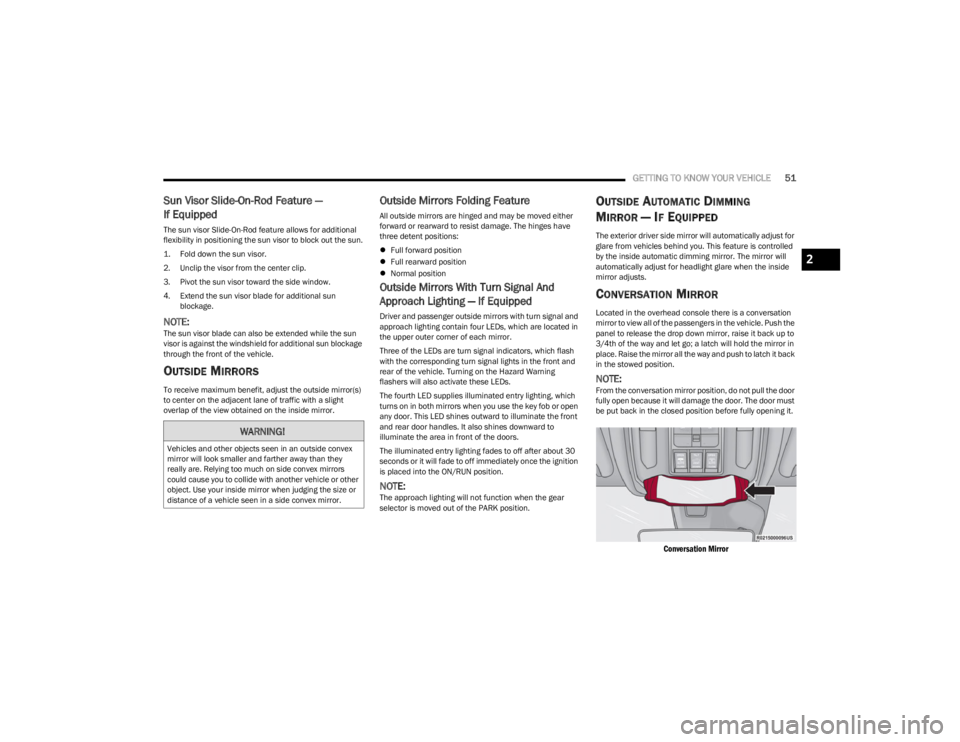
CONVERSATION MIRROR
Located in the overhead console there is a conversation
mirror to view all of the passengers in the vehicle. Push the
panel to release the drop down mirror, raise it back up to
3/4th of the way and let go; a latch will hold the mirror in
place. Raise the mirror all the way and push to latch it back
in the stowed position.
NOTE:From the conversation mirror position, do not pull the door
fully open because it will damage the door. The door must
be put back in the closed position before fully opening it.
Conversation Mirror
WARNING!
Vehicles and other objects seen in an outside convex
mirror will look smaller and farther away than they
really are. Relying too much on side convex mirrors
could cause you to collide with another vehicle or other
object. Use your inside mirror when judging the size or
distance of a vehicle seen in a side convex mirror.
2
23_WS_OM_EN_USC_t.book Page 51
Page 54 of 396
52GETTING TO KNOW YOUR VEHICLE
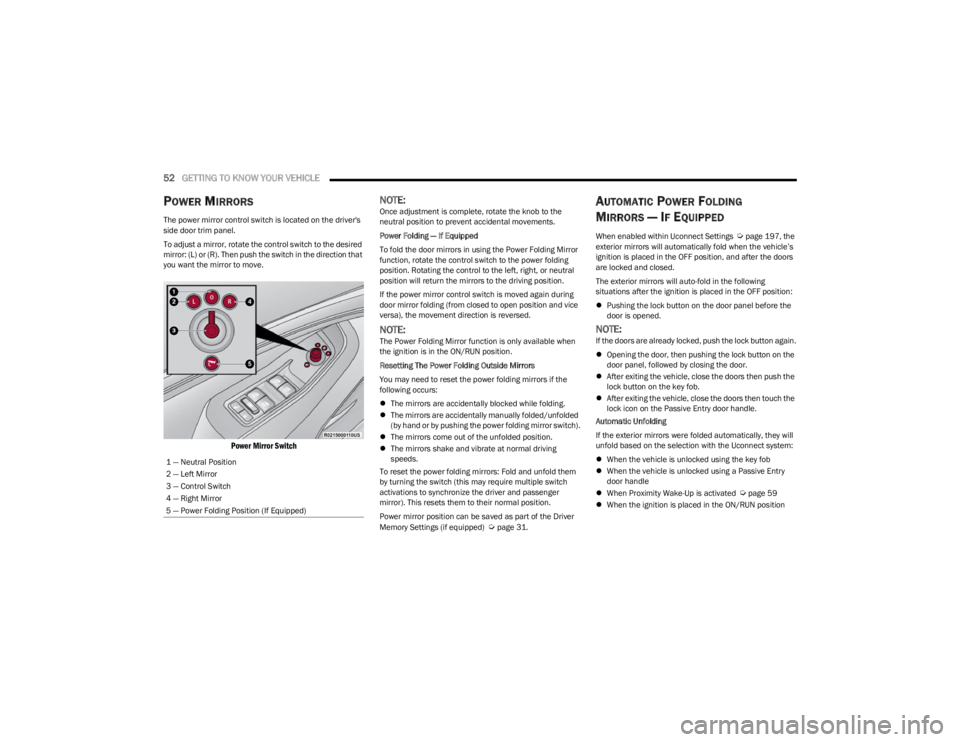
POWER MIRRORS
The power mirror control switch is located on the driver's
side door trim panel.
To adjust a mirror, rotate the control switch to the desired
mirror: (L) or (R). Then push the switch in the direction that
you want the mirror to move.
Power Mirror Switch
NOTE:Once adjustment is complete, rotate the knob to the
neutral position to prevent accidental movements.
Power Folding — If Equipped
To fold the door mirrors in using the Power Folding Mirror
function, rotate the control switch to the power folding
position. Rotating the control to the left, right, or neutral
position will return the mirrors to the driving position.
If the power mirror control switch is moved again during
door mirror folding (from closed to open position and vice
versa), the movement direction is reversed.
NOTE:The Power Folding Mirror function is only available when
the ignition is in the ON/RUN position.
Resetting The Power Folding Outside Mirrors
You may need to reset the power folding mirrors if the
following occurs:
The mirrors are accidentally blocked while folding.
The mirrors are accidentally manually folded/unfolded
(by hand or by pushing the power folding mirror switch).
The mirrors come out of the unfolded position.
The mirrors shake and vibrate at normal driving
speeds.
To reset the power folding mirrors: Fold and unfold them
by turning the switch (this may require multiple switch
activations to synchronize the driver and passenger
mirror). This resets them to their normal position.
Power mirror position can be saved as part of the Driver
Memory Settings (if equipped)
Úpage 31.
AUTOMATIC POWER FOLDING
M
IRRORS — IF EQUIPPED
When enabled within Uconnect Settings Úpage 197, the
exterior mirrors will automatically fold when the vehicle’s
ignition is placed in the OFF position, and after the doors
are locked and closed.
The exterior mirrors will auto-fold in the following
situations after the ignition is placed in the OFF position:
Pushing the lock button on the door panel before the
door is opened.
NOTE:If the doors are already locked, push the lock button again.
Opening the door, then pushing the lock button on the
door panel, followed by closing the door.
After exiting the vehicle, close the doors then push the
lock button on the key fob.
After exiting the vehicle, close the doors then touch the
lock icon on the Passive Entry door handle.
Automatic Unfolding
If the exterior mirrors were folded automatically, they will
unfold based on the selection with the Uconnect system:
When the vehicle is unlocked using the key fob
When the vehicle is unlocked using a Passive Entry
door handle
When Proximity Wake-Up is activated
Úpage 59
When the ignition is placed in the ON/RUN position
1 — Neutral Position
2 — Left Mirror
3 — Control Switch
4 — Right Mirror
5 — Power Folding Position (If Equipped)
23_WS_OM_EN_USC_t.book Page 52
Page 56 of 396

54GETTING TO KNOW YOUR VEHICLE
ERASING ALL THE HOMELINK®
C
HANNELS
To erase the channels, follow this procedure:
1. Place the ignition switch in the ON/RUN position.
2. Push and hold the two outside HomeLink® buttons
(I and III) for up to 20 seconds, or until the
HomeLink® indicator light flashes.
NOTE:Erasing all channels should only be performed when
programming HomeLink® for the first time. Do not erase
channels when programming additional buttons.
IDENTIFYING WHETHER YOU HAVE A
R
OLLING CODE OR NON-ROLLING CODE
D
EVICE
Before programming a device to one of your HomeLink®
buttons, you must determine whether the device has a
rolling code or non-rolling code.
Rolling Code Devices
To determine if your device has a rolling code, a good
indicator is its manufacturing date. Typically, devices
manufactured after 1995 have rolling codes. A device with
a rolling code will also have a “LEARN” or “TRAIN” button
located where the antenna is attached to the device. The
button may not be immediately visible when looking at the
device. The name and color of the button may vary slightly
by manufacturer.
NOTE:The “LEARN” or “TRAIN” button is not the button you
normally use to operate the device.
Non-rolling Code Devices
Most devices manufactured before 1995 will not have a
rolling code. These devices will also not have a “LEARN” or
“TRAIN” button.
PROGRAMMING HOMELINK® TO A
G
ARAGE DOOR OPENER
To program any of the HomeLink® buttons to activate your
garage door opener motor, proceed as follows:
NOTE:All HomeLink® buttons are programmed using this
procedure. You do not need to erase all channels when
programming additional buttons.
1. Place the ignition switch in the ON/RUN position.
2. Place the garage door opener transmitter
1 to 3 inches (3 to 8 cm) away from the HomeLink®
button you wish to program, while keeping the
HomeLink® indicator light in view.
3. Push and hold the HomeLink® button you want to program while you push and hold the garage door
opener transmitter button you are trying to replicate.
4. Continue to hold both buttons and observe the HomeLink® indicator light. The HomeLink® indicator
light will flash slowly and then rapidly. Once this
happens, release both buttons.
NOTE:Make sure the garage door opener motor is plugged in
before moving on to the rolling code/non-rolling code final
steps.
Rolling Code Garage Door Opener Final Steps
NOTE:You have 30 seconds in which to initiate rolling code final
step 2, after completing rolling code final step 1.
1. At the garage door opener motor (in the garage), locate the “LEARN” or “TRAIN” button. This can
usually be found where the hanging antenna wire is
attached to the garage door opener motor. Firmly
push and release the “LEARN” or “TRAIN” button.
2. Return to the vehicle and push the programmed HomeLink® button three times (holding the button
for two seconds each time). If the garage door opener
motor operates, programming is complete.
3. Push the programmed HomeLink® button to confirm that the garage door opener motor operates. If the
garage door opener motor does not operate, repeat
the final steps for the rolling code procedure.
Non-Rolling Code Garage Door Opener Final Steps
1. Push and hold the programmed HomeLink® button and observe the HomeLink® indicator light. If the
HomeLink® indicator light stays on constantly,
programming is complete.
2. Push the programmed HomeLink® button to confirm that the garage door opener motor operates. If the
garage door opener motor does not operate, repeat
the steps from the beginning.
23_WS_OM_EN_USC_t.book Page 54
Page 57 of 396
GETTING TO KNOW YOUR VEHICLE55
PROGRAMMING HOMELINK® TO A
M
ISCELLANEOUS DEVICE
The procedure on how to program HomeLink® to a
miscellaneous device follows the same procedure as
programming to a garage door opener
Úpage 54. Be sure
to determine if the device has a rolling code, or non-rolling
code before beginning the programming process.
NOTE:Canadian Radio Frequency (RF) laws require transmitter
signals to time-out (or quit) after several seconds of trans -
mission, which may not be long enough for HomeLink® to
pick up the signal during programming. Similar to this
Canadian law, some U.S. gate operators are designed to
time-out in the same manner. The procedure may need to
be performed multiple times to successfully pair the
device to your HomeLink® buttons.
REPROGRAMMING A SINGLE
H
OMELINK® BUTTON
To reprogram a single HomeLink® button that has been
previously trained, without erasing all the channels,
proceed as follows. Be sure to determine whether the new
device you want to program the HomeLink® button to has
a rolling code, or non-rolling code.
1. Place the ignition in the ON/RUN position, without
starting the engine.
2. Push and hold the desired HomeLink® button until the HomeLink® indicator light begins to flash after
20 seconds. Do not release the button.
3. Without releasing the button , proceed with Step 2 in
“Programming HomeLink® To A Garage Door
Opener” and follow all remaining steps.
CANADIAN/GATE OPERATOR
P
ROGRAMMING
For programming transmitters in Canada/United States
that require the transmitter signals to “time-out” after
several seconds of transmission:
Canadian Radio Frequency (RF) laws require transmitter
signals to time-out (or quit) after several seconds of
transmission, which may not be long enough for
HomeLink® to pick up the signal during programming.
Similar to this Canadian law, some U.S. gate operators are
designed to time-out in the same manner. It may be helpful to unplug the device during the cycling
process to prevent possible overheating of the garage
door or gate motor.
1. Place the ignition in the ON/RUN position.
NOTE:For vehicles equipped with Keyless Enter ‘n Go™, place
the ignition in the RUN position. Make sure while
programming HomeLink® with the engine on that your
vehicle is outside of your garage, or that the garage door
remains open at all times.
2. Place the hand-held transmitter 1 to 3 inches
(3 to 8 cm) away from the HomeLink® button you
wish to program while keeping the HomeLink®
indicator light in view.
3. Continue to push and hold the HomeLink® button while you push and release (cycle) your hand-held
transmitter every two seconds until HomeLink® has
successfully accepted the frequency signal. The
indicator light will flash slowly and then rapidly when
fully trained.
WARNING!
Your motorized door or gate will open and close while
you are programming the universal transmitter. Do
not program the transmitter if people or pets are in
the path of the door or gate.
Do not run your vehicle in a closed garage or
confined area while programming the transmitter.
Exhaust gas from your vehicle contains carbon
monoxide (CO) which is odorless and colorless.
Carbon monoxide is poisonous when inhaled and
can cause you and others to be severely injured or
killed.
2
23_WS_OM_EN_USC_t.book Page 55