sport mode JEEP WAGONEER 2023 User Guide
[x] Cancel search | Manufacturer: JEEP, Model Year: 2023, Model line: WAGONEER, Model: JEEP WAGONEER 2023Pages: 396, PDF Size: 15.17 MB
Page 206 of 396

204MULTIMEDIA
Night Vision Video Warning This setting will turn the Night Vision Video Warning and green/gray cluster indicator light
on or off.
ParkSense This setting will change the type of ParkSense alert when a close object is detected and
can provide both an audible chime and a visual display.
Front ParkSense Volume This setting adjusts the volume of the Front ParkSense system. The available settings are
“Low”, “Medium”, and “High”.
Rear ParkSense Volume This setting adjusts the volume of the Rear ParkSense system. The available settings are
“Low”, “Medium”, and “High”.
Active ParkSense Mode This setting will adjust the level of vehicle control when the Active ParkSense Mode is
active. The available settings are “Full Auto” and “Steering Only”
Active ParkSense Proximity Chime This setting will turn the Active ParkSense Proximity Chime on or off.
Side Distance Warning This setting will adjust the warning for side distance. The available options are “Off”,
“Sound Only”, and “Sound & Display”.
Drowsy Driver Alert This setting will monitor the driver’s driving habits and warn you of any changes,
indicating that the driver may be drowsy. The available options are “On” and “Off”.
Blind Spot Alert This setting will change the type of alert provided when an object is detected in the
vehicle’s blind spot. The “Off” setting will turn off Blind Spot Alert. The “Lights” setting will
activate the Blind Spot Alert lights on the outside mirrors. The “Lights & Chime” setting
will activate the lights on the outside mirrors and an audible chime.
Electric Power Steering Default This setting will change the Electric Power Steering mode. The available options are
“Comfort” for a lower effort steering experience, “Normal” for the standard effort steering
experience, and “Sport” for a higher effort steering experience.
Power Side Step This setting will activate the Power Side Step. The “Auto” setting will lower the step when
the door is opened and retract it once the door is closed. The “Off” setting will deactivate
the feature.
Hill Start Assist This setting will turn the Hill Start Assist system on or off.
Tire Fill Assist This setting will turn Tire Fill Assist on or off.
Setting NameDescription
23_WS_OM_EN_USC_t.book Page 204
Page 217 of 396

MULTIMEDIA215
Suspension
When the Suspension button is pressed on the touchscreen, the system will display settings related to the vehicle’s air suspension.
NOTE:Depending on the vehicle’s options, feature settings may vary.
Setting Name Description
Sound Horn With Lower This setting will allow you to sound the horn when the Suspension Lowering button is
pushed on the key fob.
Flash Lights With Lower This setting will allow you to turn the flashing of the lights when the Suspension Lowering
button is pushed on the key fob on or off.
Auto Entry/Exit Suspension This setting will turn the Auto Entry/Exit Suspension system on or off.
Display Suspension Messages This setting will display suspension messages in the Instrument Cluster Display. The “All”
setting will display all available messages. The “Warnings Only” setting will only display
warning messages.
Tire Jack Mode This setting will disable the Air Suspension system to assist in changing a spare tire.
Auxiliary Modes This setting will allow you to set the Auxiliary Suspension Mode. The available options are
“Off”, “Transport Mode”, and “Wheel Alignment Mode”. In Transport Mode, the vehicle
will not auto level when being transported by another vehicle. In Wheel Alignment Mode,
the vehicle will not auto level when a wheel alignment is being performed.
5
23_WS_OM_EN_USC_t.book Page 215
Page 239 of 396
MULTIMEDIA237
ACCESSORY GAUGES
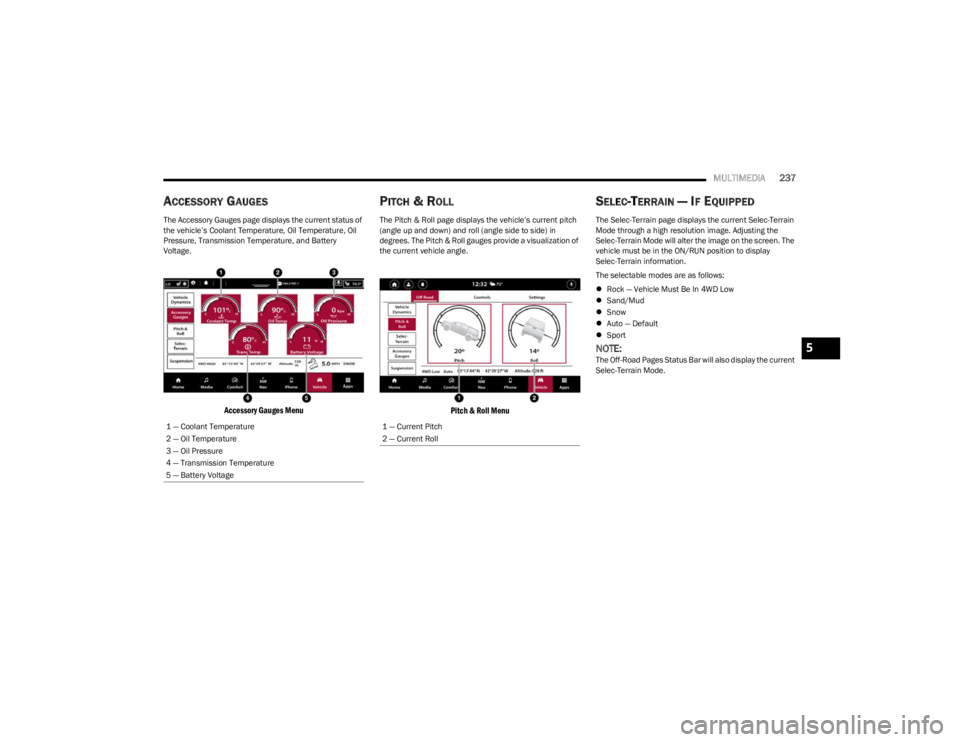
The Accessory Gauges page displays the current status of
the vehicle’s Coolant Temperature, Oil Temperature, Oil
Pressure, Transmission Temperature, and Battery
Voltage.
Accessory Gauges Menu
PITCH & ROLL
The Pitch & Roll page displays the vehicle’s current pitch
(angle up and down) and roll (angle side to side) in
degrees. The Pitch & Roll gauges provide a visualization of
the current vehicle angle.
Pitch & Roll Menu
SELEC-TERRAIN — IF EQUIPPED
The Selec-Terrain page displays the current Selec-Terrain
Mode through a high resolution image. Adjusting the
Selec-Terrain Mode will alter the image on the screen. The
vehicle must be in the ON/RUN position to display
Selec-Terrain information.
The selectable modes are as follows:
Rock — Vehicle Must Be In 4WD Low
Sand/Mud
Snow
Auto — Default
Sport
NOTE:The Off-Road Pages Status Bar will also display the current
Selec-Terrain Mode.
1 — Coolant Temperature
2 — Oil Temperature
3 — Oil Pressure
4 — Transmission Temperature
5 — Battery Voltage
1 — Current Pitch
2 — Current Roll
5
23_WS_OM_EN_USC_t.book Page 237
Page 249 of 396
SAFETY247
Trailer Sway Control (TSC)
TSC uses sensors in the vehicle to recognize an
excessively swaying trailer and will take the appropriate
actions to attempt to stop the sway. TSC will become
active automatically once an excessively swaying trailer is
recognized.
NOTE:TSC cannot stop all trailers from swaying. Always use
caution when towing a trailer and follow the trailer tongue
weight recommendations
Úpage 178.
When TSC is functioning, the ESC Activation/Malfunction
Indicator Light will flash, the engine power may be reduced
and you may feel the brakes being applied to individual
wheels to attempt to stop the trailer from swaying. TSC is
disabled when the ESC system is in the “Partial Off” mode.
AUXILIARY DRIVING SYSTEMS
BLIND SPOT MONITORING (BSM)
BSM system uses two radar sensors, located inside the
rear fascia/bumper, to detect highway licensable vehicles
(automobiles, trucks, motorcycles, etc.) that enter the
blind spot zones from the rear/front/side of the vehicle.
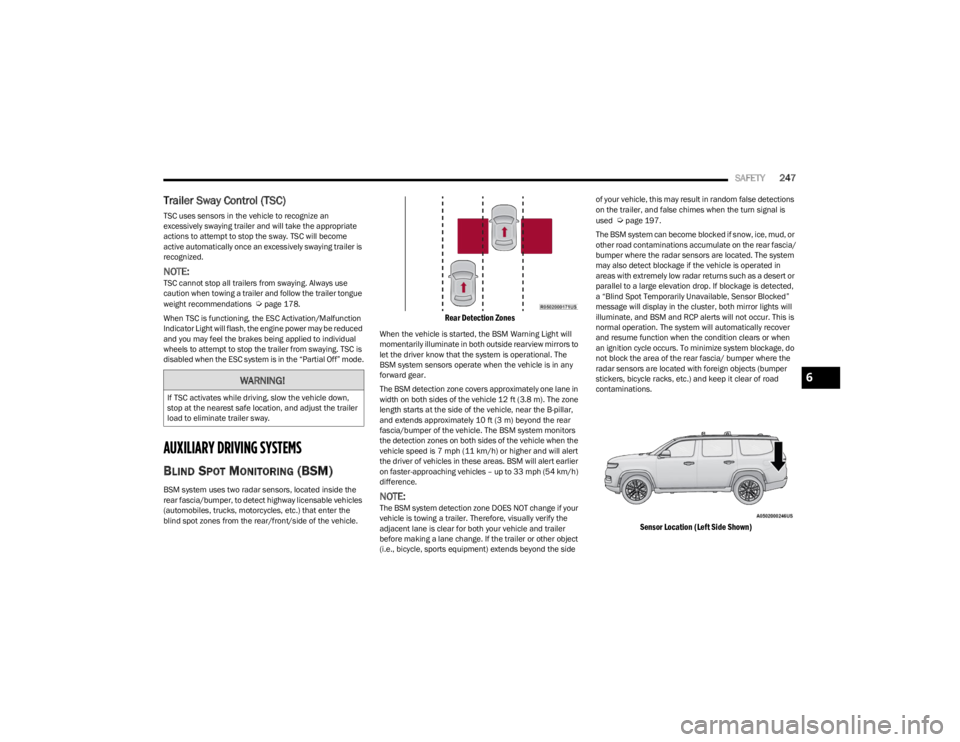
Rear Detection Zones
When the vehicle is started, the BSM Warning Light will
momentarily illuminate in both outside rearview mirrors to
let the driver know that the system is operational. The
BSM system sensors operate when the vehicle is in any
forward gear.
The BSM detection zone covers approximately one lane in
width on both sides of the vehicle 12 ft (3.8 m). The zone
length starts at the side of the vehicle, near the B-pillar,
and extends approximately 10 ft (3 m) beyond the rear
fascia/bumper of the vehicle. The BSM system monitors
the detection zones on both sides of the vehicle when the
vehicle speed is 7 mph (11 km/h) or higher and will alert
the driver of vehicles in these areas. BSM will alert earlier
on faster-approaching vehicles – up to 33 mph (54 km/h)
difference.
NOTE:The BSM system detection zone DOES NOT change if your
vehicle is towing a trailer. Therefore, visually verify the
adjacent lane is clear for both your vehicle and trailer
before making a lane change. If the trailer or other object
(i.e., bicycle, sports equipment) extends beyond the side of your vehicle, this may result in random false detections
on the trailer, and false chimes when the turn signal is
used
Úpage 197.
The BSM system can become blocked if snow, ice, mud, or
other road contaminations accumulate on the rear fascia/
bumper where the radar sensors are located. The system
may also detect blockage if the vehicle is operated in
areas with extremely low radar returns such as a desert or
parallel to a large elevation drop. If blockage is detected,
a “Blind Spot Temporarily Unavailable, Sensor Blocked”
message will display in the cluster, both mirror lights will
illuminate, and BSM and RCP alerts will not occur. This is
normal operation. The system will automatically recover
and resume function when the condition clears or when
an ignition cycle occurs. To minimize system blockage, do
not block the area of the rear fascia/ bumper where the
radar sensors are located with foreign objects (bumper
stickers, bicycle racks, etc.) and keep it clear of road
contaminations.
Sensor Location (Left Side Shown)
WARNING!
If TSC activates while driving, slow the vehicle down,
stop at the nearest safe location, and adjust the trailer
load to eliminate trailer sway.
6
23_WS_OM_EN_USC_t.book Page 247
Page 266 of 396
264SAFETY
If the passenger seating position is equipped with an ALR
and is being used for normal usage, only pull the seat belt
webbing out far enough to comfortably wrap around the
occupant’s mid-section so as to not activate the ALR. If the
ALR is activated, you will hear a clicking sound as the seat
belt retracts. Allow the webbing to retract completely in
this case and then carefully pull out only the amount of
webbing necessary to comfortably wrap around the
occupant’s mid-section. Slide the latch plate into the
buckle until you hear a "click”.
In Automatic Locking Mode, the shoulder belt is
automatically pre-locked. The seat belt will still retract to
remove any slack in the shoulder belt. Use the Automatic
Locking Mode anytime a child restraint is installed in a
seating position that has a seat belt with this feature.
Children 12 years old and under should always be properly
restrained in the rear seat of a vehicle with a rear seat. How To Engage The Automatic Locking Mode
1. Buckle the combination lap and shoulder belt.
2. Grab the shoulder portion and pull downward until
the entire seat belt is extracted.
3. Allow the seat belt to retract. As the seat belt retracts, you will hear a clicking sound. This indicates the seat
belt is now in the Automatic Locking Mode.
How To Disengage The Automatic Locking Mode
Unbuckle the combination lap/shoulder belt and allow it
to retract completely to disengage the Automatic Locking
Mode and activate the vehicle sensitive (emergency)
locking mode.SUPPLEMENTAL RESTRAINT SYSTEMS
(SRS)
Some of the safety features described in this section may
be standard equipment on some models, or may be
optional equipment on others. If you are not sure, ask an
authorized dealer.
The air bag system must be ready to protect you in a
collision. The Occupant Restraint Controller (ORC)
monitors the internal circuits and interconnecting wiring
associated with the electrical Air Bag System
Components. Your vehicle may be equipped with the
following Air Bag System Components:
Air Bag System Components
Occupant Restraint Controller (ORC)
Air Bag Warning Light
Steering Wheel and Column
Instrument Panel
Knee Impact Bolsters
Driver and Front Passenger Air Bags
Seat Belt Buckle Switch
Supplemental Side Air Bags
Supplemental Knee Air Bags
Front and Side Impact Sensors
Seat Belt Pretensioners
Seat Track Position Sensors
Occupant Classification System
WARNING!
Never place a rear-facing child restraint in front of an
air bag. A deploying passenger front air bag can
cause death or serious injury to a child 12 years or
younger, including a child in a rear-facing child
restraint.
Never install a rear-facing child restraint in the front
seat of a vehicle. Only use a rear-facing child
restraint in the rear seat. If the vehicle does not have
a rear seat, do not transport a rear-facing child
restraint in that vehicle.
WARNING!
The seat belt assembly must be replaced if the
switchable Automatic Locking Retractor (ALR)
feature or any other seat belt function is not working
properly when checked according to the procedures
in the Service Manual.
Failure to replace the seat belt assembly could
increase the risk of injury in collisions.
Do not use the Automatic Locking Mode to restrain
occupants who are wearing the seat belt or children
who are using booster seats. The locked mode is only
used to install rear-facing or forward-facing child
restraints that have a harness for restraining the
child.
23_WS_OM_EN_USC_t.book Page 264
Page 385 of 396

383
INDEX
AAbout Your Brakes ....................................................... 371
Active Driving Assist System ....................................... 148
Active Lane Management System .............................. 167
Adaptive Cruise Control (ACC)
(Cruise Control) ................................................... 137
, 139
Adding Engine Coolant (Antifreeze) ............................ 327
Adding Fuel................................................................... 177
Additives, Fuel .............................................................. 373
Adjust Down...........................................................................39
Forward ...................................................................... 39
Rearward ....................................................................39
Up................................................................................ 39
Adjustable Pedals ...........................................................49
Air Bag Air Bag Operation.................................................... 266
Air Bag Warning Light .................................... 265
, 267
Driver Knee Air Bag ................................................ 270
Enhanced Accident Response ...................... 273
, 308
Event Data Recorder (EDR).................................... 308 Front Air Bag ........................................................... 267
If Deployment Occurs ............................................. 273
Knee Impact Bolsters ............................................. 270
Maintaining Your Air Bag System .......................... 274
Maintenance ........................................................... 274
Redundant Air Bag Warning Light ......................... 265
Side Air Bags ........................................................... 270
Transporting Pets.................................................... 287 Air Bag Light ........................................................ 265
, 287
Air Cleaner, Engine (Engine Air Cleaner Filter) ...........319
Air Conditioner Maintenance ....................................... 320
Air Conditioner Refrigerant ................................ 320
, 321
Air Conditioner System ................................................. 320
Air Conditioning Rear ............................................................................ 69
Air Conditioning Filter ............................................72
, 320
Air Conditioning System .......................................... 64, 71
Air Conditioning, Operating Tips .................................... 71
Air Filter ......................................................................... 319
Air Pressure Tires.......................................................................... 357
Alarm Arm The System.................................................. 24
, 25
Disarm The System ................................................... 24
Panic........................................................................... 17
Rearm The System .................................................... 25
Security Alarm.......................................................... 111
Alarm System Security Alarm..................................................... 24
, 25
Alterations/Modifications Vehicle........................................................................ 10
Amazon FireTV .................................................... 228
, 232
Amazon FireTV Built-in ................................................. 228
Antifreeze (Engine Coolant) ............................... 326
, 375
Disposal ...................................................................327 Anti-Lock Brake System (ABS) ..................................... 239
Anti-Lock Warning Light ............................................... 111
Apps .............................................................................. 226
Arming System
Security Alarm ........................................................... 24
Assist, Hill Start ............................................................ 244
Audio Systems (Radio) ................................................. 196
Auto Down Power Windows ........................................... 82
Auto Hold ................................................... 115
, 116, 124
Automatic Folding Mirrors ............................................. 52
Automatic Headlights ..................................................... 58
Automatic High Beams .................................................. 58
Automatic Tailgate Release ........................................... 87
Automatic Temperature Control (ATC) .......................... 71 Automatic Transmission ..................................... 119
, 126
Adding Fluid ............................................................. 329
Fluid And Filter Change........................................... 329
Fluid Change ........................................................... 329
Fluid Level Check .................................................... 329
Fluid Type .......................................................329
, 377
Special Additives ..................................................... 329
Automatic Transmission Limp Home Mode ............... 128
AutoPark ....................................................................... 120
AUX Port .......................................................................... 76
Auxiliary Driving Systems ............................................. 247
Auxiliary Electrical Outlet (Power Outlet) ...................... 79
Auxiliary Power Outlet .................................................... 79
Axle Fluid....................................................................... 377
11
23_WS_OM_EN_USC_t.book Page 383