warning light JEEP WAGONEER 2023 Workshop Manual
[x] Cancel search | Manufacturer: JEEP, Model Year: 2023, Model line: WAGONEER, Model: JEEP WAGONEER 2023Pages: 396, PDF Size: 15.17 MB
Page 176 of 396

174STARTING AND OPERATING
(Continued)
The system may not be able to detect pedestrians or
animals in the following situations:
Pedestrian/animal is outside of the detection range
Pedestrian/animal is fully or partially covered
Pedestrian/animal does not reach the minimum detec -
tion height
NOTE:Other objects on the road that meet the height/shape/
temperature (e.g. sun exposure) of pedestrians/animals
may be detected and classified as targets.
SERVICE THE NIGHT VISION SYSTEM
When service conditions are present, the following fault
messages may appear in the instrument cluster display
when the vehicle is placed in the ON position.
If "Night Vision Unavailable Sensor Blocked" appears in
the instrument cluster display, make sure the camera is
clear of snow, ice, mud, dirt or other debris. The camera is
located in the upper fascia/bumper, inside the driver side
grille slot. Clean the camera using a soft wet cloth or by
pressing the Clean Camera button in the Uconnect
system. If the message continues to appear after cycling
the ignition, see an authorized dealer.
If “Night Vision Temporarily Unavailable” or “Night Vision
Unavailable Service Required" appears in the instrument
cluster display after cycling the ignition, see an authorized
dealer.
The camera must be properly aligned to work correctly.
If the camera needs adjustment, see an authorized
dealer. Do not attempt to adjust the camera yourself.
NOTE:Alignment and performance of the Night Vision may be
affected by aftermarket modifications. Mopar® parts
should be used to get the optimal performance of this
system.
NIGHT VISION SYSTEM LIMITATIONS
The Night Vision display is deactivated under the following
conditions:
Vehicle is shifted into REVERSE
The ignition is not in the ON/RUN position
The headlights are off and the vehicle speed is greater
than 8 mph (13 km/h)
The Night Vision display warnings are suppressed under
the following conditions:
Daylight hours
Temperatures above 86°F (30°C)
The system may not be fully functional in the following
situations:
On steep hills
On tight curves of the road
If the camera/sensor is damaged or blocked by dirt,
snow, ice, or other debris
In poor visibility conditions such as heavy fog, rain,
snow, or other weather conditions
If the vehicle has been modified with aftermarket parts
and/or accessories
NOTE:If any of these conditions are present, the system does not
need service.
WARNING!
Night Vision can only detect pedestrians and animals
located within the range of the infrared camera.
Night Vision may not detect pedestrians or animals
and highlight them if:
They are not in an upright position, for example
if they are sitting or lying down, or if the pedes -
trian is riding a bicycle
The figure in the display appears incomplete, for
example because the pedestrian or animal is
partially behind a vehicle
The pedestrian/animal is not directly ahead in
the coverage area
The pedestrian/animal is part of a group
The pedestrian is wearing certain types of
clothing
The pedestrian/animal is moving too quickly
through the field of view
The sensor is blocked by dirt, rain, snow, or ice
WARNING!
23_WS_OM_EN_USC_t.book Page 174
Page 179 of 396
STARTING AND OPERATING177
If the vehicle is in PARK, Zoom View is available until the
gear selector is placed in DRIVE or REVERSE and speeds
are at or above 8 mph (13 km/h).
NOTE:
If the vehicle is in DRIVE, NEUTRAL, or REVERSE, and
speed is greater than or equal to 8 mph (13 km/h),
Zoom View is unavailable and the icon will appear gray.
While in Zoom View, the guidelines will not be visible.
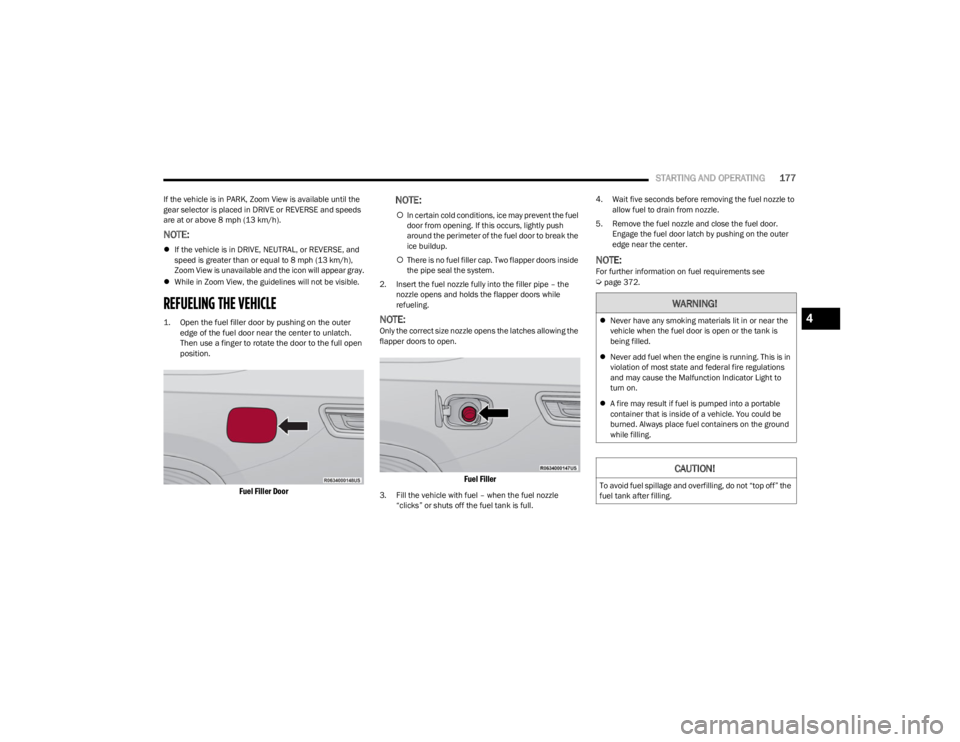
REFUELING THE VEHICLE
1. Open the fuel filler door by pushing on the outer
edge of the fuel door near the center to unlatch.
Then use a finger to rotate the door to the full open
position.
Fuel Filler Door
NOTE:
In certain cold conditions, ice may prevent the fuel
door from opening. If this occurs, lightly push
around the perimeter of the fuel door to break the
ice buildup.
There is no fuel filler cap. Two flapper doors inside
the pipe seal the system.
2. Insert the fuel nozzle fully into the filler pipe – the nozzle opens and holds the flapper doors while
refueling.
NOTE:Only the correct size nozzle opens the latches allowing the
flapper doors to open.
Fuel Filler
3. Fill the vehicle with fuel – when the fuel nozzle “clicks” or shuts off the fuel tank is full. 4. Wait five seconds before removing the fuel nozzle to
allow fuel to drain from nozzle.
5. Remove the fuel nozzle and close the fuel door. Engage the fuel door latch by pushing on the outer
edge near the center.
NOTE:For further information on fuel requirements see Úpage 372.
WARNING!
Never have any smoking materials lit in or near the
vehicle when the fuel door is open or the tank is
being filled.
Never add fuel when the engine is running. This is in
violation of most state and federal fire regulations
and may cause the Malfunction Indicator Light to
turn on.
A fire may result if fuel is pumped into a portable
container that is inside of a vehicle. You could be
burned. Always place fuel containers on the ground
while filling.
CAUTION!
To avoid fuel spillage and overfilling, do not “top off” the
fuel tank after filling.
4
23_WS_OM_EN_USC_t.book Page 177
Page 190 of 396
188STARTING AND OPERATING
Display Messages
The trailer brake control interacts with the instrument
cluster display. Display messages, along with a single
chime, will be displayed when a malfunction is determined
in the trailer connection, trailer brake control, or on the
trailer
Úpage 99.
NOTE:
An aftermarket controller may be available for use with
trailers with air or EOH trailer brake systems. To deter -
mine the type of brakes on your trailer and the avail -
ability of controllers, check with your trailer
manufacturer or dealer.
Removal of the ITBM will cause errors and it may cause
damage to the electrical system and electronic
modules of the vehicle. See an authorized dealer if an
aftermarket module is to be installed.
Towing Requirements — Trailer Lights
And Wiring
Whenever pulling a trailer, regardless of the trailer size,
stop lights and turn signals on the trailer are required for
motoring safety.
The Trailer Tow Package may include a four- and seven-pin
wiring harness. Use a factory approved trailer harness and
connector.
NOTE:Do not cut or splice wiring into the vehicle’s wiring
harness.
The electrical connections are all complete to the vehicle
but you must mate the harness to a trailer connector.
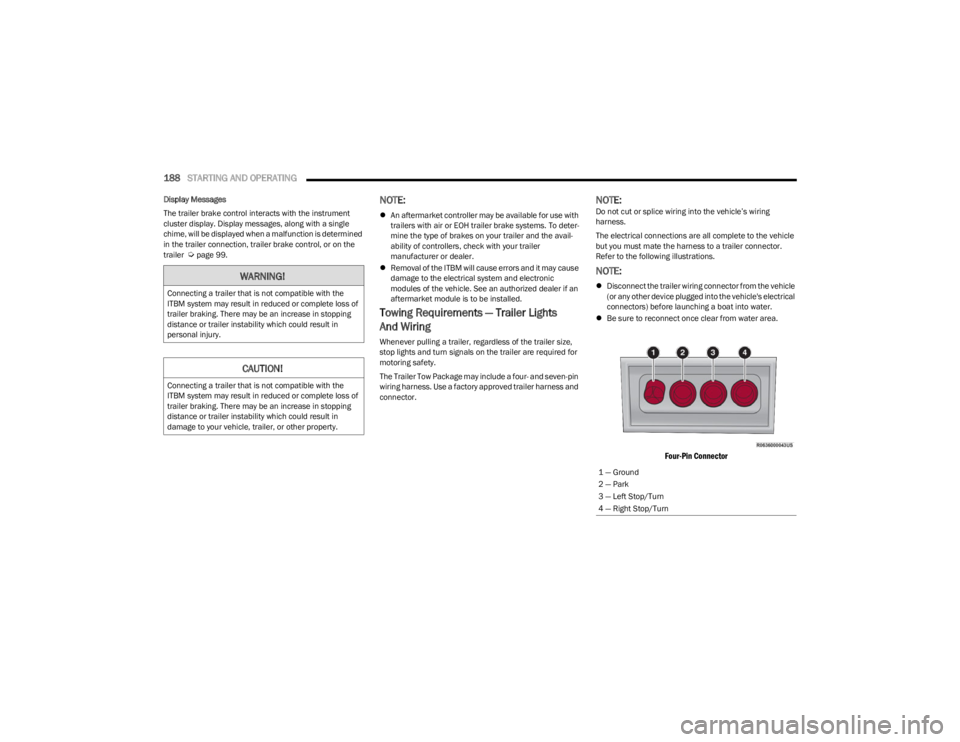
Refer to the following illustrations.
NOTE:
Disconnect the trailer wiring connector from the vehicle
(or any other device plugged into the vehicle's electrical
connectors) before launching a boat into water.
Be sure to reconnect once clear from water area.
Four-Pin Connector
WARNING!
Connecting a trailer that is not compatible with the
ITBM system may result in reduced or complete loss of
trailer braking. There may be an increase in stopping
distance or trailer instability which could result in
personal injury.
CAUTION!
Connecting a trailer that is not compatible with the
ITBM system may result in reduced or complete loss of
trailer braking. There may be an increase in stopping
distance or trailer instability which could result in
damage to your vehicle, trailer, or other property.
1 — Ground
2 — Park
3 — Left Stop/Turn
4 — Right Stop/Turn
23_WS_OM_EN_USC_t.book Page 188
Page 194 of 396
192STARTING AND OPERATING
Use the following procedure to prepare your vehicle for
recreational towing:
1. Bring the vehicle to a complete stop on level ground,
with the engine running.
2. Press and hold the brake pedal.
3. Shift the transmission into NEUTRAL.
4. If vehicle is equipped with Quadra-Lift air suspension, ensure the vehicle is set to Normal Ride Height.
NOTE:
Steps 1 through 4 are requirements that must be
met before pushing the N (Neutral) button, and
must continue to be met until the shift has been
completed. If any of these requirements are not
met before pushing the N (Neutral) button or are
no longer met during the shift, then the N (Neutral)
indicator light will flash continuously until all
requirements are met or until the N (Neutral)
button is released.
The ignition must be in the ON/RUN position for a
shift to take place and for the position indicator
lights to be operable. If the ignition is not in the
ON/RUN position, the shift will not take place and
no position indicator lights will be on or flashing.
A flashing N (Neutral) position indicator light indi-
cates that shift requirements have not been met.
If the vehicle is equipped with Quadra-Lift air
suspension, the engine should be started and left
running for a minimum of 60 seconds (with all the
doors closed) at least once every 24 hours. This
process allows the air suspension to adjust the
vehicle’s ride height to compensate for tempera -
ture effects.
Engaging/disengaging of the Electric Park Brake
requires the ignition to be in the ON/RUN position.
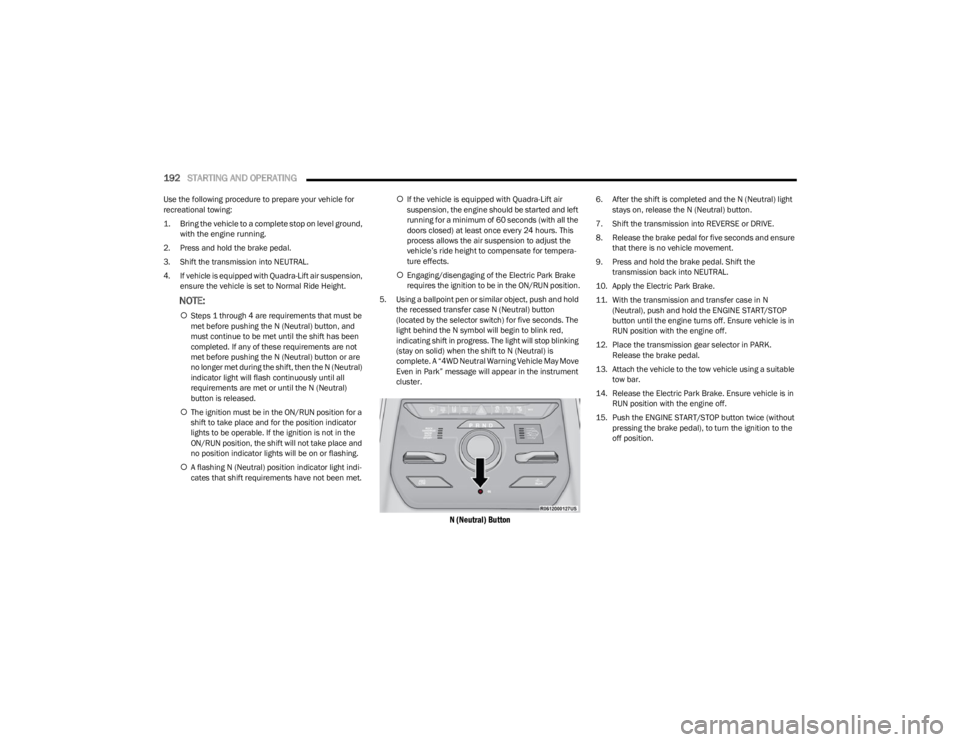
5. Using a ballpoint pen or similar object, push and hold the recessed transfer case N (Neutral) button
(located by the selector switch) for five seconds. The
light behind the N symbol will begin to blink red,
indicating shift in progress. The light will stop blinking
(stay on solid) when the shift to N (Neutral) is
complete. A “4WD Neutral Warning Vehicle May Move
Even in Park” message will appear in the instrument
cluster.
N (Neutral) Button
6. After the shift is completed and the N (Neutral) light stays on, release the N (Neutral) button.
7. Shift the transmission into REVERSE or DRIVE.
8. Release the brake pedal for five seconds and ensure that there is no vehicle movement.
9. Press and hold the brake pedal. Shift the transmission back into NEUTRAL.
10. Apply the Electric Park Brake.
11. With the transmission and transfer case in N (Neutral), push and hold the ENGINE START/STOP
button until the engine turns off. Ensure vehicle is in
RUN position with the engine off.
12. Place the transmission gear selector in PARK. Release the brake pedal.
13. Attach the vehicle to the tow vehicle using a suitable tow bar.
14. Release the Electric Park Brake. Ensure vehicle is in RUN position with the engine off.
15. Push the ENGINE START/STOP button twice (without pressing the brake pedal), to turn the ignition to the
off position.
23_WS_OM_EN_USC_t.book Page 192
Page 197 of 396

STARTING AND OPERATING195
If you stall or begin to lose forward motion while climbing
a steep hill, allow your vehicle to come to a stop and
immediately apply the brakes. Restart the engine, and
shift into REVERSE (R). Back slowly down the hill, allowing
the compression braking of the engine to help regulate
your speed. If the brakes are required to control vehicle
speed, apply them lightly and avoid locking or skidding the
tires.
Remember, never drive diagonally across a hill. Always
drive straight up or down.
If the wheels start to slip as you approach the crest of a
hill, ease off the accelerator and maintain forward motion
by turning the front wheels slowly. This may provide a fresh
“bite” into the surface and will usually provide traction to
complete the climb.Traction Downhill
When descending mountains or hills, use Hill Descent
Control or Selec-Speed Control to avoid repeated heavy
braking.
If not equipped with Hill Descent Control or Selec-Speed
Control use the following procedure:
Shift the transmission into a low gear, and the transfer
case into 4WD LOW range. Let the vehicle go slowly down
the hill with all four wheels turning against engine
compression drag. This will permit you to control the
vehicle speed and direction.
When descending mountains or hills, repeated braking
can cause brake fade with loss of braking control. Avoid
repeated heavy braking by downshifting the transmission
whenever possible.
After Driving Off-Road
Off-road operation puts more stress on your vehicle than
does most on-road driving. After going off-road, it is always
a good idea to check for damage. That way you can get any
problems taken care of right away and have your vehicle
ready when you need it.
Completely inspect the underbody of your vehicle.
Check tires, body structure, steering, suspension, and
exhaust system for damage.
Inspect the radiator for mud and debris and clean as
required.
Check threaded fasteners for looseness, particularly
on the chassis, drivetrain components, steering, and
suspension. Retighten them, if required, and torque to
the values specified in the Service Manual.
Check for accumulations of plants or brush. These
things could be a fire hazard. They might hide damage
to fuel lines, brake hoses, axle pinion seals, and
propeller shafts.
After extended operation in mud, sand, water, or
similar dirty conditions, have the radiator, fan, brake
rotors, wheels, brake linings, and axle yokes inspected
and cleaned as soon as possible.
If you experience unusual vibration after driving in
mud, slush or similar conditions, check the wheels for
impacted material. Impacted material can cause a
wheel imbalance and freeing the wheels of it will
correct the situation.
WARNING!
If the engine stalls, you lose forward motion, or cannot
make it to the top of a steep hill or grade, never attempt
to turn around. To do so may result in tipping and rolling
the vehicle. Always back carefully straight down a hill in
REVERSE gear. Never back down a hill in NEUTRAL
using only the brake.
WARNING!
Abrasive material in any part of the brakes may cause
excessive wear or unpredictable braking. You might not
have full braking power when you need it to prevent a
collision. If you have been operating your vehicle in dirty
conditions, get your brakes checked and cleaned as
necessary.
4
23_WS_OM_EN_USC_t.book Page 195
Page 206 of 396

204MULTIMEDIA
Night Vision Video Warning This setting will turn the Night Vision Video Warning and green/gray cluster indicator light
on or off.
ParkSense This setting will change the type of ParkSense alert when a close object is detected and
can provide both an audible chime and a visual display.
Front ParkSense Volume This setting adjusts the volume of the Front ParkSense system. The available settings are
“Low”, “Medium”, and “High”.
Rear ParkSense Volume This setting adjusts the volume of the Rear ParkSense system. The available settings are
“Low”, “Medium”, and “High”.
Active ParkSense Mode This setting will adjust the level of vehicle control when the Active ParkSense Mode is
active. The available settings are “Full Auto” and “Steering Only”
Active ParkSense Proximity Chime This setting will turn the Active ParkSense Proximity Chime on or off.
Side Distance Warning This setting will adjust the warning for side distance. The available options are “Off”,
“Sound Only”, and “Sound & Display”.
Drowsy Driver Alert This setting will monitor the driver’s driving habits and warn you of any changes,
indicating that the driver may be drowsy. The available options are “On” and “Off”.
Blind Spot Alert This setting will change the type of alert provided when an object is detected in the
vehicle’s blind spot. The “Off” setting will turn off Blind Spot Alert. The “Lights” setting will
activate the Blind Spot Alert lights on the outside mirrors. The “Lights & Chime” setting
will activate the lights on the outside mirrors and an audible chime.
Electric Power Steering Default This setting will change the Electric Power Steering mode. The available options are
“Comfort” for a lower effort steering experience, “Normal” for the standard effort steering
experience, and “Sport” for a higher effort steering experience.
Power Side Step This setting will activate the Power Side Step. The “Auto” setting will lower the step when
the door is opened and retract it once the door is closed. The “Off” setting will deactivate
the feature.
Hill Start Assist This setting will turn the Hill Start Assist system on or off.
Tire Fill Assist This setting will turn Tire Fill Assist on or off.
Setting NameDescription
23_WS_OM_EN_USC_t.book Page 204
Page 217 of 396

MULTIMEDIA215
Suspension
When the Suspension button is pressed on the touchscreen, the system will display settings related to the vehicle’s air suspension.
NOTE:Depending on the vehicle’s options, feature settings may vary.
Setting Name Description
Sound Horn With Lower This setting will allow you to sound the horn when the Suspension Lowering button is
pushed on the key fob.
Flash Lights With Lower This setting will allow you to turn the flashing of the lights when the Suspension Lowering
button is pushed on the key fob on or off.
Auto Entry/Exit Suspension This setting will turn the Auto Entry/Exit Suspension system on or off.
Display Suspension Messages This setting will display suspension messages in the Instrument Cluster Display. The “All”
setting will display all available messages. The “Warnings Only” setting will only display
warning messages.
Tire Jack Mode This setting will disable the Air Suspension system to assist in changing a spare tire.
Auxiliary Modes This setting will allow you to set the Auxiliary Suspension Mode. The available options are
“Off”, “Transport Mode”, and “Wheel Alignment Mode”. In Transport Mode, the vehicle
will not auto level when being transported by another vehicle. In Wheel Alignment Mode,
the vehicle will not auto level when a wheel alignment is being performed.
5
23_WS_OM_EN_USC_t.book Page 215
Page 241 of 396
239
(Continued)
SAFETY
SAFETY FEATURES
ANTI-LOCK BRAKE SYSTEM (ABS)
The ABS provides increased vehicle stability and brake
performance under most braking conditions. The system
automatically prevents wheel lock and enhances vehicle
control during braking.
The ABS performs a self-check cycle to ensure that the
ABS is working properly each time the vehicle is started
and driven. During this self-check, you may hear a slight
clicking sound as well as some related motor noises.
The ABS is activated during braking when the system
detects one or more wheels are beginning to lock. Road
conditions such as ice, snow, gravel, bumps, railroad
tracks, loose debris, or panic stops may increase the
likelihood of ABS activation(s).
You also may experience the following normal
characteristics when the ABS activates:
ABS motor noise or clicking sounds (you may continue
to hear for a short time after the stop).
Brake pedal pulsations.
A slight drop of the brake pedal at the end of the stop. The ABS is designed to function with the Original
Equipment Manufacturer (OEM) tires. Modification may
result in degraded ABS performance.
Anti-Lock Brake System (ABS) Warning
Light
The yellow ABS Warning Light will turn on when the ignition
is placed in the ON/RUN mode and may stay on for as long
as four seconds.
If the ABS Warning Light remains on or comes on while
driving, it indicates that the anti-lock portion of the brake
system is not functioning and that service is required.
However, the conventional brake system will continue to
operate normally if the ABS Warning Light is on.
If the ABS Warning Light is on, the brake system should be
serviced as soon as possible to restore the benefits of
Anti-Lock Brakes. If the ABS Warning Light does not come
on when the ignition is placed in the ON/RUN mode, have
the light repaired as soon as possible.
WARNING!
The ABS contains sophisticated electronic equip -
ment that may be susceptible to interference caused
by improperly installed or high output radio transmit -
ting equipment. This interference can cause possible
loss of anti-lock braking capability. Installation of
such equipment should be performed by qualified
professionals.
Pumping of the Anti-Lock Brakes will diminish their
effectiveness and may lead to a collision. Pumping
makes the stopping distance longer. Just press firmly
on your brake pedal when you need to slow down or
stop.
The ABS cannot prevent the natural laws of physics
from acting on the vehicle, nor can it increase
braking or steering efficiency beyond that afforded
by the condition of the vehicle brakes and tires or the
traction afforded.
The ABS cannot prevent collisions, including those
resulting from excessive speed in turns, following
another vehicle too closely, or hydroplaning.
The capabilities of an ABS equipped vehicle must
never be exploited in a reckless or dangerous
manner that could jeopardize the user’s safety or the
safety of others.
WARNING!
6
23_WS_OM_EN_USC_t.book Page 239
Page 243 of 396

SAFETY241
ELECTRONIC BRAKE CONTROL (EBC)
S
YSTEM
Your vehicle is equipped with an advanced EBC system.
This system includes the Anti-Lock Brake System (ABS),
Brake Assist System (BAS), Electronic Brake Force
Distribution (EBD), Electronic Stability Control (ESC),
Electronic Roll Mitigation (ERM), Hill Start Assist (HSA),
Intersection Collision Assist (ICA), and Traction Control
System (TCS). These systems work together to enhance
both vehicle stability and control in various driving
conditions.
Your vehicle may also be equipped with Dynamic Steering
Torque (DST), Rain Brake Support (RBS), Ready Alert
Braking (RAB), and Trailer Sway Control (TSC).
Brake Assist System (BAS)
The BAS is designed to optimize the vehicle’s braking
capability during emergency braking maneuvers. The
system detects an emergency braking situation by sensing
the rate and amount of brake application and then applies
optimum pressure to the brakes. This can help reduce
braking distances. The BAS complements the Anti-Lock
Brake System (ABS). Applying the brakes very quickly
results in the best BAS assistance. To receive the benefit
of the system, you must apply continuous braking
pressure during the stopping sequence (do not “pump”
the brakes). Do not reduce brake pedal pressure unless
braking is no longer desired. Once the brake pedal is
released, the BAS is deactivated.
Brake System Warning Light
The red Brake System Warning Light will turn on when the
ignition is placed in the ON/RUN mode and may stay on for
as long as four seconds.
If the Brake System Warning Light remains on or comes on
while driving, it indicates that the brake system is not
functioning properly and that immediate service is
required. If the Brake System Warning Light does not
come on when the ignition is placed in the ON/RUN mode,
have the light repaired as soon as possible.
Electronic Brake Force Distribution (EBD)
EBD manages the distribution of the braking torque
between the front and rear axles by limiting braking
pressure to the rear axle. This is done to prevent
overslip of the rear wheels to avoid vehicle instability, and
to prevent the rear axle from entering ABS before the
front axle.
Electronic Roll Mitigation (ERM)
ERM anticipates the potential for wheel lift by monitoring
the driver’s steering wheel input and the speed of the
vehicle. When ERM determines that the rate of change of
the steering wheel angle and vehicle’s speed are
sufficient to potentially cause wheel lift, it then applies the
appropriate brake and may also reduce engine power to
lessen the chance that wheel lift will occur. ERM can only
reduce the chance of wheel lift occurring during severe or
evasive driving maneuvers; it cannot prevent wheel lift
due to other factors, such as road conditions, leaving the
roadway, or striking objects or other vehicles.
NOTE:
ERM is disabled any time the ESC is in “Full Off” mode (if
equipped). See
Úpage 242 for a complete explanation of
the available ESC modes.
WARNING!
The Brake Assist System (BAS) cannot prevent the
natural laws of physics from acting on the vehicle, nor
can it increase the traction afforded by prevailing road
conditions. BAS cannot prevent collisions, including
those resulting from excessive speed in turns, driving
on very slippery surfaces, or hydroplaning. The
capabilities of a BAS-equipped vehicle must never be
exploited in a reckless or dangerous manner, which
could jeopardize the user's safety or the safety of
others.
WARNING!
Many factors, such as vehicle loading, road conditions
and driving conditions, influence the chance that wheel
lift or rollover may occur. ERM cannot prevent all wheel
lift or rollovers, especially those that involve leaving the
roadway or striking objects or other vehicles. The
capabilities of an ERM-equipped vehicle must never be
exploited in a reckless or dangerous manner which
could jeopardize the user's safety or the safety of
others.
6
23_WS_OM_EN_USC_t.book Page 241
Page 244 of 396

242SAFETY
Electronic Stability Control (ESC)
ESC enhances directional control and stability of the
vehicle under various driving conditions. ESC corrects for
oversteering or understeering of the vehicle by applying
the brake of the appropriate wheel(s) to assist in
counteracting these conditions. Engine power may also be
reduced to help the vehicle maintain the desired path.
Oversteer — when the vehicle is turning more than
appropriate for the steering wheel position.
Understeer — when the vehicle is turning less than
appropriate for the steering wheel position.
ESC uses sensors in the vehicle to determine the vehicle
path intended by the driver and compares it to the actual
path of the vehicle. When the actual path does not match
the intended path, ESC applies the brake of the
appropriate wheel to assist in counteracting the oversteer
or understeer condition.
The ESC Activation/Malfunction Indicator Light located in
the instrument cluster will start to flash as soon as the ESC
system becomes active. The ESC Activation/Malfunction
Indicator Light also flashes when the Traction Control
System (TCS) is active. If the ESC Activation/Malfunction
Indicator Light begins to flash during acceleration, ease up
on the accelerator and apply as little throttle as possible.
Be sure to adapt your speed and driving to the prevailing
road conditions.
ESC Operating Modes
Depending upon model and mode of operation, the ESC
system may have multiple operating modes.
ESC On
This is the normal operating mode for the ESC. Whenever
the vehicle is started, the ESC system will be in this mode.
This mode should be used for most driving conditions.
Alternate ESC modes should only be used for specific
reasons as noted in the following paragraphs.
Partial Off
This mode may be useful if the vehicle becomes stuck.
This mode may modify TCS and ESC thresholds for
activation, which allows for more wheel spin than normally
allowed.
To enter the “Partial Off” mode, momentarily push the ESC
OFF button and the ESC OFF Indicator Light will illuminate.
To turn the ESC on again, momentarily push the ESC OFF
button and the ESC OFF Indicator Light will turn off.
NOTE:For vehicles with multiple partial ESC modes, the push and
release of the button will toggle the ESC modes. Multiple
attempts may be required to return to "ESC On" mode.
WARNING!
Electronic Stability Control (ESC) cannot prevent the
natural laws of physics from acting on the vehicle,
nor can it increase the traction afforded by prevailing
road conditions. ESC cannot prevent accidents,
including those resulting from excessive speed in
turns, driving on very slippery surfaces, or hydro -
planing. ESC also cannot prevent accidents resulting
from loss of vehicle control due to inappropriate
driver input for the conditions. Only a safe, attentive,
and skillful driver can prevent accidents. The capabil -
ities of an ESC equipped vehicle must never be
exploited in a reckless or dangerous manner which
could jeopardize the user’s safety or the safety of
others.
Vehicle modifications, or failure to properly maintain
your vehicle, may change the handling characteris -
tics of your vehicle, and may negatively affect the
performance of the ESC system. Changes to the
steering system, suspension, braking system, tire
type and size or wheel size may adversely affect ESC
performance. Improperly inflated and unevenly worn
tires may also degrade ESC performance. Any vehicle
modification or poor vehicle maintenance that
reduces the effectiveness of the ESC system can
increase the risk of loss of vehicle control, vehicle
rollover, personal injury and death.
23_WS_OM_EN_USC_t.book Page 242