warning lights JEEP WAGONEER 2023 Owners Manual
[x] Cancel search | Manufacturer: JEEP, Model Year: 2023, Model line: WAGONEER, Model: JEEP WAGONEER 2023Pages: 396, PDF Size: 15.17 MB
Page 5 of 396

3
EXTERIOR LIGHTS ..............................................................57Headlight Switch ........................................................ 57
Multifunction Lever ..................................................... 58
Daytime Running Lights (DRLs) ................................. 58
High/Low Beam Switch .............................................. 58
Automatic High Beams — If Equipped ....................... 58
Flash-To-Pass ............................................................ 58
Automatic Headlights ................................................ 58
Parking Lights And Panel Lights................................. 59
Headlights On Automatically With Wipers ................. 59
Headlight Illumination On Approach .......................... 59
Headlight Delay ........................................................... 59
Lights-On Reminder .................................................... 59
Fog Lights .................................................................... 60
Turn Signals................................................................. 60
Lane Change Assist — If Equipped............................. 60
Battery Saver ............................................................... 60
INTERIOR LIGHTS ...............................................................60 Courtesy Lights............................................................ 60
Illuminated Entry — If Equipped ................................. 62
WINDSHIELD WIPERS AND WASHERS ........................... 62 Windshield Wiper Operation....................................... 62
Rain Sensing Wipers — If Equipped .......................... 63
Rear Wiper And Washer ............................................ 64
Windshield Wiper De-Icer — If Equipped ................... 64
CLIMATE CONTROLS ..........................................................64 Automatic Climate Control Descriptions And
Functions ..................................................................... 64
Automatic Temperature Control (ATC) ....................... 71
Climate Voice Recognition.......................................... 71
Operating Tips ............................................................ 71 INTERIOR STORAGE AND EQUIPMENT ............................ 73
Storage ......................................................................... 73
Center Console Cooler —
If Equipped ................................................................... 75
Center Console Safe — If Equipped ............................ 75
Sun Screens — If Equipped ......................................... 76
USB/AUX Control ......................................................... 76
Electrical Power Outlets ..............................................79
Power Inverter ............................................................. 80
Wireless Charging Pad — If Equipped......................... 81
WINDOWS .......................................................................... 82 Power Window Controls............................................... 82
Wind Buffeting ............................................................ 83
Radio Signal Devices On Windshield —
If Equipped ................................................................... 83
POWER SUNROOF — IF EQUIPPED................................... 83 Tri-Pane Power Sunroof............................................... 83
HOOD.................................................................................... 85 Opening The Hood .......................................................85
Closing The Hood ......................................................... 86
LIFTGATE .............................................................................. 86 To Unlock/Open The Liftgate ......................................86
To Lock/Close The Liftgate ......................................... 86
Adjustable Power Liftgate Height ............................... 87
Hands-Free Liftgate .................................................... 87
Cargo Area Features ................................................... 89
ROOF LUGGAGE RACK — IF EQUIPPED ........................... 91 Installing The Crossbars ..............................................91
Removing The Crossbars ............................................ 95GETTING TO KNOW YOUR
INSTRUMENT PANEL
BASE INSTRUMENT CLUSTER .......................................... 96 Instrument Cluster Descriptions ................................ 97
PREMIUM INSTRUMENT CLUSTER .................................. 98 Instrument Cluster Descriptions ................................ 99
INSTRUMENT CLUSTER DISPLAY ..................................... 99 Location And Controls ................................................. 99
Engine Oil Life Reset ................................................ 101
Display And Messages .............................................. 102Instrument Cluster Display Menu Items ................. 104Head Up Display (HUD) — If Equipped ..................... 106
Battery Saver On/Battery Saver Mode
Message — Electrical Load Reduction
Actions (If Equipped) ................................................ 107
WARNING LIGHTS AND MESSAGES ..............................108 Red Warning Lights ................................................... 109
Yellow Warning Lights ............................................... 111Yellow Indicator Lights .............................................. 114Green Indicator Lights............................................... 115White Indicator Lights ............................................... 116Blue Indicator Lights ................................................. 117
Gray Indicator Lights ................................................. 117
ONBOARD DIAGNOSTIC SYSTEM — OBD II ................... 117 Onboard Diagnostic System
(OBD II) Cybersecurity ............................................... 118
EMISSIONS INSPECTION AND MAINTENANCE
PROGRAMS ......................................................................118
23_WS_OM_EN_USC_t.book Page 3
Page 13 of 396
11
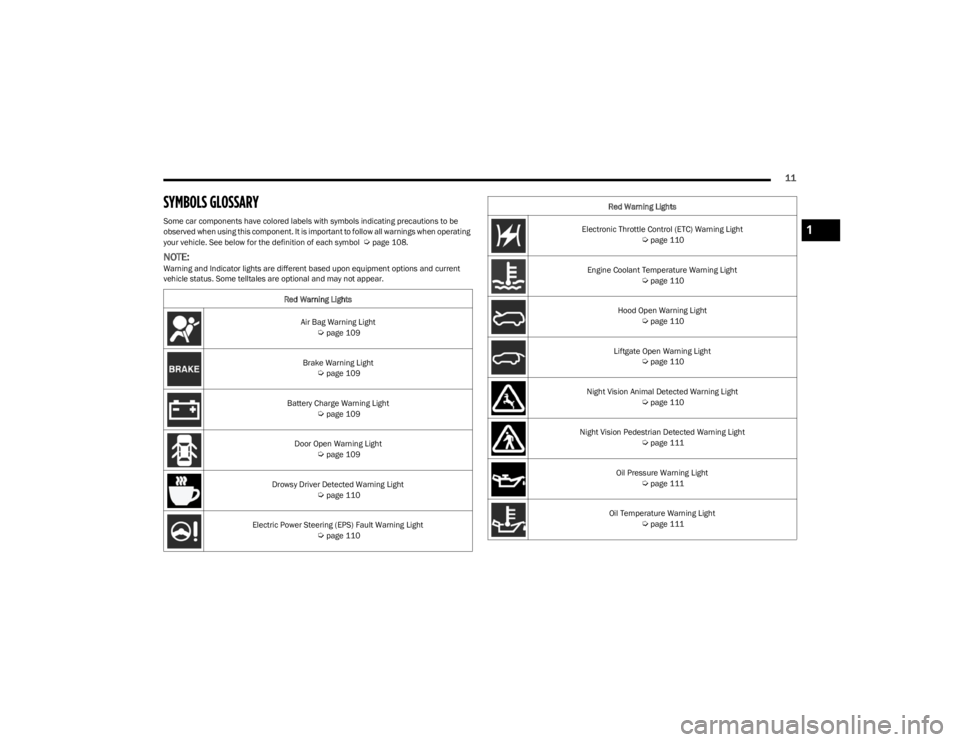
SYMBOLS GLOSSARY
Some car components have colored labels with symbols indicating precautions to be
observed when using this component. It is important to follow all warnings when operating
your vehicle. See below for the definition of each symbol
Úpage 108.
NOTE:Warning and Indicator lights are different based upon equipment options and current
vehicle status. Some telltales are optional and may not appear.Red Warning Lights
Air Bag Warning Light
Úpage 109
Brake Warning Light
Úpage 109
Battery Charge Warning Light
Úpage 109
Door Open Warning Light
Úpage 109
Drowsy Driver Detected Warning Light
Úpage 110
Electric Power Steering (EPS) Fault Warning Light
Úpage 110
Electronic Throttle Control (ETC) Warning Light Úpage 110
Engine Coolant Temperature Warning Light
Úpage 110
Hood Open Warning Light
Úpage 110
Liftgate Open Warning Light
Úpage 110
Night Vision Animal Detected Warning Light
Úpage 110
Night Vision Pedestrian Detected Warning Light
Úpage 111
Oil Pressure Warning Light
Úpage 111
Oil Temperature Warning Light
Úpage 111
Red Warning Lights
1
23_WS_OM_EN_USC_t.book Page 11
Page 14 of 396
12
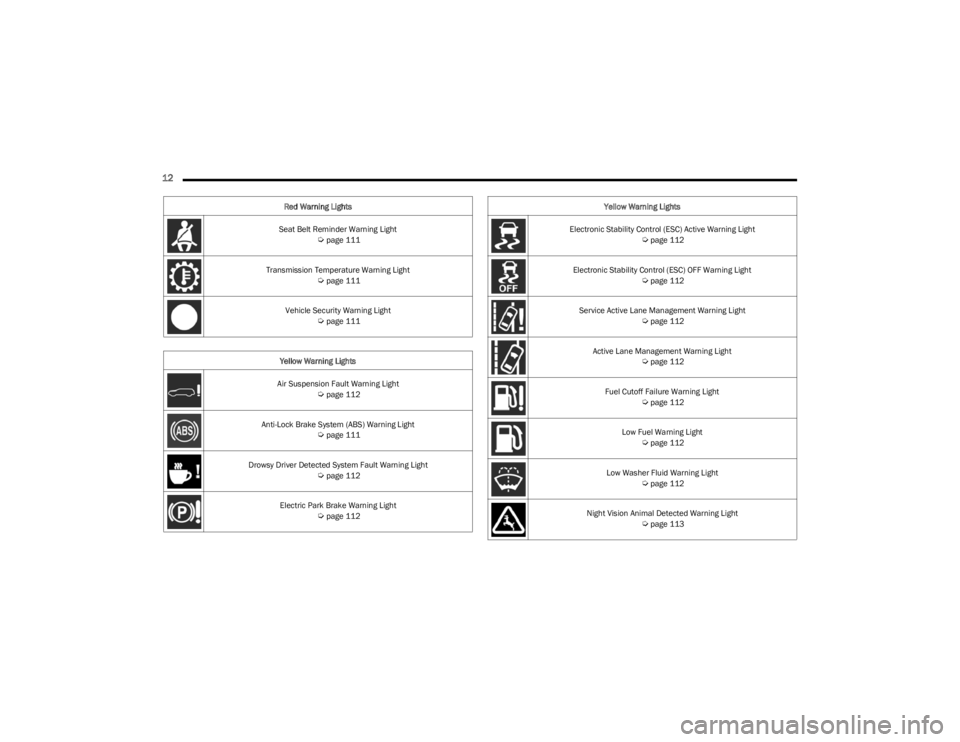
Seat Belt Reminder Warning Light Úpage 111
Transmission Temperature Warning Light
Úpage 111
Vehicle Security Warning Light
Úpage 111
Yellow Warning Lights
Air Suspension Fault Warning Light
Úpage 112
Anti-Lock Brake System (ABS) Warning Light
Úpage 111
Drowsy Driver Detected System Fault Warning Light
Úpage 112
Electric Park Brake Warning Light
Úpage 112
Red Warning Lights
Electronic Stability Control (ESC) Active Warning Light
Úpage 112
Electronic Stability Control (ESC) OFF Warning Light
Úpage 112
Service Active Lane Management Warning Light
Úpage 112
Active Lane Management Warning Light
Úpage 112
Fuel Cutoff Failure Warning Light
Úpage 112
Low Fuel Warning Light
Úpage 112
Low Washer Fluid Warning Light
Úpage 112
Night Vision Animal Detected Warning Light
Úpage 113
Yellow Warning Lights
23_WS_OM_EN_USC_t.book Page 12
Page 15 of 396
13
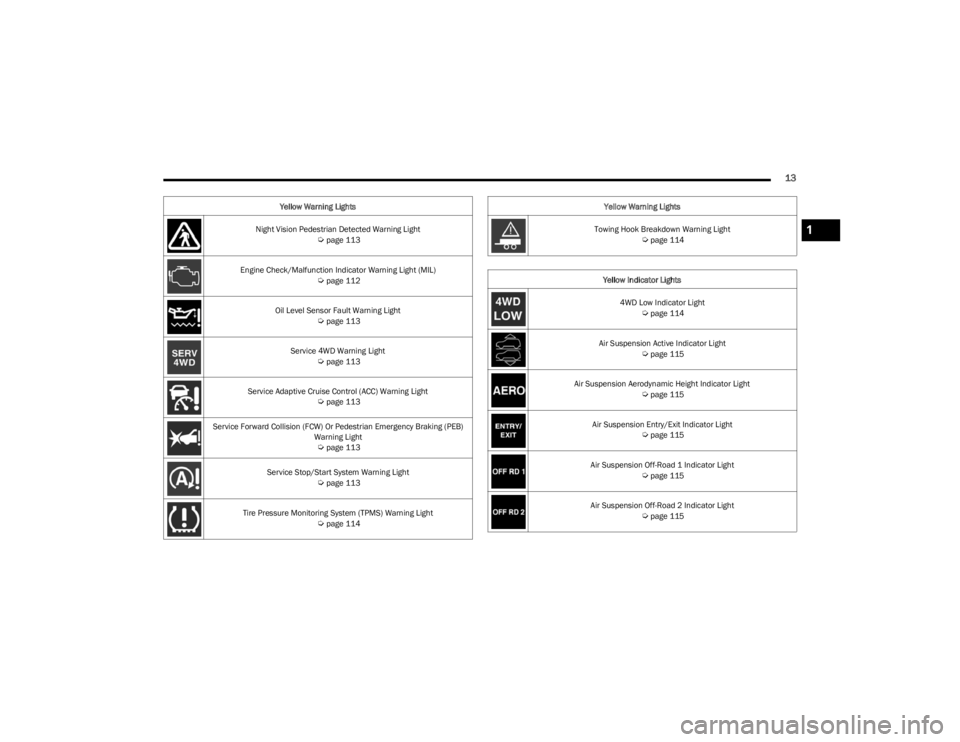
Night Vision Pedestrian Detected Warning Light Úpage 113
Engine Check/Malfunction Indicator Warning Light (MIL)
Úpage 112
Oil Level Sensor Fault Warning Light
Úpage 113
Service 4WD Warning Light
Úpage 113
Service Adaptive Cruise Control (ACC) Warning Light
Úpage 113
Service Forward Collision (FCW) Or Pedestrian Emergency Braking (PEB) Warning Light
Úpage 113
Service Stop/Start System Warning Light
Úpage 113
Tire Pressure Monitoring System (TPMS) Warning Light
Úpage 114
Yellow Warning Lights
Towing Hook Breakdown Warning Light
Úpage 114
Yellow Indicator Lights 4WD Low Indicator Light
Úpage 114
Air Suspension Active Indicator Light
Úpage 115
Air Suspension Aerodynamic Height Indicator Light
Úpage 115
Air Suspension Entry/Exit Indicator Light
Úpage 115
Air Suspension Off-Road 1 Indicator Light
Úpage 115
Air Suspension Off-Road 2 Indicator Light
Úpage 115
Yellow Warning Lights
1
23_WS_OM_EN_USC_t.book Page 13
Page 16 of 396
14
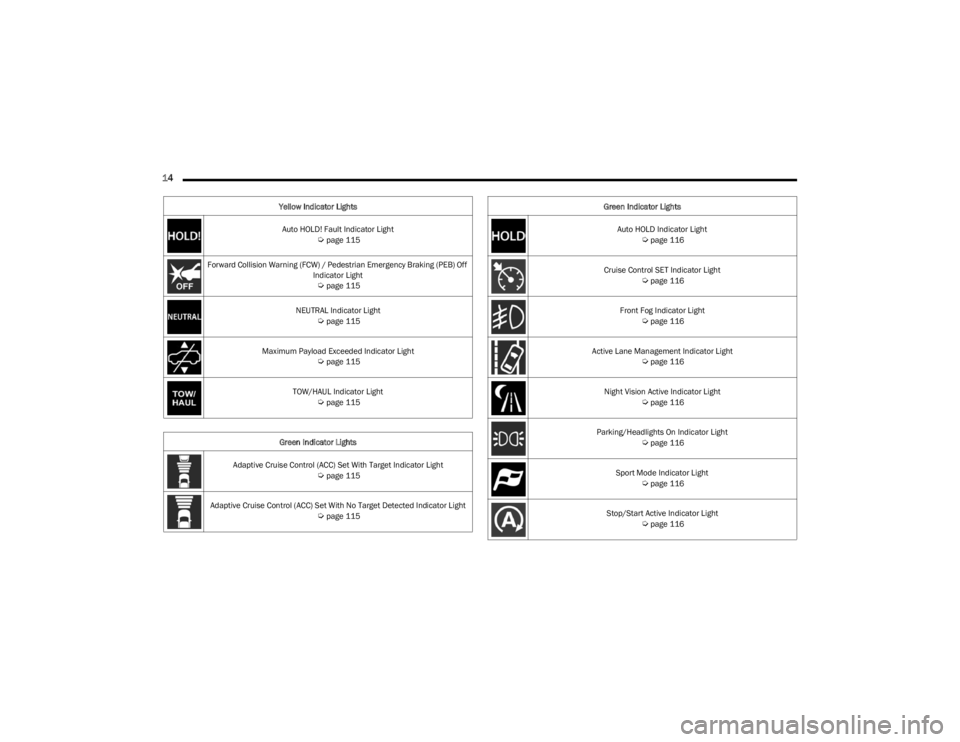
Auto HOLD! Fault Indicator Light Úpage 115
Forward Collision Warning (FCW) / Pedestrian Emergency Braking (PEB) Off Indicator Light
Úpage 115
NEUTRAL Indicator Light
Úpage 115
Maximum Payload Exceeded Indicator Light
Úpage 115
TOW/HAUL Indicator Light
Úpage 115
Green Indicator Lights
Adaptive Cruise Control (ACC) Set With Target Indicator Light
Úpage 115
Adaptive Cruise Control (ACC) Set With No Target Detected Indicator Light
Úpage 115
Yellow Indicator Lights
Auto HOLD Indicator Light
Úpage 116
Cruise Control SET Indicator Light
Úpage 116
Front Fog Indicator Light
Úpage 116
Active Lane Management Indicator Light
Úpage 116
Night Vision Active Indicator Light
Úpage 116
Parking/Headlights On Indicator Light
Úpage 116
Sport Mode Indicator Light
Úpage 116
Stop/Start Active Indicator Light
Úpage 116
Green Indicator Lights
23_WS_OM_EN_USC_t.book Page 14
Page 24 of 396
22GETTING TO KNOW YOUR VEHICLE
NOTE:
The key fob may not be detected by the vehicle Keyless
Enter ‘n Go™ system if it is located next to a mobile
phone, laptop or other electronic device; these devices
may block the key fob’s wireless signal and prevent the
Keyless Enter ‘n Go™ system from starting the vehicle.
For more information on the engine starting procedure,
see
Úpage 119.
When opening the driver's door and the ignition is in
the ON/RUN position (engine not running), a chime will
sound to remind you to place the ignition in the OFF
position. In addition to the chime, the message “Igni-
tion ON” will display in the cluster.
REMOTE START
This system uses the key fob to start the engine
conveniently from outside the vehicle while still
maintaining security. The system has a range
of approximately 328 ft (100 m).
Remote Start is used to defrost windows in cold weather,
and to reach a comfortable climate in all ambient
conditions before the driver enters the vehicle.
NOTE:Obstructions between the vehicle and key fob may reduce
this range Úpage 382.
HOW TO USE REMOTE START
Push and release the Remote Start button on the key fob
twice within five seconds. The vehicle doors will lock, the
parking lights will flash, and the horn will chirp twice (if
programmed). Then, the engine will start, and the vehicle
will remain in the Remote Start mode for a 15 minute
cycle. Pushing the Remote Start button a third time shuts
the engine off.
NOTE:
With Remote Start, the engine will only run for
15 minutes.
Remote Start can only be used twice.
If an engine fault is present or fuel level is low, the
vehicle will start and then shut down in 10 seconds.
The parking lights will turn on and remain on during
Remote Start mode.
Headlight animation (if equipped) will occur when
Remote Start is activated, if “Headlight Illumination On
Approach” is enabled within Uconnect Settings.
For security, power window and power sunroof opera -
tion (if equipped) are disabled when the vehicle is in
the Remote Start mode.
The ignition must be placed in the ON/RUN position
before the Remote Start sequence can be repeated for
a third cycle.
All of the following conditions must be met before the
engine will remote start:
Gear selector in PARK
Doors closed
Hood closed
Liftgate closed
Hazard switch off
Brake switch inactive (brake pedal not pressed)
Battery at an acceptable charge level
System not disabled from previous Remote Start event
Vehicle Security Light flashing
Ignition in OFF position
Panic button is not pushed
Fuel level meets minimum requirement
Vehicle Security system is not signaling an intrusion
Malfunction Indicator Light (MIL) is not illuminated
WARNING!
Do not start or run an engine in a closed garage or
confined area. Exhaust gas contains carbon
monoxide which is odorless and colorless. Carbon
monoxide is poisonous and can cause serious injury
or death when inhaled.
Keep key fobs away from children. Operation of the
Remote Start system, windows, door locks or other
controls could cause serious injury or death.
23_WS_OM_EN_USC_t.book Page 22
Page 45 of 396
GETTING TO KNOW YOUR VEHICLE43
(Continued)
The massage type and intensity level status will be
synchronized between the main Uconnect display and the
Front Comfort and Convenience Display.
The selected settings will save in the system’s memory
when turned off, and will resume the next time the system
is turned on.
NOTE:
For vehicles equipped with a selectable back/cushion
feature for massage seats, the massage feature can
be deselected for either the seatback or seat cushion.
If both options are deselected, massage will turn off.
The engine must be running for the power seatback
massage to operate.
The massage feature will turn off after 20 minutes of
use. However, if the massage type or intensity level is
changed, the timer then resets.
HEATED SEATS — IF EQUIPPED
Front Heated Seats
The front heated seats control buttons are
located on the sides of the radio or within the
Uconnect system. You can access the controls
through the Climate screen.
Press the heated seat button once to turn the HI setting
on.
Press the heated seat button a second time to turn the
MED setting on.
Press the heated seat button a third time to turn the
LO setting on.
Press the heated seat button a fourth time to turn the
heating elements off.
The heating elements can be turned on in the seatback
only, seat cushion only, or both. Press the seat image on
the touchscreen or push the seat zone button on the side
of the radio to cycle through these seat zones. An LED will
illuminate next to the selected zone(s). If equipped with
touchscreen buttons, the selected zones will be
highlighted on the seat image.
NOTE:
Once a heat setting is selected, heat will be felt within
two to five minutes.
The engine must be running for the heated seats to
operate.
The level of heat selected will stay on until the operator
changes it.
For information on use with the Remote Start system, see
Úpage 23.
Rear Heated Seats — If Equipped
The two second row outboard seats may be
equipped with heated seats. There are two
heated seat switches that allow the rear
passengers to operate the seats
independently. The heated seat switches for each heater
are located on the rear of the center console.
If equipped with a Rear Comfort And Convenience Display,
heated seat settings can be selected within the display
Úpage 69.
You can choose from HI, MED, LO, or OFF heat settings.
Indicator lights in each switch illuminate indicating the
level of heat in use.
Push the heated seat switch once to turn the HI setting
on.
Push the heated seat switch a second time to turn the
MED setting on.
Push the heated seat switch a third time to turn the
LO setting on.
Push the heated seat switch a fourth time to turn the
heating elements off.WARNING!
Persons who are unable to feel pain to the skin
because of advanced age, chronic illness, diabetes,
spinal cord injury, medication, alcohol use, exhaus -
tion or other physical condition must exercise care
when using the seat heater. It may cause burns even
at low temperatures, especially if used for long
periods of time.
Do not place anything on the seat or seatback that
insulates against heat, such as a blanket or cushion.
This may cause the seat heater to overheat. Sitting in
a seat that has been overheated could cause serious
burns due to the increased surface temperature of
the seat.
WARNING!
2
23_WS_OM_EN_USC_t.book Page 43
Page 46 of 396
44GETTING TO KNOW YOUR VEHICLE
The level of heat selected will stay on until the operator
changes it.
NOTE:The engine must be running for the heated seats to
operate.
VENTILATED SEATS — IF EQUIPPED
Located in the seat cushion and seatback are fans that
draw the air from the passenger compartment and move
air through fine perforations in the seat cover to help keep
the occupant cooler in higher ambient temperatures.
Front Ventilated Seats
The ventilated seats control buttons are
located on the sides of the radio or within the
Uconnect system. The fans operate at three
speeds: HI, MED and LO.
Press the ventilated seat button once to choose HI.
Press the ventilated seat button a second time to
choose MED.
Press the ventilated seat button a third time to choose
LO.
Press the ventilated seat button a fourth time to turn
the ventilation off.
The fans can be turned on in the seatback only, seat
cushion only, or both. Press the seat image on the
touchscreen or push the seat zone button on the side of
the radio to cycle through these seat zones. An LED will
illuminate next to the selected zone(s). If equipped with
touchscreen buttons, the selected zones will be
highlighted on the seat image.
NOTE:The engine must be running for the ventilated seats to
operate.
For information on use with the Remote Start system, see
Úpage 23.
Rear Ventilated Seats — If Equipped
The two second row outboard seats may be
equipped with ventilated seats. The rear
ventilated seat control switches are located on
the rear of the center console and allow the
rear passengers to operate the seats independently.
If equipped with a Rear Comfort And Convenience Display,
ventilated seat settings can be selected within the display
Úpage 69.
You can choose from HI, MED, LO, or OFF fan speed.
Indicator lights in each switch illuminate indicating the
level of fan speed in use.
Push the ventilated seat switch once to choose HI.
Push the ventilated seat switch a second time to
choose MED.
Push the ventilated seat switch a third time to choose
LO.
Push the ventilated seat switch a fourth time to turn
the ventilation off.
NOTE:The engine must be running for the ventilated seats to
operate.
HEAD RESTRAINTS
Head restraints are designed to reduce the risk of injury by
restricting head movement in the event of a rear impact.
Head restraints should be adjusted so that the top of the
head restraint is located above the top of your ear.
Front Head Restraints
Your vehicle is equipped with front four-way driver and
passenger head restraints.
The Wagoneer is equipped with manual four-way head
restraints, and the Grand Wagoneer is equipped with
power four-way head restraints with adjustable wings.
If your vehicle is equipped with manual front head
restraints, to raise the head restraint, push the
adjustment button, located on the left side of the head
restraint, and pull upward on the head restraint. To lower
the head restraint, push the adjustment button, and push
downward on the head restraint.
WARNING!
All occupants, including the driver, should not
operate a vehicle or sit in a vehicle’s seat until the
head restraints are placed in their proper positions in
order to minimize the risk of neck injury in the event
of a crash.
Head restraints should never be adjusted while the
vehicle is in motion. Driving a vehicle with the head
restraints improperly adjusted or removed could
cause serious injury or death in the event of a
collision.
23_WS_OM_EN_USC_t.book Page 44
Page 53 of 396
GETTING TO KNOW YOUR VEHICLE51
Sun Visor Slide-On-Rod Feature —
If Equipped
The sun visor Slide-On-Rod feature allows for additional
flexibility in positioning the sun visor to block out the sun.
1. Fold down the sun visor.
2. Unclip the visor from the center clip.
3. Pivot the sun visor toward the side window.
4. Extend the sun visor blade for additional sun
blockage.
NOTE:The sun visor blade can also be extended while the sun
visor is against the windshield for additional sun blockage
through the front of the vehicle.
OUTSIDE MIRRORS
To receive maximum benefit, adjust the outside mirror(s)
to center on the adjacent lane of traffic with a slight
overlap of the view obtained on the inside mirror.
Outside Mirrors Folding Feature
All outside mirrors are hinged and may be moved either
forward or rearward to resist damage. The hinges have
three detent positions:
Full forward position
Full rearward position
Normal position
Outside Mirrors With Turn Signal And
Approach Lighting — If Equipped
Driver and passenger outside mirrors with turn signal and
approach lighting contain four LEDs, which are located in
the upper outer corner of each mirror.
Three of the LEDs are turn signal indicators, which flash
with the corresponding turn signal lights in the front and
rear of the vehicle. Turning on the Hazard Warning
flashers will also activate these LEDs.
The fourth LED supplies illuminated entry lighting, which
turns on in both mirrors when you use the key fob or open
any door. This LED shines outward to illuminate the front
and rear door handles. It also shines downward to
illuminate the area in front of the doors.
The illuminated entry lighting fades to off after about 30
seconds or it will fade to off immediately once the ignition
is placed into the ON/RUN position.
NOTE:The approach lighting will not function when the gear
selector is moved out of the PARK position.
OUTSIDE AUTOMATIC DIMMING
M
IRROR — IF EQUIPPED
The exterior driver side mirror will automatically adjust for
glare from vehicles behind you. This feature is controlled
by the inside automatic dimming mirror. The mirror will
automatically adjust for headlight glare when the inside
mirror adjusts.
CONVERSATION MIRROR
Located in the overhead console there is a conversation
mirror to view all of the passengers in the vehicle. Push the
panel to release the drop down mirror, raise it back up to
3/4th of the way and let go; a latch will hold the mirror in
place. Raise the mirror all the way and push to latch it back
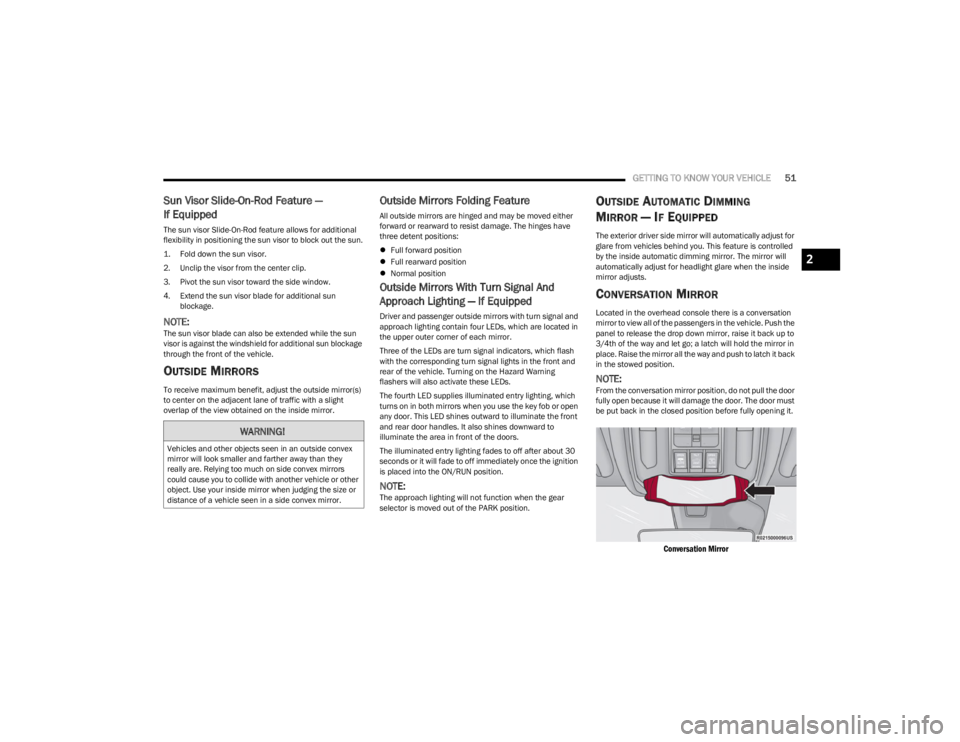
in the stowed position.
NOTE:From the conversation mirror position, do not pull the door
fully open because it will damage the door. The door must
be put back in the closed position before fully opening it.
Conversation Mirror
WARNING!
Vehicles and other objects seen in an outside convex
mirror will look smaller and farther away than they
really are. Relying too much on side convex mirrors
could cause you to collide with another vehicle or other
object. Use your inside mirror when judging the size or
distance of a vehicle seen in a side convex mirror.
2
23_WS_OM_EN_USC_t.book Page 51
Page 60 of 396
58GETTING TO KNOW YOUR VEHICLE
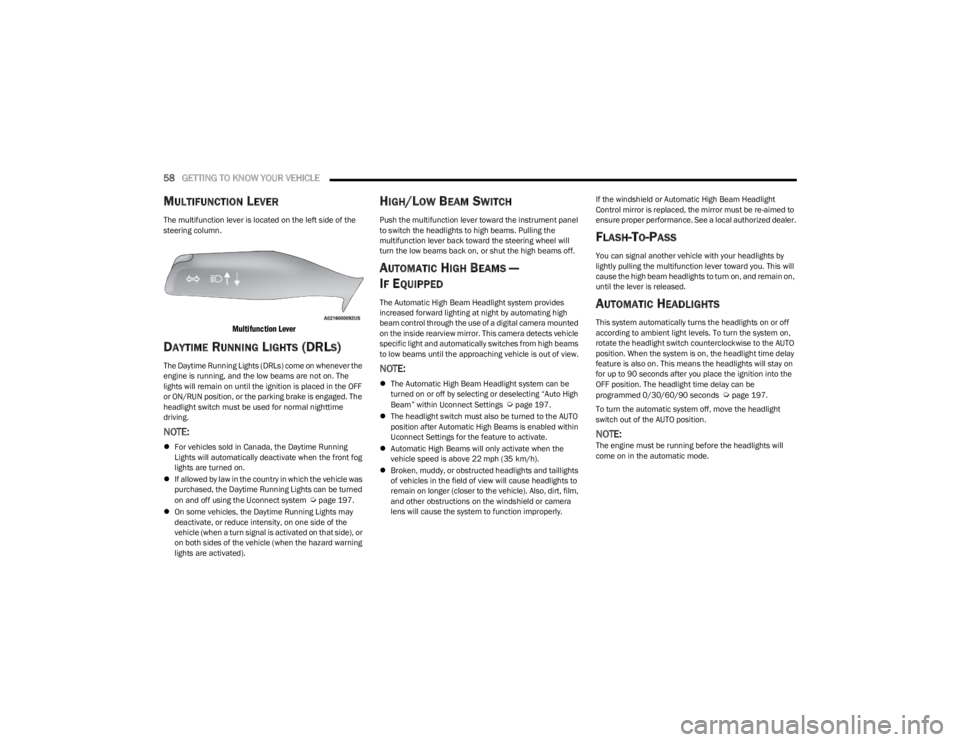
MULTIFUNCTION LEVER
The multifunction lever is located on the left side of the
steering column.
Multifunction Lever
DAYTIME RUNNING LIGHTS (DRLS)
The Daytime Running Lights (DRLs) come on whenever the
engine is running, and the low beams are not on. The
lights will remain on until the ignition is placed in the OFF
or ON/RUN position, or the parking brake is engaged. The
headlight switch must be used for normal nighttime
driving.
NOTE:
For vehicles sold in Canada, the Daytime Running
Lights will automatically deactivate when the front fog
lights are turned on.
If allowed by law in the country in which the vehicle was
purchased, the Daytime Running Lights can be turned
on and off using the Uconnect system
Úpage 197.
On some vehicles, the Daytime Running Lights may
deactivate, or reduce intensity, on one side of the
vehicle (when a turn signal is activated on that side), or
on both sides of the vehicle (when the hazard warning
lights are activated).
HIGH/LOW BEAM SWITCH
Push the multifunction lever toward the instrument panel
to switch the headlights to high beams. Pulling the
multifunction lever back toward the steering wheel will
turn the low beams back on, or shut the high beams off.
AUTOMATIC HIGH BEAMS —
I
F EQUIPPED
The Automatic High Beam Headlight system provides
increased forward lighting at night by automating high
beam control through the use of a digital camera mounted
on the inside rearview mirror. This camera detects vehicle
specific light and automatically switches from high beams
to low beams until the approaching vehicle is out of view.
NOTE:
The Automatic High Beam Headlight system can be
turned on or off by selecting or deselecting “Auto High
Beam” within Uconnect Settings
Úpage 197.
The headlight switch must also be turned to the AUTO
position after Automatic High Beams is enabled within
Uconnect Settings for the feature to activate.
Automatic High Beams will only activate when the
vehicle speed is above 22 mph (35 km/h).
Broken, muddy, or obstructed headlights and taillights
of vehicles in the field of view will cause headlights to
remain on longer (closer to the vehicle). Also, dirt, film,
and other obstructions on the windshield or camera
lens will cause the system to function improperly. If the windshield or Automatic High Beam Headlight
Control mirror is replaced, the mirror must be re-aimed to
ensure proper performance. See a local authorized dealer.
FLASH-TO-PASS
You can signal another vehicle with your headlights by
lightly pulling the multifunction lever toward you. This will
cause the high beam headlights to turn on, and remain on,
until the lever is released.
AUTOMATIC HEADLIGHTS
This system automatically turns the headlights on or off
according to ambient light levels. To turn the system on,
rotate the headlight switch counterclockwise to the AUTO
position. When the system is on, the headlight time delay
feature is also on. This means the headlights will stay on
for up to 90 seconds after you place the ignition into the
OFF position. The headlight time delay can be
programmed 0/30/60/90 seconds
Úpage 197.
To turn the automatic system off, move the headlight
switch out of the AUTO position.
NOTE:The engine must be running before the headlights will
come on in the automatic mode.
23_WS_OM_EN_USC_t.book Page 58