lock JEEP WRANGLER 2017 JK / 3.G Owner's Manual
[x] Cancel search | Manufacturer: JEEP, Model Year: 2017, Model line: WRANGLER, Model: JEEP WRANGLER 2017 JK / 3.GPages: 527, PDF Size: 5.34 MB
Page 58 of 527
Cargo Lamp
The courtesy and dome lights will turn on when the front
doors are opened, by rotating the control for the dimmer
switch on the multifunction lever fully upward, or if
equipped, when the unlock button is pushed on the
Remote Keyless Entry key fob.
The sports bar reading lights (available on four-door
models) can be turned on by pushing the switches, located
on either side of the lens. Push a switch a second time to
turn the light off.The rear cargo light may be turned on by pushing the lens.
Push the lens a second time to turn the light off.
When a door is open and the interior lights are on, rotating
the dimmer control to the extreme bottom position will
cause all the interior lights to turn off. This is also known
as the “Party” mode because it allows the doors to stay
open for extended periods of time without discharging the
vehicle’s battery.
Sports Bar Reading Light
Rear Cargo Light
56 GETTING TO KNOW YOUR VEHICLE
Page 62 of 527
Rear Window Wiper/Washer — If Equipped
A rotary switch on the center portion of the control lever
(located on the right side of the steering column) controls
the operation of the rear wiper/washer function.Rotate the switch upward to the first detent position
for rear wiper operation.Rotate the switch upward past the first detent to
activate the rear washer. The washer pump and
the wiper will continue to operate as long as the
switch is held. Upon release, the wiper will cycle
two to three times before returning to the set position. If the rear wiper is operating when the ignition is turned to
the LOCK position, the wiper will automatically return to
the “park” position. When the vehicle is restarted, the
wiper will resume function at whichever position the
switch is set at.
CLIMATE CONTROLS
Manual Climate Control Overview
Rear Wiper/Washer Control
Manual Temperature Controls
60 GETTING TO KNOW YOUR VEHICLE
Page 64 of 527
IconDescription
Rear Defrost Button
Push and release the Rear Defrost Control button to turn on the rear window defroster and the
heated outside mirrors (if equipped). An indicator will illuminate when the rear window de-
froster is on. The rear window defroster automatically turns off after 10 minutes.
Temperature Control
Use this control to regulate the temperature of the air inside the passenger compartment. Rotat-
ing the knob counterclockwise, from top center into the blue area of the scale, indicates cooler
temperatures. Rotating the knob clockwise, into the red area, indicates warmer temperatures.
Blower Control
There are seven blower speeds. Use this control to regulate the amount of air forced through the
system in any mode you select. The blower speed increases as you move the control clockwise
from the off position.
NOTE:Depending on the configuration, your vehicle may be equipped with four blower
speeds.
Modes Control
Turn the knob to adjust airflow distribution. The airflow distribution mode can be adjusted so
air comes from the instrument panel outlets, floor outlets, defrost outlets and demist outlets.
62 GETTING TO KNOW YOUR VEHICLE
Page 68 of 527
IconDescription
Front Defrost Mode
Turn the knob to the Front Defrost position. Air comes from the windshield and side window
demist outlets. When the defrost button is selected, the blower level will increase. Use Defrost
mode with maximum temperature settings for best windshield and side window defrosting and
defogging.
Rear Defrost Button
Push and release the Rear Defrost Control button to turn on the rear window defroster and the
heated outside mirrors (if equipped). An indicator will illuminate when the rear window de-
froster is on. The rear window defroster automatically turns off after 10 minutes.
Temperature Control
Use this control to regulate the temperature of the air inside the passenger compartment. Rotat-
ing the knob counterclockwise, from top center into the blue area of the scale, indicates cooler
temperatures. Rotating the knob clockwise, into the red area, indicates warmer temperatures.
Blower Control
There are seven blower speeds. Use this control to regulate the amount of air forced through the
system in any mode you select. The blower speed increases as you move the control clockwise
from the off position.
NOTE:Depending on the configuration, your vehicle may be equipped with four blower
speeds.
66 GETTING TO KNOW YOUR VEHICLE
Page 73 of 527
POWER WINDOWS — IF EQUIPPED
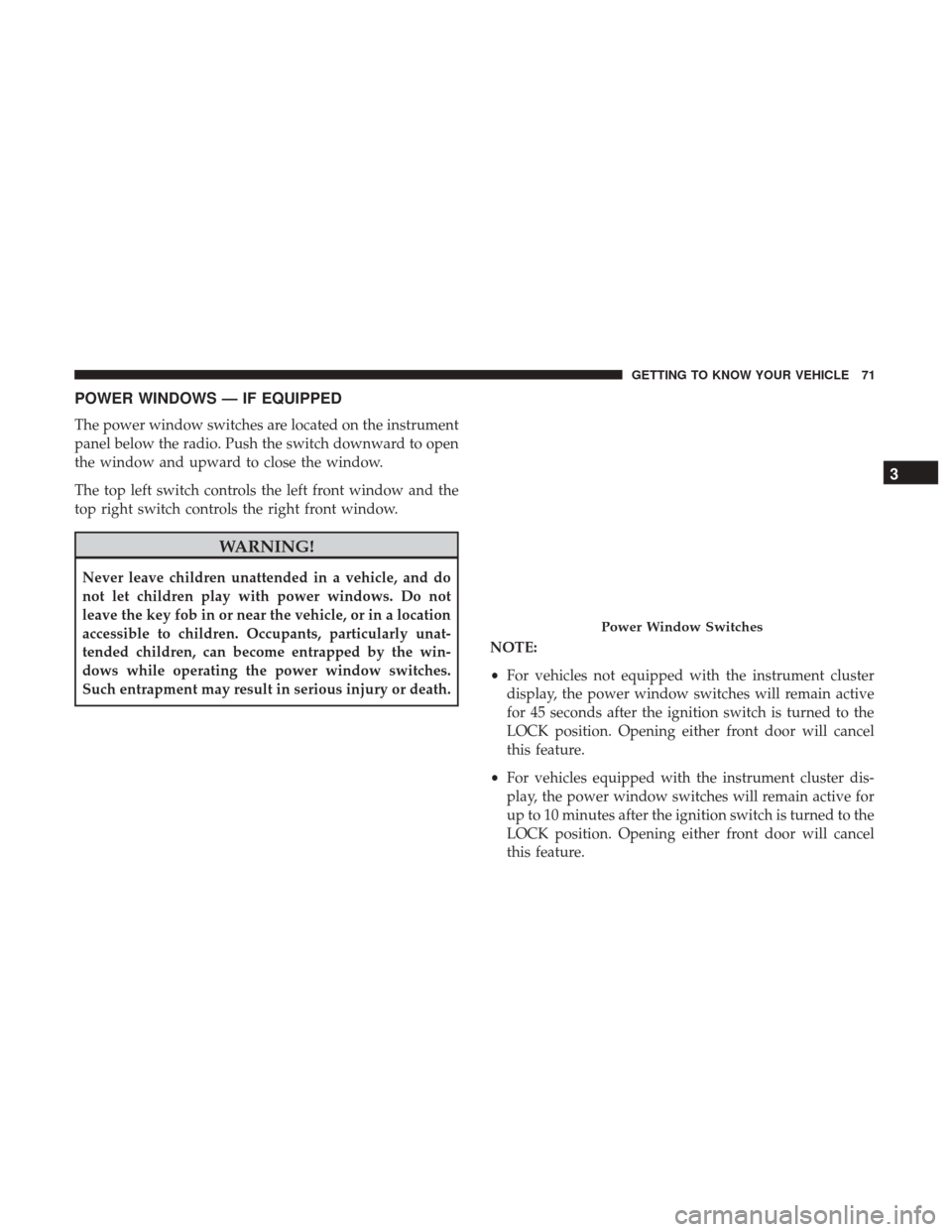
The power window switches are located on the instrument
panel below the radio. Push the switch downward to open
the window and upward to close the window.
The top left switch controls the left front window and the
top right switch controls the right front window.
WARNING!
Never leave children unattended in a vehicle, and do
not let children play with power windows. Do not
leave the key fob in or near the vehicle, or in a location
accessible to children. Occupants, particularly unat-
tended children, can become entrapped by the win-
dows while operating the power window switches.
Such entrapment may result in serious injury or death.NOTE:
•
For vehicles not equipped with the instrument cluster
display, the power window switches will remain active
for 45 seconds after the ignition switch is turned to the
LOCK position. Opening either front door will cancel
this feature.
• For vehicles equipped with the instrument cluster dis-
play, the power window switches will remain active for
up to 10 minutes after the ignition switch is turned to the
LOCK position. Opening either front door will cancel
this feature.
Power Window Switches
3
GETTING TO KNOW YOUR VEHICLE 71
Page 82 of 527
Installing The Soft Top — Four-Door Models
NOTE:The following procedures are for first time set up
only. For future soft top procedures, refer to “Soft Top” in
this section.
1. Locate and remove the following items prior to hard top removal:
• Right and left door frames
• Six door frame attachment knobs
• Right and left quarter windows
• Rear window
2. Remove the hard top. Refer to “Freedom Top Three- Piece Modular Hard Top — Front/Rear Panel Removal”
in this section.
3. Install the door frames. Refer to “Door Frame” in this section.
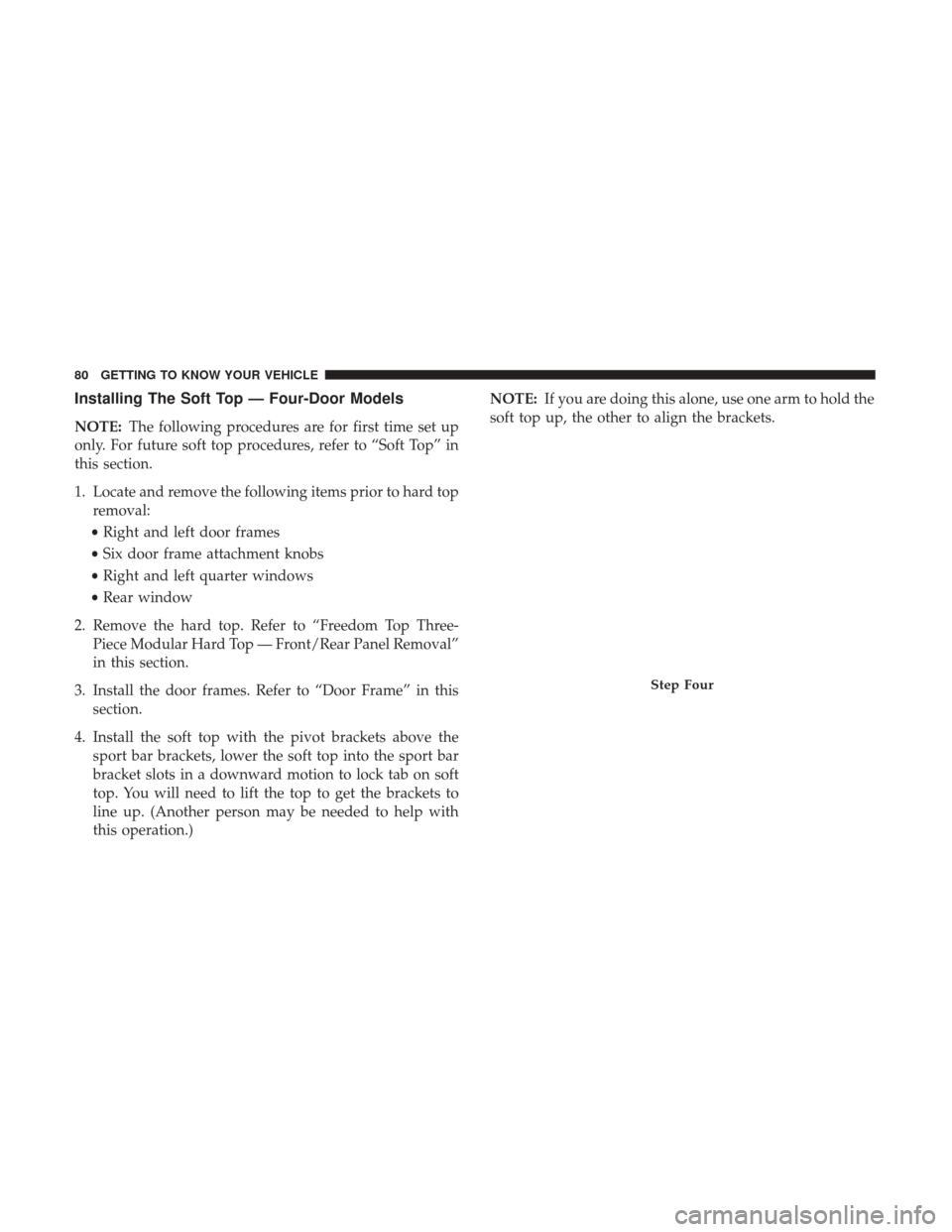
4. Install the soft top with the pivot brackets above the sport bar brackets, lower the soft top into the sport bar
bracket slots in a downward motion to lock tab on soft
top. You will need to lift the top to get the brackets to
line up. (Another person may be needed to help with
this operation.) NOTE:
If you are doing this alone, use one arm to hold the
soft top up, the other to align the brackets.
Step Four
80 GETTING TO KNOW YOUR VEHICLE
Page 83 of 527
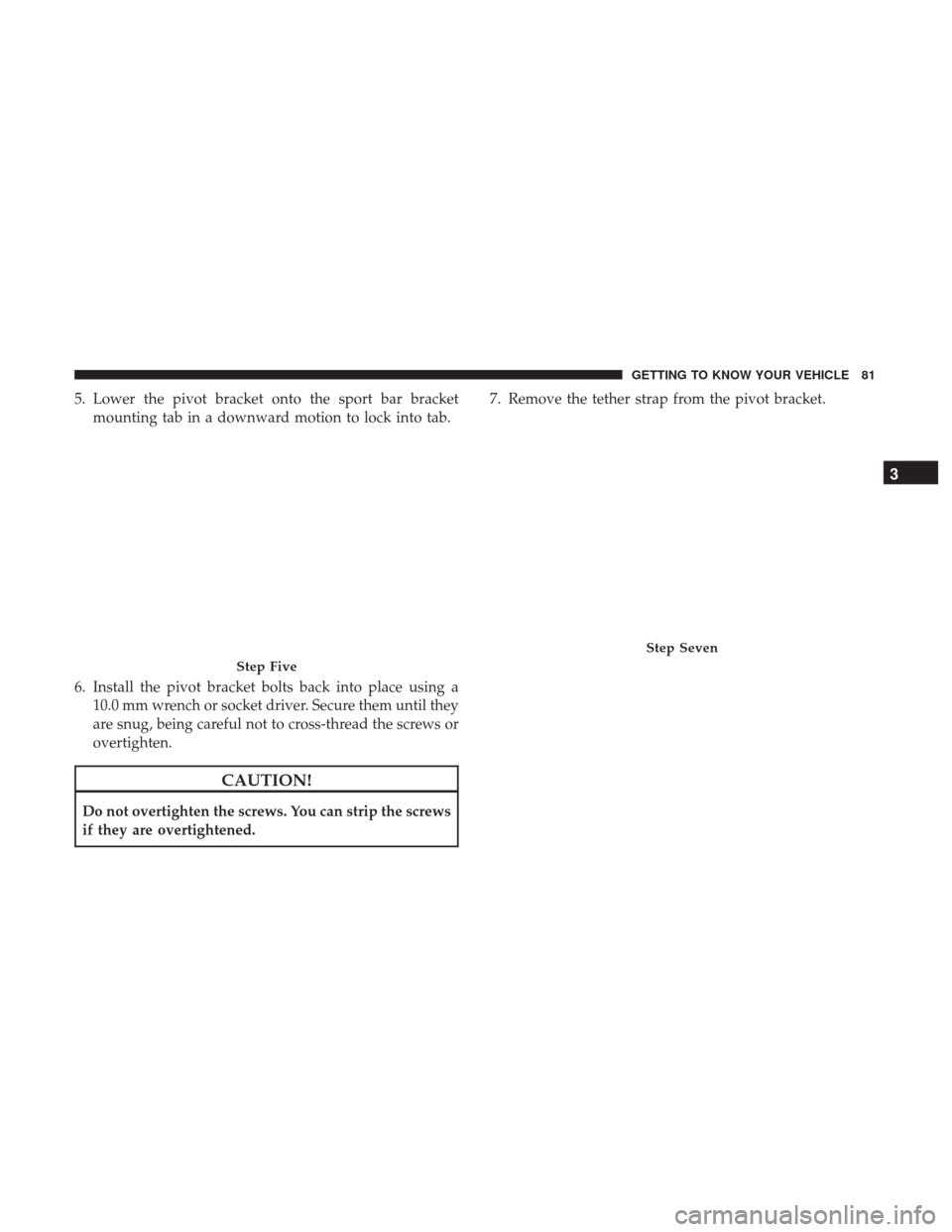
5. Lower the pivot bracket onto the sport bar bracketmounting tab in a downward motion to lock into tab.
6. Install the pivot bracket bolts back into place using a 10.0 mm wrench or socket driver. Secure them until they
are snug, being careful not to cross-thread the screws or
overtighten.
CAUTION!
Do not overtighten the screws. You can strip the screws
if they are overtightened. 7. Remove the tether strap from the pivot bracket.
Step Five
Step Seven
3
GETTING TO KNOW YOUR VEHICLE 81
Page 86 of 527
CAUTION!(Continued)
•Careless handling and storage of the removable roof
panels may damage the seals, causing water to leak
into the vehicle’s interior.
• The front panel(s) must be positioned properly to
ensure sealing. Improper installation can cause water
to leak into the vehicle’s interior.
Front Panel(s) Removal
NOTE: Left panel must be removed before removing
right panel.
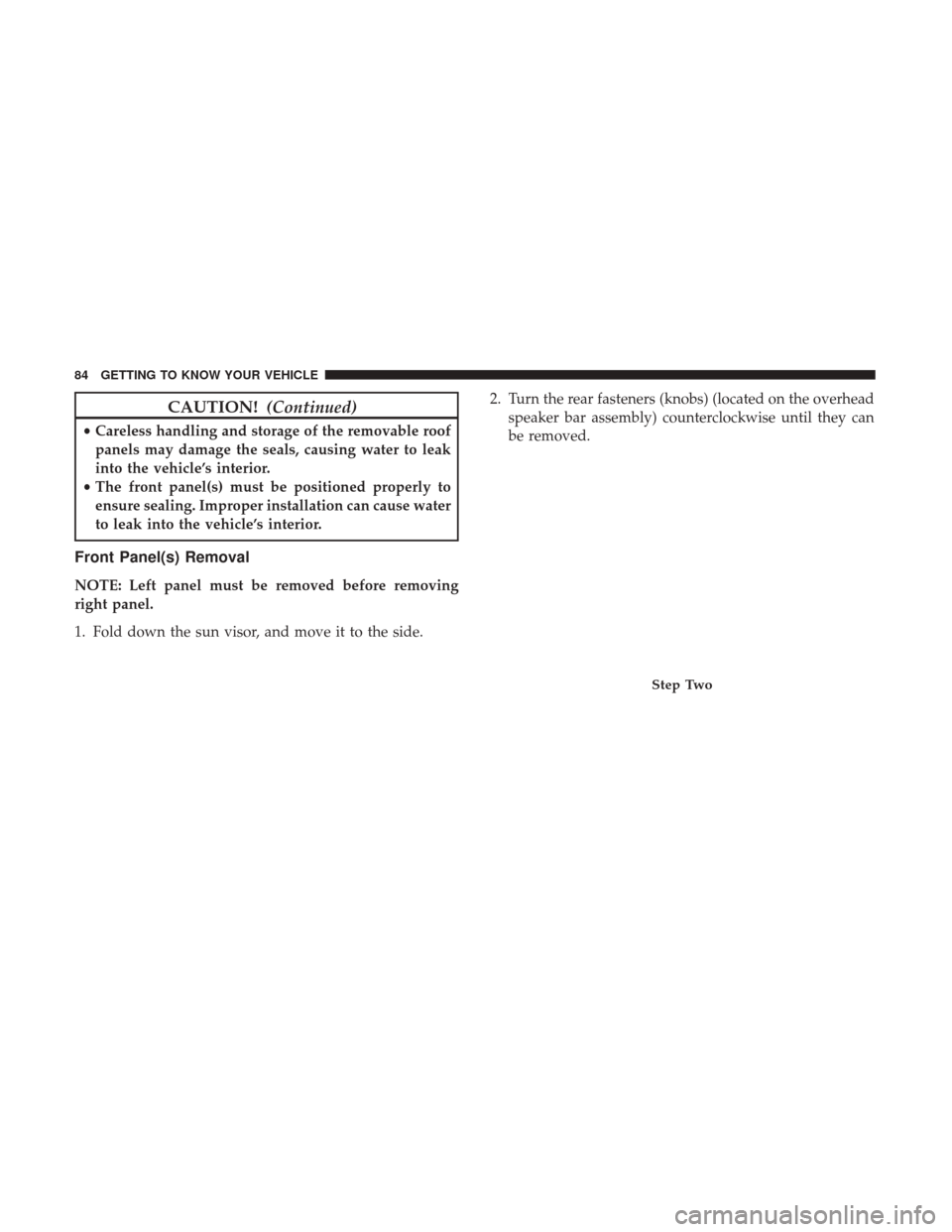
1. Fold down the sun visor, and move it to the side. 2. Turn the rear fasteners (knobs) (located on the overhead
speaker bar assembly) counterclockwise until they can
be removed.
Step Two
84 GETTING TO KNOW YOUR VEHICLE
Page 87 of 527
3. Turn the center L-shaped locks (two) from the center ofthe roof panel. 4. Turn the rear L-shaped lock (located above the shoulder
belt anchorage).
Step ThreeStep Four
3
GETTING TO KNOW YOUR VEHICLE 85
Page 92 of 527
Front Panel(s) Installation
NOTE:Set the panels on the windshield frame so that
there is no overhang. Also, make sure that the panels are
sitting flush with the body.
1. Install the right panel first, then the left panel.
2. Reinstall the panel(s) using the same steps for removal in reverse order.
Front Panel(s) Installation With Rear Hard Top
Removed
1. Turn the left and right panels over and move the spacerblock (located on the rear of the panel) upward 90
degrees. NOTE:
The front panel(s) must be positioned properly to
ensure sealing. Set the panels on the windshield frame so
that there is no overhang. Also, make sure that the panels
are sitting flush with the body.
2. Install the right panel first, then the left panel.
3. Reinstall the panel(s) using the same steps for removal in reverse order.Step One
90 GETTING TO KNOW YOUR VEHICLE