manual transmission JEEP WRANGLER 2020 Owner handbook (in English)
[x] Cancel search | Manufacturer: JEEP, Model Year: 2020, Model line: WRANGLER, Model: JEEP WRANGLER 2020Pages: 276, PDF Size: 4.47 MB
Page 124 of 276
• This light only shows that the parking brake
is applied. It does not show the degree of
brake application.
When parking on a hill, it is important to turn
the front wheels toward the curb on a down-
hill grade and away from the curb on an uphill
grade. For vehicles equipped with an auto-
matic transmission, apply the parking brake
before placing the gear selector in PARK,
otherwise the load on the transmission lock-
ing mechanism may make it difficult to move
the gear selector out of PARK. The parking
brake should always be applied whenever the
driver is not in the vehicle.
WARNING!
• Never use the PARK position on an au-
tomatic transmission as a substitute for
the parking brake. Always apply the
parking brake fully when parked to guard
WARNING!
against vehicle movement and possible
injury or damage.
• When exiting the vehicle, always remove
the key fob from the ignition and lock
your vehicle.
• Never leave children alone in a vehicle,
or with access to an unlocked vehicle.
Allowing children to be in a vehicle un-
attended is dangerous for a number of
reasons. A child or others could be seri-
ously or fatally injured. Children should
be warned not to touch the parking
brake, brake pedal or the gear selector.
• Do not leave the key fob in or near the
vehicle, or in a location accessible to
children. A child could operate power
windows, other controls, or move the
vehicle.
• Be sure the parking brake is fully disen-
gaged before driving; failure to do so can
lead to brake failure and a collision.
WARNING!
• Always fully apply the parking brake
when leaving your vehicle or it may roll
and cause damage or injury. Also, be
certain to leave an automatic transmis-
sion in PARK, a manual transmission in
REVERSE or first gear. Failure to do so
may cause the vehicle to roll and cause
damage or injury.
CAUTION!
If the “Brake Warning Light” remains on
with the parking brake released, a brake
system malfunction is indicated. Have the
brake system serviced by an authorized
dealer immediately.
STARTING AND OPERATING
122
Page 125 of 276
MANUAL TRANSMISSION —
IF EQUIPPED
WARNING!
You or others could be injured if you leave
the vehicle unattended without having the
parking brake fully applied. The parking
brake should always be applied when the
driver is not in the vehicle, especially on an
incline.
CAUTION!
Never drive with your foot resting on the
clutch pedal, or attempt to hold the ve-
hicle on a hill with the clutch pedal par-
CAUTION!
tially engaged, as this will cause abnormal
wear on the clutch.
NOTE:
During cold weather, you may experience
increased effort in shifting until the transmis-
sion fluid warms up. This is normal.
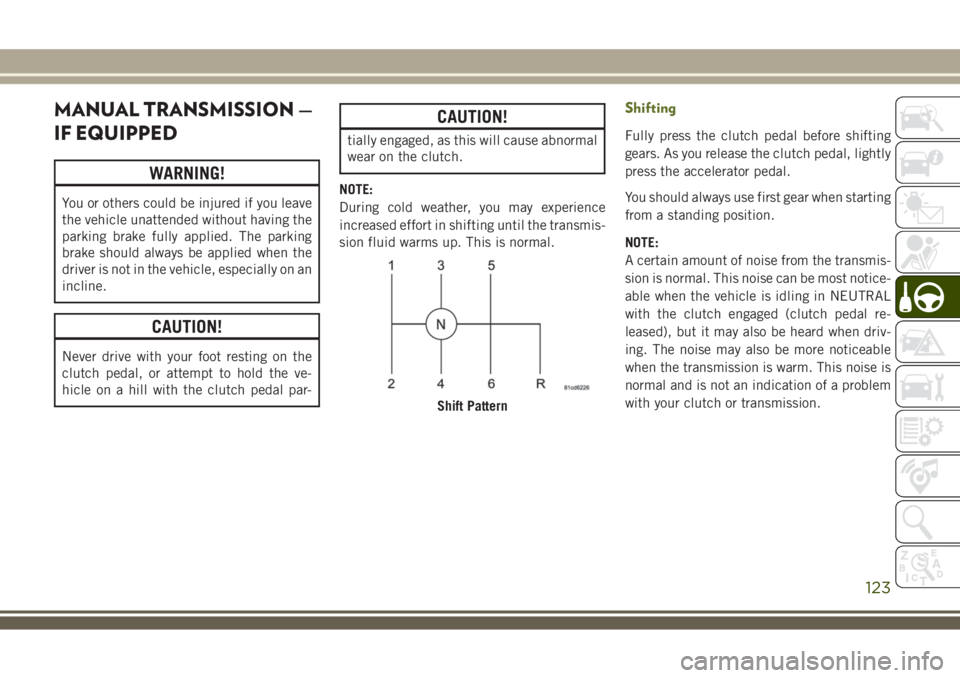
Shifting
Fully press the clutch pedal before shifting
gears. As you release the clutch pedal, lightly
press the accelerator pedal.
You should always use first gear when starting
from a standing position.
NOTE:
A certain amount of noise from the transmis-
sion is normal. This noise can be most notice-
able when the vehicle is idling in NEUTRAL
with the clutch engaged (clutch pedal re-
leased), but it may also be heard when driv-
ing. The noise may also be more noticeable
when the transmission is warm. This noise is
normal and is not an indication of a problem
with your clutch or transmission.
Shift Pattern
123
Page 126 of 276
Recommended Vehicle Shift Speeds
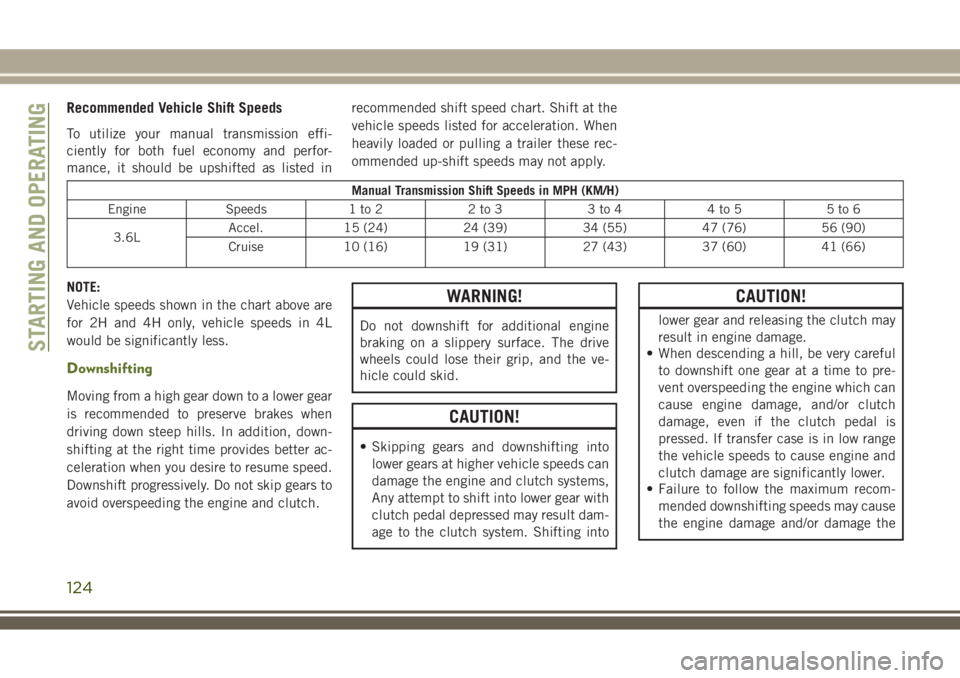
To utilize your manual transmission effi-
ciently for both fuel economy and perfor-
mance, it should be upshifted as listed inrecommended shift speed chart. Shift at the
vehicle speeds listed for acceleration. When
heavily loaded or pulling a trailer these rec-
ommended up-shift speeds may not apply.
Manual Transmission Shift Speeds in MPH (KM/H)
Engine Speeds 1 to 2 2 to 3 3 to 4 4 to 5 5 to 6
3.6LAccel. 15 (24) 24 (39) 34 (55) 47 (76) 56 (90)
Cruise 10 (16) 19 (31) 27 (43) 37 (60) 41 (66)
NOTE:
Vehicle speeds shown in the chart above are
for 2H and 4H only, vehicle speeds in 4L
would be significantly less.
Downshifting
Moving from a high gear down to a lower gear
is recommended to preserve brakes when
driving down steep hills. In addition, down-
shifting at the right time provides better ac-
celeration when you desire to resume speed.
Downshift progressively. Do not skip gears to
avoid overspeeding the engine and clutch.
WARNING!
Do not downshift for additional engine
braking on a slippery surface. The drive
wheels could lose their grip, and the ve-
hicle could skid.
CAUTION!
• Skipping gears and downshifting into
lower gears at higher vehicle speeds can
damage the engine and clutch systems,
Any attempt to shift into lower gear with
clutch pedal depressed may result dam-
age to the clutch system. Shifting into
CAUTION!
lower gear and releasing the clutch may
result in engine damage.
• When descending a hill, be very careful
to downshift one gear at a time to pre-
vent overspeeding the engine which can
cause engine damage, and/or clutch
damage, even if the clutch pedal is
pressed. If transfer case is in low range
the vehicle speeds to cause engine and
clutch damage are significantly lower.
• Failure to follow the maximum recom-
mended downshifting speeds may cause
the engine damage and/or damage the
STARTING AND OPERATING
124
Page 127 of 276
CAUTION!
clutch, even if the clutch pedal is
pressed.
• Descending a hill in low range with
clutch pedal depressed could result in
clutch damage.
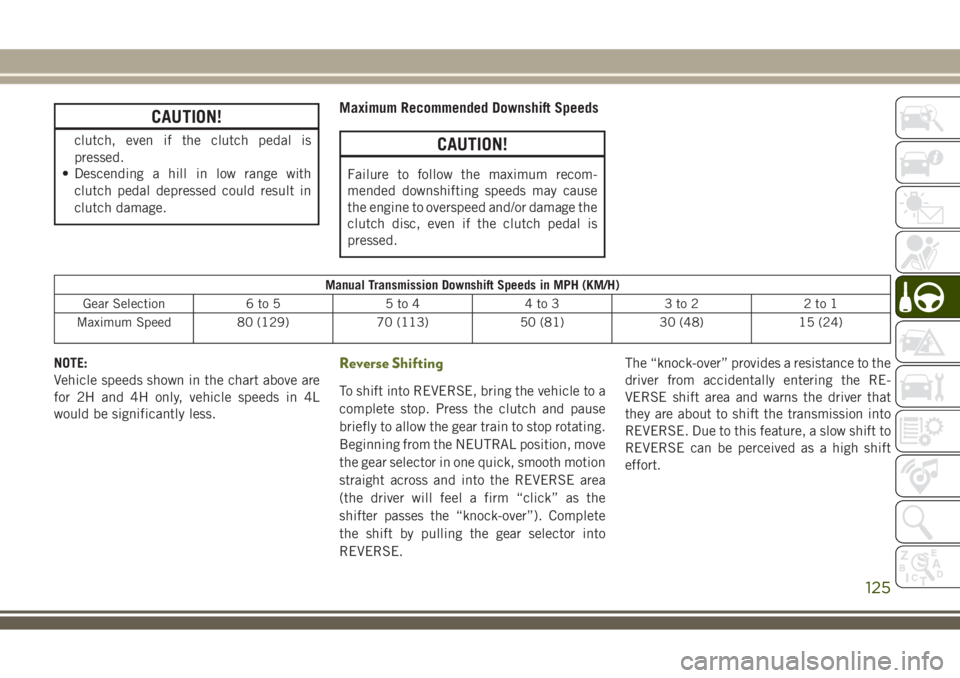
Maximum Recommended Downshift Speeds
CAUTION!
Failure to follow the maximum recom-
mended downshifting speeds may cause
the engine to overspeed and/or damage the
clutch disc, even if the clutch pedal is
pressed.
Manual Transmission Downshift Speeds in MPH (KM/H)
Gear Selection 6 to 5 5 to 4 4 to 3 3 to 2 2 to 1
Maximum Speed 80 (129) 70 (113) 50 (81) 30 (48) 15 (24)
NOTE:
Vehicle speeds shown in the chart above are
for 2H and 4H only, vehicle speeds in 4L
would be significantly less.Reverse Shifting
To shift into REVERSE, bring the vehicle to a
complete stop. Press the clutch and pause
briefly to allow the gear train to stop rotating.
Beginning from the NEUTRAL position, move
the gear selector in one quick, smooth motion
straight across and into the REVERSE area
(the driver will feel a firm “click” as the
shifter passes the “knock-over”). Complete
the shift by pulling the gear selector into
REVERSE.The “knock-over” provides a resistance to the
driver from accidentally entering the RE-
VERSE shift area and warns the driver that
they are about to shift the transmission into
REVERSE. Due to this feature, a slow shift to
REVERSE can be perceived as a high shift
effort.
125
Page 129 of 276
WARNING!
windows, other controls, or move the
vehicle.
Key Ignition Park Interlock
This vehicle is equipped with a Key Ignition
Park Interlock which requires the transmis-
sion to be in PARK before the ignition can be
turned to the LOCK/OFF (key removal) posi-
tion. The key can only be removed from the
ignition when the ignition is in the LOCK/OFF
position, and once removed the transmission
is locked in PARK.
NOTE:
If a malfunction occurs, the system will trap
the key in the ignition to warn you that this
safety feature is inoperable. The engine can
be started and stopped but the key cannot be
removed until you obtain service.
Brake/Transmission Shift Interlock
System
This vehicle is equipped with a Brake Trans-
mission Shift Interlock System (BTSI) that
holds the transmission gear selector in PARK
unless the brakes are applied. To shift the
transmission out of PARK, the ignition must
be in the ON/RUN position (engine running or
not) and the brake pedal must be pressed.
Five-Speed Automatic Transmission — If
Equipped
The transmission gear position display (lo-
cated in the instrument cluster) indicates the
transmission gear range. You must press the
brake pedal to move the gear selector out of
PARK (refer to “Brake/Transmission Shift In-
terlock System” in this section). To drive,
move the gear selector from PARK or NEU-
TRAL to the DRIVE position.The electronically-controlled transmission
adapts its shift schedule based on driver
inputs, along with environmental and road
conditions. The transmission electronics are
self-calibrating; therefore, the first few shifts
on a new vehicle may be somewhat abrupt.
This is a normal condition, and precision
shifts will develop within a few hundred miles
(kilometers).
Only shift from DRIVE to PARK or REVERSE
when the accelerator pedal is released and
the vehicle is stopped. Be sure to keep your
foot on the brake pedal when shifting be-
tween these gears.
The transmission gear selector has only
PARK, REVERSE, NEUTRAL, and DRIVE
shift positions. Manual shifts can be made
using the Autostick shift control. Moving the
gear selector to the left or right (-/+) while in
the DRIVE position will manually select the
transmission gear and will display the current
127
Page 130 of 276
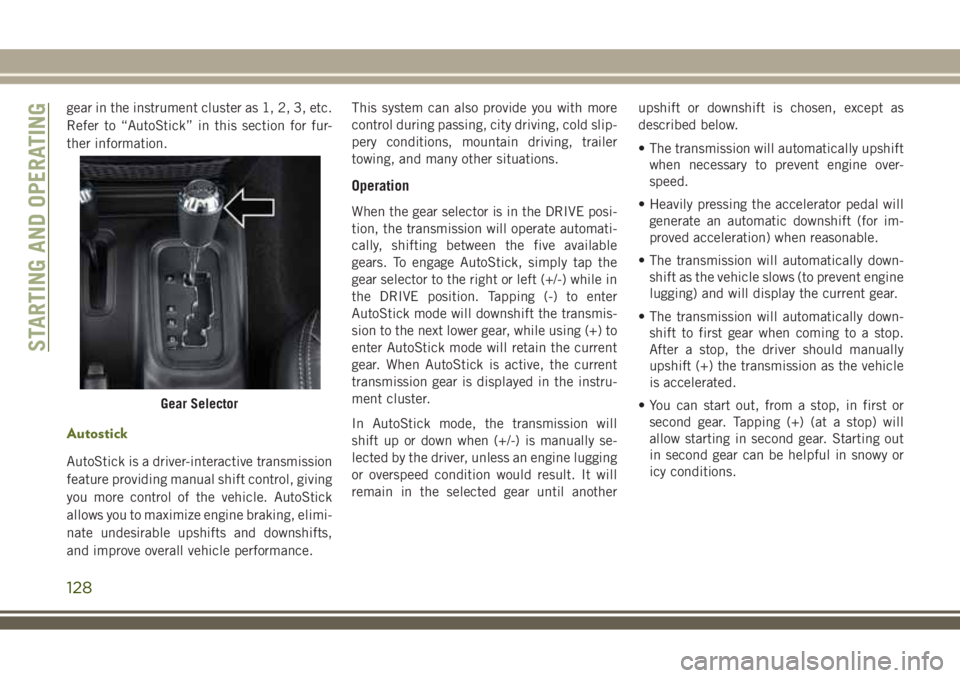
gear in the instrument cluster as 1, 2, 3, etc.
Refer to “AutoStick” in this section for fur-
ther information.
Autostick
AutoStick is a driver-interactive transmission
feature providing manual shift control, giving
you more control of the vehicle. AutoStick
allows you to maximize engine braking, elimi-
nate undesirable upshifts and downshifts,
and improve overall vehicle performance.This system can also provide you with more
control during passing, city driving, cold slip-
pery conditions, mountain driving, trailer
towing, and many other situations.
Operation
When the gear selector is in the DRIVE posi-
tion, the transmission will operate automati-
cally, shifting between the five available
gears. To engage AutoStick, simply tap the
gear selector to the right or left (+/-) while in
the DRIVE position. Tapping (-) to enter
AutoStick mode will downshift the transmis-
sion to the next lower gear, while using (+) to
enter AutoStick mode will retain the current
gear. When AutoStick is active, the current
transmission gear is displayed in the instru-
ment cluster.
In AutoStick mode, the transmission will
shift up or down when (+/-) is manually se-
lected by the driver, unless an engine lugging
or overspeed condition would result. It will
remain in the selected gear until anotherupshift or downshift is chosen, except as
described below.
• The transmission will automatically upshift
when necessary to prevent engine over-
speed.
• Heavily pressing the accelerator pedal will
generate an automatic downshift (for im-
proved acceleration) when reasonable.
• The transmission will automatically down-
shift as the vehicle slows (to prevent engine
lugging) and will display the current gear.
• The transmission will automatically down-
shift to first gear when coming to a stop.
After a stop, the driver should manually
upshift (+) the transmission as the vehicle
is accelerated.
• You can start out, from a stop, in first or
second gear. Tapping (+) (at a stop) will
allow starting in second gear. Starting out
in second gear can be helpful in snowy or
icy conditions.
Gear Selector
STARTING AND OPERATING
128
Page 133 of 276
4H Position
This range locks the front and rear driveshafts
together, forcing the front and rear wheels to
rotate at the same speed. This range (4H)
provides additional traction for loose, slip-
pery road surfaces and should not be used on
dry pavement.
The “4WD Indicator Light” (located in the
instrument cluster) will illuminate when the
transfer case is shifted into the 4H position.
N (Neutral) Position
This range disengages the front and rear
driveshafts from the powertrain. It is to be
used for flat towing behind another vehicle.
Refer to “Recreational Towing” in “Starting
And Operating” for further information.
WARNING!
You or others could be injured or killed if
you leave the vehicle unattended with the
transfer case in the NEUTRAL (N) position
without first fully engaging the parking
brake. The transfer case NEUTRAL (N)
position disengages both the front and rear
WARNING!
driveshafts from the powertrain, and will
allow the vehicle to roll, even if the auto-
matic transmission is in PARK (or manual
transmission is in gear). The parking brake
should always be applied when the driver
is not in the vehicle.
4L Position
This range locks the front and rear driveshafts
together, forcing the front and rear wheels to
rotate at the same speed. This range (4L)
provides additional traction and maximum
pulling power for loose, slippery road sur-
faces only. Do not exceed 25 mph (40 km/h).
CAUTION!
Exceeding 25 mph (40 km/h) while the
transfer case is engaged in 4L may result
in an engine overspeed condition and en-
gine damage.
The “4WD Indicator Light” (located in the
instrument cluster) will illuminate when the
transfer case is shifted into the 4L position.NOTE:
When in 4L, the “ESC Off Indicator Light”
will display in the instrument cluster.
Shifting Procedures
2H to 4H or 4H to 2H
Shifting between 2H and 4H can be made
with the vehicle stopped or in motion. With
the vehicle in motion, the transfer case will
engage/disengage faster if you momentarily
release the accelerator pedal after complet-
ing the shift. Apply a constant force when
shifting the transfer case lever.
4H to 4L or 4L to 4H
With the vehicle rolling at 2 to 3 mph (3 to
5 km/h), shift an automatic transmission into
NEUTRAL (N), or press the clutch pedal on a
manual transmission. While the vehicle is
coasting at 2 to 3 mph (3 to 5 km/h), shift the
transfer case lever firmly to the desired posi-
tion. Do not pause with the transfer case in N
(Neutral). Once the shift is completed, place
the automatic transmission into DRIVE or
release the clutch pedal on a manual trans-
mission.
131
Page 136 of 276
tion for further information. The “Sway Bar
Indicator Light” will flash until the stabilizer/
sway bar has been fully disconnected.
NOTE:
The stabilizer/sway bar may be torque locked
due to left and right suspension height differ-
ences. This condition is due to driving sur-
face differences or vehicle loading. In order
for the stabilizer/sway bar to disconnect/
reconnect, the right and left halves of the bar
must be aligned. This alignment may require
that the vehicle be driven onto level ground or
rocked from side to side.
To return to on-road mode, push the SWAY
BAR switch again.
WARNING!
If the stabilizer/sway bar will not return to
on-road mode, the “Sway Bar Indicator
Light” will flash in the instrument cluster
and vehicle stability is greatly reduced. Do
not attempt to drive the vehicle over
18 mph (29 km/h). Driving faster than
18 mph (29 km/ h) may cause loss of
control of the vehicle, which could result
WARNING!
in serious injury. Contact your local autho-
rized dealer for assistance.
STOP/START SYSTEM —
DIESEL MODELS WITH
MANUAL TRANSMISSION
ONLY
The Stop/Start function is developed to save
fuel and reduce emissions. The system will
stop the engine automatically during a ve-
hicle stop if the required conditions are met.
Pressing the clutch pedal will automatically
restart the vehicle.
Automatic Mode
The Stop/Start feature is en-
abled after every normal cus-
tomer engine start. It will remain
in STOP/START NOT READY un-
til you drive forward with a ve-
hicle speed greater than 3 mph (5 km/h). Atthat time, the system will go into STOP/
START READY and if all other conditions are
met, can go into an STOP/START AUTO STOP
ACTIVE mode.
To Activate The STOP/START AUTO STOP ACTIVE
Mode, The Following Must Occur:
• The system must be in STOP/START
READY state. A STOP/START READY mes-
sage will be displayed in the instrument
cluster. Refer to “Instrument Cluster Dis-
play” in “Getting To Know Your Instrument
Panel” for further information.
• Vehicle speed must be less 3 mph (5 km/h).
• The gear selector must be in the NEUTRAL
position and the clutch pedal must be fully
released
The engine will shut down,the tachometer will
fall to the Stop/Start position,the STOP/START
AUTO STOP ACTIVE message will appear,
and the heater/air conditioning (HVAC) air
flow will be reduced.
STARTING AND OPERATING
134
Page 142 of 276
CAUTION!
• To avoid fuel spillage and overfilling, do
not “top off” the fuel tank after filling.
NOTE:
• When the fuel nozzle “clicks” or shuts off,
the fuel tank is full.
• Tighten the fuel filler cap about 1/4 turn
until you hear one click. This is an indica-
tion that the cap is properly tightened.
• If the fuel filler cap is not tightened prop-
erly, the MIL will come on. Be sure the cap
is tightened every time the vehicle is
refueled.
Loose Fuel Filler Cap Message
After fuel has been added, the vehicle diag-
nostic system can determine if the fuel filler
cap is possibly loose, improperly installed, or
damaged. If the system detects a malfunc-
tion, the “gASCAP” message will display in
the odometer display. Tighten the gas cap
until a "clicking" sound is heard. This is an
indication that the gas cap is properly tight-
ened. Push the odometer reset button to turn
the message off. If the problem persists, the
message will appear the next time the vehicleis started. This might indicate a damaged
cap. If the problem is detected twice in a row,
the system will turn on the MIL. Resolving
the problem will turn the MIL off.
TRAILER TOWING
Trailer Towing Weights (Maximum Trailer
Weight Ratings)
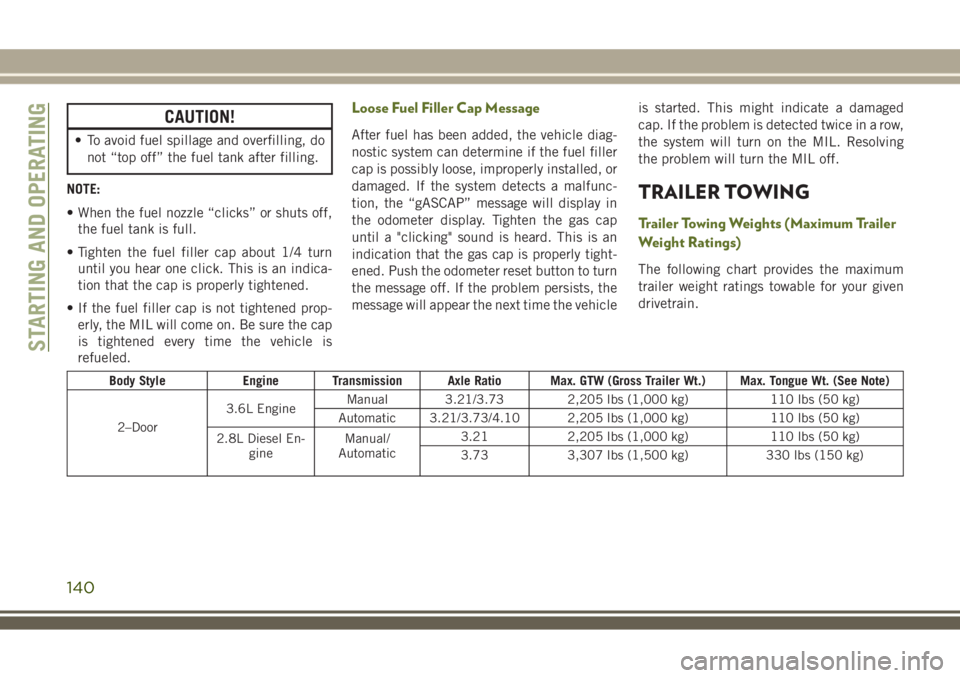
The following chart provides the maximum
trailer weight ratings towable for your given
drivetrain.
Body Style Engine Transmission Axle Ratio Max. GTW (Gross Trailer Wt.) Max. Tongue Wt. (See Note)
2–Door3.6L EngineManual 3.21/3.73 2,205 lbs (1,000 kg) 110 lbs (50 kg)
Automatic 3.21/3.73/4.10 2,205 lbs (1,000 kg) 110 lbs (50 kg)
2.8L Diesel En-
gineManual/
Automatic3.21 2,205 lbs (1,000 kg) 110 lbs (50 kg)
3.73 3,307 lbs (1,500 kg) 330 lbs (150 kg)
STARTING AND OPERATING
140
Page 143 of 276
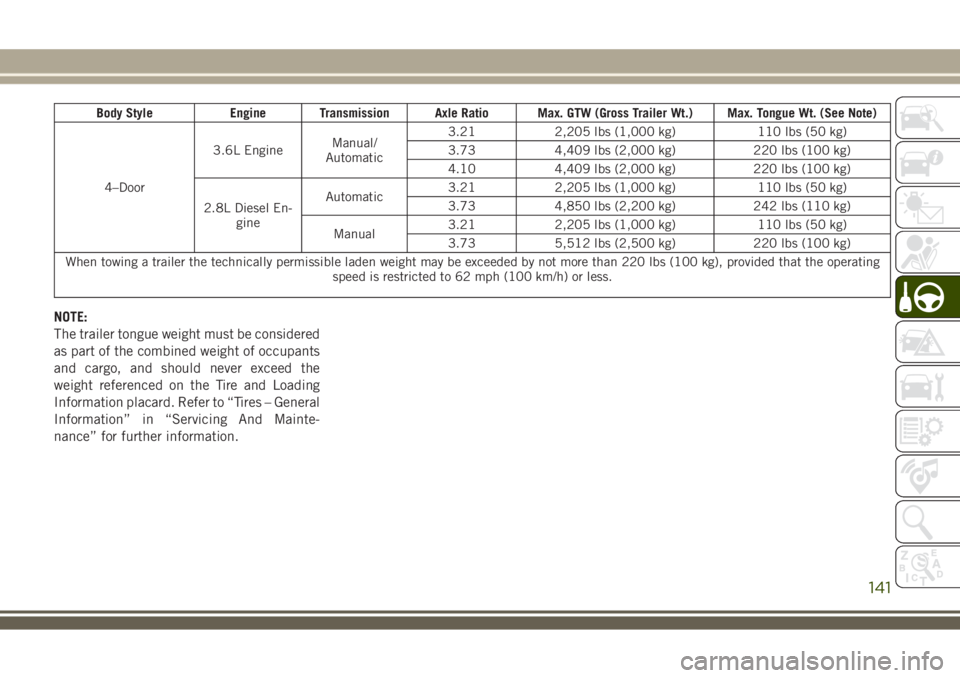
Body Style Engine Transmission Axle Ratio Max. GTW (Gross Trailer Wt.) Max. Tongue Wt. (See Note)
4–Door3.6L EngineManual/
Automatic3.21 2,205 lbs (1,000 kg) 110 lbs (50 kg)
3.73 4,409 lbs (2,000 kg) 220 lbs (100 kg)
4.10 4,409 lbs (2,000 kg) 220 lbs (100 kg)
2.8L Diesel En-
gineAutomatic3.21 2,205 lbs (1,000 kg) 110 lbs (50 kg)
3.73 4,850 lbs (2,200 kg) 242 lbs (110 kg)
Manual3.21 2,205 lbs (1,000 kg) 110 lbs (50 kg)
3.73 5,512 lbs (2,500 kg) 220 lbs (100 kg)
When towing a trailer the technically permissible laden weight may be exceeded by not more than 220 lbs (100 kg), provided that the operating
speed is restricted to 62 mph (100 km/h) or less.
NOTE:
The trailer tongue weight must be considered
as part of the combined weight of occupants
and cargo, and should never exceed the
weight referenced on the Tire and Loading
Information placard. Refer to “Tires – General
Information” in “Servicing And Mainte-
nance” for further information.
141