tire pressure JEEP WRANGLER 2023 Owners Manual
[x] Cancel search | Manufacturer: JEEP, Model Year: 2023, Model line: WRANGLER, Model: JEEP WRANGLER 2023Pages: 396, PDF Size: 25.15 MB
Page 7 of 396

5
ANDROID AUTO™ & APPLE CARPLAY® —
IF EQUIPPED ..................................................................... 222Android Auto™
S
.................................................... 222
Apple CarPlay®
S
.................................................. 224
Android Auto™ And Apple CarPlay® Tips And
Tricks.......................................................................... 225
CONNECTED VEHICLE SERVICES — IF EQUIPPED ...... 225 Is My Vehicle Connected? ........................................ 225Introduction To Connected Vehicle Services .......... 226
Getting Started With Connected Vehicle Services ... 227
Using SiriusXM Guardian™ ...................................... 228
Manage My SiriusXM Guardian™ Account ............. 237
CONNECTED SERVICES FAQS ....................................... 237 Connected Services SOS FAQs — If Equipped ........ 237
Connected Services Remote Door Lock/Unlock
FAQs .......................................................................... 237
Connected Services Roadside Assistance FAQs .... 237Connected Services Send & Go FAQs —
If Equipped ............................................................... 238
Connected Services Vehicle Finder FAQs ............... 238
Connected Services Stolen Vehicle Assistance
FAQs — If Equipped .................................................. 238
Connected Services Remote Vehicle Start FAQs ... 238
Connected Services Remote Horn & Lights FAQs .. 239
Connected Services Account FAQs — If Equipped .. 239
Data Collection & Privacy ......................................... 240
RADIO OPERATION AND MOBILE PHONES .................. 240 Regulatory And Safety Information .......................... 241
OFF-ROAD PAGES — IF EQUIPPED ................................ 241 Off-Road Pages Status Bar ...................................... 241
Drivetrain .................................................................. 242
Accessory Gauge ...................................................... 242Pitch & Roll ............................................................... 242
TrailCam — If Equipped ............................................. 243
SAFETY
SAFETY FEATURES .......................................................... 244 Anti-Lock Brake System (ABS) ................................ 244
Rear Seat Reminder Alert (RSRA) — If Equipped .... 244
Electronic Brake Control (EBC) System .................. 245
AUXILIARY DRIVING SYSTEMS ...................................... 252 Blind Spot Monitoring (BSM) — If Equipped ........... 252
Forward Collision Warning (FCW) With
Mitigation — If Equipped........................................... 255Tire Pressure Monitoring System (TPMS) ............... 257
OCCUPANT RESTRAINT SYSTEMS ............................... 261 Occupant Restraint Systems Features ................... 261
Important Safety Precautions .................................. 261
Seat Belt Systems .................................................... 261
Supplemental Restraint Systems (SRS).................. 267
Child Restraints ........................................................ 277
SAFETY TIPS ..................................................................... 288 Transporting Passengers ......................................... 288
Transporting Pets ..................................................... 288
Connected Vehicles .................................................. 288Safety Checks You Should Make Inside The
Vehicle ...................................................................... 288
Periodic Safety Checks You Should Make Outside
The Vehicle ................................................................ 290Exhaust Gas .............................................................. 290
Carbon Monoxide Warnings ..................................... 290
IN CASE OF EMERGENCY
HAZARD WARNING FLASHERS ..................................... 291
ASSIST AND SOS SYSTEM — IF EQUIPPED .................. 291 JACKING AND TIRE CHANGING
S
...............................293
Preparations For Jacking ......................................... 294
Jack Location ............................................................ 294 Spare Tire Removal .................................................. 295
Jacking Instructions .................................................. 295
JUMP STARTING ..............................................................298 Preparations For Jump Start..................................... 298
Jump Starting Procedure .......................................... 299
IF YOUR ENGINE OVERHEATS......................................... 300
MANUAL PARK RELEASE ................................................301
FREEING A STUCK VEHICLE ........................................... 302
TOWING A DISABLED VEHICLE.......................................303 Four–Wheel Drive Models ........................................ 303Without The Key Fob ................................................. 304
Emergency Tow Hooks — If Equipped ..................... 304
ENHANCED ACCIDENT RESPONSE SYSTEM (EARS) ..305
EVENT DATA RECORDER (EDR)......................................305
SERVICING AND MAINTENANCE
SCHEDULED SERVICING — GASOLINE ENGINE ...........306 Maintenance Plan ..................................................... 307
SCHEDULED SERVICING — DIESEL ENGINE .................310 Maintenance Plan — Diesel Fuel Up To B5
Biodiesel .................................................................... 311Additional Maintenance — B6 To B20 Biodiesel ..... 313
ENGINE COMPARTMENT ................................................. 314 2.0L Gasoline Engine ............................................... 3143.6L Gasoline Engine ............................................... 3153.0L Diesel Engine .................................................... 316
Checking Oil Level ..................................................... 317Adding Washer Fluid ................................................. 317
Maintenance-Free Battery ....................................... 317Pressure Washing ..................................................... 318
23_JL_OM_EN_USC_t.book Page 5
Page 12 of 396
10
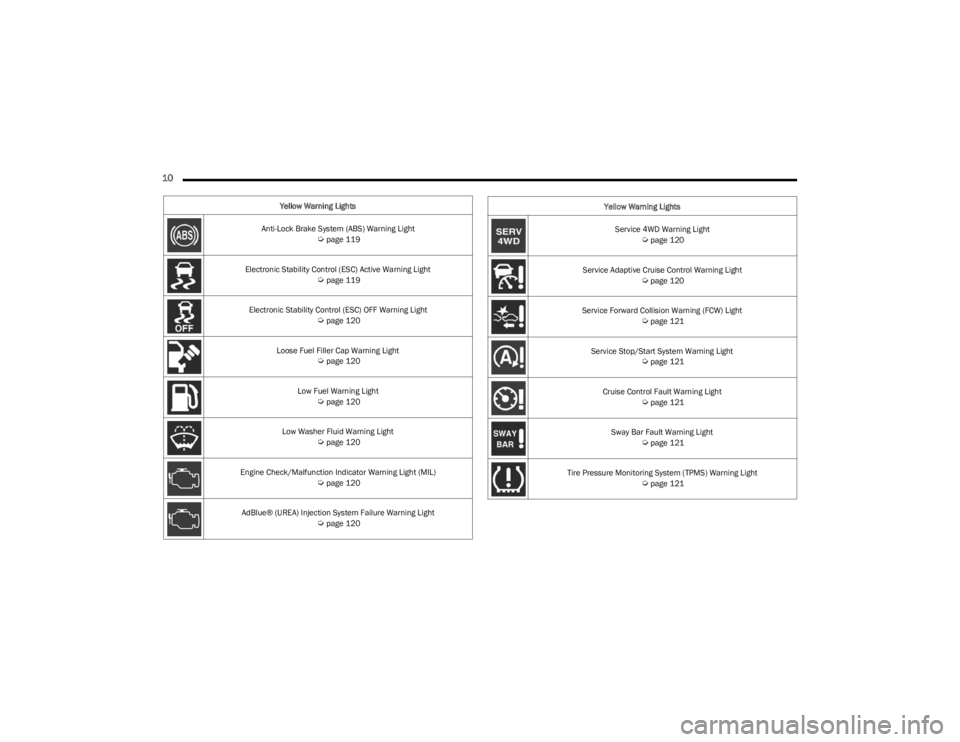
Yellow Warning Lights
Anti-Lock Brake System (ABS) Warning Light
Úpage 119
Electronic Stability Control (ESC) Active Warning Light
Úpage 119
Electronic Stability Control (ESC) OFF Warning Light
Úpage 120
Loose Fuel Filler Cap Warning Light
Úpage 120
Low Fuel Warning Light
Úpage 120
Low Washer Fluid Warning Light
Úpage 120
Engine Check/Malfunction Indicator Warning Light (MIL)
Úpage 120
AdBlue® (UREA) Injection System Failure Warning Light
Úpage 120
Service 4WD Warning Light Úpage 120
Service Adaptive Cruise Control Warning Light
Úpage 120
Service Forward Collision Warning (FCW) Light
Úpage 121
Service Stop/Start System Warning Light
Úpage 121
Cruise Control Fault Warning Light
Úpage 121
Sway Bar Fault Warning Light
Úpage 121
Tire Pressure Monitoring System (TPMS) Warning Light
Úpage 121
Yellow Warning Lights
23_JL_OM_EN_USC_t.book Page 10
Page 112 of 396
110GETTING TO KNOW YOUR INSTRUMENT PANEL
OIL CHANGE RESET — IF EQUIPPED
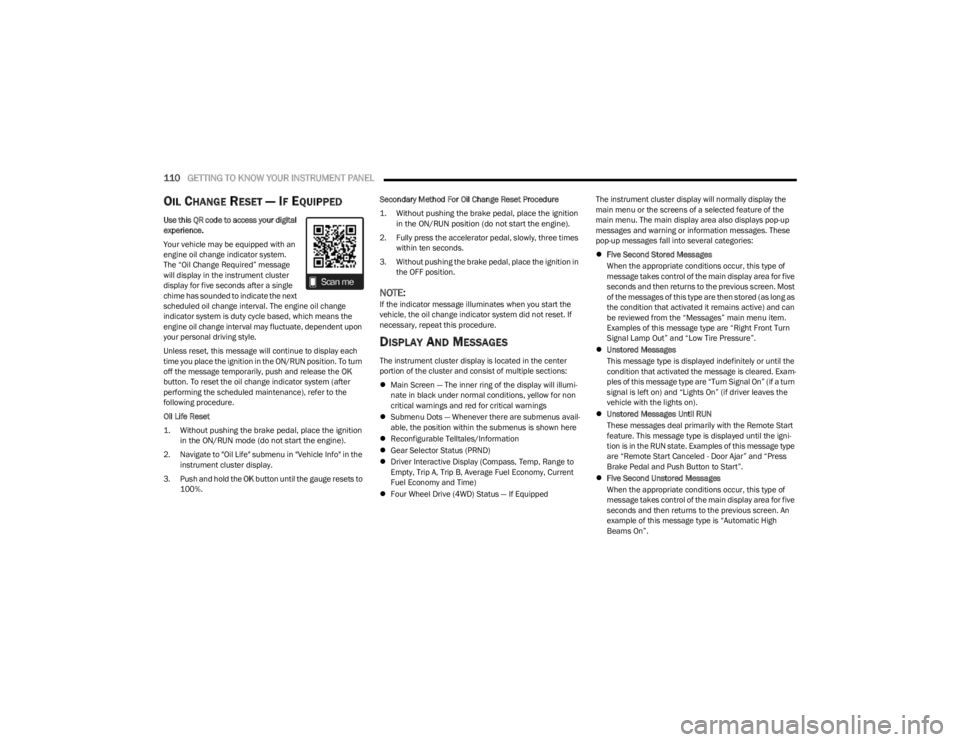
Use this QR code to access your digital
experience.
Your vehicle may be equipped with an
engine oil change indicator system.
The “Oil Change Required” message
will display in the instrument cluster
display for five seconds after a single
chime has sounded to indicate the next
scheduled oil change interval. The engine oil change
indicator system is duty cycle based, which means the
engine oil change interval may fluctuate, dependent upon
your personal driving style.
Unless reset, this message will continue to display each
time you place the ignition in the ON/RUN position. To turn
off the message temporarily, push and release the OK
button. To reset the oil change indicator system (after
performing the scheduled maintenance), refer to the
following procedure.
Oil Life Reset
1. Without pushing the brake pedal, place the ignition in the ON/RUN mode (do not start the engine).
2. Navigate to "Oil Life" submenu in "Vehicle Info" in the instrument cluster display.
3. Push and hold the OK button until the gauge resets to
100%. Secondary Method For Oil Change Reset Procedure
1. Without pushing the brake pedal, place the ignition
in the ON/RUN position (do not start the engine).
2. Fully press the accelerator pedal, slowly, three times within ten seconds.
3. Without pushing the brake pedal, place the ignition in the OFF position.
NOTE:If the indicator message illuminates when you start the
vehicle, the oil change indicator system did not reset. If
necessary, repeat this procedure.
DISPLAY AND MESSAGES
The instrument cluster display is located in the center
portion of the cluster and consist of multiple sections:
Main Screen — The inner ring of the display will illumi -
nate in black under normal conditions, yellow for non
critical warnings and red for critical warnings
Submenu Dots — Whenever there are submenus avail -
able, the position within the submenus is shown here
Reconfigurable Telltales/Information
Gear Selector Status (PRND)
Driver Interactive Display (Compass, Temp, Range to
Empty, Trip A, Trip B, Average Fuel Economy, Current
Fuel Economy and Time)
Four Wheel Drive (4WD) Status — If Equipped The instrument cluster display will normally display the
main menu or the screens of a selected feature of the
main menu. The main display area also displays pop-up
messages and warning or information messages. These
pop-up messages fall into several categories:
Five Second Stored Messages
When the appropriate conditions occur, this type of
message takes control of the main display area for five
seconds and then returns to the previous screen. Most
of the messages of this type are then stored (as long as
the condition that activated it remains active) and can
be reviewed from the “Messages” main menu item.
Examples of this message type are “Right Front Turn
Signal Lamp Out” and “Low Tire Pressure”.
Unstored Messages
This message type is displayed indefinitely or until the
condition that activated the message is cleared. Exam -
ples of this message type are “Turn Signal On” (if a turn
signal is left on) and “Lights On” (if driver leaves the
vehicle with the lights on).
Unstored Messages Until RUN
These messages deal primarily with the Remote Start
feature. This message type is displayed until the igni -
tion is in the RUN state. Examples of this message type
are “Remote Start Canceled - Door Ajar” and “Press
Brake Pedal and Push Button to Start”.
Five Second Unstored Messages
When the appropriate conditions occur, this type of
message takes control of the main display area for five
seconds and then returns to the previous screen. An
example of this message type is “Automatic High
Beams On”.
23_JL_OM_EN_USC_t.book Page 110
Page 113 of 396

GETTING TO KNOW YOUR INSTRUMENT PANEL111
Messages include the following, but not limited to:
NOTE:Certain messages may require dealer service.
Front Seat Belts Unbuckled Oil Change DueACC Override
Driver Seat Belt Unbuckled Fuel LowCruise Set To XXX mph or km/h
Passenger Seat Belt Unbuckled Service Anti-lock Brake SystemService Shifter
Traction Control Off Service Electronic Throttle ControlTire Pressure Screen With Low Tire(s)
Washer Fluid Low Service Power SteeringService Tire Pressure System
Oil Pressure Low Cruise OffPark Brake Engaged
Oil Level Low – If Equipped Cruise ReadyBrake Fluid Low
Engine Temperature Hot Lights OnRight Front Turn Signal Light Out
Right Rear Turn Signal Light Out Left Front Turn Signal Light OutLeft Rear Turn Signal Light Out
Ignition or Accessory On Vehicle Not In ParkRemote Start Active Push Start Button
Remote Start Canceled Fuel Low Remote Start Canceled Hood OpenRemote Start Canceled Liftgate Open
Remote Start Canceled Door Open Remote Start Canceled Time ExpiredRemote Start Disabled Start To Reset
Service Air Bag System Service Air Bag Warning LightDoor Open
Doors Open Hood OpenVehicle Speed Too High To Shift to D
Liftgate Open Shift Not AllowedVehicle Speed is Too High to Shift to R
Vehicle Speed is Too High to Shift to P Service Transmission
3
23_JL_OM_EN_USC_t.book Page 111
Page 114 of 396

112GETTING TO KNOW YOUR INSTRUMENT PANEL
INSTRUMENT CLUSTER DISPLAY
S
ELECTABLE ITEMS
The instrument cluster display can be used to view the
following main menu items:
NOTE:Depending on the vehicles options, feature settings may
vary.
Speedometer
Push and release the up or down arrow button
until the speedometer menu icon is displayed in the
instrument cluster display. Push and release the OK
button to toggle between MPH and km/h.
Vehicle Info
Push and release the up or down arrow button
until the Vehicle Info menu icon is displayed in the
instrument cluster display. Push and release the left or
right arrow button to scroll through the information
submenus and push and release the OK button to select
or reset the resettable submenus.
Off Road
Push and release the up or down arrow button
until the Off Road menu icon is displayed in the instrument
cluster display. Push and release the left or right
arrow button to scroll through the information submenus.
Drivetrain
Front Wheel Angle: displays the graphical and
numerical value of calculated average front wheel
angle from the steering wheel orientation.
Transfer Case Lock Status: displays “Lock”
graphic only during 4WD High, 4WD High Part
Time, 4WD Low status.
Axle Lock And Sway Bar Status (If Equipped):
displays front and rear or rear only axle locker
graphic, and sway bar connection graphic with text
message (connected or disconnected).
Pitch And Roll
Displays the pitch and roll of the vehicle in the
graphic with the angle number on the screen.
NOTE:When vehicle speed becomes too high to display the pitch
and roll, “- -” will display in place of the numbers, and the
graphic will be greyed out. A message indicating the
necessary speed for the feature to become available will
also display.
Driver Assist — If Equipped
The Driver Assist menu displays the status of the ACC
systems.
Push and release the up or down arrow button
until the Driver Assist menu is displayed in the instrument
cluster display.
Adaptive Cruise Control (ACC) Feature — If Equipped
The instrument cluster display displays the current ACC
system settings. The information displayed depends on
ACC system status.
Push the ACC ON/OFF button (located on the steering
wheel) until one of the following displays in the instrument
cluster display:
Adaptive Cruise Control Off
When ACC is deactivated, the display will read “Adaptive
Cruise Control Off.”
Adaptive Cruise Control Ready
When ACC is activated but the vehicle speed setting has
not been selected, the display will read “Adaptive Cruise
Control Ready.”
Speedometer
Driver Assist — If
EquippedStop/Start
Vehicle Info Fuel Economy Audio
Off Road Trip Info Messages
Screen Setup Phone Call
Status — If
Equipped
Tire PressureSingle Gauge
Submenu — If
EquippedCritical Level
Logic — If
Equipped
Oil Life Diesel Exhaust
Fluid Level — If
EquippedCoolant
Temperature
Oil Pressure Oil Temperature Transmission
Temperature —
Automatic
Transmission
Only
Battery Voltage
23_JL_OM_EN_USC_t.book Page 112
Page 123 of 396

GETTING TO KNOW YOUR INSTRUMENT PANEL121
Service Forward Collision Warning (FCW)
Light — If Equipped
This warning light will illuminate to indicate a
fault in the Forward Collision Warning System.
Contact an authorized dealer for service
Úpage 255.
Service Stop/Start System Warning Light —
If Equipped
This warning light will illuminate when the
Stop/Start system is not functioning properly
and service is required. Contact an authorized
dealer for service.
Cruise Control Fault Warning Light
This warning light will illuminate to indicate the
Cruise Control system is not functioning
properly and service is required. Contact an
authorized dealer.
Sway Bar Fault Warning Light
This light will illuminate when there is a fault in
the sway bar disconnect system Úpage 145.
Tire Pressure Monitoring System (TPMS)
Warning Light
The warning light switches on and a message is
displayed to indicate that the tire pressure is
lower than the recommended value and/or
that slow pressure loss is occurring. In these
cases, optimal tire duration and fuel consumption may not
be guaranteed. Should one or more tires be in the condition previously
mentioned, the display will show the indications
corresponding to each tire.
Each tire, including the spare (if provided), should be
checked monthly when cold and inflated to the inflation
pressure recommended by the vehicle manufacturer on
the vehicle placard or tire inflation pressure label. If your
vehicle has tires of a different size than the size indicated
on the vehicle placard or tire inflation pressure label, you
should determine the proper tire inflation pressure for
those tires.
As an added safety feature, your vehicle has been
equipped with a TPMS that illuminates a low tire pressure
telltale when one or more of your tires is significantly
underinflated. Accordingly, when the low tire pressure
telltale illuminates, you should stop and check your tires
as soon as possible, and inflate them to the proper
pressure. Driving on a significantly under inflated tire
causes the tire to overheat and can lead to tire failure.
Underinflation also reduces fuel efficiency and tire tread
life, and may affect the vehicle’s handling and stopping
ability.
Please note that the TPMS is not a substitute for proper
tire maintenance, and it is the driver’s responsibility to
maintain correct tire pressure, even if underinflation has not reached the level to trigger illumination of the TPMS
low tire pressure telltale.
Your vehicle has also been equipped with a TPMS
malfunction indicator to indicate when the system is not
operating properly. The TPMS malfunction indicator is
combined with the low tire pressure telltale. When the
system detects a malfunction, the telltale will flash for
approximately one minute and then remain continuously
illuminated. This sequence will continue upon subsequent
vehicle start-ups as long as the malfunction exists. When
the malfunction indicator is illuminated, the system may
not be able to detect or signal low tire pressure as
intended. TPMS malfunctions may occur for a variety of
reasons, including the installation of replacement or
alternate tires or wheels on the vehicle that prevent the
TPMS from functioning properly. Always check the TPMS
malfunction telltale after replacing one or more tires or
wheels on your vehicle to ensure that the replacement or
alternate tires and wheels allow the TPMS to continue to
function properly.
CAUTION!
Do not continue driving with one or more flat tires as
handling may be compromised. Stop the vehicle, avoid
-
ing sharp braking and steering. If a tire puncture occurs,
repair immediately using the dedicated tire repair kit and
contact an authorized dealer as soon as possible.
CAUTION!
The TPMS has been optimized for the original equip -
ment tires and wheels. TPMS pressures and warning
have been established for the tire size equipped on
your vehicle. Undesirable system operation or sensor
damage may result when using replacement equipment
that is not of the same size, type, and/or style. After -
market wheels can cause sensor damage. Using after -
market tire sealants may cause the Tire Pressure
Monitoring System (TPMS) sensor to become inopera -
ble. After using an aftermarket tire sealant it is recom -
mended that you take your vehicle to an authorized
dealer to have your sensor function checked.
3
23_JL_OM_EN_USC_t.book Page 121
Page 154 of 396

152STARTING AND OPERATING
To Set A Desired Speed
Turn the Cruise Control on.
NOTE:The vehicle should be traveling at a steady speed and on
level ground before pushing the SET (+) or SET (-) button.
When the vehicle has reached the desired speed, push
the SET (+) or SET (-) button and release. Release the
accelerator and the vehicle will operate at the selected
speed.
To Vary The Speed Setting
To Increase Or Decrease The Set Speed
When the Cruise Control is set, you can increase speed by
pushing the SET (+) button, or decrease speed by pushing
the SET (-) button.
U.S. Speed (mph)
Pushing the SET (+), or SET (-) button once will result in
a 1 mph speed adjustment. Each subsequent tap of
the button results in an adjustment of 1 mph.
If the button is continually pushed, the set speed will
continue to adjust in 5 mph increments until the button
is released, then the new set speed will be established.
Metric Speed (km/h)
Pushing the SET (+), or SET (-) button once will result in
a 1 km/h speed adjustment. Each subsequent tap of
the button results in an adjustment of 1 km/h.
If the button is continually pushed, the set speed will
continue to adjust in 10 km/h increments until the
button is released, then the new set speed will be
established.
To Accelerate For Passing
While the Cruise Control is set, press the accelerator to
pass as you would normally. When the pedal is released,
the vehicle will return to the set speed.
USING CRUISE CONTROL ON HILLS
The transmission may downshift on hills to maintain the
vehicle set speed.
The Cruise Control system maintains speed up and down
hills. A slight speed change on moderate hills is normal.
On steep hills, a greater speed loss or gain may occur so it
may be preferable to drive without Cruise Control.
To Resume Speed
To resume a previously set speed, push the RES button
and release. Resume can be used at any speed above
20 mph (32 km/h).
To Deactivate
A tap on the brake pedal, pushing the CANC (cancel)
button, or normal brake pressure while slowing the vehicle
will deactivate the Cruise Control without erasing the set
speed from memory. The following conditions will also deactivate the Cruise
Control without erasing the set speed from memory:
Vehicle parking brake is applied
Stability event occurs
Gear selector is moved out of DRIVE
Engine overspeed occurs
Clutch pedal is pressed (manual transmission only)
Vehicle is operating at a low RPM (manual transmis -
sion only)
Pushing the on/off button or placing the ignition in the OFF
position erases the set speed from memory.
ADAPTIVE CRUISE CONTROL (ACC)
Adaptive Cruise Control (ACC) increases the driving
convenience provided by Cruise Control while traveling on
highways and major roadways. However, it is not a safety
system and not designed to prevent collisions. The Cruise
Control function performs differently if your vehicle is not
equipped with ACC
Úpage 151.
NOTE:
If the ACC sensor detects a vehicle ahead, ACC will
apply limited braking or accelerate (not to exceed the
original set speed) automatically to maintain a preset
following distance, while matching the speed of the
vehicle ahead.
Any chassis/suspension or tire size modifications to
the vehicle will affect the performance of the Adaptive
Cruise Control and Forward Collision Warning system.
Fixed Speed Cruise Control (ACC not enabled) will not
detect vehicles directly ahead of you. Always be aware
of the feature selected
Úpage 381.
WARNING!
Cruise Control can be dangerous where the system
cannot maintain a constant speed. Your vehicle could
go too fast for the conditions, and you could lose control
and have an accident. Do not use Cruise Control in
heavy traffic or on roads that are winding, icy,
snow-covered or slippery.
23_JL_OM_EN_USC_t.book Page 152
Page 165 of 396

STARTING AND OPERATING163
CLEANING THE PARKSENSE SYSTEM
Clean the Rear Park Assist sensors with water, car wash
soap and a soft cloth. Do not use rough or hard cloths. In
washing stations, clean sensors quickly keeping the vapor
jet/high pressure washing nozzles at least 4 inches (10
cm) from the sensors. Do not scratch or poke the sensors.
PARKSENSE SYSTEM USAGE
P
RECAUTIONS
NOTE:
Ensure that the rear fascia/bumper is free of snow, ice,
mud, dirt and debris to keep the ParkSense system
operating properly.
Jackhammers, large trucks, and other vibrations could
affect the performance of ParkSense.
When you turn ParkSense off, the instrument cluster
display will read “PARKSENSE OFF.” Furthermore, once
you turn ParkSense off, it remains off until you turn it
on again, even if you cycle the ignition.
ParkSense, when on, will reduce the volume of the
radio when it is sounding a tone.
Clean the ParkSense sensors regularly, taking care not
to scratch or damage them. The sensors must not be
covered with ice, snow, slush, mud, dirt or debris.
Failure to do so can result in the system not working
properly. The ParkSense system might not detect an
obstacle behind the fascia/bumper, or it could provide
a false indication that an obstacle is behind the fascia/
bumper.
Use the ParkSense switch to turn the ParkSense
system off if objects such as bicycle carriers, trailer
hitches, etc. are placed within 12 inches (30 cm) of the
rear fascia/bumper. Failure to do so can result in the
system misinterpreting a close object as a sensor
problem, causing the “PARKSENSE UNAVAILABLE
SERVICE REQUIRED” message to be displayed in the
instrument cluster display.
PARKVIEW REAR BACK UP CAMERA
The ParkView Rear Back Up Camera allows you to see an
on-screen image of the rear surroundings of your vehicle
whenever the gear selector is put into REVERSE. The
image will be displayed in the touchscreen display along
with a caution note to “Check Entire Surroundings” across
the top of the screen. After five seconds this note will
disappear. The ParkView camera is located on the rear of
the vehicle in the center of the spare tire.
Manual Activation Of The Rear View Camera
1. Press the Controls button located on the bottom of
the Uconnect display.
2. Press the Back Up Camera button to turn the Rear View Camera system on.
WARNING!
Drivers must be careful when backing up even when
using ParkSense. Always check carefully behind your
vehicle, look behind you, and be sure to check for
pedestrians, animals, other vehicles, obstructions,
and blind spots before backing up. You are respon -
sible for safety and must continue to pay attention to
your surroundings. Failure to do so can result in
serious injury or death.
Before using ParkSense, it is strongly recommended
that the ball mount and hitch ball assembly be
disconnected from the vehicle when the vehicle is
not used for towing. Failure to do so can result in
injury or damage to vehicles or obstacles because
the hitch ball will be much closer to the obstacle than
the rear fascia when the vehicle sounds the contin -
uous tone. Also, the sensors could detect the ball
mount and hitch ball assembly, depending on its size
and shape, giving a false indication that an obstacle
is behind the vehicle.
CAUTION!
ParkSense is only a parking aid and it is unable to
recognize every obstacle, including small obstacles.
Parking curbs might be temporarily detected or not
detected at all. Obstacles located above or below the
sensors will not be detected when they are in close
proximity.
The vehicle must be driven slowly when using Park -
Sense in order to be able to stop in time when an
obstacle is detected. It is recommended that the
driver looks over his/her shoulder when using Park -
Sense.
4
23_JL_OM_EN_USC_t.book Page 163
Page 172 of 396

170STARTING AND OPERATING
Payload
The payload of a vehicle is defined as the allowable load
weight a truck can carry, including the weight of the driver,
all passengers, options and cargo.
Gross Axle Weight Rating (GAWR)
The GAWR is the maximum permissible load on the front
and rear axles. The load must be distributed in the cargo
area so that the GAWR of each axle is not exceeded.
Each axle GAWR is determined by the components in the
system with the lowest load carrying capacity (axle,
springs, tires or wheels). Heavier axles or suspension
components sometimes specified by purchasers for
increased durability do not necessarily increase the
vehicle's GVWR.
Tire Size
The tire size on the Vehicle Certification Label represents
the actual tire size on your vehicle. Replacement tires
must be equal to the load capacity of this tire size.
Rim Size
This is the rim size that is appropriate for the tire size
listed.
Inflation Pressure
This is the cold tire inflation pressure for your vehicle for
all loading conditions up to full GAWR.
Curb Weight
The curb weight of a vehicle is defined as the total weight
of the vehicle with all fluids, including vehicle fuel, at full
capacity conditions, and with no occupants or cargo
loaded into the vehicle. The front and rear curb weight values are determined by weighing your vehicle on a
commercial scale before any occupants or cargo are
added.
Loading
The actual total weight and the weight of the front and rear
of your vehicle at the ground can best be determined by
weighing it when it is loaded and ready for operation.
The entire vehicle should first be weighed on a commercial
scale to ensure that the GVWR has not been exceeded.
The weight on the front and rear of the vehicle should then
be determined separately to be sure that the load is
properly distributed over the front and rear axle. Weighing
the vehicle may show that the GAWR of either the front or
rear axles has been exceeded but the total load is within
the specified GVWR. If so, weight must be shifted from
front to rear or rear to front as appropriate until the
specified weight limitations are met. Store the heavier
items down low and be sure that the weight is distributed
equally. Stow all loose items securely before driving.
Improper weight distributions can have an adverse effect
on the way your vehicle steers and handles and the way
the brakes operate.
TRAILER TOWING
In this section you will find safety tips and information on
limits to the type of towing you can reasonably do with your
vehicle. Before towing a trailer, carefully review this
information to tow your load as efficiently and safely as
possible.
To maintain the New Vehicle Limited Warranty coverage,
follow the requirements and recommendations in this
manual concerning vehicles used for trailer towing.
COMMON TOWING DEFINITIONS
The following trailer towing related definitions will assist
you in understanding the following information:
Gross Vehicle Weight Rating (GVWR)
The GVWR is the total allowable weight of your vehicle.
This includes driver, passengers, cargo and tongue
weight. The total load must be limited so that you do not
exceed the GVWR
Úpage 169.
Gross Trailer Weight (GTW)
The GTW is the weight of the trailer plus the weight of all
cargo, consumables and equipment (permanent or
temporary) loaded in or on the trailer in its "loaded and
ready for operation" condition.
The recommended way to measure GTW is to put your fully
loaded trailer on a vehicle scale. The entire weight of the
trailer must be supported by the scale.
WARNING!
Do not load your vehicle any heavier than the GVWR or
the maximum front and rear GAWR. If you do, parts on
your vehicle can break, or it can change the way your
vehicle handles. This could cause you to lose control.
Overloading can shorten the life of your vehicle.
23_JL_OM_EN_USC_t.book Page 170
Page 176 of 396
174STARTING AND OPERATING
(Continued)
Towing Requirements — Tires
Proper tire inflation pressures are essential to the safe
and satisfactory operation of your vehicle.
Check the trailer tires for proper tire inflation pressures
before trailer usage.
Check for signs of tire wear or visible tire damage
before towing a trailer.
Replacing tires with a higher load carrying capacity will
not increase the vehicle's GVWR and GAWR limits.
For further information
Úpage 345.
Towing Requirements — Trailer Brakes
Do not interconnect the hydraulic brake system or
vacuum system of your vehicle with that of the trailer.
This could cause inadequate braking and possible
personal injury.
An electronically actuated trailer brake controller is
required when towing a trailer with electronically actu -
ated brakes. When towing a trailer equipped with a
hydraulic surge actuated brake system, an electronic
brake controller is not required.
Trailer brakes are recommended for trailers over 1,000
lb (453 kg) and required for trailers in excess of 2,000
lb (907 kg).
Towing Requirements — Trailer Lights And
Wiring
Whenever you pull a trailer, regardless of the trailer size,
stop lights and turn signals on the trailer are required for
motoring safety.
The Trailer Tow Package may include a four- and seven-pin
wiring harness. Use a factory approved trailer harness and
connector.
NOTE:Do not cut or splice wiring into the vehicle’s wiring
harness. The electrical connections are all complete to the vehicle
but you must mate the harness to a trailer connector.
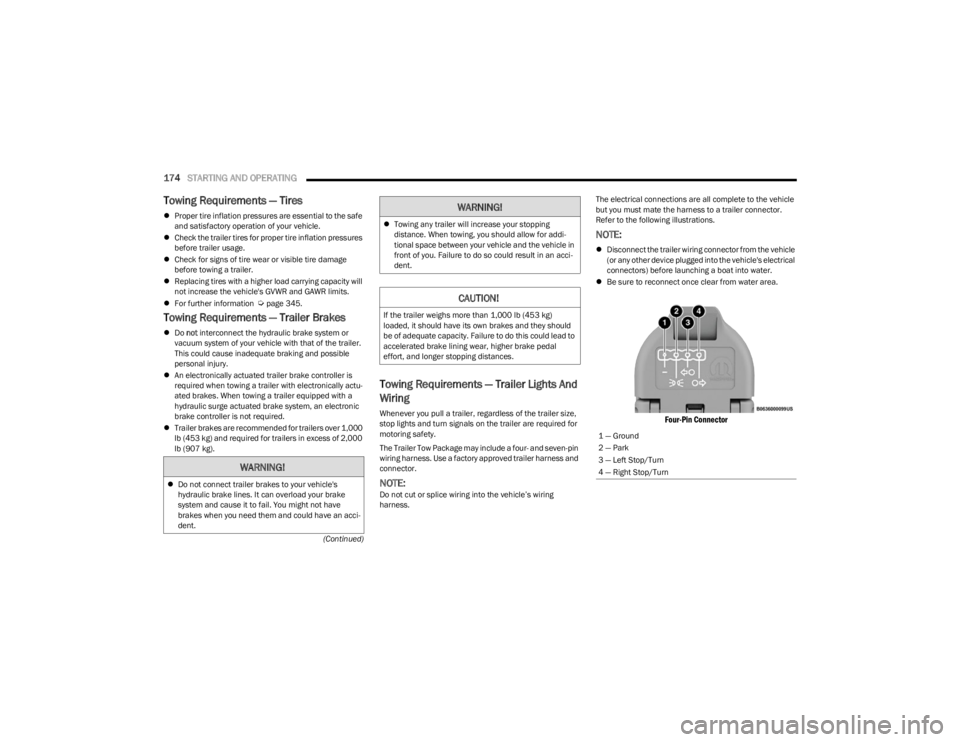
Refer to the following illustrations.
NOTE:
Disconnect the trailer wiring connector from the vehicle
(or any other device plugged into the vehicle's electrical
connectors) before launching a boat into water.
Be sure to reconnect once clear from water area.
Four-Pin Connector
WARNING!
Do not connect trailer brakes to your vehicle's
hydraulic brake lines. It can overload your brake
system and cause it to fail. You might not have
brakes when you need them and could have an acci -
dent.
Towing any trailer will increase your stopping
distance. When towing, you should allow for addi -
tional space between your vehicle and the vehicle in
front of you. Failure to do so could result in an acci -
dent.
CAUTION!
If the trailer weighs more than 1,000 lb (453 kg)
loaded, it should have its own brakes and they should
be of adequate capacity. Failure to do this could lead to
accelerated brake lining wear, higher brake pedal
effort, and longer stopping distances.
WARNING!
1 — Ground
2 — Park
3 — Left Stop/Turn
4 — Right Stop/Turn
23_JL_OM_EN_USC_t.book Page 174