wiring JEEP WRANGLER 2023 Owners Manual
[x] Cancel search | Manufacturer: JEEP, Model Year: 2023, Model line: WRANGLER, Model: JEEP WRANGLER 2023Pages: 396, PDF Size: 25.15 MB
Page 27 of 396
GETTING TO KNOW YOUR VEHICLE25
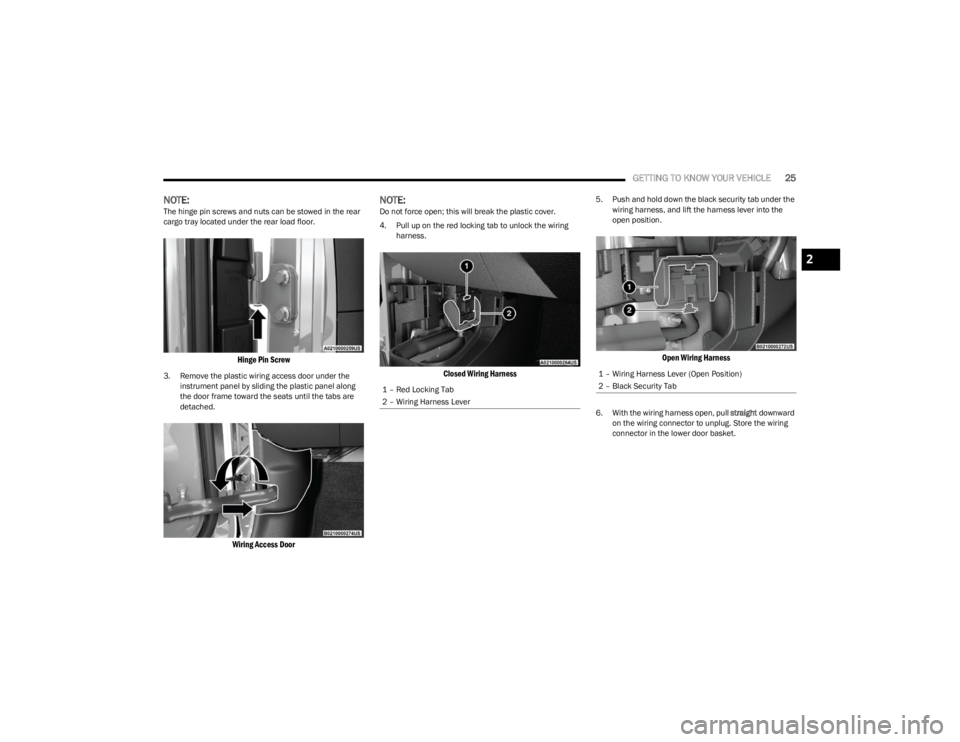
NOTE:The hinge pin screws and nuts can be stowed in the rear
cargo tray located under the rear load floor.
Hinge Pin Screw
3. Remove the plastic wiring access door under the
instrument panel by sliding the plastic panel along
the door frame toward the seats until the tabs are
detached.
Wiring Access Door
NOTE:Do not force open; this will break the plastic cover.
4. Pull up on the red locking tab to unlock the wiring harness.
Closed Wiring Harness
5. Push and hold down the black security tab under the wiring harness, and lift the harness lever into the
open position.
Open Wiring Harness
6. With the wiring harness open, pull straight downward
on the wiring connector to unplug. Store the wiring
connector in the lower door basket.
1 – Red Locking Tab
2 – Wiring Harness Lever
1 – Wiring Harness Lever (Open Position)
2 – Black Security Tab
2
23_JL_OM_EN_USC_t.book Page 25
Page 29 of 396
GETTING TO KNOW YOUR VEHICLE27
Replacing The Wiring Connector Into The Wiring Harness
To reinstall the wiring connector on the vehicle’s door into
the harness just inside the vehicle, proceed as follows:
NOTE:Make sure there is plenty of slack on the wiring connector
during installation. Close the door slightly to provide more
slack if needed.
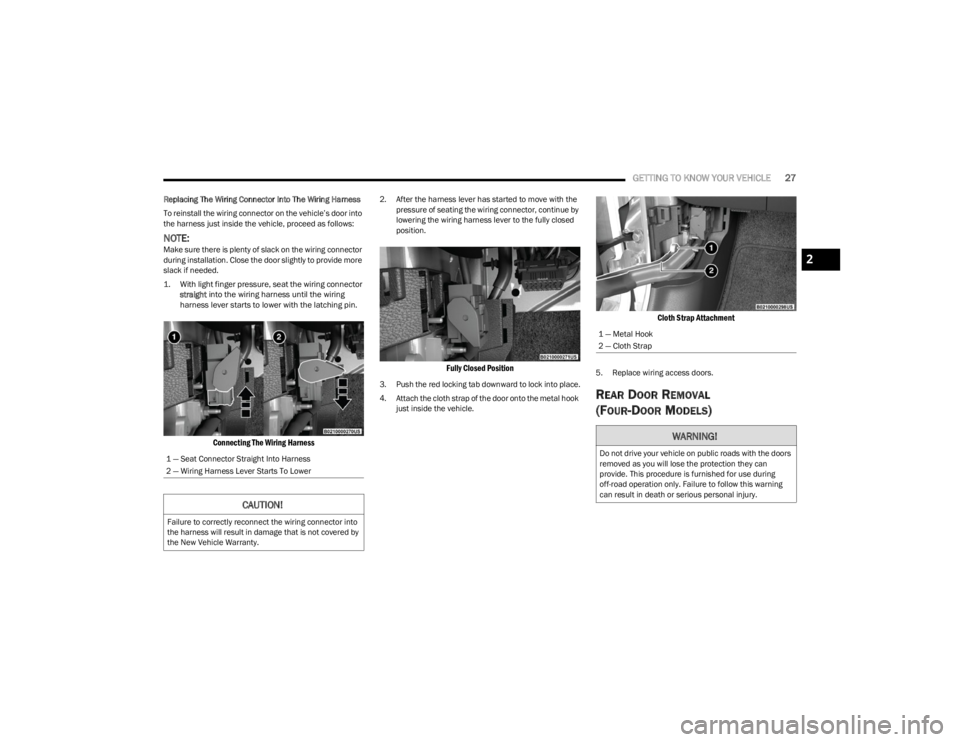
1. With light finger pressure, seat the wiring connector
straight
into the wiring harness until the wiring
harness lever starts to lower with the latching pin.
Connecting The Wiring Harness
2. After the harness lever has started to move with the pressure of seating the wiring connector, continue by
lowering the wiring harness lever to the fully closed
position.
Fully Closed Position
3. Push the red locking tab downward to lock into place.
4. Attach the cloth strap of the door onto the metal hook just inside the vehicle.
Cloth Strap Attachment
5. Replace wiring access doors.
REAR DOOR REMOVAL
(FOUR-DOOR MODELS)
1 — Seat Connector Straight Into Harness
2 — Wiring Harness Lever Starts To Lower
CAUTION!
Failure to correctly reconnect the wiring connector into
the harness will result in damage that is not covered by
the New Vehicle Warranty.
1 — Metal Hook
2 — Cloth Strap
WARNING!
Do not drive your vehicle on public roads with the doors
removed as you will lose the protection they can
provide. This procedure is furnished for use during
off-road operation only. Failure to follow this warning
can result in death or serious personal injury.
2
23_JL_OM_EN_USC_t.book Page 27
Page 30 of 396
28GETTING TO KNOW YOUR VEHICLE
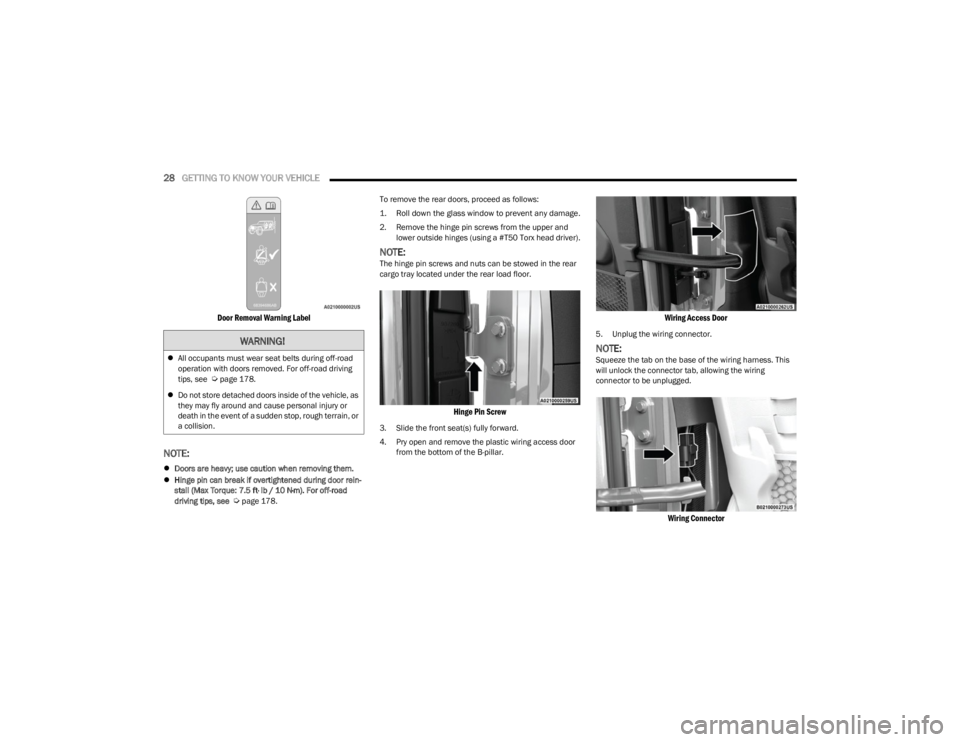
Door Removal Warning Label
NOTE:
Doors are heavy; use caution when removing them.
Hinge pin can break if overtightened during door rein -
stall (Max Torque: 7.5 ft· lb / 10 N·m). For off-road
driving tips, see
Úpage 178. To remove the rear doors, proceed as follows:
1. Roll down the glass window to prevent any damage.
2. Remove the hinge pin screws from the upper and
lower outside hinges (using a #T50 Torx head driver).
NOTE:The hinge pin screws and nuts can be stowed in the rear
cargo tray located under the rear load floor.
Hinge Pin Screw
3. Slide the front seat(s) fully forward.
4. Pry open and remove the plastic wiring access door from the bottom of the B-pillar.
Wiring Access Door
5. Unplug the wiring connector.
NOTE:Squeeze the tab on the base of the wiring harness. This
will unlock the connector tab, allowing the wiring
connector to be unplugged.
Wiring Connector
WARNING!
All occupants must wear seat belts during off-road
operation with doors removed. For off-road driving
tips, see
Úpage 178.
Do not store detached doors inside of the vehicle, as
they may fly around and cause personal injury or
death in the event of a sudden stop, rough terrain, or
a collision.
23_JL_OM_EN_USC_t.book Page 28
Page 34 of 396
32GETTING TO KNOW YOUR VEHICLE
3. Insert the upper and lower hinge pin screws into the
body hinges. Tighten the screws using a #T50 Torx
head driver to 3.8 ft· lb / 5.2 N·m.
4. Attach the cloth strap of the lower half-door to the metal hook just inside the vehicle.
Cloth Strap Attachment
5. Connect the wiring harness on the lower half-door to the connection just inside the vehicle.
NOTE:For front doors, make sure the wiring harness is closed
completely.
Front Door Wiring Harness
6. Replace wiring access doors.
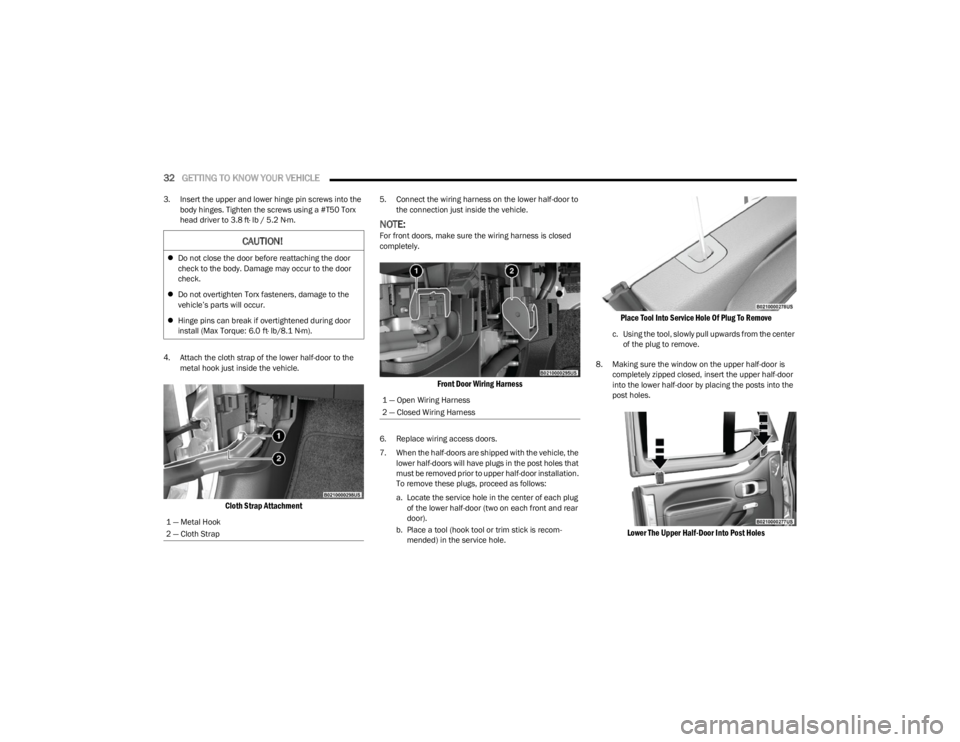
7. When the half-doors are shipped with the vehicle, the lower half-doors will have plugs in the post holes that
must be removed prior to upper half-door installation.
To remove these plugs, proceed as follows:
a. Locate the service hole in the center of each plug of the lower half-door (two on each front and rear
door).
b. Place a tool (hook tool or trim stick is recom -
mended) in the service hole.
Place Tool Into Service Hole Of Plug To Remove
c. Using the tool, slowly pull upwards from the center of the plug to remove.
8. Making sure the window on the upper half-door is completely zipped closed, insert the upper half-door
into the lower half-door by placing the posts into the
post holes.
Lower The Upper Half-Door Into Post Holes
CAUTION!
Do not close the door before reattaching the door
check to the body. Damage may occur to the door
check.
Do not overtighten Torx fasteners, damage to the
vehicle’s parts will occur.
Hinge pins can break if overtightened during door
install (Max Torque: 6.0 ft· lb/8.1 N·m).
1 — Metal Hook
2 — Cloth Strap
1 — Open Wiring Harness
2 — Closed Wiring Harness
23_JL_OM_EN_USC_t.book Page 32
Page 90 of 396
88GETTING TO KNOW YOUR VEHICLE
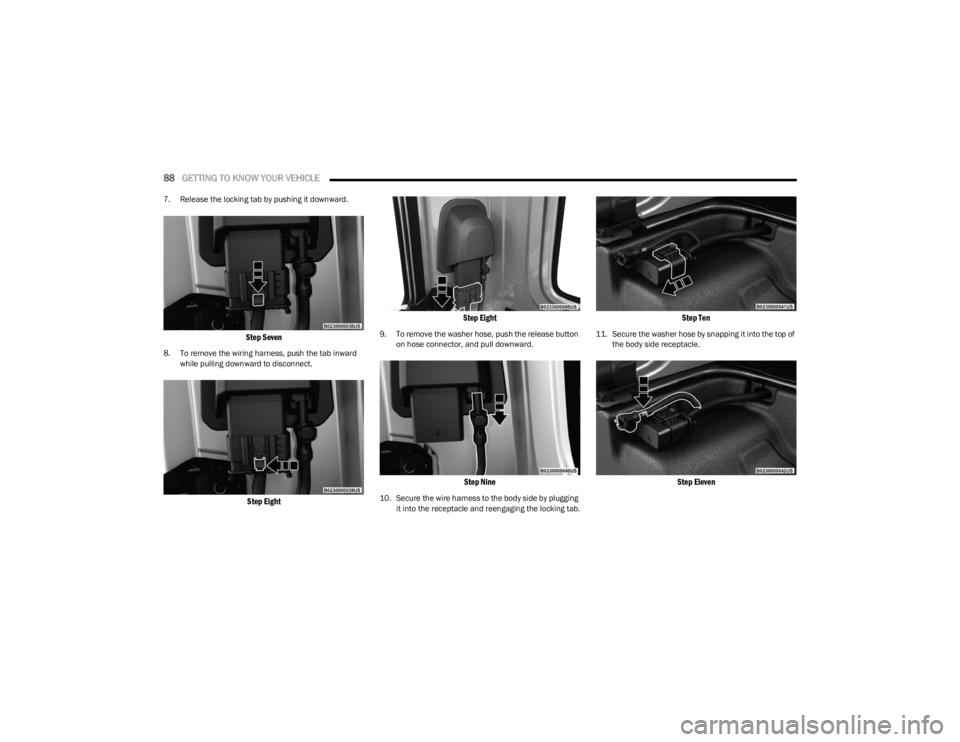
7. Release the locking tab by pushing it downward.
Step Seven
8. To remove the wiring harness, push the tab inward
while pulling downward to disconnect.
Step Eight Step Eight
9. To remove the washer hose, push the release button
on hose connector, and pull downward.
Step Nine
10. Secure the wire harness to the body side by plugging it into the receptacle and reengaging the locking tab.
Step Ten
11. Secure the washer hose by snapping it into the top of the body side receptacle.
Step Eleven
23_JL_OM_EN_USC_t.book Page 88
Page 176 of 396
174STARTING AND OPERATING
(Continued)
Towing Requirements — Tires
Proper tire inflation pressures are essential to the safe
and satisfactory operation of your vehicle.
Check the trailer tires for proper tire inflation pressures
before trailer usage.
Check for signs of tire wear or visible tire damage
before towing a trailer.
Replacing tires with a higher load carrying capacity will
not increase the vehicle's GVWR and GAWR limits.
For further information
Úpage 345.
Towing Requirements — Trailer Brakes
Do not interconnect the hydraulic brake system or
vacuum system of your vehicle with that of the trailer.
This could cause inadequate braking and possible
personal injury.
An electronically actuated trailer brake controller is
required when towing a trailer with electronically actu -
ated brakes. When towing a trailer equipped with a
hydraulic surge actuated brake system, an electronic
brake controller is not required.
Trailer brakes are recommended for trailers over 1,000
lb (453 kg) and required for trailers in excess of 2,000
lb (907 kg).
Towing Requirements — Trailer Lights And
Wiring
Whenever you pull a trailer, regardless of the trailer size,
stop lights and turn signals on the trailer are required for
motoring safety.
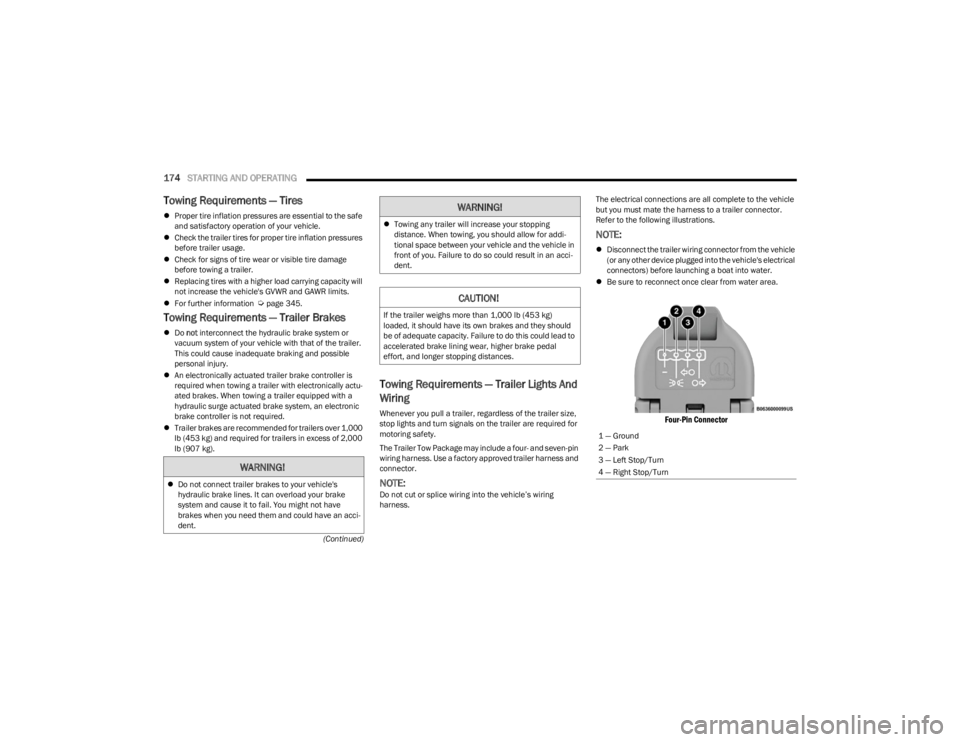
The Trailer Tow Package may include a four- and seven-pin
wiring harness. Use a factory approved trailer harness and
connector.
NOTE:Do not cut or splice wiring into the vehicle’s wiring
harness. The electrical connections are all complete to the vehicle
but you must mate the harness to a trailer connector.
Refer to the following illustrations.
NOTE:
Disconnect the trailer wiring connector from the vehicle
(or any other device plugged into the vehicle's electrical
connectors) before launching a boat into water.
Be sure to reconnect once clear from water area.
Four-Pin Connector
WARNING!
Do not connect trailer brakes to your vehicle's
hydraulic brake lines. It can overload your brake
system and cause it to fail. You might not have
brakes when you need them and could have an acci -
dent.
Towing any trailer will increase your stopping
distance. When towing, you should allow for addi -
tional space between your vehicle and the vehicle in
front of you. Failure to do so could result in an acci -
dent.
CAUTION!
If the trailer weighs more than 1,000 lb (453 kg)
loaded, it should have its own brakes and they should
be of adequate capacity. Failure to do this could lead to
accelerated brake lining wear, higher brake pedal
effort, and longer stopping distances.
WARNING!
1 — Ground
2 — Park
3 — Left Stop/Turn
4 — Right Stop/Turn
23_JL_OM_EN_USC_t.book Page 174
Page 269 of 396
SAFETY267
SUPPLEMENTAL RESTRAINT SYSTEMS
(SRS)
Some of the safety features described in this section may
be standard equipment on some models, or may be
optional equipment on others. If you are not sure, ask an
authorized dealer.
The air bag system must be ready to protect you in a
collision. The Occupant Restraint Controller (ORC)
monitors the internal circuits and interconnecting wiring
associated with the electrical Air Bag System
Components. Your vehicle may be equipped with the
following Air Bag System Components:
Air Bag System Components
Occupant Restraint Controller (ORC)
Air Bag Warning Light
Steering Wheel and Column
Instrument Panel
Knee Impact Bolsters
Driver and Front Passenger Air Bags
Seat Belt Buckle Switch
Supplemental Side Air Bags
Front and Side Impact Sensors
Seat Belt Pretensioners
Seat Track Position Sensors
Occupant Classification System
Air Bag Warning Light
The Occupant Restraint Controller (ORC)
monitors the readiness of the electronic parts
of the air bag system whenever the ignition
switch is in the START or ON/RUN position. If
the ignition switch is in the OFF position or in the ACC
position, the air bag system is not on and the air bags will
not inflate.
The ORC contains a backup power supply system that may
deploy the air bag system even if the battery loses power
or it becomes disconnected prior to deployment.
The ORC turns on the Air Bag Warning Light in the
instrument panel for approximately four to eight seconds
for a self-check when the ignition switch is first in the ON/
RUN position. After the self-check, the Air Bag Warning
Light will turn off. If the ORC detects a malfunction in any
part of the system, it turns on the Air Bag Warning Light,
either momentarily or continuously. A single chime will
sound to alert you if the light comes on again after initial
startup.
The ORC also includes diagnostics that will illuminate the
instrument panel Air Bag Warning Light if a malfunction is
detected that could affect the air bag system. The
diagnostics also record the nature of the malfunction. While the air bag system is designed to be maintenance
free, if any of the following occurs, have an authorized
dealer service the air bag system immediately.
The Air Bag Warning Light does not come on during the
four to eight seconds when the ignition switch is first in
the ON/RUN position.
The Air Bag Warning Light remains on after the four to
eight-second interval.
The Air Bag Warning Light comes on intermittently or
remains on while driving.
NOTE:If the speedometer, tachometer, or any engine related
gauges are not working, the Occupant Restraint Controller
(ORC) may also be disabled. In this condition the air bags
may not be ready to inflate for your protection. Have an
authorized dealer service the air bag system immediately.
Redundant Air Bag Warning Light
If a fault with the Air Bag Warning Light is
detected, which could affect the Supplemental
Restraint System (SRS), the Redundant Air Bag
Warning Light will illuminate on the instrument
panel. The Redundant Air Bag Warning Light will stay on
Failure to replace the seat belt assembly could
increase the risk of injury in collisions.
Do not use the Automatic Locking Mode to restrain
occupants who are wearing the seat belt or children
who are using booster seats. The locked mode is only
used to install rear-facing or forward-facing child
restraints that have a harness for restraining the
child.
WARNING!
WARNING!
Ignoring the Air Bag Warning Light in your instrument
panel could mean you won’t have the air bag system to
protect you in a collision. If the light does not come on
as a bulb check when the ignition is first turned on,
stays on after you start the vehicle, or if it comes on as
you drive, have an authorized dealer service the air bag
system immediately.
6
23_JL_OM_EN_USC_t.book Page 267
Page 277 of 396

SAFETY275
(Continued)
Side Impacts
The Side Air Bags are designed to activate in certain side
impacts. The Occupant Restraint Controller (ORC)
determines whether the deployment of the Side Air Bags
in a particular impact event is appropriate, based on the
severity and type of collision. The side impact sensors aid
the ORC in determining the appropriate response to
impact events. The system is calibrated to deploy the Side
Air Bags on the impact side of the vehicle during impacts
that require Side Air Bag occupant protection. In side
impacts, the Side Air Bags deploy independently; a left
side impact deploys the left Side Air Bags only and a
right-side impact deploys the right Side Air Bags only.
Vehicle damage by itself is not a good indicator of whether
or not Side Air Bags should have deployed.
The Side Air Bags will not deploy in all side collisions,
including some collisions at certain angles, or some side
collisions that do not impact the area of the passenger
compartment. The Side Air Bags may deploy during angled
or offset frontal collisions where the front air bags deploy.
Side Air Bags are a supplement to the seat belt restraint
system. Side Air Bags deploy in less time than it takes to
blink your eyes.
NOTE:Air bag covers may not be obvious in the interior trim, but
they will open during air bag deployment.
Air Bag System Components
NOTE:The Occupant Restraint Controller (ORC) monitors the
internal circuits and interconnecting wiring associated
with electrical Air Bag System Components listed below:
Occupant Restraint Controller (ORC)
Air Bag Warning Light
Steering Wheel and Column
Instrument Panel
Knee Impact Bolsters
Driver and Front Passenger Air Bags
Seat Belt Buckle Switch
Supplemental Side Air Bags
Front and Side Impact Sensors
Seat Belt Pretensioners
Seat Track Position Sensors
Occupant Classification System
If A Deployment Occurs
The front air bags are designed to deflate immediately
after deployment.
NOTE:Front and/or side air bags will not deploy in all collisions.
This does not mean something is wrong with the air bag
system.
WARNING!
Occupants, including children, who are up against or
very close to Side Air Bags can be seriously injured or
killed. Occupants, including children, should never
lean on or sleep against the door, side windows, or
area where the side air bags inflate, even if they are
in an infant or child restraint.
Seat belts (and child restraints where appropriate)
are necessary for your protection in all collisions.
They also help keep you in position, away from an
inflating Side Air Bag. To get the best protection from
the Side Air Bags, occupants must wear their seat
belts properly and sit upright with their backs against
the seats. Children must be properly restrained in a
child restraint or booster seat that is appropriate for
the size of the child.
WARNING!
Side Air Bags need room to inflate. Do not lean
against the door or window. Sit upright in the center
of the seat.
Being too close to the Side Air Bags during deploy -
ment could cause you to be severely injured or killed.
Relying on the Side Air Bags alone could lead to more
severe injuries in a collision. The Side Air Bags work
with your seat belt to restrain you properly. In some
collisions, Side Air Bags won’t deploy at all. Always
wear your seat belt even though you have Side Air
Bags.
WARNING!
6
23_JL_OM_EN_USC_t.book Page 275
Page 279 of 396

SAFETY277
Maintaining Your Air Bag System
Event Data Recorder (EDR)
This vehicle is equipped with an event data recorder (EDR).
The main purpose of an EDR is to record, in certain crash or
near crash-like situations, such as an air bag deployment or
hitting a road obstacle, data that will assist in understanding how a vehicle’s systems performed. The EDR is designed to
record data related to vehicle dynamics and safety systems
for a short period of time, typically 30 seconds or less. The
EDR in this vehicle is designed to record such data as:
How various systems in your vehicle were operating;
Whether or not the driver and passenger safety belts
were buckled/fastened;
How far (if at all) the driver was depressing the acceler -
ator and/or brake pedal; and,
How fast the vehicle was traveling.
These data can help provide a better understanding of the
circumstances in which crashes and injuries occur.
NOTE:
EDR data are recorded by your vehicle only if a non-trivial
crash situation occurs; no data are recorded by the EDR
under normal driving conditions and no personal data (e.g.,
name, gender, age, and crash location) are recorded.
However, other parties, such as law enforcement, could
combine the EDR data with the type of personally identifying
data routinely acquired during a crash investigation.
To read data recorded by an EDR, special equipment is
required, and access to the vehicle or the EDR is needed. In
addition to the vehicle manufacturer, other parties, such as
law enforcement, that have the special equipment, can read
the information if they have access to the vehicle or the
EDR.
CHILD RESTRAINTS
Everyone in your vehicle needs to be buckled up at all
times, including babies and children. Every state in the
United States, and every Canadian province, requires that
small children ride in proper restraint systems. This is the
law, and you can be prosecuted for ignoring it. Children 12 years or younger should ride properly buckled
up in a rear seat, if available. According to crash statistics,
children are safer when properly restrained in the rear
seats rather than in the front.
There are different sizes and types of restraints for children
from newborn size to the child almost large enough for an
adult safety belt. Always check the child seat Owner’s
Manual to make sure you have the correct seat for your
child. Carefully read and follow all the instructions and
warnings in the child restraint Owner’s Manual and on all
the labels attached to the child restraint.
Before buying any restraint system, make sure that it has
a label certifying that it meets all applicable Safety
Standards. You should also make sure that you can install
it in the vehicle where you will use it.
NOTE:
For additional information, refer to http://
www.nhtsa.gov/parents-and-caregivers or call:
1–888–327–4236
Canadian residents should refer to Transport Canada’s
website for additional information: https://
www.tc.gc.ca/en/services/road/
child-car-seat-safety.html
WARNING!
Modifications to any part of the air bag system could
cause it to fail when you need it. You could be injured
if the air bag system is not there to protect you. Do not
modify the components or wiring, including adding any
kind of badges or stickers to the steering wheel hub
trim cover or the upper passenger side of the instru -
ment panel. Do not modify the front fascia/bumper,
vehicle body structure, or add aftermarket side steps
or running boards.
It is dangerous to try to repair any part of the air bag
system yourself. Be sure to tell anyone who works on
your vehicle that it has an air bag system.
Do not attempt to modify any part of your air bag
system. The air bag may inflate accidentally or may not
function properly if modifications are made. Take your
vehicle to an authorized dealer for any air bag system
service. If your seat, including your trim cover and
cushion, needs to be serviced in any way (including
removal or loosening/tightening of seat attachment
bolts), take the vehicle to an authorized dealer. Only
manufacturer approved seat accessories may be
used. If it is necessary to modify the air bag system for
persons with disabilities, contact an authorized dealer.
WARNING!
In a collision, an unrestrained child can become a pro -
jectile inside the vehicle. The force required to hold
even an infant on your lap could become so great that
you could not hold the child, no matter how strong you
are. The child and others could be badly injured or
killed. Any child riding in your vehicle should be in a
proper restraint for the child’s size.
6
23_JL_OM_EN_USC_t.book Page 277
Page 392 of 396

390
Towing .........................................................170, 172, 303
Disabled Vehicle ..................................................... 303
Recreational ............................................................ 176
Weight...................................................................... 172
Towing Behind A Motorhome ...................................... 176
Trac-Lok Rear Axle ................................................................. 144
Traction Control............................................................ 251
Trailer Sway Control (TSC) ........................................... 251
Trailer Towing ............................................................... 170 Hitches .................................................................... 172
Minimum Requirements ........................................ 173
Trailer And Tongue Weight ............................ 172
, 173
Wiring....................................................................... 174
Trailer Towing Guide .................................................... 172
Trailer Weight ............................................................... 172
Transfer Case ............................................................... 332 Fluid ......................................................................... 376
Four-Wheel-Drive-Operation .......................... 141
, 142
Maintenance ........................................................... 332
Transmission ................................................................ 138 Automatic ....................................................... 138
, 333
Fluid ......................................................................... 376
Maintenance ........................................................... 333
Manual .................................................................... 134
Shifting .................................................................... 137
Transporting Pets ......................................................... 288
Tread Wear Indicators ................................................. 354
Turn Signals......................................................... 123
, 344
UUCI Connector .................................................................61 Uconnect Phone Call Features ............................................... 217 Things You Should Know About Your Uconnect
Phone .................................................................. 220
Uconnect Settings ..................................................... 18
Uconnect Phone ................................................. 214
, 215
Answer Or Ignore An Incoming Call — Call Currently In Progress ..................................219
Answer Or Ignore An Incoming Call — No Call Currently In Progress............................. 219
Bluetooth Communication Link .............................. 222
Call Continuation ..................................................... 220 Call Controls............................................................. 218
Call Termination ...................................................... 220
Cancel Command ....................................................214Connecting To A Particular Mobile Phone Or Audio
Device After Pairing............................................216
Help Command........................................................ 214
Join Calls .................................................................. 220
Making A Phone Or Audio Device A Favorite .........216 Making A Second Call While Current Call Is In Progress .............................................................. 220
Managing Your Favorites ........................................ 217
Natural Speech........................................................ 214
Operation ................................................................. 213
Overview...................................................................212 Pair (Link) Uconnect Phone To A Mobile Phone .... 214
Pair A Bluetooth Streaming Audio Device.............. 215
Phonebook Download ............................................. 217Place/Retrieve A Call From Hold ............................ 219
Power-Up .................................................................. 222
Recent Calls ............................................................. 218
Redial ....................................................................... 220
To Remove A Favorite ............................................. 217 Toggling Between Calls........................................... 220
Touch-Tone Number Entry ...................................... 218
Transfer Call To And From Mobile Phone .............. 220
Voice Command ...................................................... 220
Uconnect Settings ........................................................ 184 Customer Programmable Features ......... 18
, 21, 184
Passive Entry Programming ..................................... 21
Uconnect System.......................................................... 197
Uniform Tire Quality Grades ........................................ 358
Universal Consumer Interface (UCI) Connector ........... 61
Universal Garage Door Opener (HomeLink®) —
If Equipped
S
.............................................................. 47
Untwisting Procedure, Seat Belt.................................. 264
USB.................................................................................. 61
USB Port .......................................................................... 61
VVanity Mirrors ................................................................. 46
Vehicle Finder ......................................................233, 238
Vehicle Health Alert ...................................................... 235
Vehicle Health Report .................................................. 234
Vehicle Identification Number (VIN) ............................ 368
Vehicle Loading ...................................................169
, 349
Vehicle Maintenance ................................................... 318
Vehicle Modifications/Alterations ....................................8
Vehicle Notifications .................................................... 235
Vehicle Settings ............................................................ 184
Vehicle Storage............................................................. 359
Voice Command ........................................... 44
, 223, 225
Climate....................................................................... 59
Voice Recognition ........................................................... 44
Voice Recognition System (VR) ..................................... 44
23_JL_OM_EN_USC_t.book Page 390