set JEEP WRANGLER 2DOORS 2019 Owner handbook (in English)
[x] Cancel search | Manufacturer: JEEP, Model Year: 2019, Model line: WRANGLER 2DOORS, Model: JEEP WRANGLER 2DOORS 2019Pages: 348, PDF Size: 6.5 MB
Page 20 of 348
2. Perform one of the following methods to
lock the vehicle:
• Push lock on the interior power door
lock switch with the driver and/or pas-
senger door open.
• Push the lock button on the exterior
Passive Entry Door Handle with a valid
key fob available in the same exterior
zone (refer to "Keyless Enter-N-Go —
Passive Entry" in "Getting To Know Your
Vehicle" for further information).
• Push the lock button on the key fob.
3. If any doors are open, close them.
To Disarm The System
The vehicle security alarm can be disarmed
using any of the following methods:
• Push the unlock button on the key fob.
• Grasp the Passive Entry Unlock Door
Handle (if equipped, refer to "Keyless
Enter-N-Go — Passive Entry" in "Getting To
Know Your Vehicle" for further informa-
tion).• Cycle the vehicle ignition system out of the
OFF position.
NOTE:
• The driver's door key cylinder cannot arm or
disarm the vehicle security alarm.
• When the vehicle security alarm is armed,
the interior power door lock switches will
not unlock the doors.
The vehicle security alarm is designed to
protect your vehicle. However, you can create
conditions where the system will give you a
false alarm. If one of the previously described
arming sequences has occurred, the vehicle
security alarm will arm regardless of whether
you are in the vehicle or not. If you remain in
the vehicle and open a door, the alarm will
sound. If this occurs, disarm the vehicle
security alarm.
If the vehicle security alarm is armed and the
battery becomes disconnected, the vehicle
security alarm will remain armed when the
battery is reconnected; the exterior lights will
flash, and the horn will sound. If this occurs,
disarm the vehicle security alarm.
DOORS
CAUTION!
Careless handling and storage of the re-
movable door panels may damage the
seals, causing water to leak into the vehi-
cle’s interior.
Keyless Enter-N-Go — Passive Entry (If
Equipped)
The Passive Entry system is a feature that
allows you to lock and unlock the vehicle’s
door(s) and swing gate without having to push
the key fob lock or unlock buttons.
NOTE:
• Passive Entry may be programmed ON/
OFF; refer to “Uconnect Settings” in “Mul-
timedia” in your Owner’s Manual for further
information.
• The key fob may not be detected by the
vehicle passive entry system if it is located
next to a mobile phone, laptop, or other
electronic device; these devices may inter-
GETTING TO KNOW YOUR VEHICLE
18
Page 21 of 348
fere with the key fob’s wireless signal and
prevent the passive entry system from
locking/unlocking the vehicle.
• Passive Entry Unlock initiates illuminated
approach (Low Beams, License Plate
Lamp, Position Lamps) for whichever time
duration is set between 0, 30 (default),
60 or 90 seconds. Passive Entry Unlock
also initiates two flashes of the turn signal
lamps.
• If wearing gloves on your hands, or if it has
been raining/snowing on the Passive Entry
door handle, the unlock sensitivity can be
affected, resulting in a slower response
time.
• If the vehicle is unlocked by Passive Entry
and no door is opened within 60 seconds,
the vehicle will re-lock and if equipped will
arm the security alarm.
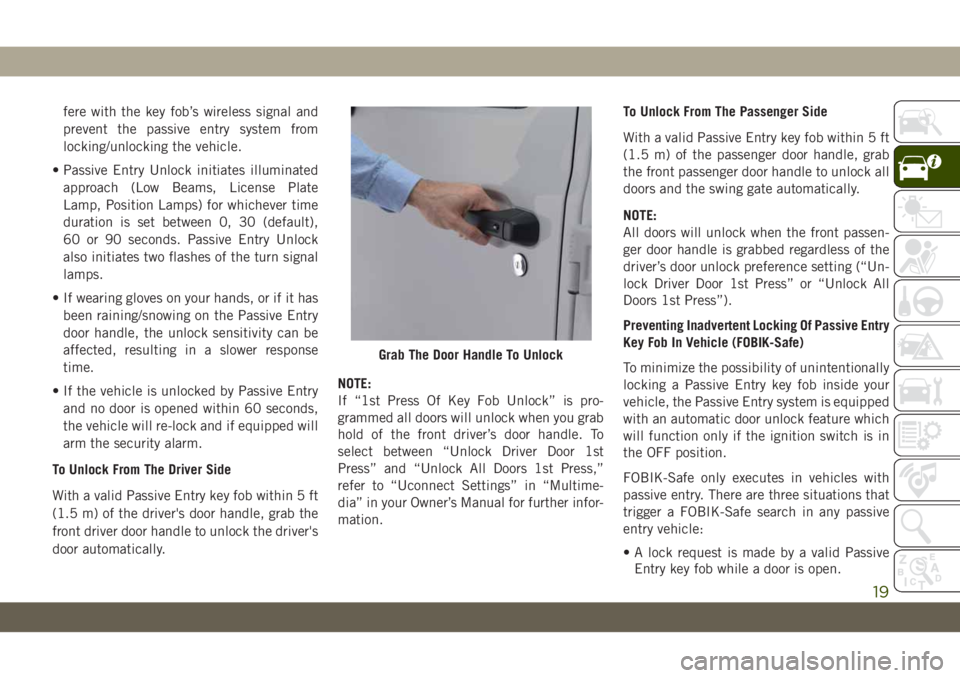
To Unlock From The Driver Side
With a valid Passive Entry key fob within 5 ft
(1.5 m) of the driver's door handle, grab the
front driver door handle to unlock the driver's
door automatically.NOTE:
If “1st Press Of Key Fob Unlock” is pro-
grammed all doors will unlock when you grab
hold of the front driver’s door handle. To
select between “Unlock Driver Door 1st
Press” and “Unlock All Doors 1st Press,”
refer to “Uconnect Settings” in “Multime-
dia” in your Owner’s Manual for further infor-
mation.To Unlock From The Passenger Side
With a valid Passive Entry key fob within 5 ft
(1.5 m) of the passenger door handle, grab
the front passenger door handle to unlock all
doors and the swing gate automatically.
NOTE:
All doors will unlock when the front passen-
ger door handle is grabbed regardless of the
driver’s door unlock preference setting (“Un-
lock Driver Door 1st Press” or “Unlock All
Doors 1st Press”).
Preventing Inadvertent Locking Of Passive Entry
Key Fob In Vehicle (FOBIK-Safe)
To minimize the possibility of unintentionally
locking a Passive Entry key fob inside your
vehicle, the Passive Entry system is equipped
with an automatic door unlock feature which
will function only if the ignition switch is in
the OFF position.
FOBIK-Safe only executes in vehicles with
passive entry. There are three situations that
trigger a FOBIK-Safe search in any passive
entry vehicle:
• A lock request is made by a valid Passive
Entry key fob while a door is open.
Grab The Door Handle To Unlock
19
Page 23 of 348
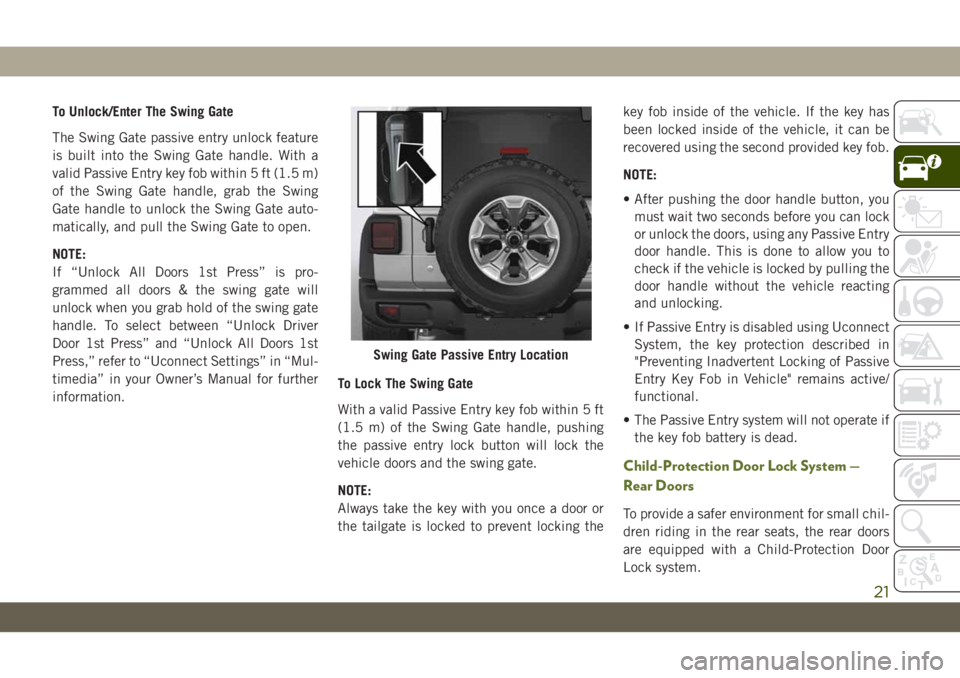
To Unlock/Enter The Swing Gate
The Swing Gate passive entry unlock feature
is built into the Swing Gate handle. With a
valid Passive Entry key fob within 5 ft (1.5 m)
of the Swing Gate handle, grab the Swing
Gate handle to unlock the Swing Gate auto-
matically, and pull the Swing Gate to open.
NOTE:
If “Unlock All Doors 1st Press” is pro-
grammed all doors & the swing gate will
unlock when you grab hold of the swing gate
handle. To select between “Unlock Driver
Door 1st Press” and “Unlock All Doors 1st
Press,” refer to “Uconnect Settings” in “Mul-
timedia” in your Owner’s Manual for further
information.To Lock The Swing Gate
With a valid Passive Entry key fob within 5 ft
(1.5 m) of the Swing Gate handle, pushing
the passive entry lock button will lock the
vehicle doors and the swing gate.
NOTE:
Always take the key with you once a door or
the tailgate is locked to prevent locking thekey fob inside of the vehicle. If the key has
been locked inside of the vehicle, it can be
recovered using the second provided key fob.
NOTE:
• After pushing the door handle button, you
must wait two seconds before you can lock
or unlock the doors, using any Passive Entry
door handle. This is done to allow you to
check if the vehicle is locked by pulling the
door handle without the vehicle reacting
and unlocking.
• If Passive Entry is disabled using Uconnect
System, the key protection described in
"Preventing Inadvertent Locking of Passive
Entry Key Fob in Vehicle" remains active/
functional.
• The Passive Entry system will not operate if
the key fob battery is dead.
Child-Protection Door Lock System —
Rear Doors
To provide a safer environment for small chil-
dren riding in the rear seats, the rear doors
are equipped with a Child-Protection Door
Lock system.
Swing Gate Passive Entry Location
21
Page 29 of 348
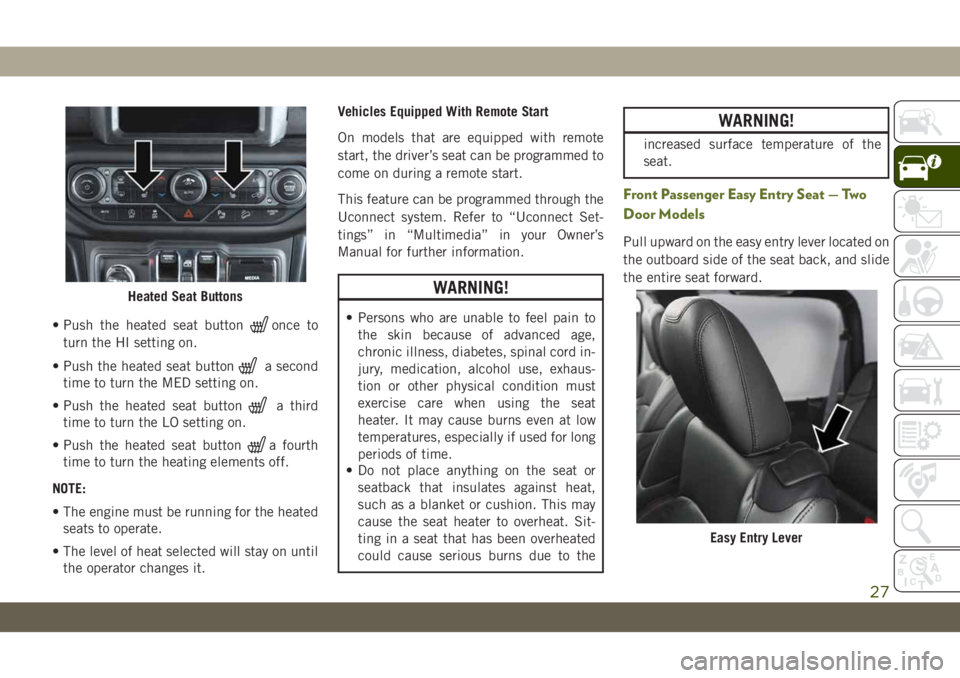
• Push the heated seat buttononce to
turn the HI setting on.
• Push the heated seat button
a second
time to turn the MED setting on.
• Push the heated seat button
a third
time to turn the LO setting on.
• Push the heated seat button
a fourth
time to turn the heating elements off.
NOTE:
• The engine must be running for the heated
seats to operate.
• The level of heat selected will stay on until
the operator changes it.Vehicles Equipped With Remote Start
On models that are equipped with remote
start, the driver’s seat can be programmed to
come on during a remote start.
This feature can be programmed through the
Uconnect system. Refer to “Uconnect Set-
tings” in “Multimedia” in your Owner’s
Manual for further information.
WARNING!
• Persons who are unable to feel pain to
the skin because of advanced age,
chronic illness, diabetes, spinal cord in-
jury, medication, alcohol use, exhaus-
tion or other physical condition must
exercise care when using the seat
heater. It may cause burns even at low
temperatures, especially if used for long
periods of time.
• Do not place anything on the seat or
seatback that insulates against heat,
such as a blanket or cushion. This may
cause the seat heater to overheat. Sit-
ting in a seat that has been overheated
could cause serious burns due to the
WARNING!
increased surface temperature of the
seat.
Front Passenger Easy Entry Seat — Two
Door Models
Pull upward on the easy entry lever located on
the outboard side of the seat back, and slide
the entire seat forward.
Heated Seat Buttons
Easy Entry Lever
27
Page 36 of 348
WARNING!
Do not adjust the steering column while
driving. Adjusting the steering column
while driving or driving with the steering
column unlocked, could cause the driver
to lose control of the vehicle. Failure to
follow this warning may result in serious
injury or death.
Heated Steering Wheel — If Equipped
The steering wheel contains a heating ele-
ment that helps warm your hands in cold
weather. The heated steering wheel has only
one temperature setting. Once the heated
steering wheel has been turned on, it will stay
on until the operator turns it off. The heated
steering wheel may not turn on when it is
already warm.
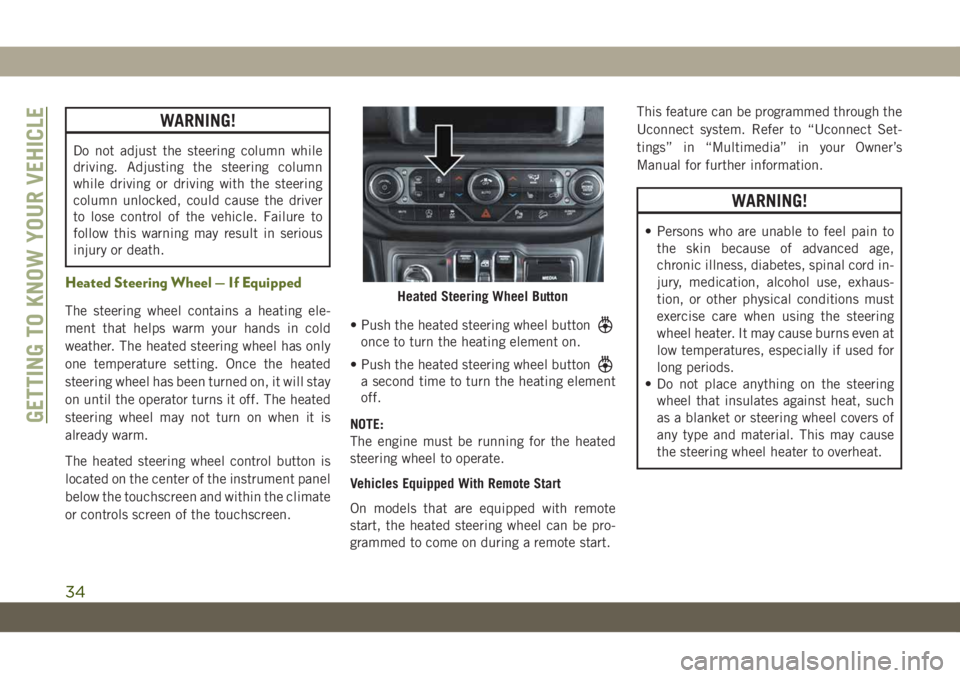
The heated steering wheel control button is
located on the center of the instrument panel
below the touchscreen and within the climate
or controls screen of the touchscreen.• Push the heated steering wheel button
once to turn the heating element on.
• Push the heated steering wheel button
a second time to turn the heating element
off.
NOTE:
The engine must be running for the heated
steering wheel to operate.
Vehicles Equipped With Remote Start
On models that are equipped with remote
start, the heated steering wheel can be pro-
grammed to come on during a remote start.This feature can be programmed through the
Uconnect system. Refer to “Uconnect Set-
tings” in “Multimedia” in your Owner’s
Manual for further information.
WARNING!
• Persons who are unable to feel pain to
the skin because of advanced age,
chronic illness, diabetes, spinal cord in-
jury, medication, alcohol use, exhaus-
tion, or other physical conditions must
exercise care when using the steering
wheel heater. It may cause burns even at
low temperatures, especially if used for
long periods.
• Do not place anything on the steering
wheel that insulates against heat, such
as a blanket or steering wheel covers of
any type and material. This may cause
the steering wheel heater to overheat.
Heated Steering Wheel Button
GETTING TO KNOW YOUR VEHICLE
34
Page 40 of 348
Windshield Wiper Operation
Rotate the end of the lever upward to the
second detent past the intermittent settings
for low-speed wiper operation. Rotate the end
of the lever upward to the third detent past
the intermittent settings for high-speed wiper
operation.
CAUTION!
In cold weather, always turn off the wiper
switch and allow the wipers to return to the
park position before turning off the en-
gine. If the wiper switch is left on and the
wipers freeze to the windshield, damage to
the wiper motor may occur when the ve-
hicle is restarted.
NOTE:
Do not operate the windshield wipers with the
blades lifted from the windshield.
Intermittent Wiper System
Use the intermittent wiper when weather
conditions make a single wiping cycle, with a
variable pause between cycles, desirable. Ro-tate the end of the lever to the first detent
position for one of four intermittent settings.
The delay cycle can be set anywhere between
1 to 18 seconds.
NOTE:
The wiper delay times depend on vehicle
speed. If the vehicle is moving less than
10 mph (16 km/h), delay times will be
doubled.
Windshield Washers
To use the washer, pull the lever toward you
and hold while spray is desired. If the lever is
pulled while in the delay range, the wiper will
start and continue to operate for two or three
wipe cycles after the lever is released. Then,
the intermittent interval previously selected
will resume.
If the lever is pulled while in the off position,
the wipers will operate for two or three wipe
cycles. Then, the wipers will turn off.
WARNING!
Sudden loss of visibility through the wind-
shield could lead to a collision. You might
WARNING!
not see other vehicles or other obstacles.
To avoid sudden icing of the windshield
during freezing weather, warm the wind-
shield with the defroster before and during
windshield washer use.
Mist Feature
Push upward on the wiper lever to activate a
single wipe to clear off road mist or spray
from a passing vehicle. As long as the lever is
held up, the wipers will continue to operate.
NOTE:
The mist feature does not activate the washer
pump; therefore, no washer fluid will be
sprayed on the windshield. The wash func-
tion must be used in order to spray the
windshield with washer fluid.
Rear Window Wiper/Washer — If Equipped
A rotary switch on the center portion of the
windshield wiper/washer lever controls the
operation of the rear wiper/washer function.
GETTING TO KNOW YOUR VEHICLE
38
Page 41 of 348
Rotate the switch upward to the first detent
position for intermittent operation and to the
second detent for continuous rear wiper op-
eration.
Push the wiper lever toward the instrument
panel to activate the rear washer. The washer
pump and wiper will continue to operate as
long as the lever is held.
If the rear wiper is operating when the igni-
tion is placed in the OFF position, the wiper
will automatically return to the “park” posi-
tion. When the vehicle is restarted, the wiper
will resume function at whichever position
the switch is set at.CLIMATE CONTROLS
Automatic Climate Controls Overview
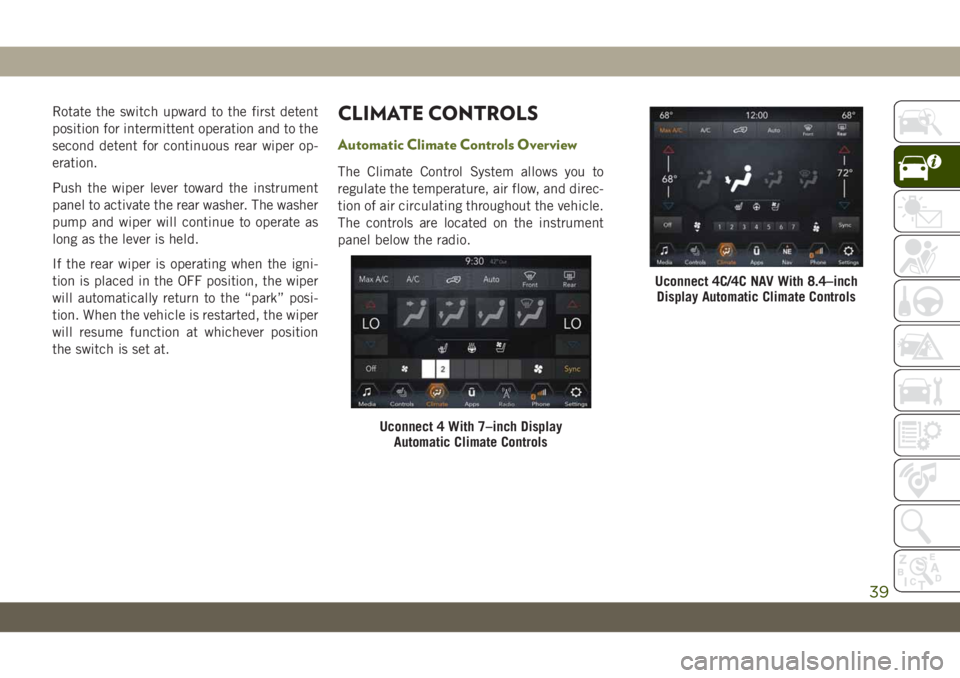
The Climate Control System allows you to
regulate the temperature, air flow, and direc-
tion of air circulating throughout the vehicle.
The controls are located on the instrument
panel below the radio.
Uconnect 4 With 7–inch Display
Automatic Climate Controls
Uconnect 4C/4C NAV With 8.4–inch
Display Automatic Climate Controls
39
Page 42 of 348
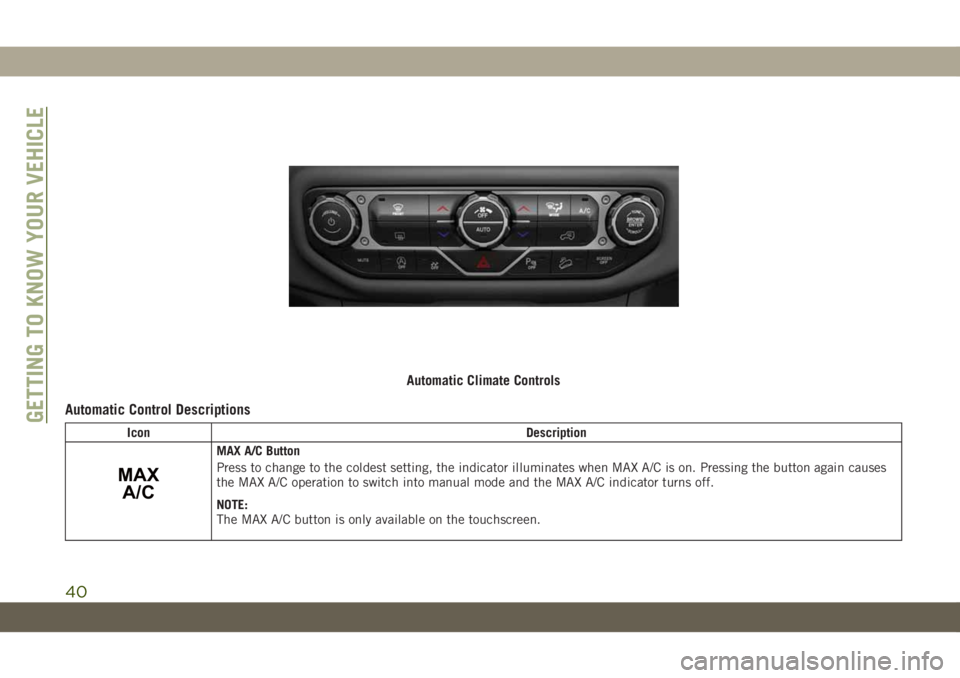
Automatic Control Descriptions
Icon Description
MAX
A/C
MAX A/C Button
Press to change to the coldest setting, the indicator illuminates when MAX A/C is on. Pressing the button again causes
the MAX A/C operation to switch into manual mode and the MAX A/C indicator turns off.
NOTE:
The MAX A/C button is only available on the touchscreen.
Automatic Climate Controls
GETTING TO KNOW YOUR VEHICLE
40
Page 43 of 348
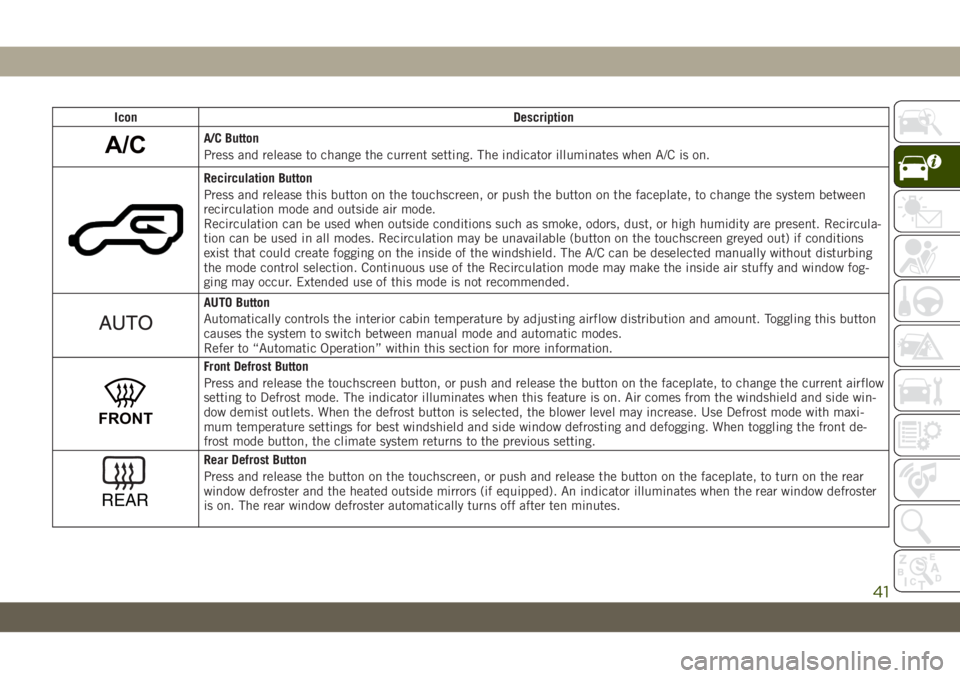
Icon Description
A/CA/C Button
Press and release to change the current setting. The indicator illuminates when A/C is on.
Recirculation Button
Press and release this button on the touchscreen, or push the button on the faceplate, to change the system between
recirculation mode and outside air mode.
Recirculation can be used when outside conditions such as smoke, odors, dust, or high humidity are present. Recircula-
tion can be used in all modes. Recirculation may be unavailable (button on the touchscreen greyed out) if conditions
exist that could create fogging on the inside of the windshield. The A/C can be deselected manually without disturbing
the mode control selection. Continuous use of the Recirculation mode may make the inside air stuffy and window fog-
ging may occur. Extended use of this mode is not recommended.
AUTO Button
Automatically controls the interior cabin temperature by adjusting airflow distribution and amount. Toggling this button
causes the system to switch between manual mode and automatic modes.
Refer to “Automatic Operation” within this section for more information.
FRONT
Front Defrost Button
Press and release the touchscreen button, or push and release the button on the faceplate, to change the current airflow
setting to Defrost mode. The indicator illuminates when this feature is on. Air comes from the windshield and side win-
dow demist outlets. When the defrost button is selected, the blower level may increase. Use Defrost mode with maxi-
mum temperature settings for best windshield and side window defrosting and defogging. When toggling the front de-
frost mode button, the climate system returns to the previous setting.
REAR
Rear Defrost Button
Press and release the button on the touchscreen, or push and release the button on the faceplate, to turn on the rear
window defroster and the heated outside mirrors (if equipped). An indicator illuminates when the rear window defroster
is on. The rear window defroster automatically turns off after ten minutes.
41
Page 44 of 348
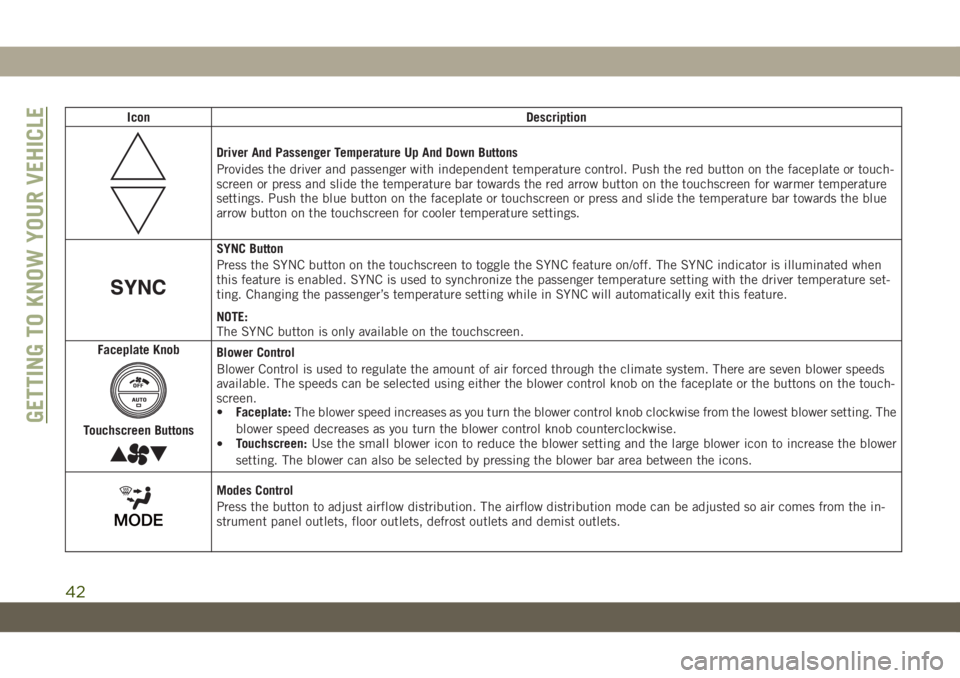
Icon Description
Driver And Passenger Temperature Up And Down Buttons
Provides the driver and passenger with independent temperature control. Push the red button on the faceplate or touch-
screen or press and slide the temperature bar towards the red arrow button on the touchscreen for warmer temperature
settings. Push the blue button on the faceplate or touchscreen or press and slide the temperature bar towards the blue
arrow button on the touchscreen for cooler temperature settings.
SYNC Button
Press the SYNC button on the touchscreen to toggle the SYNC feature on/off. The SYNC indicator is illuminated when
this feature is enabled. SYNC is used to synchronize the passenger temperature setting with the driver temperature set-
ting. Changing the passenger’s temperature setting while in SYNC will automatically exit this feature.
NOTE:
The SYNC button is only available on the touchscreen.
Faceplate Knob
Touchscreen Buttons
Blower Control
Blower Control is used to regulate the amount of air forced through the climate system. There are seven blower speeds
available. The speeds can be selected using either the blower control knob on the faceplate or the buttons on the touch-
screen.
•Faceplate:The blower speed increases as you turn the blower control knob clockwise from the lowest blower setting. The
blower speed decreases as you turn the blower control knob counterclockwise.
•Touchscreen:Use the small blower icon to reduce the blower setting and the large blower icon to increase the blower
setting. The blower can also be selected by pressing the blower bar area between the icons.
Modes Control
Press the button to adjust airflow distribution. The airflow distribution mode can be adjusted so air comes from the in-
strument panel outlets, floor outlets, defrost outlets and demist outlets.
GETTING TO KNOW YOUR VEHICLE
42