display JEEP WRANGLER UNLIMITED 2014 Owner's Manual
[x] Cancel search | Manufacturer: JEEP, Model Year: 2014, Model line: WRANGLER UNLIMITED, Model: JEEP WRANGLER UNLIMITED 2014Pages: 140, PDF Size: 12.72 MB
Page 75 of 140
Route Options
• After pressing the “OPTIONS” soft-key in the Route Guidance Menu, the following
information is displayed:
• In the left half of the screen, the current position and the current routing method
are displayed.
• “Take Detour” will allow you to calculate a different route.
• “Find Nearby POI” to search for a local POI.
• “Destination Info” displays destination information.
• “View Turn List” lists streets utilized for the current route.
• “Save Destination” to save the destination address.
• “Change Method” will allow you to change the routing method.
SiriusXM SATELLITE RADIO/TRAVEL LINK • SiriusXM Travel Link requires a subscription, sold separately after the 1 year trial
subscription included with your vehicle purchase.
• SiriusXM Travel Link is only available in the United States.
• The following describes features that are available when in SiriusXM Satellite
Radio mode.
• To access SiriusXM Satellite Radio, press the “RADIO/MEDIA” or “RADIO” and
then touch the “SAT” soft-key tab.
Info
• Touch the “i” soft-key to view detailed information about the current Sirius XM
Satellite channel.
SiriusXM Parental Controls
• SiriusXM offers the option to permanently block selected channels. Call
1-888-539-7474 and request the Family Package.
• Uconnect ®
430/430N and 730N: Press the “MENU” hard-key while in SiriusXM
Satellite Radio Mode, then touch the “Channel Lock” to enable and/or disable
desired channels. The SEEK and SCAN function will then only display channels
without Channel lock.
ELECTRONICS
73
Page 77 of 140
Display SAT Favorites List
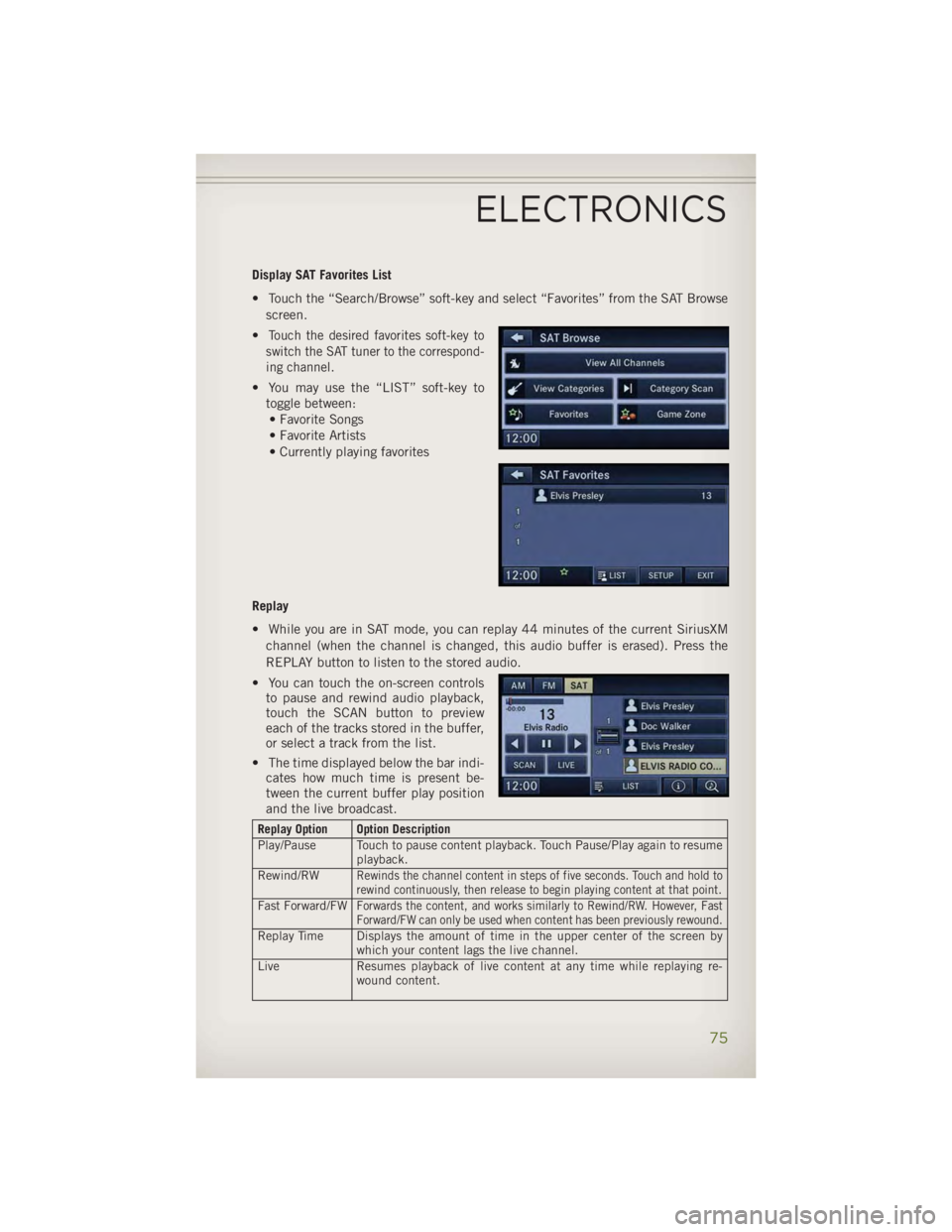
• Touch the “Search/Browse” soft-key and select “Favorites” from the SAT Browse
screen.
• Touch the desired favorites soft-key to
switch the SAT tuner to the correspond-
ing channel.
• You may use the “LIST” soft-key to
toggle between:
• Favorite Songs
• Favorite Artists
• Currently playing favorites
Replay
• While you are in SAT mode, you can replay 44 minutes of the current SiriusXM
channel (when the channel is changed, this audio buffer is erased). Press the
REPLAY button to listen to the stored audio.
• You can touch the on-screen controls
to pause and rewind audio playback,
touch the SCAN button to preview
each of the tracks stored in the buffer,
or select a track from the list.
• The time displayed below the bar indi-
cates how much time is present be-
tween the current buffer play position
and the live broadcast. Replay Option Option Description
Play/Pause Touch to pause content playback. Touch Pause/Play again to resume
playback.
Rewind/RW
Rewinds the channel content in steps of five seconds. Touch and hold to
rewind continuously, then release to begin playing content at that point.
Fast Forward/FW Forwards the content, and works similarly to Rewind/RW. However, Fast
Forward/FW can only be used when content has been previously rewound.
Replay Time Displays the amount of time in the upper center of the screen by
which your content lags the live channel.
Live Resumes playback of live content at any time while replaying re-
wound content.ELECTRONICS
75
Page 80 of 140
NOTE:
The USB port supports certain Mini, Classic, Nano, Touch, and iPhone ®
devices. The
USB port also supports playing music from compatible external USB Mass Storage
Class memory devices. For supported audio file formats, refer to the USB Port section
in the Owner's Manual on the DVD. Refer to www.UconnectPhone.com website for a
list of tested iPod ®
s. Some iPod ®
software versions may not fully support the USB
port features. Please visit Apple’s website for iPod ®
software updates.
WARNING!Do not plug in or remove the iPod ®
or external device while driving. Failure to
follow this warning could result in a collision.
Uconnect® Phone • To determine if your vehicle is equipped with Uconnect ®
Phone, press the
“Uconnect ®
Phone” button located on the radio faceplate. If your vehicle has
this feature, you will hear a voice prompt. If not, you will see a message on the
radio “Uconnect ®
Phone not available.”
• The Uconnect ®
Phone is a voice-activated, hands-free, in-vehicle communica-
tions system with Voice Command Capability (see Voice Command section).
NOTE:
To access the tutorial, press the “Uconnect ®
Phone” button . After the BEEP,
say “tutorial.” Press any hard-key/button or touch the display (Touch-Screen radio) to
cancel the “tutorial.”
• The Uconnect ®
Phone allows you to dial a phone number with your mobile phone
using simple voice commands.
• Refer to your vehicle Owner's Manual on the DVD for further details.
NOTE:
The Uconnect ®
Phone requires a mobile phone equipped with the Bluetooth ®
Hands-Free Profile, Version 1.0 or higher. For Uconnect ®
Customer Support: U.S.
residents - visit www.UconnectPhone.com or call 1–877–855–8400. Canadian
residents - visit www.UconnectPhone.com or call, 1-800-465–2001 (English) or
1-800-387-9983 (French). This site will provide specific instructions based on the
type of mobile phone being paired.
ELECTRONICS
78
Page 85 of 140
While In: Voice Command Example:
Memo Mode To switch to the voice recorder mode, say “Memo.”
The following are common voice commands for this mode:
“New Memo” (to record a new memo) — During the
recording, you may press the Voice Command
button
to stop recording. You proceed by
saying one of the following commands:
— “Save” (to save the memo)
— “Continue” (to continue recording)
— “Delete” (to delete the recording)
— “Play Memos” (to play previously recorded memos) —
During the playback you may press the Voice Command
button
to stop playing memos. You proceed by
saying one of the following commands:
— “Repeat” (to repeat a memo)
— “Next” (to play the next memo)
— “Previous” (to play the previous memo)
— “Delete” (to delete a memo)
— “Delete All” (to delete all memos)
Voice Text Reply • If equipped with Uconnect ®
Voice Command, your Uconnect ®
430N, 730N &
731N radios may be able to play incoming Short Message Service (SMS) messages
(text messages) through the vehicle's sound system.
• It also allows you to respond by selecting from various pre - defined phrases.
• Not all phones are compatible with this feature. Refer to the phone compatibility
list at www.UconnectPhone.com. Connected mobile phones must be bluetooth-
compatible and paired with your radio.
• Press the “Voice Command” button and after the BEEP, say “SMS” to get
started.
NOTE:
To access the tutorial, press the “Voice Command” button
. After the BEEP,
say “tutorial.” Press any hard-key/button or touch the display (Touch-Screen radio) to
cancel the tutorial.
WARNING!Any voice commanded system should be used only in safe driving conditions
following applicable laws regarding phone use. Your attention should be focused
on safely operating the vehicle. Failure to do so may result in a collision causing
you and others to be severely injured or killed.ELECTRONICS
83
Page 86 of 140
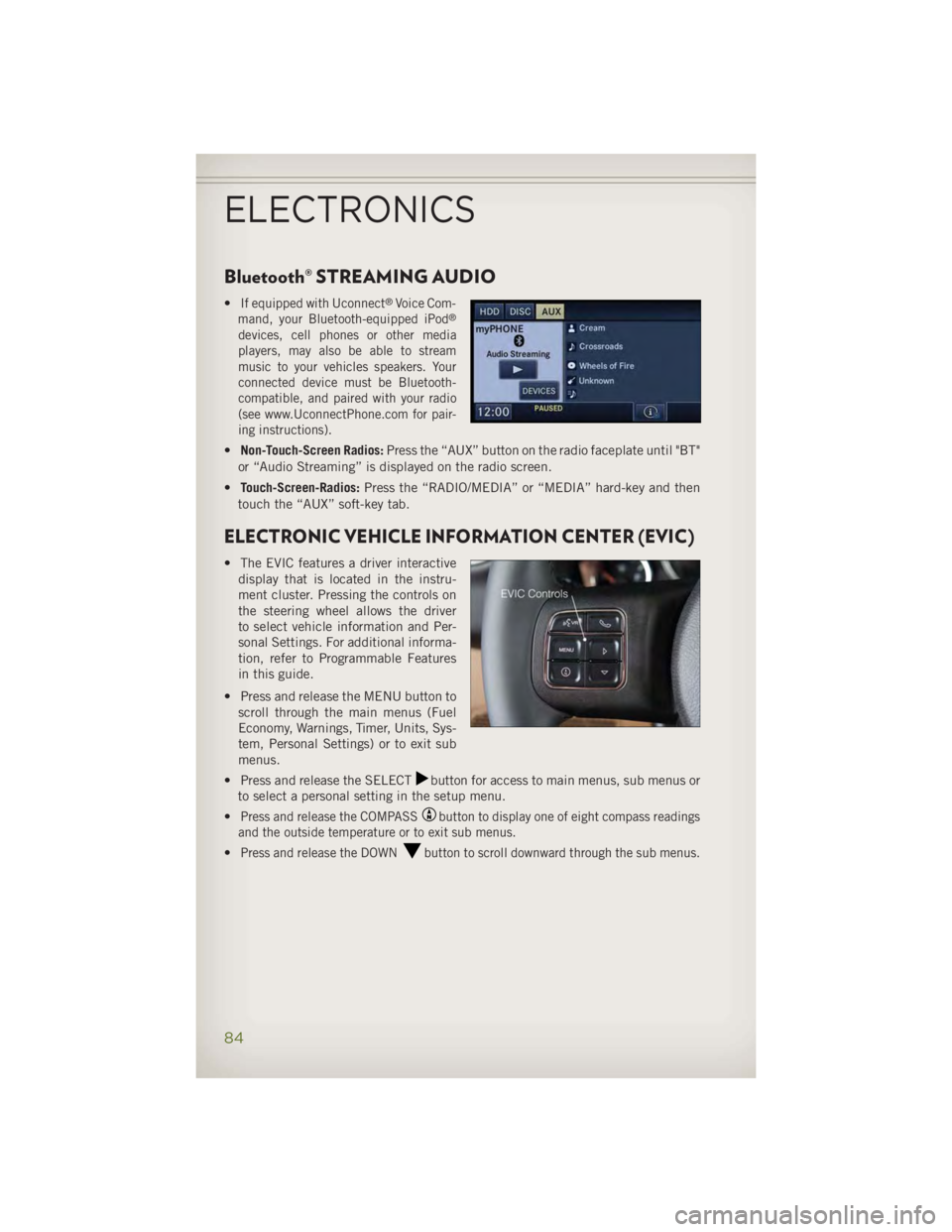
Bluetooth® STREAMING AUDIO • If equipped with Uconnect ®
Voice Com-
mand, your Bluetooth-equipped iPod ®
devices, cell phones or other media
players, may also be able to stream
music to your vehicles speakers. Your
connected device must be Bluetooth-
compatible, and paired with your radio
(see www.UconnectPhone.com for pair-
ing instructions).
• Non-Touch-Screen Radios: Press the “AUX” button on the radio faceplate until "BT"
or “Audio Streaming” is displayed on the radio screen.
• Touch-Screen-Radios: Press the “RADIO/MEDIA” or “MEDIA” hard-key and then
touch the “AUX” soft-key tab.
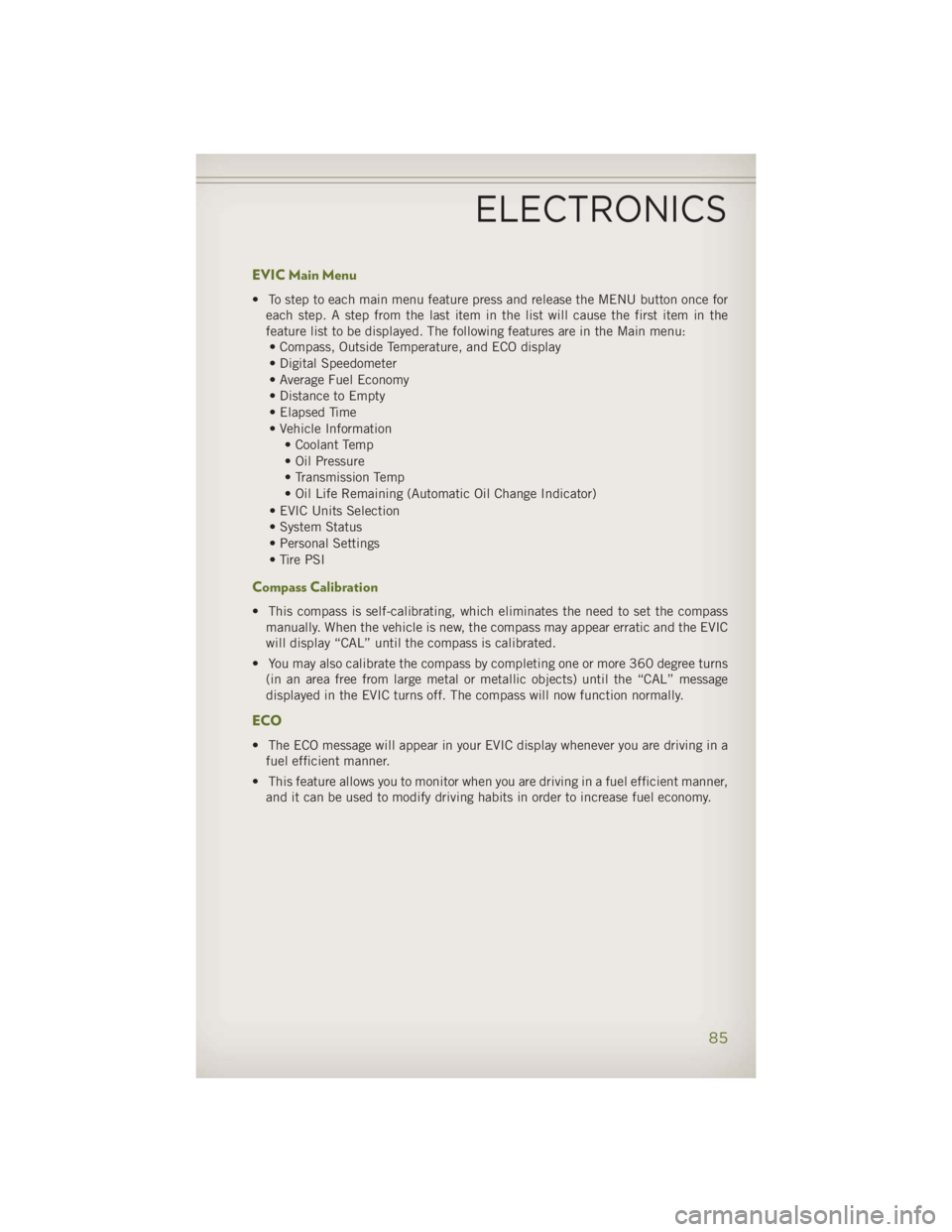
ELECTRONIC VEHICLE INFORMATION CENTER (EVIC) • The EVIC features a driver interactive
display that is located in the instru-
ment cluster. Pressing the controls on
the steering wheel allows the driver
to select vehicle information and Per-
sonal Settings. For additional informa-
tion, refer to Programmable Features
in this guide.
• Press and release the MENU button to
scroll through the main menus (Fuel
Economy, Warnings, Timer, Units, Sys-
tem, Personal Settings) or to exit sub
menus.
• Press and release the SELECT button for access to main menus, sub menus or
to select a personal setting in the setup menu.
• Press and release the COMPASS button to display one of eight compass readings
and the outside temperature or to exit sub menus.
• Press and release the DOWN button to scroll downward through the sub menus.
ELECTRONICS
84
Page 87 of 140
EVIC Main Menu • To step to each main menu feature press and release the MENU button once for
each step. A step from the last item in the list will cause the first item in the
feature list to be displayed. The following features are in the Main menu:
• Compass, Outside Temperature, and ECO display
• Digital Speedometer
• Average Fuel Economy
• Distance to Empty
• Elapsed Time
• Vehicle Information
• Coolant Temp
• Oil Pressure
• Transmission Temp
• Oil Life Remaining (Automatic Oil Change Indicator)
• EVIC Units Selection
• System Status
• Personal Settings
• Tire PSI
Compass Calibration • This compass is self-calibrating, which eliminates the need to set the compass
manually. When the vehicle is new, the compass may appear erratic and the EVIC
will display “CAL” until the compass is calibrated.
• You may also calibrate the compass by completing one or more 360 degree turns
(in an area free from large metal or metallic objects) until the “CAL” message
displayed in the EVIC turns off. The compass will now function normally.
ECO • The ECO message will appear in your EVIC display whenever you are driving in a
fuel efficient manner.
• This feature allows you to monitor when you are driving in a fuel efficient manner,
and it can be used to modify driving habits in order to increase fuel economy.
ELECTRONICS
85
Page 88 of 140
PROGRAMMABLE FEATURES Electronic Vehicle Information Center (EVIC) • The EVIC can be used to program the following Personal Settings. Press and
release the MENU button until Personal Settings displays, then press the DOWN
button to scroll through the settings. Press the SELECT button to change
the setting. • Language • Illumin Approach
• Auto UNLK On Exit • Hill Start Assist (HSA)
• RKE Unlock • Display Units of Measure In
• Sound Horn With RKE Lock • Nav – Turn by Turn
• Flash Lamp With Lock • Display Fuel Saver
• Headlamp Off Delay • Compass Variance
• Headlamps With Wipers • Calibrate Compass
• Key-Off Power Delay
Key Fob Programmable Features
• The following features may also be programmed by using the Key Fob transmitter
or the ignition switch and driver's door lock switch.
NOTE:
Pressing the LOCK button while you are inside the vehicle will activate the Vehicle
Security Alarm. Opening a door with the Vehicle Security Alarm activated will cause
the alarm to sound. Press the UNLOCK button to deactivate the Vehicle Security
Alarm. Flashing Lamps With Lock
• The turn signal lights flashing, when the doors are locked or unlocked, feature can
be turned on or off. To turn this feature on or off:
• Press and hold the UNLOCK button for at least 4 seconds, but no longer than
10 seconds. Then, press and hold the LOCK button while still holding the
UNLOCK button.
• Release both buttons at the same time.
ELECTRONICS
86
Page 117 of 140
CAUTION!• Mixing of engine coolant (antifreeze) other than specified Organic Additive
Technology (OAT) engine coolant (antifreeze), may result in engine damage and
may decrease corrosion protection. Organic Additive Technology (OAT) engine
coolant is different and should not be mixed with Hybrid Organic Additive
Technology (HOAT) engine coolant (antifreeze) or any “globally compatible”
coolant (antifreeze). If a non-OAT engine coolant (antifreeze) is introduced into
the cooling system in an emergency, the cooling system will need to be drained,
flushed, and refilled with fresh OAT coolant (conforming to MS-12106), by an
authorized dealer as soon as possible.
• Do not use water alone or alcohol-based engine coolant (antifreeze) products.
Do not use additional rust inhibitors or antirust products, as they may not be
compatible with the radiator engine coolant and may plug the radiator.
• This vehicle has not been designed for use with propylene glycol-based engine
coolant (antifreeze). Use of propylene glycol-based engine coolant (antifreeze)
is not recommended.
E85 FLEXIBLE FUEL — 3.6L ENGINE ONLY Refer to your Owner's Manual on the DVD for further details.
CAUTION!Only vehicles with the E-85 fuel filler door label or a yellow gas cap can operate
on E-85.
MAINTENANCE SCHEDULE Your vehicle is equipped with an automatic oil change indicator system. The oil change
indicator system will remind you that it is time to take your vehicle in for scheduled
maintenance.
Based on engine operation conditions, the oil change indicator message will
illuminate. This means that service is required for your vehicle. Operating conditions
such as frequent short-trips, trailer tow, extremely hot or cold ambient temperatures,
and E85 fuel usage will influence when the “Change Oil” or “Oil Change Required”
message is displayed. Severe Operating Conditions can cause the change oil
message to illuminate as early as 3,500 miles (5,600 km) since last reset. Have your
vehicle serviced as soon as possible, within the next 500 miles (805 km).MAINTAINING YOUR VEHICLE
115
Page 118 of 140
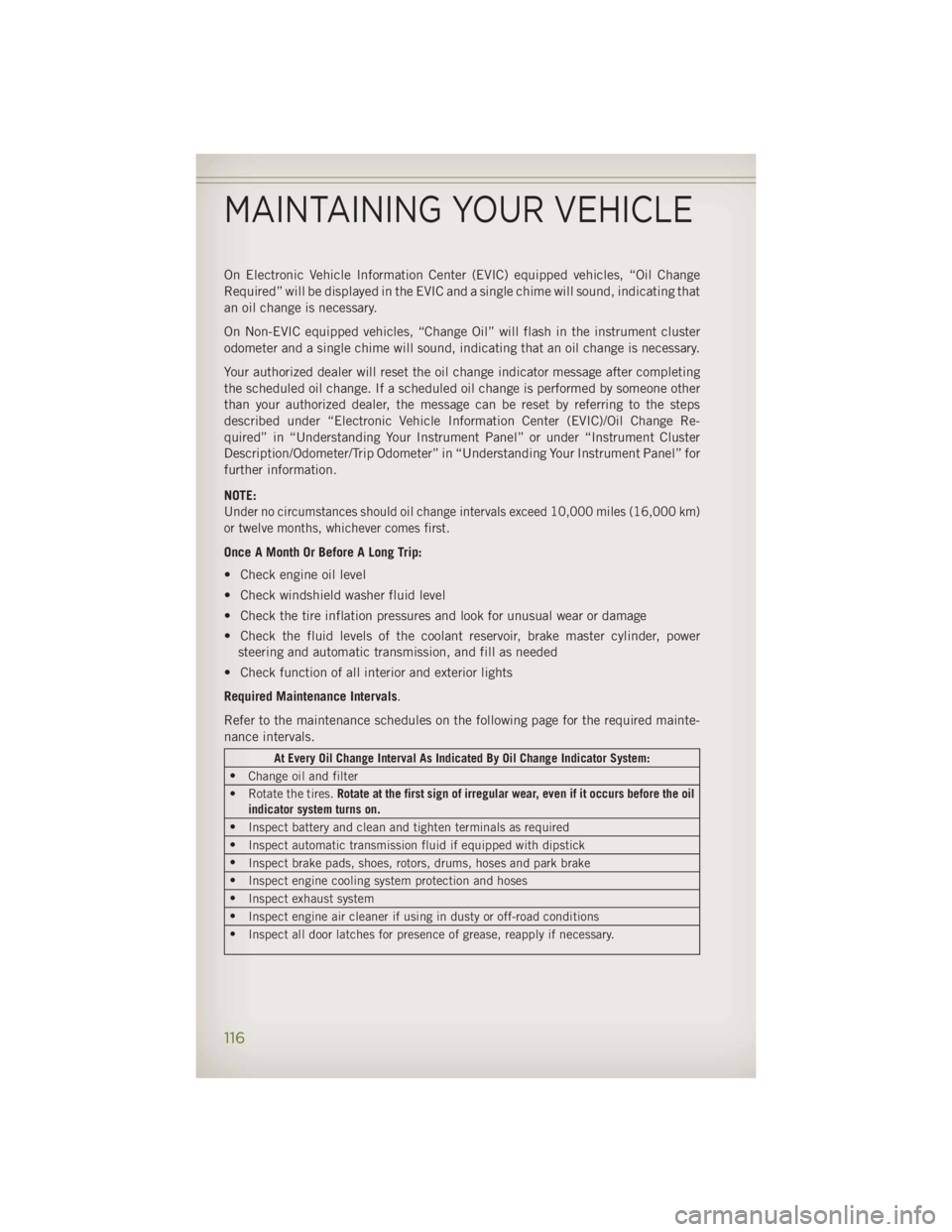
On Electronic Vehicle Information Center (EVIC) equipped vehicles, “Oil Change
Required” will be displayed in the EVIC and a single chime will sound, indicating that
an oil change is necessary.
On Non-EVIC equipped vehicles, “Change Oil” will flash in the instrument cluster
odometer and a single chime will sound, indicating that an oil change is necessary.
Your authorized dealer will reset the oil change indicator message after completing
the scheduled oil change. If a scheduled oil change is performed by someone other
than your authorized dealer, the message can be reset by referring to the steps
described under “Electronic Vehicle Information Center (EVIC)/Oil Change Re-
quired” in “Understanding Your Instrument Panel” or under “Instrument Cluster
Description/Odometer/Trip Odometer” in “Understanding Your Instrument Panel” for
further information.
NOTE:
Under no circumstances should oil change intervals exceed 10,000 miles (16,000 km)
or twelve months, whichever comes first.
Once A Month Or Before A Long Trip:
• Check engine oil level
• Check windshield washer fluid level
• Check the tire inflation pressures and look for unusual wear or damage
• Check the fluid levels of the coolant reservoir, brake master cylinder, power
steering and automatic transmission, and fill as needed
• Check function of all interior and exterior lights
Required Maintenance Intervals .
Refer to the maintenance schedules on the following page for the required mainte-
nance intervals. At Every Oil Change Interval As Indicated By Oil Change Indicator System:
•
Change oil and filter
• Rotate the tires. Rotate at the first sign of irregular wear, even if it occurs before the oil
indicator system turns on.
•
Inspect battery and clean and tighten terminals as required
•
Inspect automatic transmission fluid if equipped with dipstick
•
Inspect brake pads, shoes, rotors, drums, hoses and park brake
•
Inspect engine cooling system protection and hoses
•
Inspect exhaust system
•
Inspect engine air cleaner if using in dusty or off-road conditions
•
Inspect all door latches for presence of grease, reapply if necessary.MAINTAINING YOUR VEHICLE
116