air condition JEEP WRANGLER UNLIMITED 2014 Owners Manual
[x] Cancel search | Manufacturer: JEEP, Model Year: 2014, Model line: WRANGLER UNLIMITED, Model: JEEP WRANGLER UNLIMITED 2014Pages: 140, PDF Size: 12.72 MB
Page 24 of 140
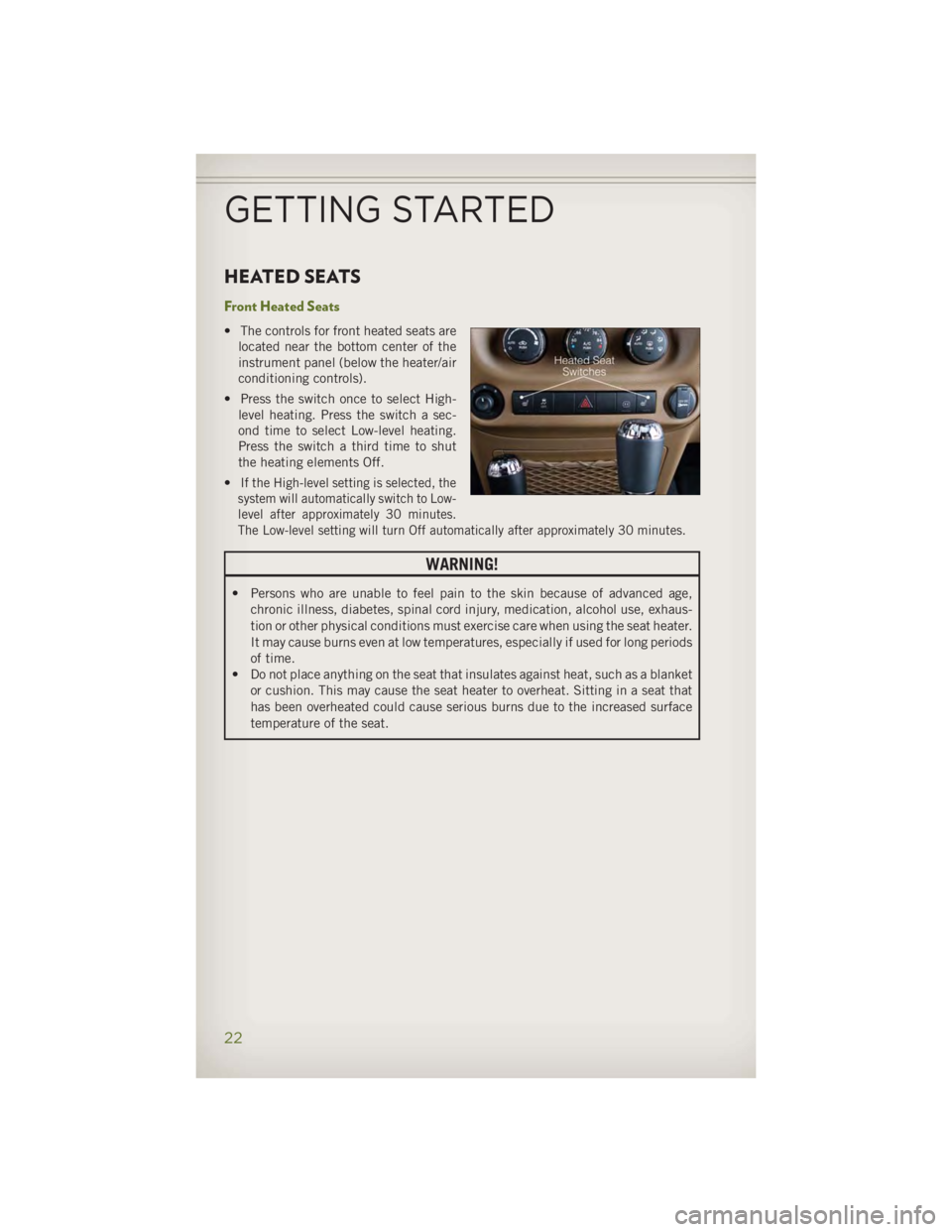
HEATED SEATS Front Heated Seats • The controls for front heated seats are
located near the bottom center of the
instrument panel (below the heater/air
conditioning controls).
• Press the switch once to select High-
level heating. Press the switch a sec-
ond time to select Low-level heating.
Press the switch a third time to shut
the heating elements Off.
• If the High-level setting is selected, the
system will automatically switch to Low-
level after approximately 30 minutes.
The Low-level setting will turn Off automatically after approximately 30 minutes.
WARNING!• Persons who are unable to feel pain to the skin because of advanced age,
chronic illness, diabetes, spinal cord injury, medication, alcohol use, exhaus-
tion or other physical conditions must exercise care when using the seat heater.
It may cause burns even at low temperatures, especially if used for long periods
of time.
• Do not place anything on the seat that insulates against heat, such as a blanket
or cushion. This may cause the seat heater to overheat. Sitting in a seat that
has been overheated could cause serious burns due to the increased surface
temperature of the seat.
GETTING STARTED
22
Page 30 of 140
AUTOMATIC TEMPERATURE CONTROLS (ATC)
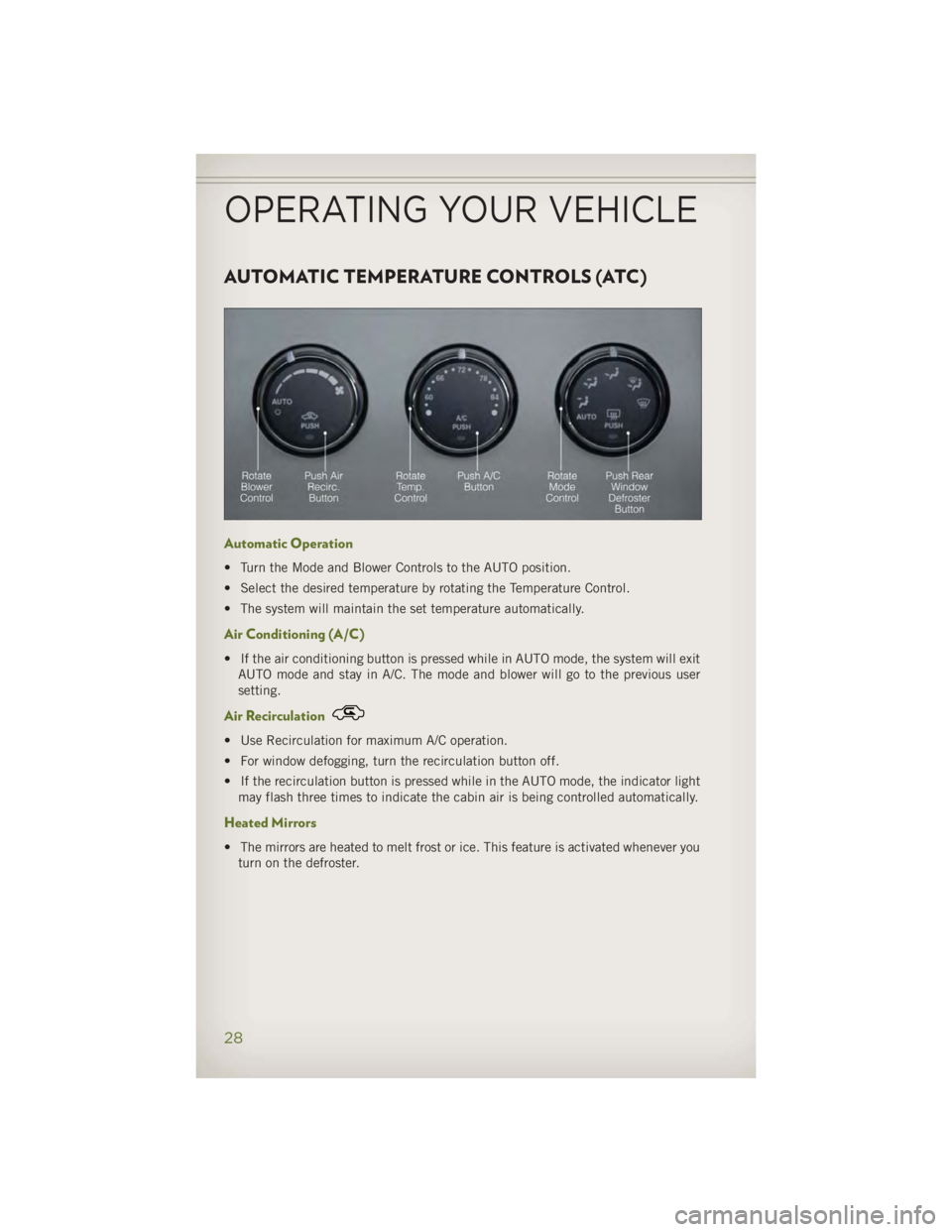
Automatic Operation • Turn the Mode and Blower Controls to the AUTO position.
• Select the desired temperature by rotating the Temperature Control.
• The system will maintain the set temperature automatically.
Air Conditioning (A/C) • If the air conditioning button is pressed while in AUTO mode, the system will exit
AUTO mode and stay in A/C. The mode and blower will go to the previous user
setting.
Air Recirculation • Use Recirculation for maximum A/C operation.
• For window defogging, turn the recirculation button off.
• If the recirculation button is pressed while in the AUTO mode, the indicator light
may flash three times to indicate the cabin air is being controlled automatically.
Heated Mirrors
• The mirrors are heated to melt frost or ice. This feature is activated whenever you
turn on the defroster.
OPERATING YOUR VEHICLE
28
Page 83 of 140
Transfer Ongoing Call Between Handset And Vehicle • During a call, press the “Voice Command” button .
• After the BEEP, say “transfer call.”
Changing The Volume • Start a dialogue by pressing the “Phone” button , then adjust the volume
during a normal call.
• Use the radio ON/OFF VOLUME rotary knob to adjust the volume to a comfortable
level while the Uconnect ®
system is speaking. Please note the volume setting for
Uconnect ®
is different than the audio system.
WARNING!• Any voice commanded system should be used only in safe driving conditions
following applicable laws regarding phone use. Your attention should be
focused on safely operating the vehicle. Failure to do so may result in a
collision causing you and others to be severely injured or killed.
• In an emergency, to use Uconnect ®
Phone, your mobile phone must be:
• turned on,
• paired to Uconnect ®
Phone,
• and have network coverage.
Uconnect® VOICE COMMAND Voice Command Operation • The Uconnect ®
Voice Command system allows you to control your AM, FM radio,
satellite radio, disc player, HDD, Uconnect ®
Phone, a memo recorder, and
supported portable media devices.
• When you press the “Voice Command” button located on the radio
faceplate or steering wheel, you will hear a beep. The beep is your signal to give a
command. If you do not say a command within a few seconds, the system will
present you with a list of options. If you ever wish to interrupt the system while it
lists options, press the “Voice Command” button , listen for the BEEP, and
say your command.
NOTE:
Visit http://www.driveuconnect.com/features/voiceCommand/ for more info on which
voice command features apply to your vehicle.ELECTRONICS
81
Page 85 of 140
While In: Voice Command Example:
Memo Mode To switch to the voice recorder mode, say “Memo.”
The following are common voice commands for this mode:
“New Memo” (to record a new memo) — During the
recording, you may press the Voice Command
button
to stop recording. You proceed by
saying one of the following commands:
— “Save” (to save the memo)
— “Continue” (to continue recording)
— “Delete” (to delete the recording)
— “Play Memos” (to play previously recorded memos) —
During the playback you may press the Voice Command
button
to stop playing memos. You proceed by
saying one of the following commands:
— “Repeat” (to repeat a memo)
— “Next” (to play the next memo)
— “Previous” (to play the previous memo)
— “Delete” (to delete a memo)
— “Delete All” (to delete all memos)
Voice Text Reply • If equipped with Uconnect ®
Voice Command, your Uconnect ®
430N, 730N &
731N radios may be able to play incoming Short Message Service (SMS) messages
(text messages) through the vehicle's sound system.
• It also allows you to respond by selecting from various pre - defined phrases.
• Not all phones are compatible with this feature. Refer to the phone compatibility
list at www.UconnectPhone.com. Connected mobile phones must be bluetooth-
compatible and paired with your radio.
• Press the “Voice Command” button and after the BEEP, say “SMS” to get
started.
NOTE:
To access the tutorial, press the “Voice Command” button
. After the BEEP,
say “tutorial.” Press any hard-key/button or touch the display (Touch-Screen radio) to
cancel the tutorial.
WARNING!Any voice commanded system should be used only in safe driving conditions
following applicable laws regarding phone use. Your attention should be focused
on safely operating the vehicle. Failure to do so may result in a collision causing
you and others to be severely injured or killed.ELECTRONICS
83
Page 99 of 140
• IF THE LIGHT STARTS FLASHING INDICATING A LOW TIRE PRESSURE, ADJUST THE AIR
PRESSURE IN THE LOW TIRE TO THE AIR PRESSURE SHOWN ON THE VEHICLE PLACARD
OR TIRE INFLATION PRESSURE LABEL LOCATED ON THE DRIVER'S DOOR.
NOTE:
AFTER INFLATION, THE VEHICLE MAY NEED TO BE DRIVEN FOR 20 MINUTES
BEFORE THE FLASHING LIGHT WILL TURN OFF.
• Please note that the TPMS is not a substitute for proper tire maintenance, and it
is the driver’s responsibility to maintain correct tire pressure, even if under-
inflation has not reached the level to trigger illumination of the TPMS low tire
pressure telltale.
• Your vehicle has also been equipped with a TPMS malfunction indicator to
indicate when the system is not operating properly. The TPMS malfunction
indicator is combined with the low tire pressure telltale. When the system detects
a malfunction, the telltale will flash for approximately one minute and then remain
continuously illuminated. This sequence will continue each time the vehicle is
restarted as long as the malfunction exists.
• When the malfunction indicator is illuminated, the system may not be able to
detect or signal low tire pressure as intended. TPMS malfunctions may occur for a
variety of reasons, including the installation of replacement or alternate tires or
wheels on the vehicle that prevent the TPMS from functioning properly. Always
check the TPMS malfunction telltale after replacing one or more tires or wheels on
your vehicle, to ensure that the replacement or alternate tires and wheels allow the
TPMS to continue to function properly.
NOTE:
Tire pressures change by approximately 1 psi (7 kPa) per 12° F (7° C) of air temperature
change. Keep this in mind when checking tire pressure inside a garage, especially in the
Winter. Example: If garage temperature is 68°F (20°C) and the outside temperature is
32°F (0°C), then the cold tire inflation pressure should be increased by 3 psi (21 kPa),
which equals 1 psi (7 kPa) for every 12°F (7°C) for this outside temperature condition.
CAUTION!The TPMS has been optimized for the original equipment tires and wheels. TPMS
pressures and warning have been established for the tire size equipped on your
vehicle. Undesirable system operation or sensor damage may result when using
replacement equipment that is not of the same size, type, and/or style. Aftermar-
ket wheels can cause sensor damage. Do not use tire sealant from a can, or
balance beads if your vehicle is equipped with a TPMS, as damage to the sensors
may result.WHAT TO DO IN EMERGENCIES
97
Page 103 of 140
IF YOUR ENGINE OVERHEATS • In any of the following situations, you can reduce the potential for overheating by
taking the appropriate action.
• On the highways — slow down.
• In city traffic — while stopped, shift the transmission to NEUTRAL, but do not
increase engine idle speed.
NOTE:
There are steps that you can take to slow down an impending overheat condition:
• If your air conditioner (A/C) is on, turn it off. The A/C system adds heat to the
engine cooling system and turning the A/C off can help remove this heat.
• You can also turn the temperature control to maximum heat, the mode control to
floor and the blower control to high. This allows the heater core to act as a
supplement to the radiator and aids in removing heat from the engine cooling
system.
CAUTION!Driving with a hot cooling system could damage your vehicle. If the temperature
gauge reads HOT (H), pull over and stop the vehicle. Idle the vehicle with the air
conditioner turned off until the pointer drops back into the normal range. If the
pointer remains on HOT (H), and you hear continuous chimes, turn the engine off
immediately, and call for service.
WARNING!You or others can be badly burned by hot engine coolant (antifreeze) or steam from
your radiator. If you see or hear steam coming from under the hood, do not open
the hood until the radiator has had time to cool. Never try to open a cooling system
pressure cap when the radiator or coolant bottle is hot.
WHAT TO DO IN EMERGENCIES
101
Page 113 of 140
EVENT DATA RECORDER (EDR) • This vehicle is equipped with an Event Data Recorder (EDR). The main purpose of
an EDR is to record, in certain crash or near crash-like situations, such as an air
bag deployment or hitting a road obstacle, data that assists in understanding how a
vehicle’s systems performed. The EDR is designed to record data related to vehicle
dynamics and safety systems for a short period of time, typically 30 seconds or
less. The EDR in this vehicle is designed to record such data as:
• How various systems in your vehicle were operating.
• Whether or not the driver and passenger safety belts were buckled/fastened.
• How far (if at all) the driver was depressing the accelerator and/or brake pedal.
• How fast the vehicle was traveling.
• These data can help provide a better understanding of the circumstances in which
crashes and injuries occur.
NOTE:
EDR data are recorded by your vehicle only if a non-trivial crash situation occurs; no
data are recorded by the EDR under normal driving conditions and no personal data
(e.g. name, gender, age, and crash location) are recorded. However, other parties,
such as law enforcement, could combine the EDR data with the type of personally
identifying data routinely acquired during a crash investigation.
• To read data recorded by an EDR, special equipment is required, and access to the
vehicle or the EDR is needed. In addition to the vehicle manufacturer, other parties
such as law enforcement, that have the special equipment, can read the informa-
tion if they have access to the vehicle or the EDR.
WHAT TO DO IN EMERGENCIES
111
Page 118 of 140
On Electronic Vehicle Information Center (EVIC) equipped vehicles, “Oil Change
Required” will be displayed in the EVIC and a single chime will sound, indicating that
an oil change is necessary.
On Non-EVIC equipped vehicles, “Change Oil” will flash in the instrument cluster
odometer and a single chime will sound, indicating that an oil change is necessary.
Your authorized dealer will reset the oil change indicator message after completing
the scheduled oil change. If a scheduled oil change is performed by someone other
than your authorized dealer, the message can be reset by referring to the steps
described under “Electronic Vehicle Information Center (EVIC)/Oil Change Re-
quired” in “Understanding Your Instrument Panel” or under “Instrument Cluster
Description/Odometer/Trip Odometer” in “Understanding Your Instrument Panel” for
further information.
NOTE:
Under no circumstances should oil change intervals exceed 10,000 miles (16,000 km)
or twelve months, whichever comes first.
Once A Month Or Before A Long Trip:
• Check engine oil level
• Check windshield washer fluid level
• Check the tire inflation pressures and look for unusual wear or damage
• Check the fluid levels of the coolant reservoir, brake master cylinder, power
steering and automatic transmission, and fill as needed
• Check function of all interior and exterior lights
Required Maintenance Intervals .
Refer to the maintenance schedules on the following page for the required mainte-
nance intervals. At Every Oil Change Interval As Indicated By Oil Change Indicator System:
•
Change oil and filter
• Rotate the tires. Rotate at the first sign of irregular wear, even if it occurs before the oil
indicator system turns on.
•
Inspect battery and clean and tighten terminals as required
•
Inspect automatic transmission fluid if equipped with dipstick
•
Inspect brake pads, shoes, rotors, drums, hoses and park brake
•
Inspect engine cooling system protection and hoses
•
Inspect exhaust system
•
Inspect engine air cleaner if using in dusty or off-road conditions
•
Inspect all door latches for presence of grease, reapply if necessary.MAINTAINING YOUR VEHICLE
116
Page 119 of 140
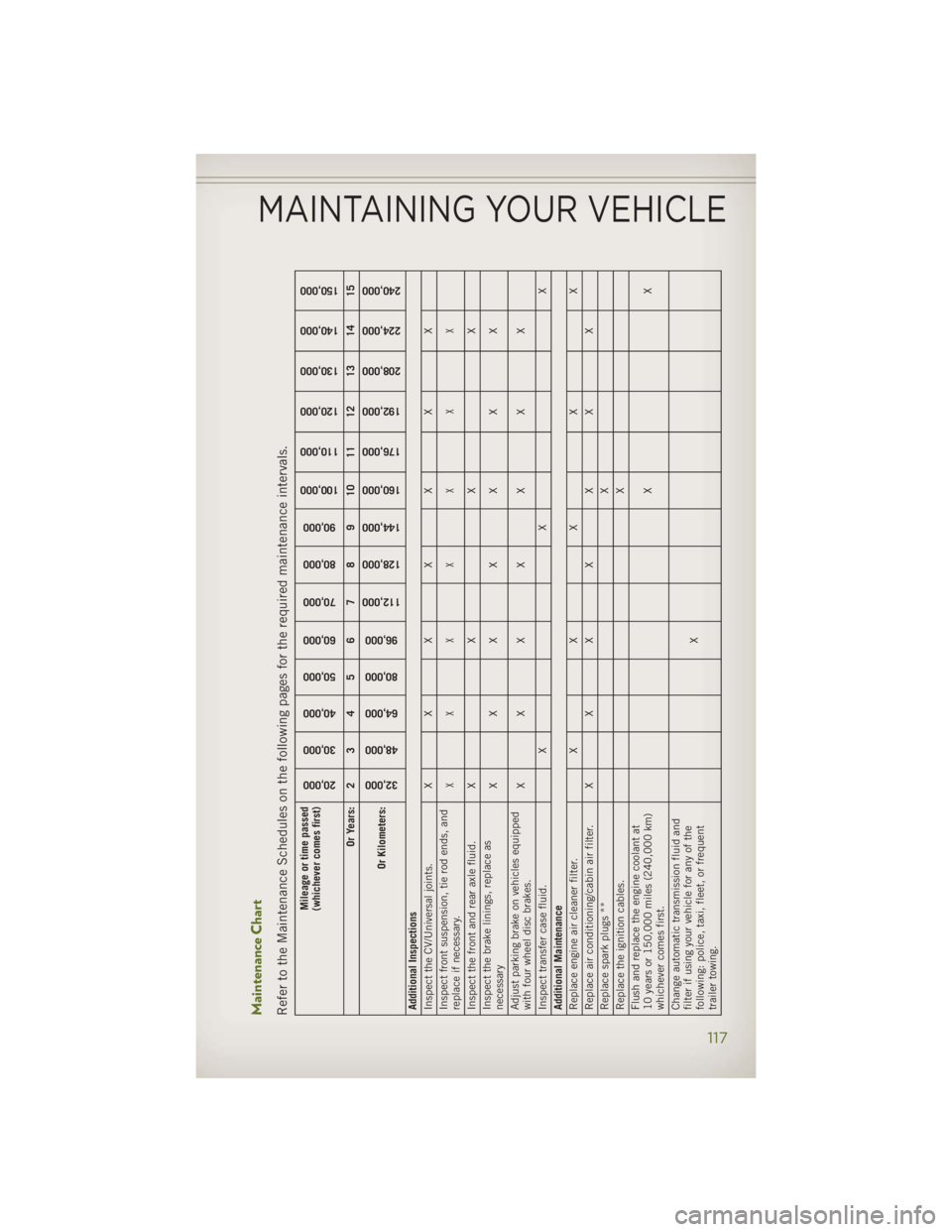
Maintenance Chart
Refer to the Maintenance Schedules on the following pages for the required maintenance intervals.
Mileage or time passed
(whichever comes first)
20,000
30,000
40,000
50,000
60,000
70,000
80,000
90,000
100,000
110,000
120,000
130,000
140,000
150,000 Or Years: 2 3 4 5 6 7 8 9 10 11 12 13 14 15
Or Kilometers:
32,000
48,000
64,000
80,000
96,000
112,000
128,000
144,000
160,000
176,000
192,000
208,000
224,000
240,000 Additional Inspections
Inspect the CV/Universal joints. X X X X X X X
Inspect front suspension, tie rod ends, and
replace if necessary. XX X X X X X
Inspect the front and rear axle fluid. X X X X
Inspect the brake linings, replace as
necessary XX X X X X X
Adjust parking brake on vehicles equipped
with four wheel disc brakes. XX X X X X X
Inspect transfer case fluid. X X X
Additional Maintenance
Replace engine air cleaner filter. X X X X X
Replace air conditioning/cabin air filter. X X X X X X X
Replace spark plugs ** X
Replace the ignition cables. X
Flush and replace the engine coolant at
10 years or 150,000 miles (240,000 km)
whichever comes first. XX
Change automatic transmission fluid and
filter if using your vehicle for any of the
following: police, taxi, fleet, or frequent
trailer towing. XMAINTAINING YOUR VEHICLE
117
Page 124 of 140
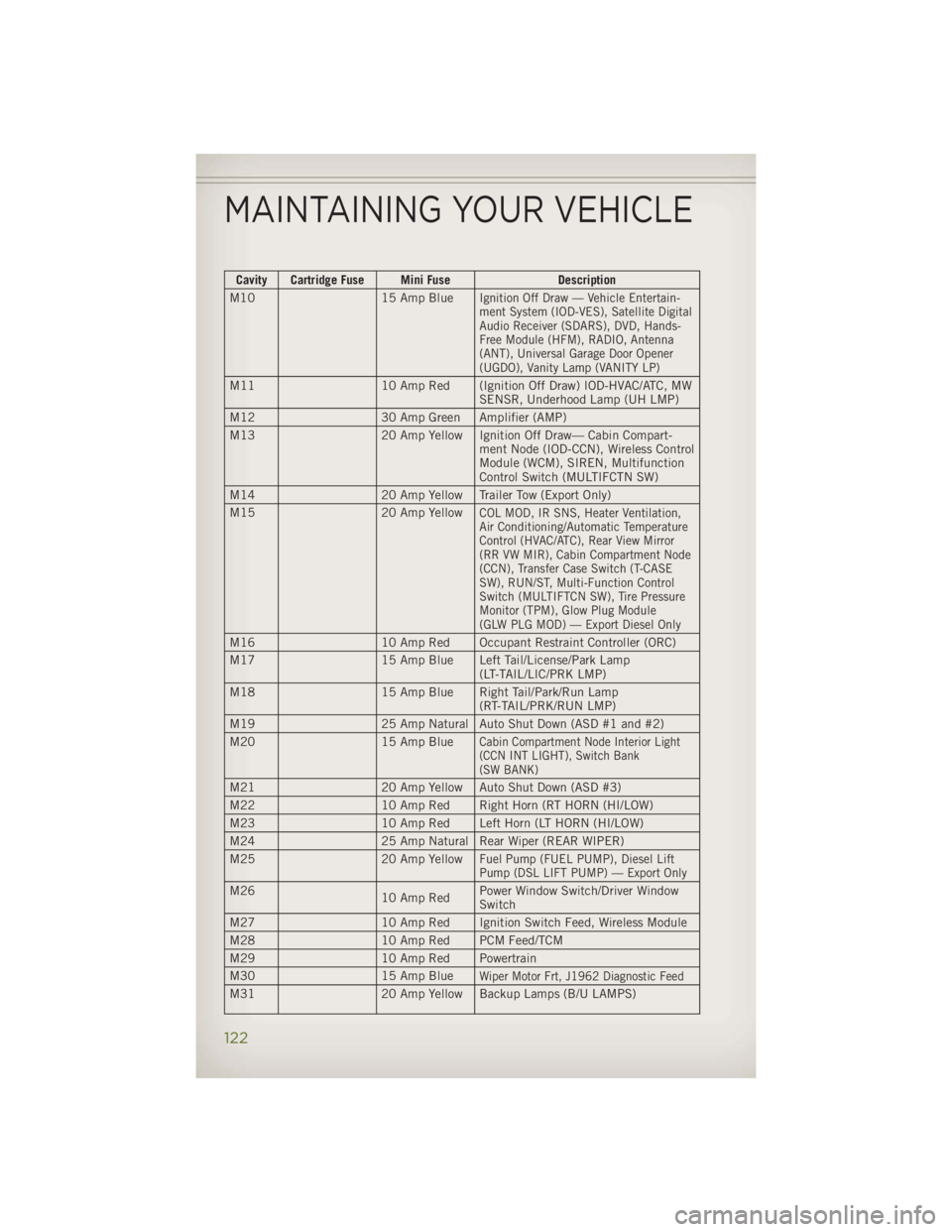
Cavity Cartridge Fuse Mini Fuse Description
M10 15 Amp Blue
Ignition Off Draw — Vehicle Entertain-
ment System (IOD-VES), Satellite Digital
Audio Receiver (SDARS), DVD, Hands-
Free Module (HFM), RADIO, Antenna
(ANT), Universal Garage Door Opener
(UGDO), Vanity Lamp (VANITY LP)
M11 10 Amp Red (Ignition Off Draw) IOD-HVAC/ATC, MW
SENSR, Underhood Lamp (UH LMP)
M12 30 Amp Green Amplifier (AMP)
M13 20 Amp Yellow Ignition Off Draw— Cabin Compart-
ment Node (IOD-CCN), Wireless Control
Module (WCM), SIREN, Multifunction
Control Switch (MULTIFCTN SW)
M14 20 Amp Yellow Trailer Tow (Export Only)
M15 20 Amp Yellow
COL MOD, IR SNS, Heater Ventilation,
Air Conditioning/Automatic Temperature
Control (HVAC/ATC), Rear View Mirror
(RR VW MIR), Cabin Compartment Node
(CCN), Transfer Case Switch (T-CASE
SW), RUN/ST, Multi-Function Control
Switch (MULTIFTCN SW), Tire Pressure
Monitor (TPM), Glow Plug Module
(GLW PLG MOD) — Export Diesel Only
M16 10 Amp Red Occupant Restraint Controller (ORC)
M17 15 Amp Blue Left Tail/License/Park Lamp
(LT-TAIL/LIC/PRK LMP)
M18 15 Amp Blue Right Tail/Park/Run Lamp
(RT-TAIL/PRK/RUN LMP)
M19 25 Amp Natural Auto Shut Down (ASD #1 and #2)
M20 15 Amp Blue
Cabin Compartment Node Interior Light
(CCN INT LIGHT), Switch Bank
(SW BANK)
M21 20 Amp Yellow Auto Shut Down (ASD #3)
M22 10 Amp Red Right Horn (RT HORN (HI/LOW)
M23 10 Amp Red Left Horn (LT HORN (HI/LOW)
M24 25 Amp Natural Rear Wiper (REAR WIPER)
M25 20 Amp Yellow
Fuel Pump (FUEL PUMP), Diesel Lift
Pump (DSL LIFT PUMP) — Export Only
M26
10 Amp Red Power Window Switch/Driver Window
Switch
M27 10 Amp Red Ignition Switch Feed, Wireless Module
M28 10 Amp Red PCM Feed/TCM
M29 10 Amp Red Powertrain
M30 15 Amp Blue
Wiper Motor Frt, J1962 Diagnostic Feed
M31 20 Amp Yellow Backup Lamps (B/U LAMPS)MAINTAINING YOUR VEHICLE
122