window KIA AMANTI 2006 Owner's Manual
[x] Cancel search | Manufacturer: KIA, Model Year: 2006, Model line: AMANTI, Model: KIA AMANTI 2006Pages: 322, PDF Size: 44.16 MB
Page 186 of 322
Driving your vehicle64
4
1
2
3
4
5
6
7
8
910
If warmer air is desired at floor
level for bi-level operation, set the
mode to the position and
adjust the temperature control to
maintain maximum comfort.
When maximum cooling is desired, set the temperature con-
trol to the Lo (62°F/17°C) and set
the air intake to the recirculated
air position, then set the fan
speed to the highest speed.
✽ ✽NOTICEWhen using the air conditioning sys-
tem, monitor the temperature gauge
closely while driving up hills or in
heavy traffic when outside tempera-
tures are high. Air conditioning sys-
tem operation may cause engine
overheating. Continue to use the
blower fan but turn the air condi-
tioning system off if the temperature
gauge indicates engine overheating.
Air conditioning system oper-
ation tips If the vehicle has been parked in
direct sunlight during hot weather,
open the windows for a short time
to let the hot air inside the vehicle
escape.
To help reduce moisture inside of windows on rainy humid days,
decrease the humidity inside the
vehicle by operating the air condi-
tioning system.
During air conditioning system operation, you may occasionally
notice a slight change in engine
speed at idle as the air condition-
ing compressor cycles on. This is
a normal system operation charac-
teristics.
Page 192 of 322
Driving your vehicle70
4
1
2
3
4
5
6
7
8
910
For maximum defrosting, set the
temperature control button to the
hot position and the fan speed con-
trol button to the highest speed.
If warm air to the floor is desired while defrosting or defogging, set
the mode selection button to the
floor- defrost position.
Before driving, clear all snow and ice from the windshield, rear win-
dow, outside rear view mirrors, and
all side windows.
Clear all snow and ice from the hood and air inlet in the cowl grill to
improve heater and defroster effi-
ciency and to reduce the probabili-
ty of fogging up inside of the wind-
shield.
Page 197 of 322
55
Driving tips
BEFORE DRIVING Before entering vehicle: Be sure that all windows, outsidemirror(s), and outside lights are
clean.
Check the condition of the tires.
Check under the vehicle for any sign of leaks.
Be sure there are no obstacles behind you if you intend to back up.Necessary inspections Fluid levels, such as engine oil,
engine coolant, brake fluid, and
washer fluid should be checked on a
regular basis, with the exact interval
depending on the fluid. Further
details are provided in Section 7,
Maintenance.
Before starting Close and lock all doors.
Position the seat so that all con-trols are easily reached.
Adjust the inside and outside rearview mirrors.
Be sure that all lights work.
Check all gauges.
Check the operation of warning lights when the ignition switch is
turned to the ON position.
Release the parking brake and make sure the brake warning light
goes out.
For safe operation, be sure you are
familiar with your vehicle and its
equipment.
1
2
3
4
5
6
7
8
910
WARNING
- Driving under
the influence of alcohol or
drugs
Drinking and driving is danger-
ous. Drunk driving is the num-
ber one contributor to the high-
way death toll each year. Even a
small amount of alcohol will
affect your reflexes, perceptions
and judgement.
You are much more likely to
have a serious accident if you
drink and drive.
If you are drinking or taking
drugs, don’t drive. Do not ride
with a driver who has been
drinking or taking drugs.
Choose a designated driver or
call a cab.
Driving while under the influ-
ence of drugs is as dangerous
or more dangerous than driving
drunk.
Page 198 of 322
Driving tips65SUGGESTIONS FOR ECONOMICAL OPERATIONYour vehicle's fuel economy depends
mainly on your style of driving, where
you drive and when you drive.
Each of these factors affects how
many kilometers (miles) you can get
from a liter (gallon) of fuel. To operate
your vehicle as economically as pos-
sible, use the following driving sug-
gestions to help save money in both
fuel and repairs:
Avoid lengthy warm-up idling.Once the engine is running
smoothly, begin driving.
Remember, engine warm-up may
take a little longer on cold days.
Save fuel by accelerating slowly after stopping.
Keep the engine in tune and follow the recommended periodic mainte-
nance schedule. This will increase
the life of all parts and lower your
operating costs. Do not use the air conditioner
unnecessarily.
Slow down when driving on rough roads.
For longer tire life and better fuel economy, always keep the tires
inflated to the recommended pres-
sures.
Maintain a safe distance from other vehicles to avoid sudden stops.
This will reduce wear on brake lin-
ings and pads. Driving in such a
way will also save fuel because
extra fuel is required to accelerate
back to driving speed.
Do not carry unnecessary weight in the vehicle.
Do not rest your foot on the brake pedal while driving. This can cause
needless wear, possible damage
to the brakes, and poor fuel econo-
my.
Improper wheel alignment results in faster tire wear and lower fuel
economy. Open windows at high speeds can
reduce fuel economy.
Fuel economy is less in crosswinds and headwinds. To help offset
some of this loss, slow down when
driving in these conditions.
Keeping a vehicle in good operating
condition is important both for econ-
omy and safety. Therefore, have an
authorized Kia dealer perform
scheduled inspections and mainte-
nance.
1
2
3
4
5
6
7
8
910
WARNING
- Engine off
during motion
Never turn the engine off to
coast down hills or anytime the
vehicle is in motion. The power
steering and power brakes will
not function without the engine
running. Instead, downshift to
an appropriate gear for engine
braking effect.
Page 201 of 322

59
Driving tips
Driving too fast through large pud-dles can affect your brakes. If you
must go through puddles, try to
drive through them slowly.
If you believe you may have gotten your brakes wet, apply them lightly
while driving until normal braking
operation returns.
Winter driving We recommend that you carryemergency equipment, including
tire chains, a window scraper,
windshield de-icer, a bag of sand
or salt, flares, a small shovel and
jumper cables.
Make sure you have sufficient eth- ylene-glycol coolant in the radiator.
Check the battery condition and cables. Cold temperatures reduce
the capacity of any battery, so it
must be in excellent condition to
provide enough winter starting
power.
Make sure the engine oil viscosity is suitable for cold weather.
Check the ignition system for loose connections and damage. Use antifreeze-formulated wind-
shield washer fluid. (Do not use
engine coolant antifreeze.)
Do not use the parking brake if it might freeze. When parking, shift
to P (Park) with an automatic
transaxle and block the rear
wheels.
1
2
3
4
5
6
7
8
910
Page 233 of 322
613
In case of an emergency
1
2
3
4
5
6
7
8
910
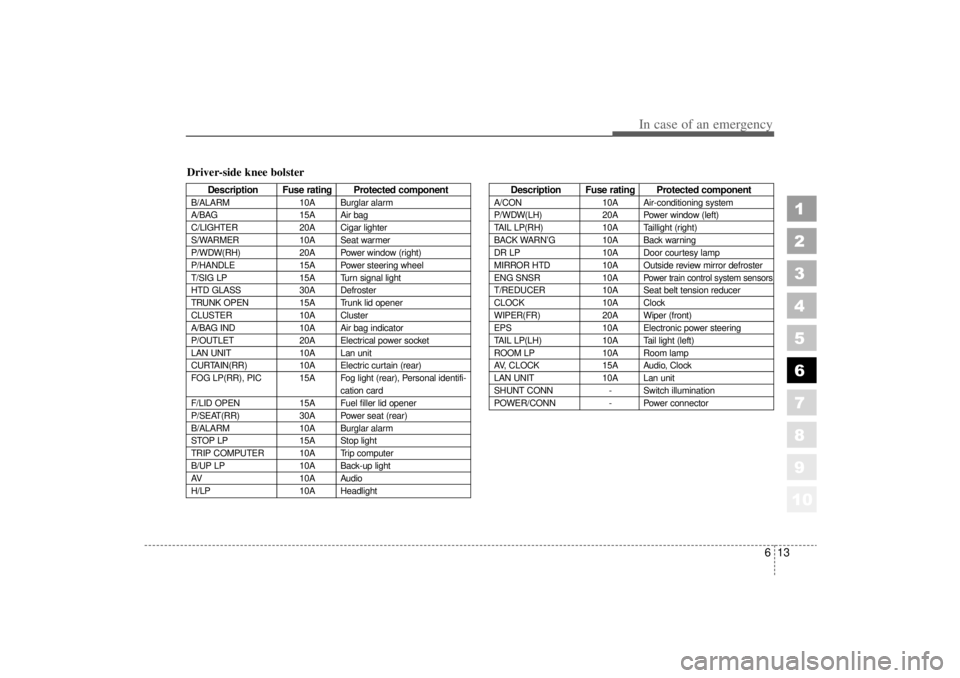
Driver-side knee bolster
Description Fuse rating Protected component
B/ALARM10A Burglar alarm
A/BAG 15A Air bag
C/LIGHTER 20A Cigar lighter
S/WARMER 10A Seat warmer
P/WDW(RH) 20A Power window (right)
P/HANDLE 15A Power steering wheel
T/SIG LP 15A Turn signal light
HTD GLASS 30A Defroster
TRUNK OPEN 15A Trunk lid opener
CLUSTER 10A Cluster
A/BAG IND 10A Air bag indicator
P/OUTLET 20A Electrical power socket
LAN UNIT 10A Lan unit
CURTAIN(RR) 10A Electric curtain (rear)
FOG LP(RR), PIC 15A Fog light (rear), Personal identifi- cation card
F/LID OPEN 15A Fuel filler lid opener
P/SEAT(RR) 30A Power seat (rear)
B/ALARM 10A Burglar alarm
STOP LP 15A Stop light
TRIP COMPUTER 10A Trip computer
B/UP LP 10A Back-up light
AV 10A Audio
H/LP 10A Headlight
Description Fuse rating Protected component
A/CON10A Air-conditioning system
P/WDW(LH) 20A Power window (left)
TAIL LP(RH) 10A Taillight (right)
BACK WARN’ G10A Back warning
DR LP 10A Door courtesy lamp
MIRROR HTD 10A Outside review mirror defroster
ENG SNSR 10A
Power train control system sensors
T/REDUCER10A Seat belt tension reducer
CLOCK 10A Clock
WIPER(FR) 20A Wiper (front)
EPS 10A Electronic power steering
TAIL LP(LH) 10A Tail light (left)
ROOM LP 10A Room lamp
AV, CLOCK 15A Audio, Clock
LAN UNIT 10A Lan unit
SHUNT CONN - Switch illumination
POWER/CONN - Power connector
Page 280 of 322

Maintenance36
7
1
2
3
4
5
6
7
8
910
Items to be reset after the battery
has been discharged or the bat-tery has been disconnected. Driver seat position memory sys-
tem (See page 3-34)
Power window (See page 3-15)
Clock (See page 3-106)
Climate control system (See pages
4-59)
Audio (See the audio manual)
Sunroof (See page 3-110)
✽ ✽
NOTICE• Before performing maintenance
or recharging the battery, turn off
all accessories and stop the engine.
• The negative battery cable must be removed first and installed last
when the battery is disconnected.
WARNING
- Recharging
battery
When recharging the battery,
observe the following precau-
tions:
The battery must be removed
from the vehicle and placed in
an area with good ventilation.
Do not allow cigarettes,
sparks, or flame near the bat-
tery.
Watch the battery during
charging, and stop or reduce
the charging rate if the battery
cells begin gassing (boiling)
violently or if the temperature
of the electrolyte of any cell
exceeds 120°F (49°C).
Wear eye protection when
checking the battery during
charging.
(Continued)
(Continued)
Disconnect the battery charg-
er in the following order.
1. Turn off the battery charger main switch.
2. Unhook the negative clamp from the negative battery ter-
minal.
3. Unhook the positive clamp from the positive battery ter-
minal.
Page 288 of 322
Maintenance44
7
1
2
3
4
5
6
7
8
910
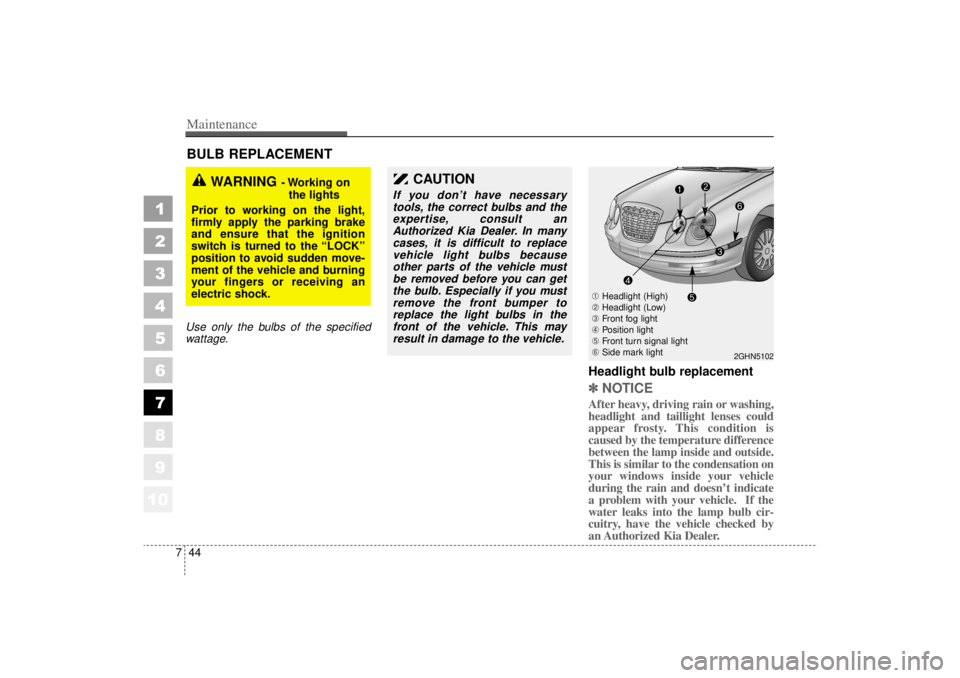
BULB REPLACEMENT Use only the bulbs of the specified
wattage.
Headlight bulb replacement ✽ ✽ NOTICEAfter heavy, driving rain or washing,
headlight and taillight lenses could
appear frosty. This condition is
caused by the temperature difference
between the lamp inside and outside.
This is similar to the condensation on
your windows inside your vehicle
during the rain and doesn’t indicate
a problem with your vehicle. If the
water leaks into the lamp bulb cir-
cuitry, have the vehicle checked by
an Authorized Kia Dealer.
WARNING
- Working on
the lights
Prior to working on the light,
firmly apply the parking brake
and ensure that the ignition
switch is turned to the “LOCK”
position to avoid sudden move-
ment of the vehicle and burning
your fingers or receiving an
electric shock.
CAUTION
If you don’ t have necessary
tools, the correct bulbs and the expertise, consult anAuthorized Kia Dealer. In manycases, it is difficult to replacevehicle light bulbs becauseother parts of the vehicle mustbe removed before you can getthe bulb. Especially if you mustremove the front bumper toreplace the light bulbs in thefront of the vehicle. This mayresult in damage to the vehicle.
2GHN5102
➀ Headlight (High)
➁ Headlight (Low)
➂ Front fog light
➃ Position light
➄ Front turn signal light
➅ Side mark light
Page 301 of 322
757
Maintenance
1
2
3
4
5
6
7
8
910
INTERIOR CARE Interior general precautions Prevent caustic solutions such as
perfume and cosmetic oil from con-
tacting the dashboard because they
may cause damage or discoloration.
If they do contact the dashboard,
wipe them off immediately. See the
instructions that follow for the proper
way to clean vinyl.Cleaning the upholstery and
interior trim Vinyl Remove dust and loose dirt from
vinyl with a whisk broom or vacuum
cleaner. Clean vinyl surfaces with a
vinyl cleaner.
Fabric Remove dust and loose dirt from fab-
ric with a whisk broom or vacuum
cleaner. Clean with a mild soap solu-
tion recommended for upholstery or
carpets. Remove fresh spots imme-
diately with a fabric spot cleaner. If
fresh spots do not receive immediate
attention, the fabric can be stained
and its color can be affected. Also, its
fire-resistant properties can be
reduced if the material is not proper-
ly maintained.
Cleaning the lap/shoulder belt
webbing Clean the belt webbing with any mild
soap solution recommended for
cleaning upholstery or carpet. Follow
the instructions provided with the
soap. Do not bleach or re-dye the
webbing because this may weaken
it.Cleaning the interior window
glass If the interior glass surfaces of the
vehicle become fogged (that is, cov-
ered with an oily, greasy or waxy
film), they should be cleaned with
glass cleaner. Follow the directions
on the glass cleaner container.✽ ✽NOTICEDo not scrape or scratch the inside
of the rear window. This may result
in damage to the rear window
defroster grid.
CAUTION
Using anything but recommend-
ed cleaners and proceduresmay affect the fabric ’s appear-
ance and fire-resistant proper- ties.
Page 314 of 322
Index2
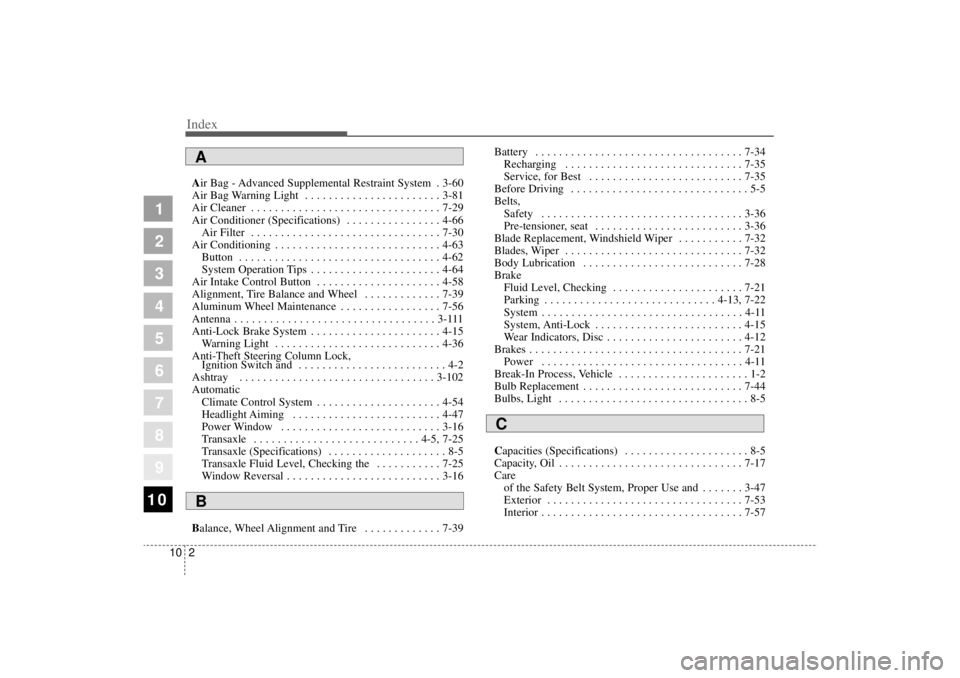
10Air Bag - Advanced Supplemental Restraint System . 3-60
Air Bag Warning Light . . . . . . . . . . . . . . . . . . . . . . . 3-81
Air Cleaner . . . . . . . . . . . . . . . . . . . . . . . . . . . . . . . . 7-29
Air Conditioner (Specifications) . . . . . . . . . . . . . . . . 4-66
Air Filter . . . . . . . . . . . . . . . . . . . . . . . . . . . . . . . . 7-30
Air Conditioning . . . . . . . . . . . . . . . . . . . . . . . . . . . . 4-63 Button . . . . . . . . . . . . . . . . . . . . . . . . . . . . . . . . . . 4-62
System Operation Tips . . . . . . . . . . . . . . . . . . . . . . 4-64
Air Intake Control Button . . . . . . . . . . . . . . . . . . . . . 4-58
Alignment, Tire Balance and Wheel . . . . . . . . . . . . . 7-39
Aluminum Wheel Maintenance . . . . . . . . . . . . . . . . . 7-56
Antenna . . . . . . . . . . . . . . . . . . . . . . . . . . . . . . . . . . 3-111
Anti-Lock Brake System . . . . . . . . . . . . . . . . . . . . . . 4-15 Warning Light . . . . . . . . . . . . . . . . . . . . . . . . . . . . 4-36
Anti-Theft Steering Column Lock, Ignition Switch and . . . . . . . . . . . . . . . . . . . . . . . . . 4-2
Ashtray . . . . . . . . . . . . . . . . . . . . . . . . . . . . . . . . . 3-102
Automatic Climate Control System . . . . . . . . . . . . . . . . . . . . . 4-54
Headlight Aiming . . . . . . . . . . . . . . . . . . . . . . . . . 4-47
Power Window . . . . . . . . . . . . . . . . . . . . . . . . . . . 3-16
Transaxle . . . . . . . . . . . . . . . . . . . . . . . . . . . . 4-5, 7-25
Transaxle (Specifications) . . . . . . . . . . . . . . . . . . . . 8-5
Transaxle Fluid Level, Checking the . . . . . . . . . . . 7-25
Window Reversal . . . . . . . . . . . . . . . . . . . . . . . . . . 3-16
Balance, Wheel Alignment and Tire . . . . . . . . . . . . . 7-39 Battery . . . . . . . . . . . . . . . . . . . . . . . . . . . . . . . . . . . 7-34
Recharging . . . . . . . . . . . . . . . . . . . . . . . . . . . . . . 7-35
Service, for Best . . . . . . . . . . . . . . . . . . . . . . . . . . 7-35
Before Driving . . . . . . . . . . . . . . . . . . . . . . . . . . . . . . 5-5
Belts, Safety . . . . . . . . . . . . . . . . . . . . . . . . . . . . . . . . . . 3-36
Pre-tensioner, seat . . . . . . . . . . . . . . . . . . . . . . . . . 3-36
Blade Replacement, Windshield Wiper . . . . . . . . . . . 7-32
Blades, Wiper . . . . . . . . . . . . . . . . . . . . . . . . . . . . . . 7-32
Body Lubrication . . . . . . . . . . . . . . . . . . . . . . . . . . . 7-28
Brake Fluid Level, Checking . . . . . . . . . . . . . . . . . . . . . . 7-21
Parking . . . . . . . . . . . . . . . . . . . . . . . . . . . . . 4-13, 7-22
System . . . . . . . . . . . . . . . . . . . . . . . . . . . . . . . . . . 4-11
System, Anti-Lock . . . . . . . . . . . . . . . . . . . . . . . . . 4-15
Wear Indicators, Disc . . . . . . . . . . . . . . . . . . . . . . . 4-12
Brakes . . . . . . . . . . . . . . . . . . . . . . . . . . . . . . . . . . . .\
7-21 Power . . . . . . . . . . . . . . . . . . . . . . . . . . . . . . . . . . 4-11
Break-In Process, Vehicle . . . . . . . . . . . . . . . . . . . . . . 1-2
Bulb Replacement . . . . . . . . . . . . . . . . . . . . . . . . . . . 7-44
Bulbs, Light . . . . . . . . . . . . . . . . . . . . . . . . . . . . . . . . 8-5
Capacities (Specifications) . . . . . . . . . . . . . . . . . . . . . 8-5
Capacity, Oil . . . . . . . . . . . . . . . . . . . . . . . . . . . . . . . 7-17
Care of the Safety Belt System, Proper Use and . . . . . . . 3-47
Exterior . . . . . . . . . . . . . . . . . . . . . . . . . . . . . . . . . 7-53
Interior . . . . . . . . . . . . . . . . . . . . . . . . . . . . . . . .\
. . 7-57
1
2
3
4
5
6
7
8
910
AB
C