Stop light KIA Amanti 2008 1.G User Guide
[x] Cancel search | Manufacturer: KIA, Model Year: 2008, Model line: Amanti, Model: KIA Amanti 2008 1.GPages: 283, PDF Size: 20.47 MB
Page 204 of 283
Driving tips
205
Following distance
Stay at least twice as far behind the vehi-
cle ahead as you would when driving
your vehicle without a trailer. This can
help you avoid situations that require
heavy braking and sudden turns.
Passing
You’ll need more passing distance up
ahead when you’re towing a trailer. And,
because you’re a good deal longer, you’ll
need to go much farther beyond the
passed vehicle before you can return to
your lane.
Backing up
Hold the bottom of the steering wheel
with one hand. Then, to move the trailer
to the left, just move your hand to the left.
To move the trailer to the right, move your
hand to the right. Always back up slowly
and, if possible, have someone guide
you.
Making turns
When you’re turning with a trailer, make
wider turns than normal. Do this so your
trailer won’t strike soft shoulders, curbs,
road signs, trees, or other objects. Avoid
jerky or sudden maneuvers. Signal well
in advance.
Turn signals when towing a trailer
When you tow a trailer, your vehicle has
to have a different turn signal flasher and
extra wiring. The green arrows on your
instrument panel will flash whenever you
signal a turn or lane change. Properly
connected, the trailer lights will also flash
to alert other drivers you’re about to turn,
change lanes, or stop.
When towing a trailer, the green arrows
on your instrument panel will flash for
turns even if the bulbs on the trailer are
burned out. Thus, you may think drivers
behind you are seeing your signals
when, in fact, they are not. It’s important
to check occasionally to be sure the trail-
er bulbs are still working. You must also
check the lights every time you discon-
nect and then reconnect the wires.
Do not connect a trailer lighting system
directly to your vehicle’s lighting system.
Use only an approved trailer wiring har-
ness.
Your Authorized Kia Dealer can assist
you in installing the wiring harness.
WARNING
Failure to use an approved trailer
wiring harness could result in dam-
age to the vehicle electrical system
and/or per sonal injury.
Page 209 of 283
525
Driving tips
HOMELINK® WIRELESS CONTROL SYSTEM (IF EQUIPPED)
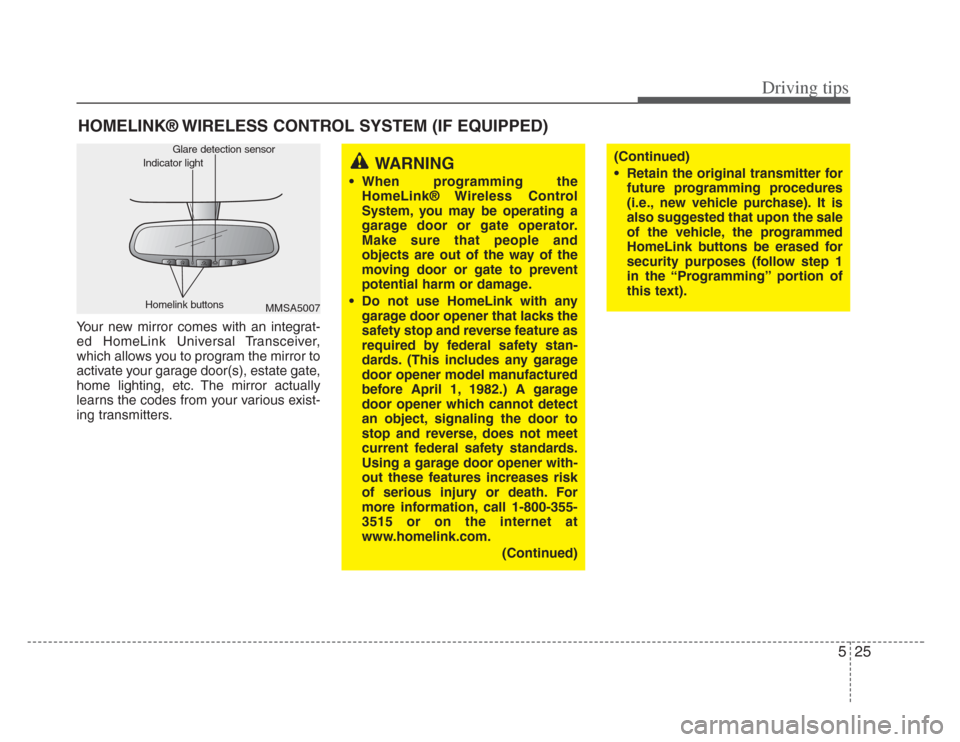
Your new mirror comes with an integrat-
ed HomeLink Universal Transceiver,
which allows you to program the mirror to
activate your garage door(s), estate gate,
home lighting, etc. The mirror actually
learns the codes from your various exist-
ing transmitters.
MMSA5007
Homelink buttons Glare detection sensor
Indicator lightWARNING
• When programming the
HomeLink® Wireless Control
System, you may be operating a
garage door or gate operator.
Make sure that people and
objects are out of the way of the
moving door or gate to prevent
potential harm or damage.
• Do not use HomeLink with any garage door opener that lacks the
safety stop and rever se feature as
required by federal safety stan-
dards. (This includes any garage
door opener model manufactured
before April 1, 1982.) A garage
door opener which cannot detect
an object, signaling the door to
stop and rever se, does not meet
current federal safety standards.
Using a garage door opener with-
out these features increases risk
of serious injury or death. For
more information, call 1-800-355-
3515 or on the internet at
www.homelink.com.
(Continued)
(Continued)
• Retain the original tran smitter for
future programming procedures
(i.e., new vehicle purcha se). It is
also suggested that upon the sale
of the vehicle, the programmed
HomeLink button s be erased for
security purposes (follow step 1
in the “Programming” portion of
this text).
Page 213 of 283
529
Driving tips
Reprogramming a single
HomeLink button
To program a device to HomeLink using
a HomeLink button previously trained,
follow these steps:
1. Press and hold the desired HomeLinkbutton. Do NOT release until step 4
has been completed.
2. When the indicator light begins to flash slowly (after 20 seconds), position the
hand-held transmitter 3~7 cm away
from the HomeLink surface.
3. Press and hold the hand-held trans- mitter button (or press and “cycle” - as
described in “Canadian Programming”
above).
4. The HomeLink indicator light will flash, first slowly and then rapidly. When the
indicator light begins to flash rapidly,
release both buttons.
The previous device has now been
erased and the new device can be acti-
vated by pushing the HomeLink button
that has just been programmed. This pro-
cedure will not affect any other pro-
grammed HomeLink buttons.
Gate operator programming &
canadian programming
During programming, your hand-held
transmitter may automatically stop trans-
mitting. Continue to press and hold the
HomeLink button (note steps 2 through 4
in the “Programming” portion of this text)
while you press and re-press (“cycle”)
your handheld transmitter every two sec-
onds until the frequency signal has been
learned. The indicator light will flash
slowly and then rapidly after several sec-
onds upon successful training.
✽ NOTICE
If programming a garage door opener
or gate, it is advised to unplug the device
during the “cycling” process to prevent
possible motor burn-up.
Accessories
If you would like additional information on
the HomeLink Wireless Control System,
HomeLink compatible products, or to
purchase other accessories such as the
HomeLink® Lighting Package, please
contact HomeLink at 1-800-355-3515 or
on the internet at www.homelink.com.
This device complie s with Industry
Canada Standard RSS-210. Operation
is subject to the following two conditions:
1. This device may not cause interfer- ence, and
2. This device must accept any interfer- ence, including interference that may
cause undesired operation of the
device.
WARNING
Changes or modifications not
expressly approved by the party
responsible for compliance could
void the user’ s authority to operate
the equipment.
IC: 4112104541A Gentex
MODEL/FCC ID: NZLSTDHL3
Page 215 of 283
In case of an emergency
26
ROAD WARNING
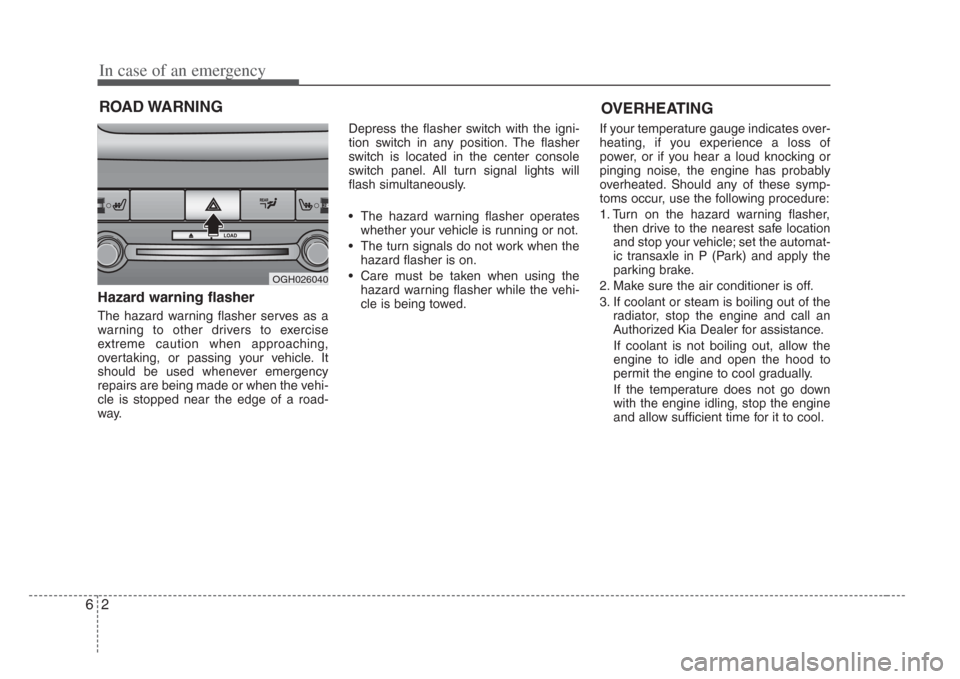
Hazard warning flasher
The hazard warning flasher serves as a
warning to other drivers to exercise
extreme caution when approaching,
overtaking, or passing your vehicle. It
should be used whenever emergency
repairs are being made or when the vehi-
cle is stopped near the edge of a road-
way.Depress the flasher switch with the igni-
tion switch in any position. The flasher
switch is located in the center console
switch panel. All turn signal lights will
flash simultaneously.
• The hazard warning flasher operates
whether your vehicle is running or not.
• The turn signals do not work when the hazard flasher is on.
• Care must be taken when using the hazard warning flasher while the vehi-
cle is being towed. If your temperature gauge indicates over-
heating, if you experience a loss of
power, or if you hear a loud knocking or
pinging noise, the engine has probably
overheated. Should any of these symp-
toms occur, use the following procedure:
1. Turn on the hazard warning flasher,
then drive to the nearest safe location
and stop your vehicle; set the automat-
ic transaxle in P (Park) and apply the
parking brake.
2. Make sure the air conditioner is off.
3. If coolant or steam is boiling out of the radiator, stop the engine and call an
Authorized Kia Dealer for assistance.
If coolant is not boiling out, allow the
engine to idle and open the hood to
permit the engine to cool gradually.
If the temperature does not go down
with the engine idling, stop the engine
and allow sufficient time for it to cool.
OGH026040
OVERHEATING
Page 223 of 283
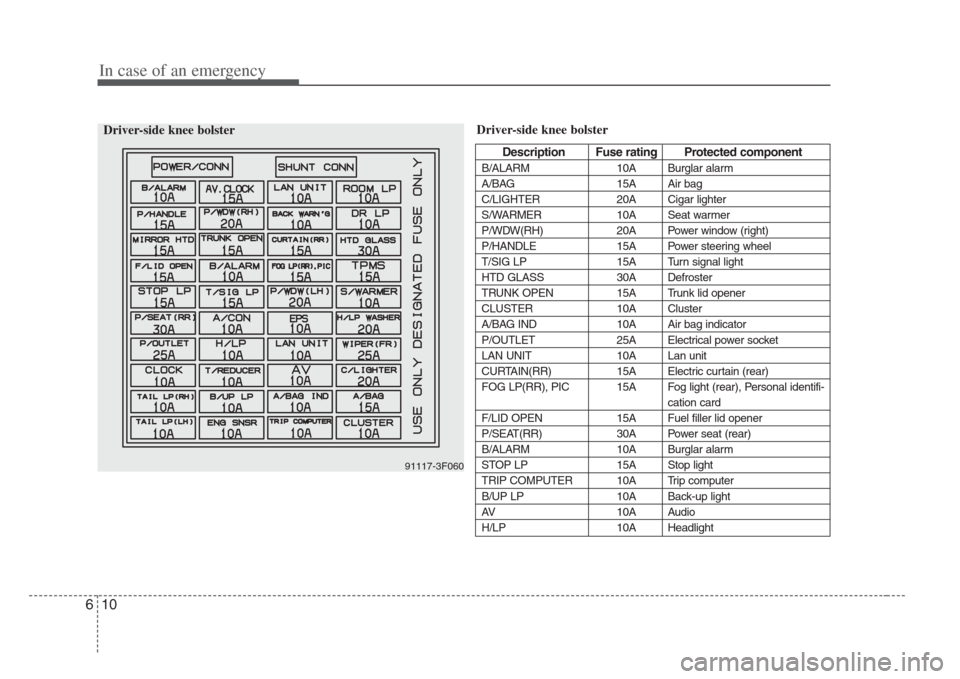
In case of an emergency
106
Driver-side knee bolster
Description Fus e rating Protected component
B/ALARM 10A Burglar alarm
A/BAG 15A Air bag
C/LIGHTER 20A Cigar lighter
S/WARMER 10A Seat warmer
P/WDW(RH) 20A Power window (right)
P/HANDLE 15A Power steering wheel
T/SIG LP 15A Turn signal light
HTD GLASS 30A Defroster
TRUNK OPEN 15A Trunk lid opener
CLUSTER 10A Cluster
A/BAG IND 10A Air bag indicator
P/OUTLET 25A Electrical power socket
LAN UNIT 10A Lan unit
CURTAIN(RR) 15A Electric curtain (rear)
FOG LP(RR), PIC 15A Fog light (rear), Personal identifi- cation card
F/LID OPEN 15A Fuel filler lid opener
P/SEAT(RR) 30A Power seat (rear)
B/ALARM 10A Burglar alarm
STOP LP 15A Stop light
TRIP COMPUTER 10A Trip computer
B/UP LP 10A Back-up light
AV 10A Audio
H/LP 10A Headlight
91117-3F060
Driver-side knee bolster
Page 242 of 283
77
Maintenance
OWNER MAINTENANCE
Owner maintenance schedule
The following lists are vehicle checks and
inspections that should be performed by
the owner or qualified service technician
at the frequencies indicated to help
ensure safe, dependable operation of
your vehicle.
Any adverse conditions should be
brought to the attention of your dealer or
qualified service technician or service
advisor as soon as possible.
These Owner Maintenance Checks are
generally not covered by warranties and
you may be charged for labor, parts and
lubricants used.
When you stop for fuel:
• Check the engine oil level.
• Check coolant level in coolant reser-voir.
• Check the windshield washer fluid level.
• Look for low or under-inflated tires.
While operating your vehicle:
• Note any changes in the sound of the exhaust or any smell of exhaust fumes
in the vehicle.
• Check for vibrations in the steering wheel. Notice any increased steering
effort or looseness in the steering
wheel, or change in its straight-ahead
position.
• Notice if your vehicle constantly turns slightly or “pulls” to one side when trav-
eling on smooth, level road.
• When stopping, listen and check for strange sounds, pulling to one side,
increased brake pedal travel or “hard-
to-push” brake pedal.
• If any slipping or changes in the oper- ation of your transaxle occurs, check
the transaxle fluid level.
• Check automatic transaxle P (Park) function.
• Check parking brake.
• Check for fluid leaks under your vehicle (water dripping from the air condition-
ing system after use is normal).
WARNING
Be careful when checking your
engine coolant level when the
engine is hot. Scalding hot coolant
and steam may blow out under
pressure. This could cause serious
injury.
Page 243 of 283
Maintenance
87
At least monthly:
• Check coolant level in the coolantrecovery reservoir.
• Check the operation of all exterior lights, including the stoplights, turn sig-
nals and hazard warning flashers.
• Check the inflation pressures of all tires including the spare.
At least twice a year (i.e., every Spring and Fall) :
• Check radiator, heater and air condi- tioning hoses for leaks or damage.
• Check windshield washer spray and wiper operation. Clean wiper blades
with clean cloth dampened with wash-
er fluid.
• Check headlight alignment.
• Check muffler, exhaust pipes, shields and clamps.
• Check the lap/shoulder belts for wear and function.
• Check for worn tires and loose wheel lug nuts.
At least once a year :
• Clean body and door drain holes.
• Lubricate door hinges and checks, andhood hinges.
• Lubricate door and hood locks and latches.
• Lubricate door rubber weatherstrips.
• Check the air conditioning system before the warm weather season.
• Check the power steering fluid level.
• Inspect and lubricate automatic transaxle linkage and controls.
• Clean battery and terminals.
• Check the brake fluid level.
Page 264 of 283
729
Maintenance
Wheel replacement
When replacing the metal wheels for
any reason, make sure the new
wheels are equivalent to the original
factory units in diameter, rim width
and offset.
WARNING - Replacing tires
• Driving on worn-out tire s is
very hazardous and will
reduce braking effectiveness,
steering accuracy, and trac-
tion.
• Your vehicle is equipped with tires designed to provide for
safe ride and handling capa-
bility. Do not use a size and
type of tire and wheel that i s
different from the one that i s
originally ins talled on your
vehicle. It can affect the safety
and performance of your vehi-
cle, which could lead to han-
dling failure or rollover and
serious injury. When replacing
the tires, be sure to equip all
four tires with the tire and
wheel of the same size, type,
tread, brand and load-carrying
capacity.
(Continued)(Continued)If you nevertheless decide to
equip your vehicle with any
tire/wheel combination not
recommended by Kia for off
road driving, you should not
use these tires for highway
driving.
• The use of any other tire size or type may seriously affect
ride, handling, ground clear-
ance, stopping di stance, body
to tire clearance, snow tire
clearance, and speedometer
reliability.
• It is best to replace all four tires at the same time. If that is
not possible, or necessary,
then replace the two front or
two rear tires as a pair.
Replacing just one tire can
seriously affect your vehicle’ s
handling.
WARNING
A wheel that is not the correct
size may adver sely affect wheel
and bearing life, braking and
s topping abilities , handling
characteris tics, ground clear-
ance, body-to-tire clearance,
s now chain clearance,
speedometer calibration, head-
light aim and bumper height.
Page 278 of 283
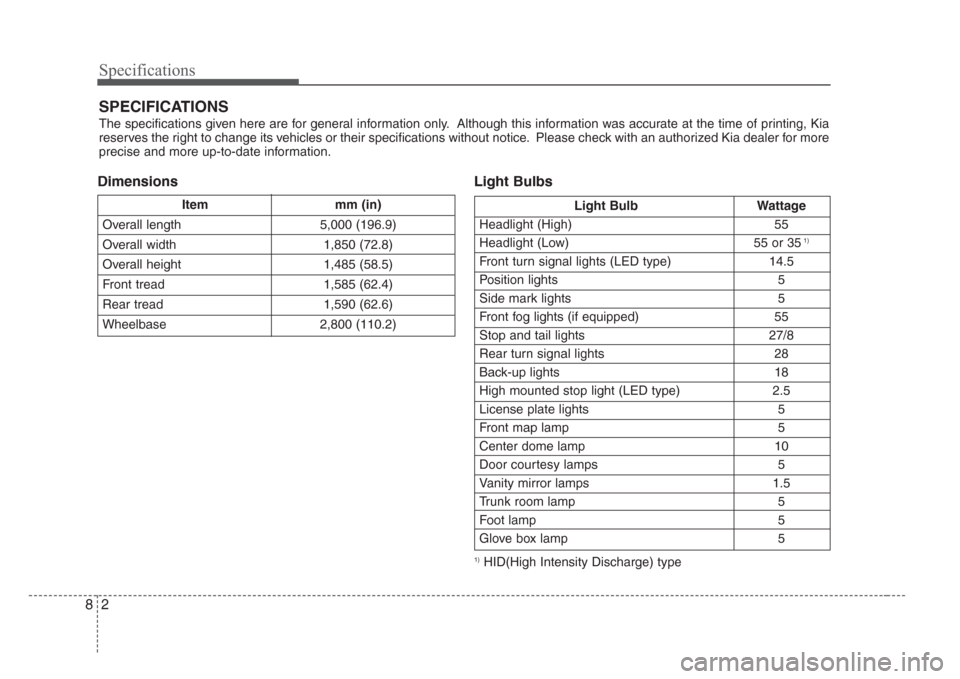
Specifications
28
DimensionsLight Bulbs
1)HID(High Intensity Discharge) type
Itemmm (in)
Overall length 5,000 (196.9)
Overall width 1,850 (72.8)
Overall height 1,485 (58.5)
Front tread 1,585 (62.4)
Rear tread 1,590 (62.6)
Wheelbase 2,800 (110.2)
SPECIFICATIONS
The specifications given here are for general information only. Although this information was accurate at the time of printing, Kia
reserves the right to change its vehicles or their specifications without notice. Please check with an authorized Kia dealer for more
precise and more up-to-date information.
Light Bulb Wattage
Headlight (High) 55
Headlight (Low) 55 or 35
1)
Front turn signal lights (LED type) 14.5
Position lights 5
Side mark lights 5
Front fog lights (if equipped) 55
Stop and tail lights 27/8
Rear turn signal lights 28
Back-up lights 18
High mounted stop light (LED type) 2.5
License plate lights 5
Front map lamp 5
Center dome lamp 10
Door courtesy lamps 5
Vanity mirror lamps 1.5
Trunk room lamp 5
Foot lamp 5
Glove box lamp 5