instrument panel KIA AMANTI 2009 User Guide
[x] Cancel search | Manufacturer: KIA, Model Year: 2009, Model line: AMANTI, Model: KIA AMANTI 2009Pages: 321, PDF Size: 23.77 MB
Page 86 of 321
Knowing your vehicle74
3Air bag (Supplemental Restraint
System) service Your Supplemental Restraint System is
virtually maintenance-free. There are no
parts which you can service.
You must have the system serviced
under the following circumstances:
If an air bag ever inflates, the air bag
must be replaced. Do not try to remove
or discard the air bag by yourself. This
must be done by an authorized Kia
dealer.
If the air bag warning indicator light alerts you to a problem, have the air
bag system checked as soon as possi-
ble. Otherwise, your air bag system
may be ineffective.
When repairing or scrapping thevehicles Repairing steering wheel, instrument panel, center console or roofs, or
installing car audio around center con-
sole or painting front metal sheet could
disable the air bag system. Have them
checked by an authorized Kia dealer.
When leaving the vehicle at an author- ized Kia dealer, inform the facility that
the vehicle is equipped with an air bag
system, and leave the owner’s manual
in the vehicle.
Since the air bag system contains explosive chemical substances, con-
tact an authorized Kia dealer when
scrapping the vehicle.
WARNING
- No mainte-
nance or repair
Do not modify your steering
wheel, seat or any other part of
the Supplemental Restraint
System. Modification could make
the system inoperable.
Do not work on the system’s com- ponents or wiring. This could
cause the air bags to inflate inad-
vertently, possibly seriously injur-
ing someone. Working on the sys-
tem could also disable the sys-
tem so that the air bags would not
deploy in a collision.
Any work on the SRS system, such as removing, installing,
repairing, or any work on the
steering wheel must be per-
formed by a qualified Kia techni-
cian. Improper handling of the air
bag system may result in serious
personal injury or death.
CAUTION
- No modifica-tion
Do not modify any part of the air
bag system. Modification couldmake the air bag system ineffective or could cause unnecessarydeployment.
Page 92 of 321
Knowing your vehicle80
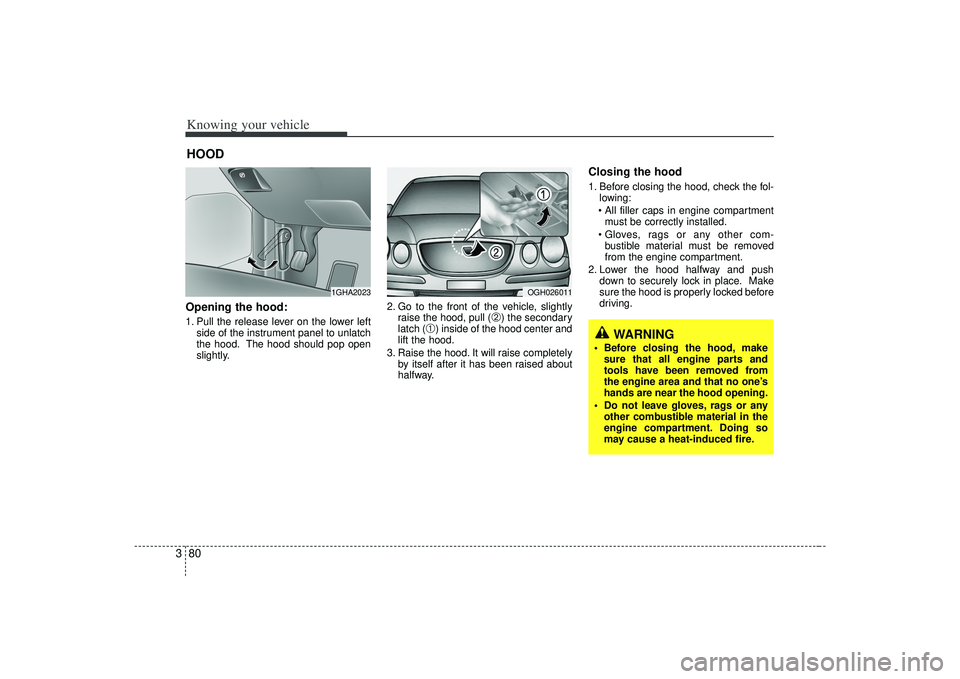
3Opening the hood:1. Pull the release lever on the lower left
side of the instrument panel to unlatch
the hood. The hood should pop open
slightly. 2. Go to the front of the vehicle, slightly
raise the hood, pull (
➁) the secondary
latch (
➀) inside of the hood center and
lift the hood.
3. Raise the hood. It will raise completely by itself after it has been raised about
halfway.
Closing the hood1. Before closing the hood, check the fol-lowing:
must be correctly installed.
bustible material must be removed
from the engine compartment.
2. Lower the hood halfway and push down to securely lock in place. Make
sure the hood is properly locked before
driving.
HOOD
1GHA2023
OGH026011
WARNING
Before closing the hood, makesure that all engine parts and
tools have been removed from
the engine area and that no one’s
hands are near the hood opening.
Do not leave gloves, rags or any other combustible material in the
engine compartment. Doing so
may cause a heat-induced fire.
Page 95 of 321
383
Knowing your vehicle
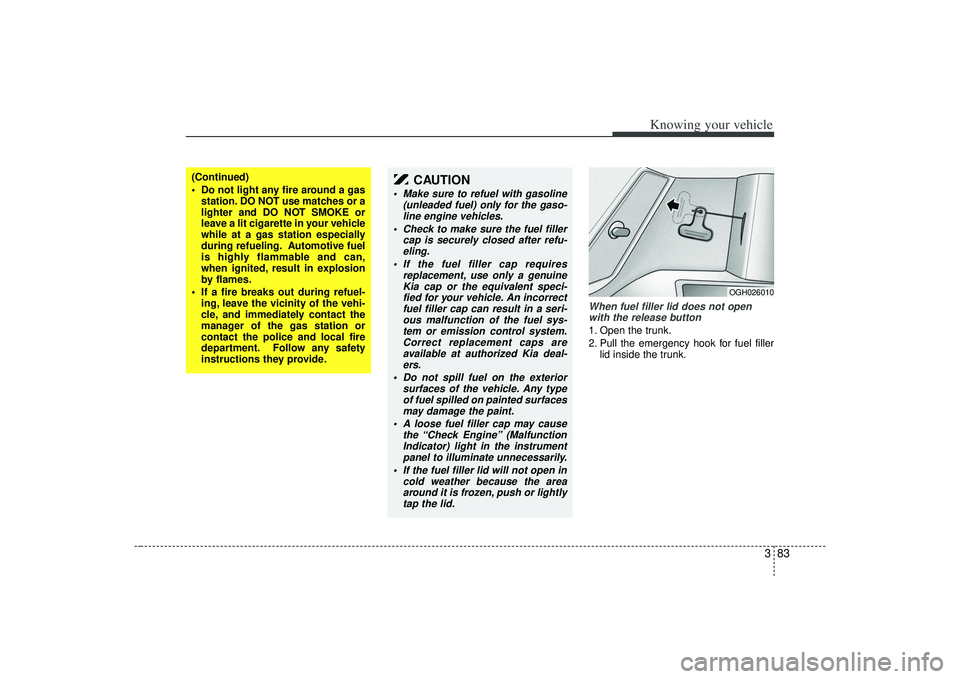
When fuel filler lid does not openwith the release button1. Open the trunk.
2. Pull the emergency hook for fuel filler lid inside the trunk.
OGH026010
(Continued)
Do not light any fire around a gasstation. DO NOT use matches or a
lighter and DO NOT SMOKE or
leave a lit cigarette in your vehicle
while at a gas station especially
during refueling. Automotive fuel
is highly flammable and can,
when ignited, result in explosion
by flames.
If a fire breaks out during refuel- ing, leave the vicinity of the vehi-
cle, and immediately contact the
manager of the gas station or
contact the police and local fire
department. Follow any safety
instructions they provide.
CAUTION
Make sure to refuel with gasoline (unleaded fuel) only for the gaso-line engine vehicles.
Check to make sure the fuel filler cap is securely closed after refu-eling.
If the fuel filler cap requires replacement, use only a genuineKia cap or the equivalent speci- fied for your vehicle. An incorrectfuel filler cap can result in a seri-ous malfunction of the fuel sys- tem or emission control system.Correct replacement caps are available at authorized Kia deal-ers.
Do not spill fuel on the exterior surfaces of the vehicle. Any typeof fuel spilled on painted surfaces may damage the paint.
A loose fuel filler cap may cause the “Check Engine” (MalfunctionIndicator) light in the instrument panel to illuminate unnecessarily.
If the fuel filler lid will not open in cold weather because the areaaround it is frozen, push or lightlytap the lid.
Page 162 of 321
Driving your vehicle26
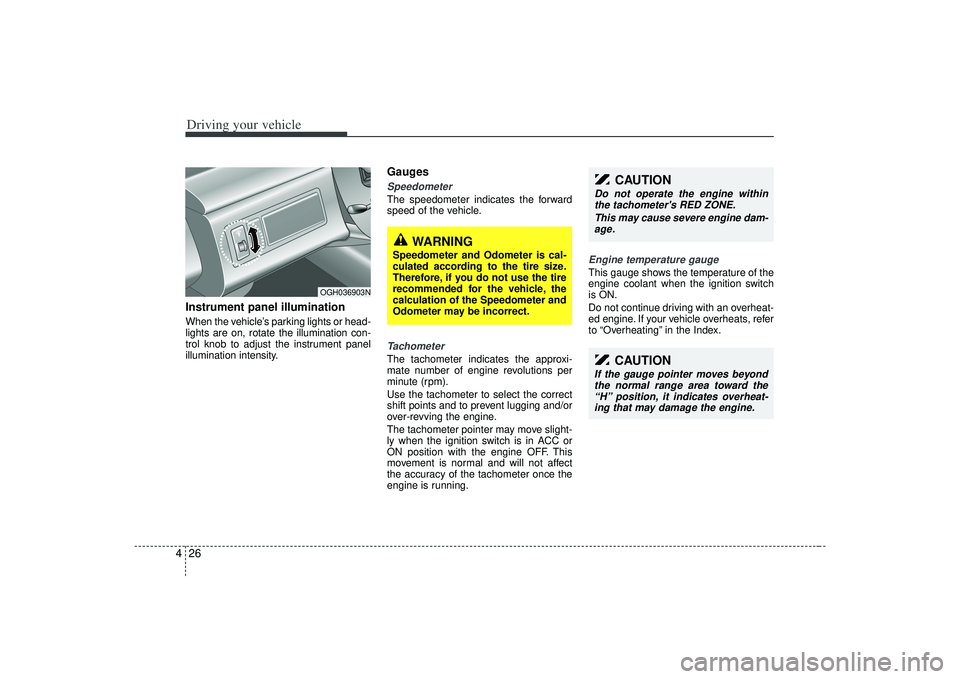
4Instrument panel illuminationWhen the vehicle’s parking lights or head-
lights are on, rotate the illumination con-
trol knob to adjust the instrument panel
illumination intensity.
GaugesSpeedometer The speedometer indicates the forward
speed of the vehicle.Tachometer The tachometer indicates the approxi-
mate number of engine revolutions per
minute (rpm).
Use the tachometer to select the correct
shift points and to prevent lugging and/or
over-revving the engine.
The tachometer pointer may move slight-
ly when the ignition switch is in ACC or
ON position with the engine OFF. This
movement is normal and will not affect
the accuracy of the tachometer once the
engine is running.
Engine temperature gauge This gauge shows the temperature of the
engine coolant when the ignition switch
is ON.
Do not continue driving with an overheat-
ed engine. If your vehicle overheats, refer
to “Overheating” in the Index.
CAUTION
Do not operate the engine within
the tachometer's RED ZONE.
This may cause severe engine dam-age.
CAUTION
If the gauge pointer moves beyond the normal range area toward the“H” position, it indicates overheat- ing that may damage the engine.
OGH036903N
WARNING
Speedometer and Odometer is cal-
culated according to the tire size.
Therefore, if you do not use the tire
recommended for the vehicle, the
calculation of the Speedometer and
Odometer may be incorrect.
Page 170 of 321
Driving your vehicle34
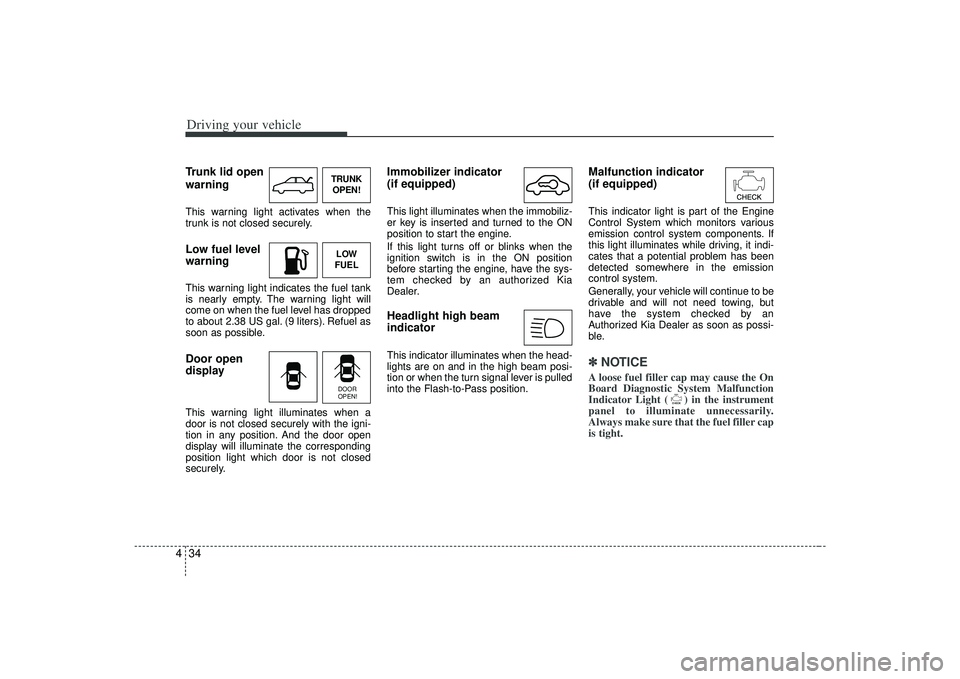
4Trunk lid open
warningThis warning light activates when the
trunk is not closed securely.Low fuel level
warningThis warning light indicates the fuel tank
is nearly empty. The warning light will
come on when the fuel level has dropped
to about 2.38 US gal. (9 liters). Refuel as
soon as possible.Door open
displayThis warning light illuminates when a
door is not closed securely with the igni-
tion in any position. And the door open
display will illuminate the corresponding
position light which door is not closed
securely.
Immobilizer indicator
(if equipped)This light illuminates when the immobiliz-
er key is inserted and turned to the ON
position to start the engine.
If this light turns off or blinks when the
ignition switch is in the ON position
before starting the engine, have the sys-
tem checked by an authorized Kia
Dealer.Headlight high beam
indicator This indicator illuminates when the head-
lights are on and in the high beam posi-
tion or when the turn signal lever is pulled
into the Flash-to-Pass position.
Malfunction indicator
(if equipped)This indicator light is part of the Engine
Control System which monitors various
emission control system components. If
this light illuminates while driving, it indi-
cates that a potential problem has been
detected somewhere in the emission
control system.
Generally, your vehicle will continue to be
drivable and will not need towing, but
have the system checked by an
Authorized Kia Dealer as soon as possi-
ble.✽ ✽
NOTICEA loose fuel filler cap may cause the On
Board Diagnostic System Malfunction
Indicator Light ( ) in the instrument
panel to illuminate unnecessarily.
Always make sure that the fuel filler cap
is tight.
TRUNK
OPEN!LOW
FUELDOOR
OPEN!
Page 174 of 321
Driving your vehicle38
4Battery saver function The purpose of this feature is to pre-
vent the battery from being dis-
charged. The system automatically
turns off the exterior light when the
driver removes the ignition key and
opens the driver- side door.
With this feature, the parklight will be turned off automatically if the driver
parks on the side of road at night.
If necessary, to keep the lights on when
the ignition key is removed, perform the
following :
1) Open the driver-side door.
2) Turn the parklights OFF and ON again using the light switch on the steering
column.
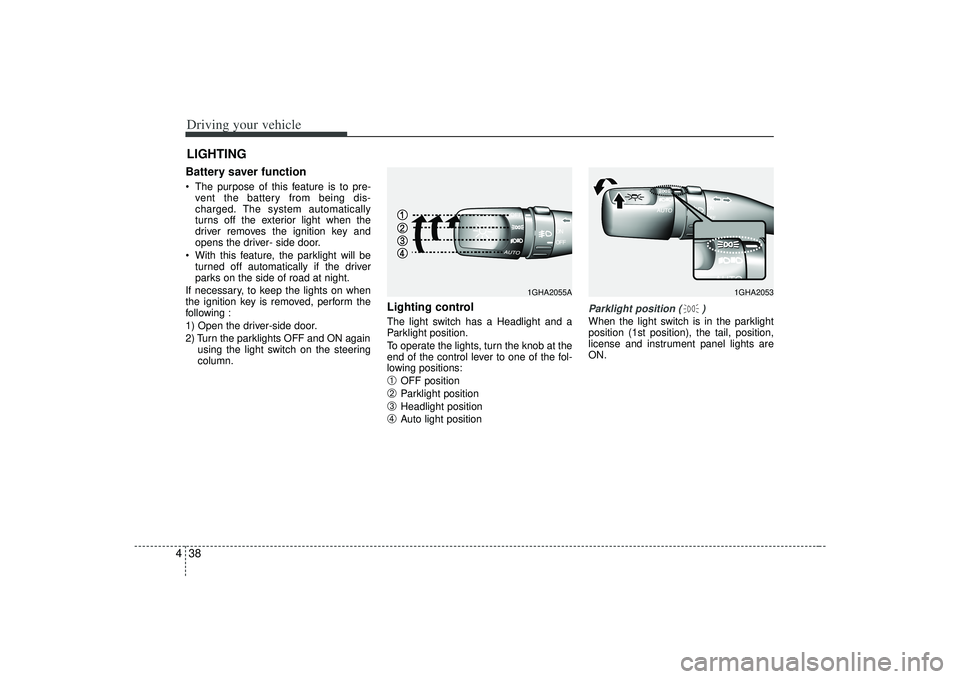
Lighting control The light switch has a Headlight and a
Parklight position.
To operate the lights, turn the knob at the
end of the control lever to one of the fol-
lowing positions:➀
OFF position
➁
Parklight position
➂
Headlight position
➃
Auto light position
Parklight position ( )When the light switch is in the parklight
position (1st position), the tail, position,
license and instrument panel lights are
ON.
LIGHTING
1GHA2053
1GHA2055A
Page 175 of 321
439
Driving your vehicle
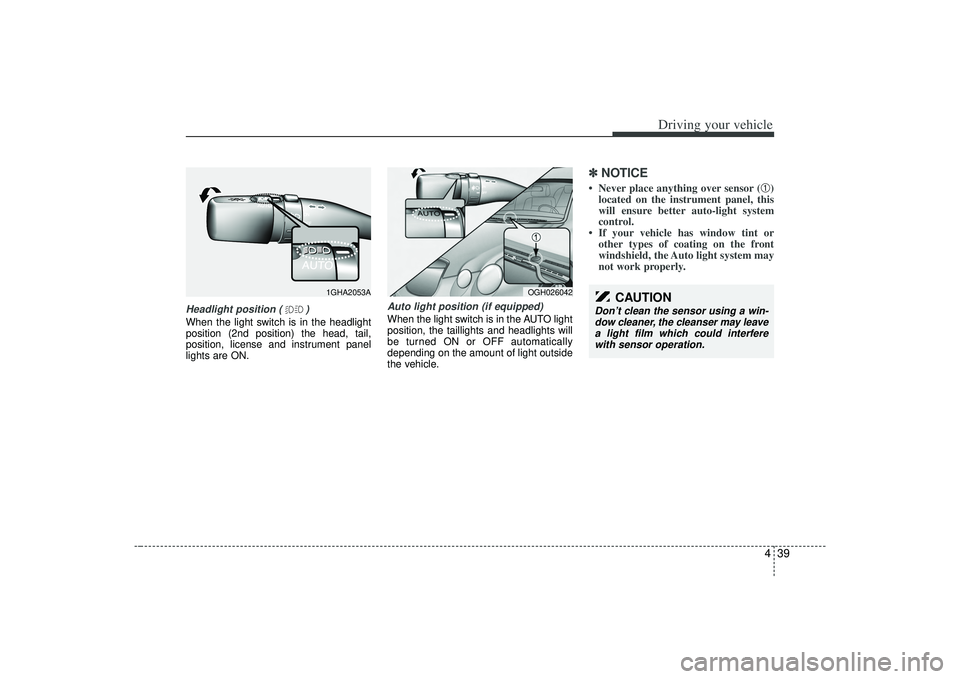
Headlight position ( )When the light switch is in the headlight
position (2nd position) the head, tail,
position, license and instrument panel
lights are ON.
Auto light position (if equipped)When the light switch is in the AUTO light
position, the taillights and headlights will
be turned ON or OFF automatically
depending on the amount of light outside
the vehicle.
✽ ✽NOTICE• Never place anything over sensor (
➀)
located on the instrument panel, this
will ensure better auto-light system
control.
• If your vehicle has window tint or other types of coating on the front
windshield, the Auto light system may
not work properly.
1GHA2053A
OGH026042
CAUTION
Don’t clean the sensor using a win-
dow cleaner, the cleanser may leavea light film which could interfere with sensor operation.
Page 176 of 321
Driving your vehicle40
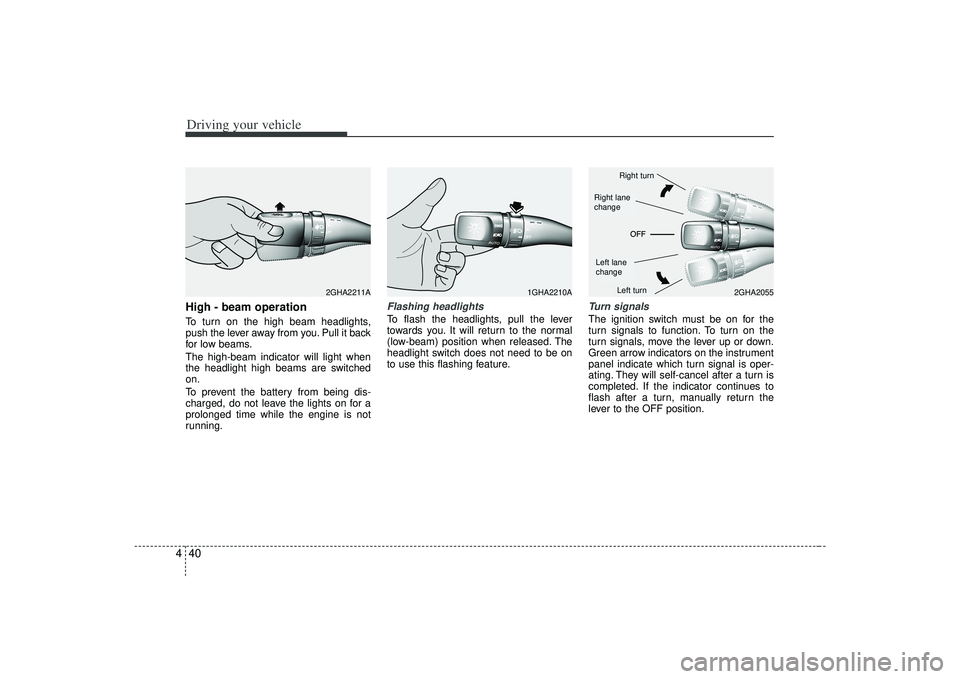
4High - beam operation To turn on the high beam headlights,
push the lever away from you. Pull it back
for low beams.
The high-beam indicator will light when
the headlight high beams are switched
on.
To prevent the battery from being dis-
charged, do not leave the lights on for a
prolonged time while the engine is not
running.
Flashing headlights To flash the headlights, pull the lever
towards you. It will return to the normal
(low-beam) position when released. The
headlight switch does not need to be on
to use this flashing feature.
Turn signalsThe ignition switch must be on for the
turn signals to function. To turn on the
turn signals, move the lever up or down.
Green arrow indicators on the instrument
panel indicate which turn signal is oper-
ating. They will self-cancel after a turn is
completed. If the indicator continues to
flash after a turn, manually return the
lever to the OFF position.
1GHA2210A
2GHA2055
2GHA2211A
Right turnLeft turn
Left lane
changeRight lane
change
Page 183 of 321
447
Driving your vehicle
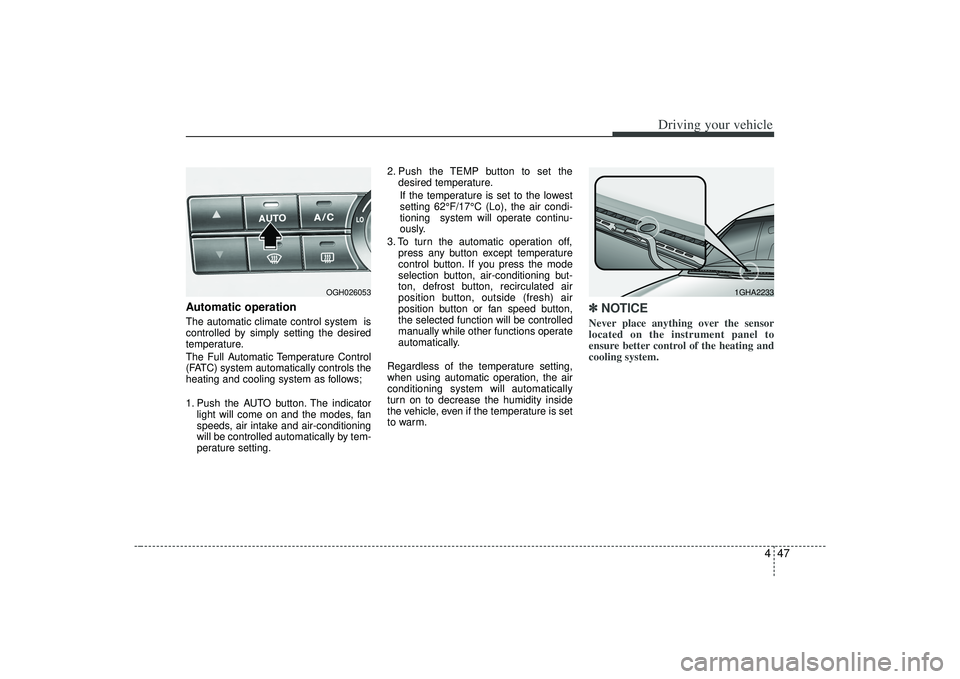
Automatic operationThe automatic climate control system is
controlled by simply setting the desired
temperature.
The Full Automatic Temperature Control
(FATC) system automatically controls the
heating and cooling system as follows;
1. Push the AUTO button. The indicatorlight will come on and the modes, fan
speeds, air intake and air-conditioning
will be controlled automatically by tem-
perature setting. 2. Push the TEMP button to set the
desired temperature.
If the temperature is set to the lowest
setting 62°F/17°C (Lo), the air condi-
tioning system will operate continu-
ously.
3. To turn the automatic operation off, press any button except temperature
control button. If you press the mode
selection button, air-conditioning but-
ton, defrost button, recirculated air
position button, outside (fresh) air
position button or fan speed button,
the selected function will be controlled
manually while other functions operate
automatically.
Regardless of the temperature setting,
when using automatic operation, the air
conditioning system will automatically
turn on to decrease the humidity inside
the vehicle, even if the temperature is set
to warm.
✽ ✽ NOTICENever place anything over the sensor
located on the instrument panel to
ensure better control of the heating and
cooling system.
OGH026053
1GHA2233
Page 189 of 321
453
Driving your vehicle
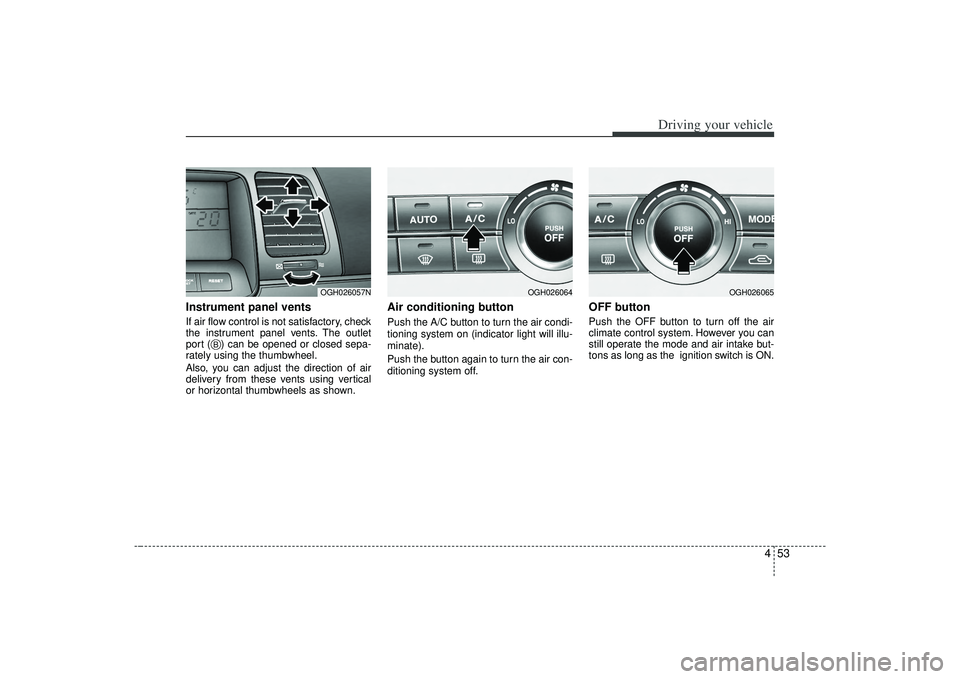
Instrument panel ventsIf air flow control is not satisfactory, check
the instrument panel vents. The outlet
port ( ) can be opened or closed sepa-
rately using the thumbwheel.
Also, you can adjust the direction of air
delivery from these vents using vertical
or horizontal thumbwheels as shown.
Air conditioning button Push the A/C button to turn the air condi-
tioning system on (indicator light will illu-
minate).
Push the button again to turn the air con-
ditioning system off.
OFF buttonPush the OFF button to turn off the air
climate control system. However you can
still operate the mode and air intake but-
tons as long as the ignition switch is ON.
OGH026057N
B
OGH026064
OGH026065