key KIA Borrego 2011 1.G Owner's Guide
[x] Cancel search | Manufacturer: KIA, Model Year: 2011, Model line: Borrego, Model: KIA Borrego 2011 1.GPages: 464, PDF Size: 12.57 MB
Page 99 of 464
419
Features of your vehicle
D070100AHM-EE
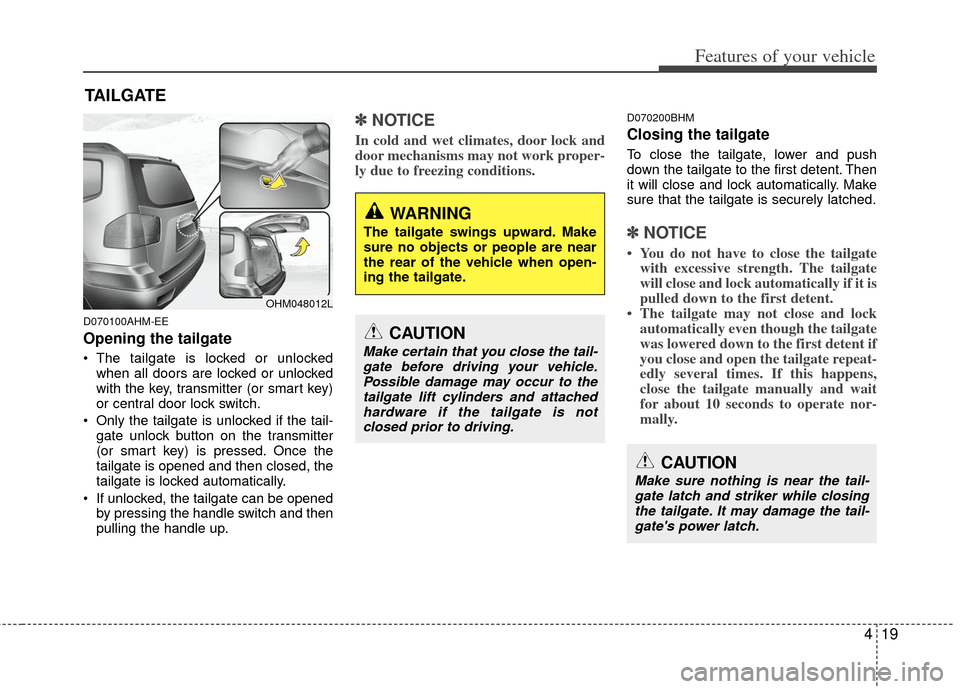
Opening the tailgate
The tailgate is locked or unlockedwhen all doors are locked or unlocked
with the key, transmitter (or smart key)
or central door lock switch.
Only the tailgate is unlocked if the tail- gate unlock button on the transmitter
(or smart key) is pressed. Once the
tailgate is opened and then closed, the
tailgate is locked automatically.
If unlocked, the tailgate can be opened by pressing the handle switch and then
pulling the handle up.
✽ ✽ NOTICE
In cold and wet climates, door lock and
door mechanisms may not work proper-
ly due to freezing conditions.
D070200BHM
Closing the tailgate
To close the tailgate, lower and push
down the tailgate to the first detent. Then
it will close and lock automatically. Make
sure that the tailgate is securely latched.
✽ ✽NOTICE
• You do not have to close the tailgate
with excessive strength. The tailgate
will close and lock automatically if it is
pulled down to the first detent.
• The tailgate may not close and lock automatically even though the tailgate
was lowered down to the first detent if
you close and open the tailgate repeat-
edly several times. If this happens,
close the tailgate manually and wait
for about 10 seconds to operate nor-
mally.
TAILGATE
OHM048012L
WARNING
The tailgate swings upward. Make
sure no objects or people are near
the rear of the vehicle when open-
ing the tailgate.
CAUTION
Make certain that you close the tail-
gate before driving your vehicle.Possible damage may occur to thetailgate lift cylinders and attachedhardware if the tailgate is not closed prior to driving.
CAUTION
Make sure nothing is near the tail-gate latch and striker while closing the tailgate. It may damage the tail-gate's power latch.
Page 102 of 464
Features of your vehicle
22
4
D080100BHM-EE
Power windows
The ignition switch must be in the ON
position for power windows to operate.
Each door has a power window switch
that controls the door's window. The driv-
er has a power window lock switch which
can block the operation of passenger
windows. The power windows can be
operated for approximately 30 seconds
after the ignition key is removed or turned
to the ACC or LOCK position. However, if
the front doors are opened, the power
windows cannot be operated even within
the 30 second period.
✽ ✽
NOTICE
While driving with the rear windows
down or with the sunroof (if equipped)
in an open (or partially open) position,
your vehicle may demonstrate a wind
buffeting or pulsation noise. This noise
is a normal occurrence and can be
reduced or eliminated by taking the fol-
lowing actions. If the noise occurs with
one or both of the rear windows down,
partially lower both front windows
approximately one inch. If you experi-
ence the noise with the sunroof open,
slightly reduce the size of the sunroof
opening.
D080101AUN
Window opening and closing
The driver’s door has a master power
window switch that controls all the win-
dows in the vehicle.
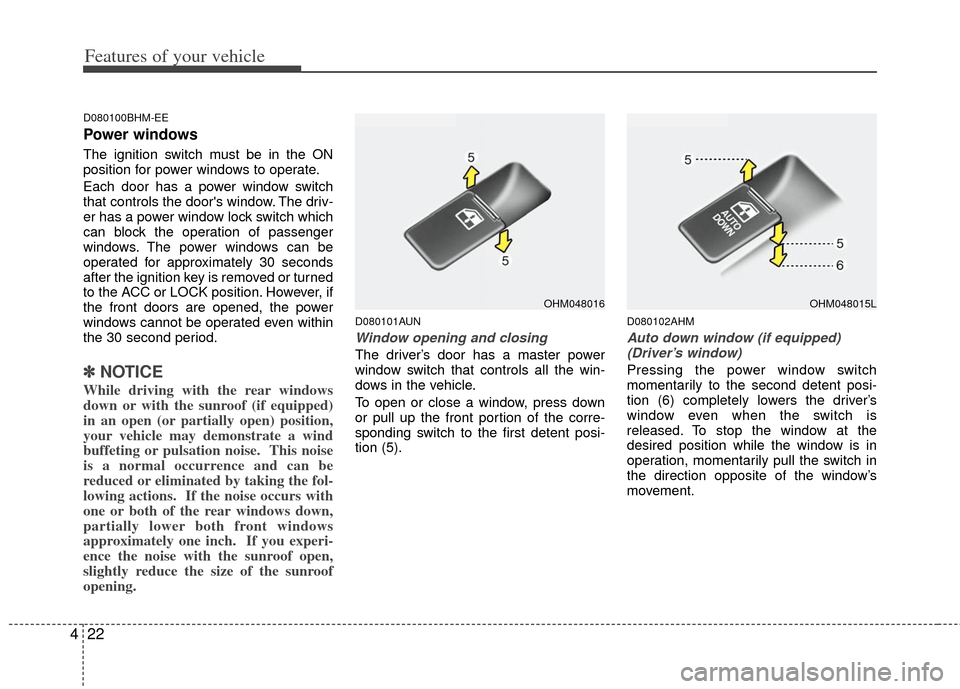
To open or close a window, press down
or pull up the front portion of the corre-
sponding switch to the first detent posi-
tion (5).
D080102AHM
Auto down window (if equipped)
(Driver’s window)
Pressing the power window switch
momentarily to the second detent posi-
tion (6) completely lowers the driver’s
window even when the switch is
released. To stop the window at the
desired position while the window is in
operation, momentarily pull the switch in
the direction opposite of the window’s
movement.
OHM048016OHM048015L
Page 104 of 464
Features of your vehicle
24
4
D080104AHM
Power window lock button
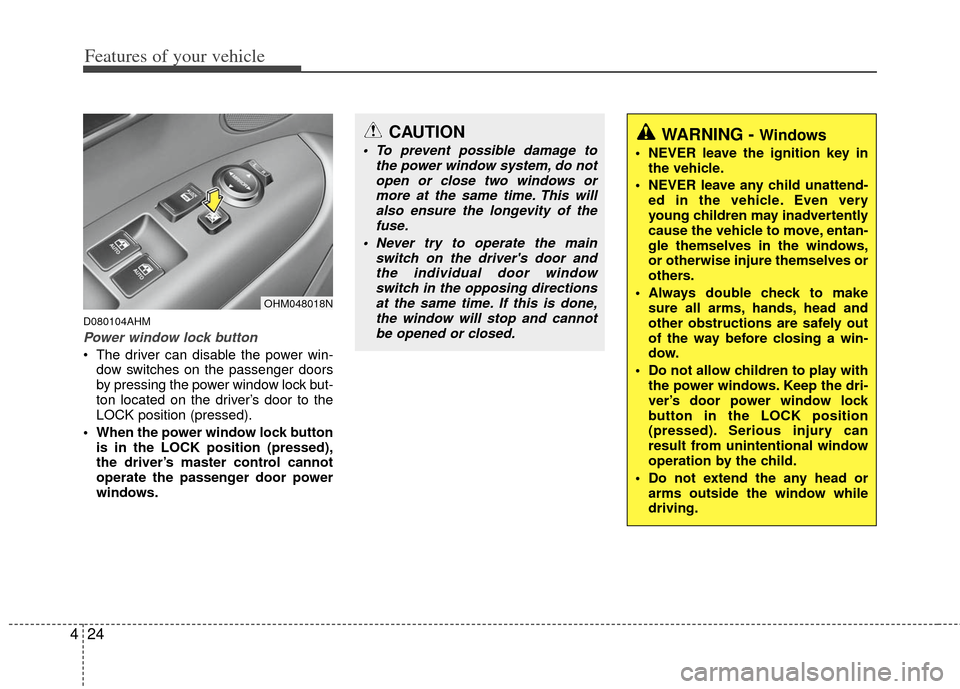
The driver can disable the power win-
dow switches on the passenger doors
by pressing the power window lock but-
ton located on the driver’s door to the
LOCK position (pressed).
When the power window lock button is in the LOCK position (pressed),
the driver’s master control cannot
operate the passenger door power
windows.
CAUTION
To prevent possible damage to the power window system, do notopen or close two windows ormore at the same time. This willalso ensure the longevity of the fuse.
Never try to operate the main switch on the driver's door andthe individual door windowswitch in the opposing directionsat the same time. If this is done,the window will stop and cannotbe opened or closed.WARNING - Windows
NEVER leave the ignition key in the vehicle.
NEVER leave any child unattend- ed in the vehicle. Even very
young children may inadvertently
cause the vehicle to move, entan-
gle themselves in the windows,
or otherwise injure themselves or
others.
Always double check to make sure all arms, hands, head and
other obstructions are safely out
of the way before closing a win-
dow.
Do not allow children to play with the power windows. Keep the dri-
ver’s door power window lock
button in the LOCK position
(pressed). Serious injury can
result from unintentional window
operation by the child.
Do not extend the any head or arms outside the window while
driving.
OHM048018N
Page 115 of 464
435
Features of your vehicle
D120300AHM-EU
Easy access function
(if equipped)
With the shift lever in the P (Park) posi-
tion, the system will move the driver’s
seat and the steering wheel forward or
rearward automatically so you can com-
fortably enter and exit the vehicle.
With ignition key- The steering wheel will move awayfrom the driver and the seat will move
rearward, when the ignition key is
removed.
- The steering wheel will move toward the driver and the seat will move for-
ward, when the ignition key is insert-
ed. With smart key
- The steering wheel will move awayfrom the driver and the seat will move
rearward, when the ENGINE START/
STOP button is in the OFF position.
- The steering wheel will move toward the driver and the seat will move for-
ward, when the ENGINE START/
STOP button is in the ACC position.
To deactivate or activate the easy access
function
1. Shift the transmission shift lever into P (Park) while the ignition switch is ON.
2. Press the SET button and hold it for 10 seconds or more.
3. Release the button after one or two beep sounds. The system will beep
once to indicate the function deactivat-
ed or twice to indicate the function
activated.D120400AHM
Reverse parking aid function
(if equipped)
While the vehicle is moving backward,
the outside rearview mirror(s) will move
downward to aid reverse parking.
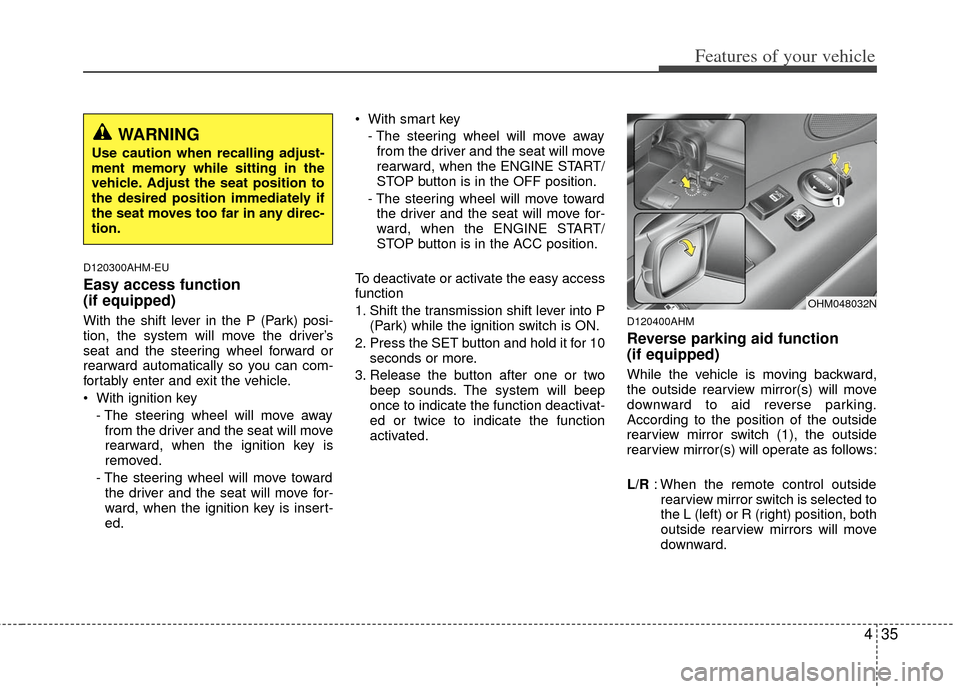
According to the position of the outside
rearview mirror switch (1), the outside
rearview mirror(s) will operate as follows:
L/R : When the remote control outside
rearview mirror switch is selected to
the L (left) or R (right) position, both
outside rearview mirrors will move
downward.
WARNING
Use caution when recalling adjust-
ment memory while sitting in the
vehicle. Adjust the seat position to
the desired position immediately if
the seat moves too far in any direc-
tion.
OHM048032N
Page 140 of 464
Features of your vehicle
60
4
D150331AHM
Low tire pressure telltale
The low tire pressure telltale comes on
for 3 seconds after the ignition key is
turned to the "ON" position.
If the warning light does not come on, or
continuously remains on after coming on
for about 3 seconds when you turned the
ignition key to the "ON" position, the Tire
Pressure Monitoring System is not work-
ing properly. If this occurs, have your
vehicle checked by an KIA authorized
dealer as soon as possible.
This warning light will also illuminate if
one or more of your tires is significantly
under-inflated. You should stop and
check your tires as soon as possible. If
the warning light illuminates while driv-
ing, reduce vehicle speed immediately
and stop the vehicle.
Avoid hard braking and overcorrecting at
the steering wheel. Inflate the tires to the
proper pressure as indicated on the vehi-
cle’s tire information placard.
D150332AHM
TPMS (Tire Pressure
Monitoring System) malfunction indicator
TPMS malfunction indicator comes on for
3 seconds after the ignition key is turned
to the "ON" position. If the warning light
does not come on, or continuously
remains on after coming on for about 3
seconds when you turned the ignition key
to the "ON" position, the Tire Pressure
Monitoring System is not working proper-
ly. If this occurs, have your vehicle
checked by an authorized KIA dealer as
soon as possible.
The warning light also comes on and
stays on when there is a problem with the
Tire Pressure Monitoring System.
If this happens, the system may not mon-
itor the tire pressure. Have the system
checked by an authorized KIA dealer as
soon as possible.
WARNING
Significantly low tire pressure
makes the vehicle unstable and can
contribute to loss of vehicle control
and increased braking distances.
Continued driving tire with low
pressure tires will cause the tires to
overheat and fail.TPMS
Page 142 of 464
Features of your vehicle
62
4
D150316AUN
Door ajar warning light
This warning light illuminates when a
door is not closed securely with the igni-
tion switch in any position.
D150317AHM-EE
Immobilizer indicator
(if equipped)
Without smart key system
This indicator light illuminates when the
immobilizer key is inserted and turned to
the ON position to start the engine.
At this time, you can start the engine. The
light goes out after the engine is running.
If this light blinks when the ignition switch
is in the ON position before starting the
engine, have the system checked by an
authorized KIA dealer. With smart key system
If any of the following occurs in a vehicle
equipped with the smart key, the immobi-
lizer indicator illuminates, blinks or goes
off.
When the smart key is in the vehicle, if
the ENGINE START/STOP button is in
the ACC or ON position, the indicator
will illuminate for a few minutes to indi-
cate that you are able to start the
engine. However, when the smart key
is not in the vehicle, if the ENGINE
START/STOP button is pressed, the
indicator will blink for a few minutes to
indicate that you are not be able to
start the engine.
When the ENGINE START/STOP but- ton is changed to the ON position from
the ACC position without the smart key
in the vehicle, the indicator light blinks
for a few minutes to indicate that you
are not be able to start the engine.
When the battery is weak, if the ENGINE START/STOP button is
pressed, the indicator will blink and you
are not able to start the engine.
However, you are able to start the
engine by inserting the smart key in
the smart key holder. If the smart key
system related parts have a problem,
the indicator will blink.
D150318AHM
Low fuel level warning light
This warning light indicates the fuel tank
is nearly empty. When it comes on, you
should add fuel as soon as possible.
Driving with the fuel level warning light on
or with the fuel level below “E” can cause
the engine to misfire and damage the
catalytic converter (if equipped).
D150319AHM
Low washer fluid levelwarning light (if equipped)
This warning light indicates the washer
fluid reservoir is nearly empty. Refill the
washer fluid as soon as possible.
Page 145 of 464
465
Features of your vehicle
Cruise SET indicator
The indicator light illuminates when the
cruise function switch (-/SET or RES/+)
is ON.
The cruise SET indicator light in the
instrument cluster is illuminated when
the cruise control switch (-/SET or
RES/+) is pushed.
The cruise SET indicator light does not
illuminate when the cruise control switch
(CANCEL) is pushed or the system is
disengaged.
D150327AUN
Key reminder warning chime (if equipped)
If the driver’s door is opened while the
ignition key is left in the ignition switch
(ACC or LOCK position), the key
reminder warning chime will sound. This
is to prevent you from locking your keys
in the vehicle. The chime sounds until the
key is removed from the ignition switch or
the driver’s door is closed.
D150336AHM
4WD system warning light(if equipped)
If the 4WD system warning light illumi-
nates, this indicates that there is a mal-
function in the 4WD system. If this
occurs, have your vehicle checked by an
authorized KIA dealer as soon as possi-
ble.
D150337AHM-EE
4WD LOW indicator (if equipped)
When the ignition switch is turned to the
ON position, the 4WD LOW indicator will
illuminate and then go off in a few sec-
onds. The 4WD LOW indicator illumi-
nates when the transfer shift knob is set
to the 4L(Low-speed 4-wheel drive) posi-
tion.
D150337AHM-EE
4WD HI indicator (if equipped)
When the ignition switch is turned to the
ON position, the 4WD HI indicator will
illuminate and then go off in a few sec-
onds. The 4WD HI indicator illuminates
when the transfer shift knob is set to the
4H(High-speed 4-wheel drive) position.
4WD
LOW
4WD HI
SET
Page 146 of 464
Features of your vehicle
66
4
D150338AHM
KEY OUT indicator
(if equipped)
When the ENGINE START/STOP button
is in the ACC or ON position, if any door
is open, the system checks for the smart
key. If the smart key is not in the vehicle,
the indicator will blink, and if all doors are
closed, the chime will also sound for
about 5 seconds. The indicator will go off
while the vehicle is moving. Keep the
smart key in the vehicle or insert it in the
smart key holder.
D150326AHM-EE
Lights on warning chime (if equipped)
The lights on warning chime will sound if
the driver's door is opened when the
headlight switch is left in the 1st or 2nd
position with the ignition switch removed
(for smart key, in OFF position).
D150400AHM
LCD display warning (if equipped)
Key is not in vehicle
If the smart key is not in the vehicle and
if any door is opened or closed with the
ENGINE START/STOP button in the
ACC, ON, or START position, the warn-
ing illuminates on the LCD display. Also,
the chime sounds for 5 seconds when
the smart key is not in the vehicle and the
door is closed.
Always have the smart key with you.
Key is not detected
If the smart key is not in the vehicle or is
not detected and you press the ENGINE
START/STOP button, the warning illumi-
nates on the LCD display for 10 seconds.
Also, the immobilizer indicator and the
key holder light blinks for 10 seconds.
Low key battery
If the ENGINE START/STOP button
changes to the OFF position when the
smart key in the vehicle discharges, the
warning illuminates on the LCD display
for about 10 seconds. Also, the warning
chime sounds once.
Replace the battery with a new one. Press brake pedal to start engine
If the ENGINE START/STOP button
changes to the ACC position twice by
pressing the button repeatedly without
depressing the brake pedal, the warning
illuminates on the LCD display for about
10 seconds to indicate that you should
depress the brake pedal to start the
engine.
Shift to "P" position
If you try to turn off the engine without the
shift lever in the P (Park) position, the
ENGINE START/STOP button will
change to the ACC position. If the button
is pressed once more it will turn to the
ON position The warning illuminates on
the LCD display for about 10 seconds to
indicate that you should press the
ENGINE START/STOP button with the
shift lever in the P (Park) position to turn
off the engine.
Remove key
When you turn off the engine with the
smart key in the smart key holder, the
warning illuminates on the LCD display
for about 10 seconds. Also, the smart key
holder light blinks for about 10 seconds.
To remove the smart key push the smart
key once and pull it out from the smart
key holder.
KEY
OUT
Page 147 of 464
467
Features of your vehicle
Insert key
If you press the ENGINE START/STOP
button while "Key is not detected" illumi-
nates on the LCD display, the warning
“Insert key” illuminates for about 10 sec-
onds. Also, the immobilizer indicator and
the key holder light blinks for about 10
seconds.
Press start button again
If you can not operate the ENGINE
START/STOP button when there is a
problem with the ENGINE START/STOP
button system, the warning illuminates
for 10 seconds and the chime sounds
continuously to indicate that you could
start the engine by pressing the ENGINE
START/STOP button once more.
The chime will stop if the ENGINE
START/STOP button system works nor-
mally or the theft alarm system is armed.
If the warning illuminates each time you
press the ENGINE START/STOP button,
take your vehicle to an authorized KIA
dealer and have the system checked.Shift to "P" or "N" to start the engine
If you try to start the engine with the shift
lever not in the P(Park) or N(Neutral)
position, the warning illuminates for
about 10 seconds on the LCD display.
You can also start the engine with the
shift lever in the N(Neutral) position, but
for your safety start the engine with the
shift lever in the P(Park) position.
Press button while turn steering
If the steering wheel does not unlock nor-
mally when the ENGINE START/STOP
button is pressed, the warning illumi-
nates for 10 seconds on the LCD display.
Also, the warning chime sounds once
and the ENGINE START/STOP button
light blinks for 10 seconds.
When you are warned, press the
ENGINE START/STOP button while turn-
ing the steering wheel right and left.
Check steering wheel lock
If the steering wheel does not lock nor-
mally when the ENGINE START/STOP
button changes to the OFF position, the
warning illuminates for 10 seconds on
the LCD display. Also, the warning chime
sounds for 3 seconds and the ENGINE
START/STOP button light blinks for 10
seconds.
Page 151 of 464

471
Features of your vehicle
D330000BHM-EE
The rearview camera will activate when
the back-up light is ON with the ignition
switch ON and the shift lever in the R
(Reverse) position.
This system is a supplemental system
that shows behind of the vehicle through
the rearview display mirror while back-
ing-up.The rearview camera may be turned off
by pressing the ON/OFF button (1) when
the rearview camera is activated.
To turn the camera on again, press the
ON/OFF button (1) again when the igni-
tion switch is ON and the shift lever in R
(Reverse) position. Also, the camera will
turn on automatically whenever the igni-
tion switch is turned off and on again.
D180000AHM
The hazard warning flasher should be
used whenever you find it necessary to
stop the vehicle in a hazardous location.
When you must make such an emer-
gency stop, always pull off the road as far
as possible.
The hazard warning lights are turned on
by pushing in the hazard switch. Both
turn signal lights will blink. The hazard
warning lights will operate even though
the key is not in the ignition switch.
To turn the hazard warning lights off,
push the switch again.
OHM068001N
HAZARD WARNING FLASHER
WARNING
This system is a supplementary
function only. It is the responsi-
bility of the driver to always
check the inside/outside rearview
mirror and the area behind the
vehicle before and while backing
up because there is a dead zone
that can't see through the cam-
era.
Always keep the camera lens clean. If lens is covered with for-
eign matter, the camera may not
operate normally.
OHM048062
OHM048061L
REARVIEW CAMERA (IF EQUIPPED)