change time KIA BORREGO 2015 User Guide
[x] Cancel search | Manufacturer: KIA, Model Year: 2015, Model line: BORREGO, Model: KIA BORREGO 2015Pages: 420, PDF Size: 41.56 MB
Page 198 of 420

Features of your vehicle
124
4
Minute (2)
Press the M button to advance the time
displayed by one minute.
Hold the M button to advance the hour
reading more rapildy.
Reset (3)
To clear away minutes, press the R but-
ton. Then the clock will be set precisely
on the hour.
For example, if the R button is pressed
while the time is between 9:01 and 9:29,
the display will reset to 9:00.
9:01 ~ 9:29 display changed to 9:00
9:30 ~ 9:59 display changed to 10:00 D280604AHM
Display conversion
To change the 12 hour format to the 24
hour format, press the R button until the
display blinks.
For example, if the R button is pressed
while the time is 10:15 p.m., the displaywill change to 22:15. D281200AHM-EE Outside thermometer
The current outside temperature is dis-
played in 1°C (1°F) increments. The tem-
perature range is between -40°C ~ 60°C(-40°F~140°F). The outside temperature on the display
may not change immediately like a
general thermometer to prevent the
driver from being inattentive.
For details, refer to the "Climate control system" in section 4.
Temperature
Seconds
1. Turn the ignition switch to the ON posi- tion.
2. Press the H button at least 3 times within 3 seconds while pressing the R
button.
3. The temperature mode will change to the time mode. The time displays in
seconds.
4. If the M button is pressed, the clock’s minute will change and the counting
will start again from the beginning(00).
5. To return to the temperature mode, press the H button at least 3 timeswithin 3 seconds while pressing the R
button.
If the ignition switch turns OFF and ON
again, the temperature mode will be dis-
played.
OHM048138
OHM048139
■ Type A
■ Type B
Page 231 of 420
4157
Features of your vehicle
10. TUNE Knob & ENTER Button
Turn the knob clockwise to display theTrack NO(File name) after the current song.
Turn the knob counterclockwise to dis- play the Track NO(File Name) beforethe current song.
To select the displayed song, press the button.
11. FOLDER Button
Folder name/File name(the first song in the folder) is moved up or down from
the currently playing folder.
To select the displayed folder, press ENTER(NO.10) button.
12. INFO(INFORMATION) Button
Displays the information of the current CD
TRACK(FILE) as below when the button
is pressed each time. CDDA : DISC TITLE ➟DISC ARTIST ➟
TRACK TITLE ➟TRACK ARTIST ➟TOTAL
TRACK...
MP3/WMA : FILE NAME ➟TITLE ➟
ARTIST ➟ALBUM ➟FOLDER NAME ➟
TOTAL FILE...13. DISC Button(CD Changer:PA 960)
Disc is moved up or down from the cur-
rently playing disc.
14. LOAD Button(CD Changer:PA 960)
How to load a CD
Press [LOAD] for less than 0.8 second.
An empty slot is selected and the CD
number indicator(a) blinks on the LCD.
After "WAIT" is displayed for a moment, "INSERT DISC(1~6)" is diplayed and
the CD slot indicator(b) blinks.
Insert a CD while the slot indicator blinks.
How to load CDs(ALL Load)
Press [LOAD] for more than 0.8 sec- ond.
An empty slot is selected and the CD number indicator(a) blinks on the LCD.
After "WAIT" is displayed for a moment, "INSERT DISC(1~6)" is
diplayed and the CD slot indicator(b)
blinks.
Insert a CD while the slot indicator blinks. After the CD is inserted, the rest of the
empty CD slots' number blink.
Repeat step 2 and 3 until all of the slots are loaded.CAUTION
Insert a CD only while "Insert Disc(1~6)" is displayed and theslot indicator blinks.
Don't insert two CDs for one oper- ation.
Page 240 of 420
Features of your vehicle
166
4
Before using Bluetooth ®
features, the
phone must be paired (registered) with
the audio system. Up to 5 phones can bepaired with the system.
✽✽ NOTICE
The pairing procedure of the phone varies according to each phone model.
Before attempting to pair phone,
please see your phone’s User’s Guide
for instructions.
Once pairing with the phone is com-
pleted, there is no need to pair with that
phone again unless the phone is deleted
manually from the audio system (refer
“Deleting Phone” section) or the vehi-
cle’s information is removed from the
phone.
1. Press [ENTER(TUNE knob)] button to enter SETUP mode.
2. Select “PHONE”, then “PAIR” in PHONE menu.
3. The audio displays “searching ----
passkey: 0000”
4. Search the Bluetooth ®
system on your
phone .Your phone should display your
[vehicle model name] on theBluetooth ®
device list. Then attempt
pairing on your phone
✽✽ NOTICE
If the phone is paired with two or more
vehicles of the same model, some phones
may not handle Bluetooth® devices of
that name correctly. In this case, you
may need to change the name displayed
on your phone.
For example, if the vehicles' name is
KMC CAR, you may need to change the
name displayed on you phone from
KMC_CAR to JOHNS_CAR or KMC
CAR_1 to avoid ambiguity.
Refer to your phone User’s Guide, or
contact your cellular carrier or phone
manufacturer for instructions.
When the Bluetooth ®
system is enabled,
the phone previously used is automati-
cally selected and re-connected. If you
want to select different phone previouslypaired, the phone can be selected
through “Select Phone” menu. Only a selected phone can be used with
the hands-free system at a time.
1. Press [ENTER(TUNE knob)] button to
enter SETUP mode.
2. Select “PHONE”, then “SELECT” in PHONE menu.
3. Select desired phone name from the list shown.
If several phones are paired with theaudio system, the system attempts to
connect following order when theBluetooth
®
system is enabled:
1) “Priority” checked phone.
2) Previously connected phone
3) Gives up auto connection.
1. Press [ENTER(TUNE knob)] button to enter SETUP mode.
2. Select “PHONE”, then in “PRIORITY” in PHONE menu.
3. Select desired phone name from the list shown.
Bluetooth ®
wireless tech-
nology ON/OFF
Bluetooth ®
system can be enabled (ON)
or disabled (OFF) by this menu.
- If Bluetooth ®
is disabled, all the com-
mands related to Bluetooth ®
system
prompts whether you wish to turn Bluetooth ®
ON or not.
1. Press [ENTER(TUNE knob)] button to enter SETUP mode.
2. Select “PHONE”, then “BT OFF” in PHONE menu.
Page 241 of 420
![KIA BORREGO 2015 User Guide 4167
Features of your vehicle
The paired phone can be deleted.
1. Press [ENTER(TUNE knob)] button toenter SETUP mode.
2. Select “PHONE”, then “DELETE” in PHONE menu.
3. Select desired phone](/img/2/57933/w960_57933-240.png "KIA BORREGO 2015 User Guide 4167
Features of your vehicle
The paired phone can be deleted.
1. Press [ENTER(TUNE knob)] button toenter SETUP mode.
2. Select “PHONE”, then “DELETE” in PHONE menu.
3. Select desired phone")
4167
Features of your vehicle
The paired phone can be deleted.
1. Press [ENTER(TUNE knob)] button toenter SETUP mode.
2. Select “PHONE”, then “DELETE” in PHONE menu.
3. Select desired phone name from the list shown.
■ Receiving a Phone Call
When receiving a phone call, a ringt one
is audible from speakers and the audio
system changes into telephone mode.
When receiving a phone call, “Incoming”
message and incoming phone number
(if available) are displayed on the audio.
- Press bu t t o n on the steering wheel.
- Press button on the steering wheel.
- Use VOLUME buttons on the steering wheel.
Call):
- Press and hold button on the steer- ing wheel until the audio system trans-
fers a call to the phone. ■
Talking on the Phone
When talking on the phone, “Active Calls”
message and the other party’s phone
number (if available) are displayed on the
audio.
- Press [MUTE] button on the audio.
- Press button on the steering wheel.
■ Making a Phone Call
A Call Back can be made by pressing button on the steering wheel.
- This is the same function as using the
button solely on the cellular phone.
✽✽NOTICE
Some phone models require pressing button twice to make a call.
✽
✽ NOTICE
In the following situations, you or the
other party may have difficulty hearing
each other:
1. Speaking at the same time, your voice may not reach the other party. (This is
not a malfunction.) Speak alternately
with the other party on the phone.
2. Keep the Bluetooth ®
volume to a low
level. High-level volume may result in
distortion and echo. 3. When driving on a rough road.
4. When driving at high speeds.
5. When the window is open.
6. When the air conditioning vents are
facing the microphone.
7. When the sound of the air condition-
ing fan is loud.
■Using the head unit as Bluetooth ®
wireless technology
music
This audio system supports A2DP (Audio
Advanced Distribution Profile) and
AVRCP(Audio Video Remote ControlProfile).
Both profiles are available for listening to
the MP3 music via Bluetooth cellular phone
supporting above Bluetooth profiles.
To play MP3 music from the Bluetooth
cellular phone, press the [AUX] button
until “MP3 Play” is displayed on the LCD.
Then try playing music by phone.
When playing music from the Bluetooth
cellular phone, the head unit displays MP3 MODE.
Page 244 of 420

Driving your vehicle
2
5
E010000AUN
WARNING - ENGINE EXHAUST CAN BE DANGEROUS!
Engine exhaust fumes can be extremely dangerous. If, at any time, you smell exhaust fumes inside the vehicle, open the win-
dows immediately.
• Do not inhale exhaust fumes. Exhaust fumes contain carbon monoxide, a colorless, odorless gas that can cause unconsciousness and death by asphyxia- tion.
The exhaust system should be checked whenever the vehicle is raised to change the oil or for any other purpose. If you hear
a change in the sound of the exhaust or if you drive over something that strikes the underneath side of the vehicle, have the
exhaust system checked as soon as possible by an authorized Kia dealer.
Letting the engine idle in your garage, even with the garage door open, is a hazardous practice. Never run the engine in your
garage any longer than it takes to start the engine and back the vehicle out.
If it is necessary to idle the engine for a prolonged period with people inside the vehicle, be sure to do so only in an open a rea
with the air intake set at "Fresh" and fan operating at one of the higher speeds so fresh air is drawn into the interior.
If you must drive with the tailgate open because you are carrying objects that make this necessary:
1. Close all windows.
2. Open side vents.
3. Set the air intake control at "Fresh", the air flow control at "Floor" or "Face" and the fan at one of the higher speeds.
To assure proper operation of the ventilation system, be sure the ventilation air intakes located just in front of the windshie ld are
kept clear of snow, ice, leaves or other obstructions.
Page 248 of 420

Driving your vehicle
6
5
Illuminated ENGINE START/STOP
button E030100AHM
Whenever the front door is opened, the
ENGINE START/STOP button will illumi-
nate for your convenience. The light willgo off after about 30 seconds when the
door is closed. It will also go off immedi-
ately when the theft-alarm system is
armed. ENGINE START/STOP button position E030701AHM
OFF
To turn off the engine (START/RUN posi-
tion) or vehicle power (ON position),
press the ENGINE START/STOP button
with the shift lever in the P (Park) posi-
tion. When you press the ENGINE
START/STOP button without the shift
lever in the P (Park) position, the
ENGINE START/STOP button will not
changed to the OFF position but to the
ACC position.
Also, the steering wheel locks when the
ENGINE START/STOP button is in the
OFF position to protect you against theft.
It locks when the door is opened or when
you pull out the smart key from the smart
key holder.
If the steering wheel is not locked prop-
erly when you open the driver's door, the
warning chime will sound. Try locking the
steering wheel again. If the problem is
not solved, have it checked by an author-
ized Kia dealer.In addition, if the ENGINE START/STOP
button is in the OFF position after the dri-
ver's door is opened, the steering wheel
will not lock and the warning chime will
sound. In such a situation, close the door.
Then the steering wheel will lock and the
warning chime will stop.
✽✽
NOTICE
If the steering wheel doesn't unlock
properly, the ENGINE START/STOP
button will not work. Press the ENGINE
START/STOP button while turning the
steering wheel right and left to release
the tension.
ENGINE START/STOP BUTTON (IF EQUIPPED)
OHM058001
CAUTION
You are able to turn off the engine (START/RUN) or vehicle power (ON), only when the vehicle is not in
motion. In an emergency situationwhile the vehicle is in motion, you are able to turn the engine off and to theACC position by pressing the ENGINE
START/STOP button for more than 2 seconds or 3 times successively within 3 seconds. If the vehicle is stillmoving, you can restart the engine
without depressing the brake pedalby pressing the ENGINE START/STOP button with the shift lever in the N(Neutral) position.
Not illuminated
Page 249 of 420

57
Driving your vehicle
E030202AHM
ACC(Accessory)
Press the ENGINE START/STOP button while it is in the OFF position without
depressing the brake pedal.
The steering wheel unlocks and electri-
cal accessories are operational.
If the ENGINE START/STOP button is in
the ACC position for more than 1 hour,
the button is turned off automatically to
prevent battery discharge. E030203AHM
ON
Press the ENGINE START/STOP button
while it is in the ACC position without
depressing the brake pedal.
The warning lights can be checked before
the engine is started. Do not leave the
ENGINE START/STOP button in the ON
position for a long time. The battery may
discharge, because the engine is not run-ning.E030704AHM
START/RUN
To start the engine, depress the brake
pedal and press the ENGINE START/
STOP button with the shift lever in the P
(Park) or the N (Normal) position. For
your safety, start the engine with the shift
lever in the P (Park) position.
✽✽
NOTICE
If you press the ENGINE START/STOP
button without depressing the brake
pedal, the engine will not start and the
button will change in OFF ➔
➔
ACC ➔➔
ON ➔➔
OFF or ACC order.
E030205AHM
✽✽
NOTICE
If you leave the ENGINE START/ STOP
button in the ACC or ON position for a
long time, the battery will discharge.
Orange indicator
Green indicator
Not illuminated
WARNING
Never press the ENGINE START/STOP button while the
vehicle is in motion. This wouldresult in loss of directional con-
trol and braking function, whichcould cause an accident.
The anti-theft steering column lock is not a substitute for the
parking brake. Before leaving the
driver's seat, always make sure
the shift lever is engaged in P
(Park), set the parking brake fully
and shut the engine off.
Unexpected and sudden vehicle
movement may occur if theseprecautions are not taken.
Never reach for the ENGINE START/STOP button or any other
controls through the steering
wheel while the vehicle is in
motion. The presence of yourhand or arm in the area could
cause loss of vehicle control, an
accident and serious bodily
injury or death.
Do not place any movable objects around the driver's seat as they
may move while driving, interferewith the driver and lead to anaccident.
Page 265 of 420

523
Driving your vehicle
E170300AHM
For safe four-wheel drive opera- tion
Do not try to drive in deep standingwater or mud since such conditions
can stall your engine and clog your
exhaust pipes. Do not drive down
steep hills since it requires extreme
skill to maintain control of the vehicle. When you are driving up or down hills
drive as straight as possible. Use
extreme caution in going up or down
steep hills, since you may flip your
vehicle over depending on the grade,
terrain and water/mud conditions.
WARNING - Four-wheel driving
The conditions of on-road or off-
road that demand four-wheel drive
mean all functions of your vehicle
are exposed to extreme stress than
under normal road conditions. Slow
down and be ready for changes inthe composition and traction of the
surface under your tires. If you
have any doubt about the safety of
the conditions you are facing, stop
and consider the best way to pro-
ceed. Do not exceed the ability of
yourself or your vehicle to operate
safely.
WARNING - Hills
Driving across the contour of steep
hills can be extremely dangerous.
This danger can come from slight
changes in the wheel angle which
can destabilize the vehicle or, even
if the vehicle is maintaining stabili-
ty under power, it can lose that sta-
bility if the vehicle stops its forward
motion. Your vehicle may roll overwithout warning and without time
for you to correct a mistake that
could cause serious injury ordeath.
HILL1HILL2
Page 288 of 420
Driving your vehicle
46
5
E090300BHM
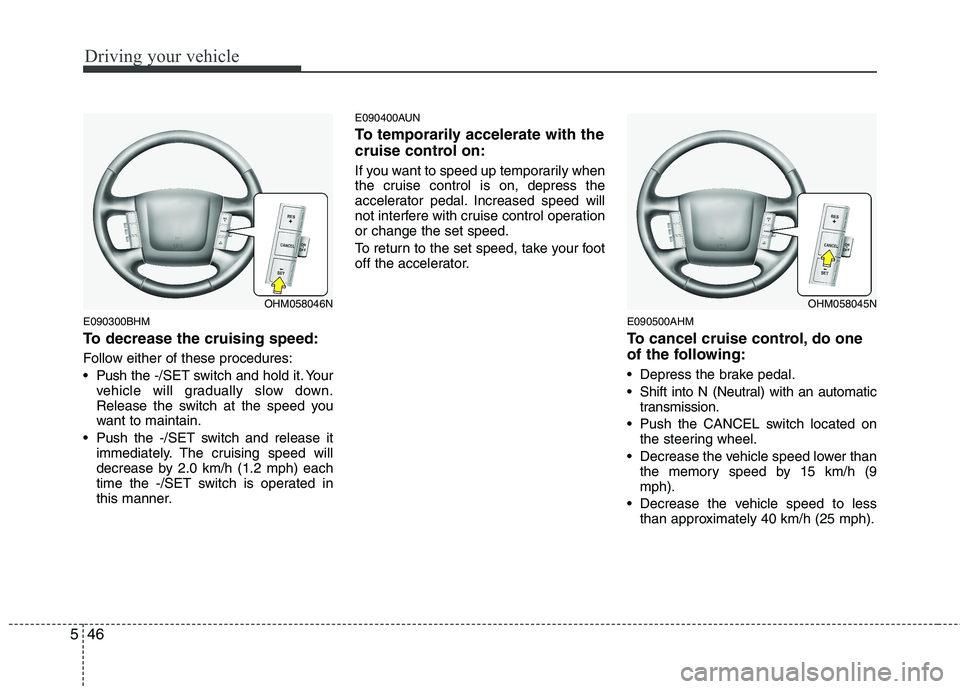
To decrease the cruising speed:
Follow either of these procedures:
Push the -/SET switch and hold it. Your
vehicle will gradually slow down.
Release the switch at the speed you
want to maintain.
Push the -/SET switch and release it immediately. The cruising speed will
decrease by 2.0 km/h (1.2 mph) each
time the -/SET switch is operated in
this manner. E090400AUN
To temporarily accelerate with the
cruise control on:
If you want to speed up temporarily when
the cruise control is on, depress the
accelerator pedal. Increased speed will
not interfere with cruise control operationor change the set speed.
To return to the set speed, take your foot
off the accelerator.
E090500AHM
To cancel cruise control, do one
of the following:
Depress the brake pedal.
Shift into N (Neutral) with an automatictransmission.
Push the CANCEL switch located on the steering wheel.
Decrease the vehicle speed lower than the memory speed by 15 km/h (9 mph).
Decrease the vehicle speed to less than approximately 40 km/h (25 mph).
OHM058046NOHM058045N
Page 298 of 420
Driving your vehicle
56
5
E120200AUN
Use high quality ethylene glycol coolant
Your vehicle is delivered with high quality
ethylene glycol coolant in the cooling
system. It is the only type of coolant that
should be used because it helps prevent
corrosion in the cooling system, lubri-
cates the water pump and prevents
freezing. Be sure to replace or replenish
your coolant in accordance with themaintenance schedule in section 7.
Before winter, have your coolant tested toassure that its freezing point is sufficient
for the temperatures anticipated during
the winter.
E120300AUN
Check battery and cables
Winter puts additional burdens on the
battery system. Visually inspect the bat-
tery and cables as described in section
7. The level of charge in your battery can
be checked by an authorized Kia dealer
or a service station. E120400BUN
Change to "winter weight" oil if
necessary In some climates it is recommended that
a lower viscosity "winter weight" oil be
used during cold weather. See section 8
for recommendations. If you aren't sure
what weight oil you should use, consult
an authorized Kia dealer.
E120500AUN
Check spark plugs and ignition system
Inspect your spark plugs as described in
section 7 and replace them if necessary.
Also check all ignition wiring and compo-
nents to be sure they are not cracked,
worn or damaged in any way.
WARNING
- Tire chains
The use of chains may adversely affect vehicle handling.
Do not exceed 30 km/h (20 mph) or the chain manufacturer’s rec-
ommended speed limit, whichev-
er is lower.
Drive carefully and avoid bumps, holes, sharp turns, and other
road hazards, which may cause
the vehicle to bounce.
Avoid sharp turns or locked- wheel braking.
CAUTION
Chains that are the wrong size or
improperly installed can damage
your vehicle's brake lines, sus-pension, body and wheels.
Stop driving and retighten the chains any time you hear themhitting the vehicle.