steering KIA BORREGO 2017 Owner's Guide
[x] Cancel search | Manufacturer: KIA, Model Year: 2017, Model line: BORREGO, Model: KIA BORREGO 2017Pages: 548, PDF Size: 36.78 MB
Page 187 of 548
Features of your vehicle
98
4
Battery saver function
The purpose of this feature is to
prevent the battery from being dis-
charged. The system automatically
turns off the parking lights when
the driver removes the ignition key
and opens the driver-side door.
With this feature, the parking lights will turn off automatically if the driver
parks on the side of the road at night.
If necessary, to keep the lights on
when the ignition key is removed,
perform the following:
1) Open the driver-side door.
2) Turn the parking lights OFF and ON again using the light switch
on the steering column. Daytime running light (if equipped)
The Daytime Running Lights (DRL)
can make it easier for others to see the
front of your vehicle during the day.
DRL can be helpful in many different
driving conditions, and it is especially
helpful after dawn and before sunset.
The DRL system will turn the dedi- cated lamp OFF when:
1. The headlight or fog lamp switch is
ON.
2. The engine is OFF.
LIGHTINGCAUTION
If the driver gets out of the vehi-
cle through other doors (exceptdriver's door), the battery saver function does not operate.Therefore, It causes the batteryto be discharged. In this case,make sure to turn off the lamp before getting out of the vehicle.
Page 243 of 548
Audio system
AUDIO SYSTEM . . . . . . . . . . . . . . . . . . . . . . . . . . . 5-2 Antenna . . . . . . . . . . . . . . . . . . . . . . . . . . . . . . . . . . . . . 5-2
Steering wheel audio controls. . . . . . . . . . . . . . . . . . . . 5-3
Aux, USB port . . . . . . . . . . . . . . . . . . . . . . . . . . . . . . . . 5-4
How vehicle radio works . . . . . . . . . . . . . . . . . . . . . . . 5-4
AUDIO (With Touch Screen) . . . . . . . . . . . . . . . . . 5-7 Features of Your Audio . . . . . . . . . . . . . . . . . . . . . . . . . 5-8
Radio Mode (Type-1) . . . . . . . . . . . . . . . . . . . . . . . . . 5-20
Radio Mode (Type-2) . . . . . . . . . . . . . . . . . . . . . . . . . 5-23
Media Mode . . . . . . . . . . . . . . . . . . . . . . . . . . . . . . . . . 5-25
Phone Mode . . . . . . . . . . . . . . . . . . . . . . . . . . . . . . . . . 5-40
Bluetooth ®
Wireless Technology (Type-1) . . . . . . . . . 5-41
Bluetooth ®
Wireless Technology (Type-2) . . . . . . . . . 5-48
Voice Recognition Mode . . . . . . . . . . . . . . . . . . . . . . . 5-55
Setup Mode (Type-1) . . . . . . . . . . . . . . . . . . . . . . . . . . 5-63
Setup Mode (Type-2) . . . . . . . . . . . . . . . . . . . . . . . . . . 5-72
Declaration of Conformity . . . . . . . . . . . . . . . . . . 5-80 FCC . . . . . . . . . . . . . . . . . . . . . . . . . . . . . . . . . . . . . . . . 5-80
CE for EU. . . . . . . . . . . . . . . . . . . . . . . . . . . . . . . . . . . 5-82
5
Page 245 of 548
Audio system
35
Steering wheel audio controls (if equipped)
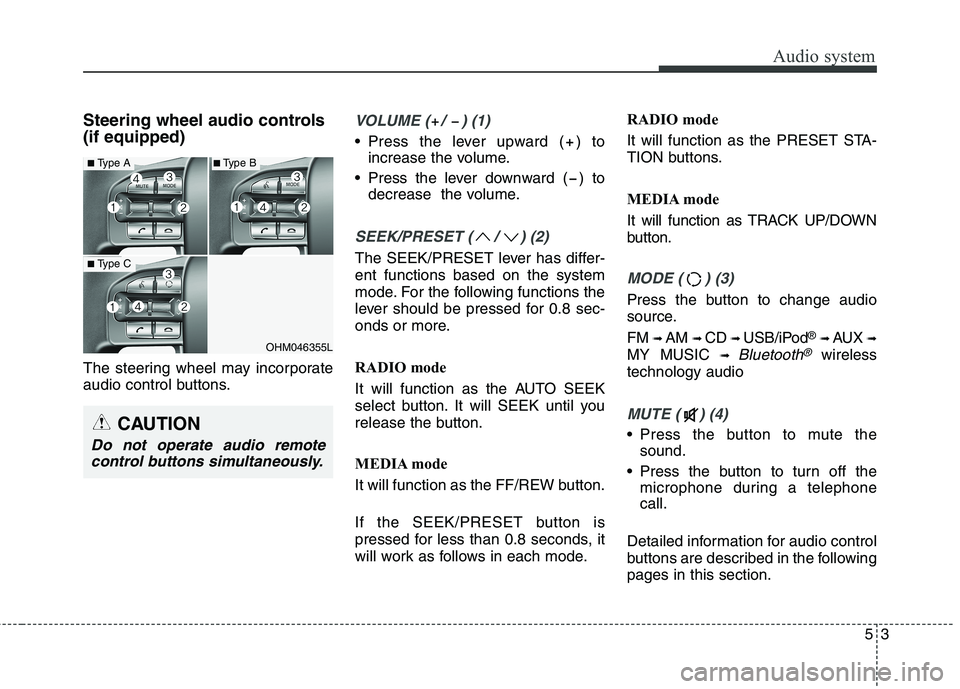
The steering wheel may incorporate
audio control buttons.VOLUME ( / ) (1)
• Press the lever upward ( ) toincrease the volume.
Press the lever downward ( ) to decrease the volume.
SEEK/PRESET ( / ) (2)
The SEEK/PRESET lever has differ- ent functions based on the system
mode. For the following functions the
lever should be pressed for 0.8 sec-
onds or more.
RADIO mode
It will function as the AUTO SEEK
select button. It will SEEK until you
release the button.
MEDIA mode
It will function as the FF/REW button.
If the SEEK/PRESET button is
pressed for less than 0.8 seconds, it
will work as follows in each mode. RADIO mode
It will function as the PRESET STA-
TION buttons.
MEDIA mode
It will function as TRACK UP/DOWN
button.
MODE ( ) (3)
Press the button to change audio
source. FM
➟ AM ➟ CD ➟ USB/iPod ®
➟ AUX ➟
MY MUSIC ➟
Bluetooth®wireless
technology audio
MUTE ( ) (4)
Press the button to mute the sound.
Press the button to turn off the microphone during a telephone call.
Detailed information for audio control
buttons are described in the followingpages in this section.
OHM046355L
■ Type A
■Type C
■Type B
CAUTION
Do not operate audio remote
control buttons simultaneously.
Page 282 of 548
Audio system
540Phone Mode
Making a call using the Steering
wheel controls
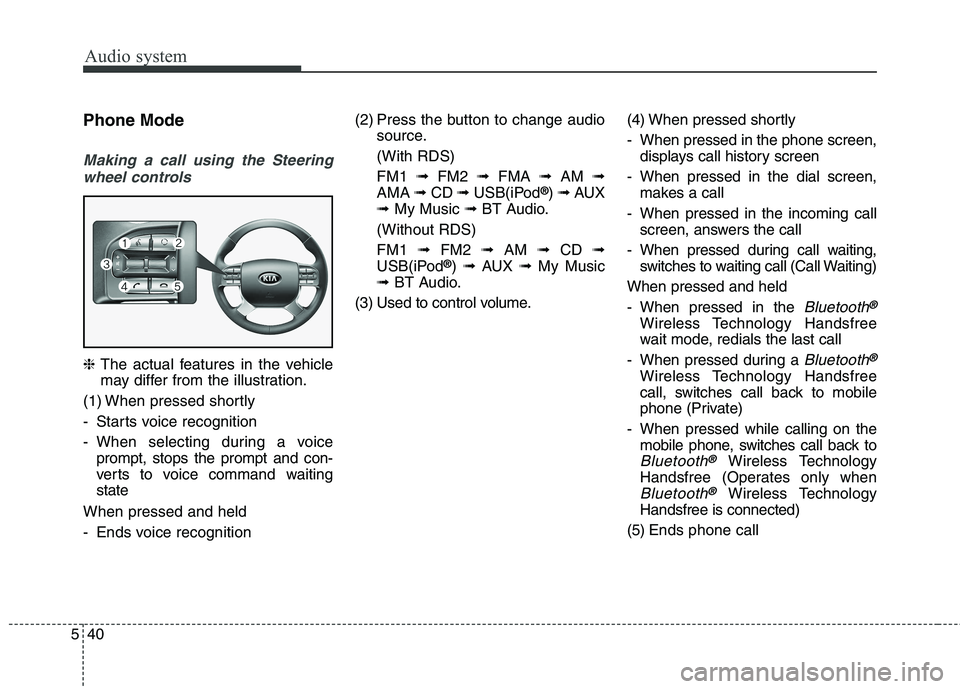
❈ The actual features in the vehicle
may differ from the illustration.
(1) When pressed shortly
- Starts voice recognition
- When selecting during a voice prompt, stops the prompt and con-
verts to voice command waitingstate
When pressed and held
- Ends voice recognition (2) Press the button to change audio
source.
(With RDS)FM1 ➟FM2 ➟FMA ➟AM ➟
AMA ➟CD ➟USB(iPod ®
) ➟ AUX
➟ My Music ➟BT Audio.
(Without RDS)FM1 ➟FM2 ➟AM ➟CD ➟
USB(iPod ®
) ➟ AUX ➟My Music
➟ BT Audio.
(3) Used to control volume. (4) When pressed shortly
- When pressed in the phone screen,
displays call history screen
- When pressed in the dial screen, makes a call
- When pressed in the incoming call screen, answers the call
- When pressed during call waiting, switches to waiting call (Call Waiting)
When pressed and held
- When pressed in the
Bluetooth®
Wireless Technology Handsfree
wait mode, redials the last call
- When pressed during a
Bluetooth®
Wireless Technology Handsfree
call, switches call back to mobile
phone (Private)
- When pressed while calling on the mobile phone, switches call back to
Bluetooth®Wireless Technology
Handsfree (Operates only when
Bluetooth®Wireless Technology
Handsfree is connected)
(5) Ends phone call
Page 283 of 548
![KIA BORREGO 2017 Owners Guide Audio system
41
5
Bluetooth®Wireless Technology
(Type-1)
When No Devices have been Paired
➀ Press the [PHONE]button or the
[CALL] button on the steering
wheel controls. The following
screen is](/img/2/57934/w960_57934-282.png "KIA BORREGO 2017 Owners Guide Audio system
41
5
Bluetooth®Wireless Technology
(Type-1)
When No Devices have been Paired
➀ Press the [PHONE]button or the
[CALL] button on the steering
wheel controls. The following
screen is")
Audio system
41
5
Bluetooth®Wireless Technology
(Type-1)
When No Devices have been Paired
➀ Press the [PHONE]button or the
[CALL] button on the steering
wheel controls. The following
screen is displayed.
➁ Press the [OK] button to enter the
Pair Phone screen. Device : Name of device as shown
when searching from your
Bluetooth®Wireless Technology
device
Passkey : Passkey used to pair the device
➂ From your
Bluetooth®Wireless
Technology device (i.e. Mobile
Phone), search and select yourcar audio system.
❈ SSP : Secure Simple Pairing
Non SSP supported device : ➃ After a few moments, a screen is
displayed where the passkey is entered.
Enter the passkey “0000” to pair
your
Bluetooth®Wireless Technology
device with the car audio system. SSP supported device : ➃
After a few moments, a screen is dis-
played 6 digits passkey.
Check the passkey on your
Bluetooth®Wireless Technology
device and confirm.
➄ Once pairing is complete, the fol-
lowing screen is displayed.
Some phones (i.e., iPhone ®
, Android
and Blackberry phones) may offer an
option to allow acceptance of all futureBluetooth ®
connection requests by
default. Visit http://www.kia.com/#/blue-
tooth for additional information on pair-
ing your Bluetooth ®
-enabled mobile
phone, and to view a phone compatibil-ity list.
Page 284 of 548
![KIA BORREGO 2017 Owners Guide Audio system
542
✽✽NOTICE
If Bluetooth ®
Wireless Technology
devices are paired but none are cur-
rently connected, pressing the
[PHONE]button or the [CALL]but-
ton on the steering wheel contr](/img/2/57934/w960_57934-283.png "KIA BORREGO 2017 Owners Guide Audio system
542
✽✽NOTICE
If Bluetooth ®
Wireless Technology
devices are paired but none are cur-
rently connected, pressing the
[PHONE]button or the [CALL]but-
ton on the steering wheel contr")
Audio system
542
✽✽NOTICE
If Bluetooth ®
Wireless Technology
devices are paired but none are cur-
rently connected, pressing the
[PHONE]button or the [CALL]but-
ton on the steering wheel controls
displays the following screen. Press
the [Pair] button to pair a new
device or press the [Connect] to con-
nect a previously paired device.
Pairing through [PHONE] Setup
Press the [SETUP]button Select
[Phone]
Pair Phone
The following steps are the same as
those described in the section “When
No Devices have been Paired” on the
previous page.
✽✽ NOTICE
The waiting period during phone pairing will last for one minute.
The pairing process will fail if the
device is not paired within the
given time. If the pairing process
fails, you must start the process
from the beginning.
Generally, most Bluetooth®
Wireless Technology devices will
automatically connect once pair-
ing is complete. However, some
devices may require a separate
verification process to connect.
Check to see whether Bluetooth®
Wireless Technology has been
properly connected within your
mobile phone.
List of paired Bluetooth®
Wireless
Technology devices can be viewedat
[SETUP] [Phone][Paired
Phone List].
Page 290 of 548
![KIA BORREGO 2017 Owners Guide Audio system
548
Bluetooth®Wireless Technology
(Type-2)
When No Devices have been Paired
➀ Press the [PHONE]button or the
[CALL] button on the steering
wheel controls. The following
screen is d](/img/2/57934/w960_57934-289.png "KIA BORREGO 2017 Owners Guide Audio system
548
Bluetooth®Wireless Technology
(Type-2)
When No Devices have been Paired
➀ Press the [PHONE]button or the
[CALL] button on the steering
wheel controls. The following
screen is d")
Audio system
548
Bluetooth®Wireless Technology
(Type-2)
When No Devices have been Paired
➀ Press the [PHONE]button or the
[CALL] button on the steering
wheel controls. The following
screen is displayed.
➁ Press the [OK] button to enter the
Pair Phone screen. Vehicle Name : Name of device as
shown when searching from your
Bluetooth®Wireless Technology
device
Passkey : Passkey used to pair the device
➂ From your
Bluetooth®Wireless
Technology device (i.e. Mobile
Phone), search and select yourcar audio system.
❈ SSP : Secure Simple Pairing
Non SSP supported device : ➃ After a few moments, a screen is
displayed where the passkey is entered.
Enter the passkey “0000” to pair
your
Bluetooth®Wireless Technology
device with the car audio system. SSP supported device : ➃
After a few moments, a screen is dis-
played 6 digits passkey.
Check the passkey on your
Bluetooth®Wireless Technology
device and confirm.
➄ Once pairing is complete, the fol-
lowing screen is displayed.
Some phones (i.e., iPhone ®
, Android
and Blackberry phones) may offer an
option to allow acceptance of all futureBluetooth ®
connection requests by
default. Visit http://www.kia.com/#/blue-
tooth for additional information on pair-
ing your Bluetooth ®
-enabled mobile
phone, and to view a phone compatibil-ity list.
Page 291 of 548
![KIA BORREGO 2017 Owners Guide Audio system
49
5
✽✽
NOTICE
If Bluetooth ®
Wireless Technology
devices are paired but none are cur-
rently connected, pressing the
[PHONE]button or the [CALL]but-
ton on the steering wheel con](/img/2/57934/w960_57934-290.png "KIA BORREGO 2017 Owners Guide Audio system
49
5
✽✽
NOTICE
If Bluetooth ®
Wireless Technology
devices are paired but none are cur-
rently connected, pressing the
[PHONE]button or the [CALL]but-
ton on the steering wheel con")
Audio system
49
5
✽✽
NOTICE
If Bluetooth ®
Wireless Technology
devices are paired but none are cur-
rently connected, pressing the
[PHONE]button or the [CALL]but-
ton on the steering wheel controls
displays the following screen. Press
the [Pair] button to pair a new
device or press the [Connect] to con-
nect a previously paired device.
Pairing through [PHONE] Setup
Press the [SETUP]button
Select
[Phone]
Pair Phone
The following steps are the same as
those described in the section “When
No Devices have been Paired” on the
previous page.
✽✽ NOTICE
The waiting period during phone pairing will last for one minute.
The pairing process will fail if the
device is not paired within the
given time. If the pairing process
fails, you must start the process
from the beginning.
Generally, most Bluetooth®
Wireless Technology devices will
automatically connect once pair-
ing is complete. However, some
devices may require a separate
verification process to connect.
Check to see whether Bluetooth®
Wireless Technology has been
properly connected within your
mobile phone.
List of paired Bluetooth®
Wireless
Technology devices can be viewedat
[SETUP] [Phone][Paired
Phone List].
Page 297 of 548
Audio system
55
5
Voice Recognition Mode (if equipped)
Using Voice Recognition
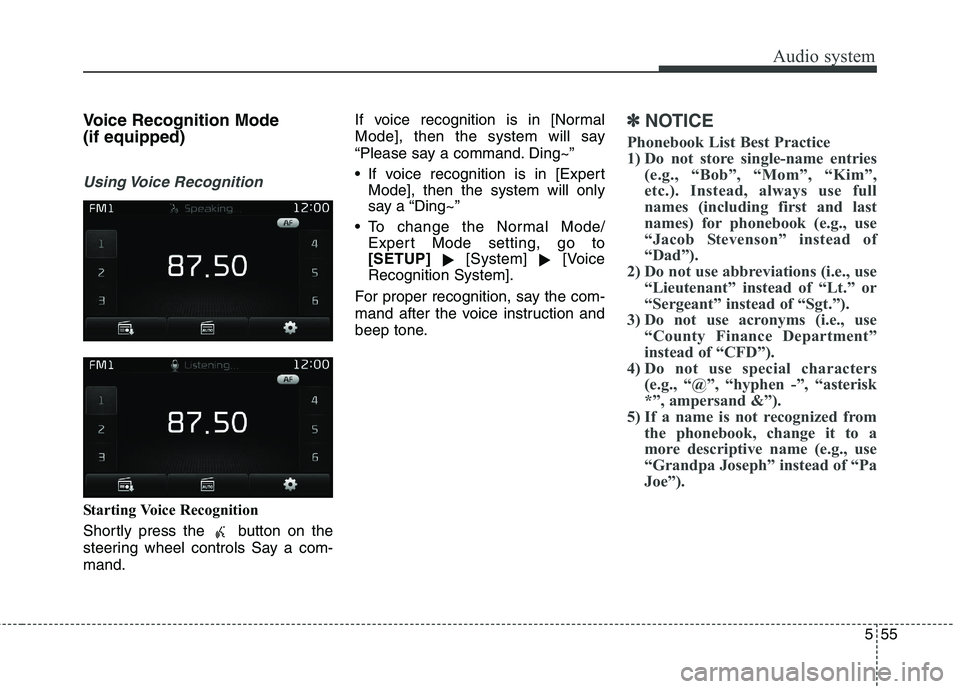
Starting Voice Recognition
Shortly press the button on the
steering wheel controls Say a com-mand. If voice recognition is in [Normal
Mode], then the system will say
“Please say a command. Ding~”
If voice recognition is in [Expert
Mode], then the system will only
say a “Ding~”
To change the Normal Mode/ Expert Mode setting, go to[SETUP] [System]
[Voice
Recognition System].
For proper recognition, say the com-
mand after the voice instruction and
beep tone.
✽✽ NOTICE
Phonebook List Best Practice
1) Do not store single-name entries (e.g., “Bob”, “Mom”, “Kim”,
etc.). Instead, always use full
names (including first and last
names) for phonebook (e.g., use
“Jacob Stevenson” instead of
“Dad”).
2) Do not use abbreviations (i.e., use “Lieutenant” instead of “Lt.” or
“Sergeant” instead of “Sgt.”).
3) Do not use acronyms (i.e., use “County Finance Department”
instead of “CFD”).
4) Do not use special characters (e.g., “@”, “hyphen -”, “asterisk
*”, ampersand &”).
5) If a name is not recognized from the phonebook, change it to a
more descriptive name (e.g., use
“Grandpa Joseph” instead of “Pa
Joe”).
Page 298 of 548
Audio system
556Skipping Prompt Messages While prompt message is being stat- ed
Shortly press the button on
the steering wheel controls. The prompt message is immediately ended and the beep tone will sound.
After the “Ding”, say the voice com-mand.
Re-starting Voice Recognition
While system waits for a command
Shortly press the button on the
steering wheel controls.
The command wait state is immedi- ately ended and the beep tone will
sound. After the “Ding”, say the voicecommand. Ending Voice Recognition
While Voice Recognition is operating
Press and hold the button on
the steering wheel controls.
While using voice commands, pressing some steering wheel con-
trols or some different buttons will
end voice command.
When the system is waiting for a voice command, say “cancel” or
“end” to end voice command.
When the system is waiting for a voice command, press and hold
the button on the steering
wheel controls to end voice com-mand.
✽✽ NOTICE
Voice Recognition and Phonebook
Tips
The Kia Voice Recognition System
may have difficulty understanding
some accents or uncommon names.
When using Voice Recognition to
place a call, speak in a moderate
tone, with clear pronunciation.
To maximize the use of Voice
Recognition, consider these guide-
lines when storing contacts:
Do not store single-name entries (e.g., “Bob”, “Mom”, etc.). Instead,
always use full names (including
first and last names) for these con-
tacts.
Do not use special characters (e.g., '@', '-', '*', '&', etc.).
Do not use abbreviations (i.e., use "Lieutenant" instead of "Lt.") or
acronyms (i.e., use "County
Finance Department" instead of
"C. F. D."; Be sure to say the name
exactly as it is entered in the con-
tacts list