radio KIA CADENZA 2011 Owners Manual
[x] Cancel search | Manufacturer: KIA, Model Year: 2011, Model line: CADENZA, Model: KIA CADENZA 2011Pages: 352, PDF Size: 28.17 MB
Page 68 of 352
47
Features of your vehicle
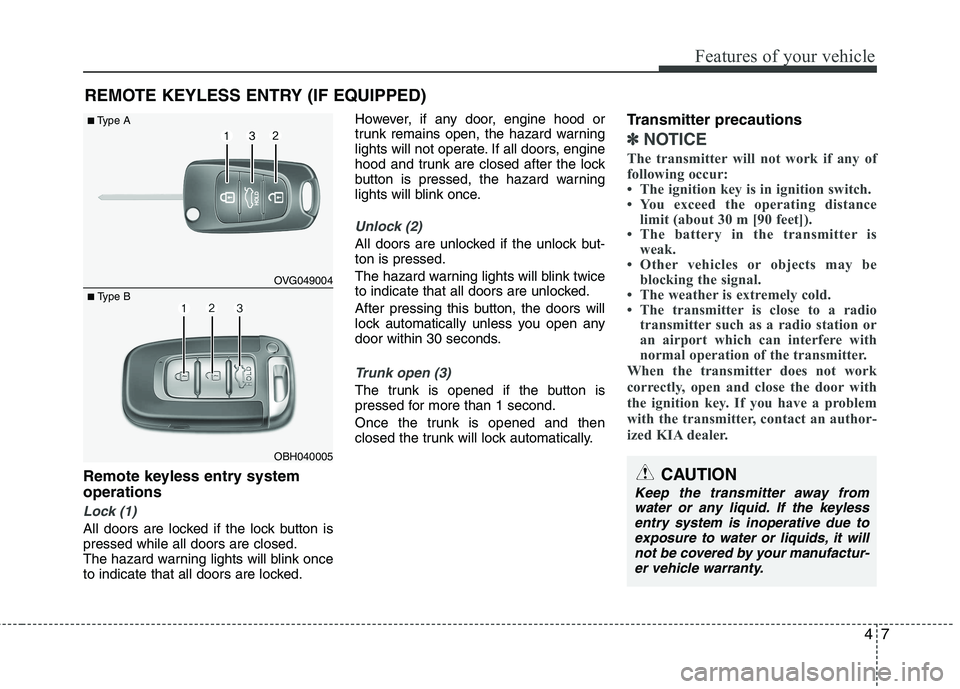
Remote keyless entry system operations
Lock (1)
All doors are locked if the lock button is pressed while all doors are closed.
The hazard warning lights will blink once
to indicate that all doors are locked.However, if any door, engine hood or
trunk remains open, the hazard warning
lights will not operate. If all doors, engine
hood and trunk are closed after the lock
button is pressed, the hazard warning
lights will blink once.
Unlock (2)
All doors are unlocked if the unlock but- ton is pressed.
The hazard warning lights will blink twice
to indicate that all doors are unlocked.
After pressing this button, the doors will
lock automatically unless you open any
door within 30 seconds.
Trunk open (3)
The trunk is opened if the button is
pressed for more than 1 second.
Once the trunk is opened and then
closed the trunk will lock automatically.
Transmitter precautions
✽✽
NOTICE
The transmitter will not work if any of
following occur:
The ignition key is in ignition switch.
You exceed the operating distance limit (about 30 m [90 feet]).
The battery in the transmitter is weak.
Other vehicles or objects may be blocking the signal.
The weather is extremely cold.
The transmitter is close to a radio transmitter such as a radio station or
an airport which can interfere with
normal operation of the transmitter.
When the transmitter does not work
correctly, open and close the door with
the ignition key. If you have a problem
with the transmitter, contact an author-
ized KIA dealer.
REMOTE KEYLESS ENTRY (IF EQUIPPED)
OVG049004
OBH040005
■
Type A
■ Type B
CAUTION
Keep the transmitter away from
water or any liquid. If the keyless entry system is inoperative due toexposure to water or liquids, it will
not be covered by your manufactur-er vehicle warranty.
Page 72 of 352
411
Features of your vehicle
Trunk unlocking
If you are within 0.7~1 m (28~40 in.) from
the outside trunk handle with your smart
key in your possession, the trunk will
unlock and open when you press the
trunk handle switch.
Also, once the trunk is opened and then
closed, the trunk will lock automatically.
Start-up
You can start the engine without inserting
the key. For detailed information refer to
“ENGINE START/STOP button” in sec-tion 5.Smart key precautions
✽✽
NOTICE
If, for some reason, you happen to lose your smart key, you will not be able to
start the engine. Tow the vehicle, if
necessary, and contact an authorized
KIA dealer.
A maximum of 2 smart keys can be
registered to a single vehicle. If you
lose a smart key, you should immedi-
ately take the vehicle and key to your
authorized KIA dealer to protect it
from potential theft.
The smart key will not work if any of
following occur:
- The smart key is close to a radiotransmitter such as a radio station or
an airport which can interfere with
normal operation of the smart key.
- You keep the smart key near a
mobile two-way radio system or a
cellular phone.
- Another vehicle’s smart key is being operated close to your vehicle.
When the smart key does not work
correctly, open and close the door with
the mechanical key. If you have a
problem with the smart key, contact
an authorized KIA dealer.CAUTION
Keep the smart key away from
water or any liquid. If the keyless
entry system is inoperative due to exposure to water or liquids, it willnot be covered by your manufactur- er’s vehicle warranty.
Page 181 of 352
Features of your vehicle
120
4
✽✽
NOTICE
If you install an aftermarket HID head
lamp, your vehicle’s audio and electron-
ic device may malfunction.
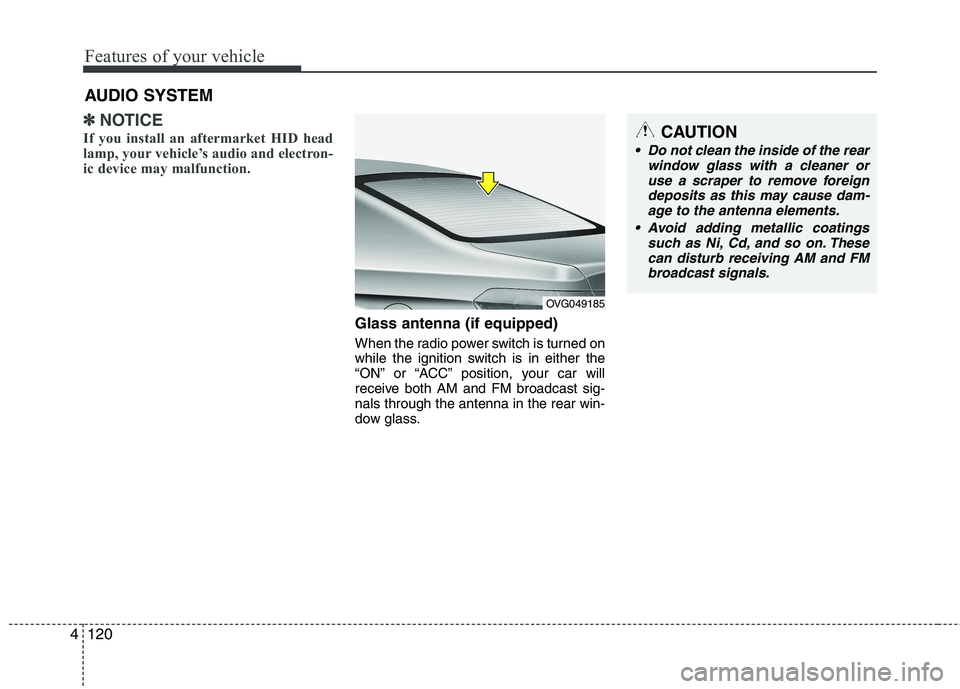
Glass antenna (if equipped)
When the radio power switch is turned on
while the ignition switch is in either the
“ON” or “ACC” position, your car will
receive both AM and FM broadcast sig-nals through the antenna in the rear win-
dow glass.
AUDIO SYSTEM
OVG049185
CAUTION
• Do not clean the inside of the rear
window glass with a cleaner or
use a scraper to remove foreign deposits as this may cause dam-age to the antenna elements.
Avoid adding metallic coatings such as Ni, Cd, and so on. Thesecan disturb receiving AM and FMbroadcast signals.
Page 182 of 352
4121
Features of your vehicle
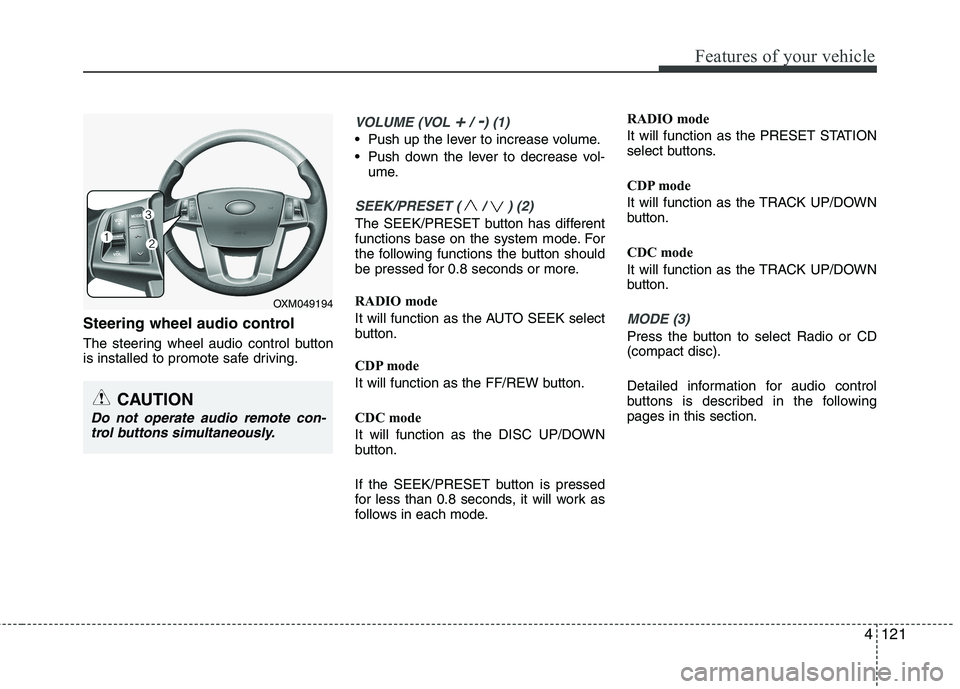
Steering wheel audio control
The steering wheel audio control button
is installed to promote safe driving.
VOLUME (VOL +/ -) (1)
Push up the lever to increase volume.
Push down the lever to decrease vol-ume.
SEEK/PRESET ( / ) (2)
The SEEK/PRESET button has different
functions base on the system mode. For
the following functions the button should
be pressed for 0.8 seconds or more.
RADIO mode
It will function as the AUTO SEEK select
button.
CDP mode
It will function as the FF/REW button.
CDC mode
It will function as the DISC UP/DOWN
button.
If the SEEK/PRESET button is pressed
for less than 0.8 seconds, it will work as
follows in each mode. RADIO mode
It will function as the PRESET STATION
select buttons.
CDP mode
It will function as the TRACK UP/DOWN
button.
CDC mode
It will function as the TRACK UP/DOWN
button.
MODE (3)
Press the button to select Radio or CD (compact disc).
Detailed information for audio control
buttons is described in the followingpages in this section.
CAUTION
Do not operate audio remote con-
trol buttons simultaneously.
OXM049194
Page 183 of 352
Features of your vehicle
122
4
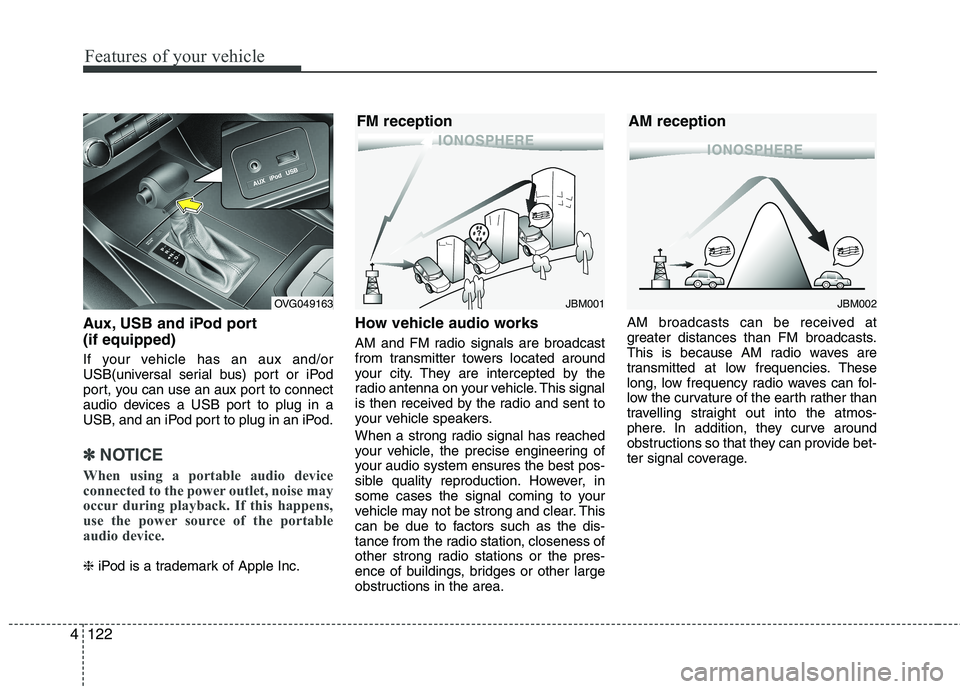
Aux, USB and iPod port (if equipped)
If your vehicle has an aux and/or
USB(universal serial bus) port or iPod
port, you can use an aux port to connect
audio devices a USB port to plug in a
USB, and an iPod port to plug in an iPod.
✽✽
NOTICE
When using a portable audio device
connected to the power outlet, noise may
occur during playback. If this happens,
use the power source of the portable
audio device.
❈ iPod is a trademark of Apple Inc. How vehicle audio works
AM and FM radio signals are broadcast
from transmitter towers located around
your city. They are intercepted by the
radio antenna on your vehicle. This signal
is then received by the radio and sent to
your vehicle speakers.
When a strong radio signal has reached
your vehicle, the precise engineering of
your audio system ensures the best pos-
sible quality reproduction. However, in
some cases the signal coming to your
vehicle may not be strong and clear. This
can be due to factors such as the dis-
tance from the radio station, closeness of
other strong radio stations or the pres-
ence of buildings, bridges or other large
obstructions in the area. AM broadcasts can be received at
greater distances than FM broadcasts.
This is because AM radio waves are
transmitted at low frequencies. These
long, low frequency radio waves can fol-
low the curvature of the earth rather than
travelling straight out into the atmos-
phere. In addition, they curve around
obstructions so that they can provide bet-
ter signal coverage.
JBM002
AM receptionJBM001
FM receptionOVG049163
Page 184 of 352
4123
Features of your vehicle
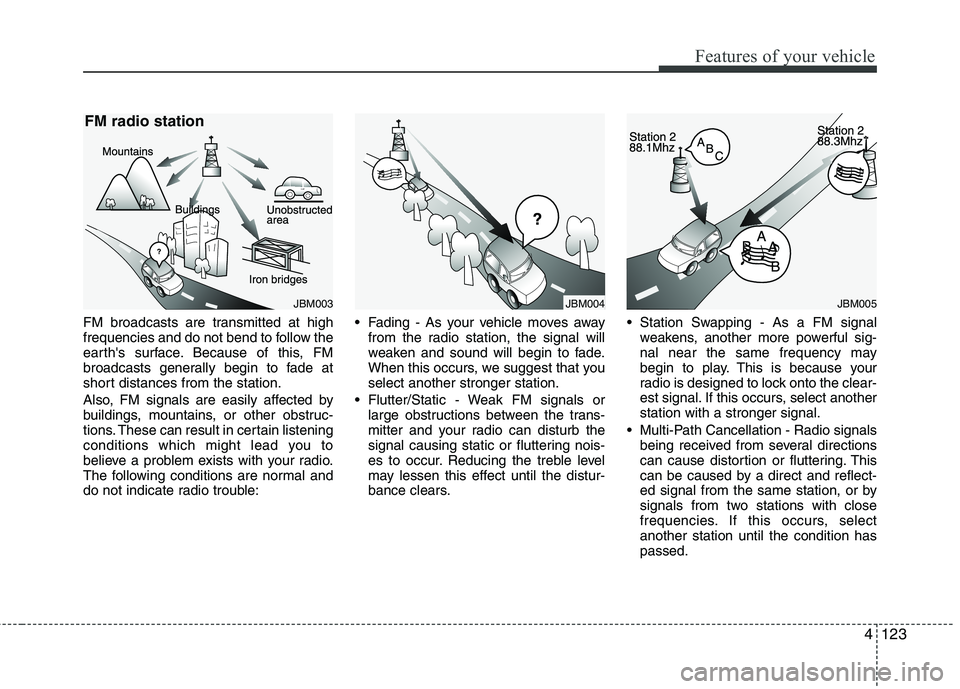
FM broadcasts are transmitted at high
frequencies and do not bend to follow the
earth's surface. Because of this, FM
broadcasts generally begin to fade at
short distances from the station.
Also, FM signals are easily affected by
buildings, mountains, or other obstruc-
tions. These can result in certain listening
conditions which might lead you to
believe a problem exists with your radio.
The following conditions are normal and
do not indicate radio trouble: Fading - As your vehicle moves away
from the radio station, the signal will
weaken and sound will begin to fade.
When this occurs, we suggest that youselect another stronger station.
Flutter/Static - Weak FM signals or large obstructions between the trans-
mitter and your radio can disturb the
signal causing static or fluttering nois-
es to occur. Reducing the treble level
may lessen this effect until the distur-
bance clears. Station Swapping - As a FM signal
weakens, another more powerful sig-
nal near the same frequency may
begin to play. This is because your
radio is designed to lock onto the clear-
est signal. If this occurs, select anotherstation with a stronger signal.
Multi-Path Cancellation - Radio signals being received from several directions
can cause distortion or fluttering. This
can be caused by a direct and reflect-
ed signal from the same station, or by
signals from two stations with close
frequencies. If this occurs, selectanother station until the condition haspassed.
JBM005JBM004JBM003
FM radio station
Page 185 of 352
Features of your vehicle
124
4
Using a cellular phone or a two-way
radio
When a cellular phone is used inside the
vehicle, noise may be produced from the
audio equipment. This does not meanthat something is wrong with the audio
equipment. In such a case, use the cellu-
lar phone at a place as far as possiblefrom the audio equipment. Care of discs
If the temperature inside the vehicle is
too high, open the vehicle windows for
ventilation before using your vehicle
audio.
It is illegal to copy and use MP3/WMA files without permission. Use CDs that
are created only by lawful means.
Do not apply volatile agents such as benzene and thinner, normal cleaners
and magnetic sprays made for ana-
logue disc onto CDs.
To prevent the disc surface from get- ting damaged. Hold and carry CDs bythe edges or the edges of the center
hole only.
Clean the disc surface with a piece of soft cloth before playback (wipe it fromthe center to the outside edge).
Do not damage the disc surface or attach pieces of sticky tape or paperonto it.
Make sure objects other than CDs are not inserted into the CD player (Do not
insert more than one CD at a time). Keep CDs in their cases after use to
protect them from scratches or dirt.
Depending on the type of CD-R/CD- RW CDs, certain CDs may not operate
normally according to manufacturingcompanies or making and recording
methods. In such circumstances, if you
still continue to use those CDs, they
may cause the malfunction of your
vehicle audio system.
✽✽ NOTICE - Playing an
Incompatible Copy
Protected Audio CD
Some copy protected CDs, which do not
comply with the international audio CD
standards (Red Book), may not play on
your vehicle audio. Please note that if
you try to play copy protected CDs and
the CD player does not perform correct-
ly the CDs maybe defective, not the CD
player.
WARNING
Do not use a cellular phone while
driving. Stop at a safe location to
use a cellular phone.
CAUTION
When using a communication sys- tem such a cellular phone or a radioset inside the vehicle, a separate
external antenna must be fitted.When a cellular phone or a radio setis used with an internal antennaalone, it may interfere with the vehi-
cle's electrical system and adverse-ly affect safe operation of the vehi- cle.
Page 186 of 352
4125
Features of your vehicle
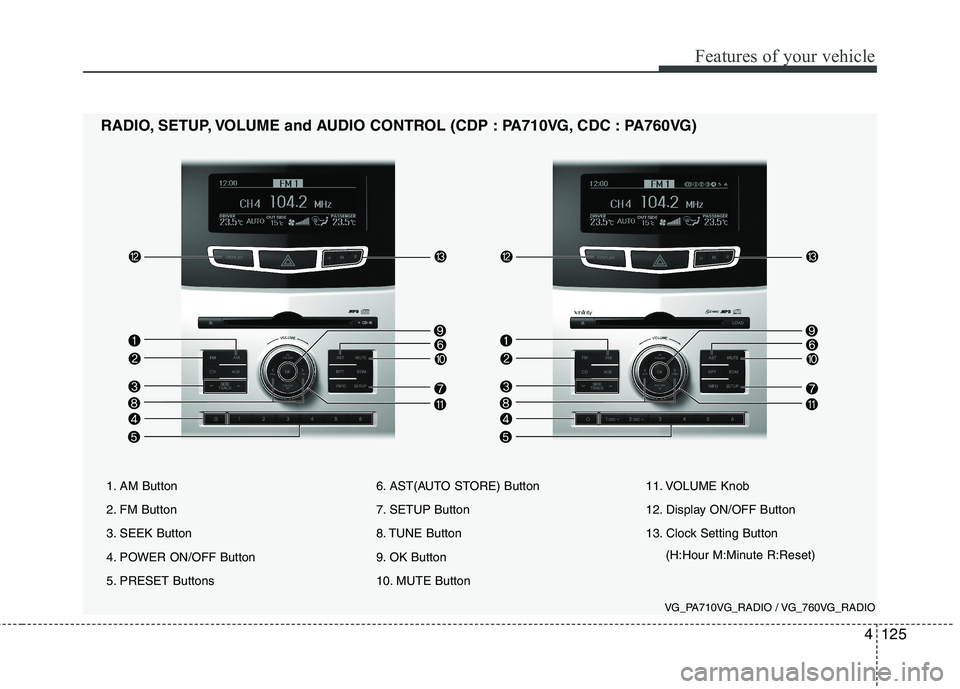
1. AM Button
2. FM Button
3. SEEK Button
4. POWER ON/OFF Button
5. PRESET Buttons6. AST(AUTO STORE) Button
7. SETUP Button
8. TUNE Button
9. OK Button
10. MUTE Button11. VOLUME Knob
12. Display ON/OFF Button
13. Clock Setting Button
(H:Hour M:Minute R:Reset)
RADIO, SETUP, VOLUME and AUDIO CONTROL (CDP : PA710VG, CDC : PA760VG)
VG_PA710VG_RADIO / VG_760VG_RADIO
Page 187 of 352
![KIA CADENZA 2011 Owners Manual Knowing your vehicle
126
4
Using RADIO, SETUP, VOLUME
and AUDIO CONTROL
1. AM Button
Pressing the [AM] button selects the AM
band. AM Mode is displayed on the LCD.
2. FM Button
Turns to FM mode a](/img/2/57935/w960_57935-186.png "KIA CADENZA 2011 Owners Manual Knowing your vehicle
126
4
Using RADIO, SETUP, VOLUME
and AUDIO CONTROL
1. AM Button
Pressing the [AM] button selects the AM
band. AM Mode is displayed on the LCD.
2. FM Button
Turns to FM mode a")
Knowing your vehicle
126
4
Using RADIO, SETUP, VOLUME
and AUDIO CONTROL
1. AM Button
Pressing the [AM] button selects the AM
band. AM Mode is displayed on the LCD.
2. FM Button
Turns to FM mode and toggles FM1and
FM2 when the button is pressed each time.
3. SEEK Button
When the [SEEK ] button is pressed,
it increases the band frequency to auto-
matically select channel. Stops at the
previous frequency if no channel is
found.
When the [TRACK ] button is press- ed, it reduces the band frequency to
automatically select channel. Stops at
the previous frequency if no channel is
found. 4. POWER ON/OFF Button
Turns on/off the set when the IGNITION
SWITCH is on ACC or ON.
5. PRESET Buttons
Push [1]~[6] buttons less than 0.8 sec-
onds to play the channel saved in each
button. Push Preset button for 0.8 sec-
onds or longer to save current channel to
the respective button with a beep.
6. AST(AUTO STORE Button)
When the button is pressed, it automati-
cally selects and saves channels with
high reception rate to PRESET buttons
[1]~[6] and plays the channel saved in
PRESET1. If no channel is saved after
AST, it will play the previous channel.
7. SETUP Button ■
PA710VG
Press this button to turn to the SCROLL
option and the other adjustment mode. If
no action is taken for 5 seconds after
pressing the button, it will return to the
play mode. (After entering SETUP mode,
select Manual tune Button and push OK
Button. )The setup change in the order ofSOUND ↔SDVC ↔CLOCK ↔TEMP ↔
SCROLL ↔RETURN
■ PA760VG
The setup change in the order ofSOUND ↔V-EQ ↔SDVC ↔CLOCK ↔
TEMP ↔SCROLL ↔PHONE ↔RETURN
In the case of JBL AMP SOUND ↔SDVC ↔CLOCK ↔TEMP ↔SCR
OLL ↔PHONE
Page 188 of 352
![KIA CADENZA 2011 Owners Manual 4127
Knowing your vehicle
SOUNDSelect this menu to adjust the sound in
following order: BASS, MIDDLE, TRE-
BLE and FADER /BALANCE. To move
between items, press [OK] button.
BASS/MIDDLE/TREBLE : Use](/img/2/57935/w960_57935-187.png "KIA CADENZA 2011 Owners Manual 4127
Knowing your vehicle
SOUNDSelect this menu to adjust the sound in
following order: BASS, MIDDLE, TRE-
BLE and FADER /BALANCE. To move
between items, press [OK] button.
BASS/MIDDLE/TREBLE : Use")
4127
Knowing your vehicle
SOUNDSelect this menu to adjust the sound in
following order: BASS, MIDDLE, TRE-
BLE and FADER /BALANCE. To move
between items, press [OK] button.
BASS/MIDDLE/TREBLE : Use [ FILE ],
[TUNE ] buttons to adjust the menu.
FADER/BALANCE : Use [ FILE ],
[TUNE ] buttons to adjust BALANCE
and [ FOLDER ] buttons to
adjust FADER.
This function automatically adjusts the
volume level according to the speed of
the vehicle and can be turned ON/OFF
through the sound quality control knob.
CLOCK Pressing the [ FILE ], [ TUNE ] but-ton select the time mode(12, 24mode),
and push the [OK] button. TEMP
Select this item to set the
"Temperature Display Type".
SCROLL Select whether long file names are
scrolled continuously (“ON”) or justonce (“OFF”).
PHONE (if equipped) Select this item to enter BLUETOOTH
setup mode. Refer to “BLUETOOTH
PHONE OPERATION” section for
detailed information.
Press [ FILE ], [ TUNE ] button
changes the Innocente, Forza,
Concertro mode, and push [OK]Button. 8. TUNE Button
Push this button to manually adjust fre-
quency, While listening to the radio chan-nel.
9. OK Button
Push this button to select each mode.
10. MUTE Button
When the button is pressed, stops sound
and “Audio Mute” is displayed on LCD.
11. VOLUME Knob
If the knob is turned clockwise/counter-
clockwise, the volume will increase
/decrease.