warning KIA Cadenza 2014 1.G Owner's Manual
[x] Cancel search | Manufacturer: KIA, Model Year: 2014, Model line: Cadenza, Model: KIA Cadenza 2014 1.GPages: 415, PDF Size: 5.09 MB
Page 245 of 415
535
Driving your vehicle
The VSM is designed to functionabove approximately 18 mph (30
km/h) when a vehicle is braking on
a split-mu road. The split-mu road
is made of surfaces which have dif-
ferent friction forces.
The Vehicle Stability Management system is not a substitute for safe
driving practices but a supplemen-
tary function only. It is the respon-
sibility of the driver to always check
the speed and the distance to the
vehicle ahead. Always hold the
steering wheel firmly while driving.
Your vehicle is designed to activate according to the driver’s intention,
even with installed VSM. Always
follow all the normal precautions
for driving at safe speeds for the
conditions – including driving in
inclement weather and on a slip-
pery road.Good braking practices
Check to be sure the parking brakeis not engaged and that the park-
ing brake indicator light is out
before driving away.
Driving through water may get the brakes wet. They can also get wet
when the vehicle is washed. Wet
brakes can be dangerous! Your
vehicle will not stop as quickly if the
brakes are wet. Wet brakes may
cause the vehicle to pull to one
side.
To dry the brakes, apply the brakes
lightly until the braking action
returns to normal, taking care to
keep the vehicle under control at
all times. If the braking action does
not return to normal, stop as soon
as it is safe to do so and call an
authorized Kia dealer for assis-
tance.
Don't coast down hills with the vehicle out of gear. This is extreme-
ly hazardous. Keep the vehicle in
gear at all times, use the brakes to
slow down, then shift to a lower
gear so that engine braking will
help you maintain a safe speed.WARNING - Tire/Wheelsize
When replacing tires and
wheels, make sure they are the
same size as the original tires
and wheels installed. Driving
with varying tire or wheel sizes
may diminish any supplemental
safety benefits of the VSM sys-
tem.
Page 247 of 415

537
Driving your vehicle
The cruise control system allows you
to program the vehicle to maintain a
constant speed without depressing
the accelerator pedal.
This system is designed to function
above approximately 40 km/h (25
mph).
If the cruise control is left on,
(CRUISE indicator light in the instru-
ment cluster illuminated) the cruise
control can be switched on acciden-
tally. Keep the cruise control system
off (CRUISE indicator light OFF)
when the cruise control is not in use,
to avoid inadvertently setting a
speed.
Use the cruise control system only
when traveling on open highways in
good weather.
Do not use the cruise control when
driving in heavy or varying traffic, or
on slippery (rainy, icy or snow-cov-
ered) or winding roads or over 6%
up-hill or down-hill roads.✽ ✽NOTICE
• During normal cruise control
operation, when the SET switch is
activated or reactivated after
applying the brakes, the cruise
control will energize after approx-
imately 3 seconds. This delay is
normal.
• To activate cruise control, depress the brake pedal at least once after
turning the ignition switch to the
ON position or starting the engine.
This is to check if the brake switch
which is important part to cancel
cruise control is in normal condi-
tion.
To set cruise control speed:
1. Press the CRUISE button on the
steering wheel to turn the system
on. The CRUISE indicator light in
the instrument cluster will illumi-
nate.
2. Accelerate to the desired speed, which must be more than 40 km/h
(25 mph).
CRUISE CONTROL SYSTEM
WARNING - Misuse of
Cruise Control or Cruise
Control Misuse
Do not use cruise control if the
traffic situation does not allow
you to drive safely at a constant
speed and with sufficient dis-
tance to the vehicle in front.
OXM053006
Page 251 of 415
541
Driving your vehicle
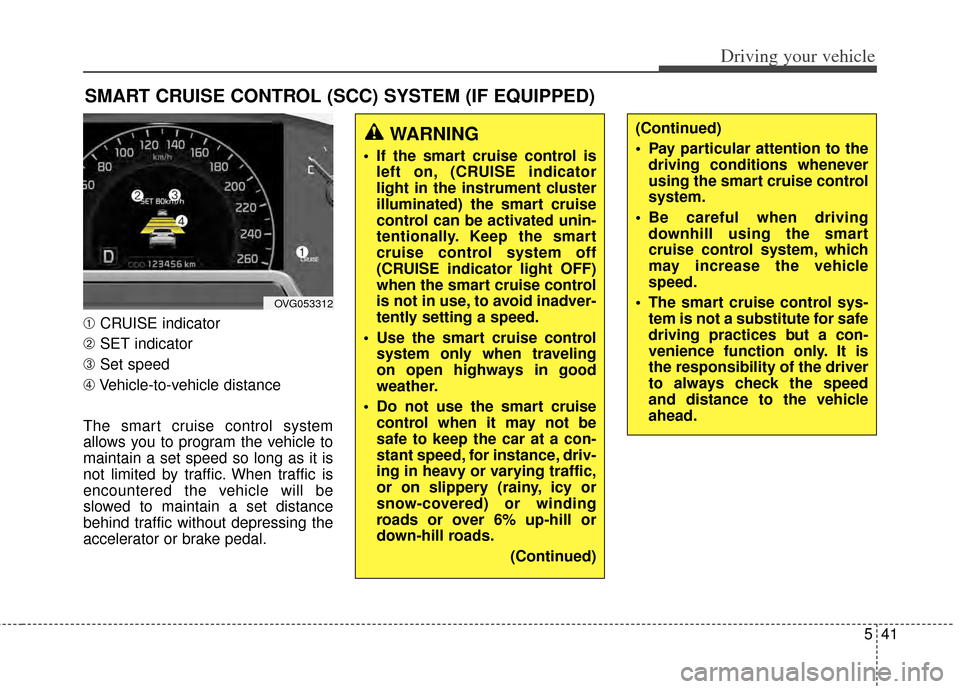
➀CRUISE indicator
➁ SET indicator
➂ Set speed
\b Vehicle-to-vehicle distance
The smart cruise control system
allows you to program the vehicle to
maintain a set speed so long as it is
not limited by traffic. When traffic is
encountered the vehicle will be
slowed to maintain a set distance
behind traffic without depressing the
accelerator or brake pedal.
SMART CRUISE CONTROL (SCC) SYSTEM (IF EQUIPPED)
OVG053312
WARNING
If the smart cruise control is left on, (CRUISE indicator
light in the instrument cluster
illuminated) the smart cruise
control can be activated unin-
tentionally. Keep the smart
cruise control system off
(CRUISE indicator light OFF)
when the smart cruise control
is not in use, to avoid inadver-
tently setting a speed.
Use the smart cruise control system only when traveling
on open highways in good
weather.
Do not use the smart cruise control when it may not be
safe to keep the car at a con-
stant speed, for instance, driv-
ing in heavy or varying traffic,
or on slippery (rainy, icy or
snow-covered) or winding
roads or over 6% up-hill or
down-hill roads.
(Continued)
(Continued)
Pay particular attention to thedriving conditions whenever
using the smart cruise control
system.
Be careful when driving downhill using the smart
cruise control system, which
may increase the vehicle
speed.
The smart cruise control sys- tem is not a substitute for safe
driving practices but a con-
venience function only. It is
the responsibility of the driver
to always check the speed
and distance to the vehicle
ahead.
Page 255 of 415
545
Driving your vehicle
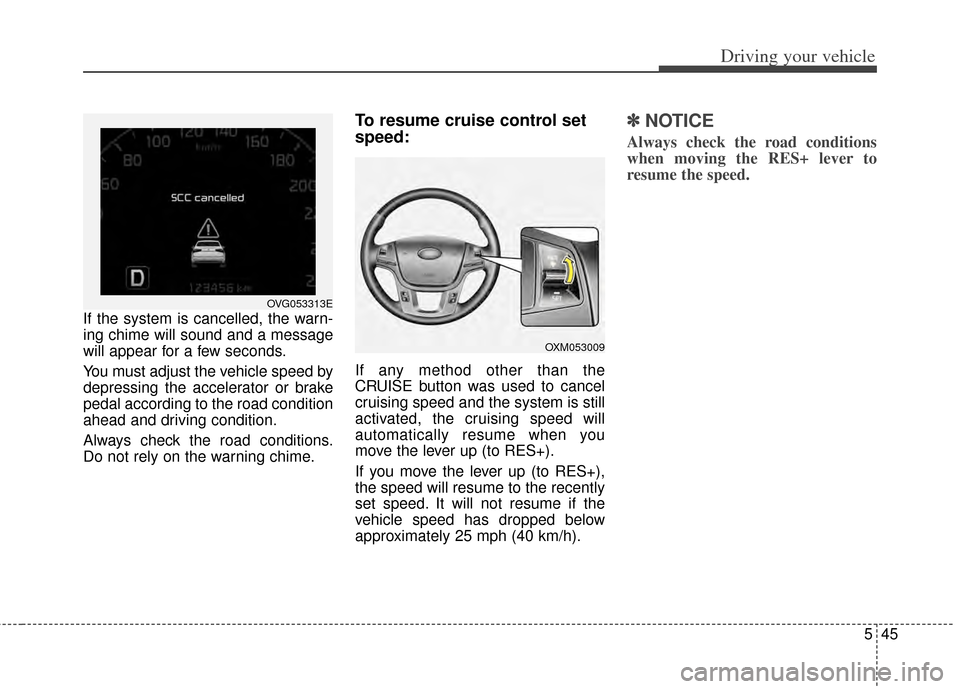
If the system is cancelled, the warn-
ing chime will sound and a message
will appear for a few seconds.
You must adjust the vehicle speed by
depressing the accelerator or brake
pedal according to the road condition
ahead and driving condition.
Always check the road conditions.
Do not rely on the warning chime.
To resume cruise control set
speed:
If any method other than the
CRUISE button was used to cancel
cruising speed and the system is still
activated, the cruising speed will
automatically resume when you
move the lever up (to RES+).
If you move the lever up (to RES+),
the speed will resume to the recently
set speed. It will not resume if the
vehicle speed has dropped below
approximately 25 mph (40 km/h).
✽ ✽NOTICE
Always check the road conditions
when moving the RES+ lever to
resume the speed.
OVG053313E
OXM053009
Page 258 of 415
Driving your vehicle
48
5
■In SCC mode■Except SCC mode
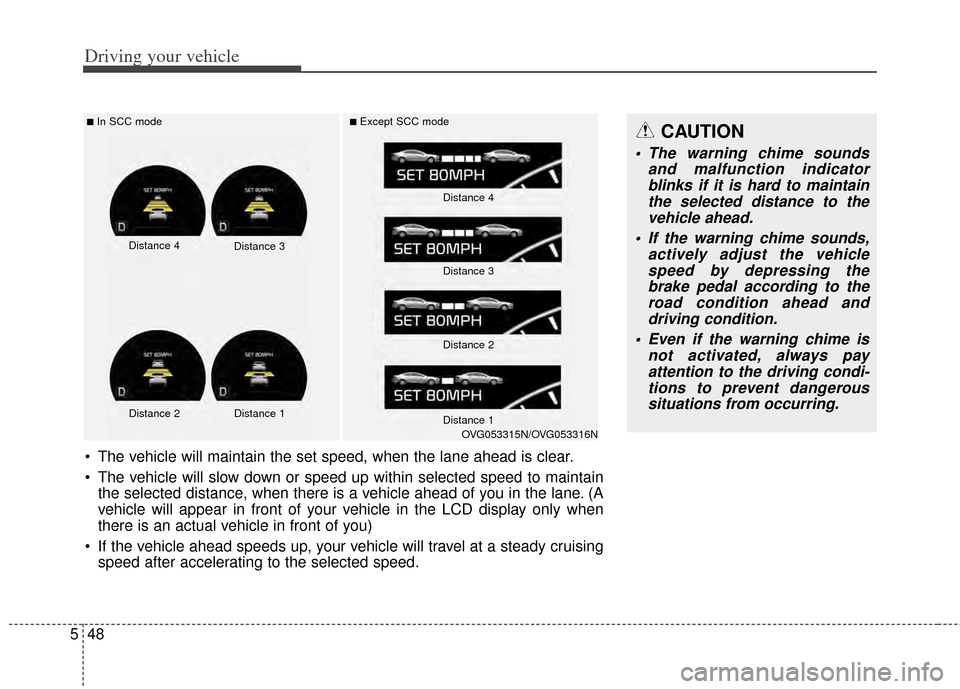
The vehicle will maintain the set speed, when the lane ahead is clear.
The vehicle will slow down or speed up within selected speed to maintain
the selected distance, when there is a vehicle ahead of you in the lane. (A
vehicle will appear in front of your vehicle in the LCD display only when
there is an actual vehicle in front of you)
If the vehicle ahead speeds up, your vehicle will travel at a steady cruising speed after accelerating to the selected speed.
CAUTION
The warning chime sounds and malfunction indicatorblinks if it is hard to maintainthe selected distance to thevehicle ahead.
If the warning chime sounds, actively adjust the vehiclespeed by depressing thebrake pedal according to theroad condition ahead anddriving condition.
Even if the warning chime is not activated, always payattention to the driving condi-tions to prevent dangeroussituations from occurring.
Distance 4 Distance 3
Distance 2 Distance 1
Distance 4
Distance 3
Distance 2
Distance 1
OVG053315N/OVG053316N
Page 259 of 415

549
Driving your vehicle
In traffic situation
In traffic, your vehicle will stop if the
vehicle ahead of you stops. Also, if
the vehicle ahead of you starts mov-
ing, your vehicle will start as well.
However, if the vehicle stops for
more than 3 seconds, you must
depress the accelerator pedal or
move the lever (to RES+ or SET-) to
start driving.
Sensor to detect distance to
the vehicle ahead
The sensor detects distance to the
vehicle ahead.
If the sensor is covered with dirt or
other foreign matter, the vehicle to
vehicle distance control may not
operate correctly.
Always keep the sensor clean.
CAUTION
If the vehicle ahead (vehiclespeed: less than 16.8 mph(30km/h)) disappears to the nextlane, the warning chime willsound and a message willappear. Adjust your vehiclespeed for vehicles or objectsthat can suddenly appear infront of you by depressing thebrake pedal according to theroad condition ahead and driv-ing condition.
OVG053317E
OVG053318E
OVG053319
Page 260 of 415

Driving your vehicle
50
5
Sensor malfunction indicator
If the sensor or cover is
dirty or obscured with
foreign matter such as
snow, the indicator will
illuminate. Clean the
sensor by using a soft
cloth.
SCC (Smart cruise control) mal-
function indicator
The warning light illumi-
nates when the vehicle
to vehicle distance con-
trol system is not func-
tioning normally.
Take your vehicle to an
authorized Kia dealer
and have the system
checked.
CAUTION
Do not install accessories around the sensor and do notreplace the bumper by your-self. It may interfere with thesensor performance.
Always keep the sensor and bumper clean.
To prevent sensor cover dam- age from occurring, wash thecar with a soft cloth.
Do not damage the sensor or sensor area by a strongimpact. If the sensor movesslightly off position, the smartcruise control system will notoperate correctly.
If this occurs, have your vehi-cle checked by an authorizedKia dealer as soon as possi-ble.
Use only a genuine Kia sensor cover for your vehicle.
Page 263 of 415

553
Driving your vehicle
Vehicle recognition
Some vehicles ahead in your lane
cannot be recognized by the sensor
as follows:
- Narrow vehicles such as motorcy-cles or bicycles
- Vehicles offset to one side
- Slow-moving vehicles or sudden- decelerating vehicles
- Stopped vehicles
- Vehicles with small rear profile such as trailers with no loads A vehicle ahead cannot be recog-
nized correctly by the sensor if any of
following occurs:
- When the vehicle is pointing
upwards due to overloading in the
trunk
- When operating the steering wheel
- When driving to one side of the lane
- When driving on narrow lanes or on curves
Apply the brakes or accelerator
pedal if necessary.
OBH058046
WARNING
The vehicle cannot be stopped by using the smart
cruise control system.
If an emergency stop is nec-
essary, you must apply the
brakes.
Keep a safe distance accord- ing to road conditions and
vehicle speed. If the vehicle to
vehicle distance is too close
during a high-speed driving, it
may cause a serious collision.
The smart cruise control sys- tem can not recognize a
stopped vehicle, pedestrians
or an oncoming vehicle.
Always look ahead cautiously
to prevent unexpected and
sudden situations from occur-
ring.
(Continued)
Page 265 of 415

555
Driving your vehicle
This system detects the lane with the
sensor at the front windshield and
warns you when your vehicle leaves
the lane.
LANE DEPARTURE WARNING SYSTEM (LDWS) (IF EQUIPPED)
OVG059041
OVG053314
WARNING
The LDWS does not make thevehicle change lanes. It is the
driver's responsibility to
always check the road condi-
tions.
Do not turn the steering wheel suddenly, when the LDWS
warns that your vehicle is
leaving the lane.
If the sensor cannot detect the lane or if the vehicle speed
does not exceed 43 mph
(70km/h), the LDWS won't
warn you even though the
vehicle leaves the lane.
If your vehicle has window tint or other types of coating on
the front windshield, the
LDWS may not work properly.
Prevent damage to the LDWS sensor from water or any liq-
uid.
Do not remove the LDWS parts and do not damage the
sensor by a strong impact.
(Continued)
(Continued)
Do not put objects that reflectlight on the dash board.
Always check the road condi- tions for you may not hear the
warning chime because of
audio, or external noise.
Page 266 of 415
Driving your vehicle
56
5
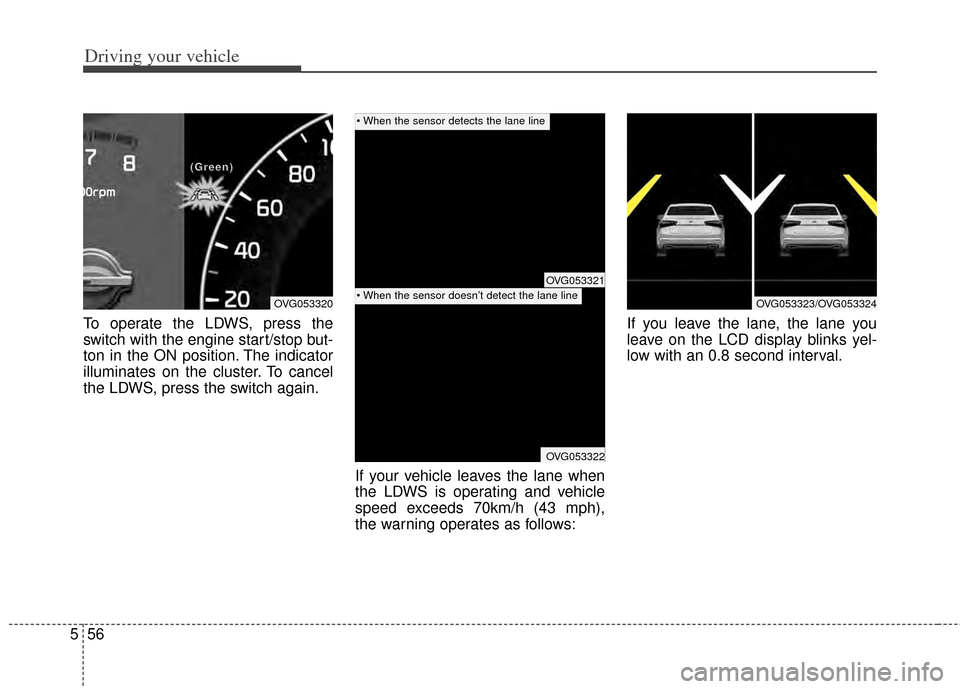
To operate the LDWS, press the
switch with the engine start/stop but-
ton in the ON position. The indicator
illuminates on the cluster. To cancel
the LDWS, press the switch again.
If your vehicle leaves the lane when
the LDWS is operating and vehicle
speed exceeds 70km/h (43 mph),
the warning operates as follows:If you leave the lane, the lane you
leave on the LCD display blinks yel-
low with an 0.8 second interval.
OVG053320
(
(
(
(
G
G
G
G
r
r
r
r
e
e
e
e
e
e
e
e
n
n
n
n
)
)
)
)
OVG053321
OVG053322
OVG053323/OVG053324