brake KIA Cadenza 2014 1.G Workshop Manual
[x] Cancel search | Manufacturer: KIA, Model Year: 2014, Model line: Cadenza, Model: KIA Cadenza 2014 1.GPages: 415, PDF Size: 5.09 MB
Page 255 of 415
545
Driving your vehicle
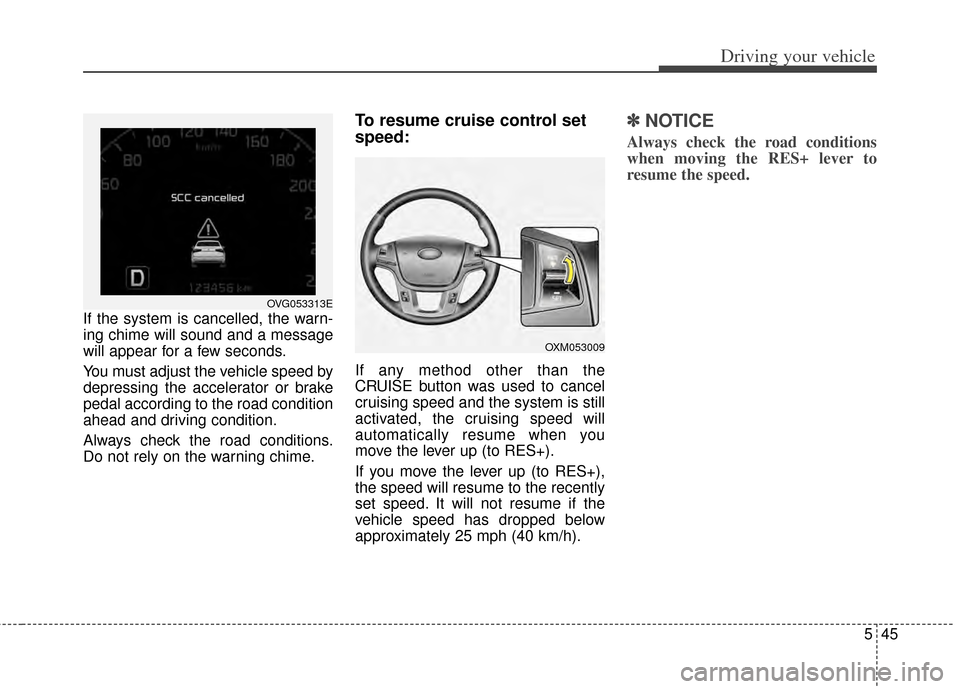
If the system is cancelled, the warn-
ing chime will sound and a message
will appear for a few seconds.
You must adjust the vehicle speed by
depressing the accelerator or brake
pedal according to the road condition
ahead and driving condition.
Always check the road conditions.
Do not rely on the warning chime.
To resume cruise control set
speed:
If any method other than the
CRUISE button was used to cancel
cruising speed and the system is still
activated, the cruising speed will
automatically resume when you
move the lever up (to RES+).
If you move the lever up (to RES+),
the speed will resume to the recently
set speed. It will not resume if the
vehicle speed has dropped below
approximately 25 mph (40 km/h).
✽ ✽NOTICE
Always check the road conditions
when moving the RES+ lever to
resume the speed.
OVG053313E
OXM053009
Page 256 of 415
Driving your vehicle
46
5
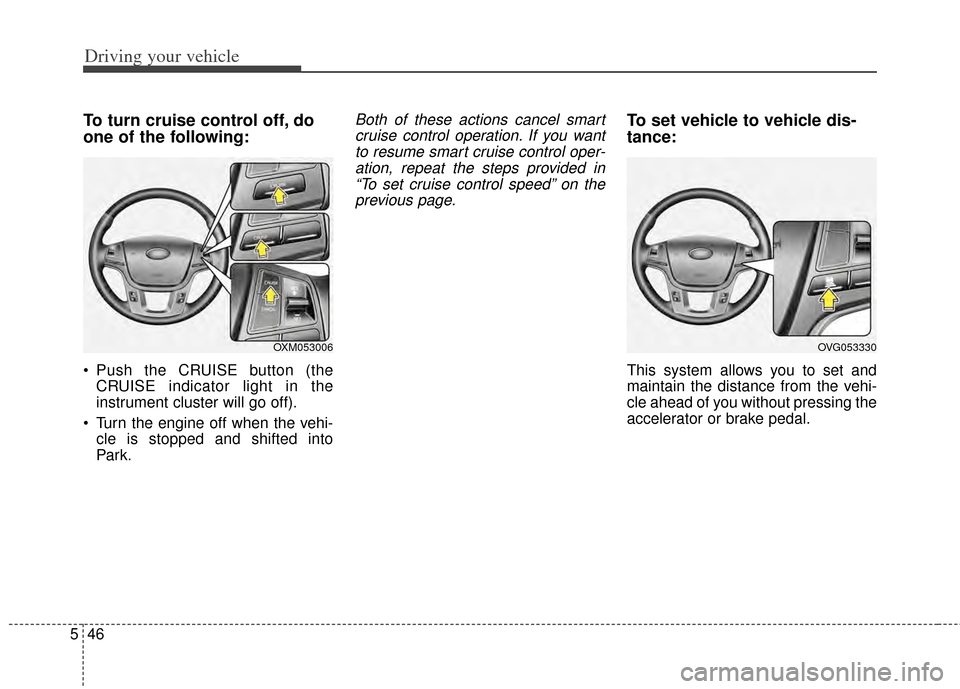
To turn cruise control off, do
one of the following:
Push the CRUISE button (the
CRUISE indicator light in the
instrument cluster will go off).
Turn the engine off when the vehi- cle is stopped and shifted into
Par k.
Both of these actions cancel smartcruise control operation. If you wantto resume smart cruise control oper-ation, repeat the steps provided in“To set cruise control speed” on theprevious page.To set vehicle to vehicle dis-
tance:
This system allows you to set and
maintain the distance from the vehi-
cle ahead of you without pressing the
accelerator or brake pedal.
OXM053006OVG053330
Page 258 of 415
Driving your vehicle
48
5
■In SCC mode■Except SCC mode
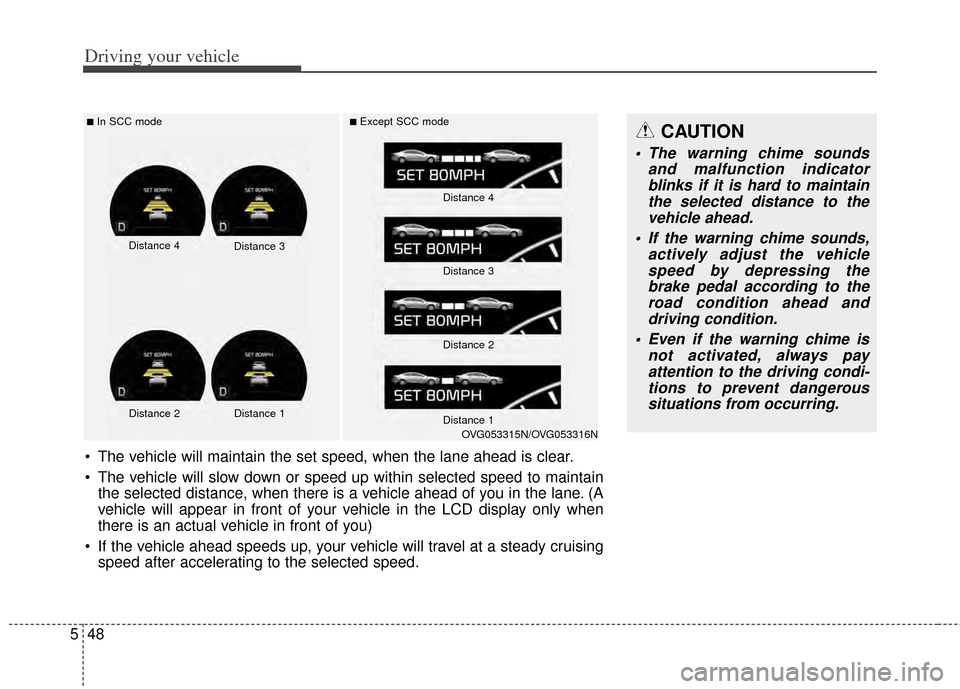
The vehicle will maintain the set speed, when the lane ahead is clear.
The vehicle will slow down or speed up within selected speed to maintain
the selected distance, when there is a vehicle ahead of you in the lane. (A
vehicle will appear in front of your vehicle in the LCD display only when
there is an actual vehicle in front of you)
If the vehicle ahead speeds up, your vehicle will travel at a steady cruising speed after accelerating to the selected speed.
CAUTION
The warning chime sounds and malfunction indicatorblinks if it is hard to maintainthe selected distance to thevehicle ahead.
If the warning chime sounds, actively adjust the vehiclespeed by depressing thebrake pedal according to theroad condition ahead anddriving condition.
Even if the warning chime is not activated, always payattention to the driving condi-tions to prevent dangeroussituations from occurring.
Distance 4 Distance 3
Distance 2 Distance 1
Distance 4
Distance 3
Distance 2
Distance 1
OVG053315N/OVG053316N
Page 259 of 415

549
Driving your vehicle
In traffic situation
In traffic, your vehicle will stop if the
vehicle ahead of you stops. Also, if
the vehicle ahead of you starts mov-
ing, your vehicle will start as well.
However, if the vehicle stops for
more than 3 seconds, you must
depress the accelerator pedal or
move the lever (to RES+ or SET-) to
start driving.
Sensor to detect distance to
the vehicle ahead
The sensor detects distance to the
vehicle ahead.
If the sensor is covered with dirt or
other foreign matter, the vehicle to
vehicle distance control may not
operate correctly.
Always keep the sensor clean.
CAUTION
If the vehicle ahead (vehiclespeed: less than 16.8 mph(30km/h)) disappears to the nextlane, the warning chime willsound and a message willappear. Adjust your vehiclespeed for vehicles or objectsthat can suddenly appear infront of you by depressing thebrake pedal according to theroad condition ahead and driv-ing condition.
OVG053317E
OVG053318E
OVG053319
Page 261 of 415
551
Driving your vehicle
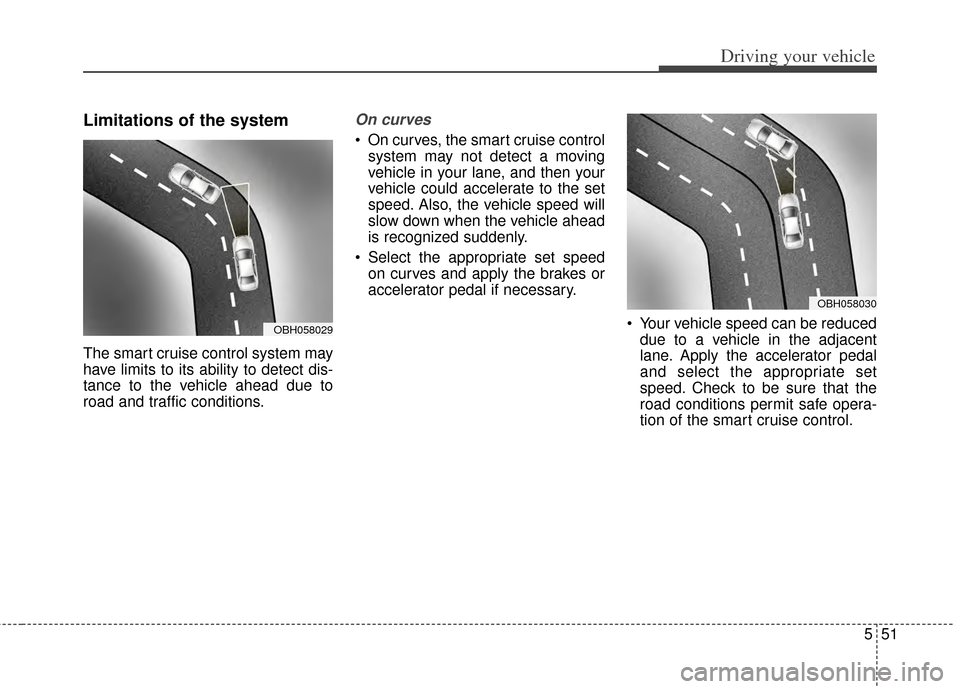
Limitations of the system
The smart cruise control system may
have limits to its ability to detect dis-
tance to the vehicle ahead due to
road and traffic conditions.
On curves
On curves, the smart cruise controlsystem may not detect a moving
vehicle in your lane, and then your
vehicle could accelerate to the set
speed. Also, the vehicle speed will
slow down when the vehicle ahead
is recognized suddenly.
Select the appropriate set speed on curves and apply the brakes or
accelerator pedal if necessary.
Your vehicle speed can be reduceddue to a vehicle in the adjacent
lane. Apply the accelerator pedal
and select the appropriate set
speed. Check to be sure that the
road conditions permit safe opera-
tion of the smart cruise control.
OBH058030
OBH058029
Page 262 of 415
Driving your vehicle
52
5
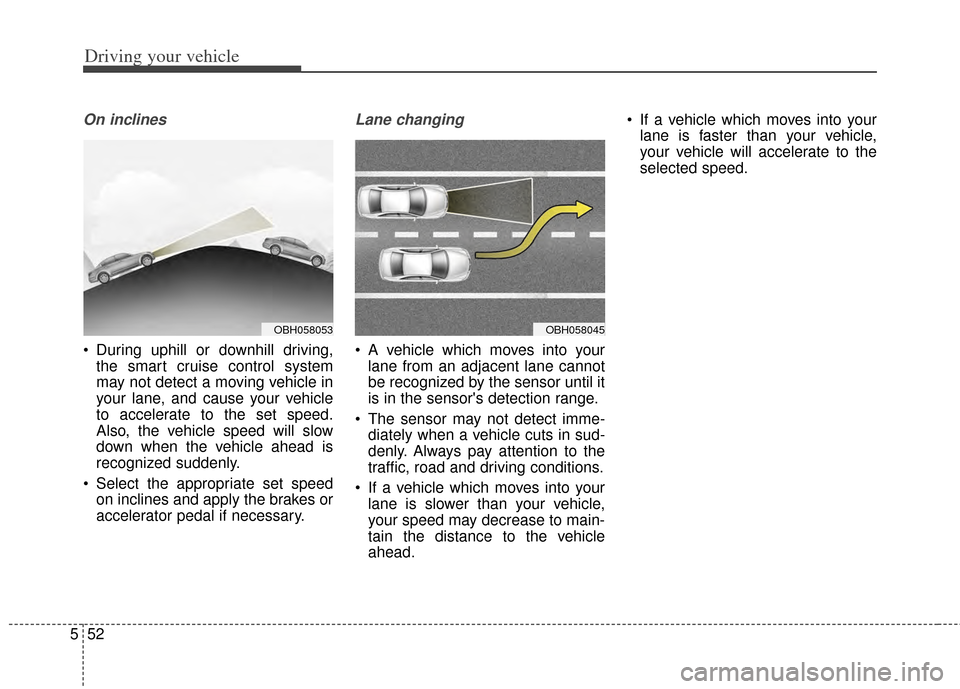
On inclines
During uphill or downhill driving,
the smart cruise control system
may not detect a moving vehicle in
your lane, and cause your vehicle
to accelerate to the set speed.
Also, the vehicle speed will slow
down when the vehicle ahead is
recognized suddenly.
Select the appropriate set speed on inclines and apply the brakes or
accelerator pedal if necessary.
Lane changing
A vehicle which moves into yourlane from an adjacent lane cannot
be recognized by the sensor until it
is in the sensor's detection range.
The sensor may not detect imme- diately when a vehicle cuts in sud-
denly. Always pay attention to the
traffic, road and driving conditions.
If a vehicle which moves into your lane is slower than your vehicle,
your speed may decrease to main-
tain the distance to the vehicle
ahead. If a vehicle which moves into your
lane is faster than your vehicle,
your vehicle will accelerate to the
selected speed.
OBH058045OBH058053
Page 263 of 415

553
Driving your vehicle
Vehicle recognition
Some vehicles ahead in your lane
cannot be recognized by the sensor
as follows:
- Narrow vehicles such as motorcy-cles or bicycles
- Vehicles offset to one side
- Slow-moving vehicles or sudden- decelerating vehicles
- Stopped vehicles
- Vehicles with small rear profile such as trailers with no loads A vehicle ahead cannot be recog-
nized correctly by the sensor if any of
following occurs:
- When the vehicle is pointing
upwards due to overloading in the
trunk
- When operating the steering wheel
- When driving to one side of the lane
- When driving on narrow lanes or on curves
Apply the brakes or accelerator
pedal if necessary.
OBH058046
WARNING
The vehicle cannot be stopped by using the smart
cruise control system.
If an emergency stop is nec-
essary, you must apply the
brakes.
Keep a safe distance accord- ing to road conditions and
vehicle speed. If the vehicle to
vehicle distance is too close
during a high-speed driving, it
may cause a serious collision.
The smart cruise control sys- tem can not recognize a
stopped vehicle, pedestrians
or an oncoming vehicle.
Always look ahead cautiously
to prevent unexpected and
sudden situations from occur-
ring.
(Continued)
Page 264 of 415
Driving your vehicle
54
5
(Continued)
Vehicles moving in front of
you with a frequent lane
change may cause a delay in
the system's reaction or may
cause the system to react to a
vehicle actually in an adjacent
lane. Always look ahead cau-
tiously to prevent unexpected
and sudden situations from
occurring.
The smart cruise control sys- tem is not a substitute for safe
driving practices but a con-
venience function only. It is
the responsibility of the driver
to always check the speed
and the distance to the vehi-
cle ahead.
Always be aware of the select- ed speed and vehicle to vehi-
cle distance.
Always maintain sufficient braking distance and deceler-
ate your vehicle by applying
the brakes if necessary.
(Continued)(Continued)
As the smart cruise controlsystem may not recognize
complex driving situations,
always pay attention to driv-
ing conditions and control
your vehicle speed.
For safe operation, carefully read and follow the instruc-
tions in this manual before
use.CAUTION
The smart cruise control systemmay not operate temporarilydue to electrical interference.
Page 274 of 415
Driving your vehicle
64
5
ECONOMICAL OPERATION
Your vehicle's fuel economy depends
mainly on your style of driving, where
you drive and when you drive.
Each of these factors affects how
many miles (kilometers) you can get
from a gallon (liter) of fuel. To operate
your vehicle as economically as pos-
sible, use the following driving sug-
gestions to help save money in both
fuel and repairs:
Drive smoothly. Accelerate at a
moderate rate. Don't make "jack-
rabbit" starts or full-throttle shifts
and maintain a steady cruising
speed. Don't race between stop-
lights. Try to adjust your speed to
the traffic so you don't have to
change speeds unnecessarily.
Avoid heavy traffic whenever pos-
sible. Always maintain a safe dis-
tance from other vehicles so you
can avoid unnecessary braking.
This also reduces brake wear.
Drive at a moderate speed. The faster you drive, the more fuel your
vehicle uses. Driving at a moderate
speed, especially on the highway,
is one of the most effective ways to
reduce fuel consumption. Don't "ride" the brake pedal. This
can increase fuel consumption and
also increase wear on these com-
ponents. In addition, driving with
your foot resting on the brake pedal
may cause the brakes to overheat,
which reduces their effectiveness
and may lead to more serious con-
sequences.
Take care of your tires. Keep them inflated to the recommended pres-
sure. Incorrect inflation, either too
much or too little, results in unnec-
essary tire wear. Check the tire
pressures at least once a month.
Be sure that the wheels are aligned correctly. Improper align-
ment can result from hitting curbs
or driving too fast over irregular
surfaces. Poor alignment causes
faster tire wear and may also result
in other problems as well as
greater fuel consumption. Keep your vehicle in good condi-
tion. For better fuel economy and
reduced maintenance costs, main-
tain your vehicle in accordance
with the maintenance schedule in
section 7. If you drive your vehicle
in severe conditions, more frequent
maintenance is required (see sec-
tion 7 for details).
Keep your vehicle clean. For maxi- mum service, your vehicle should
be kept clean and free of corrosive
materials. It is especially important
that mud, dirt, ice, etc. not be
allowed to accumulate on the
underside of the vehicle. This extra
weight can result in increased fuel
consumption and also contribute to
corrosion.
Travel lightly. Don't carry unneces- sary weight in your vehicle. Weight
reduces fuel economy.
Don't let the engine idle longer than necessary. If you are waiting
(and not in traffic), turn off your
engine and restart only when
you're ready to go.
Page 275 of 415
565
Driving your vehicle
Remember, your vehicle does notrequire extended warm-up. After
the engine has started, allow the
engine to run for 10 to 20 seconds
prior to placing the vehicle in gear.
In very cold weather, however, give
your engine a slightly longer warm-
up period.
Don't "lug" or "over-rev" the engine. Lugging is driving too slowly in a
very high gear resulting in engine
bucking. If this happens, shift to a
lower gear. Over-revving is racing
the engine beyond its safe limit.
This can be avoided by shifting at
the recommended speed. Use your air conditioning sparingly.
The air conditioning system is
operated by engine power so your
fuel economy is reduced when you
use it.
Open windows at high speeds can reduce fuel economy.
Fuel economy is reduced by cross- winds and headwinds. To help off-
set some of this loss, slow down
when driving in these conditions.
Keeping a vehicle in good operating
condition is important both for econ-
omy and safety. Therefore, have an
authorized Kia dealer perform
scheduled inspections and mainte-
nance.
WARNING - Engine off during
motion
Never turn the engine off to
coast down hills or anytime the
vehicle is in motion. The power
steering and power brakes will
not function properly without
the engine running. In addition,
turning off the ignition while
driving could engage the steer-
ing wheel lock resulting in loss
of vehicle steering. Keep the
engine on and downshift to an
appropriate gear for engine
braking effect.