audio KIA Cadenza 2014 1.G Owner's Manual
[x] Cancel search | Manufacturer: KIA, Model Year: 2014, Model line: Cadenza, Model: KIA Cadenza 2014 1.GPages: 415, PDF Size: 5.09 MB
Page 3 of 415

ii
1
2
3
4
5
6
7
8I
IntroductionHow to use this manual / Fuel requirements / Vehicle break-in process
Your vehicle at a glance
Exterior overview / Interior overview / Instrument panel overview / Engi\
ne compartment
Safety features of your vehicle
Seats / Seat belts / Child restraint system / Air bag
Features of your vehicleKeys / Door locks / Trunk / Windows / Hood / Fuel filler lid / Panoramic sunroof / Steering wheel / Mirrors /Instrument cluster / Lighting / Wipers & Washers / Climate control system / Audio system / Etc.
Driving your vehicleBefore driving / Engine start/stop button / Transaxle / Brake system /
Cruise control system / Smart cruise control system / Winter driving / Vehicle load limit / Etc.
What to do in an emergencyRoad warning / Emergency while driving / Emergency starting / Engine overheat / TPMS / Flat tire / Towing / Etc.
MaintenanceEngine compartment / Maintenance service / Engine oil / Engine coolant /\
Brake fluid / Washer fluid /
Parking brake / Air cleaner / Wiper blades / Battery / Tire and wheels / Fuses / Etc.
Specifications & Consumer information
Index
table of contents
Page 13 of 415
25
Your vehicle at a glance
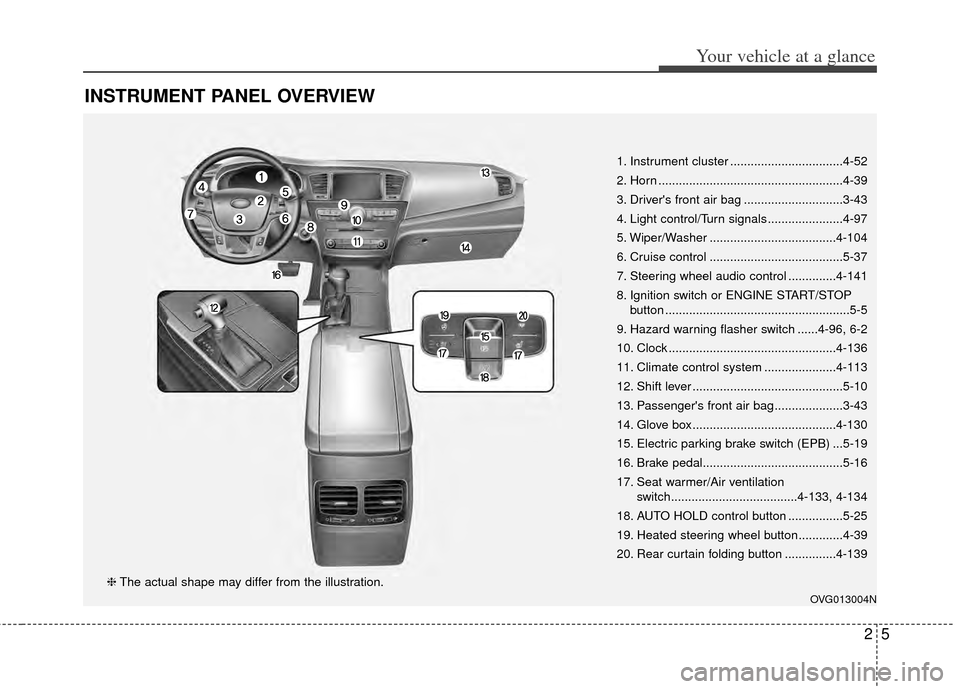
INSTRUMENT PANEL OVERVIEW
1. Instrument cluster .................................4-52
2. Horn ......................................................4-39
3. Driver's front air bag .............................3-43
4. Light control/Turn signals ......................4-97
5. Wiper/Washer .....................................4-104
6. Cruise control .......................................5-37
7. Steering wheel audio control ..............4-141
8. Ignition switch or ENGINE START/STOPbutton ......................................................5-5
9. Hazard warning flasher switch ......4-96, 6-2
10. Clock .................................................4-136
11. Climate control system .....................4-113
12. Shift lever ............................................5-10
13. Passenger's front air bag ....................3-43
14. Glove box ..........................................4-130
15. Electric parking brake switch (EPB) ...5-19
16. Brake pedal.........................................5-16
17. Seat warmer/Air ventilation switch.....................................4-133, 4-134
18. AUTO HOLD control button ................5-25
19. Heated steering wheel button.............4-39
20. Rear curtain folding button ...............4-139
OVG013004N
❈ The actual shape may differ from the illustration.
Page 56 of 415
Safety features of your vehicle
42
3
Any child age 12 and under should
ride in the rear seat. Children too
large for child restraints should use
the available lap/shoulder belts. No
matter what type of crash, children of
all ages are safer when restrained in
the rear seat.
✽ ✽
NOTICE
Do not modify or replace the front
passenger seat. Don't place anything
on or attach anything such as a blan-
ket, front seat covers or after market
seat heater to the front passenger
seat. This can adversely affect the
occupant detection system.
If the occupant detection system is
not working properly, the SRS air bag
warning light on the instrument
panel will illuminate because the pas-
senger's front air bag is connected
with the occupant detection system. If
there is a malfunction of the occupant
detection system, the PASSENGER
AIR BAG “OFF” indicator will not illu-
minate and the passenger's front air
bag will inflate in frontal impact crash-
es even if there is no occupant in the
front passenger's seat.
WARNING
Do not put a heavy load or an
active electronic device (ex.
laptop computer, after market
DMB/navigation/satellite
audio, video game machine,
MP3, etc.) in the front passen-
ger seatback pocket or on the
front passenger seat. Do not
hang onto the front passenger
seat. Do not hang any items
such as seatback table on the
front passenger seatback. Do
not place feet on the front pas-
senger seatback. Do not place
any items under the front pas-
senger seat. Any of these
could interfere with proper
sensor operation or turn on
the air bag warning light.
Do not place sharp objects on the front passenger seat.
These may damage the occu-
pant detection system, if they
puncture the seat cushion.
(Continued)
(Continued)
Air bags can only be usedonce – have an authorized Kia
dealer replace the air bag
immediately after deployment.
The occupant detection sys- tem may not work properly if
water, coffee or any other liq-
uid including rain gets on the
seat. Keep the front seat dry
at all times.
Page 71 of 415
Automaticl climate control system . . . . . . . . . . . 4-113
. . . . . . . . . . . . . . . . . . 4-114
. . . . . . . . . . . 4-116
. . . . . . . . . . . . . . . . . . . . . . . . . . . . 4-122
. . . . . . . . . . . . . . . . . . . . . . 4-124
lubricant . . . . . . . . . . . . . . . . . . . . . . . . . . . . . . . . . 4-125
Windshield defrosting and defogging . . . . . . . . . 4-126
. . . . . . . . . . . . . . . . . . . . 4-126
. . . . . . . . . . . . . . . . . 4-127
Storage compartment. . . . . . . . . . . . . . . . . . . . . . 4-130
. . . . . . . . . . . . . . . . . . . . . . . 4-130
. . . . . . . . . . . . . . . . . . . . . . . . . . . . . . . . . . 4-13\
0
. . . . . . . . . . . . . . . . . . . . . . . . . . . . . 4-131
Interior features . . . . . . . . . . . . . . . . . . . . . . . . . . 4-132
. . . . . . . . . . . . . . . . . . . . . . . . . . . . . . . . . 4-132
. . . . . . . . . . . . . . . . . . . . . . . . . . . . . . . . . . . 4-\
132
. . . . . . . . . . . . . . . . . . . . . . . . . . . . . . . . 4-133
. . . . . . . . . . . . . . . . . . . . . . . . . . 4-134
. . . . . . . . . . . . . . . . . . . . . . . . . . . . . . . . 4-135
. . . . . . . . . . . . . . . . . . . . . . . . . . . . . . . . . . . . \
. . 4-136
. . . . . . . . . . . . . . . . . . . . . . . . . . . . . . 4-137
. . . . . . . . . . . . . . . . . . . . . . . . . . . . 4-137
. . . . . . . . . . . . . . . . . . . . . . . . . . 4-138 . . . . . . . . . . . . . . . . . . . . . . . . . . . . . . . . 4-139
. . . . . . . . . . . . . . . . . . . . . . . . . . . 4-139
Audio system . . . . . . . . . . . . . . . . . . . . . . . . . . . . . 4-140
. . . . . . . . . . . . . . . . . . . . . . . . . . . . . . . . . . . 4-\
140
. . . . . . . . . . . . . . . 4-141
USB port . . . . . . . . . . . . . . . . . . . . . . . . . . . . . . 4-142
4
Page 162 of 415
Features of your vehicle
94
4
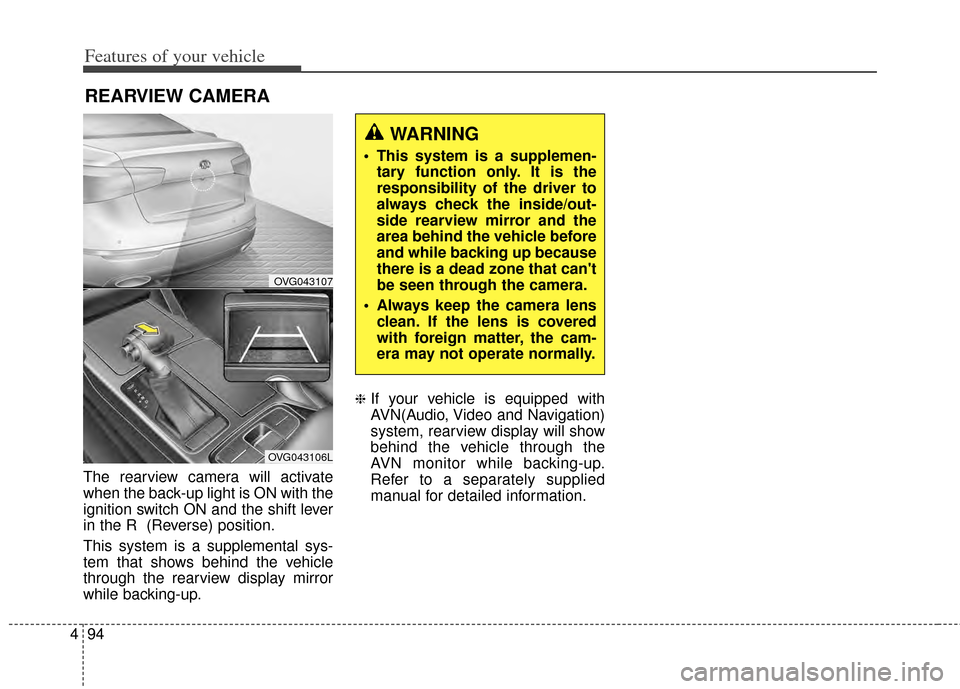
The rearview camera will activate
when the back-up light is ON with the
ignition switch ON and the shift lever
in the R (Reverse) position.
This system is a supplemental sys-
tem that shows behind the vehicle
through the rearview display mirror
while backing-up.
❈If your vehicle is equipped with
AVN(Audio, Video and Navigation)
system, rearview display will show
behind the vehicle through the
AVN monitor while backing-up.
Refer to a separately supplied
manual for detailed information.
REARVIEW CAMERA
OVG043107
OVG043106L
WARNING
This system is a supplemen-
tary function only. It is the
responsibility of the driver to
always check the inside/out-
side rearview mirror and the
area behind the vehicle before
and while backing up because
there is a dead zone that can't
be seen through the camera.
Always keep the camera lens clean. If the lens is covered
with foreign matter, the cam-
era may not operate normally.
Page 204 of 415
Features of your vehicle
136
4
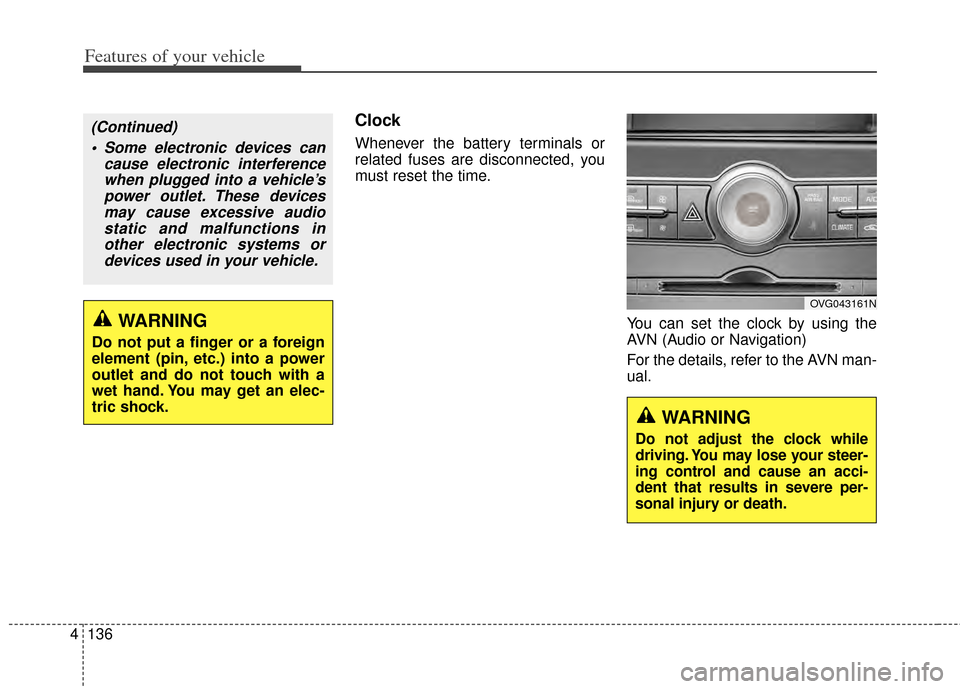
Clock
Whenever the battery terminals or
related fuses are disconnected, you
must reset the time.
You can set the clock by using the
AVN (Audio or Navigation)
For the details, refer to the AVN man-
ual.
OVG043161N
WARNING
Do not adjust the clock while
driving. You may lose your steer-
ing control and cause an acci-
dent that results in severe per-
sonal injury or death.
WARNING
Do not put a finger or a foreign
element (pin, etc.) into a power
outlet and do not touch with a
wet hand. You may get an elec-
tric shock.
(Continued) Some electronic devices can cause electronic interferencewhen plugged into a vehicle’spower outlet. These devicesmay cause excessive audiostatic and malfunctions inother electronic systems ordevices used in your vehicle.
Page 208 of 415
Features of your vehicle
140
4
✽
✽
NOTICE
If you install an after market HID
head lamp, your vehicle’s audio and
electronic device may malfunction.
❈ If your vehicle is equipped with
AVN(Audio, Video and Navigation)
system, refer to a separately sup-
plied manual for detailed informa-
tion.
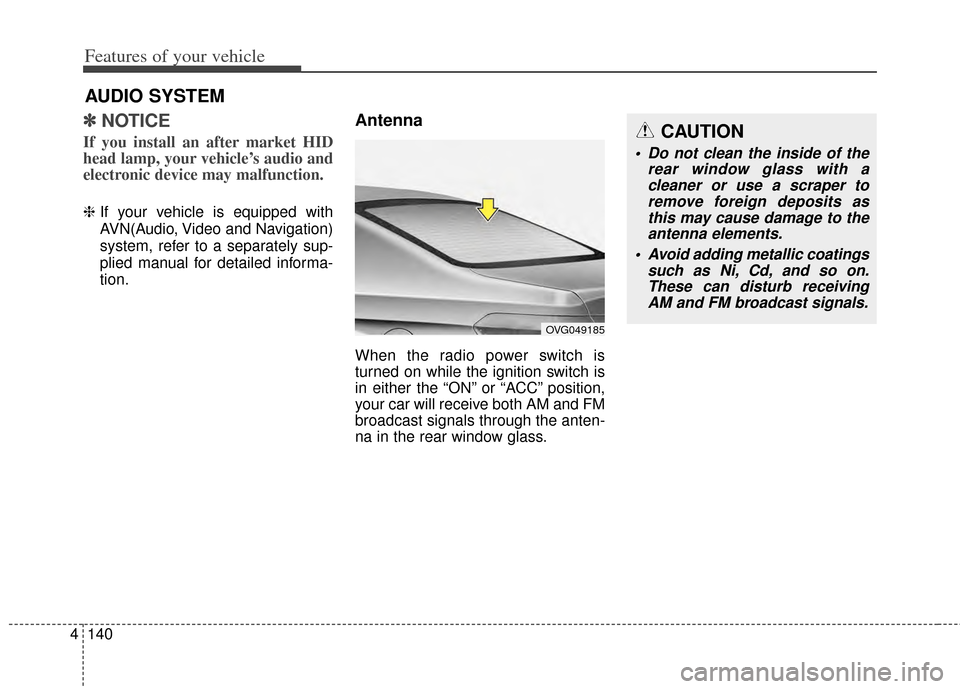
Antenna
When the radio power switch is
turned on while the ignition switch is
in either the “ON” or “ACC” position,
your car will receive both AM and FM
broadcast signals through the anten-
na in the rear window glass.
AUDIO SYSTEM
CAUTION
Do not clean the inside of the
rear window glass with acleaner or use a scraper toremove foreign deposits asthis may cause damage to theantenna elements.
Avoid adding metallic coatings such as Ni, Cd, and so on.These can disturb receivingAM and FM broadcast signals.
OVG049185
Page 209 of 415
4141
Features of your vehicle
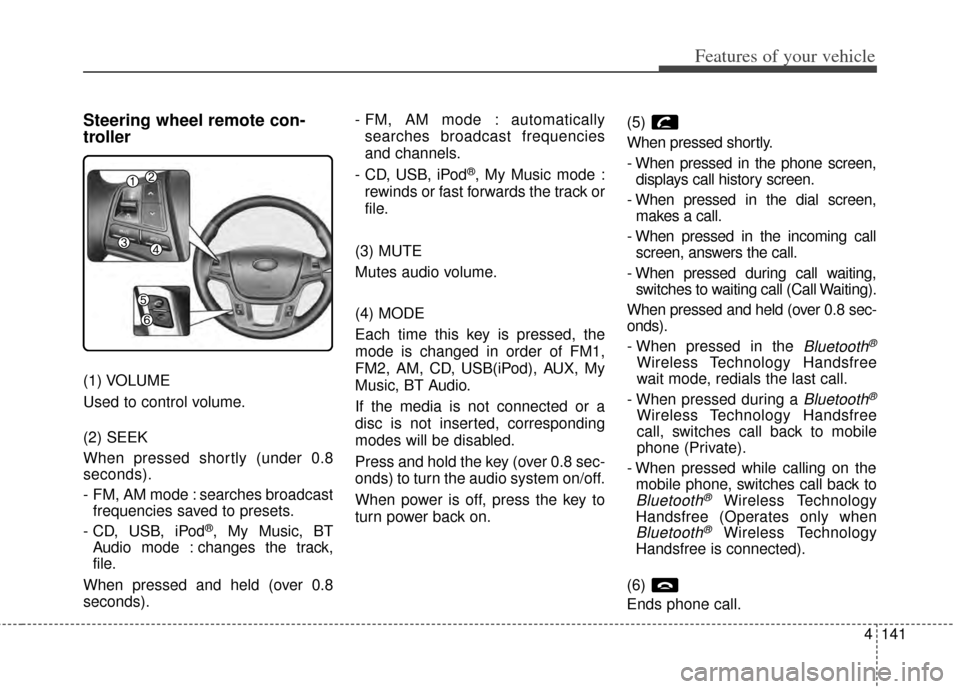
Steering wheel remote con-
troller
(1) VOLUME
Used to control volume.
(2) SEEK
When pressed shortly (under 0.8
seconds).
- FM, AM mode : searches broadcastfrequencies saved to presets.
- CD, USB, iPod
®, My Music, BT
Audio mode : changes the track,
file.
When pressed and held (over 0.8
seconds). - FM, AM mode : automatically
searches broadcast frequencies
and channels.
- CD, USB, iPod
®, My Music mode :
rewinds or fast forwards the track or
file.
(3) MUTE
Mutes audio volume.
(4) MODE
Each time this key is pressed, the
mode is changed in order of FM1,
FM2, AM, CD, USB(iPod), AUX, My
Music, BT Audio.
If the media is not connected or a
disc is not inserted, corresponding
modes will be disabled.
Press and hold the key (over 0.8 sec-
onds) to turn the audio system on/off.
When power is off, press the key to
turn power back on. (5)
When pressed shortly.
- When pressed in the phone screen,
displays call history screen.
- When pressed in the dial screen, makes a call.
- When pressed in the incoming call screen, answers the call.
- When pressed during call waiting, switches to waiting call (Call Waiting).
When pressed and held (over 0.8 sec-
onds).
- When pressed in the
Bluetooth®
Wireless Technology Handsfree
wait mode, redials the last call.
- When pressed during a
Bluetooth®
Wireless Technology Handsfree
call, switches call back to mobile
phone (Private).
- When pressed while calling on the mobile phone, switches call back to
Bluetooth®Wireless Technology
Handsfree (Operates only when
Bluetooth®Wireless Technology
Handsfree is connected).
(6)
Ends phone call.
Page 210 of 415
Features of your vehicle
142
4
(7)
When pressed shortly.
- Starts voice recognition.
- When selecting during a voice
prompt, stops the prompt and con-
verts to voice command waiting
state.
When pressed and held (over 0.8 sec-
onds).
- Ends voice recognition.
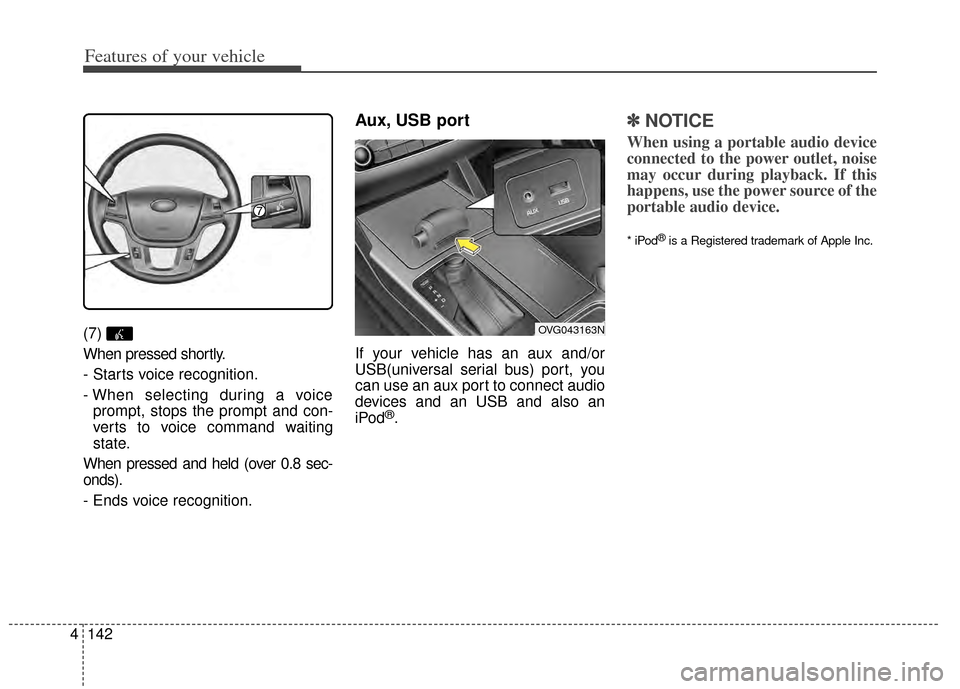
Aux, USB port
If your vehicle has an aux and/or
USB(universal serial bus) port, you
can use an aux port to connect audio
devices and an USB and also an
iPod
®.
✽ ✽ NOTICE
When using a portable audio device
connected to the power outlet, noise
may occur during playback. If this
happens, use the power source of the
portable audio device.
* iPod®is a Registered trademark of Apple Inc.
OVG043163N
Page 265 of 415

555
Driving your vehicle
This system detects the lane with the
sensor at the front windshield and
warns you when your vehicle leaves
the lane.
LANE DEPARTURE WARNING SYSTEM (LDWS) (IF EQUIPPED)
OVG059041
OVG053314
WARNING
The LDWS does not make thevehicle change lanes. It is the
driver's responsibility to
always check the road condi-
tions.
Do not turn the steering wheel suddenly, when the LDWS
warns that your vehicle is
leaving the lane.
If the sensor cannot detect the lane or if the vehicle speed
does not exceed 43 mph
(70km/h), the LDWS won't
warn you even though the
vehicle leaves the lane.
If your vehicle has window tint or other types of coating on
the front windshield, the
LDWS may not work properly.
Prevent damage to the LDWS sensor from water or any liq-
uid.
Do not remove the LDWS parts and do not damage the
sensor by a strong impact.
(Continued)
(Continued)
Do not put objects that reflectlight on the dash board.
Always check the road condi- tions for you may not hear the
warning chime because of
audio, or external noise.