instrument cluster KIA Cadenza 2014 1.G Owner's Manual
[x] Cancel search | Manufacturer: KIA, Model Year: 2014, Model line: Cadenza, Model: KIA Cadenza 2014 1.GPages: 415, PDF Size: 5.09 MB
Page 3 of 415

ii
1
2
3
4
5
6
7
8I
IntroductionHow to use this manual / Fuel requirements / Vehicle break-in process
Your vehicle at a glance
Exterior overview / Interior overview / Instrument panel overview / Engi\
ne compartment
Safety features of your vehicle
Seats / Seat belts / Child restraint system / Air bag
Features of your vehicleKeys / Door locks / Trunk / Windows / Hood / Fuel filler lid / Panoramic sunroof / Steering wheel / Mirrors /Instrument cluster / Lighting / Wipers & Washers / Climate control system / Audio system / Etc.
Driving your vehicleBefore driving / Engine start/stop button / Transaxle / Brake system /
Cruise control system / Smart cruise control system / Winter driving / Vehicle load limit / Etc.
What to do in an emergencyRoad warning / Emergency while driving / Emergency starting / Engine overheat / TPMS / Flat tire / Towing / Etc.
MaintenanceEngine compartment / Maintenance service / Engine oil / Engine coolant /\
Brake fluid / Washer fluid /
Parking brake / Air cleaner / Wiper blades / Battery / Tire and wheels / Fuses / Etc.
Specifications & Consumer information
Index
table of contents
Page 13 of 415
25
Your vehicle at a glance
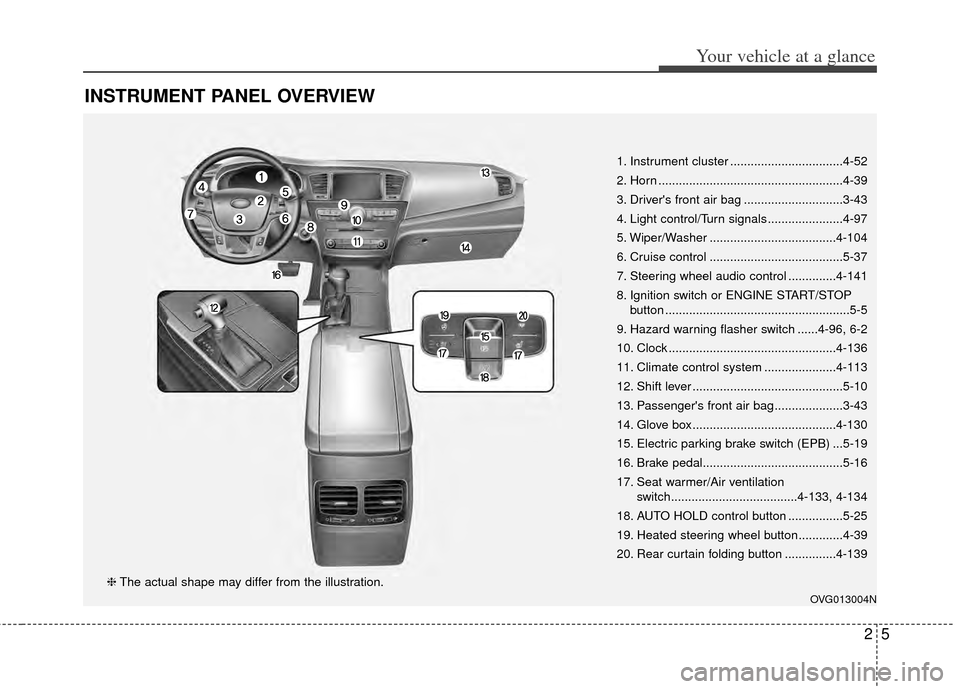
INSTRUMENT PANEL OVERVIEW
1. Instrument cluster .................................4-52
2. Horn ......................................................4-39
3. Driver's front air bag .............................3-43
4. Light control/Turn signals ......................4-97
5. Wiper/Washer .....................................4-104
6. Cruise control .......................................5-37
7. Steering wheel audio control ..............4-141
8. Ignition switch or ENGINE START/STOPbutton ......................................................5-5
9. Hazard warning flasher switch ......4-96, 6-2
10. Clock .................................................4-136
11. Climate control system .....................4-113
12. Shift lever ............................................5-10
13. Passenger's front air bag ....................3-43
14. Glove box ..........................................4-130
15. Electric parking brake switch (EPB) ...5-19
16. Brake pedal.........................................5-16
17. Seat warmer/Air ventilation switch.....................................4-133, 4-134
18. AUTO HOLD control button ................5-25
19. Heated steering wheel button.............4-39
20. Rear curtain folding button ...............4-139
OVG013004N
❈ The actual shape may differ from the illustration.
Page 22 of 415
Safety features of your vehicle
83
Recalling positions from memory
1. The shift lever should be in P(Park) when :
- The ignition switch is in ON or engine is running.
- It is less than 20 minutes after the driver's door is opened with the
ignition switch in OFF or ACC.
- It is less than 30 seconds after the driver's door is closed with
the ignition switch in OFF or
ACC.
2. To recall the position in memory, press the desired memory button
(1 or 2). The system will beep
once, then the driver seat, outside
rearview mirror and steering
wheel will automatically adjust to
the stored positions.
3. "Driver 1 (or 2) set is changed" will appear on the instrument cluster
LCD display. Adjusting the control switch for the
driver seat while the system is recall-
ing the stored position will cause the
movement to stop and move in the
direction that the control switch is
moved.Easy access function
With the shift lever in the P position,
the system will move the driver's seat
automatically as follows:
• It will move the driver’s seat rear-
ward when the engine start/stop
button is turned to the OFF position.
It will move the driver’s seat forward when the engine start/stop button is
turned to the ACC or START posi-
tion.
You can activate or deactivate this
feature. Refer to "User settings" in
chapter 4.
WARNING
Use caution when recalling
adjustment memory while sitting
in the vehicle. Push the seat
position control knob to the
desired position immediately if
the seat moves too far in any
direction.
Page 69 of 415
Features of your vehicle
Smart key . . . . . . . . . . . . . . . . . . . . . . . . . . . . . . . . . 4-4
• Record your key number . . . . . . . . . . . . . . . . . . . . . . . 4-4
. . . . . . . . . . . . . . . . . . . . . . . . . . . . 4-4
. . . . . . . . . . . . . . . . . . . . . . . . . 4-5
. . . . . . . . . . . 4-6
. . . . . . . . . . . . . . . . . . . . . . . . 4-7
. . . . . . . . . . . . . . . . . . . . . . . . . . . 4-8
. . . . . . . . . . . . . . . . . . . . . . . . . . . 4-11
Theft-alarm system . . . . . . . . . . . . . . . . . . . . . . . . 4-14
. . . . . . . . . . . . . . . . . . . . . . . . . . . . . . . . . 4-14
. . . . . . . . . . . . . . . . . . . . . . . . . . . . 4-15
Door locks . . . . . . . . . . . . . . . . . . . . . . . . . . . . . . . 4-17
. . . . . . . . . . . . . . . . . . . . . . 4-17
. . . . . . . . . . . . . . . . . . . . . . . 4-18
. . . . . . . . . . . . . . 4-20
. . . . . . . . . . . . . . . . . . 4-20
. . . . . . . . . . . . . . . . . 4-20
Trunk . . . . . . . . . . . . . . . . . . . . . . . . . . . . . . . . . . . 4-21
. . . . . . . . . . . . . . . . . . . . . . . . . . . . . . . . . . . . \
4-21
. . . . . . . . . . . . . . . . . . . . . . . . . . . . . . . . . . . . \
. 4-22
. . . . . . . . . . . . . . . . . 4-22
Windows . . . . . . . . . . . . . . . . . . . . . . . . . . . . . . . . . 4-23
. . . . . . . . . . . . . . . . . . . . . . . . . . . . . . 4-24
Hood. . . . . . . . . . . . . . . . . . . . . . . . . . . . . . . . . . . . \
. 4-27
. . . . . . . . . . . . . . . . . . . . . . . . . . . . . . . . . . . . \
4-27
. . . . . . . . . . . . . . . . . . . . . . . . . . . . . . . . . . . . \
. 4-28
Fuel filler lid . . . . . . . . . . . . . . . . . . . . . . . . . . . . . . 4-29
. . . . . . . . . . . . . . . . . . . . . . . . . . 4-29
Panoramic sunroof . . . . . . . . . . . . . . . . . . . . . . . . . 4-32
. . . . . . . . . . . . . . . . . . . . . . . . 4-32
. . . . . . . . . . . . . . . . . . . . . . . . . . . 4-33
. . . . . . . . . . . . . . . . . . . . . . . . . . . 4-33
. . . . . . . . . . . . . . . . . . . . . . . . . . . . 4-34
. . . . . . . . . . . . . . . . . . . . . . . . . . . . . . . . . . . 4-\
35
. . . . . . . . . . . . . . . . . . . . . . . . . 4-36
Steering wheel . . . . . . . . . . . . . . . . . . . . . . . . . . . . . 4-37
. . . . . . . . . . . . . . . . . . 4-37
. . . . . . . . . . . . . . . . . . . . . 4-38
. . . . . . . . . . . . . . . . . . . . . . . . 4-39
. . . . . . . . . . . . . . . . . . . . . . . . . . . . . . . . . . . . \
. . . 4-39
Mirrors . . . . . . . . . . . . . . . . . . . . . . . . . . . . . . . . . . 4-40\
. . . . . . . . . . . . . . . . . . . . . . . . 4-40
Instrument cluster . . . . . . . . . . . . . . . . . . . . . . . . . 4-52
. . . . . . . . . . . . . . . . . . . . 4-53
. . . . . . . . . . . . . . . . . . . . . . . . . 4-53
. . . . . . . . . . . . . . . . . . . . . . . . . . . . . . . . . . . . \
. 4-54
4
Page 120 of 415
Features of your vehicle
52
4
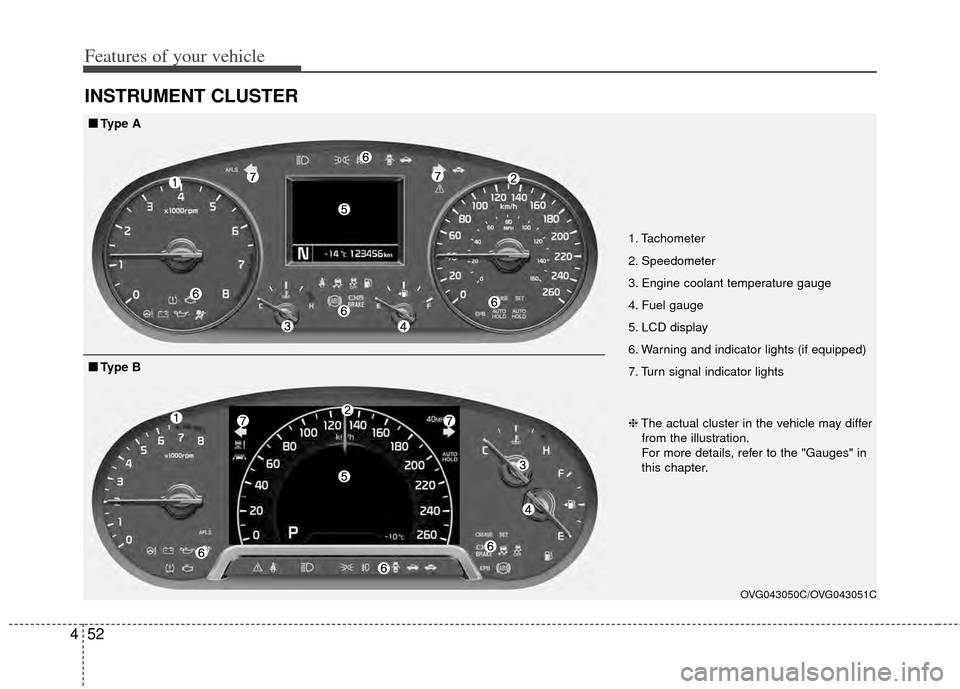
INSTRUMENT CLUSTER
1. Tachometer
2. Speedometer
3. Engine coolant temperature gauge
4. Fuel gauge
5. LCD display
6. Warning and indicator lights (if equipped)
7. Turn signal indicator lights
OVG043050C/OVG043051C
■
■
Type A
❈The actual cluster in the vehicle may differ
from the illustration.
For more details, refer to the "Gauges" in
this chapter.
■
■ Type B
Page 121 of 415
453
Features of your vehicle
Instrument Cluster Control
Adjusting Instrument ClusterIllumination
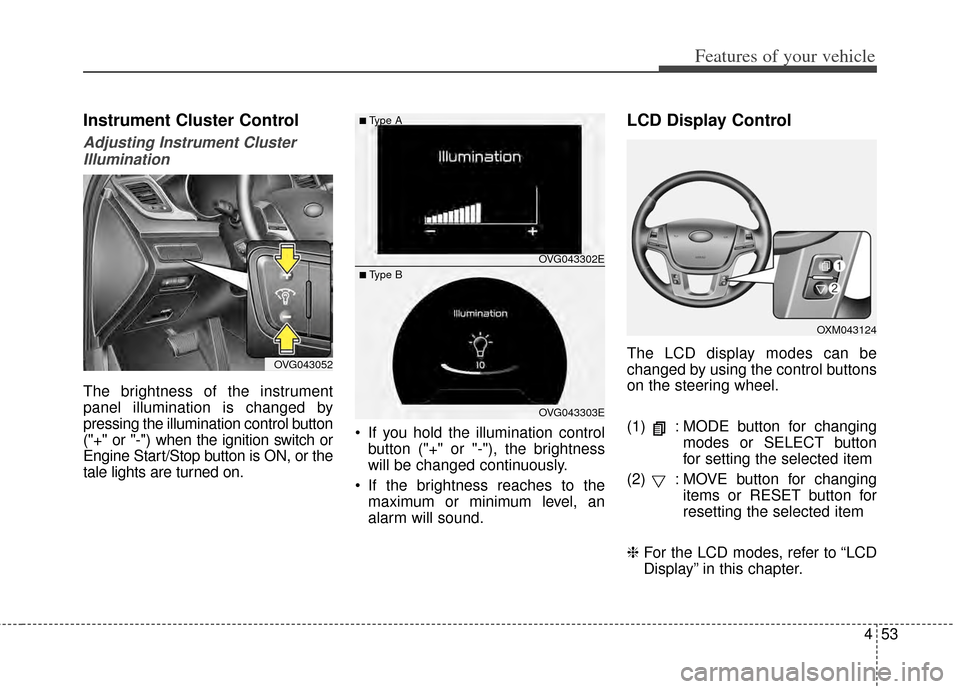
The brightness of the instrument
panel illumination is changed by
pressing the illumination control button
("+" or "-") when the ignition switch or
Engine Start/Stop button is ON, or the
tale lights are turned on. If you hold the illumination control
button ("+" or "-"), the brightness
will be changed continuously.
If the brightness reaches to the maximum or minimum level, an
alarm will sound.
LCD Display Control
The LCD display modes can be
changed by using the control buttons
on the steering wheel.
(1) : MODE button for changing modes or SELECT button
for setting the selected item
(2) : MOVE button for changing items or RESET button for
resetting the selected item
❈ For the LCD modes, refer to “LCD
Display” in this chapter.OVG043052
OXM043124
OVG043302E
OVG043303E
■Type A
■ Type B
Page 221 of 415
511
Driving your vehicle
For smooth operation, depress thebrake pedal when shifting from N(Neutral) to a forward or reversegear.
When stopped on an upgrade, do not
hold the vehicle with engine power.
Use the service brake or the parking
brake.
Transaxle ranges
The indicator light in the instrument
cluster displays the shift lever posi-
tion when the ignition switch is in the
ON position.
P (Park)
Always come to a complete stop
before shifting into P (Park). This
position locks the transaxle and pre-
vents the front wheels from rotating.
Shifting into P (Park) while the vehi-
cle is in motion will cause the drive
wheels to lock which will cause you
to lose control of the vehicle.CAUTION - Transaxle
To avoid damage to yourtransaxle, do not accelerate theengine in R (Reverse) or any for-ward gear position with thebrakes on. The transaxle may bedamaged if you shift into P(Park) while the vehicle is inmotion.
Page 244 of 415
Driving your vehicle
34
5
The HAC does not operate when
the transaxle shift lever is in the P
(Park) or N (Neutral) position.
The HAC activates even though the ESC is off but it does not acti-
vate when the ESC has malfunc-
tioned.Vehicle stability management
(VSM)
This system provides further
enhancements to vehicle stability
and steering responses when a vehi-
cle is driving on a slippery road or a
vehicle detected changes in coeffi-
cient of friction between right wheels
and left wheels when braking.
VSM operation
When the VSM is in operation, ESC
indicator light ( ) blinks.
When the vehicle stability manage-
ment is operating properly, you can
feel a slight pulsation in the vehicle.
This is only the effect of brake control
and indicates nothing unusual.
The VSM does not operate when:
Driving on bank road such as gra-dient or incline
Driving rearward
ESC OFF indicator light ( ) remains on the instrument cluster
ESC indicator light remains on the instrument cluster
VSM operation off
If you press the ESC OFF button to
turn off the ESC, the VSM will also
cancel and the ESC OFF indicator
light ( ) illuminates.
To turn on the VSM, press the button
again. The ESC OFF indicator light
goes out.
Malfunction indicator
The VSM can be deactivated even if
you don’t cancel the VSM operation
by pressing the ESC OFF button. It
indicates that a malfunction has
been detected somewhere in the
Electric Power Steering system or
VSM system. If the ESC indicator
light ( ) or ESC warning light
remains on, take your vehicle to an
authorized Kia dealer and have the
system checked.
The VSM is designed to functionabove approximately 9 mph (15
km/h) on curves.
Page 247 of 415

537
Driving your vehicle
The cruise control system allows you
to program the vehicle to maintain a
constant speed without depressing
the accelerator pedal.
This system is designed to function
above approximately 40 km/h (25
mph).
If the cruise control is left on,
(CRUISE indicator light in the instru-
ment cluster illuminated) the cruise
control can be switched on acciden-
tally. Keep the cruise control system
off (CRUISE indicator light OFF)
when the cruise control is not in use,
to avoid inadvertently setting a
speed.
Use the cruise control system only
when traveling on open highways in
good weather.
Do not use the cruise control when
driving in heavy or varying traffic, or
on slippery (rainy, icy or snow-cov-
ered) or winding roads or over 6%
up-hill or down-hill roads.✽ ✽NOTICE
• During normal cruise control
operation, when the SET switch is
activated or reactivated after
applying the brakes, the cruise
control will energize after approx-
imately 3 seconds. This delay is
normal.
• To activate cruise control, depress the brake pedal at least once after
turning the ignition switch to the
ON position or starting the engine.
This is to check if the brake switch
which is important part to cancel
cruise control is in normal condi-
tion.
To set cruise control speed:
1. Press the CRUISE button on the
steering wheel to turn the system
on. The CRUISE indicator light in
the instrument cluster will illumi-
nate.
2. Accelerate to the desired speed, which must be more than 40 km/h
(25 mph).
CRUISE CONTROL SYSTEM
WARNING - Misuse of
Cruise Control or Cruise
Control Misuse
Do not use cruise control if the
traffic situation does not allow
you to drive safely at a constant
speed and with sufficient dis-
tance to the vehicle in front.
OXM053006
Page 248 of 415
Driving your vehicle
38
5
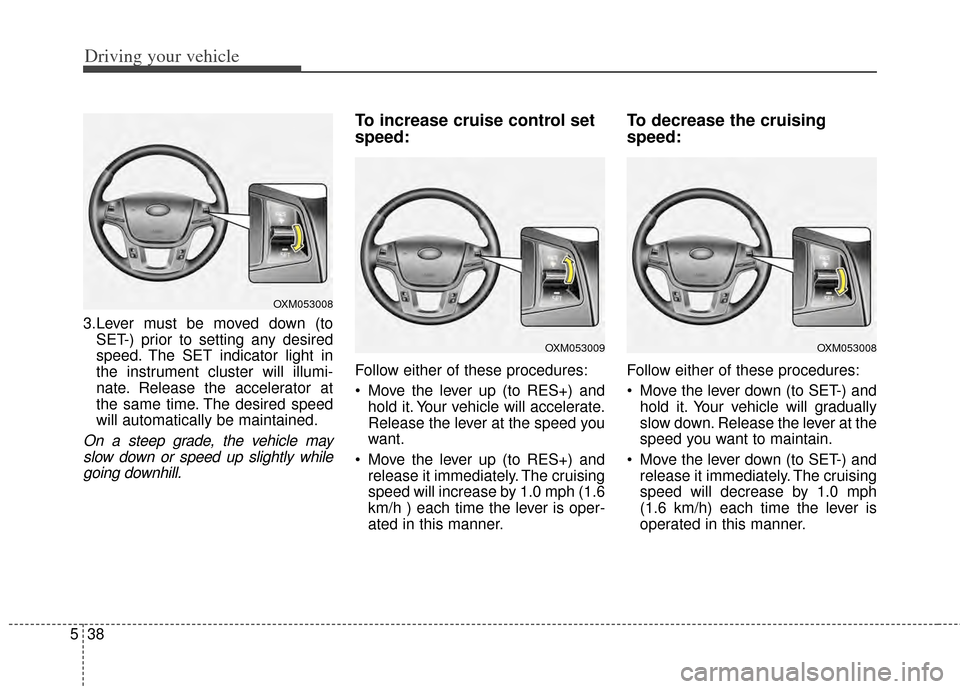
3.Lever must be moved down (to
SET-) prior to setting any desired
speed. The SET indicator light in
the instrument cluster will illumi-
nate. Release the accelerator at
the same time. The desired speed
will automatically be maintained.
On a steep grade, the vehicle mayslow down or speed up slightly whilegoing downhill.
To increase cruise control set
speed:
Follow either of these procedures:
Move the lever up (to RES+) and hold it. Your vehicle will accelerate.
Release the lever at the speed you
want.
Move the lever up (to RES+) and release it immediately. The cruising
speed will increase by 1.0 mph (1.6
km/h ) each time the lever is oper-
ated in this manner.
To decrease the cruising
speed:
Follow either of these procedures:
Move the lever down (to SET-) andhold it. Your vehicle will gradually
slow down. Release the lever at the
speed you want to maintain.
Move the lever down (to SET-) and release it immediately. The cruising
speed will decrease by 1.0 mph
(1.6 km/h) each time the lever is
operated in this manner.
OXM053008
OXM053009OXM053008