mirror KIA Cadenza 2014 1.G Owner's Manual
[x] Cancel search | Manufacturer: KIA, Model Year: 2014, Model line: Cadenza, Model: KIA Cadenza 2014 1.GPages: 415, PDF Size: 5.09 MB
Page 3 of 415

ii
1
2
3
4
5
6
7
8I
IntroductionHow to use this manual / Fuel requirements / Vehicle break-in process
Your vehicle at a glance
Exterior overview / Interior overview / Instrument panel overview / Engi\
ne compartment
Safety features of your vehicle
Seats / Seat belts / Child restraint system / Air bag
Features of your vehicleKeys / Door locks / Trunk / Windows / Hood / Fuel filler lid / Panoramic sunroof / Steering wheel / Mirrors /Instrument cluster / Lighting / Wipers & Washers / Climate control system / Audio system / Etc.
Driving your vehicleBefore driving / Engine start/stop button / Transaxle / Brake system /
Cruise control system / Smart cruise control system / Winter driving / Vehicle load limit / Etc.
What to do in an emergencyRoad warning / Emergency while driving / Emergency starting / Engine overheat / TPMS / Flat tire / Towing / Etc.
MaintenanceEngine compartment / Maintenance service / Engine oil / Engine coolant /\
Brake fluid / Washer fluid /
Parking brake / Air cleaner / Wiper blades / Battery / Tire and wheels / Fuses / Etc.
Specifications & Consumer information
Index
table of contents
Page 10 of 415

Your vehicle at a glance
22
EXTERIOR OVERVIEW
1. Hood .....................................................4-27
2. Head lamp ............................................4-97
3. Fog lamp .............................................4-102
4. Tire and wheel ...............................7-46, 8-2
5. Outside rearview mirror ........................4-50
6. Panorama sunroof ................................4-32
7. Front windshield wiper blades ...4-104, 7-40
8. Windows ...............................................4-23
OVG013001N
■Front view
❈The actual shape may differ from the illustration.
Page 12 of 415
Your vehicle at a glance
42
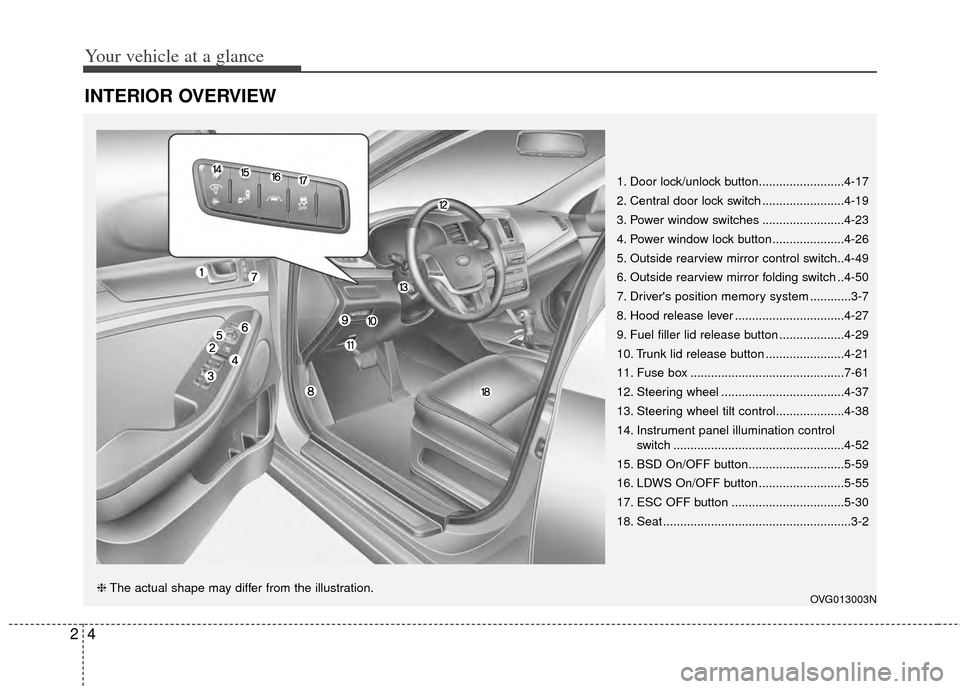
INTERIOR OVERVIEW
1. Door lock/unlock button.........................4-17
2. Central door lock switch ........................4-19
3. Power window switches ........................4-23
4. Power window lock button .....................4-26
5. Outside rearview mirror control switch..4-49
6. Outside rearview mirror folding switch ..4-50
7. Driver's position memory system ............3-7
8. Hood release lever ................................4-27
9. Fuel filler lid release button ...................4-29
10. Trunk lid release button .......................4-21
11. Fuse box .............................................7-61
12. Steering wheel ....................................4-37
13. Steering wheel tilt control....................4-38
14. Instrument panel illumination controlswitch ..................................................4-52
15. BSD On/OFF button............................5-59
16. LDWS On/OFF button .........................5-55
17. ESC OFF button .................................5-30
18. Seat .......................................................3-2
OVG013003N❈ The actual shape may differ from the illustration.
Page 21 of 415
37
Safety features of your vehicle
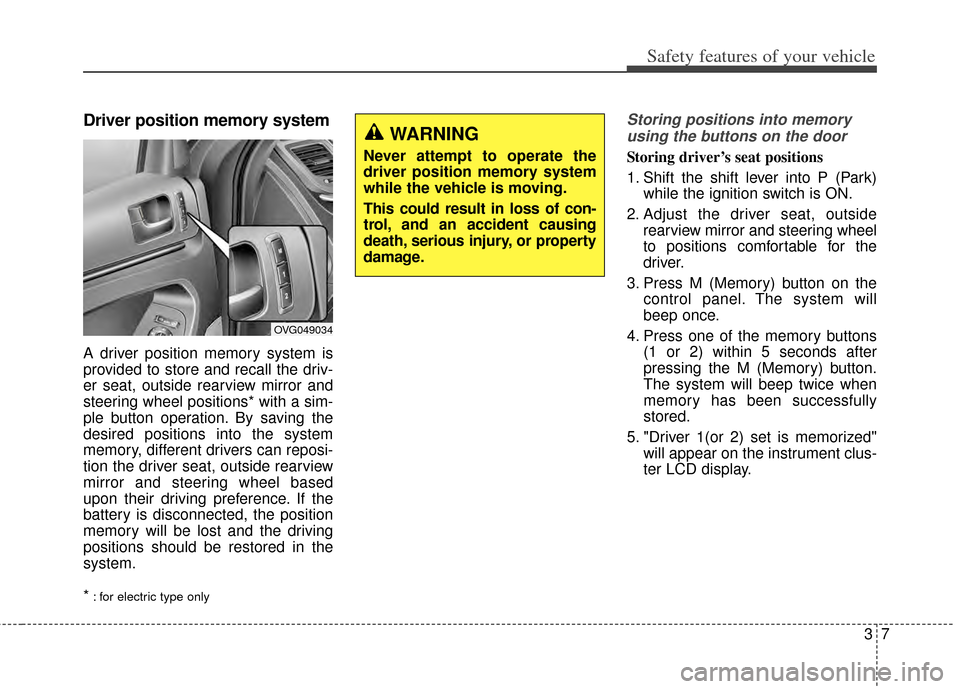
Driver position memory system
A driver position memory system is
provided to store and recall the driv-
er seat, outside rearview mirror and
steering wheel positions* with a sim-
ple button operation. By saving the
desired positions into the system
memory, different drivers can reposi-
tion the driver seat, outside rearview
mirror and steering wheel based
upon their driving preference. If the
battery is disconnected, the position
memory will be lost and the driving
positions should be restored in the
system.
*
: for electric type only
Storing positions into memoryusing the buttons on the door
Storing driver’s seat positions
1. Shift the shift lever into P (Park) while the ignition switch is ON.
2. Adjust the driver seat, outside rearview mirror and steering wheel
to positions comfortable for the
driver.
3. Press M (Memory) button on the control panel. The system will
beep once.
4. Press one of the memory buttons (1 or 2) within 5 seconds after
pressing the M (Memory) button.
The system will beep twice when
memory has been successfully
stored.
5. "Driver 1(or 2) set is memorized" will appear on the instrument clus-
ter LCD display.
OVG049034
WARNING
Never attempt to operate the
driver position memory system
while the vehicle is moving.
This could result in loss of con-
trol, and an accident causing
death, serious injury, or property
damage.
Page 22 of 415
Safety features of your vehicle
83
Recalling positions from memory
1. The shift lever should be in P(Park) when :
- The ignition switch is in ON or engine is running.
- It is less than 20 minutes after the driver's door is opened with the
ignition switch in OFF or ACC.
- It is less than 30 seconds after the driver's door is closed with
the ignition switch in OFF or
ACC.
2. To recall the position in memory, press the desired memory button
(1 or 2). The system will beep
once, then the driver seat, outside
rearview mirror and steering
wheel will automatically adjust to
the stored positions.
3. "Driver 1 (or 2) set is changed" will appear on the instrument cluster
LCD display. Adjusting the control switch for the
driver seat while the system is recall-
ing the stored position will cause the
movement to stop and move in the
direction that the control switch is
moved.Easy access function
With the shift lever in the P position,
the system will move the driver's seat
automatically as follows:
• It will move the driver’s seat rear-
ward when the engine start/stop
button is turned to the OFF position.
It will move the driver’s seat forward when the engine start/stop button is
turned to the ACC or START posi-
tion.
You can activate or deactivate this
feature. Refer to "User settings" in
chapter 4.
WARNING
Use caution when recalling
adjustment memory while sitting
in the vehicle. Push the seat
position control knob to the
desired position immediately if
the seat moves too far in any
direction.
Page 69 of 415
Features of your vehicle
Smart key . . . . . . . . . . . . . . . . . . . . . . . . . . . . . . . . . 4-4
• Record your key number . . . . . . . . . . . . . . . . . . . . . . . 4-4
. . . . . . . . . . . . . . . . . . . . . . . . . . . . 4-4
. . . . . . . . . . . . . . . . . . . . . . . . . 4-5
. . . . . . . . . . . 4-6
. . . . . . . . . . . . . . . . . . . . . . . . 4-7
. . . . . . . . . . . . . . . . . . . . . . . . . . . 4-8
. . . . . . . . . . . . . . . . . . . . . . . . . . . 4-11
Theft-alarm system . . . . . . . . . . . . . . . . . . . . . . . . 4-14
. . . . . . . . . . . . . . . . . . . . . . . . . . . . . . . . . 4-14
. . . . . . . . . . . . . . . . . . . . . . . . . . . . 4-15
Door locks . . . . . . . . . . . . . . . . . . . . . . . . . . . . . . . 4-17
. . . . . . . . . . . . . . . . . . . . . . 4-17
. . . . . . . . . . . . . . . . . . . . . . . 4-18
. . . . . . . . . . . . . . 4-20
. . . . . . . . . . . . . . . . . . 4-20
. . . . . . . . . . . . . . . . . 4-20
Trunk . . . . . . . . . . . . . . . . . . . . . . . . . . . . . . . . . . . 4-21
. . . . . . . . . . . . . . . . . . . . . . . . . . . . . . . . . . . . \
4-21
. . . . . . . . . . . . . . . . . . . . . . . . . . . . . . . . . . . . \
. 4-22
. . . . . . . . . . . . . . . . . 4-22
Windows . . . . . . . . . . . . . . . . . . . . . . . . . . . . . . . . . 4-23
. . . . . . . . . . . . . . . . . . . . . . . . . . . . . . 4-24
Hood. . . . . . . . . . . . . . . . . . . . . . . . . . . . . . . . . . . . \
. 4-27
. . . . . . . . . . . . . . . . . . . . . . . . . . . . . . . . . . . . \
4-27
. . . . . . . . . . . . . . . . . . . . . . . . . . . . . . . . . . . . \
. 4-28
Fuel filler lid . . . . . . . . . . . . . . . . . . . . . . . . . . . . . . 4-29
. . . . . . . . . . . . . . . . . . . . . . . . . . 4-29
Panoramic sunroof . . . . . . . . . . . . . . . . . . . . . . . . . 4-32
. . . . . . . . . . . . . . . . . . . . . . . . 4-32
. . . . . . . . . . . . . . . . . . . . . . . . . . . 4-33
. . . . . . . . . . . . . . . . . . . . . . . . . . . 4-33
. . . . . . . . . . . . . . . . . . . . . . . . . . . . 4-34
. . . . . . . . . . . . . . . . . . . . . . . . . . . . . . . . . . . 4-\
35
. . . . . . . . . . . . . . . . . . . . . . . . . 4-36
Steering wheel . . . . . . . . . . . . . . . . . . . . . . . . . . . . . 4-37
. . . . . . . . . . . . . . . . . . 4-37
. . . . . . . . . . . . . . . . . . . . . 4-38
. . . . . . . . . . . . . . . . . . . . . . . . 4-39
. . . . . . . . . . . . . . . . . . . . . . . . . . . . . . . . . . . . \
. . . 4-39
Mirrors . . . . . . . . . . . . . . . . . . . . . . . . . . . . . . . . . . 4-40\
. . . . . . . . . . . . . . . . . . . . . . . . 4-40
Instrument cluster . . . . . . . . . . . . . . . . . . . . . . . . . 4-52
. . . . . . . . . . . . . . . . . . . . 4-53
. . . . . . . . . . . . . . . . . . . . . . . . . 4-53
. . . . . . . . . . . . . . . . . . . . . . . . . . . . . . . . . . . . \
. 4-54
4
Page 73 of 415
45
Features of your vehicle
In some instances, when the outside
door button is selected, the doors will
not lock and an audible chime will
sound for 3 seconds if any of the fol-
lowing occurs:
• The smart key is in the vehicle.
The ignition switch is in the ACC orON position.
Any door except the trunk is opened.Unlocking
Pressing the button of the driver's (or
front passenger’s) outside door han-
dle with all doors closed and locked,
unlocks the driver's door.
If you press the button of the driver's
outside door handle again within 4
seconds, The other doors will be
unlocked. But if you press the button
of the driver's outside door handle
again after 4 seconds, all doors will be
locked. The hazard warning lights will
blink and the chime will sound twice to
indicate that the driver's door is
unlocked. Also, the outside rearview
mirrors will automatically unfold if the
outside rearview mirror folding switch
is in the AUTO position.
The button will only operate when the
smart key is within 0.7~1 m (28~40
in.) from the outside door handle.
Start-up
You can start the engine without
inserting the key. For detailed infor-
mation refer to “Starting the engine
with a smart key” in chapter 5.
Smart key precautions
If you lose your smart key, you willnot be able to start the engine. Tow
the vehicle, if necessary, and con-
tact an authorized Kia dealer.
A maximum of 3 smart keys can be registered to a single vehicle. If you
lose a smart key, you should imme-
diately take the vehicle and key to
your authorized Kia dealer to pro-
tect it from potential theft.
The smart key will not work if any of following occurs:
- The smart key is close to a radiotransmitter such as a radio sta-
tion or an airport which can inter-
fere with normal operation of the
smart key.
- The smart key near a mobile two- way radio system or a cellular
phone.
- Another vehicle’s smart key is being operated close to your
vehicle.
When the smart key does not work
correctly, open and close the door
with the mechanical key. If you
have a problem with the smart key,
contact an authorized Kia dealer.
Page 108 of 415
Features of your vehicle
40
4
MIRRORS
Inside rearview mirror
Adjust the rearview mirror so that the
center view through the rear window
is seen. Make this adjustment before
you start driving.
Do not place objects in the rear seat
which would interfere with your vision
through the rear window.
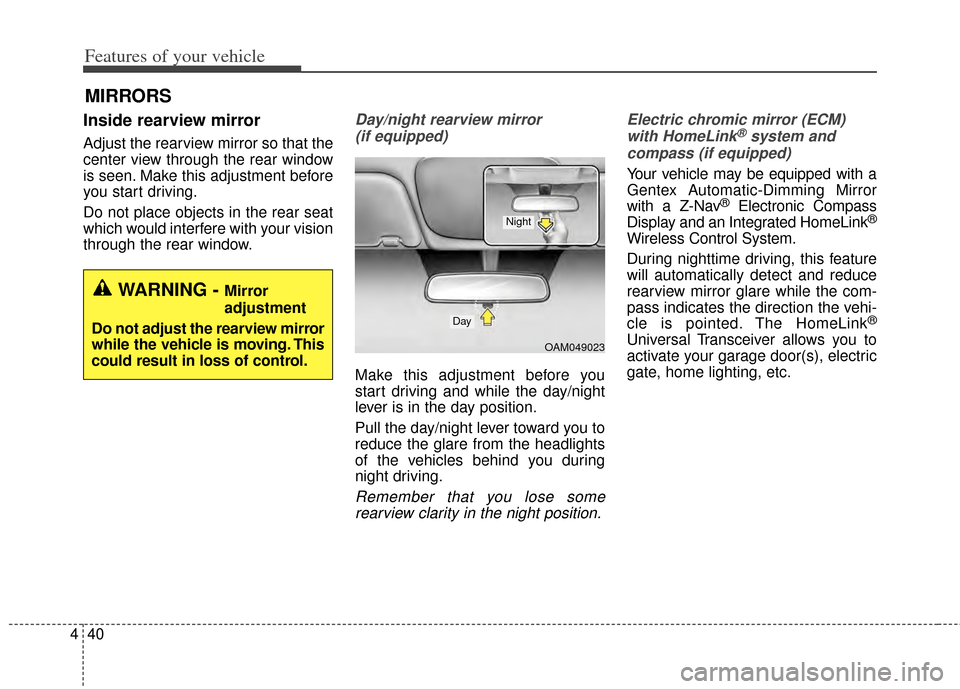
Day/night rearview mirror
(if equipped)
Make this adjustment before you
start driving and while the day/night
lever is in the day position.
Pull the day/night lever toward you to
reduce the glare from the headlights
of the vehicles behind you during
night driving.
Remember that you lose somerearview clarity in the night position. Electric chromic mirror (ECM)
with HomeLink
®system and
compass (if equipped)
Your vehicle may be equipped with a
Gentex Automatic-Dimming Mirror
with a Z-Nav
®Electronic Compass
Display and an Integrated HomeLink®
Wireless Control System.
During nighttime driving, this feature
will automatically detect and reduce
rearview mirror glare while the com-
pass indicates the direction the vehi-
cle is pointed. The HomeLink
®
Universal Transceiver allows you to
activate your garage door(s), electric
gate, home lighting, etc.
WARNING - Mirror
adjustment
Do not adjust the rearview mirror
while the vehicle is moving. This
could result in loss of control.
OAM049023
Day
Night
Page 109 of 415

441
Features of your vehicle
(1) Channel 1 button
(2) Channel 2 button
(3) Status indicator LED
(4) Channel 3 button
(5) Rear light sensor
(6) Dimming ON/OFF button
(7) Compass control button
(8) Compass display Automatic-Dimming Night Vision
Safety
®(NVS®) Mirror
The NVS
®Mirror in your vehicle is
the most advanced way to reduce
annoying glare in the rearview mirror
during any driving situation. For more
information regarding NVS
®mirrors
and other applications, please refer
to the Gentex website:
www.gentex.com Automatic-dimming function
Your mirror will automatically dim
upon detecting glare from the vehi-
cles traveling behind you. The auto-
dimming function can be controlled
by the Dimming ON/OFF Button:
1. Pressing the button turns the
auto-dimming function OFF which
is indicated by the green Status
Indicator LED turning off.
2. Pressing the button again turns the auto-dimming function ON
which is indicated by the green
Status Indicator LED turning on.
✽ ✽NOTICE
The mirror defaults to the ON posi-
tion each time the vehicle is started.
Z-Nav™ Compass Display
The NVS
®Mirror in your vehicle is
also equipped with a Z-Nav®
Compass that shows the vehicle
Compass heading in the Display
Window using the 8 basic cardinal
headings (N, NE, E, SE, etc.).
OYF049230CCAUTION
The NVS®Mirror automatically
reduces glare during driving conditions based upon light lev-els monitored in front of the vehi-cle and from the rear of the vehi-cle. These light sensors are visi-ble through openings in the frontand rear of the mirror case. Anyobject that obstructs either lightsensor will degrade the automat-ic dimming control feature.
Page 110 of 415

Features of your vehicle
42
4
Compass function
The Compass can be turned ON and
OFF and will remember the last state
when the ignition is cycled. To turn
the display feature ON/OFF:
1. Press and release the button to
turn the display feature OFF.
2. Press and release the button again to turn the display back ON.
Additional options can be set with
press and hold sequences of the
button and are detailed below.
There is a difference between mag-
netic north and true north. The com-
pass in the mirror can compensate
for this difference when it knows the
Magnetic Zone in which it is operat-
ing. This is set either by the dealer or
by the user. The operating Zone
Numbers for North America are
shown in the figure on the following
section.
B520C05NF