lock KIA CADENZA 2019 User Guide
[x] Cancel search | Manufacturer: KIA, Model Year: 2019, Model line: CADENZA, Model: KIA CADENZA 2019Pages: 518, PDF Size: 11.08 MB
Page 55 of 518
Safety features of your vehicle
38
3
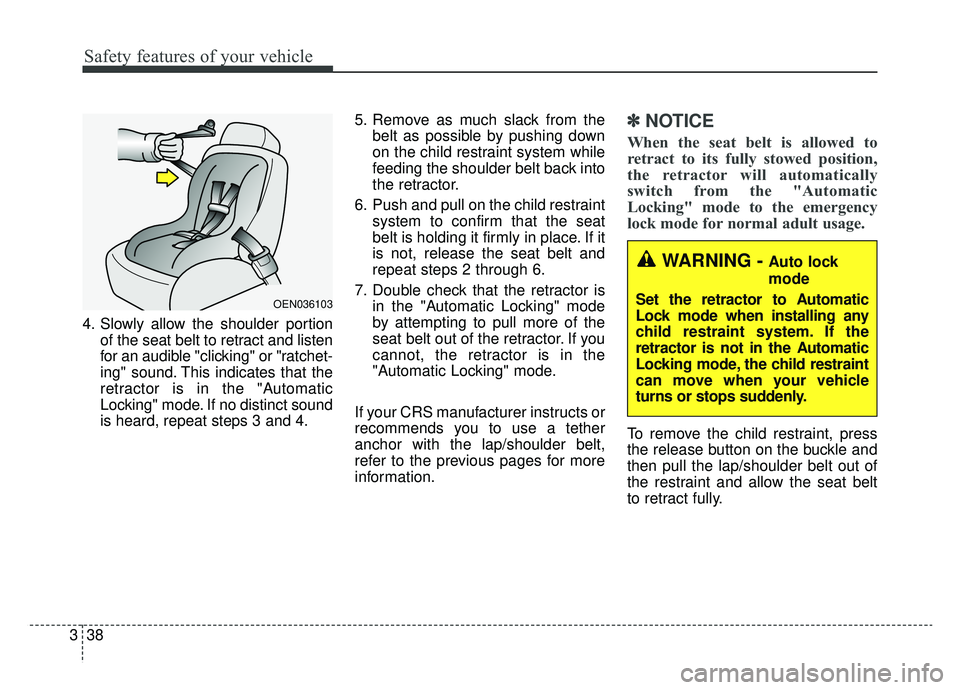
4. Slowly allow the shoulder portion
of the seat belt to retract and listen
for an audible "clicking" or "ratchet-
ing" sound. This indicates that the
retractor is in the "Automatic
Locking" mode. If no distinct sound
is heard, repeat steps 3 and 4. 5. Remove as much slack from the
belt as possible by pushing down
on the child restraint system while
feeding the shoulder belt back into
the retractor.
6. Push and pull on the child restraint system to confirm that the seat
belt is holding it firmly in place. If it
is not, release the seat belt and
repeat steps 2 through 6.
7. Double check that the retractor is in the "Automatic Locking" mode
by attempting to pull more of the
seat belt out of the retractor. If you
cannot, the retractor is in the
"Automatic Locking" mode.
If your CRS manufacturer instructs or
recommends you to use a tether
anchor with the lap/shoulder belt,
refer to the previous pages for more
information.
✽ ✽ NOTICE
When the seat belt is allowed to
retract to its fully stowed position,
the retractor will automatically
switch from the "Automatic
Locking" mode to the emergency
lock mode for normal adult usage.
To remove the child restraint, press
the release button on the buckle and
then pull the lap/shoulder belt out of
the restraint and allow the seat belt
to retract fully.
OEN036103
WARNING - Auto lock
mode
Set the retractor to Automatic
Lock mode when installing any
child restraint system. If the
retractor is not in the Automatic
Locking mode, the child restraint
can move when your vehicle
turns or stops suddenly.
Page 83 of 518
Features of your vehicle
Smart key . . . . . . . . . . . . . . . . . . . . . . . . . . . . . . . . . 4-5
• Record your key number . . . . . . . . . . . . . . . . . . . . . . . 4-5
• Smart key functions . . . . . . . . . . . . . . . . . . . . . . . . . . . 4-5
• Remote keyless entry system operations . . . . . . . . . . . 4-8
• Transmitter precautions . . . . . . . . . . . . . . . . . . . . . . . . 4-9
• This device complies with Part 15 of the FCC rules. 4-10
• Battery replacement . . . . . . . . . . . . . . . . . . . . . . . . . . 4-10
• Mechanical key operations . . . . . . . . . . . . . . . . . . . . . 4-11
• Restrictions in handling keys . . . . . . . . . . . . . . . . . . . 4-12
• Immobilizer system . . . . . . . . . . . . . . . . . . . . . . . . . . . 4-12
• This device complies with part 15 of the FCC rules . 4-13
Theft-alarm system . . . . . . . . . . . . . . . . . . . . . . . . 4-14
• Armed stage . . . . . . . . . . . . . . . . . . . . . . . . . . . . . . . . . 4-14
• Theft-alarm stage . . . . . . . . . . . . . . . . . . . . . . . . . . . . 4-15
• Disarmed stage. . . . . . . . . . . . . . . . . . . . . . . . . . . . . . . 4-15
Door locks . . . . . . . . . . . . . . . . . . . . . . . . . . . . . . . . 4-16
• Operating door locks from outside the vehicle. . . . . 4-16
• Operating door locks from inside the vehicle . . . . . . 4-17
• Impact sensing door unlock system . . . . . . . . . . . . . . 4-19
• Auto door lock/unlock feature . . . . . . . . . . . . . . . . . . 4-19
• Child-protector rear door lock. . . . . . . . . . . . . . . . . . 4-19
Trunk . . . . . . . . . . . . . . . . . . . . . . . . . . . . . . . . . . . . \
4-21
• Non-powered trunk . . . . . . . . . . . . . . . . . . . . . . . . . . . 4-21
• Power trunk . . . . . . . . . . . . . . . . . . . . . . . . . . . . . . . . . 4-22• Trunk lid control button . . . . . . . . . . . . . . . . . . . . . . . 4-25
• Emergency trunk safety release . . . . . . . . . . . . . . . . . 4-26
Smart trunk . . . . . . . . . . . . . . . . . . . . . . . . . . . . . . 4-28
Windows . . . . . . . . . . . . . . . . . . . . . . . . . . . . . . . . . 4-32
• Power windows . . . . . . . . . . . . . . . . . . . . . . . . . . . . . . 4-33
Hood. . . . . . . . . . . . . . . . . . . . . . . . . . . . . . . . . . . . \
. 4-37
• Opening the hood . . . . . . . . . . . . . . . . . . . . . . . . . . . . 4-37
• Closing the hood . . . . . . . . . . . . . . . . . . . . . . . . . . . . . 4-38
Fuel filler lid . . . . . . . . . . . . . . . . . . . . . . . . . . . . . . 4-39
• Opening the fuel filler lid . . . . . . . . . . . . . . . . . . . . . . 4-39
• Closing the fuel filler lid . . . . . . . . . . . . . . . . . . . . . . . 4-39
• Emergency fuel filler lid release . . . . . . . . . . . . . . . . 4-40
Panoramic sunroof . . . . . . . . . . . . . . . . . . . . . . . . . 4-43
• Sunroof open warning. . . . . . . . . . . . . . . . . . . . . . . . . 4-44
• Sunshade. . . . . . . . . . . . . . . . . . . . . . . . . . . . . . . . \
. . . . 4-45
• Sliding the sunroof . . . . . . . . . . . . . . . . . . . . . . . . . . . 4-45
• Tilting the sunroof . . . . . . . . . . . . . . . . . . . . . . . . . . . . 4-47
• Closing the sunroof . . . . . . . . . . . . . . . . . . . . . . . . . . . 4-47
• Resetting the sunroof . . . . . . . . . . . . . . . . . . . . . . . . . 4-48
Steering wheel . . . . . . . . . . . . . . . . . . . . . . . . . . . . . 4-49
• Electric Power Steering (EPS) . . . . . . . . . . . . . . . . . . 4-49
• Tilt and telescopic steering . . . . . . . . . . . . . . . . . . . . . 4-50
• Heated steering wheel . . . . . . . . . . . . . . . . . . . . . . . . . 4-52
• Horn . . . . . . . . . . . . . . . . . . . . . . . . . . . . . . . . . . . . \
. . . 4-53
4
Page 85 of 518
Wipers and washers . . . . . . . . . . . . . . . . . . . . . . . 4-120
• Windshield wipers . . . . . . . . . . . . . . . . . . . . . . . . . . . 4-120
• Front windshield washers . . . . . . . . . . . . . . . . . . . . . 4-122
Interior lights . . . . . . . . . . . . . . . . . . . . . . . . . . . . 4-123
• Automatic turn off function . . . . . . . . . . . . . . . . . . . 4-123
• Room lamp . . . . . . . . . . . . . . . . . . . . . . . . . . . . . . . . . 4-123
• Map lamp . . . . . . . . . . . . . . . . . . . . . . . . . . . . . . . . . . 4-12\
4
• Trunk room lamp . . . . . . . . . . . . . . . . . . . . . . . . . . . 4-125
• Vanity mirror lamp . . . . . . . . . . . . . . . . . . . . . . . . . . 4-125
• Glove box lamp . . . . . . . . . . . . . . . . . . . . . . . . . . . . . 4-125
Welcome system . . . . . . . . . . . . . . . . . . . . . . . . . . 4-126
• Headlight (Headlamp) escort function . . . . . . . . . . 4-126
• Interior light. . . . . . . . . . . . . . . . . . . . . . . . . . . . . . . . 4-126
• Pocket lamp . . . . . . . . . . . . . . . . . . . . . . . . . . . . . . . . 4-126
Defroster . . . . . . . . . . . . . . . . . . . . . . . . . . . . . . . . 4-127
• Rear window defroster . . . . . . . . . . . . . . . . . . . . . . . 4-127
Automatic climate control system . . . . . . . . . . . 4-128
• Automatic heating and air conditioning . . . . . . . . . 4-129
• Manual heating and air conditioning . . . . . . . . . . . 4-131
• System operation . . . . . . . . . . . . . . . . . . . . . . . . . . . . 4-137
• Climate control air filter . . . . . . . . . . . . . . . . . . . . . . 4-139
• Checking the amount of air conditionerrefrigerant and compressor lubricant . . . . . . . . . . 4-140
• Air Conditioning refrigerant label. . . . . . . . . . . . . . 4-140
Windshield defrosting and defogging . . . . . . . . . 4-141
• Automatic climate control system . . . . . . . . . . . . . . 4-141
• Defogging logic. . . . . . . . . . . . . . . . . . . . . . . . . . . . . . 4-142
Automatic ventilation. . . . . . . . . . . . . . . . . . . . . . 4-145
Clean air . . . . . . . . . . . . . . . . . . . . . . . . . . . . . . . . 4-145
• To cancel or reset the automatic ventilation . . . . . . 4-145
Storage compartments . . . . . . . . . . . . . . . . . . . . . 4-146
• Center console storage . . . . . . . . . . . . . . . . . . . . . . . 4-146
• Glove box . . . . . . . . . . . . . . . . . . . . . . . . . . . . . . . . . . 4-14\
6
• Sunglass holder . . . . . . . . . . . . . . . . . . . . . . . . . . . . . 4-147
Interior features . . . . . . . . . . . . . . . . . . . . . . . . . . 4-148
• Cup holder . . . . . . . . . . . . . . . . . . . . . . . . . . . . . . . . . 4-148
• Seat warmer . . . . . . . . . . . . . . . . . . . . . . . . . . . . . . . . 4-148
• Air ventilation seat . . . . . . . . . . . . . . . . . . . . . . . . . . 4-150
• Sunvisor . . . . . . . . . . . . . . . . . . . . . . . . . . . . . . . . . . . 4-\
150
• Power outlet . . . . . . . . . . . . . . . . . . . . . . . . . . . . . . . . 4-151
• Wireless smart phone charging system . . . . . . . . . . 4-152
• Coat hook . . . . . . . . . . . . . . . . . . . . . . . . . . . . . . . . . . 4-15\
6
• Floor mat anchor (s) . . . . . . . . . . . . . . . . . . . . . . . . . 4-157
• Side curtain . . . . . . . . . . . . . . . . . . . . . . . . . . . . . . . . 4-157
• Rear curtain . . . . . . . . . . . . . . . . . . . . . . . . . . . . . . . . 4-158
• Clock . . . . . . . . . . . . . . . . . . . . . . . . . . . . . . . . . . . . \
. . 4-158
• Luggage net (Holder) . . . . . . . . . . . . . . . . . . . . . . . . 4-159
4
Page 87 of 518
45
Features of your vehicle
Record your key number
The key code num-
ber is stamped on
the key code tag
attached to the key
set. Should you
lose your keys, this number will
enable an authorized Kia dealer to
duplicate the keys easily.
Remove the key code tag and store it
in a safe place. Also, record the key
code number and keep it in a safe
and handy place, but not in the vehi-
cle.
Smart key functions
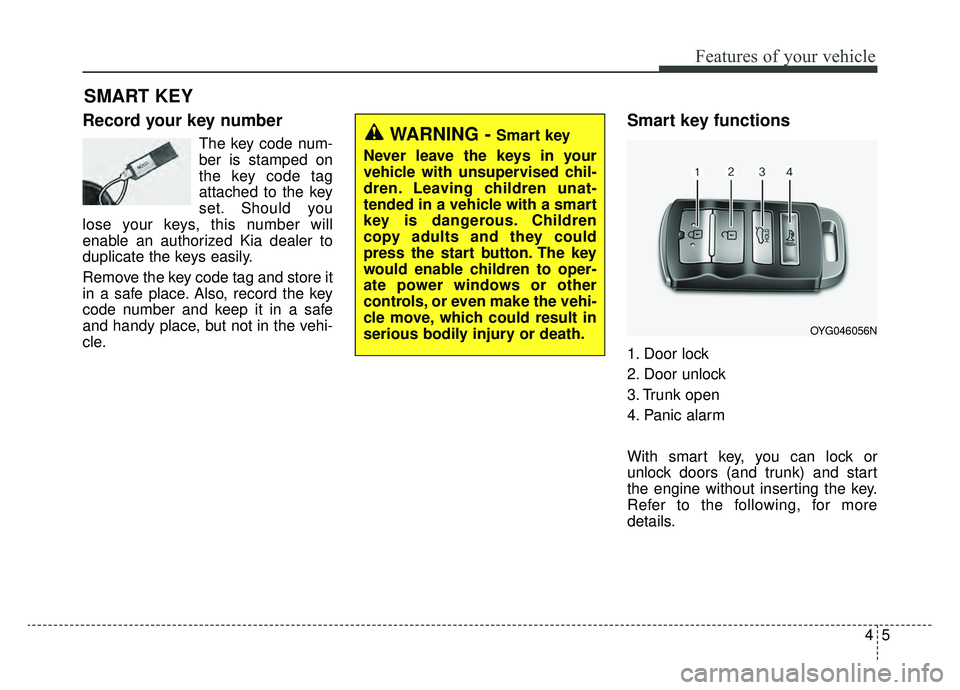
1. Door lock
2. Door unlock
3. Trunk open
4. Panic alarm
With smart key, you can lock or
unlock doors (and trunk) and start
the engine without inserting the key.
Refer to the following, for more
details.
SMART KEY
WARNING - Smart key
Never leave the keys in your
vehicle with unsupervised chil-
dren. Leaving children unat-
tended in a vehicle with a smart
key is dangerous. Children
copy adults and they could
press the start button. The key
would enable children to oper-
ate power windows or other
controls, or even make the vehi-
cle move, which could result in
serious bodily injury or death.
OYG046056N
Page 88 of 518
Features of your vehicle
64
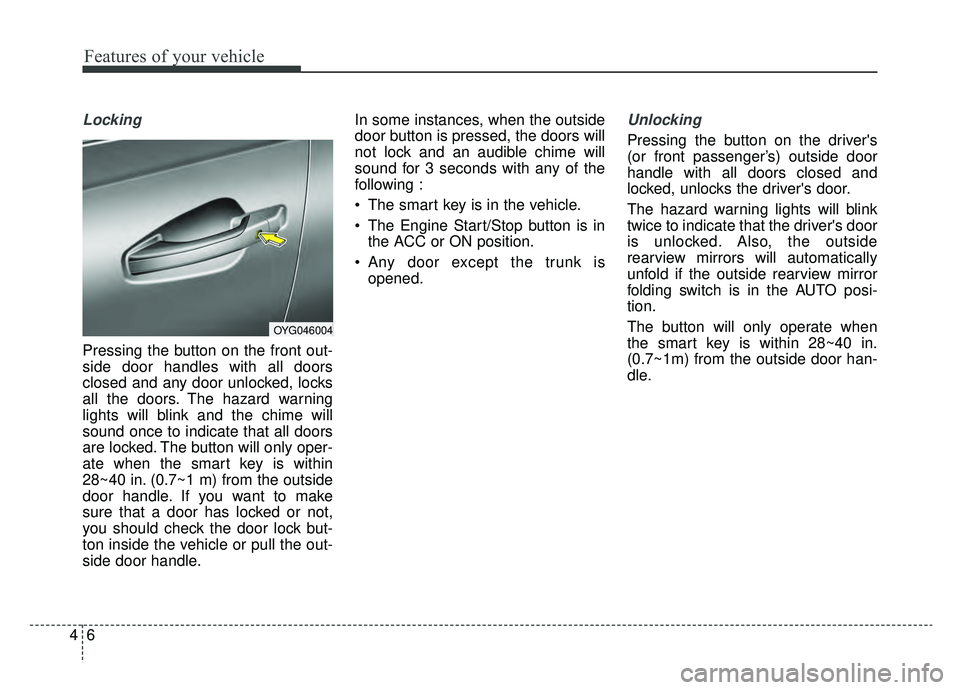
Locking
Pressing the button on the front out-
side door handles with all doors
closed and any door unlocked, locks
all the doors. The hazard warning
lights will blink and the chime will
sound once to indicate that all doors
are locked. The button will only oper-
ate when the smart key is within
28~40 in. (0.7~1 m) from the outside
door handle. If you want to make
sure that a door has locked or not,
you should check the door lock but-
ton inside the vehicle or pull the out-
side door handle.In some instances, when the outside
door button is pressed, the doors will
not lock and an audible chime will
sound for 3 seconds with any of the
following :
• The smart key is in the vehicle.
The Engine Start/Stop button is in
the ACC or ON position.
Any door except the trunk is opened.
Unlocking
Pressing the button on the driver's
(or front passenger’s) outside door
handle with all doors closed and
locked, unlocks the driver's door.
The hazard warning lights will blink
twice to indicate that the driver's door
is unlocked. Also, the outside
rearview mirrors will automatically
unfold if the outside rearview mirror
folding switch is in the AUTO posi-
tion.
The button will only operate when
the smart key is within 28~40 in.
(0.7~1m) from the outside door han-
dle.
OYG046004
Page 89 of 518
47
Features of your vehicle
When the Two Press Unlock function
is activated,
- Press the driver's outside doorhandle button, the driver`s door will
unlock.
- Press the driver's outside door handle button within four seconds
again, then all the doors will
unlock.
✽ ✽ NOTICE
You can activate or deactivate the
Two Press Unlock function. Refer to
“User settings” in this chapter.
Start-up
You can start the engine without
inserting the key.
❈ For detailed information refer to
“ENGINE START/STOP button” in
chapter 5.
Smart key precautions
If you lose your smart key, you will
not be able to start the engine. Tow
the vehicle, if necessary, and con-
tact an authorized Kia dealer.
A maximum of 2 smart keys can be registered to a single vehicle. If you
lose a smart key, you should imme-
diately take the vehicle and key to
your authorized Kia dealer to pro-
tect it from potential theft.
The smart key will not work if any of following occurs:
- The smart key is close to a radiotransmitter such as a radio sta-
tion or an airport which can inter-
fere with normal operation of the
smart key.
- The smart key is near a mobile two-way radio system or a cellu-
lar phone.
- Another vehicle’s smart key is being operated close to your
vehicle.
Page 90 of 518

Features of your vehicle
84
If the smart key does not work cor-
rectly, you may lock and unlock the
door with the mechanical key. If
you have a problem with the smart
key, contact an authorized Kia
dealer.
If the smart key is in close proximi- ty to your cell phone or smart
phone, the signal from the smart
key could be blocked by normal
operation of your cell phone or
smart phone.
This is especially important when
the phone is active such as making
calls, receiving calls, text messag-
ing, and/or sending/receiving
emails. Avoid placing the smart key
and your cell phone or smart
phone in the same pants or jacket
pocket and maintain adequate dis-
tance between the two devices.Remote keyless entry system
operations
Lock (1)
All doors are locked if the lock button
is pressed. If all doors (and trunk) are
closed, the hazard warning lights will
blink once to indicate that all doors
(and trunk) are locked.
However, if any door remains open,
the hazard warning lights will not
operate. But if all doors are closed
after the lock button is pressed, the
hazard warning lights will blink once.
Unlock (2)
All doors can be unlocked if the
unlock button is pressed. The hazard
warning lights will blink twice again to
indicate that all doors are unlocked.
After pressing this button, the doors
will lock automatically unless you
open any door within 30 seconds.
When the Two Press Unlock function
is activated,
- If you press the Door Unlock but-ton(2) on the smart key, the driv-
er`s door will unlock.
- If you press Door Unlock button(2) on the smart key within four sec-
onds again, then all the doors will
unlock.
✽ ✽ NOTICE
You can activate or deactivate the
Two Press Unlock function. Refer to
“User settings” in this chapter.
OYG046056N
CAUTION - Transmitter
Keep the smart key away from
water or any liquid as it canbecome damaged and not func-tion properly.
Page 91 of 518
49
Features of your vehicle
✽ ✽NOTICE
If the keyless entry system is inoper-
ative due to exposure to water or liq-
uids, it will not be covered by your
manufacturer's vehicle warranty.
Trunk open (3)
The trunk is opened if the button is
pressed for more than 1 second.
Once the trunk is opened and then
closed, the trunk will lock automati-
cally.
Panic alarm (4)
The horn sounds and the hazard
warning lights blink for about 30 sec-
onds if this button is pressed for
more than 0.5 seconds. To stop the
horn and lights, press any button on
the transmitter.
Transmitter precautions
The smart key will not
work if any of following occurs:
You exceed the operating distance
limit (about 90 feet [30 m]).
The battery in the smart key is weak.
Other vehicles or objects may be blocking the signal.
The weather is extremely cold.
The smart key is close to a radio transmitter such as a radio station
or an airport which can interfere
with normal operation of the trans-
mitter.
If the smart key does not work cor-
rectly, you may lock and unlock the
door with the mechanical key. If you
have a problem with the smart key,
contact an authorized Kia dealer.
Page 92 of 518
Features of your vehicle
10
4
If the transmitter is in close proxim-
ity to your cell phone or smart
phone, the signal from the trans-
mitter could be blocked by normal
operation of your cell phone or
smart phone. This is especially
important when the phone is active
such as making calls, receiving
calls, text messaging, and/or send-
ing/receiving emails.
Avoid placing the transmitter and
your cell phone or smart phone in
the same pants or jacket pocket
and maintain adequate distance
between the two devices.This device complies with Part
15 of the FCC rules.
Operation is subject to the following
two conditions:
1. This device may not cause harmful interference, and
2. This device must accept any inter- ference received, including inter-
ference that may cause undesired
operation.
✽ ✽NOTICE
Changes or modifications not
expressly approved by the party
responsible for compliance could
void the user’s authority to operate
the equipment. If the keyless entry
system is inoperative due to changes
or modifications not expressly
approved by the party responsible
for compliance, it will not be cov-
ered by your manufacturer’s vehicle
warranty.
Battery replacement
A battery should last for several
years, but if the smart key is not
working properly, try replacing the
battery with a new one. If you are
unsure how to use or replace the
battery, contact an authorized Kia
dealer.
CAUTION - Transmitter
damage
Do not drop, wet or expose the
keyless entry system transmit-ter to heat or sunlight.
Page 93 of 518
411
Features of your vehicle
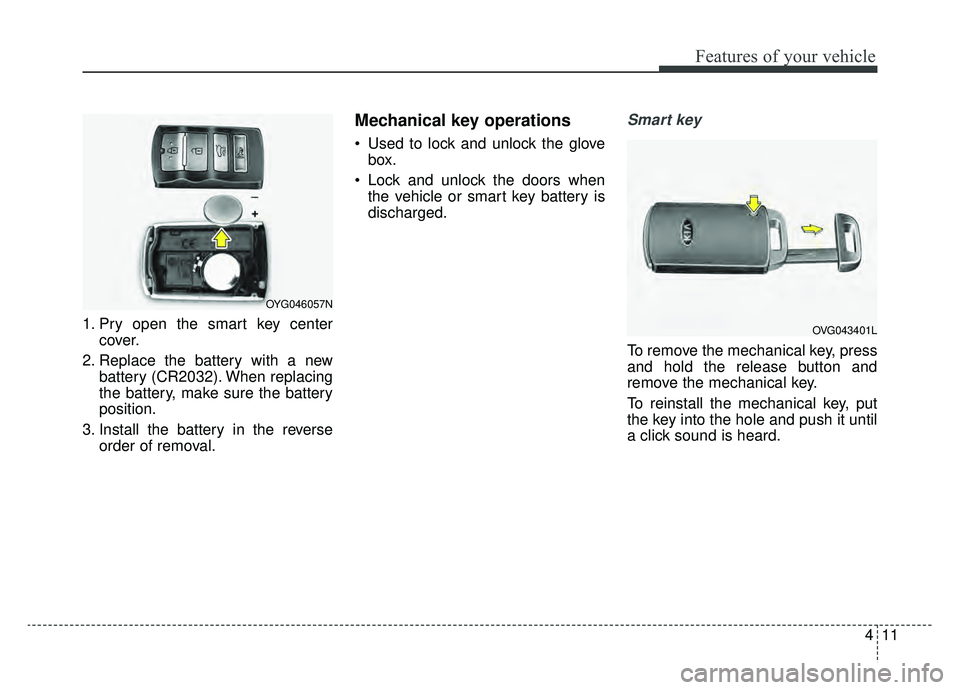
1. Pry open the smart key centercover.
2. Replace the battery with a new battery (CR2032). When replacing
the battery, make sure the battery
position.
3. Install the battery in the reverse order of removal.
Mechanical key operations
Used to lock and unlock the glovebox.
Lock and unlock the doors when the vehicle or smart key battery is
discharged.
Smart key
To remove the mechanical key, press
and hold the release button and
remove the mechanical key.
To reinstall the mechanical key, put
the key into the hole and push it until
a click sound is heard.
OYG046057N
OVG043401L