door lock KIA CADENZA 2019 Owner's Guide
[x] Cancel search | Manufacturer: KIA, Model Year: 2019, Model line: CADENZA, Model: KIA CADENZA 2019Pages: 518, PDF Size: 11.08 MB
Page 167 of 518
485
Features of your vehicle
Driver Assistance (if equipped)
Smart Cruise Control with Stop
& Go Reaction (if equipped) :
Choose the sensitivity
(Slow/Normal/Fast) of the smart
cruise control.
❈ For more details, refer to “Smart
Cruise Control with Stop & Go” in
chapter 5.
Forward Collision-Avoidance Assist (FCA, if equipped) :To
activate or deactivate the FCA sys-
tem.
❈ For more details, refer to “Forward
Collision-Avoidance Assist(FCA)”
in chapter 5
Forward Collision Warning (FCW, if equipped) : Choose the
sensitivity of the for-ward collision
warning. (Late/Normal/Early)
❈ For more details, refer to “Forward
Collision-Avoidance Assist(FCA)”
in chapter 5.
LCA (Lane change assist) (if
equipped) : To adjust the initial
warning alert time for the Lane
Change Assist.
❈ For more information, refer to “Blind
Spot Detection System” in chapter 5.
Rear Cross Traffic Alert (if
equipped) : If this item is checked,
the rear cross traffic alert function
will be activated.
❈ For more details, refer to “Blind Spot
Detection System” in chapter 5.
Blind Spot Collision Warning
Sound (if equipped) : If this item
is checked, the blind spot collision
warning sound function will be acti-
vated.
❈ For more details, refer to “Blind spot
Collision Warning” in chapter 5. Door
Automatically Lock
- Enable on Speed : All doors will be automatically locked when the
vehicle speed exceeds 9.3 mph
(15 km/h).
- Enable on Shift : All doors will be automatically locked if the
transaxle shift lever is shifted from
the P (Park) position to the R
(Reverse), N (Neutral), or D (Drive)
position.
Automatically Unlock
- Off : The auto door unlock opera- tion will be canceled.
- Vehicle Off/On key out : All doors will be automatically unlocked
when the Engine Start/Stop button
is set to the OFF position.
- On Shift to P : All doors will be automatically unlocked if the
transaxle shift lever is shifted to the
P (Park) position.
Page 168 of 518
Features of your vehicle
86
4
Two Press Unlock (if equipped)
- Off : The two press unlock function
will be deactivated. Therefore, all
doors will unlock upon one press of
the button.
- On : Only the driver's door will unlock when unlock button is
pressed once and all doors will
unlock when the same button is
pressed again within 4 seconds.
Door Lock Sound (if equipped) :
If this item checked, the door lock
sound function will be activated
when locking doors.
Smart Trunk (if equipped) :To
activate or deactivate the Smart
Trunk system.
❈ For more details, refer to “Smart
Trunk” in this chapter. Lights
One Touch Turn Signal
- Off : The one touch turn lamp func- tion will be deactivated.
- 3, 5, 7 Flashing : The lane change signals will blink 3, 5, or 7 times
when the turn signal lever is
moved slightly.
❈ For more details, refer to “Lighting”
in this chapter.
Headlamp escort (if equipped) :
If this item checked, the headlamp
escort function will be activated.
Welcome Light (if equipped) :If
this item checked, the welcome
light function will be activated. Sound
Park Assist System Vol. (if
equipped) : Adjust the Park Assist
System volume. (Level 1~3)
❈ For more details, refer to “Parking
Assist System” in this chapter.
Cluster voice guide Vol. (if
equipped) : Adjust the cluster
voice guide volume. (Level 0~3)
Welcome Sound (if equipped) :If
this item checked, the welcome
sound function will be activated.
Page 172 of 518

Features of your vehicle
90
4
Low Key Battery
(for smart key system)
This warning message illuminates
if the battery of the smart key is
discharged when the Engine
Start/Stop Button changes to the
OFF position.
Press START button while turning
wheel (for smart key system)
This warning message illuminates if the steering wheel does not
unlock normally when the Engine
Start/Stop Button is pressed.
It means that you should press the Engine Start/Stop Button while
turning the steering wheel right
and left. Press brake pedal to start engine
(for smart key system)
This warning message illuminates
if the Engine Start/Stop Button
changes to the ACC position twice
by pressing the button repeatedly
without depressing the brake pedal.
It means that you should depress the brake pedal to start the engine.
Key not in vehicle (for smart key system)
This warning message illuminates if the smart key is not in the vehicle
when you press the Engine
Start/Stop Button.
It means that you should always have the smart key with you. Key not detected (for smart key system)
This warning message illuminates
if the smart key is not detected
when you press the Engine
Start/Stop Button.
Vehicle is On(for smart key system)
If the driver’s door is opened with the engine start/stop button in the
ON position and shift lever in
P(Park) position, the message
above will appear.
Page 206 of 518
Features of your vehicle
124
4
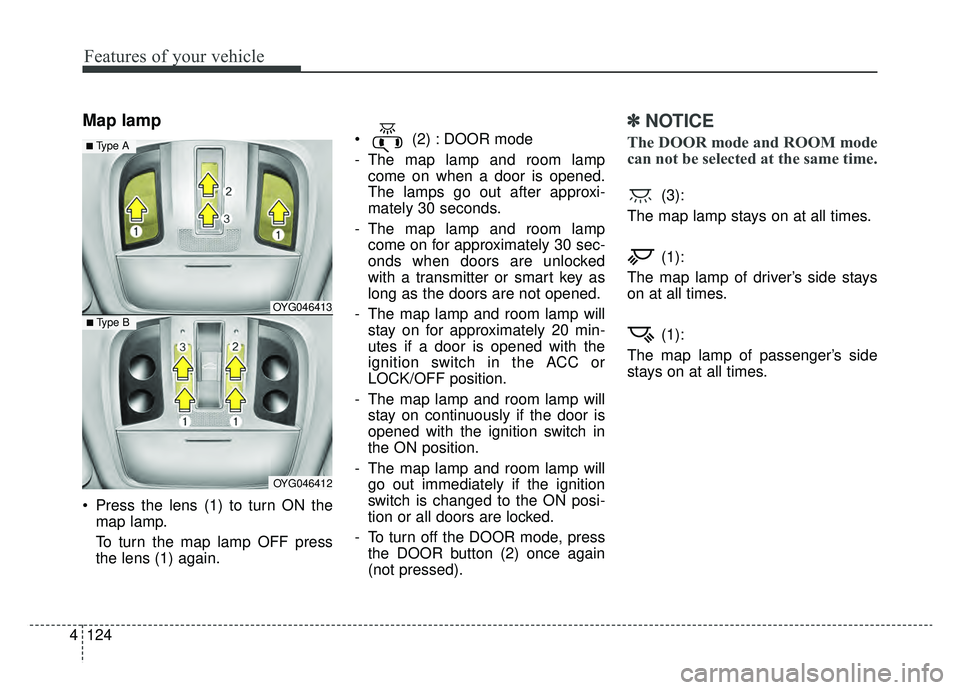
Map lamp
Press the lens (1) to turn ON the
map lamp.
To turn the map lamp OFF press
the lens (1) again. (2) : DOOR mode
- The map lamp and room lamp
come on when a door is opened.
The lamps go out after approxi-
mately 30 seconds.
- The map lamp and room lamp come on for approximately 30 sec-
onds when doors are unlocked
with a transmitter or smart key as
long as the doors are not opened.
- The map lamp and room lamp will stay on for approximately 20 min-
utes if a door is opened with the
ignition switch in the ACC or
LOCK/OFF position.
- The map lamp and room lamp will stay on continuously if the door is
opened with the ignition switch in
the ON position.
- The map lamp and room lamp will go out immediately if the ignition
switch is changed to the ON posi-
tion or all doors are locked.
- To turn off the DOOR mode, press the DOOR button (2) once again
(not pressed).
✽ ✽ NOTICE
The DOOR mode and ROOM mode
can not be selected at the same time.
(3):
The map lamp stays on at all times.
(1):
The map lamp of driver’s side stays
on at all times.
(1):
The map lamp of passenger’s side
stays on at all times.
OYG046413
OYG046412
■ Type B
■ Type A
Page 208 of 518
Features of your vehicle
126
4
WELCOME SYSTEM (IF EQUIPPED)
Headlight (Headlamp) escort
function
When the headlight(light switch in
the headlight or AUTO position) is on
and all doors (and trunk) are locked
and closed, the position light and
headlight will come on for 15 sec-
onds if any of the below is per-
formed.
Without smart key system
- When the door unlock button ispressed on the transmitter.
With the smart key system - When the door unlock button ispressed on the smart key.
At this time, if you press the door lock
or unlock button, the position light
and headlight will turn off immediate-
ly.
Interior light
When the interior light switch is in the
DOOR position and all doors (and
trunk) are locked and closed, the
room lamp will come on for 30 sec-
onds if any of the below is performed.
Without smart key system - When the door unlock button ispressed on the transmitter.
With the smart key system - When the door unlock button ispressed on the smart key.
- When the button of the outside door handle is pressed.
At this time, if you press the door lock
button, the lamps will turn off imme-
diately.
Pocket lamp (if equipped)
When all the doors (and trunk) are
locked and closed, the pocket lamp
and puddle lamp will come on for
about 15 seconds if any of the below
is performed.
With the smart key system - When the vehicle is approachedwith the smart key in possession.
Page 250 of 518
Driving your vehicle
45
Before entering vehicle
• Be sure that all windows, outsidemirror(s), and outside lights are
clean.
Check the condition of the tires.
Check under the vehicle for any sign of leaks.
Be sure there are no obstacles behind you if you intend to back up.
Necessary inspections
Fluid levels, such as engine oil,
engine coolant, brake fluid, and
washer fluid should be checked on a
regular basis, at the exact interval
depending on the fluid. Further
details are provided in chapter 7,
“Maintenance”.
Before starting
Close and lock all doors.
Position the seat so that all con-trols are easily reached.
Buckle your seat belt.
Adjust the inside and outside rearview mirrors.
Be sure that all lights work.
Check all gauges.
Check the operation of warning lights when the ignition switch is
turned to the ON position.
Release the parking brake and make sure the brake warning light
goes out.
For safe operation, be sure you are
familiar with your vehicle and its
equipment.
BEFORE DRIVING
WARNING - Distracted driving
Focus on the road while driving.
The driver's primary responsi-
bility is in the safe and legal
operation of the vehicle. Use of
any handled devices, other
equipment or vehicle systems
that distract the driver should
not be used during vehicle
operation.
Page 252 of 518
Driving your vehicle
65
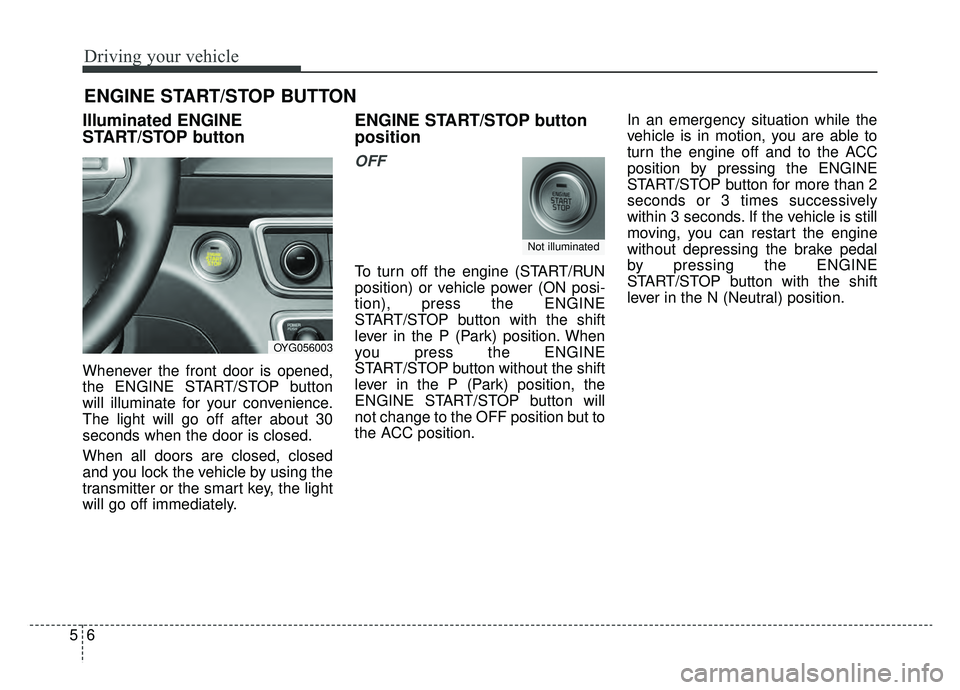
Illuminated ENGINE
START/STOP button
Whenever the front door is opened,
the ENGINE START/STOP button
will illuminate for your convenience.
The light will go off after about 30
seconds when the door is closed.
When all doors are closed, closed
and you lock the vehicle by using the
transmitter or the smart key, the light
will go off immediately.
ENGINE START/STOP button
position
OFF
To turn off the engine (START/RUN
position) or vehicle power (ON posi-
tion), press the ENGINE
START/STOP button with the shift
lever in the P (Park) position. When
you press the ENGINE
START/STOP button without the shift
lever in the P (Park) position, the
ENGINE START/STOP button will
not change to the OFF position but to
the ACC position.In an emergency situation while the
vehicle is in motion, you are able to
turn the engine off and to the ACC
position by pressing the ENGINE
START/STOP button for more than 2
seconds or 3 times successively
within 3 seconds. If the vehicle is still
moving, you can restart the engine
without depressing the brake pedal
by pressing the ENGINE
START/STOP button with the shift
lever in the N (Neutral) position.
ENGINE START/STOP BUTTON
OYG056003
Not illuminated
Page 274 of 518
Driving your vehicle
28
5
(Continued)
In these cases, the brake warning
light comes on, the AUTO HOLD
indicator changes from green to
white, and a warning sounds and a
message will appear to inform you
that EPB has been automatically
engaged. Before driving off again,
press foot brake pedal, check the
surrounding area near your vehi-
cle and release parking brake
manually with the EPB switch.
• If the AUTO HOLD indicator lights up yellow, the Auto Hold is
not working properly. Take your
vehicle to an authorized Kia deal-
er and have the system checked.If there is a malfunction with the dri-
ver’s door or engine hood open detec-
tion system, the Auto Hold may not
work properly.
Take your vehicle to an authorized Kia
dealer and have the system checked.
✽ ✽ NOTICE
A click or electric brake motor
whine sound may be heard while
operating or releasing the EPB, but
these conditions are normal and
indicate that the EPB is functioning
properly.
Warning messages
“Parking brake automatically locked”
When the EPB is applied from Auto
Hold, a warning will sound and a
message will appear.
“AUTO HOLD deactivating. Press
brake pedal”
When the conversion from Auto Hold
to EPB is not working properly a
warning will sound and a message
will appear.
✽ ✽NOTICE
When this message is displayed, the
Auto Hold and EPB may not oper-
ate. For your safety, depress the
brake pedal.
WARNING
To reduce the risk of an acci-
dent, do not activate Auto Hold
while driving downhill, backing
up or parking your vehicle.
Page 275 of 518
![KIA CADENZA 2019 Owners Guide 529
Driving your vehicle
“Press brake pedal to deactivate AUTO
HOLD”
If you do not apply the brake pedal
when you release the Auto Hold by
pressing the [AUTO HOLD] switch, a
warning will sound and](/img/2/40378/w960_40378-274.png "KIA CADENZA 2019 Owners Guide 529
Driving your vehicle
“Press brake pedal to deactivate AUTO
HOLD”
If you do not apply the brake pedal
when you release the Auto Hold by
pressing the [AUTO HOLD] switch, a
warning will sound and")
529
Driving your vehicle
“Press brake pedal to deactivate AUTO
HOLD”
If you do not apply the brake pedal
when you release the Auto Hold by
pressing the [AUTO HOLD] switch, a
warning will sound and a message
will appear.
“AUTO HOLD conditions not met.
Close door, hood, and fasten seatbelt”
When you press the [AUTO HOLD]
switch, if the driver’s door or engine
hood are not closed or the driver’s
seat belt is unfastened, a warning
will sound and a message will
appear on the LCD display. At this
moment, press the [AUTO HOLD]
button after closing the driver’s door
and engine hood and fastening the
seat belt.Anti-lock brake system (ABS)
ABS (or ESC) will not prevent acci-
dents due to improper or dangerous
driving maneuvers. Even though
vehicle control is improved during
emergency braking, always maintain
a safe distance between you and
objects ahead. Vehicle speeds
should always be reduced during
extreme road conditions. The vehicle
should be driven at reduced speeds
in the following circumstances:
When driving on rough, gravel orsnow-covered roads
When driving with tire chains installed
When driving on roads where the road surface is pitted or has differ-
ent surface heights.
Driving in these conditions increases
the stopping distance for your vehicle. The ABS continuously senses the
speed of the wheels. If the wheels
are going to lock, the ABS system
repeatedly modulates the hydraulic
brake pressure to the wheels.
When you apply your brakes under
conditions which may lock the
wheels, you may hear a “tik-tik’’
sound from the brakes, or feel a cor-
responding sensation in the brake
pedal. This is normal and it means
your ABS is active.
In order to obtain the maximum benefit
from your ABS in an emergency situa-
tion, do not attempt to modulate your
brake pressure and do not try to pump
your brakes. Press your brake pedal as
hard as possible to allow the ABS to
control the force being delivered to the
brakes.
✽ ✽
NOTICE
A click sound may be heard in the
engine compartment when the vehi-
cle begins to move after the engine is
started. These conditions are normal
and indicate that the anti-lock brake
system is functioning properly.
Page 307 of 518
561
Driving your vehicle
To temporarily accelerate with thecruise control on:
If you want to speed up temporarily
when the cruise control is on,
depress the accelerator pedal.
Increased speed will not interfere
with cruise control operation or
change the set speed.
To return to the set speed, take your
foot off the accelerator.
If you move the lever down (to SET-)
at increased speed, the cruising
speed will be set again.
✽ ✽ NOTICE
Be careful when accelerating tem-
porarily, because the speed is not
regulated automatically at this time
even if there is a vehicle in front of
you.
Smart cruise control system will
be temporarily canceled when:
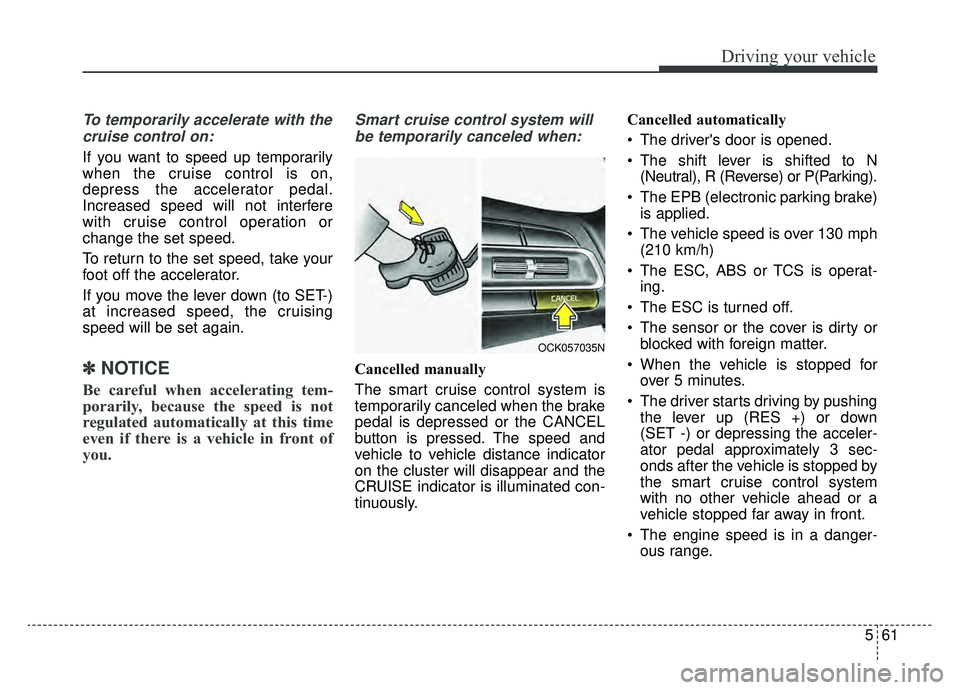
Cancelled manually
The smart cruise control system is
temporarily canceled when the brake
pedal is depressed or the CANCEL
button is pressed. The speed and
vehicle to vehicle distance indicator
on the cluster will disappear and the
CRUISE indicator is illuminated con-
tinuously. Cancelled automatically
The driver's door is opened.
The shift lever is shifted to N
(Neutral), R (Reverse) or P(Parking).
The EPB (electronic parking brake) is applied.
The vehicle speed is over 130 mph (210 km/h)
The ESC, ABS or TCS is operat- ing.
The ESC is turned off.
The sensor or the cover is dirty or blocked with foreign matter.
When the vehicle is stopped for over 5 minutes.
The driver starts driving by pushing the lever up (RES +) or down
(SET -) or depressing the acceler-
ator pedal approximately 3 sec-
onds after the vehicle is stopped by
the smart cruise control system
with no other vehicle ahead or a
vehicle stopped far away in front.
The engine speed is in a danger- ous range.
OCK057035N