steering KIA CADENZA 2019 Service Manual
[x] Cancel search | Manufacturer: KIA, Model Year: 2019, Model line: CADENZA, Model: KIA CADENZA 2019Pages: 518, PDF Size: 11.08 MB
Page 326 of 518

Driving your vehicle
80
5
DRIVE MODE Indicator Screen
The DRIVE MODE indicator screen
can be displayed by using the trip com-
puter button on the steering wheel.
DRIVE MODE indicator screen dis-
plays status of current drive mode.
DRIVE MODE button is located on
the lower part of the transmission
lever for selecting drive mode.
If drive mode is selected manually
by the user, the drive mode indica-
tor screen will show user-selected
drive mode. (COMFORT, ECO, or
SPORT)
If SMART MODE is selected by
DRIVE MODE button, the drive
mode indicator screen will show
current drive mode automatically
selected by SMART MODE sys-
tem. (SMART COMFORT, SMART
ECO, or SMART SPORT) When the trip computer mode is
selected to show DRIVE MODE
and the SMART MODE is in oper-
ation, an automatically selected
driving mode SMART ECO,
SMART COMFORT, or SMART
SPORT, will be selected on the
cluster's center.
And right below is the horizontal
driving style gauge which reflects
the driving style in real time.
If you drive carefully and slowly in SMART MODE, the left side of the
driving style gauge will illuminate,
and be automatically shifted to the
SMART ECO MODE.
When the driver accelerates more
frequently, the right side of the driv-
ing style gauge will fill up, and shift
to SMART COMFORT MODE.
In addition, if the rate of accelera-
tion and speed is increased, drive
mode will change to SMART
SPORT MODE. If the auto cruise control function is
operated or the transmission is
shifted to manual mode while
SMART MODE is on, the SMART
MODE will stop temporarily, and
the DRIVE MODE will be displayed
as OFF. The driving style gauge
light will be turned off accordingly.
If the trip computer is not set to show DRIVE MODE indicator
screen, and you want to know the
on/off status of the SMART MODE,
simply check whether the letters
'SMART' appear on the screen or
not (green - ECO MODE, white -
COMFORT MODE, red - SPORT
MODE).
Page 327 of 518

581
Driving your vehicle
Driving Style Gauge
Once the SMART MODE is selected
by pressing the DRIVE MODE but-
ton, and the DRIVE MODE indicator
screen is selected by pressing the
trip computer button on the steering
wheel, the driving style gauge bar
will show up at the bottom of screen
and visualize current style of driving. Left poles of the driving style gauge
indicate economic driving in green
color. The more economically you
drive, the more the left poles will
light up in green.
Likewise, the right pole of the driving
style gauge indicates sporty driving
in red color. As the vehicle acceler-
ates, the gauge will move to the right
pole. If the driving style gauge fills up
toward left side (or Economic side)
and is maintained there for a certain
time, the vehicle will be automatical-
ly switch to SMART ECO MODE.
Likewise, when driving style gauge
fills up toward right side and is main-
tained there for a certain time, the
vehicle will be automatically switch
to SMART SPORT MODE.
If you wish to maintain the SMART ECO MODE for better fuel econo-
my, try to maintain economic driv-
ing style and keep the driving style
gauge green.
OYG056149N
Page 328 of 518
Driving your vehicle
82
5
Attributes of SMART MODE.
If the accelerator pedal is pressed
gently, your vehicle will recognize it
as a economic driving style. After
some time, the system will automat-
ically shift to SMART ECO MODE.
If you press the accelerator pedal frequently in SMART ECO MODE,
the system will automatically shift
to SMART COMFORT MODE.
Even when driving style has not changed from SMART ECO
MODE, if your vehicle is driven
uphill considerably, the system will
detect the gradient. Then, the
SMART system will automatically
change the setting to the SMART
COMFORT MODE temporarily.
Once your vehicle is out of the hilly
ground, your vehicle will automati-
cally return to the SMART ECO
MODE. The SMART system will recognize
repetitive acceleration or steering
and automatically turn to the SMART
SPORT MODE. Your vehicle will run
at a lower gear in SMART SPORT
MODE compared to those in
SMART COMFORT MODE.
The vehicle's start and stop
response rate will become faster.
When the SMART SPORT MODE is activated, and you take your feet
off the accelerator pedal, the vehi-
cle will remain in low gear and you
may sense engine brake. This is
due to necessary preparatory time
for the next acceleration and is for
convenience.
The SMART SPORT MODE is acti- vated only when repetitive acceler-
ation.
The artificial intelligence algorithm will instantly calculate each driver's
style of driving. So if the driver is
changed to a different person, the
algorithm will measure accordingly.
Conditions which Limit SMART
MODE
In following conditions your vehicle will
temporarily stop the SMART Mode
and the indicator light will turn off.
When using the manual transmis- sion operation mode: If the
transaxle system is changed from
automatic to manual, your vehicle
will automatically stop the SMART
MODE.
If transmission operation is
changed from automatic to manu-
al, the vehicle will reflect it and
automatically stop the SMART
MODE.
When the Cruise Control system is turned on:
When the driver sets a target
cruise control speed, your vehicle
will automatically stop the SMART
MODE. (The SMART MODE will
stop not immediately after you
press the cruise control button, but
when the cruise control system
takes control of the vehicle speed.)
Page 340 of 518

Driving your vehicle
94
5
It gently applies braking power on
the tire, which is located in the oppo-
site side of the possibly-colliding
point. The instrument cluster will
inform the driver of the system acti-
vation.
Blind-Spot Collision-Avoidance
Assist System (BCA) is automatical-
ly deactivated when :
- The vehicle drives a certain dis-
tance away
- The vehicle direction is changed against the possible-colliding point
- The steering wheel is abruptly moved
- The brake pedal is depressed
- After a certain period of time
The driver should drive the vehicle in
the middle of the vehicle lanes to
keep the system in the ready status.
When the vehicle drives too close to
one side of the vehicle lanes, the
system may not properly operate.
In addition, the system may not prop-
erly control your vehicle in accor-
dance with driving situations. Thus,
always pay close attention to road
situations. Check Blind-Spot Collision-Avoidance
Assist (BCA) system
If there is a problem with the BCA
system, a warning message will
appear. The system will turn off auto-
matically. BCW will still operate even
if the BCA system turns off due to
malfunction. We recommend that you
have your vehicle inspected by an
authorized Kia dealer to use BCA
system.Limitations of the system
The driver must be cautious in the
below situations, because the sys-
tem may not detect other vehicles or
objects in certain circumstances.
When a trailer or carrier is
installed.
The vehicle drives in inclement weather such as heavy rain or
snow.
The sensor is polluted with rain, snow, mud, etc.
The rear bumper where the sensor is located is covered with a foreign
object such as a bumper sticker, a
bumper guard, a bike rack, etc.
The rear bumper is damaged, or the sensor is out of the original
default position.
The vehicle height gets lower or higher due to heavy loading in a
trunk, abnormal tire pressure, etc.
When the temperature of the rear bumper is high.
When the sensors are blocked by other vehicles, walls or parking-lot
pillars.
OYG058243L
Page 343 of 518

597
Driving your vehicle
LANE KEEPING ASSIST (LKA) SYSTEM (IF EQUIPPED)
The Lane Keeping Assist System is
designed to detect the lane markers
on the road with a front view camera
at the front windshield, and assists
the driver’s steering to help keep the
vehicle in the lanes.
When the system detects the vehicle
straying from its lane, it alerts the
driver with a visual and audible warn-
ing, while applying a slight counter-
steering torque, trying to prevent the
vehicle from moving out of its lane.
✽ ✽
NOTICE
• Driver is responsible for being
aware of surroundings, steering
the vehicle, and safe driving prac-
tices.
• LKA SYSTEM helps prevent the driver from moving out of the lane
unintentionally by assisting the
driver’s steering. However, the
system is just a convenience func-
tion and the steering wheel is not
always controlled. While driving,
the driver should pay attention to
the steering wheel.
• The operation of the LKA SYS- TEM can be cancelled or not work
properly according to road condi-
tion and surroundings. Always be
cautious when driving.
OYG056052
WARNING
Do not turn the steering wheel
suddenly when the vehicle is
being directed by the LKA sys-
tem. This can result in a sudden
loss of control and crash of the
vehicle.
WARNING - The Lane
Keeping
Assist System is a supplemen-
tal system and is not a substi-
tute for safe driving practices. It
is the responsibility of the driv-
er to always pay attention and
drive safely.
Page 344 of 518

Driving your vehicle
98
5
Do not disassemble the front view
camera temporarily for tinted win-
dows or attaching any types of
coatings and accessories. If you
disassemble the camera and
assemble it again, take your vehi-
cle to an authorized Kia dealer and
have the system checked.
When you replace the windshield glass, front view camera or parts of
the steering system take your vehi-
cle to an authorized Kia dealer and
have the system checked.
The system is designed to detect lane markers using a front view
camera. If the lane markers are
hard to detect, then the system
may be limited. Always be cautious
when using the system.
When the lane markers are hard to detect, please refer to “Driver’s
Attention”.
Do not remove or damage the related parts of LKA SYSTEM.
Do not place objects on the dash- board that reflects light such as
mirrors, white paper, etc. This may
prevent the system from function-
ing. You may not hear warning sound of
LKA SYSTEM because of the
excessive audio sound.
If you drive with your hands off the steering wheel, the LKA SYSTEM
will stop controlling the steering
wheel after the hands off alarm.
Afterwards, if you drive with your
hands on the steering wheel, the
control will be activated again.✽ ✽
NOTICE
• If the vehicle speed is high, steer-
ing torque for assistance will not
be enough to keep your vehicle
within the lane. If so, the vehicle
may move out of its lane. Obey
speed limit when using LKA SYS-
TEM.
• If you attach objects to the steer- ing wheel, the system may not
assist steering.
• If you attach objects to the steer- ing wheel, hands off alarm may
not work properly.
Page 345 of 518

599
Driving your vehicle
LKA SYSTEM operation
To activate/deactivate the LKA SYS-
TEM:
With the ignition switch in the ON
position, press the LKA SYSTEM
button located on the instrument
panel on the lower left hand side of
the driver.
The indicator in the cluster display
will initially illuminate white.
When the indicator (white) activated
in the previous ignition cycle, the
system turns on without any control.If you press the LKA SYSTEM button
again, the indicator on the cluster
display will go off.
The color of indicator will change
depend on the condition of LKA
SYSTEM.
- White : Sensor does not detect the
lane marker or vehicle
speed is less than 40 mph
(64 km/h).
- Green : S ensor detects the lane
marker and system is able
to control the steering.
LKA SYSTEM activation
To see the LKA SYSTEM screen on the LCD display in the cluster,
Tab to the Assist mode ( ).
For further details, refer to [menu settings] in chapter 4, [crash pad].
After LKA SYSTEM is activated, if both lane markers are detected,
vehicle speed is over 40 mph (64
km/h) and all the activation condi-
tions are satisfied, a green steering
wheel indicator will illuminate and
the steering wheel will be controlled.
OYG058193
WARNING
The Lane Keeping Assist
System is a system to help pre-
vent the driver from leaving the
lane. However, the driver should
not solely rely on the system
but always check the road con-
ditions when driving.
Page 346 of 518

Driving your vehicle
100
5
If the speed of the vehicle is over
40 mph (64 km/h) and the system
detects lane markers, the color
changes from gray to white. When the conditions below are met,
LKA SYSTEM will be enabled to
assist steering.
Vehicle speed is above 40 mph (64
km/h).
Both lane markers are detected by LKA SYSTEM.
The vehicle is between the lane markers.
If LKA SYSTEM can assist steering,
a green steering wheel indicator will
illuminate.
Warning
If the vehicle leaves a lane, the lane marker you cross will blink on
the LCD display.
OYG058236N
OYG058237N
■ Lane undetected
■Lane detectedOYG058238N
OYG058239N
■ Left lane
■Right lane
Page 347 of 518
5101
Driving your vehicle
If the vehicle moves out its lanebecause steering torque for assis-
tance is not enough, the line indi-
cator will blink.
If all the conditions to activate LKA SYSTEM are not satisfied, the sys-
tem will convert to LDW system
(Lane Departure Warning) and
only warn the driver when the driv-
er crosses the lane lines. In this
scenario, the LDW system does
not provide any steering inputs into
the vehicle for you. Accordingly,
you must take the necessary steps
to maintain control of the vehicle
and keep it within the lanes.
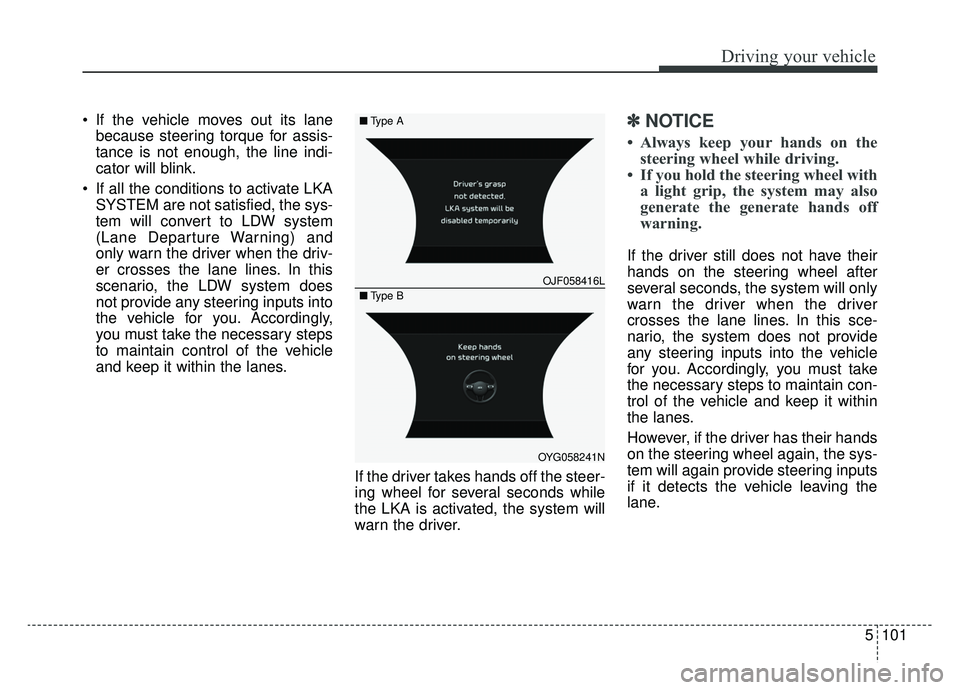
If the driver takes hands off the steer-
ing wheel for several seconds while
the LKA is activated, the system will
warn the driver.✽ ✽
NOTICE
• Always keep your hands on the
steering wheel while driving.
• If you hold the steering wheel with a light grip, the system may also
generate the generate hands off
warning.
If the driver still does not have their
hands on the steering wheel after
several seconds, the system will only
warn the driver when the driver
crosses the lane lines. In this sce-
nario, the system does not provide
any steering inputs into the vehicle
for you. Accordingly, you must take
the necessary steps to maintain con-
trol of the vehicle and keep it within
the lanes.
However, if the driver has their hands
on the steering wheel again, the sys-
tem will again provide steering inputs
if it detects the vehicle leaving the
lane.
OJF058416L
OYG058241N
■ Type A
■Type B
Page 348 of 518
Driving your vehicle
102
5
The driver is responsible for accu-
rate steering.
Even though the steering is assist- ed by the system, the driver may
control the steering wheel.
Turn off the system in the following situations.
- In bad weather
- In bad road conditions
- When the steering wheel needsto be controlled by the driver fre-
quently.
The steering wheel may feel heav- ier when the steering wheel is
assisted by the system than when
it is not.✽ ✽
NOTICE
• Even though the steering is assist-
ed by the system, the driver may
control the steering.
• The steering wheel may feel heav- ier when the steering wheel is
assisted by the system than when it
is not.
The system will be cancelled when:
You change lanes with the turn sig-
nal.
- Using the turn signal to change lanes.
- If you change lanes without the turn signal on, the steering wheel
might be controlled.
LKA SYSTEM can transit to steer- ing assist mode when the car is
near to middle of the lane after sys-
tem on or the lane was changed.
LKA SYSTEM can not assist steer-
ing if the vehicle follows lane mark-
er too close continuously before
transition to steering assist mode.
The control of ESC (Electronic Stability Control) or VSM (Vehicle
Stability Management) is activated.
The steering will not be assisted when your drive fast on a sharp
curve.
The steering will not be assisted when vehicle speed is below 40
mph (64 km/h) and over 110 mph
(177 kph). Always obey all traffic
laws and drive safely.