air condition KIA CADENZA 2020 User Guide
[x] Cancel search | Manufacturer: KIA, Model Year: 2020, Model line: CADENZA, Model: KIA CADENZA 2020Pages: 560, PDF Size: 11.37 MB
Page 137 of 560
455
Features of your vehicle
There are some conditions that can
cause changes to the vehicle mag-
nets, such as installing a ski rack or
a CB antenna. Body repair work on
the vehicle can also cause changes
to the vehicle's magnetic field. In
these situations, the compass will
need to be re-calibrated to correct
these changes.
If you need to recalibrate the com-
pass :
1. Press and hold the Control Button
for more than 6 seconds. When
the compass memory is cleared, a
“C” will appear in the display.
2. Drive the vehicle in 2 complete cir-
cles at less than 5 mph (8 km/h).Integrated HomeLink®Wireless
Control System
The HomeLink
®Wireless Control
System provides a convenient way to
replace up to three hand-held radio-
frequency (RF) transmitters with a
single built-in device. This innovative
feature will learn the radio frequency
codes of most current transmitters to
operate devices such as gate opera-
tors, garage door openers, entry
door locks, security systems, even
home lighting. Both standard and
rolling code-equipped transmitters
can be programmed by following the
outlined procedures.
Additional HomeLink
®information
can be found at : www.homelink.com,
www.youtube.com/HomeLinkGentex
or by calling 1-800-355-3515.
❈HomeLink
®is a registered trade-
mark of Johnson Controls, Inc.Retain the original transmitter of the
RF device you are programming for
use in other vehicles as well as for
future HomeLink
®programming. It is
also suggested that upon the sale of
the vehicle, the programmed
HomeLink
®buttons be erased for
security purposes.
Page 151 of 560

469
Features of your vehicle
Distance to empty
The distance to empty is the esti-
mated distance the vehicle can be
driven with the remaining fuel.
- Distance range : 1 ~ 9,999 mi. or
1 ~ 9,999 km If the estimated distance is below 1
mi. (1 km), the trip computer will
display “---” as distance to empty.
Outside Temperature Gauge
This gauge indicates the current out-
side air temperatures by 1°F (1°C).
- Temperature range : -40°F ~ 140°F
(-40°C ~ 60°C)
OYG040547NOYG040190N
CAUTION
If the vehicle is not on level
ground or the battery power
has been interrupted, the dis-
tance to empty function may
not operate correctly.
The distance to empty may
differ from the actual driving
distance as it is anestimate
of the available driving dis-
tance.
The trip computer may not
register additional fuel if less
than 1.6 gallons (6 liters) of
fuel are added to the vehicle.
The distance to empty may
vary significantly based on
driving conditions, driving
habits, and condition of the
vehicle.
Page 185 of 560
4103
Features of your vehicle
Types of warning sound
When an object is 24 in. to 48 in
(60 cm to 120 cm) from the rear
bumper: Buzzer beeps intermit-
tently.
When an object is 12 in. to 24 in
(30 cm to 60 cm) from the rear
bumper: Buzzer beeps more fre-
quently.
When an object is within 16 in. (40
cm) of the rear bumper:
Buzzer sounds continuously.
Non-operational conditions of
Reverse Parking Distance
Warning
Reverse Parking Distance
Warning may not operate properly
when:
1. Moisture is frozen to the sensor. (It
will operate normally once the
moisture clears.)
2. The sensor is covered with foreign
matter, such as snow or water, or
the sensor cover is blocked. (It will
operate normally when the materi-
al is removed or the sensor is no
longer blocked.)
3. Driving on uneven road surfaces
(unpaved roads, gravel, bumps,
gradient).
4. Objects generating excessive
noise (vehicle horns, loud motor-
cycle engines, or truck air brakes)
are within range of the sensor.5. Heavy rain or water spray exists.
6. Wireless transmitters or mobile
phones are within range of the
sensor.
7. The sensor is covered with snow.
8. Trailer towing
Page 195 of 560
4113
Features of your vehicle
Outside air temperature is hot or
cold.
The wind is either strong (over 12
mph (20 km/h) or blowing perpen-
dicular to the rear bumper.
Objects generating excessive
noise, such as vehicle horns, loud
motorcycle engines, or truck air
brakes, are near the vehicle.
An ultrasonic sensor with a similar
frequency is near the vehicle.
There is ground height difference
between the vehicle and the
pedestrian.
The image of the pedestrian in the
rear view camera is indistinguish-
able from the background.
The pedestrian is near the rear
edge of the vehicle.
The pedestrian is not standing
upright.
The pedestrian is either too short
or too tall for the system to recog-
nize.
The pedestrian is wearing clothes
that are hard for the system to rec-
ognize.
that does not reflect ultrasound
well.
The size, thickness, height, or
shape of the object does not reflect
ultrasound well (e.g., pole, bush,
curbs, carts, edge of a wall, etc.).
The pedestrian or the object is
moving.
The pedestrian or the object is very
close to the rear of the vehicle.
A wall is behind the pedestrian or
the object.
The object is not at the rear center
of the vehicle.
The plane of the obstacle is not
parallel to the rear bumper.
The road is slippery or inclined.
The driver backs up the vehicle
immediately after shifting to
R(Reverse).
The driver accelerates or turns the
vehicle.Reverse Parking Collision-Avoidance
Assist may alert the driver or apply
brake power unnecessarily under the
following conditions even if there are
“no” pedestrians or objects.
Any non-factory equipment or
accessories have been installed.
The condition of the vehicle is
unstable due to an accident or
other causes.
The height of the bumper or the
sensor installation has been modi-
fied.
The bumper height has changed
due to heavy loads, tire pressure
change, etc.
The rear view camera or the ultra-
sonic sensor(s) is stained with for-
eign matter, such as snow, dirt, etc.
The pattern on the road is mistak-
en for a pedestrian.
There is a shadow or a light reflect-
ing on the ground.
Pedestrians or objects are around
the path of the vehicle.
Page 202 of 560
Features of your vehicle
120 4
The driver must be cautious in the
below situations may not work prop-
erly when recognition of light from
on-coming or front vehicle is poor or
limited :
When the light from on-coming or
front vehicle is poor
- When the light from the on-com-
ing or front vehicle is not detected
because of lamp damage, hidden
from sight, etc.
- When the lamp of the on-coming
or front vehicle is covered with
dust, snow or water.
- When the front vehicle’s head-
lamps are off but the fog lamps
on and etc.
When external condition is inter-
vened
- When there is a similar shape
lamp with the front vehicle’s
lamps.
- When the headlamp is not
repaired or replaced at an author-
ized dealer.- When headlamp aiming is not
properly adjusted.
- When driving on a narrow curved
road, rough road, downhill or
uphill.
- When only part of the vehicle in
front is visible on a crossroad or
curved road.
- When there is a traffic light,
reflecting sign, flashing sign or
mirror ahead.
- When there is a temporary reflec-
tor or flash ahead (construction
area).
- When the road conditions are bad
such as being wet, iced or cov-
ered with snow.
- When a vehicle suddenly
appears from a curve.
- When the vehicle is tilted from a
flat tire or being towed.
- When Lane Keeping Assist failure
indicator (yellow) illuminates (if
equipped) and etc.When front visibility is poor
- When the lamp of the on-coming
or front vehicle is covered with
dust, snow or water.
- When the light from the on-com-
ing or front vehicle is not detected
because of exhaust fume, smoke,
fog, snow, etc.
- When the front window is covered
with foreign matters.
- When it is hard to see because of
fog, heavy rain or snow and etc.
- The system may not work around
15 seconds after starting the
vehicle or the initialization or
rebooting of the front vehicle
camera.
- Do not disassemble a front view
camera temporarily for tinted win-
dow or attaching any types of
coatings and accessories. If you
disassemble the camera and
assemble it again, take your vehi-
cle to an authorized Kia dealer
and have the system checked to
need a calibration.
Page 215 of 560

4133
Features of your vehicle
AUTOMATIC CLIMATE CONTROL SYSTEM
OYG040345N/OYG040616N
System Overview
1. Front windshield defroster button
2. Rear window defroster button
3. SYNC temperature control selection button
4. Passenger's temperature control button
5. Driver’s temperature control button
6. AUTO (automatic control) button
7. OFF button
8. Air conditioning button
9. Fan speed control button
10. Mode selection button
11. Air intake control button
12. Climate information screen selection but-
ton
■ ■
Type B
■ ■
Type A
CAUTION
Operating the blower when the
Engine Start/Stop button is in
the ON position could cause the
battery to discharge. Operate
the blower when the engine is
running.
Page 216 of 560

Features of your vehicle
134 4
Automatic heating and air con-
ditioning
1. Press the AUTO button. The
modes, fan speeds, air intake and
air-conditioning will be controlled
automatically by setting the tem-
perature.2. Turn the temperature control but-
ton to the desired temperature.
✽ ✽
NOTICE
• To turn the automatic operation
off, select any button or switch of
the following:
- Mode selection button
- Air conditioning button
- Front windshield defroster button
(Press the button one more time
to deselect the front windshield
defroster function. The ‘AUTO’
sign will illuminate on the infor-
mation display once again.)
- Air intake control button
- Fan speed control switch
The selected function will be con-
trolled manually while other func-
tions operate automatically.
• For your convenience and to
improve the effectiveness of the
climate control, use the AUTO
button and set the temperature to
73°F (23°C).
OYG049343
■Driver’s side■Passenger’s side
OYG049348
Page 218 of 560
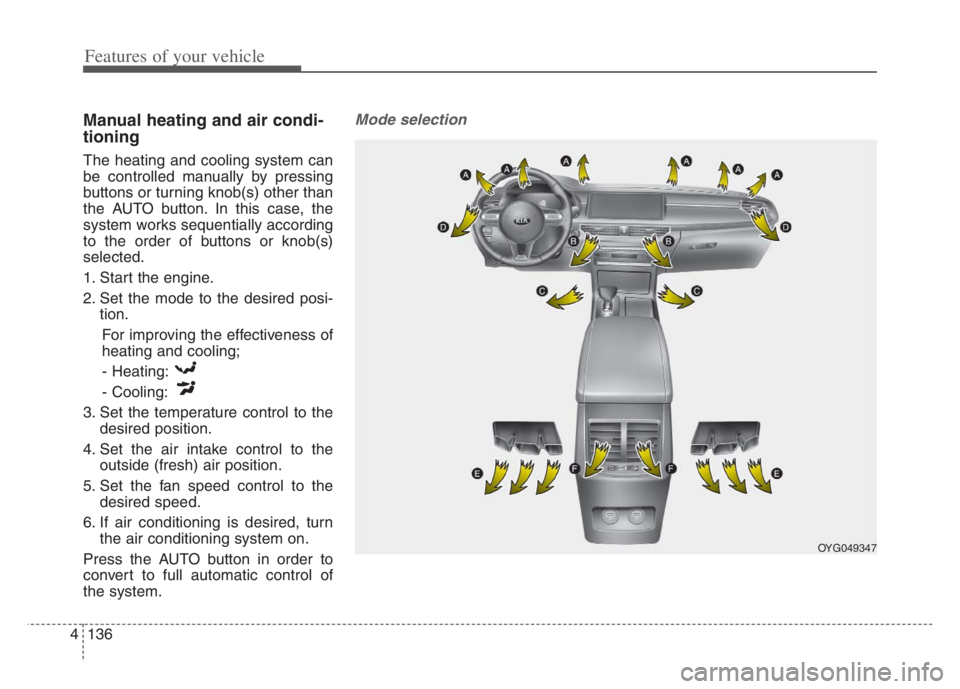
Features of your vehicle
136 4
Manual heating and air condi-
tioning
The heating and cooling system can
be controlled manually by pressing
buttons or turning knob(s) other than
the AUTO button. In this case, the
system works sequentially according
to the order of buttons or knob(s)
selected.
1. Start the engine.
2. Set the mode to the desired posi-
tion.
For improving the effectiveness of
heating and cooling;
- Heating:
- Cooling:
3. Set the temperature control to the
desired position.
4. Set the air intake control to the
outside (fresh) air position.
5. Set the fan speed control to the
desired speed.
6. If air conditioning is desired, turn
the air conditioning system on.
Press the AUTO button in order to
convert to full automatic control of
the system.
Mode selection
OYG049347
Page 220 of 560

Features of your vehicle
138 4
Defrost-Level
Most of the air flow is directed to the
windshield with a small amount of air
directed to the side window defrosters.Instrument panel vents
The outlet vents can be opened or
closed separately using the thumb-
wheel (if equipped).
Also, you can adjust the direction of
air delivery from these vents using
the vent control lever as shown.
Temperature control
The temperature will increase to the
maximum (HI) by raise the toggle
switch to the extreme up.
The temperature will decrease to the
minimum (Lo) by depress the toggle
switch to the extreme down.
When raise and depress the toggle
switch, the temperature will increase
or decrease by 1°F/0.5°C. When set
to the lowest temperature setting, the
air conditioning will operate continu-
ously.
OYG049346 OYG049349
■Driver’s side■Passenger’s side
OYG049348
Page 222 of 560

Features of your vehicle
140 4
Outside (fresh) air position
With the outside (fresh)
air position selected, air
enters the vehicle from
outside and is heated or
cooled according to the
function selected.
Recirculated air position
With the recirculated air
position selected, air
from the passenger
compartment will be
drawn through the heat-
ing system and heated
or cooled according to
the function selected.Prolonged operation of the heater in
the recirculated air position (without
air conditioning selected) may cause
fogging of the windshield and side
windows and the air within the pas-
senger compartment may become
stale.
In addition, prolonged use of the air
conditioning with the recirculated air
position selected will result in exces-
sively dry air in the passenger com-
partment.Fan speed control
The fan speed can be set to the
desired speed by operating the fan
speed control switch.
To change the fan speed, raise the
switch for higher speed or depress the
switch for lower speed. To turn the fan
speed control off, press the front
blower OFF button.
OYG049352 ■Type B
■ Type A