reset KIA CADENZA 2020 User Guide
[x] Cancel search | Manufacturer: KIA, Model Year: 2020, Model line: CADENZA, Model: KIA CADENZA 2020Pages: 560, PDF Size: 11.37 MB
Page 233 of 560
4151
Features of your vehicle
Automatic climate control system
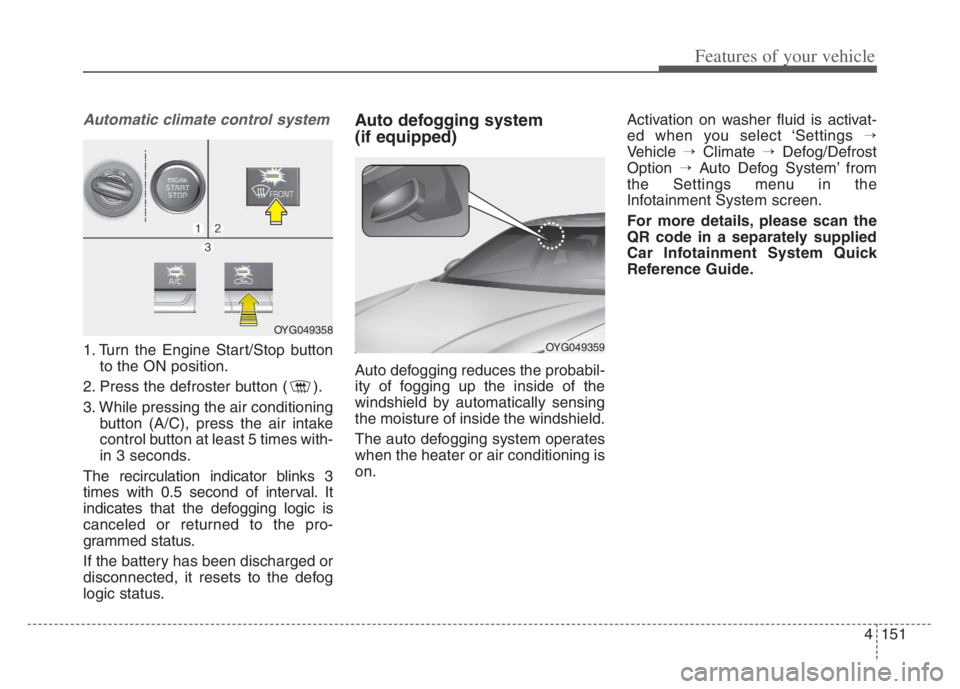
1. Turn the Engine Start/Stop button
to the ON position.
2. Press the defroster button ( ).
3. While pressing the air conditioning
button (A/C), press the air intake
control button at least 5 times with-
in 3 seconds.
The recirculation indicator blinks 3
times with 0.5 second of interval. It
indicates that the defogging logic is
canceled or returned to the pro-
grammed status.
If the battery has been discharged or
disconnected, it resets to the defog
logic status.
Auto defogging system
(if equipped)
Auto defogging reduces the probabil-
ity of fogging up the inside of the
windshield by automatically sensing
the moisture of inside the windshield.
The auto defogging system operates
when the heater or air conditioning is
on.Activation on washer fluid is activat-
ed when you select ‘Settings →
Vehicle →Climate →Defog/Defrost
Option →Auto Defog System’ from
the Settings menu in the
Infotainment System screen.
For more details, please scan the
QR code in a separately supplied
Car Infotainment System Quick
Reference Guide.
OYG049358
OYG049359
Page 234 of 560

Features of your vehicle
152 4
This indicator illuminates
when the auto defogging
system senses the mois-
ture on the inside of the
windshield and operates.
The Auto defogging system address-
es excess moisture on the inside of
the windshield in stages. For exam-
ple, if auto defogging does not defog
inside the windshield at step 1
Outside air position, it tries to defog
again at step 2 Operating the air con-
ditioning.
Step 1 : Outside air position
Step 2 : Operating the air condition-
ing
Step 3 : Blowing air flow toward the
windshield
Step 4 : Increasing air flow toward
the windshieldTo cancel or reset the Auto Defogging
System
To cancel or set the Auto Defogging
System, press the Front Windshield
Defroster button for 3 seconds while
Engine Start/Stop button is On.
The indicator of Front Windshield
Defroster button or “ADS OFF” mes-
sage will blink or display 3 times in
0.5 second interval and the system
will be cancelled or set.
CAUTION
Do not remove the sensor cover
located on the upper end of the
passenger side windshield
glass. Damage to the system
parts could occur and may not
be covered by your vehicle war-
ranty.
Page 341 of 560
Driving your vehicle
88 5
Resetting the function
The last break time is set to 00:00
and the driver's attention level is
set to 5 (very attentive) when the
driver resets the Inattentive driving
warning function.
Inattentive driving warning function
resets in the following situations.
- The engine is turned OFF.
- The driver unfastens the seat belt
and then opens the driver’s door.
- Stop lasting more than 10 min-
utes.
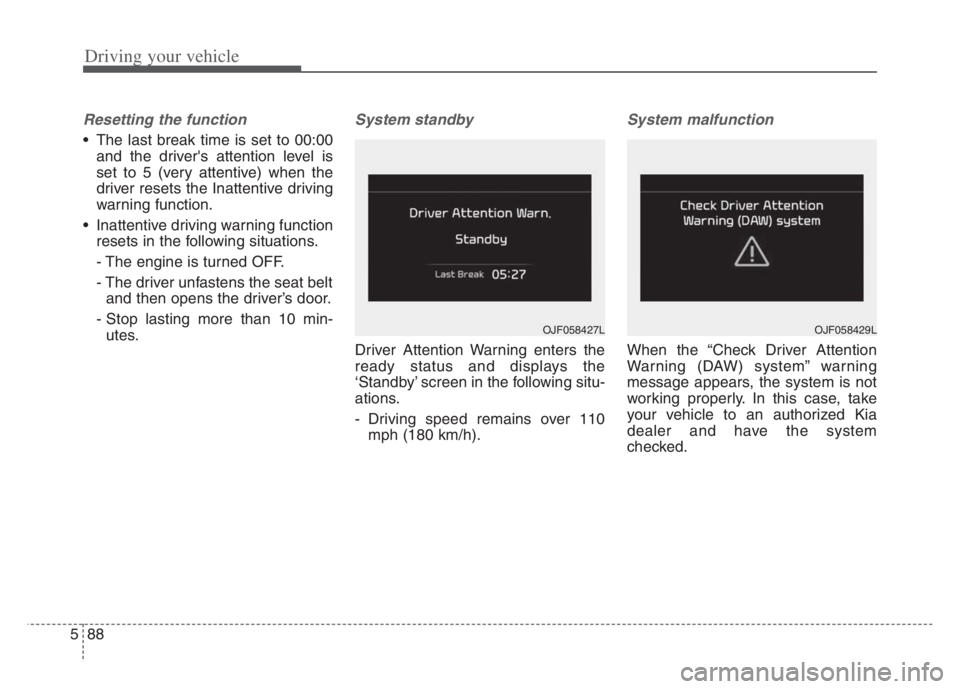
System standby
Driver Attention Warning enters the
ready status and displays the
‘Standby’ screen in the following situ-
ations.
- Driving speed remains over 110
mph (180 km/h).
System malfunction
When the “Check Driver Attention
Warning (DAW) system” warning
message appears, the system is not
working properly. In this case, take
your vehicle to an authorized Kia
dealer and have the system
checked.
OJF058429LOJF058427L
Page 371 of 560
Driving your vehicle
118 5
(Continued)
• Deceleration by the system may
not be sufficient if the driver accel-
erates while the system is operat-
ing,
• Deceleration by the system may
not be sufficient due to road con-
ditions such as uneven road sur-
faces, narrow lanes, etc.
• If the road is controlled, due to
construction or holiday events, the
system might not work properly. ✽ ✽
NOTICE
Navigation-based Cruise Control
may not function properly in the fol-
lowing situations :
• The navigation is not working
properly.
• The navigation is not updated.
• The real-time GPS or map infor-
mation provided has errors.
• The navigation is overloaded by
performing functions such as
route search, video playback,
voice recognition, etc. are per-
forming simultaneously.
• GPS signals are blocked in areas
such as a tunnel.
• The driver goes off course or the
route to the destination is changed
or canceled by resetting the navi-
gation.
• The vehicle enters a service station
or rest area.
• A section of the highway’s shape
has changed.
• Android Auto or Car Play is oper-
ating.
(Continued)(Continued)
• The navigation cannot detect the
current vehicle position (ex: ele-
vated roads including overpass
adjacent to general roads or near-
by roads exist in a parallel way).
• The navigation is being updated
while driving.
• The navigation is being reset while
driving.
• The road is slippery due to bad
weather such as rain or snow.
Page 387 of 560
Driving your vehicle
134
5
Highway Driving Assist may not func-
tion properly in the following situa-
tions:
The navigation is not working prop-
erly.
The navigation is not updated.
The real-time GPS or map infor- mation provided has errors.
The navigation is overloaded by performing functions such as route
search, video playback, voice
recognition, etc. are performing
simultaneously.
The navigation is recalculating the route while driving.
GPS signals are blocked in areas such as a tunnel.
The driver goes off course or the route to the destination is changed
or canceled by resetting the navi-
gation.
The vehicle enters a service sta- tion or rest area
The speed limit of selected high- way section is changed due to road
conditions. Android Auto or Car Play is operat-
ing.
The navigation cannot detect the current vehicle position (ex: elevat-
ed roads including overpass adja-
cent to general roads or nearby
roads exist in a parallel way).
The navigation is being updated while driving.
The navigation is being reset while driving.
The road is slippery due to bad weather such as rain or snow.
If your vehicle tows a trailer or another vehicle, you should
release Highway Driving Assist.
Operating the brake system or
steering system while towing may
adversely affect the safety. * Refer to “Smart Cruise Control
(SCC)” in this chapter. for cautions
and warnings about headway con-
trol and front radar.
* Refer to “Lane Following Assist (LFA) “ in this chapter. for cautions
and warnings about steering con-
trol and front view camera.
Page 419 of 560

63
What to do in an emergency
If the engine stalls at a cross-
road or crossing
If the engine stalls at a crossroad or
crossing, set the shift lever in the N
(Neutral) position and then push the
vehicle to a safe place.
If you have a flat tire while
driving
If a tire goes flat while you are driv-
ing:
1. Take your foot off the accelerator
pedal and let the vehicle slow
down while driving straight ahead.
Do not apply the brakes immedi-
ately or attempt to pull off the road
as this may cause a loss of con-
trol. When the vehicle has slowed
to such a speed that it is safe to do
so, brake carefully and pull off the
road. Drive off the road as far as
possible and park on firm level
ground. If you are on a divided
highway, do not park in the median
area between the two traffic lanes.2. When the vehicle is stopped, turn
on your emergency hazard flash-
ers, set the parking brake and put
the transmission in P.
3. Have all passengers get out of the
vehicle. Be sure they all get out on
the side of the vehicle that is away
from traffic.
4. When changing a flat tire, follow
the instruction provided later in
this section.
If the engine stalls while driv-
ing
1. Reduce your speed gradually,
keeping a straight line. Move cau-
tiously off the road to a safe place.
2. Turn on your emergency flashers.
3. Try to start the engine again. If
your vehicle will not start, contact
an authorized Kia dealer or seek
other qualified assistance.
✽ ✽
NOTICE
If there was a check engine light and
loss of power or stall and if safe to do
so, wait at least 10 seconds to restart
the vehicle after it stalls. This may
reset the car so it will no longer run
at low power (limp home) condition.
IN CASE OF AN EMERGENCY WHILE DRIVING
Page 446 of 560
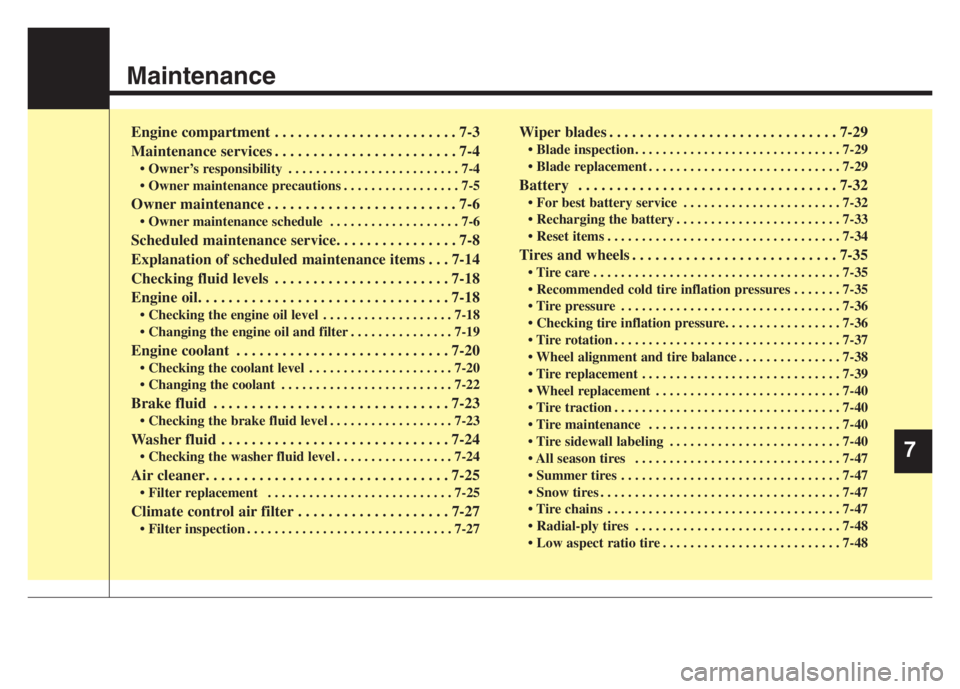
Maintenance
Engine compartment . . . . . . . . . . . . . . . . . . . . . . . . 7-3
Maintenance services . . . . . . . . . . . . . . . . . . . . . . . . 7-4
• Owner’s responsibility . . . . . . . . . . . . . . . . . . . . . . . . . 7-4
• Owner maintenance precautions . . . . . . . . . . . . . . . . . 7-5
Owner maintenance . . . . . . . . . . . . . . . . . . . . . . . . . 7-6
• Owner maintenance schedule . . . . . . . . . . . . . . . . . . . 7-6
Scheduled maintenance service. . . . . . . . . . . . . . . . 7-8
Explanation of scheduled maintenance items . . . 7-14
Checking fluid levels . . . . . . . . . . . . . . . . . . . . . . . 7-18
Engine oil. . . . . . . . . . . . . . . . . . . . . . . . . . . . . . . . . 7-18
• Checking the engine oil level . . . . . . . . . . . . . . . . . . . 7-18
• Changing the engine oil and filter . . . . . . . . . . . . . . . 7-19
Engine coolant . . . . . . . . . . . . . . . . . . . . . . . . . . . . 7-20
• Checking the coolant level . . . . . . . . . . . . . . . . . . . . . 7-20
• Changing the coolant . . . . . . . . . . . . . . . . . . . . . . . . . 7-22
Brake fluid . . . . . . . . . . . . . . . . . . . . . . . . . . . . . . . 7-23
• Checking the brake fluid level . . . . . . . . . . . . . . . . . . 7-23
Washer fluid . . . . . . . . . . . . . . . . . . . . . . . . . . . . . . 7-24
• Checking the washer fluid level . . . . . . . . . . . . . . . . . 7-24
Air cleaner. . . . . . . . . . . . . . . . . . . . . . . . . . . . . . . . 7-25
• Filter replacement . . . . . . . . . . . . . . . . . . . . . . . . . . . 7-25
Climate control air filter . . . . . . . . . . . . . . . . . . . . 7-27
• Filter inspection . . . . . . . . . . . . . . . . . . . . . . . . . . . . . . 7-27
Wiper blades . . . . . . . . . . . . . . . . . . . . . . . . . . . . . . 7-29
• Blade inspection . . . . . . . . . . . . . . . . . . . . . . . . . . . . . . 7-29
• Blade replacement . . . . . . . . . . . . . . . . . . . . . . . . . . . . 7-29
Battery . . . . . . . . . . . . . . . . . . . . . . . . . . . . . . . . . . 7-32
• For best battery service . . . . . . . . . . . . . . . . . . . . . . . 7-32
• Recharging the battery . . . . . . . . . . . . . . . . . . . . . . . . 7-33
• Reset items . . . . . . . . . . . . . . . . . . . . . . . . . . . . . . . . . . 7-34
Tires and wheels . . . . . . . . . . . . . . . . . . . . . . . . . . . 7-35
• Tire care . . . . . . . . . . . . . . . . . . . . . . . . . . . . . . . . . . . . 7-35
• Recommended cold tire inflation pressures . . . . . . . 7-35
• Tire pressure . . . . . . . . . . . . . . . . . . . . . . . . . . . . . . . . 7-36
• Checking tire inflation pressure. . . . . . . . . . . . . . . . . 7-36
• Tire rotation . . . . . . . . . . . . . . . . . . . . . . . . . . . . . . . . . 7-37
• Wheel alignment and tire balance . . . . . . . . . . . . . . . 7-38
• Tire replacement . . . . . . . . . . . . . . . . . . . . . . . . . . . . . 7-39
• Wheel replacement . . . . . . . . . . . . . . . . . . . . . . . . . . . 7-40
• Tire traction . . . . . . . . . . . . . . . . . . . . . . . . . . . . . . . . . 7-40
• Tire maintenance . . . . . . . . . . . . . . . . . . . . . . . . . . . . 7-40
• Tire sidewall labeling . . . . . . . . . . . . . . . . . . . . . . . . . 7-40
• All season tires . . . . . . . . . . . . . . . . . . . . . . . . . . . . . . 7-47
• Summer tires . . . . . . . . . . . . . . . . . . . . . . . . . . . . . . . . 7-47
• Snow tires . . . . . . . . . . . . . . . . . . . . . . . . . . . . . . . . . . . 7-47
• Tire chains . . . . . . . . . . . . . . . . . . . . . . . . . . . . . . . . . . 7-47
• Radial-ply tires . . . . . . . . . . . . . . . . . . . . . . . . . . . . . . 7-48
• Low aspect ratio tire . . . . . . . . . . . . . . . . . . . . . . . . . . 7-48
7
Page 479 of 560
Maintenance
34 7
When recharging the battery,
observe the following precautions:
The battery must be removed from
the vehicle and placed in an area
with good ventilation.
Do not allow cigarettes, sparks, or
flame near the battery.
Watch the battery during charging,
and stop or reduce the charging
rate if the battery cells begin
gassing (boiling) violently or if the
temperature of the electrolyte of
any cell exceeds 120°F (49°C).
Wear eye protection when check-
ing the battery during charging.
Disconnect the battery charger in
the following order.
1. Turn off the battery charger main
switch.
2. Unhook the negative clamp from
the negative battery terminal.
3. Unhook the positive clamp from
the positive battery terminal. Before performing maintenance or
recharging the battery, turn off all
accessories and stop the engine.
The negative battery cable must be
removed first and installed last
when the battery is disconnected.Reset items
Items should be reset after the bat-
tery has been discharged or the bat-
tery has been disconnected.
Auto up/down window
Sunroof
Trip computer
Climate control system
Driver position memory system
Page 483 of 560
Maintenance
38 7
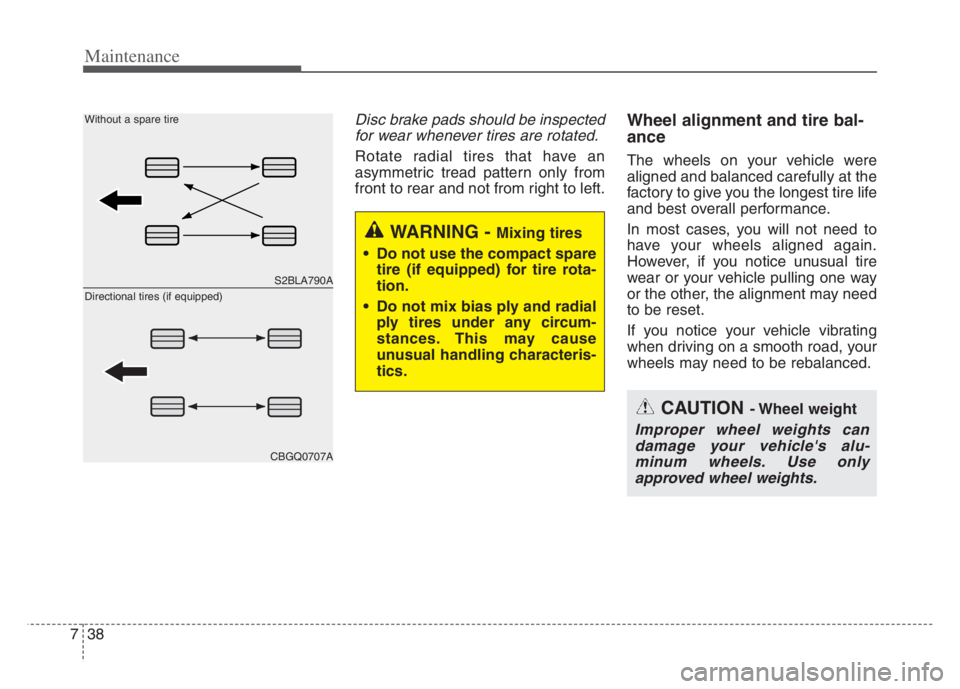
Disc brake pads should be inspected
for wear whenever tires are rotated.
Rotate radial tires that have an
asymmetric tread pattern only from
front to rear and not from right to left.
Wheel alignment and tire bal-
ance
The wheels on your vehicle were
aligned and balanced carefully at the
factory to give you the longest tire life
and best overall performance.
In most cases, you will not need to
have your wheels aligned again.
However, if you notice unusual tire
wear or your vehicle pulling one way
or the other, the alignment may need
to be reset.
If you notice your vehicle vibrating
when driving on a smooth road, your
wheels may need to be rebalanced.
WARNING - Mixing tires
Do not use the compact spare
tire (if equipped) for tire rota-
tion.
Do not mix bias ply and radial
ply tires under any circum-
stances. This may cause
unusual handling characteris-
tics.
CAUTION - Wheel weight
Improper wheel weights can
damage your vehicle's alu-
minum wheels. Use only
approved wheel weights.
S2BLA790A
CBGQ0707A
Without a spare tire
Directional tires (if equipped)
Page 498 of 560
753
Maintenance
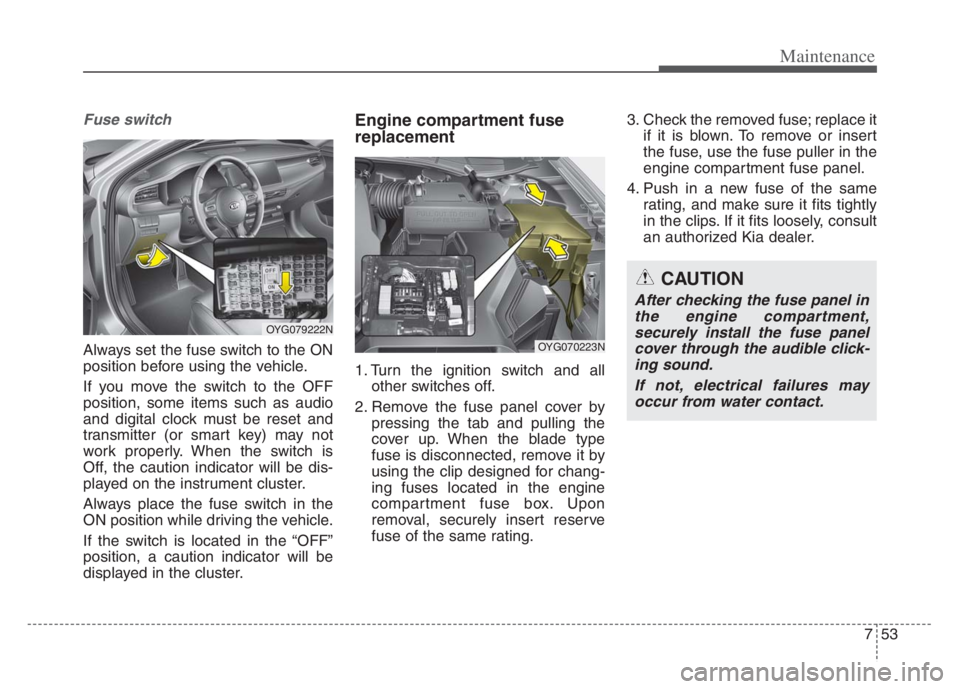
Fuse switch
Always set the fuse switch to the ON
position before using the vehicle.
If you move the switch to the OFF
position, some items such as audio
and digital clock must be reset and
transmitter (or smart key) may not
work properly. When the switch is
Off, the caution indicator will be dis-
played on the instrument cluster.
Always place the fuse switch in the
ON position while driving the vehicle.
If the switch is located in the “OFF”
position, a caution indicator will be
displayed in the cluster.
Engine compartment fuse
replacement
1. Turn the ignition switch and all
other switches off.
2. Remove the fuse panel cover by
pressing the tab and pulling the
cover up. When the blade type
fuse is disconnected, remove it by
using the clip designed for chang-
ing fuses located in the engine
compartment fuse box. Upon
removal, securely insert reserve
fuse of the same rating.3. Check the removed fuse; replace it
if it is blown. To remove or insert
the fuse, use the fuse puller in the
engine compartment fuse panel.
4. Push in a new fuse of the same
rating, and make sure it fits tightly
in the clips. If it fits loosely, consult
an authorized Kia dealer.
CAUTION
After checking the fuse panel in
the engine compartment,
securely install the fuse panel
cover through the audible click-
ing sound.
If not, electrical failures may
occur from water contact.
OYG079222N
OYG070223N