door lock KIA CADENZA 2020 Owners Manual
[x] Cancel search | Manufacturer: KIA, Model Year: 2020, Model line: CADENZA, Model: KIA CADENZA 2020Pages: 560, PDF Size: 11.37 MB
Page 14 of 560
Your vehicle at a glance
4 2
INTERIOR OVERVIEW
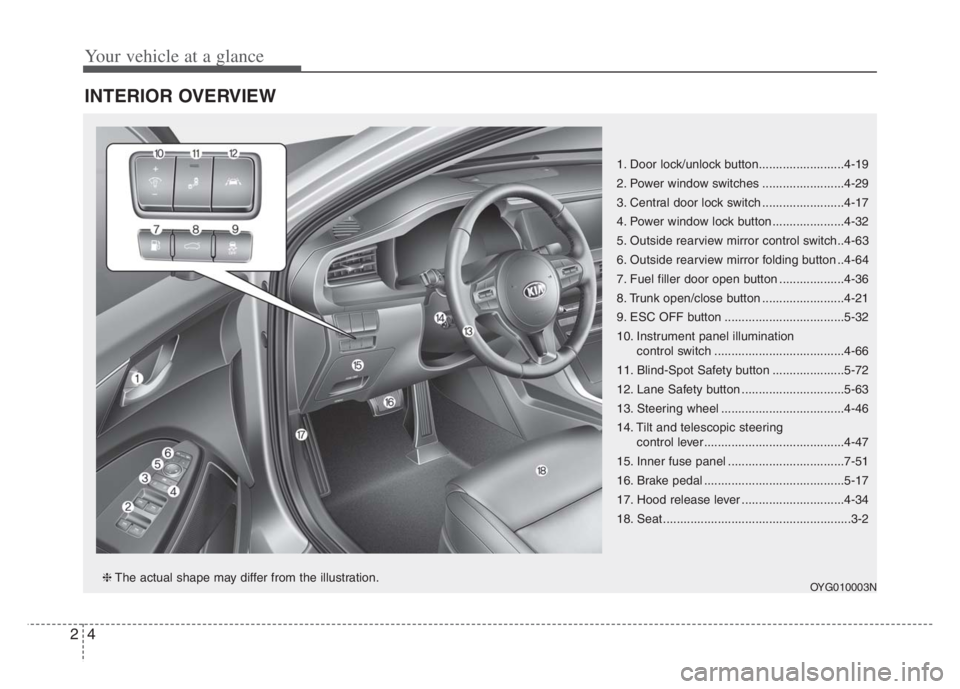
1. Door lock/unlock button.........................4-19
2. Power window switches ........................4-29
3. Central door lock switch ........................4-17
4. Power window lock button .....................4-32
5. Outside rearview mirror control switch..4-63
6. Outside rearview mirror folding button ..4-64
7. Fuel filler door open button ...................4-36
8. Trunk open/close button ........................4-21
9. ESC OFF button ...................................5-32
10. Instrument panel illumination
control switch ......................................4-66
11. Blind-Spot Safety button .....................5-72
12. Lane Safety button ..............................5-63
13. Steering wheel ....................................4-46
14. Tilt and telescopic steering
control lever.........................................4-47
15. Inner fuse panel ..................................7-51
16. Brake pedal .........................................5-17
17. Hood release lever ..............................4-34
18. Seat .......................................................3-2
OYG010003N❈The actual shape may differ from the illustration.
Page 39 of 560
323
Safety features of your vehicle
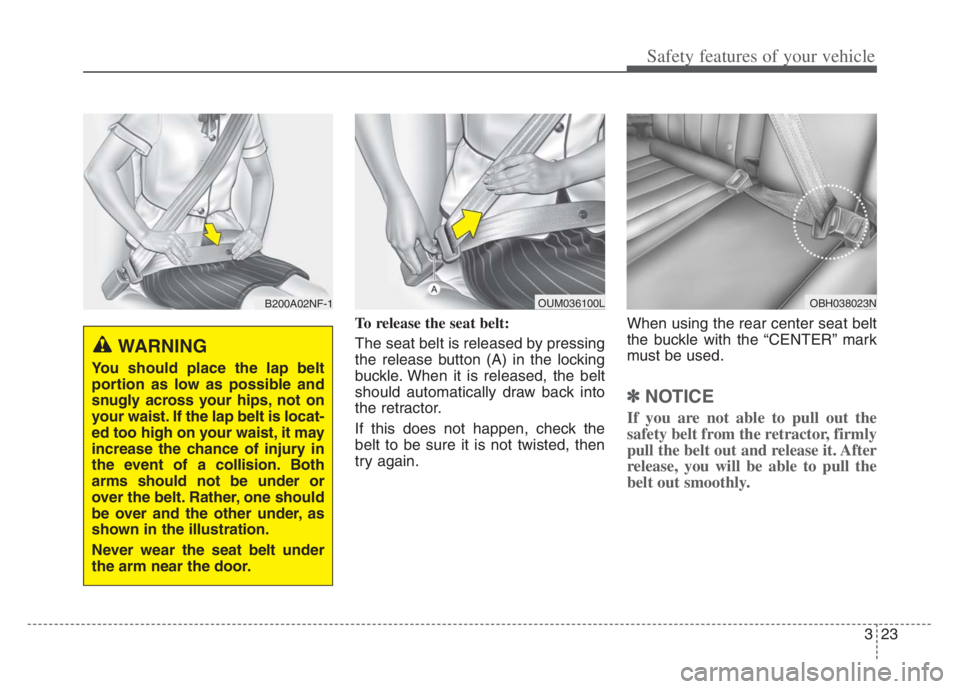
To release the seat belt:
The seat belt is released by pressing
the release button (A) in the locking
buckle. When it is released, the belt
should automatically draw back into
the retractor.
If this does not happen, check the
belt to be sure it is not twisted, then
try again.When using the rear center seat belt
the buckle with the “CENTER” mark
must be used.
✽ ✽
NOTICE
If you are not able to pull out the
safety belt from the retractor, firmly
pull the belt out and release it. After
release, you will be able to pull the
belt out smoothly.
B200A02NF-1
WARNING
You should place the lap belt
portion as low as possible and
snugly across your hips, not on
your waist. If the lap belt is locat-
ed too high on your waist, it may
increase the chance of injury in
the event of a collision. Both
arms should not be under or
over the belt. Rather, one should
be over and the other under, as
shown in the illustration.
Never wear the seat belt under
the arm near the door.
OUM036100LOBH038023N
Page 83 of 560
Features of your vehicle
Smart key . . . . . . . . . . . . . . . . . . . . . . . . . . . . . . . . . 4-4
• Record your key number . . . . . . . . . . . . . . . . . . . . . . . 4-4
Smart key functions . . . . . . . . . . . . . . . . . . . . . . . . . . . 4-4
Smart key precautions . . . . . . . . . . . . . . . . . . . . . . . . . 4-8
Mechanical key operations . . . . . . . . . . . . . . . . . . . . . . 4-9
Battery replacement . . . . . . . . . . . . . . . . . . . . . . . . . . 4-10
Immobilizer system . . . . . . . . . . . . . . . . . . . . . . . . . . . 4-11
Theft-alarm system . . . . . . . . . . . . . . . . . . . . . . . . 4-13
Armed stage . . . . . . . . . . . . . . . . . . . . . . . . . . . . . . . . . 4-13
Theft-alarm stage . . . . . . . . . . . . . . . . . . . . . . . . . . . . 4-14
Disarmed stage. . . . . . . . . . . . . . . . . . . . . . . . . . . . . . . 4-14
Door locks . . . . . . . . . . . . . . . . . . . . . . . . . . . . . . . . 4-15
Operating door locks from outside the vehicle . . . . 4-15
Operating door locks from inside the vehicle . . . . . . 4-16
Impact sensing door unlock system . . . . . . . . . . . . . . 4-18
Auto door lock/unlock feature . . . . . . . . . . . . . . . . . . 4-18
Child-protector rear door lock. . . . . . . . . . . . . . . . . . 4-18
Safe Exit Assist (SEA) . . . . . . . . . . . . . . . . . . . . . . . . . 4-19
Trunk . . . . . . . . . . . . . . . . . . . . . . . . . . . . . . . . . . . . 4-21
Opening the trunk . . . . . . . . . . . . . . . . . . . . . . . . . . . . 4-21
Closing the trunk . . . . . . . . . . . . . . . . . . . . . . . . . . . . . 4-22
Emergency trunk safety release . . . . . . . . . . . . . . . . . 4-22
Smart trunk . . . . . . . . . . . . . . . . . . . . . . . . . . . . . . 4-25
How to use the Smart Trunk . . . . . . . . . . . . . . . . . . . 4-25How to deactivate the Smart Trunk function using the
Smart key . . . . . . . . . . . . . . . . . . . . . . . . . . . . . . . . . . 4-27
Detecting area . . . . . . . . . . . . . . . . . . . . . . . . . . . . . . . 4-28
Windows . . . . . . . . . . . . . . . . . . . . . . . . . . . . . . . . . 4-29
Power windows . . . . . . . . . . . . . . . . . . . . . . . . . . . . . . 4-30
Hood. . . . . . . . . . . . . . . . . . . . . . . . . . . . . . . . . . . . . 4-34
Opening the hood . . . . . . . . . . . . . . . . . . . . . . . . . . . . 4-34
Closing the hood . . . . . . . . . . . . . . . . . . . . . . . . . . . . . 4-35
Fuel filler door . . . . . . . . . . . . . . . . . . . . . . . . . . . . 4-36
Opening the fuel filler door . . . . . . . . . . . . . . . . . . . . 4-36
Closing the fuel filler door . . . . . . . . . . . . . . . . . . . . . 4-37
Emergency fuel filler door release . . . . . . . . . . . . . . . 4-37
Panoramic sunroof . . . . . . . . . . . . . . . . . . . . . . . . . 4-40
Sunroof open warning. . . . . . . . . . . . . . . . . . . . . . . . . 4-41
Sunshade. . . . . . . . . . . . . . . . . . . . . . . . . . . . . . . . . . . . 4-42
Sliding the sunroof . . . . . . . . . . . . . . . . . . . . . . . . . . . 4-42
Tilting the sunroof . . . . . . . . . . . . . . . . . . . . . . . . . . . 4-44
Closing the sunroof . . . . . . . . . . . . . . . . . . . . . . . . . . . 4-44
Resetting the sunroof . . . . . . . . . . . . . . . . . . . . . . . . . 4-45
Steering wheel . . . . . . . . . . . . . . . . . . . . . . . . . . . . . 4-46
Electric power steering (EPS) . . . . . . . . . . . . . . . . . . 4-46
Tilt and telescopic steering . . . . . . . . . . . . . . . . . . . . 4-47
Heated steering wheel . . . . . . . . . . . . . . . . . . . . . . . . 4-49
Horn . . . . . . . . . . . . . . . . . . . . . . . . . . . . . . . . . . . . . . . 4-50
4
Page 86 of 560
Features of your vehicle
4 4
Record your key number
The key code num-
ber is stamped on
the key code tag
attached to the key
set. Should you
lose your keys, this number will
enable an authorized Kia dealer to
duplicate the keys easily.
Remove the key code tag and store it
in a safe place. Also, record the key
code number and keep it in a safe
and handy place, but not in the vehi-
cle.
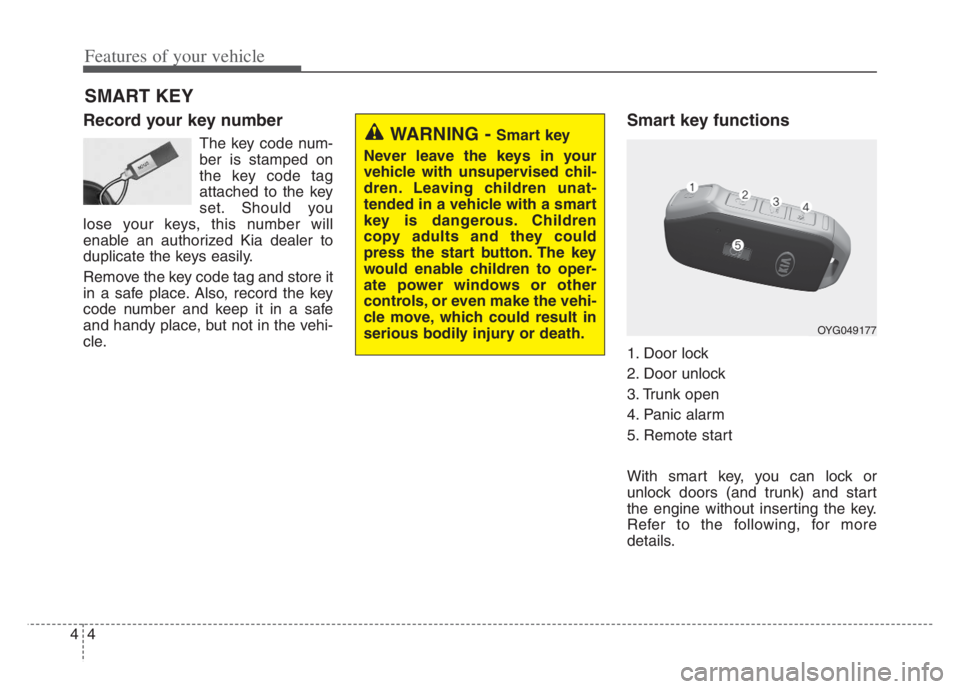
Smart key functions
1. Door lock
2. Door unlock
3. Trunk open
4. Panic alarm
5. Remote start
With smart key, you can lock or
unlock doors (and trunk) and start
the engine without inserting the key.
Refer to the following, for more
details.
SMART KEY
WARNING - Smart key
Never leave the keys in your
vehicle with unsupervised chil-
dren. Leaving children unat-
tended in a vehicle with a smart
key is dangerous. Children
copy adults and they could
press the start button. The key
would enable children to oper-
ate power windows or other
controls, or even make the vehi-
cle move, which could result in
serious bodily injury or death.
OYG049177
Page 87 of 560
45
Features of your vehicle
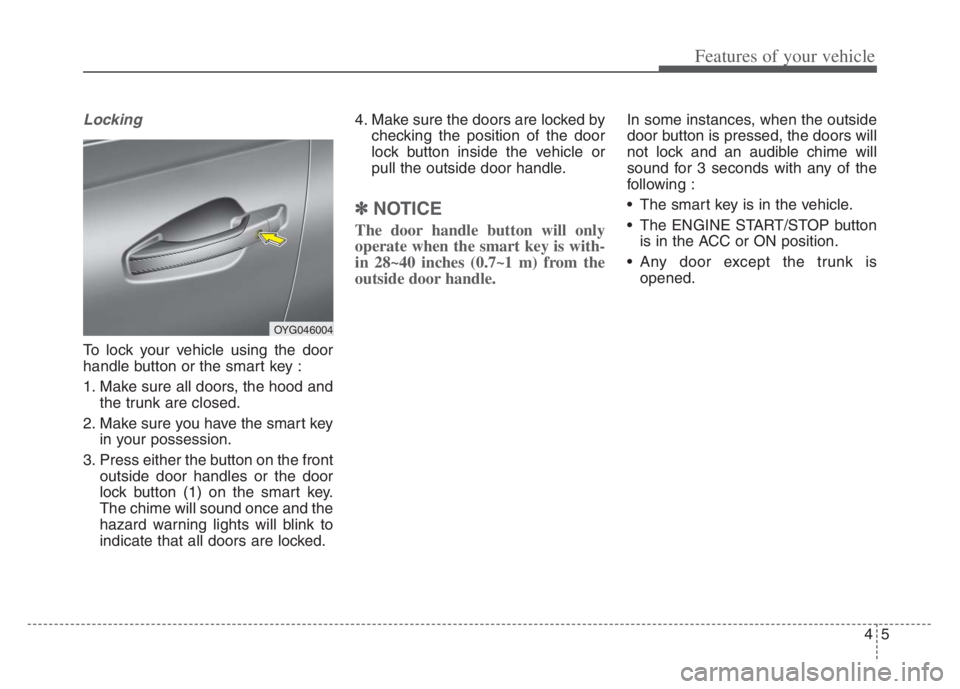
Locking
To lock your vehicle using the door
handle button or the smart key :
1. Make sure all doors, the hood and
the trunk are closed.
2. Make sure you have the smart key
in your possession.
3. Press either the button on the front
outside door handles or the door
lock button (1) on the smart key.
The chime will sound once and the
hazard warning lights will blink to
indicate that all doors are locked.4. Make sure the doors are locked by
checking the position of the door
lock button inside the vehicle or
pull the outside door handle.
✽ ✽
NOTICE
The door handle button will only
operate when the smart key is with-
in 28~40 inches (0.7~1 m) from the
outside door handle.
In some instances, when the outside
door button is pressed, the doors will
not lock and an audible chime will
sound for 3 seconds with any of the
following :
• The smart key is in the vehicle.
The ENGINE START/STOP button
is in the ACC or ON position.
Any door except the trunk is
opened.
OYG046004
Page 88 of 560
Features of your vehicle
6 4
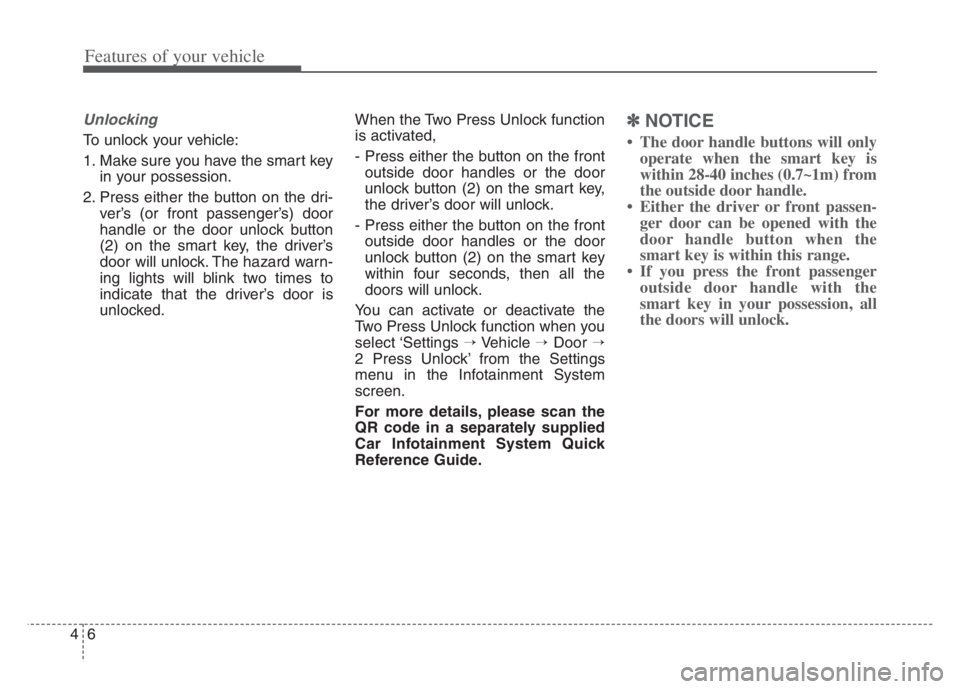
Unlocking
To unlock your vehicle:
1. Make sure you have the smart key
in your possession.
2. Press either the button on the dri-
ver’s (or front passenger’s) door
handle or the door unlock button
(2) on the smart key, the driver’s
door will unlock. The hazard warn-
ing lights will blink two times to
indicate that the driver’s door is
unlocked.When the Two Press Unlock function
is activated,
- Press either the button on the front
outside door handles or the door
unlock button (2) on the smart key,
the driver’s door will unlock.
- Press either the button on the front
outside door handles or the door
unlock button (2) on the smart key
within four seconds, then all the
doors will unlock.
You can activate or deactivate the
Two Press Unlock function when you
select ‘Settings →Vehicle →Door →
2 Press Unlock’ from the Settings
menu in the Infotainment System
screen.
For more details, please scan the
QR code in a separately supplied
Car Infotainment System Quick
Reference Guide.
✽ ✽
NOTICE
• The door handle buttons will only
operate when the smart key is
within 28-40 inches (0.7~1m) from
the outside door handle.
• Either the driver or front passen-
ger door can be opened with the
door handle button when the
smart key is within this range.
• If you press the front passenger
outside door handle with the
smart key in your possession, all
the doors will unlock.
Page 89 of 560
47
Features of your vehicle
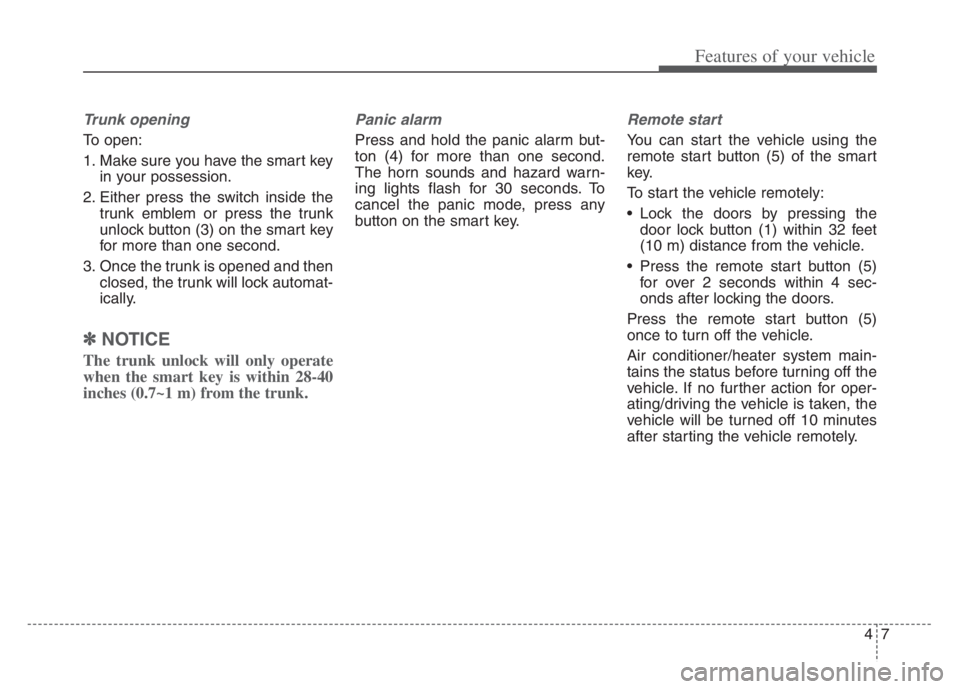
Trunk opening
To open:
1. Make sure you have the smart key
in your possession.
2. Either press the switch inside the
trunk emblem or press the trunk
unlock button (3) on the smart key
for more than one second.
3. Once the trunk is opened and then
closed, the trunk will lock automat-
ically.
✽ ✽
NOTICE
The trunk unlock will only operate
when the smart key is within 28-40
inches (0.7~1 m) from the trunk.
Panic alarm
Press and hold the panic alarm but-
ton (4) for more than one second.
The horn sounds and hazard warn-
ing lights flash for 30 seconds. To
cancel the panic mode, press any
button on the smart key.
Remote start
You can start the vehicle using the
remote start button (5) of the smart
key.
To start the vehicle remotely:
Lock the doors by pressing the
door lock button (1) within 32 feet
(10 m) distance from the vehicle.
Press the remote start button (5)
for over 2 seconds within 4 sec-
onds after locking the doors.
Press the remote start button (5)
once to turn off the vehicle.
Air conditioner/heater system main-
tains the status before turning off the
vehicle. If no further action for oper-
ating/driving the vehicle is taken, the
vehicle will be turned off 10 minutes
after starting the vehicle remotely.
Page 91 of 560
49
Features of your vehicle
If the smart key does not work cor-
rectly, you may lock and unlock the
door with the mechanical key. If
you have a problem with the smart
key, contact an authorized Kia
dealer.
If the smart key is in close proximi-
ty to your cell phone or smart
phone, the signal from the smart
key could be blocked by normal
operation of your cell phone or
smart phone.
This is especially important when
the phone is active such as making
calls, receiving calls, text messag-
ing, and/or sending/receiving
emails. Avoid placing the smart key
and your cell phone or smart
phone in the same pants or jacket
pocket and maintain adequate dis-
tance between the two devices.This device complies with Part 15
of the FCC rules.
Operation is subject to the following
two conditions:
1. This device may not cause harmful
interference, and
2. This device must accept any inter-
ference received, including inter-
ference that may cause undesired
operation.
✽ ✽
NOTICE
Changes or modifications not
expressly approved by the party
responsible for compliance could
void the user’s authority to operate
the equipment. If the keyless entry
system is inoperative due to changes
or modifications not expressly
approved by the party responsible
for compliance, it will not be cov-
ered by your manufacturer’s vehicle
warranty.
Mechanical key operations
Used to lock and unlock the glove
box.
Lock and unlock the doors when
the vehicle or smart key battery is
discharged.
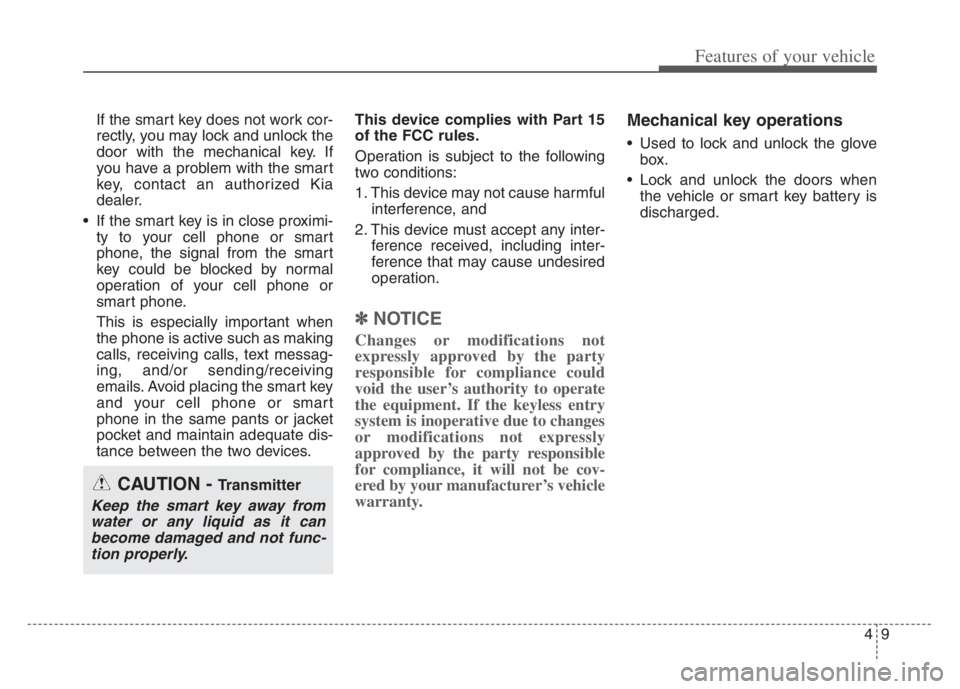
CAUTION - Transmitter
Keep the smart key away from
water or any liquid as it can
become damaged and not func-
tion properly.
Page 95 of 560
413
Features of your vehicle
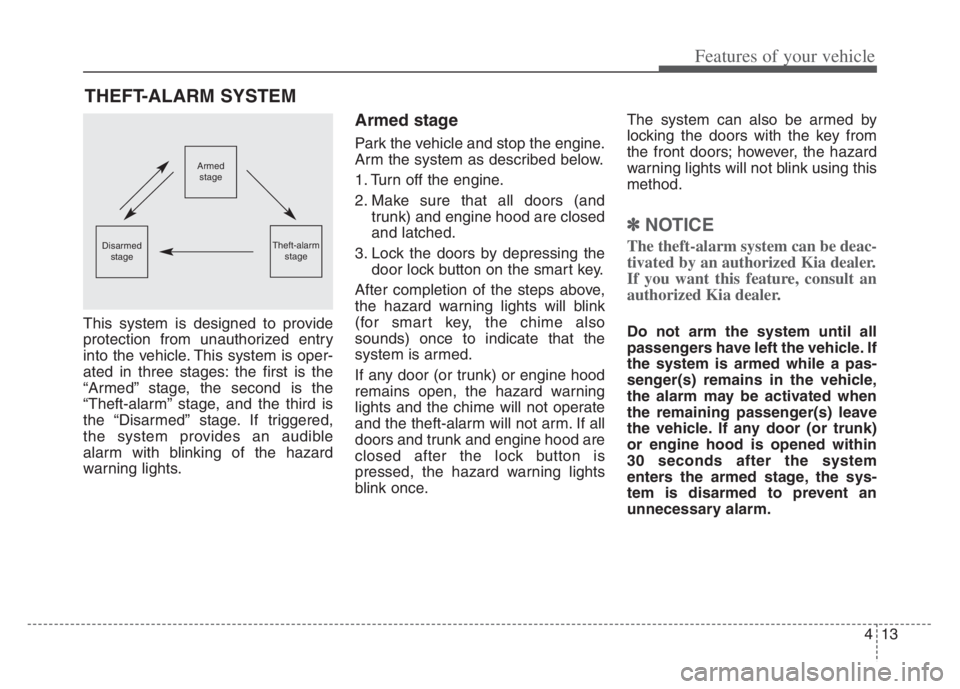
This system is designed to provide
protection from unauthorized entry
into the vehicle. This system is oper-
ated in three stages: the first is the
“Armed” stage, the second is the
“Theft-alarm” stage, and the third is
the “Disarmed” stage. If triggered,
the system provides an audible
alarm with blinking of the hazard
warning lights.
Armed stage
Park the vehicle and stop the engine.
Arm the system as described below.
1. Turn off the engine.
2. Make sure that all doors (and
trunk) and engine hood are closed
and latched.
3. Lock the doors by depressing the
door lock button on the smart key.
After completion of the steps above,
the hazard warning lights will blink
(for smart key, the chime also
sounds) once to indicate that the
system is armed.
If any door (or trunk) or engine hood
remains open, the hazard warning
lights and the chime will not operate
and the theft-alarm will not arm. If all
doors and trunk and engine hood are
closed after the lock button is
pressed, the hazard warning lights
blink once.The system can also be armed by
locking the doors with the key from
the front doors; however, the hazard
warning lights will not blink using this
method.
✽ ✽
NOTICE
The theft-alarm system can be deac-
tivated by an authorized Kia dealer.
If you want this feature, consult an
authorized Kia dealer.
Do not arm the system until all
passengers have left the vehicle. If
the system is armed while a pas-
senger(s) remains in the vehicle,
the alarm may be activated when
the remaining passenger(s) leave
the vehicle. If any door (or trunk)
or engine hood is opened within
30 seconds after the system
enters the armed stage, the sys-
tem is disarmed to prevent an
unnecessary alarm.
THEFT-ALARM SYSTEM
Armed
stage
Theft-alarm
stageDisarmed
stage
Page 96 of 560
Features of your vehicle
14 4
Theft-alarm stage
The alarm will be activated if any of
the following occurs while the system
is armed.
A front or rear door is opened with-
out using the smart key.
The trunk is opened without using
the smart key.
The engine hood is opened.
The horn will sound and the hazard
warning lights will blink continuously
for approximately 27 seconds, and
repeat the horn 2 times unless the
system is disarmed. To turn off the
system, unlock the doors with the
smart key.
Disarmed stage
The system will be disarmed when
The doors (and trunk) are unlocked
with the smart key.
After depressing the unlock button,
the hazard warning lights will blink
and the chime will sound twice (in
smart key) to indicate that the sys-
tem is disarmed.
After depressing the unlock button, if
any door (or trunk) is not opened
within 30 seconds, the system will be
rearmed.
Avoid trying to start the engine
while the alarm is activated. The
vehicle starting motor is disabled
during the theft-alarm stage.
If the system is not disarmed with
the smart key, open the doors by
using the mechanical key and start
the engine by directly pressing the
ENGINE START/STOP button with
the smart key.
If you lose your keys, consult your
authorized Kia dealer.
✽ ✽
NOTICE
Malfunctions caused by improper
alterations, adjustments or modifi-
cations to the theft-alarm system are
not covered by your vehicle manu-
facturer warranty.
CAUTION - Adjusting
alarm system
Do not change, alter or adjust
the theft-alarm system because
it could cause the theft-alarm
system to malfunction.