key KIA CARENS RHD 2017 User Guide
[x] Cancel search | Manufacturer: KIA, Model Year: 2017, Model line: CARENS RHD, Model: KIA CARENS RHD 2017Pages: 723, PDF Size: 40.8 MB
Page 104 of 723
Features of your vehicle
8
4
Remote keyless entry system operations
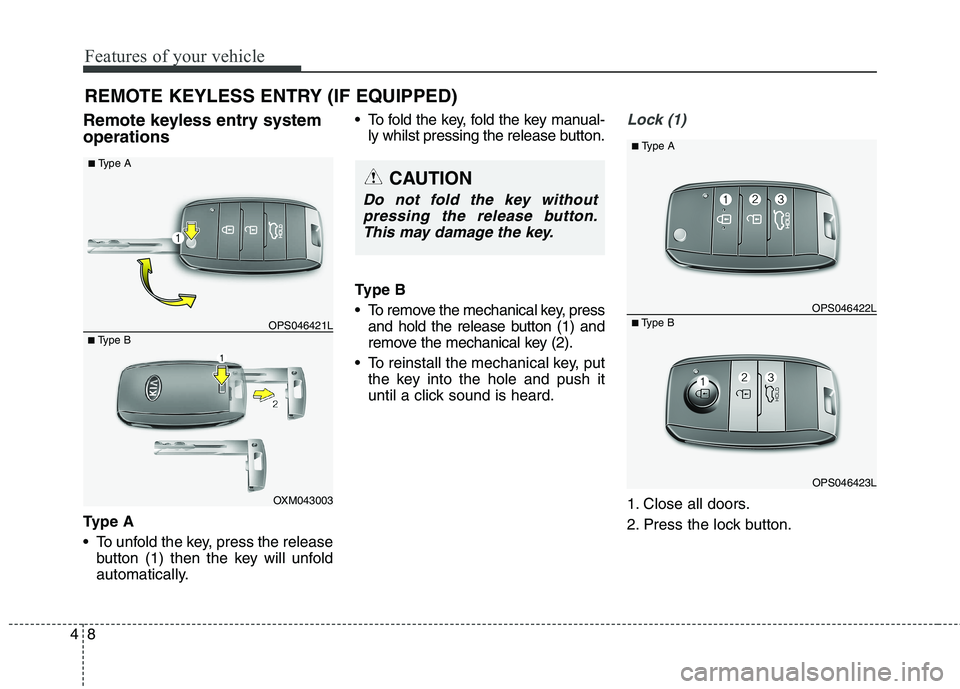
Ty p e A
To unfold the key, press the release
button (1) then the key will unfold
automatically. To fold the key, fold the key manual-
ly whilst pressing the release button.
Type B
To remove the mechanical key, press and hold the release button (1) and
remove the mechanical key (2).
To reinstall the mechanical key, put the key into the hole and push it
until a click sound is heard.Lock (1)
1. Close all doors.
2. Press the lock button.
REMOTE KEYLESS ENTRY (IF EQUIPPED)
CAUTION
Do not fold the key without
pressing the release button.This may damage the key.
OXM043003
■
Type B OPS046421L
■
Type A
OPS046423L
■
Type B OPS046422L
■
Type A
Page 106 of 723
Features of your vehicle
10
4
Transmitter precautions
✽✽
NOTICE
The transmitter will not work if any
of following occur:
The ignition key is in ignition switch.
You exceed the operating distance limit (about 10 m [30 feet]).
The battery in the transmitter is weak.
Other vehicles or objects may be blocking the signal.
The weather is extremely cold.
The transmitter is close to a radio transmitter such as a radio station
or an airport which can interfere
with normal operation of the
transmitter.
When the transmitter does not work
correctly, open and close the door
with the ignition key. If you have a
problem with the transmitter, we
recommend that you contact an
authorised Kia dealer. (Continued)(Continued)
If the transmitter is in close prox-
imity to your cell phone or smart
phone, the signal from the trans-
mitter could be blocked by normal
operation of your cell phone or
smart phone. This is especially
important when the phone is
active such as making call, receiv-
ing calls, text messaging, and/or
sending/ receiving emails. Avoid
placing the transmitter and your
cell phone or smart phone in the
same pants or jacket pocket and
maintain adequate distance
between the two devices. CAUTION
Changes or modifications not
expressly approved by the partyresponsible for compliancecould void the user’s authority to operate the equipment. If thekeyless entry system is inopera-tive due to changes or modifica- tions not expressly approved bythe party responsible for com-pliance, it will not be covered by your manufacturer’s vehiclewarranty.
CAUTION
Keep the transmitter away fromwater or any liquid. If the keylessentry system is inoperative due to exposure to water or liquids, itwill not be covered by your man-ufacturer vehicle warranty.
CAUTION
Keep the transmitter away fromelectromagnetic materials thatblocks electromagnetic waves to the key surface.
Page 107 of 723
411
Features of your vehicle
Battery replacement
A battery should last for several
years, but if the transmitter or smart
key is not working properly, try
replacing the battery with a new one.
If you are unsure how to use or
replace the battery, we recommend
that you contact an authorised Kia
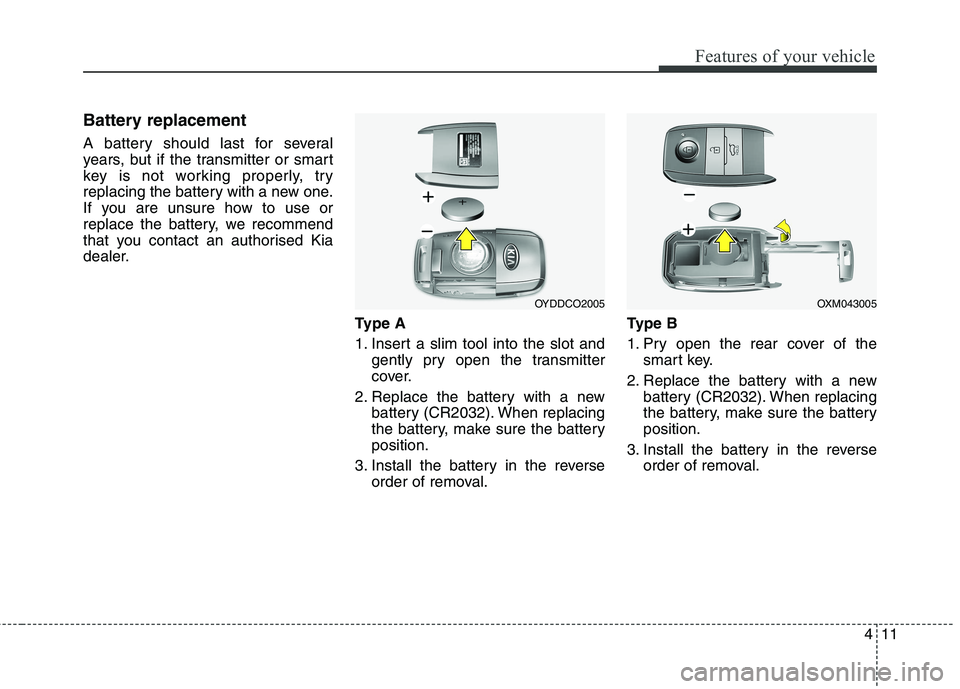
dealer.Type A
1. Insert a slim tool into the slot andgently pry open the transmitter
cover.
2. Replace the battery with a new battery (CR2032). When replacing
the battery, make sure the batteryposition.
3. Install the battery in the reverse order of removal. Ty p e B
1. Pry open the rear cover of the
smart key.
2. Replace the battery with a new battery (CR2032). When replacing
the battery, make sure the batteryposition.
3. Install the battery in the reverse order of removal.
OYDDCO2005OXM043005
Page 108 of 723
Features of your vehicle
12
4
✽✽
NOTICE
Using the wrong battery can cause the transmitter or smart key to
malfunction. Be sure to use the
correct battery.
Circuits inside the transmitter or smart key may develop problems
when dropped, exposed to mois-
ture or static electricity.
If you suspect that your transmit- ter or smart key might have sus-
tained some damage, or you feel
your transmitter or smart key is
not working correctly, we recom-
mend that you contact an autho-
rised Kia dealer.
The transmitter or smart key is designed to give you years of trou-
ble-free use, however it can mal-
function if exposed to moisture or
static electricity. If you are unsure
how to use or replace the battery,
we recommend that you contact
an authorised Kia dealer.CAUTION
An inappropriately disposed
battery can be harmful to theenvironment and human health.
Dispose the battery according toyour local law(s) or regulation.
Page 109 of 723
413
Features of your vehicle
SMART KEY (IF EQUIPPED)
Smart key function
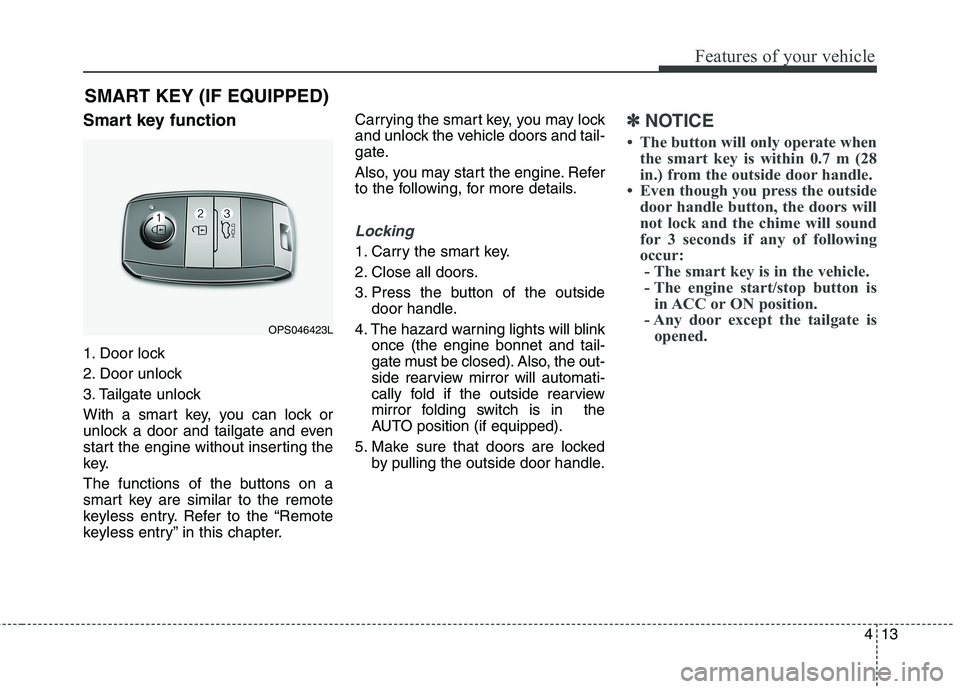
1. Door lock
2. Door unlock
3. Tailgate unlock
With a smart key, you can lock or
unlock a door and tailgate and even
start the engine without inserting the
key.
The functions of the buttons on a
smart key are similar to the remote
keyless entry. Refer to the “Remote
keyless entry” in this chapter. Carrying the smart key, you may lock
and unlock the vehicle doors and tail-
gate.
Also, you may start the engine. Refer
to the following, for more details.
Locking
1. Carry the smart key.
2. Close all doors.
3. Press the button of the outside
door handle.
4. The hazard warning lights will blink once (the engine bonnet and tail-
gate must be closed). Also, the out-
side rearview mirror will automati-
cally fold if the outside rearview
mirror folding switch is in the
AUTO position (if equipped).
5. Make sure that doors are locked by pulling the outside door handle.
✽✽ NOTICE
The button will only operate when the smart key is within 0.7 m (28
in.) from the outside door handle.
Even though you press the outside door handle button, the doors will
not lock and the chime will sound
for 3 seconds if any of following
occur:- The smart key is in the vehicle.
- The engine start/stop button is in ACC or ON position.
- Any door except the tailgate is opened.
OPS046423L
Page 110 of 723
Features of your vehicle
14
4
Unlocking
1. Carry the smart key.
2. Press the button of the front out-
side door handle.
3. All doors will unlock and the hazard warning lights will blink twice. Also,
the outside rearview mirror will
automatically unfold if the outside
rearview mirror folding switch is in
the AUTO position (if equipped).
✽✽ NOTICE
The button will only operate when the smart key is within 0.7 m (28
in.) from the outside door handle.
When the smart key is recognized in the area of 0.7 m (28 in.) from
the front outside door handle, other
people can also open the doors.
After unlocking all doors, the doors will lock and the outside
rearview mirror will unfold if the
outside rearview mirror folding
switch is in the AUTO position (if
equipped) unless a door is opened
within 30 seconds.
Tailgate unlocking
1. Carry the smart key.
2. Press the tailgate handle switch.
3. The tailgate will unlock.
✽✽ NOTICE
Once the tailgate is opened and then closed, the tailgate will lock
automatically.
The button will only operate when the smart key is within 0.7 m (28
in.) from the tailgate handle.
Smart key precautions
✽✽ NOTICE
If, for some reason, you happen to lose your smart key, you will not
be able to start the engine. Tow
the vehicle, if necessary, we recom-
mend that you contact an autho-
rised Kia dealer.
A maximum of 2 smart keys can be registered to a single vehicle. If
you lose a smart key, we recom-
mend that you contact an autho-
rised Kia dealer.
The smart key will not work if any of the following occurs:
- The smart key is close to a radiotransmitter such as a radio sta-
tion or an airport which can
interfere with normal operation
of the smart key.
- The smart key is near a mobile two-way radio system or a
mobile phone.
- Another vehicle’s smart key is being operated close to your
vehicle. (Continued)
Page 111 of 723
415
Features of your vehicle
(Continued)When the smart key does not work
properly, open and close the door
with the mechanical key. If you
have a problem with the smart
key, we recommend that you con-
tact an authorised Kia dealer.
If the smart key is in close proximity to your cell phone or smart phone,
the signal from the smart key could
be blocked by normal operation of
your cell phone or smart phone. This
is especially important when the
phone is active such as making call,
receiving calls, text messaging,
and/or sending/receiving emails.
Avoid placing the smart key and
your cell phone or smart phone in
the same pants or jacket pocket and
maintain adequate distance between
the two devices.Door lock/unlock in an emer-
gency situation
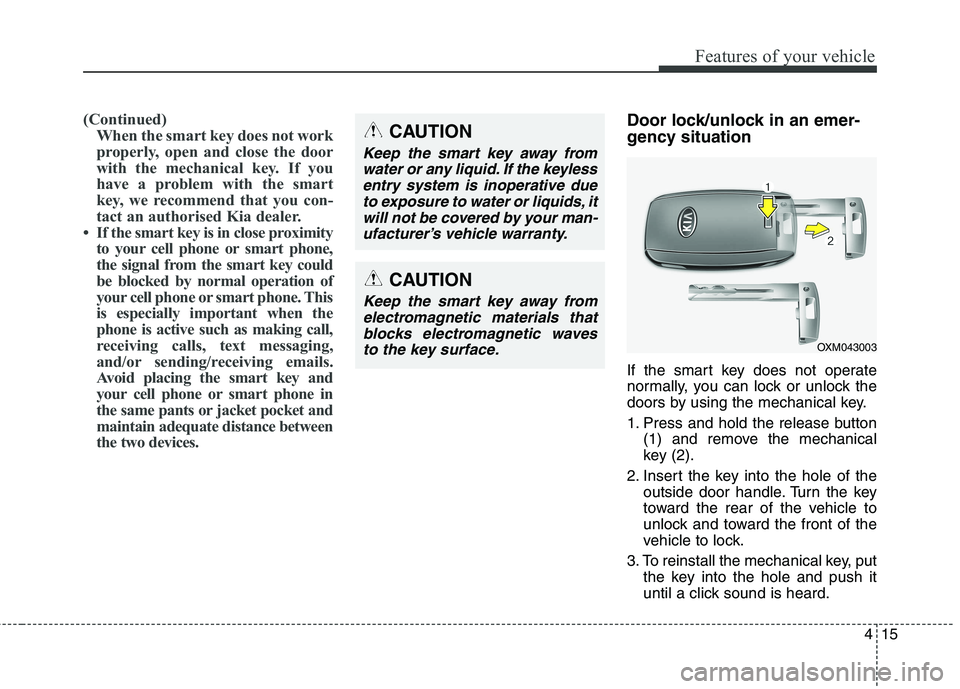
If the smart key does not operate
normally, you can lock or unlock the
doors by using the mechanical key.
1. Press and hold the release button (1) and remove the mechanical
key (2).
2. Insert the key into the hole of the outside door handle. Turn the key
toward the rear of the vehicle to
unlock and toward the front of the
vehicle to lock.
3. To reinstall the mechanical key, put the key into the hole and push it
until a click sound is heard.CAUTION
Keep the smart key away from
water or any liquid. If the keylessentry system is inoperative due to exposure to water or liquids, itwill not be covered by your man-ufacturer’s vehicle warranty.
OXM043003
CAUTION
Keep the smart key away fromelectromagnetic materials thatblocks electromagnetic waves to the key surface.
Page 112 of 723
Features of your vehicle
16
4
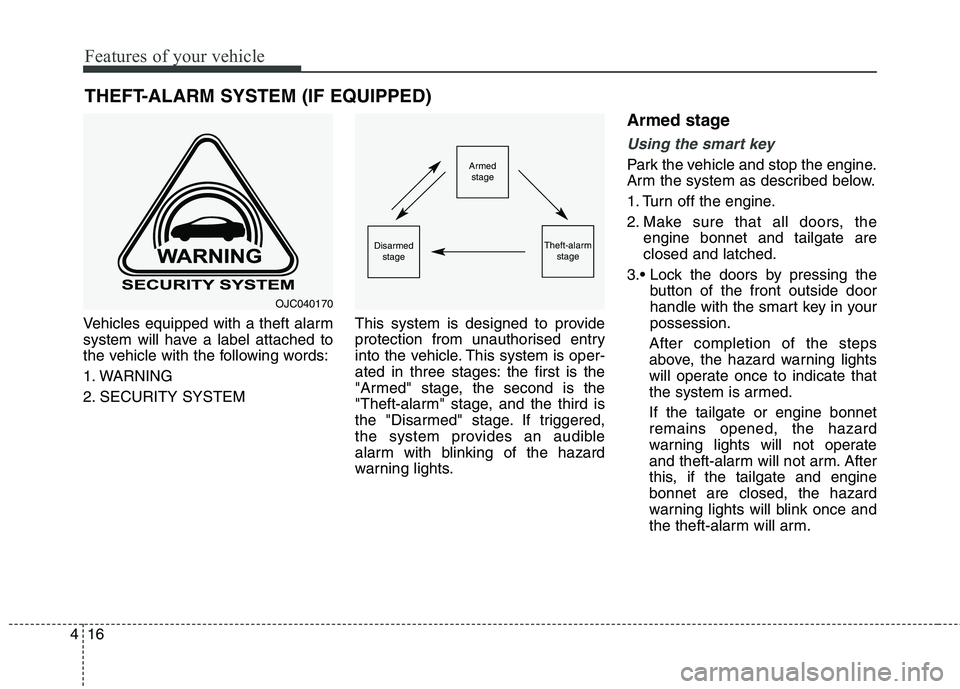
Vehicles equipped with a theft alarm
system will have a label attached to
the vehicle with the following words:
1. WARNING
2. SECURITY SYSTEM This system is designed to provide
protection from unauthorised entry
into the vehicle. This system is oper-
ated in three stages: the first is the
"Armed" stage, the second is the
"Theft-alarm" stage, and the third is
the "Disarmed" stage. If triggered,
the system provides an audible
alarm with blinking of the hazard
warning lights.Armed stage
Using the smart key
Park the vehicle and stop the engine.
Arm the system as described below.
1. Turn off the engine.
2. Make sure that all doors, the
engine bonnet and tailgate are closed and latched.
button of the front outside door
handle with the smart key in yourpossession.
After completion of the steps
above, the hazard warning lights
will operate once to indicate that
the system is armed. If the tailgate or engine bonnet remains opened, the hazard
warning lights will not operate
and theft-alarm will not arm. After
this, if the tailgate and enginebonnet are closed, the hazard
warning lights will blink once and
the theft-alarm will arm.
THEFT-ALARM SYSTEM (IF EQUIPPED)Armed
stage
Theft-alarm stageDisarmedstage
OJC040170
Page 113 of 723
417
Features of your vehicle
lock button on the smart key.
After completion of the steps
above, the hazard warning lights
will operate once to indicate that
the system is armed. If the tailgate or engine bonnet remains opened, the hazard
warning lights will not operate
and theft-alarm will not arm. After
this, if the tailgate and enginebonnet are closed, the hazard
warning lights will blink once and
the theft-alarm will arm.Using the transmitter
Park the vehicle and stop the engine.
Arm the system as described below.
1. Turn off the engine and remove the ignition key from the ignition switch.
2. Make sure that all doors, the engine bonnet and tailgate areclosed and latched.
3. Lock the doors by pressing the lock button on the transmitter.
After completion of the steps
above, the hazard warning lights
will blink once to indicate that the
system is armed. If the tailgate or engine bonnet
remains opened, the hazard warn-
ing lights will not operate and
theft-alarm will not arm. After this,if the tailgate and engine bonnet
are closed, the hazard warning
lights will blink once and the theft-
alarm will arm. Do not arm the system until all
passengers have left the vehi-
cle. If the system is armed whilst
a passenger(s) remains in the
vehicle, the alarm may be acti-
vated when the remaining pas-
senger(s) leave the vehicle. If
any door, tailgate or engine bon-net is opened within 30 seconds
after entering the armed stage,the system is disarmed to pre-
vent unnecessary alarm.
Page 114 of 723
Features of your vehicle
18
4
Theft-alarm stage
The alarm will be activated if any of
the following occurs whilst the sys-
tem is armed.
A front or rear door is opened with-
out using transmitter or smart key.
The tailgate is opened without using transmitter or smart key.
The engine bonnet is opened.The siren will sound and the hazard
warning lights will blink continuously
for 27 seconds, unless the system is
disarmed. To turn off the system,
unlock the doors with the transmitter
or smart key. Disarmed stage
The system will be disarmed when:
Transmitter
- The door unlock button is pressed.
- The engine is started.
- The ignition switch is in the “ON”
position for 30 seconds or more.
Smart key
- The door unlock button is pressed.
- The button of the front outside dooris pressed whilst carrying the
smart key.
- The engine is started.
After the doors are unlocked, the haz-
ard warning lights will blink twice to
indicate that the system is disarmed.
After pressing the unlock button, if
any door (or tailgate) is not opened
within 30 seconds, the system will be
rearmed.
✽✽ NOTICE
Without smart key system If the system is not disarmed withthe transmitter, insert the key into
the ignition switch and start the
engine. Then the system will be
disarmed.
With smart key system If the system is not disarmed with
the smart key, open the door with
the mechanical key and start the
engine. Then the system will be
disarmed.
If you lose your keys, we recom- mend that you consult an autho-
rised Kia dealer.
CAUTION
Do not change, alter or adjust the
theft-alarm system because itcould cause the theft-alarm sys- tem to malfunction and we rec-ommend that the system be serv-iced by an authorised Kia dealer.
Malfunctions caused by improp-er alterations, adjustments or modifications to the theft-alarmsystem are not covered by yourvehicle manufacturer warranty.