key battery KIA CARENS RHD 2017 User Guide
[x] Cancel search | Manufacturer: KIA, Model Year: 2017, Model line: CARENS RHD, Model: KIA CARENS RHD 2017Pages: 723, PDF Size: 40.8 MB
Page 320 of 723
537
Audio system
CAUTION
Bluetooth®Wireless Technology
connection may become inter- mittently disconnected in somemobile phones. Follow these next steps to try again.
1) Turn the Bluetooth ®
Wireless
Technology function within the mobile phone ON/OFF and tryto connect again.
2) Turn the mobile phone power ON/OFF and try to connectagain.
3) Completely remove the mobile phone battery, reboot, and thentry to connect again.
4) Reboot the audio system and try to connect again
5) Delete all paired devices in your mobile phone and theaudio system and pair again for use.
Bluetooth®Wireless
Technology System Off
This feature is used when you do not wish to use the
Bluetooth®Wireless
Technology system.
Select [Bluetooth System Off] Set
through TUNE knob ❈ If a phone is already connected, disconnect the currently connect-
ed phone and turn the
Bluetooth®
Wireless Technology system off.
Using the
Bluetooth®Wireless
Technology System
To use
Bluetooth®Wireless
Technology when the system is cur-
rently off, follow these next steps.
®Wireless
Technology through the Key
Press the key Screen Guidance ❈ Moves to the screen where Bluetooth
®Wireless Technology
functions can be used and dis-
plays guidance. On
Bluetooth®Wireless
Technology through the Key
Press the key Select [Phone] ➀ A screen asking whether to turn on
Bluetooth®Wireless Technology will
be displayed.
➁ On the screen, select to turn on
Bluetooth®Wireless Technology
and display guidance.
❈ If the
Bluetooth®Wireless
Technology system is turned on, the
system will automatically try to con-nect the most recently connected
Bluetooth®Wireless Technology
mobile phone. YES
SETUP
SETUP
PHONE
PHONE
Page 377 of 723
Audio system
94
5
✽✽
NOTICE - USING THE
iPod®DEVICE
iPod ®
is a registered trademark of
Apple Inc.
In order to use the iPod whilst operating the keys, you must use a
dedicated iPod cable. (the cable
that is supplied when purchasing
iPod/iPhone products)
If the iPod is connected to the vehicle whilst it is playing, a high
pitch sound could occur for
approximately 1-2 seconds imme-
diately after connecting. If possi-
ble, connect the iPod to the vehicle
with the iPod stopped/paused.
During ACC ON state, connecting the iPod through the iPod cable
will charge the iPod through the
car audio system.
When connecting with the iPod cable, make sure to fully insert the
jack to prevent communication
interference. (Continued)(Continued)
When the EQ features of an exter-
nal device, such as the iPod, and the
audio system are both active, EQ
effects could overlap and cause
sound deterioration and distortion.
Whenever possible, turn off the EQ
feature within the external device
upon use by connecting with the
audio system.
Noise may occur when an iPod or AUX device is connected. When
such devices are not being used, dis-
connect the device for storage.
When the iPod or AUX device power is connected to the power
jack, playing the external device
may result in noise. In such cases,
disconnect the power connection
before use.
Skipping or improper operation may occur depending on the charac-
teristics of your iPod/Phone device.
If your iPh one is connected to both
the Bluetooth ®
Wireless Technology
and USB, the sound may not be
properly played. In your iPhone,
select the Dock connector or
Bluetooth ®
Wireless Technology to
change the sound output (source). (Continued)(Continued)
iPod mode cannot be operated
when the iPod cannot be recog-
nized due to the playing of ver-
sions that do not support commu-
nication protocols, cases of iPod
abnormalities and defects.
For fifth generation iPod Nano devices, the iPod may not be rec-
ognized when the battery level is
low. Please charge the iPod for
use.
Search/play orders shown within the iPod device may differ with the
orders shown within the audio sys-
tem.
If the iPod malfunctions due to an iPod device defect, reset the iPod
and try again. (To learn more,
refer to your iPod manual)
Some iPods may not sync with the System depending on its version.
If the Media is removed before the
Media is recognized, then the sys-
tem may not properly restore the
previously operated mode. (iPad
charging is not supported.)
Page 441 of 723
Driving your vehicle
6
6
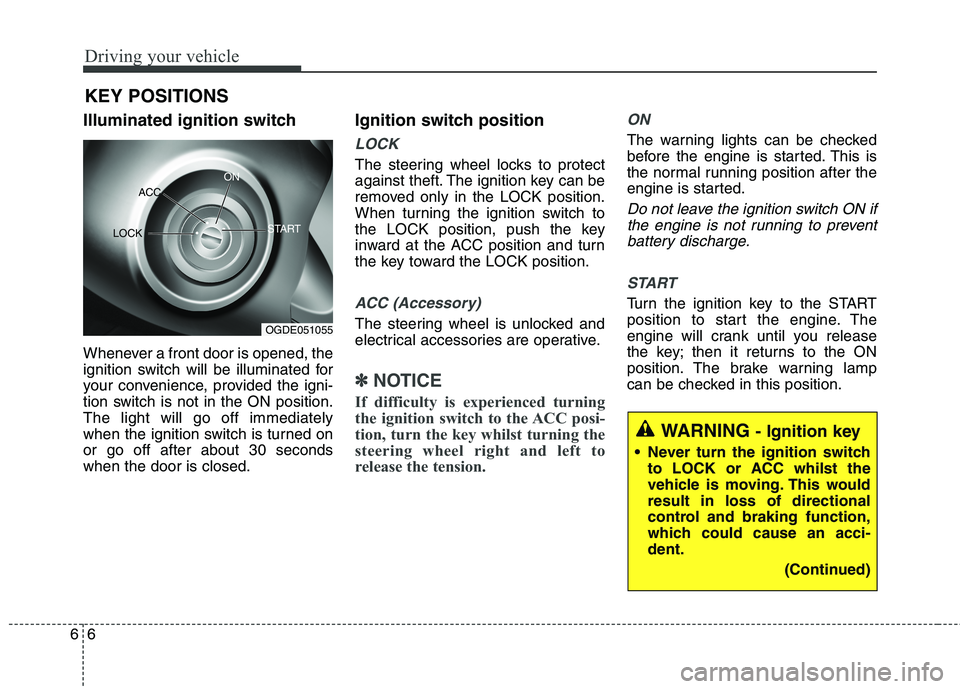
Illuminated ignition switch
Whenever a front door is opened, the
ignition switch will be illuminated for
your convenience, provided the igni-
tion switch is not in the ON position.The light will go off immediately
when the ignition switch is turned onor go off after about 30 secondswhen the door is closed. Ignition switch position
LOCK
The steering wheel locks to protect
against theft. The ignition key can be
removed only in the LOCK position.
When turning the ignition switch to
the LOCK position, push the key
inward at the ACC position and turn
the key toward the LOCK position.
ACC (Accessory)
The steering wheel is unlocked and
electrical accessories are operative.
✽✽
NOTICE
If difficulty is experienced turning
the ignition switch to the ACC posi-
tion, turn the key whilst turning the
steering wheel right and left to
release the tension.
ON
The warning lights can be checked
before the engine is started. This is
the normal running position after the
engine is started.
Do not leave the ignition switch ON if the engine is not running to preventbattery discharge.
START
Turn the ignition key to the START
position to start the engine. The
engine will crank until you release
the key; then it returns to the ON
position. The brake warning lamp
can be checked in this position.
KEY POSITIONS
WARNING
- Ignition key
Never turn the ignition switch to LOCK or ACC whilst the
vehicle is moving. This wouldresult in loss of directional
control and braking function,
which could cause an acci-dent.
(Continued)
OGDE051055
ACC
ON
START
LOCK
Page 451 of 723
Driving your vehicle
16
6
✽✽
NOTICE
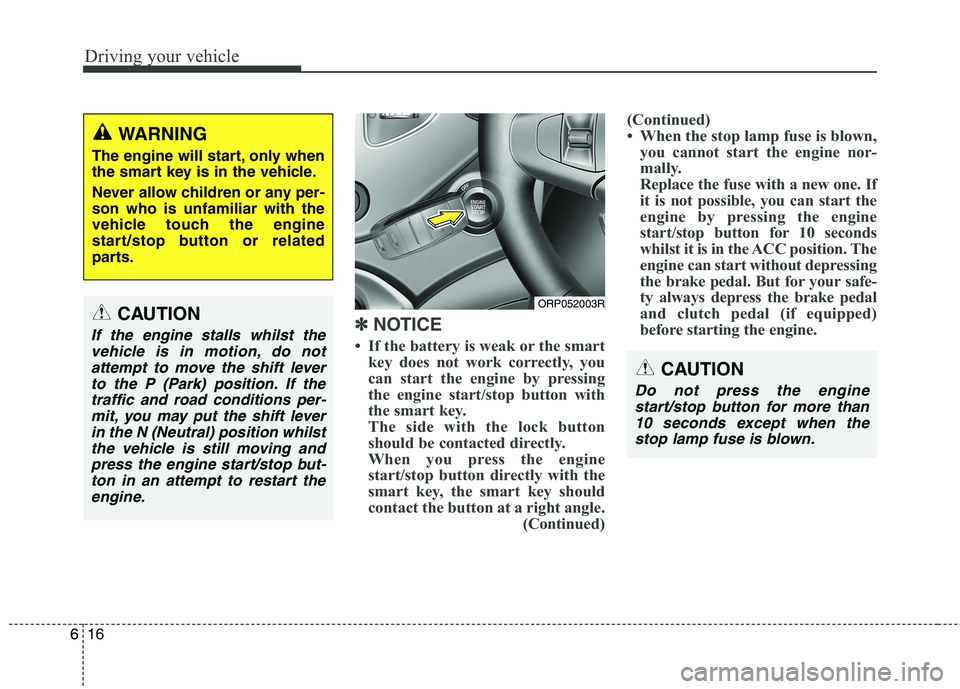
If the battery is weak or the smart key does not work correctly, you
can start the engine by pressing
the engine start/stop button with
the smart key.
The side with the lock button
should be contacted directly.
When you press the engine
start/stop button directly with the
smart key, the smart key should
contact the button at a right angle. (Continued) (Continued)
When the stop lamp fuse is blown,
you cannot start the engine nor-
mally.
Replace the fuse with a new one. If
it is not possible, you can start the
engine by pressing the engine
start/stop button for 10 seconds
whilst it is in the ACC position. The
engine can start without depressing
the brake pedal. But for your safe-
ty always depress the brake pedal
and clutch pedal (if equipped)
before starting the engine.
CAUTION
Do not press the engine
start/stop button for more than10 seconds except when thestop lamp fuse is blown.
ORP052003RCAUTION
If the engine stalls whilst thevehicle is in motion, do notattempt to move the shift lever to the P (Park) position. If thetraffic and road conditions per-mit, you may put the shift lever in the N (Neutral) position whilstthe vehicle is still moving andpress the engine start/stop but-ton in an attempt to restart the engine.
WARNING
The engine will start, only when
the smart key is in the vehicle.
Never allow children or any per- son who is unfamiliar with the
vehicle touch the engine
start/stop button or related
parts.
Page 653 of 723
Maintenance
66
8
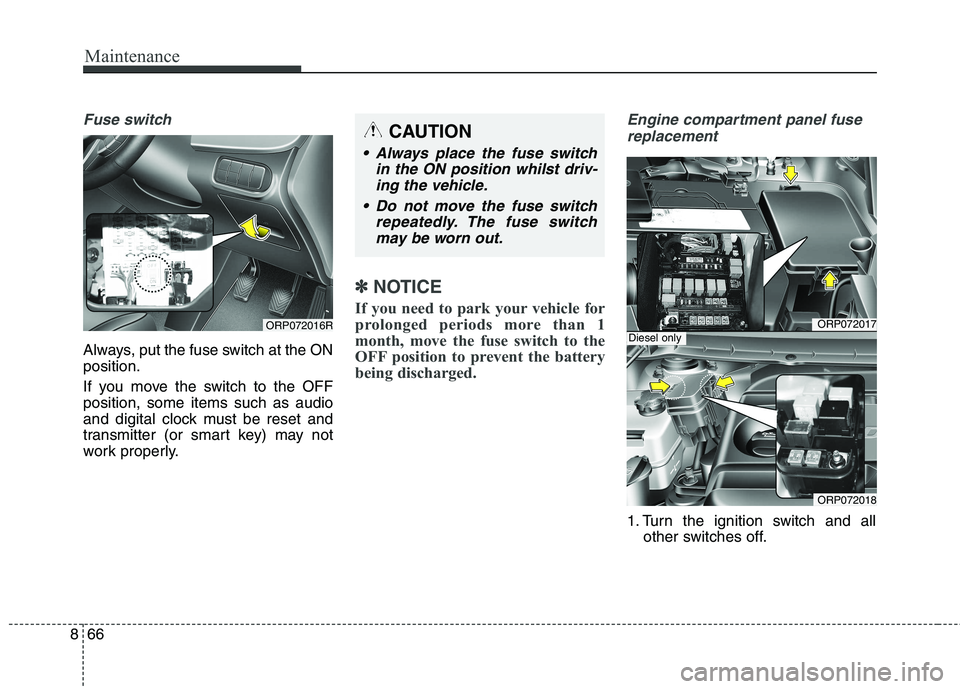
Fuse switch
Always, put the fuse switch at the ON position.
If you move the switch to the OFF position, some items such as audio
and digital clock must be reset and
transmitter (or smart key) may not
work properly.
✽✽
NOTICE
If you need to park your vehicle for
prolonged periods more than 1
month, move the fuse switch to the
OFF position to prevent the battery
being discharged.
Engine compartment panel fuse replacement
1. Turn the ignition switch and all other switches off.
CAUTION
Always place the fuse switch
in the ON position whilst driv-ing the vehicle.
Do not move the fuse switch repeatedly. The fuse switchmay be worn out.
ORP072017
ORP072018
Diesel onlyORP072016R
Page 720 of 723
Index
8
I
Parking brake - hand type ..............................................8-39
Checking the parking brake ......................................8-39
Rear parking assist system ............................................4-96 Non-operational conditions of rear parking assist system ........................................4-97
Operation of the rear parking assist system................4-96
Rear parking assist system precautions ......................4-98
Self-diagnosis..............................................................4-99
Rearview camera..........................................................4-116
Recommended lubricants and capacities ........................9-8 Recommended SAE viscosity number ......................9-10
Refrigerant label ............................................................9-13
Remote keyless entry ......................................................4-8 Battery replacement ....................................................4-11
Remote keyless entry system operations ......................4-8
Transmitter precautions ..............................................4-10
Road warning ..................................................................7-2 Hazard warning flasher ..............................................7-2
Scheduled maintenance service ..................................8-11
Seat ..................................................................................3-2 Armrest ......................................................................3-19
Front seat adjustment - Manual ....................................3-6 Front seat adjustment - Power ......................................3-7
Headrest (Front seat) ..................................................3-10
Headrest (Rear seat) ....................................................3-20
Rear seat adjustment ..................................................3-13
Seatback pocket ..........................................................3-13
Seat belt ........................................................................3-22 3 Point rear centre belt ................................................3-29
Care of seat belts ........................................................3-37
Lap belt ......................................................................3-28
Lap/shoulder belt ........................................................3-26
Pre-tensioner seat belt ................................................3-32
Seat belt precautions ..................................................3-35
Seat belt warning ........................................................3-24
Smart key ......................................................................4-13 Door lock/unlock in an emergency situation ..............4-15
Smart key function ......................................................4-13
Smart key precautions ................................................4-14
Smart parking assist system (SPAS)............................4-106 How the system works ..............................................4-110
Non-operating condition ..........................................4-107
Operating condition ..................................................4-107
System malfunction ..................................................4-115
Special driving conditions ............................................6-92 Driving at night ..........................................................6-93
Driving in flooded areas ............................................6-94
Driving in the rain ......................................................6-94
Driving off-road ..........................................................6-94
Hazardous driving conditions ..................................6-92
S
R