steering KIA CARENS RHD 2017 User Guide
[x] Cancel search | Manufacturer: KIA, Model Year: 2017, Model line: CARENS RHD, Model: KIA CARENS RHD 2017Pages: 723, PDF Size: 40.8 MB
Page 97 of 723

Features of your vehicle
Keys . . . . . . . . . . . . . . . . . . . . . . . . . . . . . . . . . . . . . . 4-5• Record your key number . . . . . . . . . . . . . . . . . . . . . . . 4-5
. . . . . . . . . . . . . . . . . . . . . . . . . . . . . . . . 4-5
. . . . . . . . . . . . . . . . . . . . . . . . . . . . 4-6
Remote keyless entry . . . . . . . . . . . . . . . . . . . . . . . . 4-8 . . . . . . . . . . . 4-8
. . . . . . . . . . . . . . . . . . . . . . . 4-10
. . . . . . . . . . . . . . . . . . . . . . . . . . 4-11
Smart key . . . . . . . . . . . . . . . . . . . . . . . . . . . . . . . . 4-13 . . . . . . . . . . . . . . . . . . . . . . . . . . . 4-13
. . . . . . . . . . . . . . . . . . . . . . . . 4-14
. . . . . . 4-15
Theft-alarm system . . . . . . . . . . . . . . . . . . . . . . . . 4-16 . . . . . . . . . . . . . . . . . . . . . . . . . . . . . . . . . 4-16
. . . . . . . . . . . . . . . . . . . . . . . . . . . . 4-18
Theft-alarm system (intrusion protection system, UK only) . . . . . . . 4-19 . . . . . . . . . . . . . . . . . . . . . . . . . . . . . . . . . 4-19
. . . . . . . . . . . . . . . . . . . . . . . . . . . . 4-21
. . . . . . . . . . . . . . . . . . . . . . . . . . . . . . . . 4-22
Door locks . . . . . . . . . . . . . . . . . . . . . . . . . . . . . . . . 4-23 . . . . 4-23
. . . . . . . . . . . . . . . . . . . . . . . . . . . . . . . . . . . 4-27
. . . . . . . . . . . . . . . . . 4-29
Tailgate . . . . . . . . . . . . . . . . . . . . . . . . . . . . . . . . . . 4-30 . . . . . . . . . . . . . . . . . . . . . . . . . . 4-30
. . . . . . . . . . . . . . . . . . . . . . . . . . . 4-31
. . . . . . . . . . . . . . . 4-32
Windows . . . . . . . . . . . . . . . . . . . . . . . . . . . . . . . . . 4-33 . . . . . . . . . . . . . . . . . . . . . . . . . . . . . . 4-34
Bonnet . . . . . . . . . . . . . . . . . . . . . . . . . . . . . . . . . . . 4-38 . . . . . . . . . . . . . . . . . . . . . . . . . . 4-38
. . . . . . . . . . . . . . . . . . . . . . . . . . . . 4-39
Fuel filler lid . . . . . . . . . . . . . . . . . . . . . . . . . . . . . . 4-41 . . . . . . . . . . . . . . . . . . . . . . 4-41
. . . . . . . . . . . . . . . . . . . . . . . 4-41
Panorama sunroof . . . . . . . . . . . . . . . . . . . . . . . . . 4-44
. . . . . . . . . . . . . . . . . . . . . . . . . . . . . . . . . . . 4-45
. . . . . . . . . . . . . . . . . . . . . . . . . . . 4-45
. . . . . . . . . . . . . . . . . . . . . . . . . . . 4-45
. . . . . . . . . . . . . . . . . . . . . . . . . . . 4-46
. . . . . . . . . . . . . . . . . . . . . . . . . 4-47
Steering wheel . . . . . . . . . . . . . . . . . . . . . . . . . . . . . 4-48 . . . . . . . . . . . . . . . . 4-48
. . . . . . . . . . . . . . . . . . . . . . 4-49
4
Page 144 of 723
Features of your vehicle
48
4
STEERING WHEEL
Electronic power steering (EPS)
Power steering uses the motor to
assist you in steering the vehicle. If
the engine is off or if the power steer-
ing system becomes inoperative, the
vehicle may still be steered, but it will
require increased steering effort.
The motor driven power steering is
controlled by the power steering con-
trol unit which senses the steering
wheel torque and vehicle speed to
command the motor.
The steering wheel becomes heavier
as the vehicle’s speed increases and
becomes lighter as the vehicle’s
speed decreases for better control of
the steering wheel.
Should you notice any change in the
effort required to steer during normal
vehicle operation, we recommend
that the system be checked by an
authorised Kia dealer.
✽✽ NOTICE
The following symptoms may occur
during normal vehicle operation:
The EPS warning light does not illuminate.
The steering effort is high immedi- ately after turning the ignition
switch on. This happens as the sys-
tem performs the EPS system diag-
nostics. When the diagnostics is
completed, the steering wheel will
return to its normal condition.
A click noise may be heard from the EPS relay after the ignition switch
is turned to the ON or LOCK/OFF
position.
Motor noise may be heard when the vehicle is at a stop or at a low driv-
ing speed.
The steering effort increases if the steering wheel is rotated continu-
ously when the vehicle is not in
motion. However, after a few min-
utes, it will return to its normal con-
ditions. (Continued)(Continued)
If an error is detected in the electric
power steering system, EPS will
stop assisting driver in steering the
vehicle to prevent accidents and the
warning light on the cluster will
illuminate or blink. We recom-
mend that the system be checked
by an authorised Kia dealer.
When you operate the steering wheel in low temperature, abnor-
mal noise could occur. If tempera-
ture rises, the noise will disappear.
This is a normal condition.
When the vehicle is stationary, if you turn the steering wheel all the
way to the left or right continuously,
the steering wheel becomes heavier
from the end. This is not a system
malfunction but for your safety. As
time passes, the steering wheel
returns to its normal condition.
When the charging system warn- ing light comes on or the voltage is
low (When the alternator (or bat-
tery) does not operate normally or
it malfunctions), the steering wheel
may get heavy and become diffi-
cult to control operate abnormally.
Page 145 of 723
449
Features of your vehicle
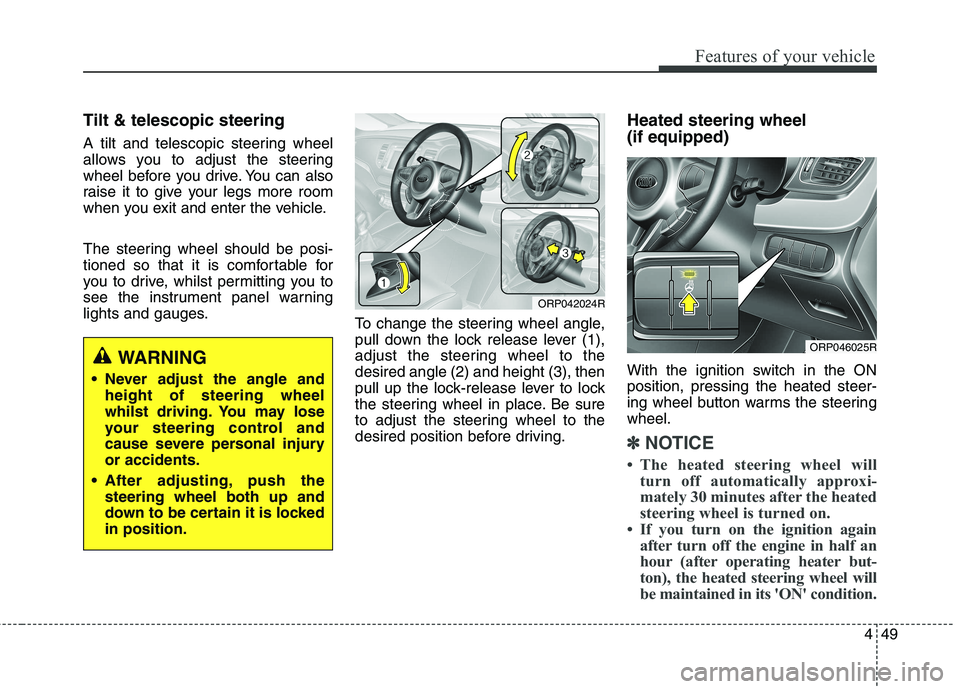
Tilt & telescopic steering
A tilt and telescopic steering wheel
allows you to adjust the steering
wheel before you drive. You can also
raise it to give your legs more room
when you exit and enter the vehicle.
The steering wheel should be posi-
tioned so that it is comfortable for
you to drive, whilst permitting you to
see the instrument panel warning
lights and gauges.To change the steering wheel angle,
pull down the lock release lever (1),
adjust the steering wheel to thedesired angle (2) and height (3), then
pull up the lock-release lever to lock
the steering wheel in place. Be sure
to adjust the steering wheel to the
desired position before driving.Heated steering wheel (if equipped)
With the ignition switch in the ON position, pressing the heated steer-
ing wheel button warms the steeringwheel.
✽✽
NOTICE
The heated steering wheel will turn off automatically approxi-
mately 30 minutes after the heated
steering wheel is turned on.
If you turn on the ignition again after turn off the engine in half an
hour (after operating heater but-
ton), the heated steering wheel will
be maintained in its 'ON' condition.
WARNING
Never adjust the angle and height of steering wheel
whilst driving. You may lose
your steering control and
cause severe personal injuryor accidents.
After adjusting, push the steering wheel both up and
down to be certain it is lockedin position.
ORP042024R
ORP046025R
Page 146 of 723
Features of your vehicle
50
4
Horn
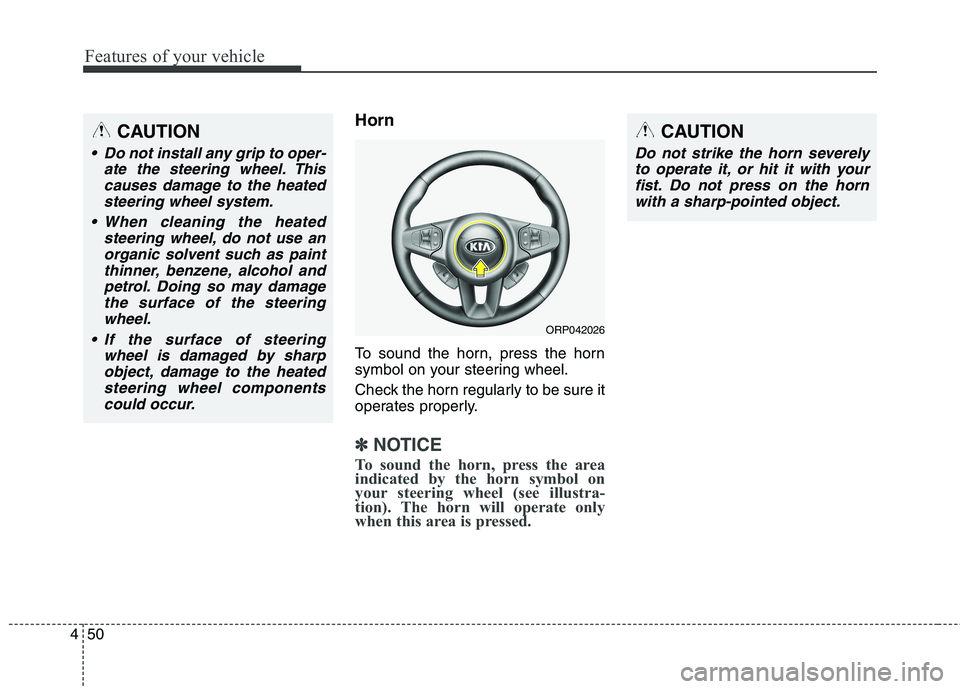
To sound the horn, press the horn
symbol on your steering wheel.
Check the horn regularly to be sure it
operates properly.
✽✽
NOTICE
To sound the horn, press the area
indicated by the horn symbol on
your steering wheel (see illustra-
tion). The horn will operate only
when this area is pressed.
ORP042026
CAUTION
Do not strike the horn severely to operate it, or hit it with yourfist. Do not press on the hornwith a sharp-pointed object.
CAUTION
Do not install any grip to oper- ate the steering wheel. Thiscauses damage to the heatedsteering wheel system.
When cleaning the heated steering wheel, do not use anorganic solvent such as paint thinner, benzene, alcohol andpetrol. Doing so may damagethe surface of the steering wheel.
If the surface of steering wheel is damaged by sharpobject, damage to the heatedsteering wheel components could occur.
Page 147 of 723
451
Features of your vehicle
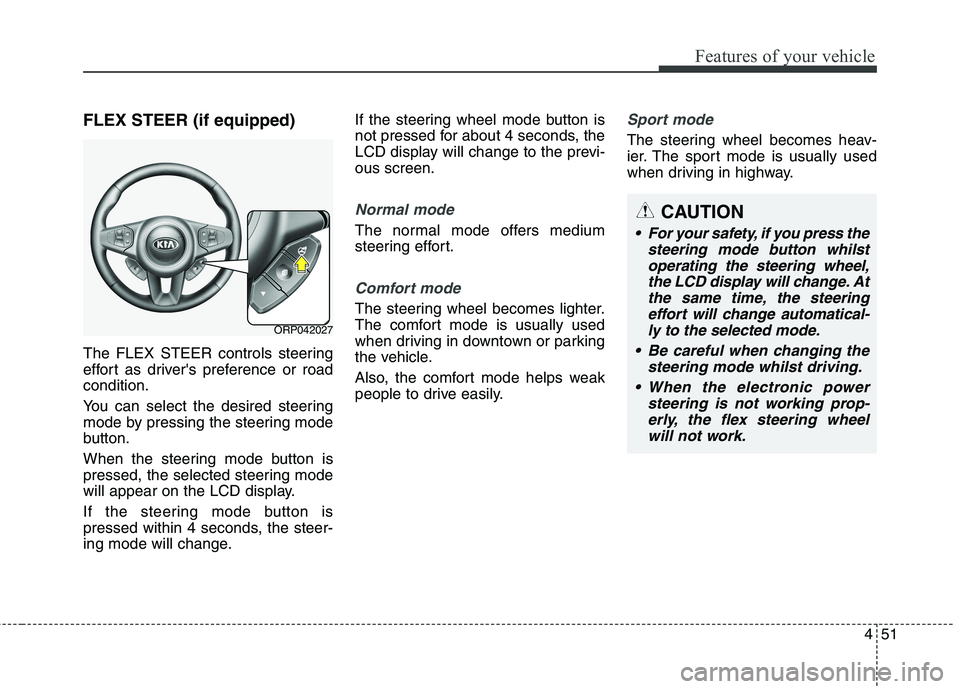
FLEX STEER (if equipped)
The FLEX STEER controls steering
effort as driver's preference or roadcondition.
You can select the desired steering
mode by pressing the steering mode
button.
When the steering mode button is
pressed, the selected steering mode
will appear on the LCD display.
If the steering mode button is
pressed within 4 seconds, the steer-
ing mode will change.If the steering wheel mode button is
not pressed for about 4 seconds, the
LCD display will change to the previ-ous screen.
Normal mode
The normal mode offers medium
steering effort.
Comfort mode
The steering wheel becomes lighter.
The comfort mode is usually used
when driving in downtown or parking
the vehicle.
Also, the comfort mode helps weak
people to drive easily.
Sport mode
The steering wheel becomes heav-
ier. The sport mode is usually used
when driving in highway.
ORP042027
CAUTION
For your safety, if you press the
steering mode button whilstoperating the steering wheel, the LCD display will change. Atthe same time, the steeringeffort will change automatical- ly to the selected mode.
Be careful when changing the steering mode whilst driving.
When the electronic power steering is not working prop-erly, the flex steering wheelwill not work.
Page 155 of 723
![KIA CARENS RHD 2017 User Guide 459
Features of your vehicle
LCD Display Control
The LCD display modes can be
changed by using the control buttons
on the steering wheel.
[Type A]
(1) : TRIP button for changing tripmodes
(2) :](/img/2/57939/w960_57939-154.png "KIA CARENS RHD 2017 User Guide 459
Features of your vehicle
LCD Display Control
The LCD display modes can be
changed by using the control buttons
on the steering wheel.
[Type A]
(1) : TRIP button for changing tripmodes
(2) :")
459
Features of your vehicle
LCD Display Control
The LCD display modes can be
changed by using the control buttons
on the steering wheel.
[Type A]
(1) : TRIP button for changing tripmodes
(2) : RESET button for resetting items [Type B]
(1) : MODE button for changing
modes or SELECT button
for setting the selected item
(2) : MOVE button for changing items or RESET button forresetting the selected item
❈ For the LCD modes, refer to “LCD
Display” in this chapter.
ORP042032
Page 165 of 723

469
Features of your vehicle
Service in OFF
If the service interval is not set,
“Service in OFF” message is dis-
played on the LCD display (for type A).
✽✽NOTICE
If any of the following conditions
occurs, the mileage and days may be
incorrect.
- The battery cable is disconnected.
- The fuse switch is turned off.
- The battery is discharged.
User Settings Mode
Description
On this mode, you can change set-
ting of the doors, lamps, and so on.
Driving Assist (if equipped)
Rear Cross Traffic Alert (if equipped) : If this item is checked,
the rear cross traffic alert function
will be activated.
❈ For more details, refer to "Blind SpotDetection System" in chapter 6.
BSD (Blind Spot Detection)Sound (if equipped) : If this item
checked, the blind spot detection
sound will be activated.
❈ For more details, refer to "Blind SpotDetection System" in chapter 6.
ORP046315L
ORP046317L
WARNING
Do not adjust the User Setting
whilst driving. You may lose
your steering control and cause
severe personal injury or acci-dents.
Page 168 of 723
Features of your vehicle
72
4
Warning Messages (if equipped)
Shift to "P" position (for smart key
system and automatic transaxle / dual clutch transmission)
This warning message illuminates if you try to turn off the engine without
the shift lever in P (Park) position.
At this time, the Engine Start/Stop Button turns to the ACC position (If
you press the Engine Start/Stop
Button once more, it will turn to theON position).
Low Key Battery
(for smart key system)
This warning message illuminates if the battery of the smart key is discharged when the Engine
Start/Stop Button changes to theOFF position.
Press start button whilst turn
steering (for smart key system)
This warning message illuminates if the steering wheel does not
unlock normally when the Engine
Start/Stop Button is pressed.
It means that you should press the Engine Start/Stop Button whilst
turning the steering wheel rightand left.
Steering wheel unlocked
(for smart key system)
This warning message illuminates if the steering wheel does not lock
when the Engine Start/Stop Buttonchanges to the OFF position.
Check steering wheel lock
system (for smart key system)
This warning message illuminates if the steering wheel does not lock
normally when the Engine
Start/Stop Button changes to theOFF position.
Press brake pedal to start engine
(for smart key system and auto- matic transaxle / dual clutchtransmission)
This warning message illuminates if the Engine Start/Stop Button
changes to the ACC position twice
by pressing the button repeatedly
without depressing the brake pedal.
It means that you should depress the brake pedal to start the engine.
Page 174 of 723
Features of your vehicle
78
4
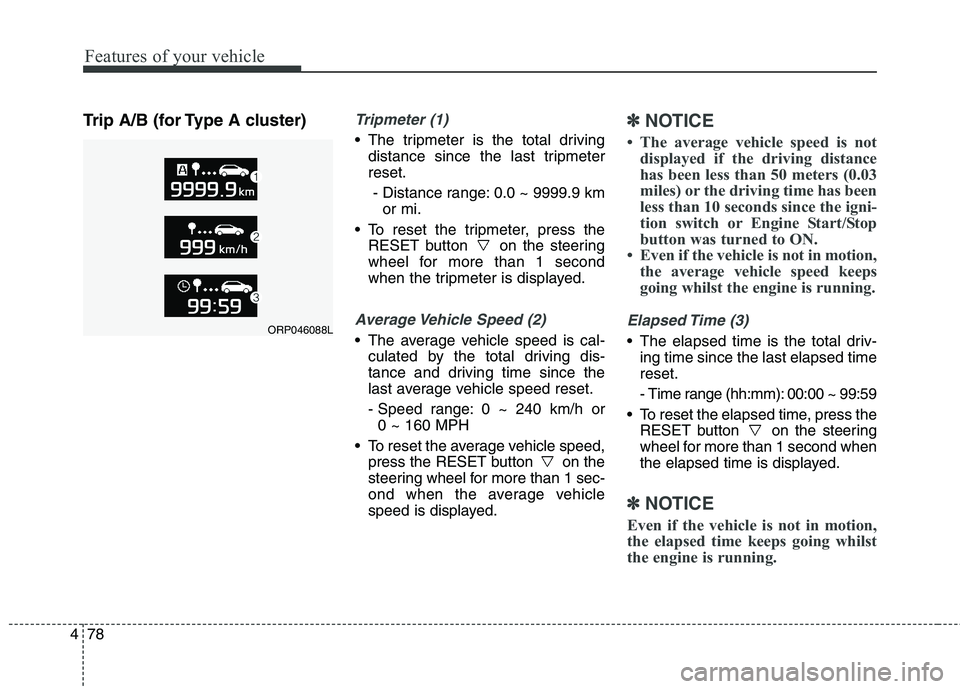
Trip A/B (for Type A cluster)Tripmeter (1)
The tripmeter is the total driving
distance since the last tripmeter reset.
- Distance range: 0.0 ~ 9999.9 km or mi.
To reset the tripmeter, press the RESET button on the steering
wheel for more than 1 second
when the tripmeter is displayed.
Average Vehicle Speed (2)
The average vehicle speed is cal-culated by the total driving dis-
tance and driving time since the
last average vehicle speed reset.
- Speed range: 0 ~ 240 km/h or 0 ~ 160 MPH
To reset the average vehicle speed, press the RESET button on the
steering wheel for more than 1 sec-
ond when the average vehicle
speed is displayed.
✽✽ NOTICE
The average vehicle speed is not displayed if the driving distance
has been less than 50 meters (0.03
miles) or the driving time has been
less than 10 seconds since the igni-
tion switch or Engine Start/Stop
button was turned to ON.
Even if the vehicle is not in motion, the average vehicle speed keeps
going whilst the engine is running.
Elapsed Time (3)
The elapsed time is the total driv-ing time since the last elapsed time reset.
- Time range (hh:mm): 00:00 ~ 99:59
To reset the elapsed time, press the RESET button on the steering
wheel for more than 1 second when
the elapsed time is displayed.
✽✽ NOTICE
Even if the vehicle is not in motion,
the elapsed time keeps going whilst
the engine is running.
ORP046088L
Page 176 of 723

Features of your vehicle
80
4
Choose the average fuel reset mode
you prefer with in "User settings" of
the "LCD Display" as below ;
- OFF (manual reset)
The average fuel economy will not
reset automatically.
To clear the average fuel economy
manually, press the RESET button
" " on the steering wheel for more
than 1 second when the average fuel
economy is displayed.
- After Ignition (automatic reset) The average fuel economy will reset
4 hours after the engine is turned off.
- After refuelling (automatic reset) The average fuel economy will reset
to zero (---) when the vehicle speed
exceeds 1 km/h after refuelling
more than 6 litres.✽✽ NOTICE
The average fuel economy is not dis-
played for more accurate calculation
if the vehicle does not drive more
than 10 seconds or 50 meters (0.03
miles) since the ignition switch or
Engine Start/Stop button is turned
to ON.Instant Fuel Economy (3)
This mode displays the instant fuel economy during the last few sec-
onds when the vehicle speed ismore than 10 km/h (6.2 MPH).
- Fuel economy range: 0.0 ~ 20.0L/100km or 0.0 ~ 50.0 MPG