brake light KIA CARENS RHD 2017 Owners Manual
[x] Cancel search | Manufacturer: KIA, Model Year: 2017, Model line: CARENS RHD, Model: KIA CARENS RHD 2017Pages: 723, PDF Size: 40.8 MB
Page 134 of 723
Features of your vehicle
38
4
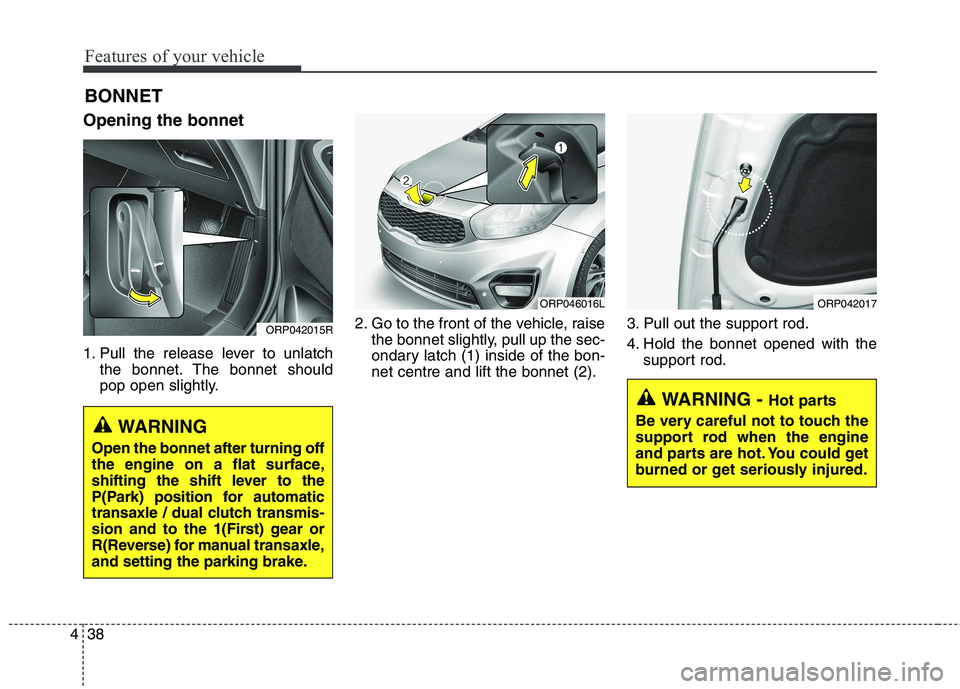
Opening the bonnet
1. Pull the release lever to unlatch
the bonnet. The bonnet should
pop open slightly. 2. Go to the front of the vehicle, raise
the bonnet slightly, pull up the sec-
ondary latch (1) inside of the bon-net centre and lift the bonnet (2). 3. Pull out the support rod.
4. Hold the bonnet opened with the
support rod.
BONNET
ORP042015R
WARNING
Open the bonnet after turning off
the engine on a flat surface,
shifting the shift lever to the
P(Park) position for automatic
transaxle / dual clutch transmis-
sion and to the 1(First) gear or
R(Reverse) for manual transaxle,
and setting the parking brake.
WARNING - Hot parts
Be very careful not to touch the
support rod when the engine
and parts are hot. You could get
burned or get seriously injured.
ORP046016LORP042017
Page 169 of 723
473
Features of your vehicle
Press clutch pedal to start engine(for smart key system and manual transaxle)
This warning message illuminates if the Engine Start/Stop Button
changes to the ACC position twice
by pressing the button repeatedlywithout depressing the clutch pedal.
It means that you should depress the clutch pedal to start the engine.
Key not in vehicle
(for smart key system)
This warning message illuminates if the smart key is not in the vehicle
when you press the Engine
Start/Stop Button.
It means that you should always have the smart key with you.
Key not detected
(for smart key system)
This warning message illuminates if the smart key is not detected
when you press the Engine
Start/Stop Button.
Press start button again
(for smart key system)
This warning message illuminates if you can not operate the Engine
Start/Stop Button when there is a
problem with the Engine Start/StopButton system.
It means that you could start the engine by pressing the Engine
Start/ Stop Button once more.
If the warning illuminates each time you press the Engine
Start/Stop Button, we recommend
that you have the vehicle inspected
by an authorised Kia dealer.
Press start button with smart key
(for smart key system)
This warning message illuminates if you press the Engine Start/Stop
Button whilst the warning message
“Key not detected” is illuminating.
At this time, the immobiliser indica- tor light blinks.
Check fuse "Brake Switch"
(for smart key system and automatic transaxle / dual clutchtransmission)
This warning message illuminates if the brake switch fuse is discon- nected.
It means that you should replace the fuse with a new one. If that is
not possible, you can start the
engine by pressing the Engine
Start/Stop Button for 10 seconds in
the ACC position.
Page 178 of 723
Features of your vehicle
82
4
Parking Brake & Brake
Fluid Warning Light
This warning light illuminates:
Once you set the ignition switch or Engine Start/Stop Button to the ON position.
- It illuminates for approximately 3seconds
- It remains on if the parking brake is applied.
When the parking brake is applied.
When the brake fluid level in the reservoir is low.
- If the warning light illuminateswith the parking brake released, it
indicates the brake fluid level in
reservoir is low. If the brake fluid level in the reservoir
is low:
1. Drive carefully to the nearest safe
location and stop your vehicle.
2. With the engine stopped, check the brake fluid level immediately
and add fluid as required (For
more details, refer to “Brake Fluid”
in chapter 8). Then check all brake
components for fluid leaks. If any
leak on the brake system is still
found, the warning light remains
on, or the brakes do not operate
properly, do not drive the vehicle.
In this case, we recommend that
you have the vehicle towed to an
authorised Kia dealer and inspect-ed. Dual-diagonal braking system
Your vehicle is equipped with dual-
diagonal braking systems. This
means you still have braking on two
wheels even if one of the dual sys-
tems should fail. With only one of the dual systems
working, more than normal pedal
travel and greater pedal pressure are
required to stop the vehicle.
Also, the vehicle will not stop in as
short a distance with only a portion
of the brake system working.
If the brakes fail whilst you are driv-
ing, shift to a lower gear for addition-
al engine braking and stop the vehi-
cle as soon as it is safe to do so.
Page 179 of 723
483
Features of your vehicle
Anti-lock Brake System(ABS) Warning Light
This warning light illuminates:
Once you set the ignition switch or Engine Start/Stop Button to the ON position.
- It illuminates for approximately 3seconds and then goes off.
When there is a malfunction with the ABS (The normal braking sys-
tem will still be operational without
the assistance of the anti-lock
brake system).
In this case, we recommend that
you have the vehicle inspected by
an authorised Kia dealer.
Electronic
Brake force Distribution(EBD) System Warning Light
These two warning lights illuminate at
the same time whilst driving:
When the ABS and regular brake system may not work normally.
In this case, we recommend that
you have the vehicle inspected by
an authorised Kia dealer.
WARNING - Parking Brake
& Brake Fluid
Warning Light
Driving the vehicle with a warn-
ing light ON is dangerous. If the
Parking Brake & Brake Fluid
Warning Light illuminates with
the parking brake released, itindicates that the brake fluid
level is low.
In this case, we recommend that
you have the vehicle inspected
by an authorised Kia dealer.
WARNING - Electronic
Brake force Distribution
(EBD) System Warning Light
When both ABS and Parking
Brake & Brake Fluid Warning
Lights are on, the brake system
will not work normally and you
may experience an unexpected
and dangerous situation during
sudden braking.
In this case, avoid high speed driving and abrupt braking.
We recommend you have the
vehicle inspected by an autho-rised Kia dealer as soon as pos-
sible.
Page 180 of 723
Features of your vehicle
84
4
✽✽
NOTICE- Electronic Brake
force Distribution(EBD) System
Warning Light
When the ABS Warning Light is on
or both ABS and Parking Brake &
Brake Fluid Warning Lights are on,
the speedometer, odometer, or trip-
meter may not work. Also, the EPS
Warning Light may illuminate and
the steering effort may increase or
decrease.
In this case, we recommend you
have the vehicle inspected by an
authorised Kia dealer as soon as
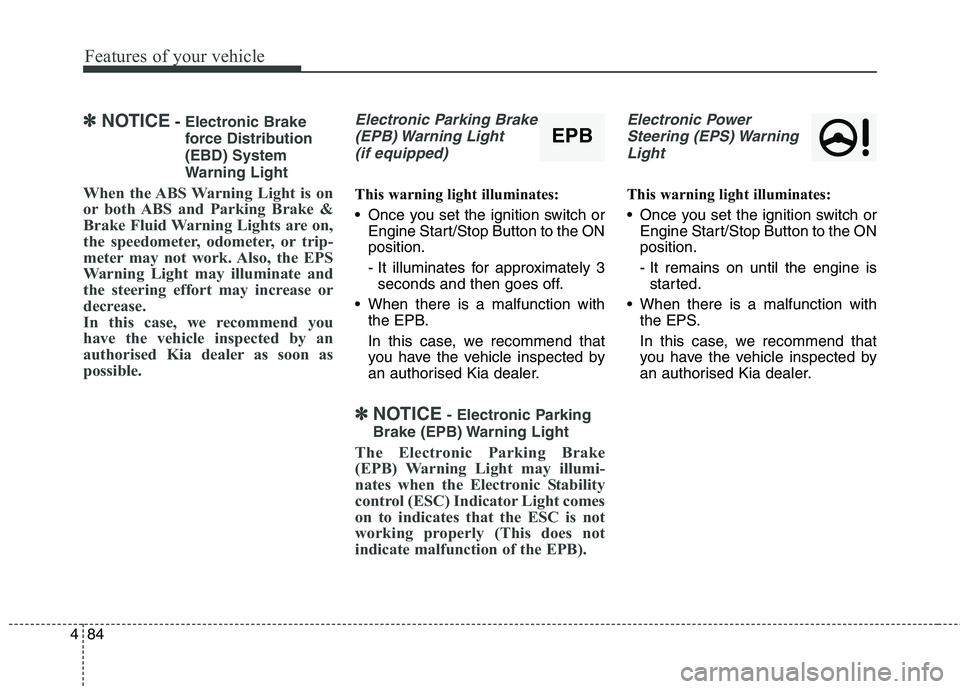
possible.Electronic Parking Brake (EPB) Warning Light (if equipped)
This warning light illuminates:
Once you set the ignition switch or Engine Start/Stop Button to the ON position.
- It illuminates for approximately 3seconds and then goes off.
When there is a malfunction with the EPB.
In this case, we recommend that
you have the vehicle inspected by
an authorised Kia dealer.
✽✽ NOTICE - Electronic Parking
Brake (EPB) Warning Light
The Electronic Parking Brake
(EPB) Warning Light may illumi-
nates when the Electronic Stability
control (ESC) Indicator Light comes
on to indicates that the ESC is not
working properly (This does not
indicate malfunction of the EPB).
Electronic Power Steering (EPS) Warning Light
This warning light illuminates:
Once you set the ignition switch or Engine Start/Stop Button to the ON position.
- It remains on until the engine isstarted.
When there is a malfunction with the EPS.
In this case, we recommend that
you have the vehicle inspected by
an authorised Kia dealer.
EPB
Page 184 of 723

Features of your vehicle
88
4
Low Fuel Level Warning
Light
This warning light illuminates:
When the fuel tank is nearly empty.
If the fuel tank is nearly empty:
Add fuel as soon as possible.
Low Tyre PressureWarning Light (if equipped)
This warning light illuminates:
Once you set the ignition switch or Engine Start/Stop Button to the ON position.
- It illuminates for approximately 3seconds and then goes off.
When one or more of your tyres are significantly underinflated (The
location of the underinflated tyres
are displayed on the LCD display).
For more details, refer to “Tyre
Pressure Monitoring System
(TPMS)” in chapter 7. This warning light remains on after
blinking for approximately 60 seconds
or repeats blinking and off at the
intervals of approximately 3 seconds:
When there is a malfunction with
the TPMS.
In this case, we recommend that
you have the vehicle inspected by
an authorised Kia dealer as soon
as possible.
For more details, refer to “Tyre
Pressure Monitoring System
(TPMS)” in chapter 7.
CAUTION - Low Fuel
Level
Driving with the Low Fuel Level
warning light on or with the fuellevel below “0 or E” can cause the engine to misfire and dam-age the catalytic converter (ifequipped).WARNING - Safe Stopping
The TPMS cannot alert you to severe and sudden tyre dam-
age caused by external factors.
If you notice any vehicle insta- bility, immediately take your
foot off the accelerator pedal,
apply the brakes gradually with
light force, and slowly move to
a safe position off the road.
Page 188 of 723
Features of your vehicle
92
4
Auto stop indicator
(if equipped)
This indicator will illuminate when the engine enters the Idle Stop mode ofthe ISG (Idle Stop and Go) system.
When the automatic starting occurs, the auto stop indicator on the cluster
will blink for 5 seconds.
For more details, refer to the ISG (Idle Stop and Go) system in chapter 6.
✽✽ NOTICE
When the engine automatically starts
by the ISG system, some warning
lights (ABS, ESC, ESC OFF, EPS or
Parking brake warning light) may
turn on for a few seconds.
This happens because of the low bat-
tery voltage. It does not mean the
system is malfunctioning.
Immobiliser Indicator Light (Without Smart Key) (if equipped)
This indicator light illuminates:
When the vehicle detects the immobiliser in your key properly
whilst the ignition switch is ON.
- At this time, you can start theengine.
- The indicator light goes off after starting the engine.
This indicator light blinks:
When there is a malfunction with the immobiliser system.
In this case, we recommend that
you have the vehicle inspected by
an authorised Kia dealer.
Immobiliser Indicator
Light (With Smart Key) (if equipped)
This indicator light illuminates for up
to 30 seconds:
When the vehicle detects the smart key in the vehicle properly
whilst the Engine Start/Stop Button
is ACC or ON.
- At this time, you can start theengine.
- The indicator light goes off after starting the engine.
This indicator light blinks for a few
seconds:
When the smart key is not in the vehicle.
- At this time, you can not start theengine.
Page 203 of 723
4107
Features of your vehicle
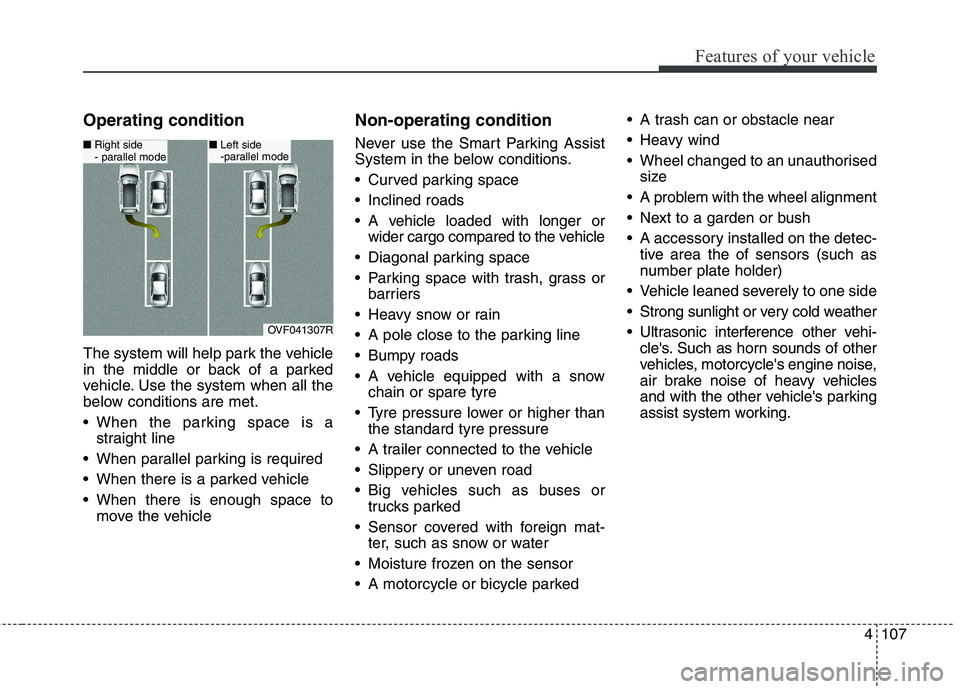
Operating condition
The system will help park the vehicle
in the middle or back of a parked
vehicle. Use the system when all the
below conditions are met.
When the parking space is astraight line
When parallel parking is required
When there is a parked vehicle
When there is enough space to move the vehicle Non-operating condition
Never use the Smart Parking Assist
System in the below conditions.
Curved parking space
Inclined roads
A vehicle loaded with longer or
wider cargo compared to the vehicle
Diagonal parking space
Parking space with trash, grass or barriers
Heavy snow or rain
A pole close to the parking line
Bumpy roads
A vehicle equipped with a snow chain or spare tyre
Tyre pressure lower or higher than the standard tyre pressure
A trailer connected to the vehicle
Slippery or uneven road
Big vehicles such as buses or trucks parked
Sensor covered with foreign mat- ter, such as snow or water
Moisture frozen on the sensor
A motorcycle or bicycle parked A trash can or obstacle near
Heavy wind
Wheel changed to an unauthorised
size
A problem with the wheel alignment
Next to a garden or bush
A accessory installed on the detec- tive area the of sensors (such as
number plate holder)
Vehicle leaned severely to one side
Strong sunlight or very cold weather
Ultrasonic interference other vehi- cle's. Such as horn sounds of other
vehicles, motorcycle's engine noise,
air brake noise of heavy vehicles
and with the other vehicle's parking
assist system working.
OVF041307R
■Right side
- parallel mode■ Left side
-parallel mode
Page 439 of 723
Driving your vehicle
4
6
Before entering vehicle
• Be sure that all windows, outside
mirror(s), and outside lights are clean.
Check the condition of the tyres.
Check under the vehicle for any sign of leaks.
Be sure there are no obstacles behind you if you intend to back up. Necessary inspections
Fluid levels, such as engine oil,
engine coolant, brake fluid, and
washer fluid should be checked on a
regular basis, with the exact interval
depending on the fluid. Further
details are provided in chapter 8,“Maintenance”.
Before starting
Close and lock all doors.
Position the seat so that all con-
trols are easily reached.
Adjust the inside and outside rearview mirrors.
Be sure that all lights work.
Check all gauges.
Check the operation of warning lights when the ignition switch is
turned to the ON position.
Release the parking brake and make sure the brake warning lightgoes out.
For safe operation, be sure you are
familiar with your vehicle and itsequipment.
BEFORE DRIVING
WARNING
Driving whilst distracted can
result in a loss of vehicle con-
trol, that may lead to an acci-
dent, severe personal injury,
and death. The driver’s primary
responsibility is in the safe and
legal operation of a vehicle, and
use of any handheld devices,
other equipment, or vehicle sys-
tems which take the driver’s
eyes, attention and focus away
from the safe operation of a
vehicle or which are not permis-
sible by law should never beused during operation of the
vehicle.
Page 441 of 723
Driving your vehicle
6
6
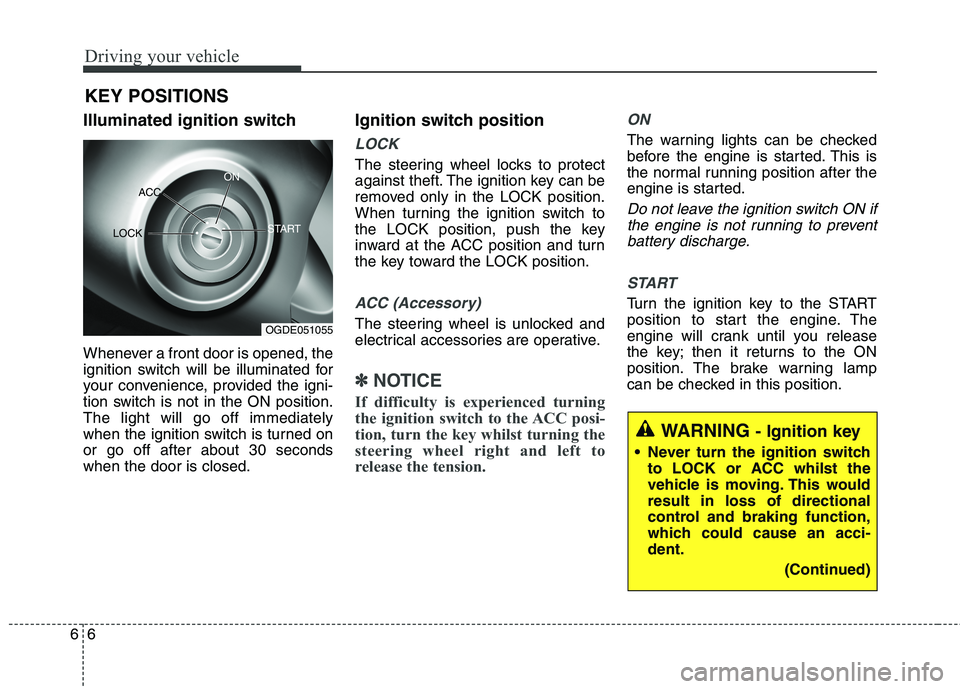
Illuminated ignition switch
Whenever a front door is opened, the
ignition switch will be illuminated for
your convenience, provided the igni-
tion switch is not in the ON position.The light will go off immediately
when the ignition switch is turned onor go off after about 30 secondswhen the door is closed. Ignition switch position
LOCK
The steering wheel locks to protect
against theft. The ignition key can be
removed only in the LOCK position.
When turning the ignition switch to
the LOCK position, push the key
inward at the ACC position and turn
the key toward the LOCK position.
ACC (Accessory)
The steering wheel is unlocked and
electrical accessories are operative.
✽✽
NOTICE
If difficulty is experienced turning
the ignition switch to the ACC posi-
tion, turn the key whilst turning the
steering wheel right and left to
release the tension.
ON
The warning lights can be checked
before the engine is started. This is
the normal running position after the
engine is started.
Do not leave the ignition switch ON if the engine is not running to preventbattery discharge.
START
Turn the ignition key to the START
position to start the engine. The
engine will crank until you release
the key; then it returns to the ON
position. The brake warning lamp
can be checked in this position.
KEY POSITIONS
WARNING
- Ignition key
Never turn the ignition switch to LOCK or ACC whilst the
vehicle is moving. This wouldresult in loss of directional
control and braking function,
which could cause an acci-dent.
(Continued)
OGDE051055
ACC
ON
START
LOCK