warning KIA CARENS RHD 2018 Owners Manual
[x] Cancel search | Manufacturer: KIA, Model Year: 2018, Model line: CARENS RHD, Model: KIA CARENS RHD 2018Pages: 723, PDF Size: 40.94 MB
Page 149 of 723
453
Features of your vehicle
Electric chromic mirror (ECM)(if equipped)
The electric rearview mirror automat- ically controls the glare from the
headlights of the vehicle behind you
in nighttime or low light driving condi-
tions. The sensor mounted in the mir-
ror senses the light level around the
vehicle, and automatically controls
the headlight glare from vehicles
behind you.
When the engine is running, the glare
is automatically controlled by the sen-
sor mounted in the rearview mirror.
Whenever the shift lever is shifted
into R (Reverse), the mirror will auto-
matically go to the brightest setting in
order to improve the drivers view
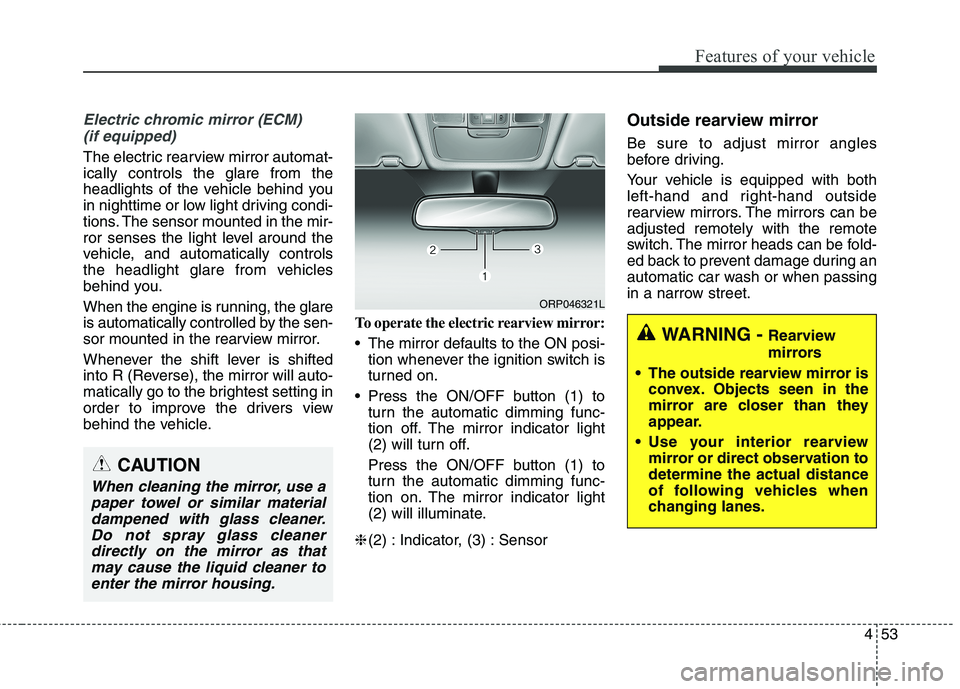
behind the vehicle. To operate the electric rearview mirror:
The mirror defaults to the ON posi-
tion whenever the ignition switch is
turned on.
Press the ON/OFF button (1) to turn the automatic dimming func-
tion off. The mirror indicator light
(2) will turn off.
Press the ON/OFF button (1) to
turn the automatic dimming func-
tion on. The mirror indicator light
(2) will illuminate.
❈ (2) : Indicator, (3) : Sensor Outside rearview mirror Be sure to adjust mirror angles
before driving.
Your vehicle is equipped with both
left-hand and right-hand outside
rearview mirrors. The mirrors can beadjusted remotely with the remote
switch. The mirror heads can be fold-
ed back to prevent damage during an
automatic car wash or when passing
in a narrow street.
CAUTION
When cleaning the mirror, use a
paper towel or similar materialdampened with glass cleaner. Do not spray glass cleanerdirectly on the mirror as thatmay cause the liquid cleaner to enter the mirror housing.
WARNING - Rearview
mirrors
The outside rearview mirror is convex. Objects seen in the
mirror are closer than they
appear.
Use your interior rearview mirror or direct observation todetermine the actual distance
of following vehicles when
changing lanes.
ORP046321L
Page 150 of 723
Features of your vehicle
54
4
Remote control
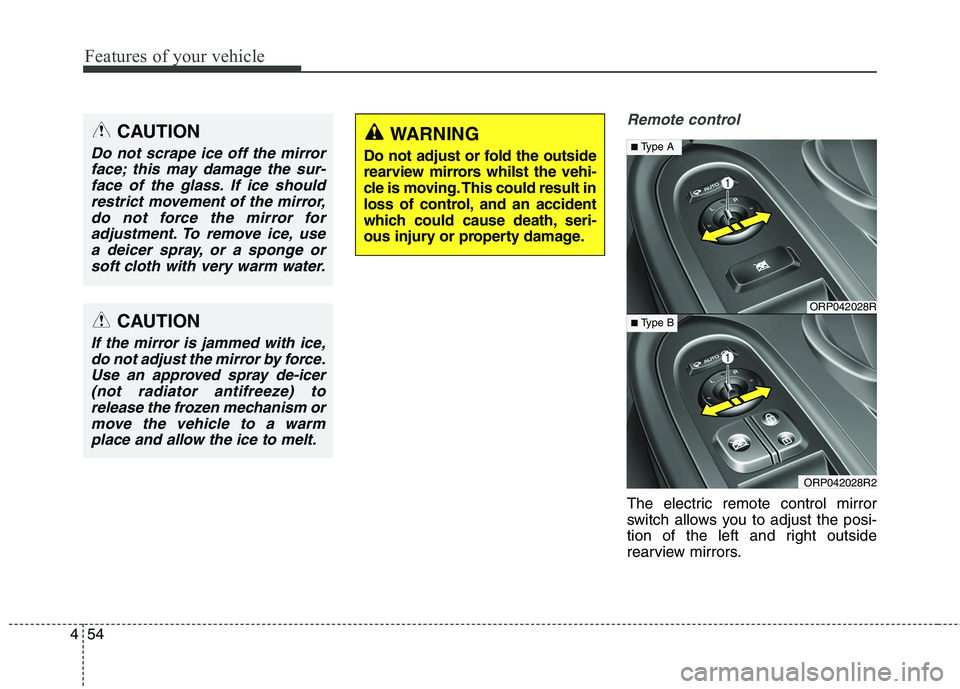
The electric remote control mirror
switch allows you to adjust the posi-
tion of the left and right outside
rearview mirrors.
CAUTION
Do not scrape ice off the mirror
face; this may damage the sur-face of the glass. If ice should restrict movement of the mirror,do not force the mirror foradjustment. To remove ice, use a deicer spray, or a sponge orsoft cloth with very warm water.
CAUTION
If the mirror is jammed with ice,do not adjust the mirror by force.Use an approved spray de-icer (not radiator antifreeze) torelease the frozen mechanism ormove the vehicle to a warm place and allow the ice to melt.
WARNING
Do not adjust or fold the outside
rearview mirrors whilst the vehi-
cle is moving. This could result in
loss of control, and an accident
which could cause death, seri-
ous injury or property damage.
ORP042028R
ORP042028R2
■ Type A
■ Type B
Page 153 of 723
457
Features of your vehicle
INSTRUMENT CLUSTER
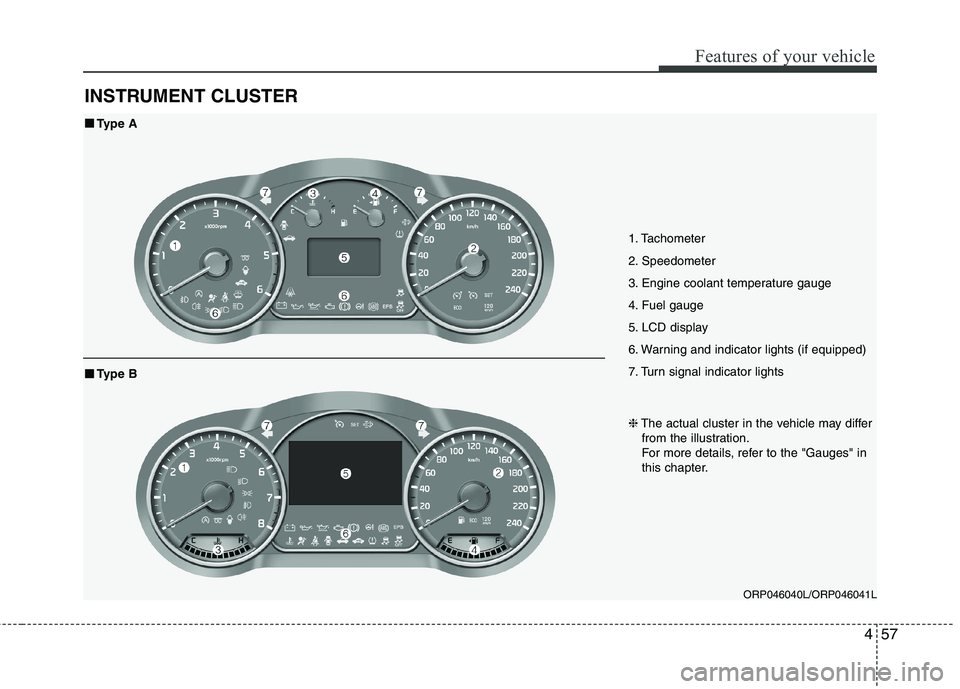
1. Tachometer
2. Speedometer
3. Engine coolant temperature gauge
4. Fuel gauge
5. LCD display
6. Warning and indicator lights (if equipped)
7. Turn signal indicator lightsORP046040L/ORP046041L
■■Type A
❈The actual cluster in the vehicle may differ
from the illustration.
For more details, refer to the "Gauges" in
this chapter.
■■ Type B
Page 154 of 723
Features of your vehicle
58
4
Instrument Cluster ControlAdjusting Instrument Cluster
Illumination (if equipped)
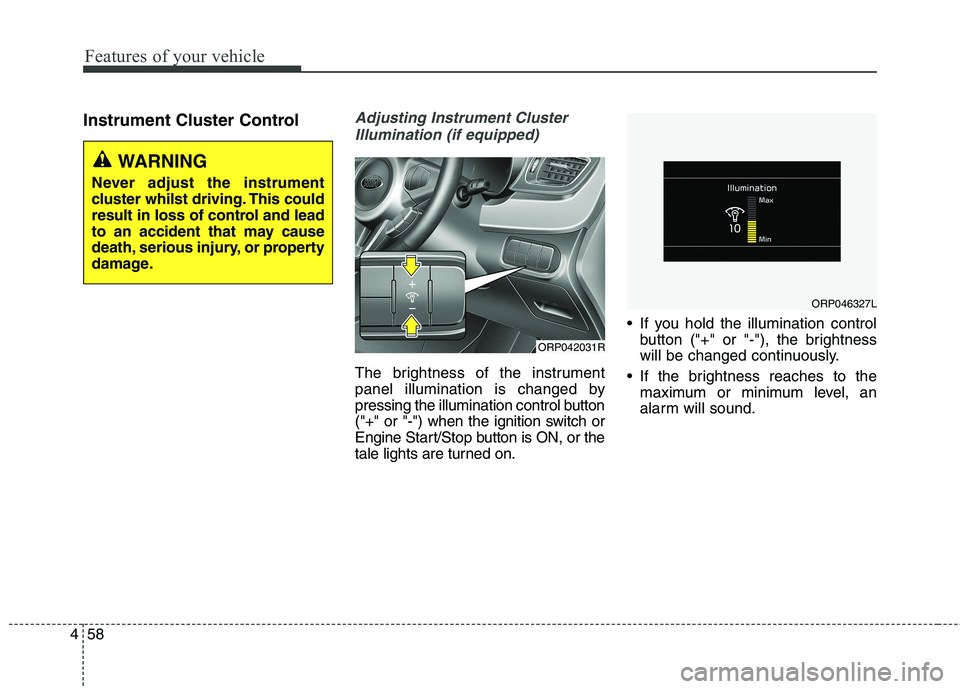
The brightness of the instrument
panel illumination is changed by
pressing the illumination control button
("+" or "-") when the ignition switch or
Engine Start/Stop button is ON, or the
tale lights are turned on. If you hold the illumination control
button ("+" or "-"), the brightness
will be changed continuously.
If the brightness reaches to the maximum or minimum level, an
alarm will sound.
ORP042031R
WARNING
Never adjust the instrument
cluster whilst driving. This could
result in loss of control and lead
to an accident that may cause
death, serious injury, or property
damage.
ORP046327L
Page 157 of 723
461
Features of your vehicle
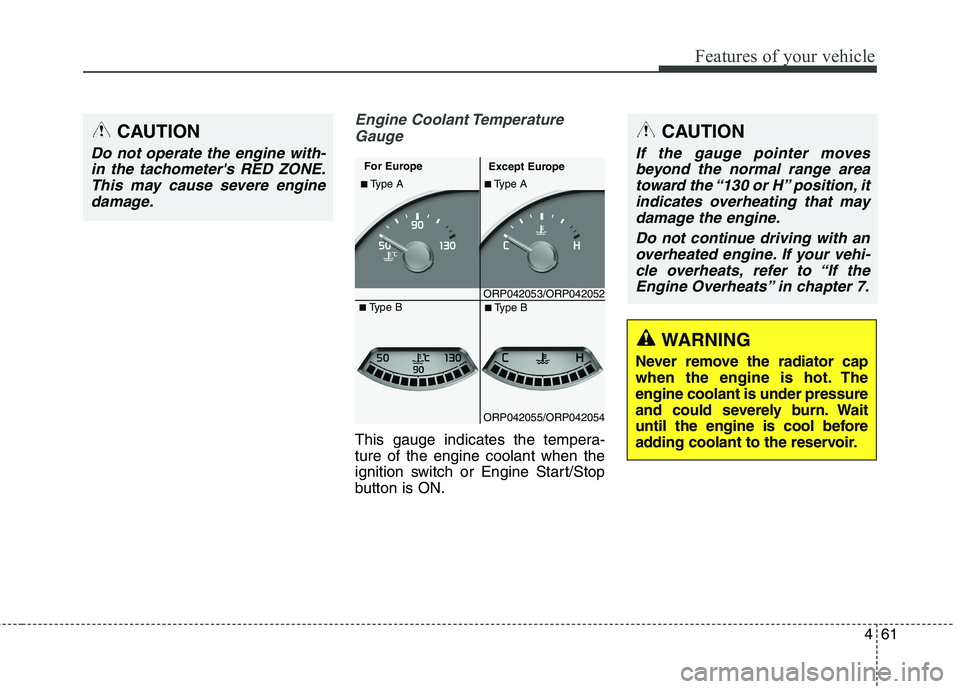
Engine Coolant TemperatureGauge
This gauge indicates the tempera- ture of the engine coolant when the
ignition switch or Engine Start/Stop
button is ON.
CAUTION
Do not operate the engine with-in the tachometer's RED ZONE.This may cause severe engine damage.
ORP042053/ORP042052
■
Type A
For Europe
Except Europe
■ Type A
ORP042055/ORP042054■
Type B
■ Type B
WARNING
Never remove the radiator cap
when the engine is hot. Theengine coolant is under pressure
and could severely burn. Wait
until the engine is cool before
adding coolant to the reservoir.
CAUTION
If the gauge pointer moves beyond the normal range areatoward the “130 or H” position, itindicates overheating that may damage the engine.
Do not continue driving with anoverheated engine. If your vehi-cle overheats, refer to “If theEngine Overheats” in chapter 7.
Page 158 of 723
Features of your vehicle
62
4
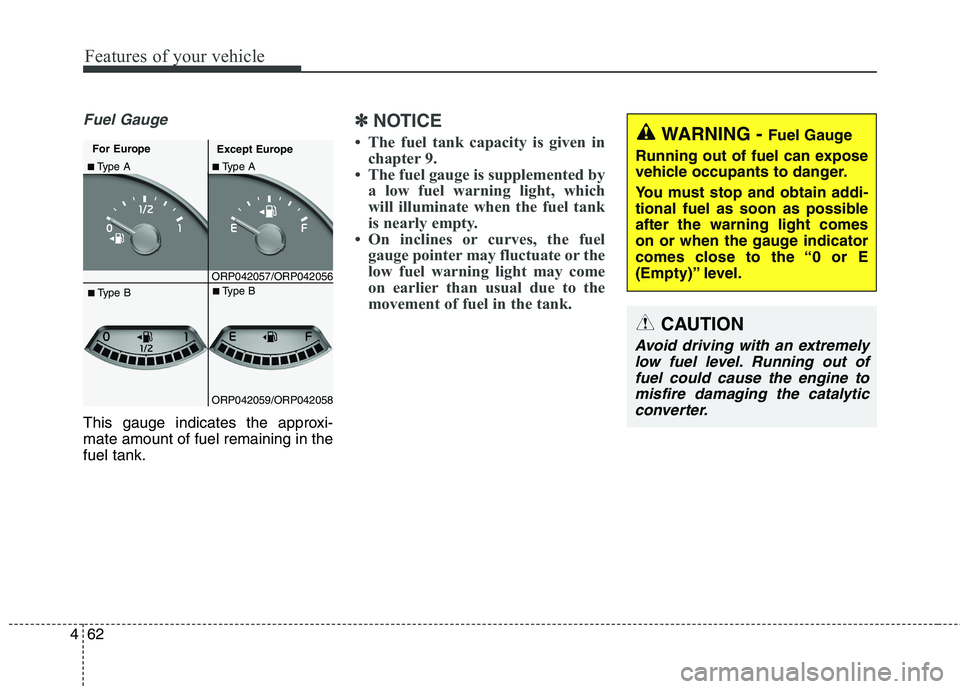
Fuel Gauge
This gauge indicates the approxi- mate amount of fuel remaining in thefuel tank.
✽✽
NOTICE
The fuel tank capacity is given in chapter 9.
The fuel gauge is supplemented by a low fuel warning light, which
will illuminate when the fuel tank
is nearly empty.
On inclines or curves, the fuel gauge pointer may fluctuate or the
low fuel warning light may come
on earlier than usual due to the
movement of fuel in the tank.
ORP042057/ORP042056
■Type A
For Europe
Except Europe■ Type A
ORP042059/ORP042058■
Type B
■Type B
WARNING - Fuel Gauge
Running out of fuel can expose
vehicle occupants to danger.
You must stop and obtain addi-
tional fuel as soon as possibleafter the warning light comes
on or when the gauge indicator
comes close to the “0 or E
(Empty)” level.
CAUTION
Avoid driving with an extremely low fuel level. Running out offuel could cause the engine tomisfire damaging the catalytic converter.
Page 163 of 723
467
Features of your vehicle
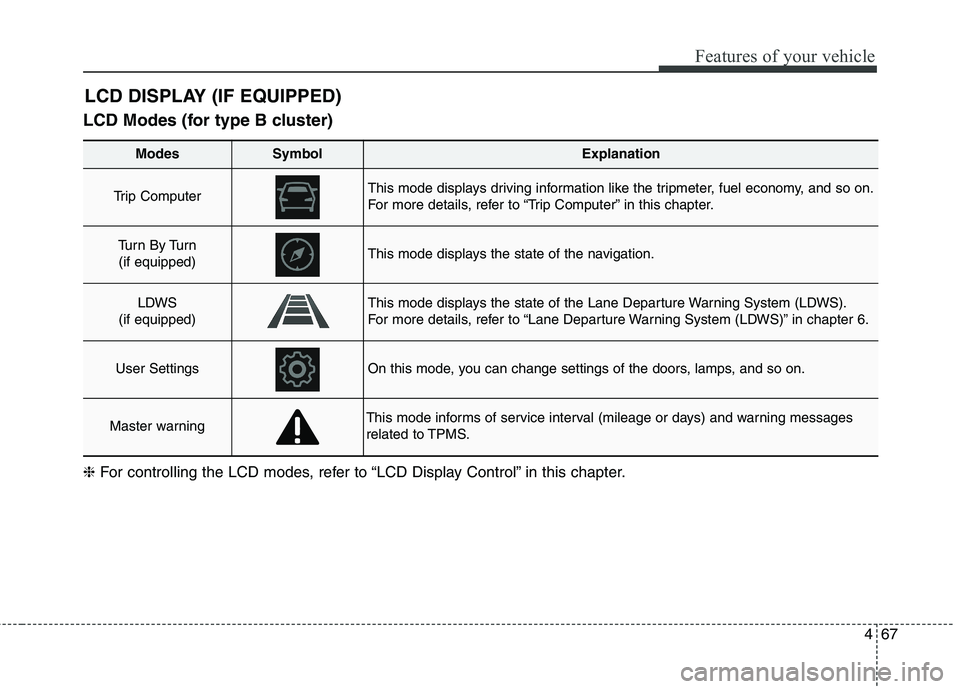
LCD Modes (for type B cluster)LCD DISPLAY (IF EQUIPPED)
Modes SymbolExplanation
Trip Computer This mode displays driving information like the tripmeter, fuel economy, and so on.
For more details, refer to “Trip Computer” in this chapter.
Tu r n B y Tu r n
(if equipped)This mode displays the state of the navigation.
LDWS
(if equipped)This mode displays the state of the Lane Departure Warning System (LDWS).
For more details, refer to “Lane Departure Warning System (LDWS)” in chapter 6.
User SettingsOn this mode, you can change settings of the doors, lamps, and so on.
Master warningThis mode informs of service interval (mileage or days) and warning messages
related to TPMS.
❈ For controlling the LCD modes, refer to “LCD Display Control” in this chapter.
Page 165 of 723
469
Features of your vehicle
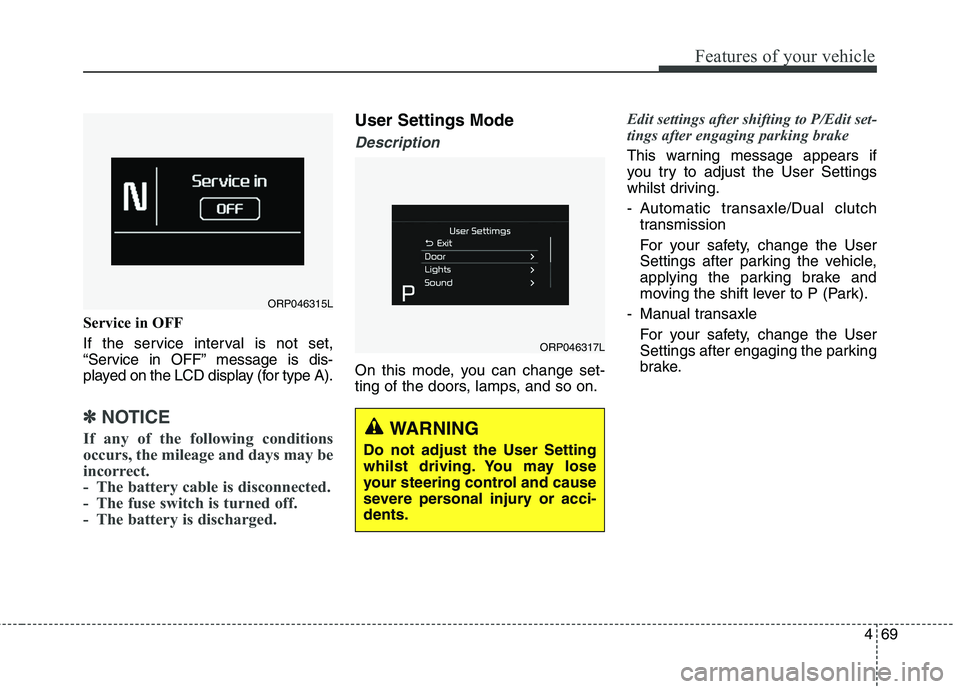
Service in OFF
If the service interval is not set,
“Service in OFF” message is dis-
played on the LCD display (for type A).
✽✽NOTICE
If any of the following conditions
occurs, the mileage and days may be
incorrect.
- The battery cable is disconnected.
- The fuse switch is turned off.
- The battery is discharged.
User Settings Mode
Description
On this mode, you can change set-
ting of the doors, lamps, and so on.
Edit settings after shifting to P/Edit set-
tings after engaging parking brake
This warning message appears if
you try to adjust the User Settings
whilst driving.
- Automatic transaxle/Dual clutch transmission
For your safety, change the User
Settings after parking the vehicle,
applying the parking brake and
moving the shift lever to P (Park).
- Manual transaxle For your safety, change the User
Settings after engaging the parking
brake.
ORP046315L
ORP046317L
WARNING
Do not adjust the User Setting
whilst driving. You may lose
your steering control and cause
severe personal injury or acci-dents.
Page 168 of 723
Features of your vehicle
72
4
Warning Messages (if equipped)
Shift to "P" position (for smart key
system and automatic transaxle / dual clutch transmission)
This warning message illuminates if you try to turn off the engine without
the shift lever in P (Park) position.
At this time, the Engine Start/Stop Button turns to the ACC position (If
you press the Engine Start/Stop
Button once more, it will turn to theON position).
Low Key Battery
(for smart key system)
This warning message illuminates if the battery of the smart key is discharged when the Engine
Start/Stop Button changes to theOFF position.
Press start button whilst turn
steering (for smart key system)
This warning message illuminates if the steering wheel does not
unlock normally when the Engine
Start/Stop Button is pressed.
It means that you should press the Engine Start/Stop Button whilst
turning the steering wheel rightand left.
Steering wheel unlocked
(for smart key system)
This warning message illuminates if the steering wheel does not lock
when the Engine Start/Stop Buttonchanges to the OFF position.
Check steering wheel lock
system (for smart key system)
This warning message illuminates if the steering wheel does not lock
normally when the Engine
Start/Stop Button changes to theOFF position.
Press brake pedal to start engine
(for smart key system and auto- matic transaxle / dual clutchtransmission)
This warning message illuminates if the Engine Start/Stop Button
changes to the ACC position twice
by pressing the button repeatedly
without depressing the brake pedal.
It means that you should depress the brake pedal to start the engine.
Page 169 of 723
473
Features of your vehicle
Press clutch pedal to start engine(for smart key system and manual transaxle)
This warning message illuminates if the Engine Start/Stop Button
changes to the ACC position twice
by pressing the button repeatedlywithout depressing the clutch pedal.
It means that you should depress the clutch pedal to start the engine.
Key not in vehicle
(for smart key system)
This warning message illuminates if the smart key is not in the vehicle
when you press the Engine
Start/Stop Button.
It means that you should always have the smart key with you.
Key not detected
(for smart key system)
This warning message illuminates if the smart key is not detected
when you press the Engine
Start/Stop Button.
Press start button again
(for smart key system)
This warning message illuminates if you can not operate the Engine
Start/Stop Button when there is a
problem with the Engine Start/StopButton system.
It means that you could start the engine by pressing the Engine
Start/ Stop Button once more.
If the warning illuminates each time you press the Engine Start/Stop
Button, have the vehicle inspected
by a professional workshop. Kia
recommends to visit an authorised
Kia dealer/service partner.
Press start button with smart key
(for smart key system)
This warning message illuminates if you press the Engine Start/Stop
Button whilst the warning message
“Key not detected” is illuminating.
At this time, the immobiliser indica- tor light blinks.
Check fuse "Brake Switch"
(for smart key system and automatic transaxle / dual clutchtransmission)
This warning message illuminates if the brake switch fuse is discon- nected.
It means that you should replace the fuse with a new one. If that is
not possible, you can start the
engine by pressing the Engine
Start/Stop Button for 10 seconds in
the ACC position.