audio KIA CARENS RHD 2018 Owner's Manual
[x] Cancel search | Manufacturer: KIA, Model Year: 2018, Model line: CARENS RHD, Model: KIA CARENS RHD 2018Pages: 723, PDF Size: 40.94 MB
Page 299 of 723
Audio system
16
5
Features of your vehicle
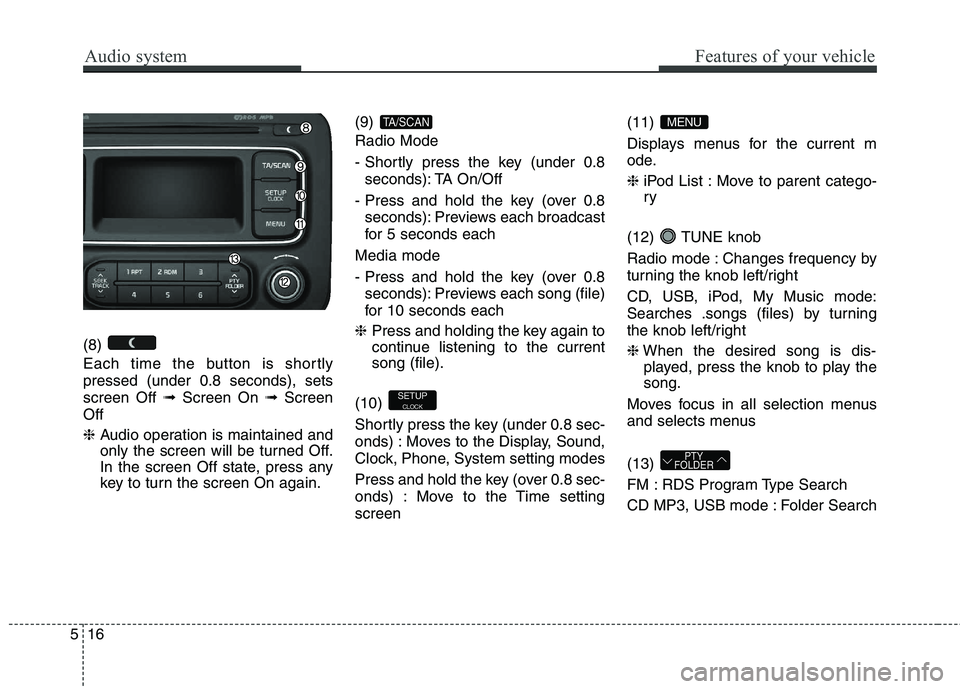
(8)
Each time the button is shortly pressed (under 0.8 seconds), setsscreen Off ➟Screen On ➟Screen
Off ❈ Audio operation is maintained and
only the screen will be turned Off.
In the screen Off state, press any
key to turn the screen On again. (9) Radio Mode
- Shortly press the key (under 0.8
seconds): TA On/Off
- Press and hold the key (over 0.8 seconds): Previews each broadcast
for 5 seconds each
Media mode
- Press and hold the key (over 0.8 seconds): Previews each song (file)
for 10 seconds each
❈ Press and holding the key again to
continue listening to the currentsong (file).
(10)
Shortly press the key (under 0.8 sec-
onds) : Moves to the Display, Sound,
Clock, Phone, System setting modes
Press and hold the key (over 0.8 sec-
onds) : Move to the Time settingscreen (11)
Displays menus for the current m
ode. ❈
iPod List : Move to parent catego- ry
(12) TUNE knob
Radio mode : Changes frequency by
turning the knob left/right
CD, USB, iPod, My Music mode:
Searches .songs (files) by turning
the knob left/right ❈ When the desired song is dis-
played, press the knob to play the song.
Moves focus in all selection menus
and selects menus (13)
FM : RDS Program Type Search
CD MP3, USB mode : Folder Search
PTY
FOLDER
MENU
SETUP
CLOCK
TA/SCAN
Page 300 of 723
517
Audio system
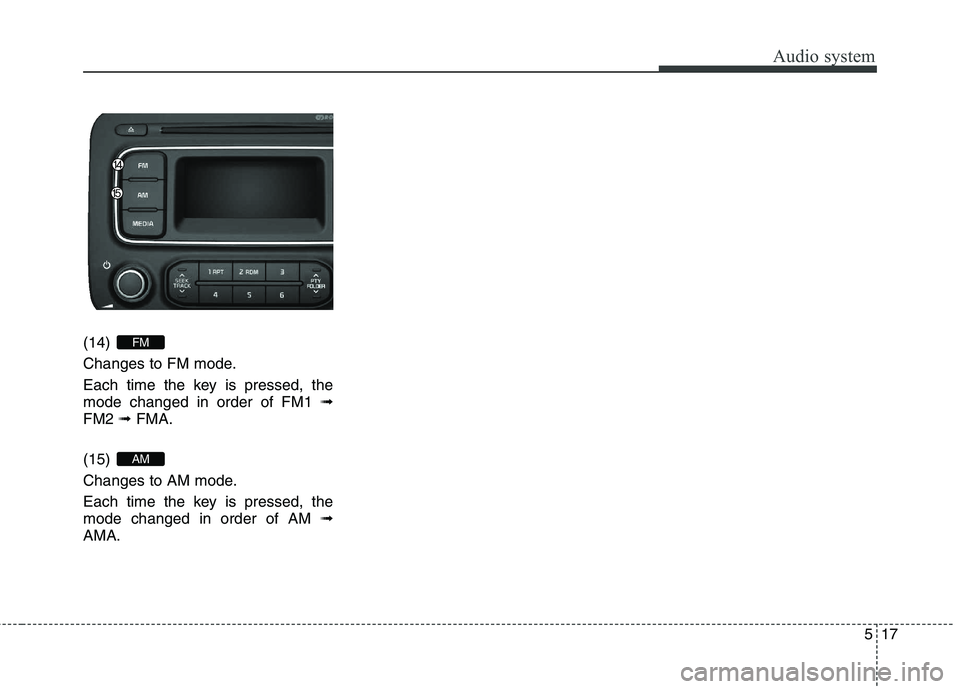
(14)
Changes to FM mode.
Each time the key is pressed, the mode changed in order of FM1 ➟
FM2 ➟FMA.
(15)
Changes to AM mode.
Each time the key is pressed, the mode changed in order of AM ➟
AMA.
AM
FM
Page 301 of 723
Audio system
18
5
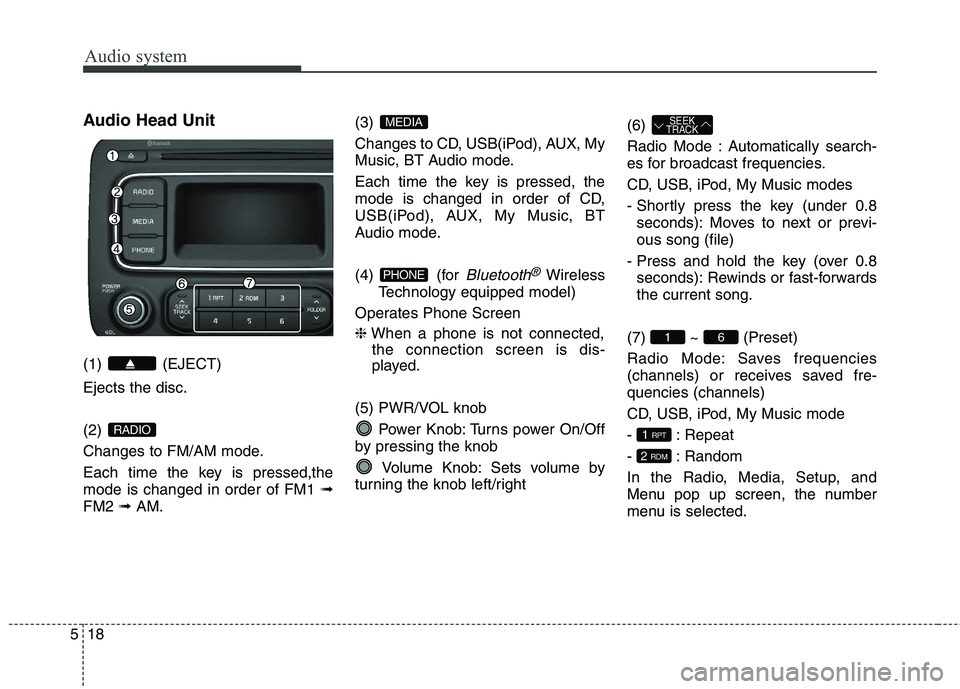
Audio Head Unit (1) (EJECT) Ejects the disc. (2)
Changes to FM/AM mode.
Each time the key is pressed,the mode is changed in order of FM1 ➟
FM2 ➟AM. (3)
Changes to CD, USB(iPod), AUX, My
Music, BT Audio mode.
Each time the key is pressed, the
mode is changed in order of CD,
USB(iPod), AUX, My Music, BT
Audio mode.
(4) (for
Bluetooth®Wireless
Technology equipped model)
Operates Phone Screen ❈ When a phone is not connected,
the connection screen is dis-
played.
(5) PWR/VOL knob Power Knob: Turns power On/Off
by pressing the knob
Volume Knob: Sets volume by
turning the knob left/right (6)
Radio Mode : Automatically search-
es for broadcast frequencies.
CD, USB, iPod, My Music modes
- Shortly press the key (under 0.8
seconds): Moves to next or previ- ous song (file)
- Press and hold the key (over 0.8 seconds): Rewinds or fast-forwardsthe current song.
(7) ~ (Preset)
Radio Mode: Saves frequencies
(channels) or receives saved fre-quencies (channels)
CD, USB, iPod, My Music mode
- : Repeat
- : Random
In the Radio, Media, Setup, and
Menu pop up screen, the number
menu is selected.
2 RDM
1 RPT
61
SEEK
TRACK
PHONE
MEDIA
RADIO
Page 302 of 723
519
Audio system
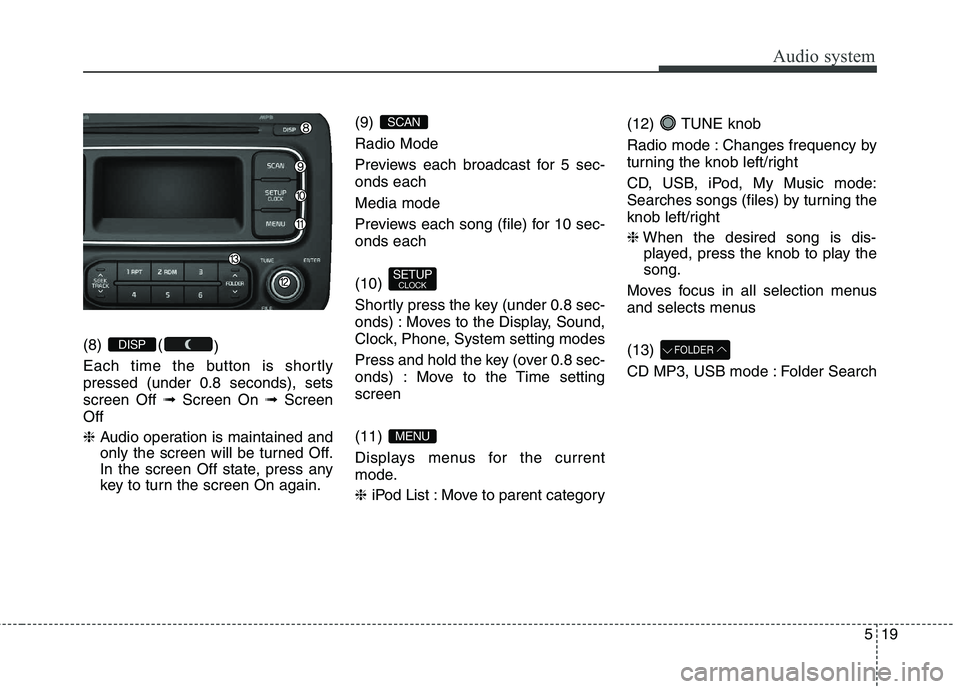
(8) ()
Each time the button is shortly pressed (under 0.8 seconds), setsscreen Off ➟Screen On ➟Screen
Off ❈ Audio operation is maintained and
only the screen will be turned Off.
In the screen Off state, press any
key to turn the screen On again. (9) Radio Mode
Previews each broadcast for 5 sec- onds each Media mode
Previews each song (file) for 10 sec- onds each (10)
Shortly press the key (under 0.8 sec-
onds) : Moves to the Display, Sound,
Clock, Phone, System setting modes
Press and hold the key (over 0.8 sec-
onds) : Move to the Time settingscreen (11)
Displays menus for the current
mode. ❈
iPod List : Move to parent category (12) TUNE knob
Radio mode : Changes frequency by
turning the knob left/right
CD, USB, iPod, My Music mode:
Searches songs (files) by turning the
knob left/right ❈
When the desired song is dis-
played, press the knob to play the song.
Moves focus in all selection menus
and selects menus (13)
CD MP3, USB mode : Folder SearchFOLDER
MENU
SETUP CLOCK
SCAN
DISP
Page 303 of 723
Audio system
20
5
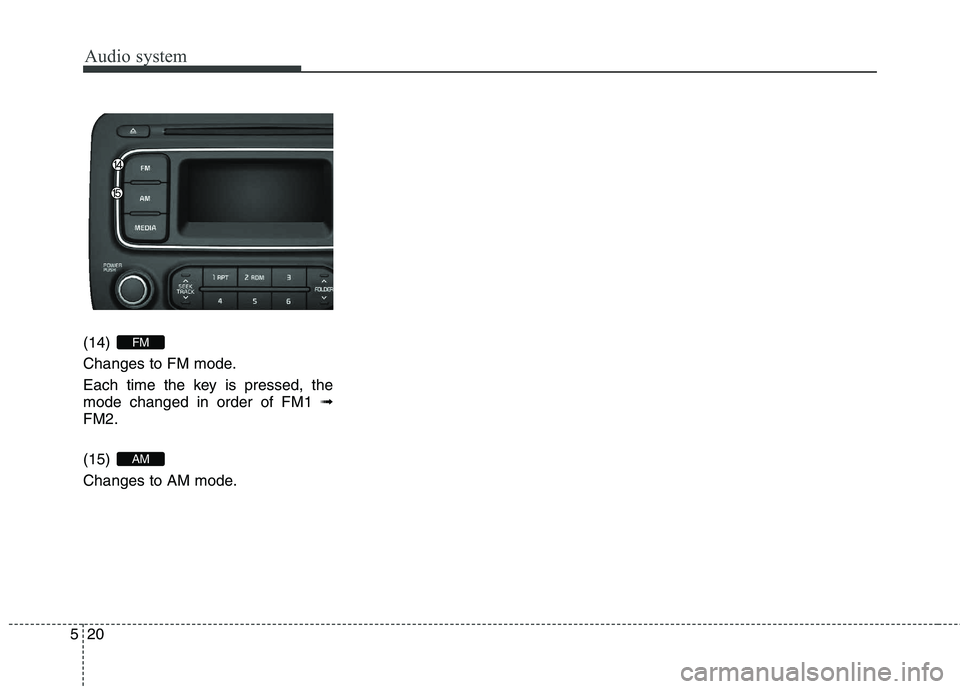
(14)
Changes to FM mode.
Each time the key is pressed, the mode changed in order of FM1 ➟
FM2. (15)
Changes to AM mode.
AM
FM
Page 304 of 723
![KIA CARENS RHD 2018 Owners Manual 521
Audio system
SETUP (for RDS model)
AM100A4EE, AM110A4EE
Display Settings
Press the key Select [Display]
through TUNE knob or key
Select menu through TUNE knobMode Pop up
[Mode Pop up] Change](/img/2/57938/w960_57938-303.png "KIA CARENS RHD 2018 Owners Manual 521
Audio system
SETUP (for RDS model)
AM100A4EE, AM110A4EE
Display Settings
Press the key Select [Display]
through TUNE knob or key
Select menu through TUNE knobMode Pop up
[Mode Pop up] Change")
521
Audio system
SETUP (for RDS model)
AM100A4EE, AM110A4EE
Display Settings
Press the key Select [Display]
through TUNE knob or key
Select menu through TUNE knobMode Pop up
[Mode Pop up] Changes . selection mode
or key to display the mode change pop up screen.
Scroll text
[Scroll text] Set /
Maintains scroll
: Scrolls only one (1) time.
Song Info
When playing an MP3 file, select the
desired display info from ‘Folder/File’
or ‘Album/Artist/Song’. Sound Settings
Press the key Select [Sound]
through TUNE knob or key
Select menu through TUNE knob2
RDM
SETUP
OFF
ON
OFFON
MEDIA
RADIO
ON
1 RPT
SETUP
Page 305 of 723
![KIA CARENS RHD 2018 Owners Manual Audio system
22
5
Audio Settings
This menu allows you to set the
‘Bass, Middle, Treble’ and the Sound
Fader and Balance.
Select [Audio Settings] Select
menu through TUNE knob Turn
TUNE knob l](/img/2/57938/w960_57938-304.png "KIA CARENS RHD 2018 Owners Manual Audio system
22
5
Audio Settings
This menu allows you to set the
‘Bass, Middle, Treble’ and the Sound
Fader and Balance.
Select [Audio Settings] Select
menu through TUNE knob Turn
TUNE knob l")
Audio system
22
5
Audio Settings
This menu allows you to set the
‘Bass, Middle, Treble’ and the Sound
Fader and Balance.
Select [Audio Settings] Select
menu through TUNE knob Turn
TUNE knob left/right to set
Selects the sound tone.
Moves the sound fader and balance.
Restores default settings. ❈ Return : Whilst adjusting values,
re-pressing the TUNE knob will
restore the parent menu. Speed Dependent Volume
Control
This feature is used to automatically
control the volume level according to
the speed of the vehicle.
Select [Speed Dependent Vol.] Set
in 4 levels [Off/Low/Mid/High] of TUNE knob
Volume Dialogue
Adjusts voice recognition volume.
Select [Volume Dialogue] Set vol-
ume of TUNE knob
Page 306 of 723
![KIA CARENS RHD 2018 Owners Manual 523
Audio system
CLOCK SETTINGS
Press the key Select [Clock]
through TUNE knob or key
Select menu through TUNE knob
Clock Settings
This menu is used to set the time.
Select [Clock Settings] Set](/img/2/57938/w960_57938-305.png "KIA CARENS RHD 2018 Owners Manual 523
Audio system
CLOCK SETTINGS
Press the key Select [Clock]
through TUNE knob or key
Select menu through TUNE knob
Clock Settings
This menu is used to set the time.
Select [Clock Settings] Set")
523
Audio system
CLOCK SETTINGS
Press the key Select [Clock]
through TUNE knob or key
Select menu through TUNE knob
Clock Settings
This menu is used to set the time.
Select [Clock Settings] Set throughTUNE knob Press TUNE knob
❈ Adjust the number currently in
focus to set the [hour] and press
the tune knob to set the [minute].
Day Settings
This menu is used to set the date (DD/MM/YYYY).
Select [Day Settings] Set through
TUNE knob Press TUNE knob
❈ Adjust the number currently in
focus to make the settings and
press the tune knob to move to the
next setting. (Set in order of
Year/Month/Day)
Time Format This function is used to set the 12/24
hour time format of the audio system.
Select [Time Format] Set 12Hr /
24Hr through TUNE knob
Clock Display when Power is OFF
Select [Clock Disp.(Pwr Off)
Set
/ through TUNE knob
: Displays time/date on screen
Turn off.
Automatic RDS Time This option is used to automatically set
the time by synchronizing with RDS.
Select [Automatic RDS Time]
Set
/ through TUNE knob
: Turn on Automatic Time
Turn off.
Off
On
OffOn
Off
On
OffOn
3
SETUP
CLOCK
Page 307 of 723
![KIA CARENS RHD 2018 Owners Manual Audio system
24
5
Phone Setup (
Bluetooth®Wireless
Technology equipped model)
Press the key Select [Phone] Pair Phone
Select [Pair Phone] Set through TUNE knob ➀
Search for device names as di](/img/2/57938/w960_57938-306.png "KIA CARENS RHD 2018 Owners Manual Audio system
24
5
Phone Setup (
Bluetooth®Wireless
Technology equipped model)
Press the key Select [Phone] Pair Phone
Select [Pair Phone] Set through TUNE knob ➀
Search for device names as di")
Audio system
24
5
Phone Setup (
Bluetooth®Wireless
Technology equipped model)
Press the key Select [Phone] Pair Phone
Select [Pair Phone] Set through TUNE knob ➀
Search for device names as dis-
played on your mobile phone andconnect.
➁ Input the passkey displayed on the
screen. (Passkey : 0000)
❈ The device name and passkey will
be displayed on the screen for up
to 3 minutes. If pairing is not com-
pleted within the 3 minutes, the
mobile phone pairing process willautomatically be canceled. ➂
Pairing completion is displayed.
❈ In some mobile phones, pairing
will automatically be followed byconnection.
❈ It is possible to pair up to five
Bluetooth® Wireless Technology
enabled mobile phones.
SETUP
CAUTION
To pair a Bluetooth ®
Wireless
Technology enabled mobile phone, authentication and con- nection processes are firstrequired. As a result, you can-not pair your mobile phonewhilst driving the vehicle. First park your vehicle before use.
Page 308 of 723
![KIA CARENS RHD 2018 Owners Manual 525
Audio system
Phone List The names of up to 5 paired phones
will be displayed.
A [ ] is displayed in front of the cur-
rently connected phone. Select the desired name to setup the
selected phon](/img/2/57938/w960_57938-307.png "KIA CARENS RHD 2018 Owners Manual 525
Audio system
Phone List The names of up to 5 paired phones
will be displayed.
A [ ] is displayed in front of the cur-
rently connected phone. Select the desired name to setup the
selected phon")
525
Audio system
Phone List The names of up to 5 paired phones
will be displayed.
A [ ] is displayed in front of the cur-
rently connected phone. Select the desired name to setup the
selected phone.
Connecting a phone
Select [Phone List] Select mobile
phone through TUNE knobSelect [Connect Phone] ➀ Select a mobile phone that is not currently connected.
➁ Connect the selected mobile
phone.
➂ Connection completion is dis-
played.
❈ If a phone is already connected,disconnect the currently connect-
ed phone and select a new phoneto connect.
Disconnecting a connected phone
Select [Phone List] Select mobile
phone through TUNE knobSelect [Disconnect Phone] ➀ Select the currently connected
mobile phone.
➁ Disconnect the selected mobile
phone.
➂ Disconnection completion is dis-
played.