ECU KIA CEED 2010 Owner's Manual
[x] Cancel search | Manufacturer: KIA, Model Year: 2010, Model line: CEED, Model: KIA CEED 2010Pages: 442, PDF Size: 28.25 MB
Page 124 of 442
453
Features of your vehicle
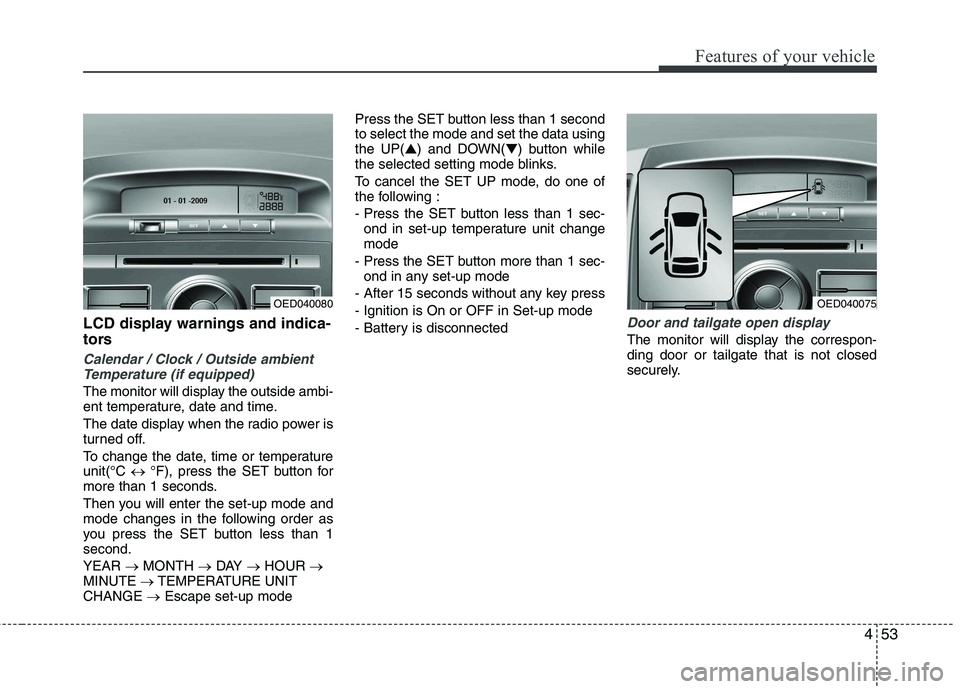
LCD display warnings and indica-
tors
Calendar / Clock / Outside ambientTemperature (if equipped)
The monitor will display the outside ambi-
ent temperature, date and time.
The date display when the radio power is
turned off.
To change the date, time or temperature unit(°C °F), press the SET button for
more than 1 seconds.
Then you will enter the set-up mode and
mode changes in the following order as
you press the SET button less than 1second. YEAR MONTH DAY HOUR
MINUTE TEMPERATURE UNIT
CHANGE Escape set-up mode Press the SET button less than 1 second to select the mode and set the data usingthe UP(
▲) and DOWN( ▼) button while
the selected setting mode blinks.
To cancel the SET UP mode, do one of
the following :
- Press the SET button less than 1 sec- ond in set-up temperature unit change mode
- Press the SET button more than 1 sec- ond in any set-up mode
- After 15 seconds without any key press
- Ignition is On or OFF in Set-up mode
- Battery is disconnected
Door and tailgate open display
The monitor will display the correspon- ding door or tailgate that is not closed
securely.
OED040075OED040080
Page 161 of 442

Features of your vehicle
90
4
These compartments can be used to
store small items.
Center console storage
These compartments can be used to
store small items required by the driver
or front passenger.
To open either of the console storage
compartments, pull up on the locking tab1 or 2.Glove box
To open the glove box, pull the handle
and the glove box will automatically
open. Close the glove box after use.
STORAGE COMPARTMENT
OED040351
WARNING
To reduce the risk of injury in an
accident or sudden stop, always
keep the glove box door closedwhile driving.
OED036053
WARNING - Flammable
materials
Do not store cigarette lighters,
propane cylinders, or other flamma-
ble/explosive materials in the vehi-
cle. These items may catch fire
and/or explode if the vehicle is
exposed to hot temperatures for
extended periods.
CAUTION
To avoid possible theft, do not leave valuables in the storagecompartment.
Always keep the storage com- partment covers closed whiledriving. Do not attempt to place
so many items in the storagecompartment that the storage compartment cover cannot close securely.
Page 165 of 442
Features of your vehicle
94
4
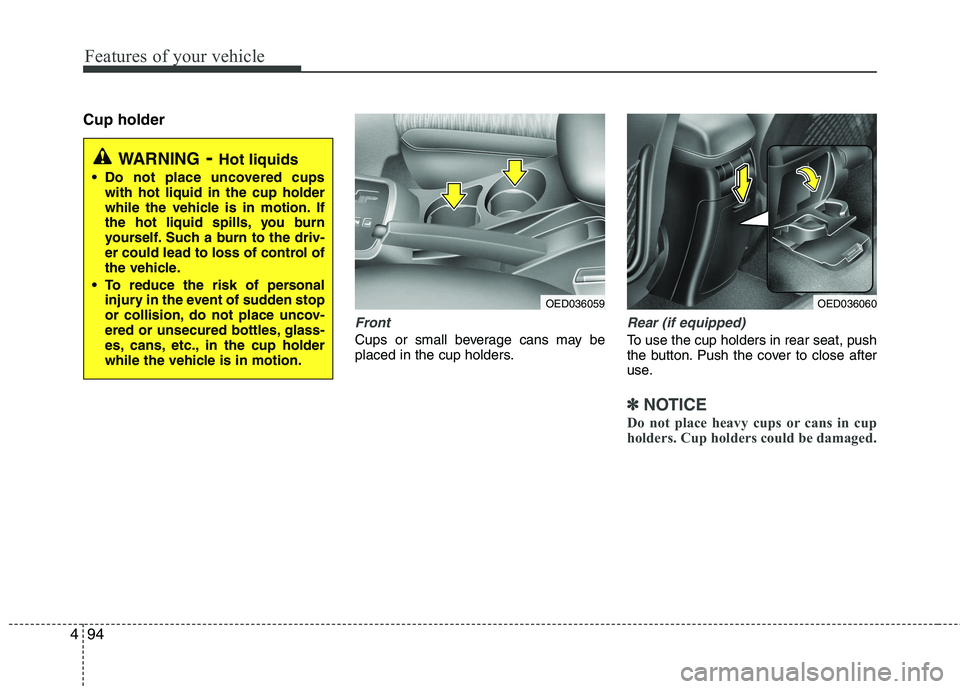
Cup holder
Front
Cups or small beverage cans may be
placed in the cup holders.
Rear (if equipped)
To use the cup holders in rear seat, push
the button. Push the cover to close after
use.
✽✽
NOTICE
Do not place heavy cups or cans in cup
holders. Cup holders could be damaged.
WARNING - Hot liquids
Do not place uncovered cups with hot liquid in the cup holder
while the vehicle is in motion. If
the hot liquid spills, you burn
yourself. Such a burn to the driv-
er could lead to loss of control of
the vehicle.
To reduce the risk of personal injury in the event of sudden stop
or collision, do not place uncov-
ered or unsecured bottles, glass-
es, cans, etc., in the cup holder
while the vehicle is in motion.
OED036059OED036060
Page 166 of 442
495
Features of your vehicle
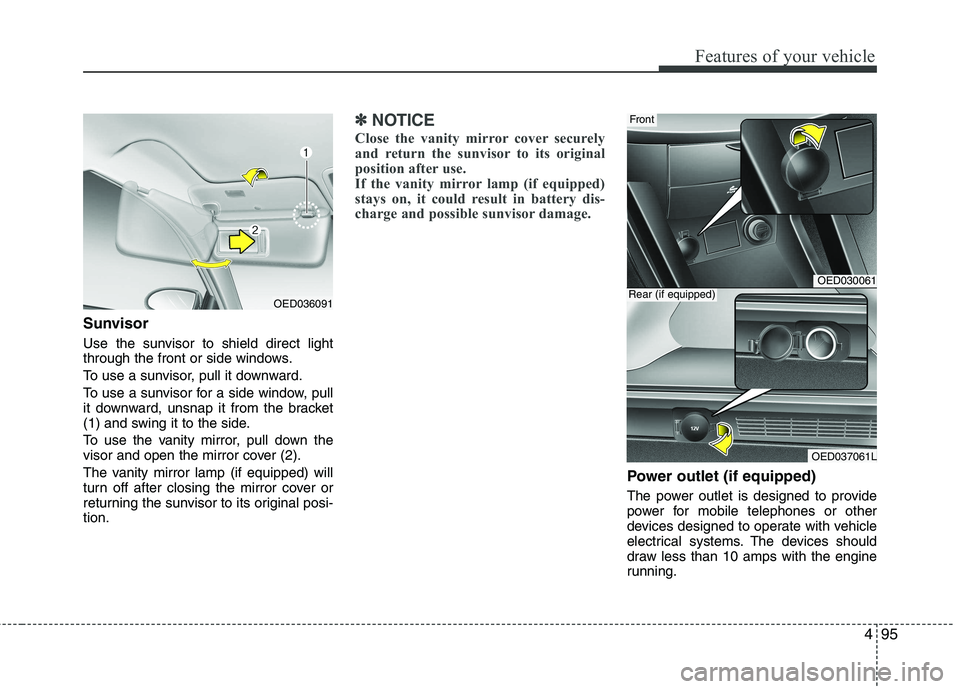
Sunvisor
Use the sunvisor to shield direct light
through the front or side windows.
To use a sunvisor, pull it downward.
To use a sunvisor for a side window, pull
it downward, unsnap it from the bracket
(1) and swing it to the side.
To use the vanity mirror, pull down the
visor and open the mirror cover (2).
The vanity mirror lamp (if equipped) will
turn off after closing the mirror cover or
returning the sunvisor to its original posi-tion.
✽✽NOTICE
Close the vanity mirror cover securely
and return the sunvisor to its original
position after use.
If the vanity mirror lamp (if equipped)
stays on, it could result in battery dis-
charge and possible sunvisor damage.
Power outlet (if equipped)
The power outlet is designed to provide
power for mobile telephones or other
devices designed to operate with vehicle
electrical systems. The devices should
draw less than 10 amps with the engine
running.
OED036091
OED030061
OED037061L
Rear (if equipped)
Front
Page 170 of 442
499
Features of your vehicle
Your vehicle is equipped with a barrier net.
When you load some cargoes on the rear
seat or rear cargo area, you must install
the barrier net behind front seatback or
rear seatback. It is designed to help protect the heads of
the occupants by obstructing objects fly-
ing forward in frontal collisions.
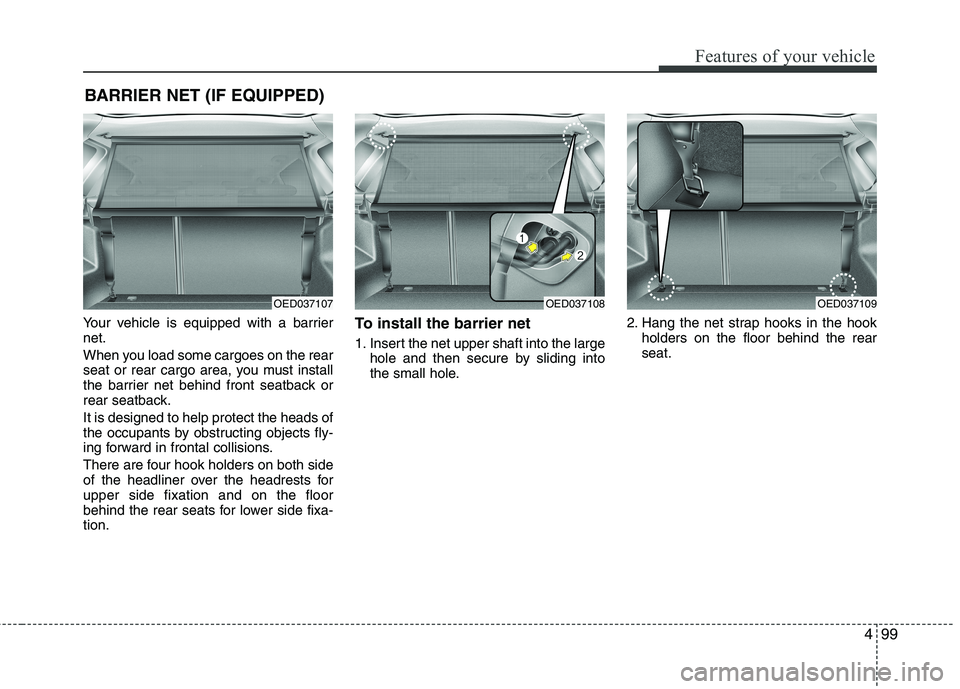
There are four hook holders on both side
of the headliner over the headrests forupper side fixation and on the floor
behind the rear seats for lower side fixa-tion.To install the barrier net
1. Insert the net upper shaft into the large
hole and then secure by sliding into
the small hole. 2. Hang the net strap hooks in the hook
holders on the floor behind the rearseat.
BARRIER NET (IF EQUIPPED)
OED037107OED037108OED037109
Page 171 of 442
Features of your vehicle
100
4
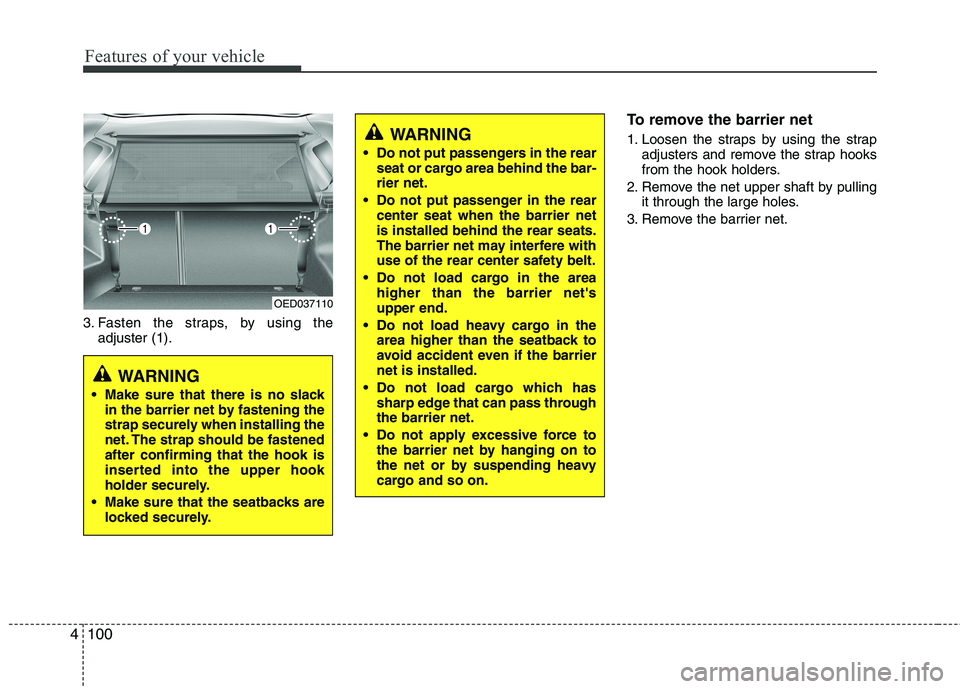
3. Fasten the straps, by using the
adjuster (1). To remove the barrier net
1. Loosen the straps by using the strap
adjusters and remove the strap hooks
from the hook holders.
2. Remove the net upper shaft by pulling it through the large holes.
3. Remove the barrier net.
OED037110
WARNING
Make sure that there is no slack in the barrier net by fastening the
strap securely when installing the
net. The strap should be fastenedafter confirming that the hook is
inserted into the upper hook
holder securely.
Make sure that the seatbacks are locked securely.
WARNING
Do not put passengers in the rear seat or cargo area behind the bar- rier net.
Do not put passenger in the rear center seat when the barrier netis installed behind the rear seats.
The barrier net may interfere with
use of the rear center safety belt.
Do not load cargo in the area higher than the barrier net'supper end.
Do not load heavy cargo in the area higher than the seatback to
avoid accident even if the barriernet is installed.
Do not load cargo which has sharp edge that can pass throughthe barrier net.
Do not apply excessive force to the barrier net by hanging on to
the net or by suspending heavy
cargo and so on.
Page 174 of 442
4103
Features of your vehicle
EXTERIOR FEATURE
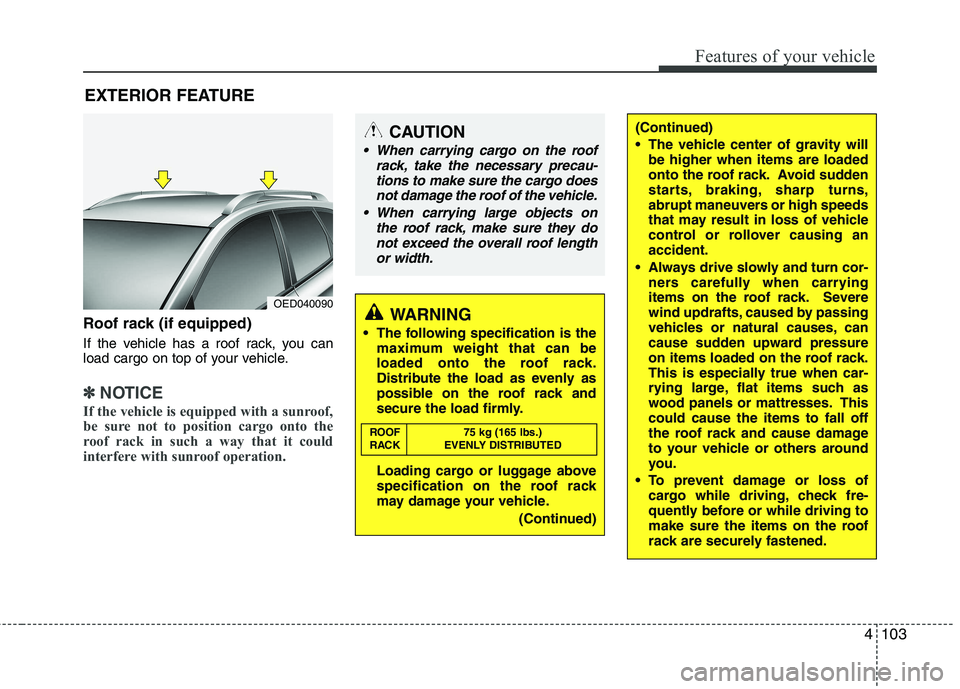
Roof rack (if equipped)
If the vehicle has a roof rack, you can
load cargo on top of your vehicle.
✽✽ NOTICE
If the vehicle is equipped with a sunroof,
be sure not to position cargo onto the
roof rack in such a way that it could
interfere with sunroof operation.
WARNING
The following specification is the maximum weight that can be
loaded onto the roof rack.
Distribute the load as evenly as
possible on the roof rack and
secure the load firmly.
Loading cargo or luggage above
specification on the roof rack
may damage your vehicle.
(Continued)
ROOF 75 kg (165 lbs.)
RACK EVENLY DISTRIBUTED
(Continued)
The vehicle center of gravity will
be higher when items are loaded
onto the roof rack. Avoid sudden
starts, braking, sharp turns,
abrupt maneuvers or high speeds
that may result in loss of vehicle
control or rollover causing anaccident.
Always drive slowly and turn cor- ners carefully when carrying
items on the roof rack. Severe
wind updrafts, caused by passing
vehicles or natural causes, can
cause sudden upward pressure
on items loaded on the roof rack.
This is especially true when car-
rying large, flat items such as
wood panels or mattresses. Thiscould cause the items to fall off
the roof rack and cause damage
to your vehicle or others around
you.
To prevent damage or loss of cargo while driving, check fre-
quently before or while driving to
make sure the items on the roof
rack are securely fastened.CAUTION
When carrying cargo on the roof
rack, take the necessary precau-
tions to make sure the cargo doesnot damage the roof of the vehicle.
When carrying large objects on the roof rack, make sure they do
not exceed the overall roof length or width.
OED040090
Page 186 of 442
4115
Features of your vehicle
Listening to the Tuner
Selecting FM or AM
The tuner offers you two different wave
bands.
Either press the FMor the AMbutton.
✎ The unit switches to band selected.
Selecting a FM band
The tuner offers you to select three FM
bands.
Short press the FMbutton till the
required FM band is selected.
FM 1
FM 2
FM AST:
In the FM 1 and FM 2 band you can
manually store up to 6 FM stationseach.
In the FM AST band up to 6 FM sta-tions will be automatically stored. Selecting an AM band
The tuner offers you to select the one AM
waveband, the AM. You can select from
two AM bands.
Short press the AMbutton till the
required AM band is selected.
AM
AM AST:
In AM you can manually store up to 6
AM stations.
In the AM AST band up to 6 AM sta-tions will be automatically stored.
Autostore This function automatically stores
received stations fulfilling the presetreception quality into the FM AST or AMAST band.
Short press the AST button to store
strongest stations in the AST memory.
The maximum number of stations
stored in each AST-band is 6.
✎ Execute “Autostore” to update the list
of the stations (e.g. when leaving anarea). Automatic search
With this function you can search for the
next or previous station that fulfils the
preset reception quality.
Press the or button to search
for the previous/next station in the
currently selected waveband.
Search will always start for the stationwith the strongest signal at LOCAL
search level. If no station is found at
LOCAL level, search will be continued
at the DISTANCE level.
To exit, press or button respec-
tively.
Manual tune
With this function you can increase or
decrease the radio frequency manually.
Press the (Tune Down) or
(Tune up) button to decrease or
increase the frequency.
Fast tune
With this function you can continuously
increase or decrease the radio frequen-
cy.
Either press and hold the or or
the or button to increase or
decrease the frequency.
The operation shall continue as long
as the button is pressed.
Page 202 of 442

4131
Features of your vehicle
The Setup menu
In the setup menu you can change to
your preferred settings.
Short press the SETUPbutton to
enter the Setup menu.
Short press the or button to
access the desired sub-menu.
To exit, press SETUP, CD, FM or AM
buttons.
The following options are available:
On Volume
In this sub-menu the On volume can be
set to a certain level the unit will use
when switched on.
Enter the this sub menu as described
above.
Press the or buttons to select
the desired value.
Default setting: 12
Setting range: 3 ... 25 TA/News Volume
With this setting you can set the volume
used when traffic announcements arebroadcasted.
Enter the this sub menu as described
above.
Press the or buttons to select
the desired value.
Default setting: 12
Setting range: 3 ... 25
Setting the speed-dependent volume
(SDVC)
With this function the volume is automat-
ically changed proportionally to the carspeed.
The higher the car’s speed is, the louder
the volume.
Enter the SDVC sub-menu as
described above.
Press the or buttons to select
the pre-defined curve.
Default setting: 1
Setting curve range: 1 ... 5
Curve range 0: SDVC feature is
switched OFF PTY search
Searching for stations by programme
type.
Enter the this sub menu as described
above.
Press the or buttons to select
the desired programme type.
Press the OK button to confirm.
PTY programme type 1 ... 29 can beselected
Default setting: No PTY
News
Enter the this sub menu as described
above.
Press the or buttons to selectOff or On.
News On – Allows the reception of
News broadcast
News Off – Does not allow the recep-
tion of News broadcast
Default setting: NEWS OFF
On Volume
Text Scrolling SDVC
Region TA/News Volume
News
AF Security Code
Bluetooth Menu
PTY
Page 204 of 442
4133
Features of your vehicle
Security Code
The unit is equipped with a security code
option. This code can be used to protect
the Head Unit against theft. In case theHead Unit is being disconnected from the
car’s power supply and the security code
option being active you will be prompted
to enter the four digit security code.
Any code except 0000 enables the
security code feature.
Code 0000 disables the security code
feature. Enabling the Security Code option
Short press the SETUPbutton to
enter the SETUP menu.
Short press the or button to
access the Security Code mode.
✎ Now you have to enter the current
security code.
1.Short press the or button to
set the value for each digit of the cur-
rent security code.
2.Short press the or button to
select a specific digit.
3.Short press the OKbutton to con-
firm the security code.
Upon correct entry of the security
code, you will be asked to enter the
new security code that will replace the
previous code memorized in the HeadUnit.
Repeat the steps 1., 2. and 3.to enter
the new code.
To abort the Security Code Menu in
Setup mode, press either one of the
following buttons: , , FM, AM,
CD, AUX, MUTE, TA, 1 through 6,
AST, SCAN, INFO, SETUP, SOUND
or .
WARNING
If security code function is activat-
ed and battery was disconnected,
audio set will ask for the Security
code. Be careful and remember the
password that you have changed.