instrument panel KIA CEED 2013 User Guide
[x] Cancel search | Manufacturer: KIA, Model Year: 2013, Model line: CEED, Model: KIA CEED 2013Pages: 1168, PDF Size: 48.01 MB
Page 126 of 1168
447
Features of your vehicle
CAUTION
Do not operate the engine withinthe tachometer's RED ZONE. This may cause severe engine damage.
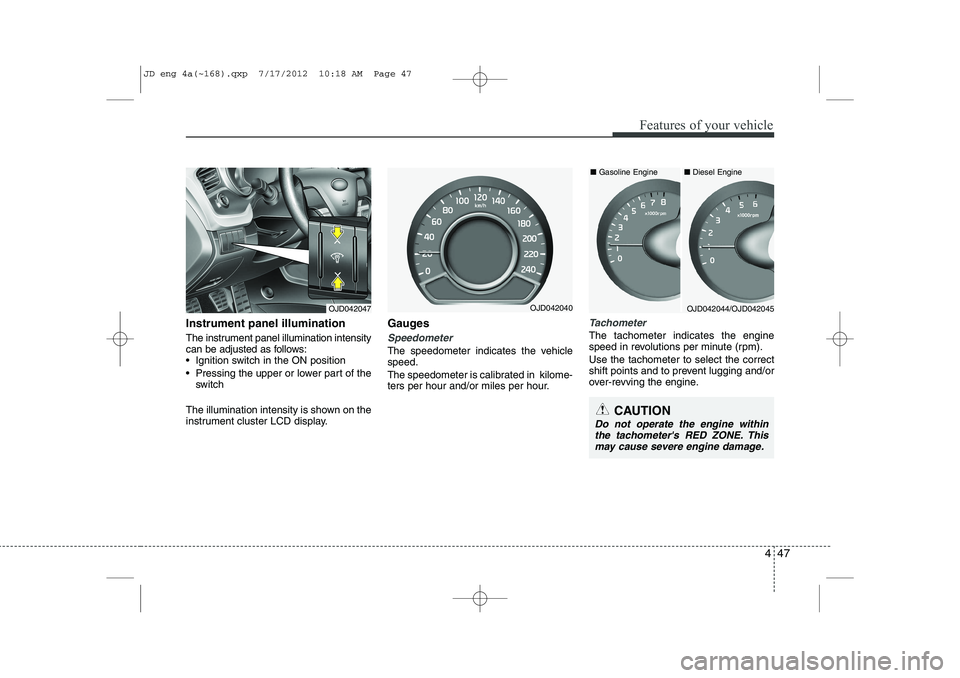
Instrument panel illumination
The instrument panel illumination intensity
can be adjusted as follows:
Ignition switch in the ON position
Pressing the upper or lower part of the switch
The illumination intensity is shown on the
instrument cluster LCD display. Gauges
Speedometer
The speedometer indicates the vehicle speed.
The speedometer is calibrated in kilome-
ters per hour and/or miles per hour.
Tachometer
The tachometer indicates the engine
speed in revolutions per minute (rpm). Use the tachometer to select the correct
shift points and to prevent lugging and/or
over-revving the engine.
OJD042047OJD042044/OJD042045OJD042040■
Diesel Engine
■ Gasoline Engine
JD eng 4a(~168).qxp 7/17/2012 10:18 AM Page 47
Page 139 of 1168
Features of your vehicle
60
4
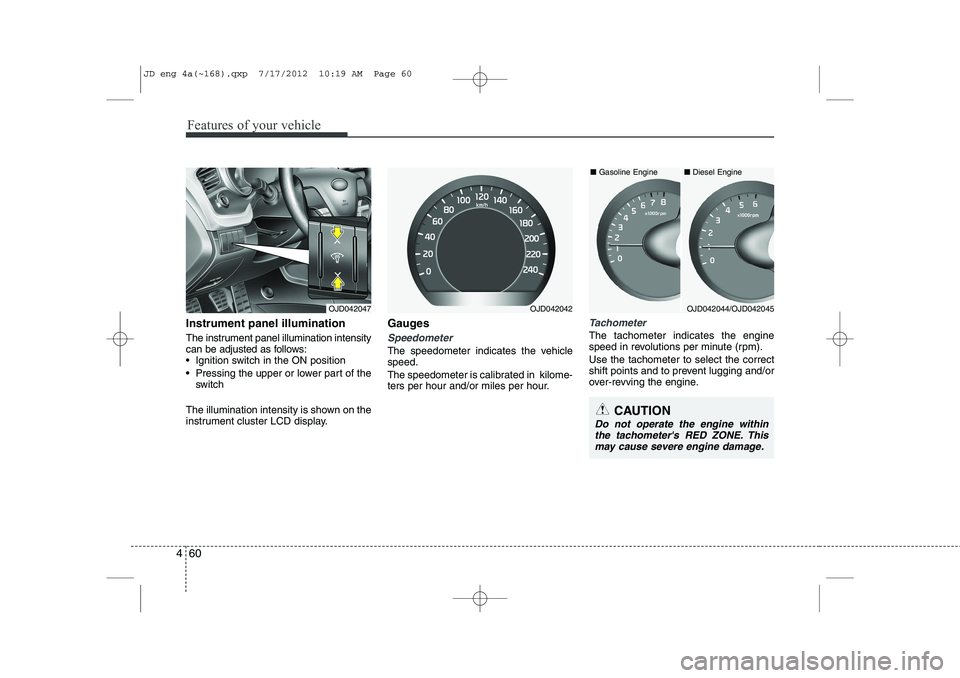
Instrument panel illumination
The instrument panel illumination intensity
can be adjusted as follows:
Ignition switch in the ON position
Pressing the upper or lower part of the
switch
The illumination intensity is shown on the
instrument cluster LCD display. Gauges
Speedometer
The speedometer indicates the vehicle speed.
The speedometer is calibrated in kilome-
ters per hour and/or miles per hour.
Tachometer
The tachometer indicates the engine
speed in revolutions per minute (rpm). Use the tachometer to select the correct
shift points and to prevent lugging and/or
over-revving the engine.
OJD042047
CAUTION
Do not operate the engine within
the tachometer's RED ZONE. This may cause severe engine damage.
OJD042044/OJD042045OJD042042 ■
Diesel Engine
■ Gasoline Engine
JD eng 4a(~168).qxp 7/17/2012 10:19 AM Page 60
Page 150 of 1168
471
Features of your vehicle
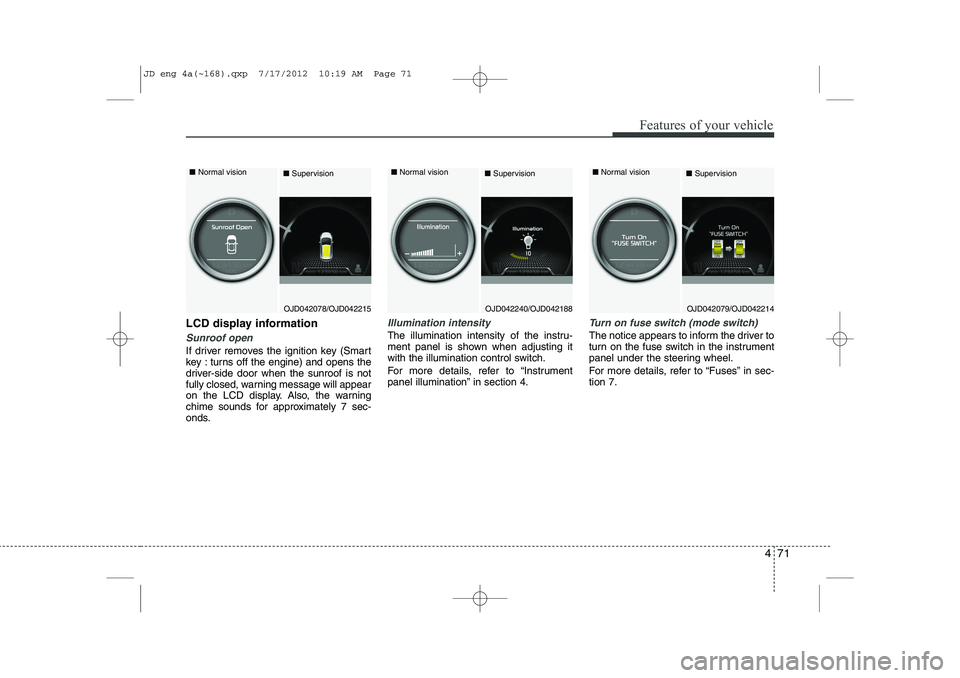
LCD display information
Sunroof open
If driver removes the ignition key (Smart
key : turns off the engine) and opens the
driver-side door when the sunroof is not
fully closed, warning message will appear
on the LCD display. Also, the warning
chime sounds for approximately 7 sec-
onds.
Illumination intensity
The illumination intensity of the instru-
ment panel is shown when adjusting it
with the illumination control switch.
For more details, refer to “Instrument
panel illumination” in section 4.
Turn on fuse switch (mode switch)
The notice appears to inform the driver to
turn on the fuse switch in the instrument
panel under the steering wheel.
For more details, refer to “Fuses” in sec- tion 7.
OJD042078/OJD042215
■
Normal vision
■SupervisionOJD042079/OJD042214
■
Normal vision
■SupervisionOJD042240/OJD042188
■
Normal vision
■Supervision
JD eng 4a(~168).qxp 7/17/2012 10:19 AM Page 71
Page 167 of 1168
Features of your vehicle
88
4
LCD DISPLAY WARNINGS AND INDICATORS (INSTRUMENT PANEL DISPLAY)
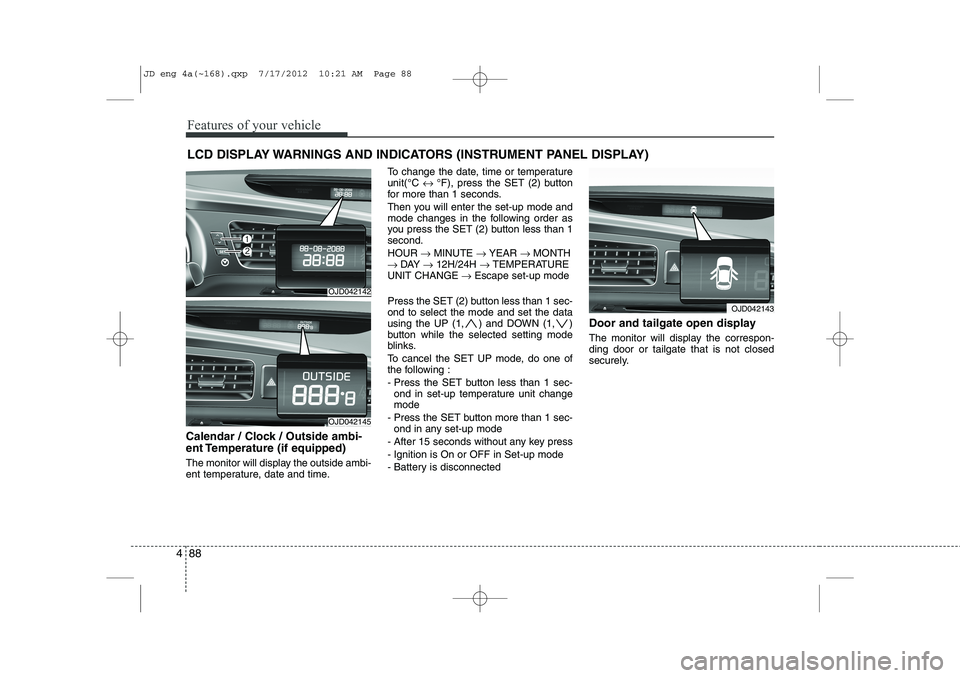
Calendar / Clock / Outside ambi-
ent Temperature (if equipped)
The monitor will display the outside ambi-
ent temperature, date and time. To change the date, time or temperatureunit(°C
↔ °F), press the SET (2) button
for more than 1 seconds.
Then you will enter the set-up mode and
mode changes in the following order as
you press the SET (2) button less than 1second. HOUR → MINUTE → YEAR → MONTH
→ DAY → 12H/24H → TEMPERATURE
UNIT CHANGE → Escape set-up mode
Press the SET (2) button less than 1 sec- ond to select the mode and set the data
using the UP (1, ) and DOWN (1, )
button while the selected setting mode
blinks.
To cancel the SET UP mode, do one of
the following :
- Press the SET button less than 1 sec- ond in set-up temperature unit change mode
- Press the SET button more than 1 sec- ond in any set-up mode
- After 15 seconds without any key press
- Ignition is On or OFF in Set-up mode
- Battery is disconnected Door and tailgate open display
The monitor will display the correspon- ding door or tailgate that is not closed
securely.
OJD042142
OJD042145
OJD042143
JD eng 4a(~168).qxp 7/17/2012 10:21 AM Page 88
Page 190 of 1168
4 111
Features of your vehicle
Static bending light (if equipped)
While driving the corner, for your sight
and safety, the static bending light turns
on automatically. The system will operate
automatically as follows:
When vehicle speed is under 10km/hand steering wheel angle approximate-
ly 80 degrees.
When vehicle speed is over 10km/h and steering wheel angle approximate-
ly 35 degrees.
When the vehicle is at a standstill.
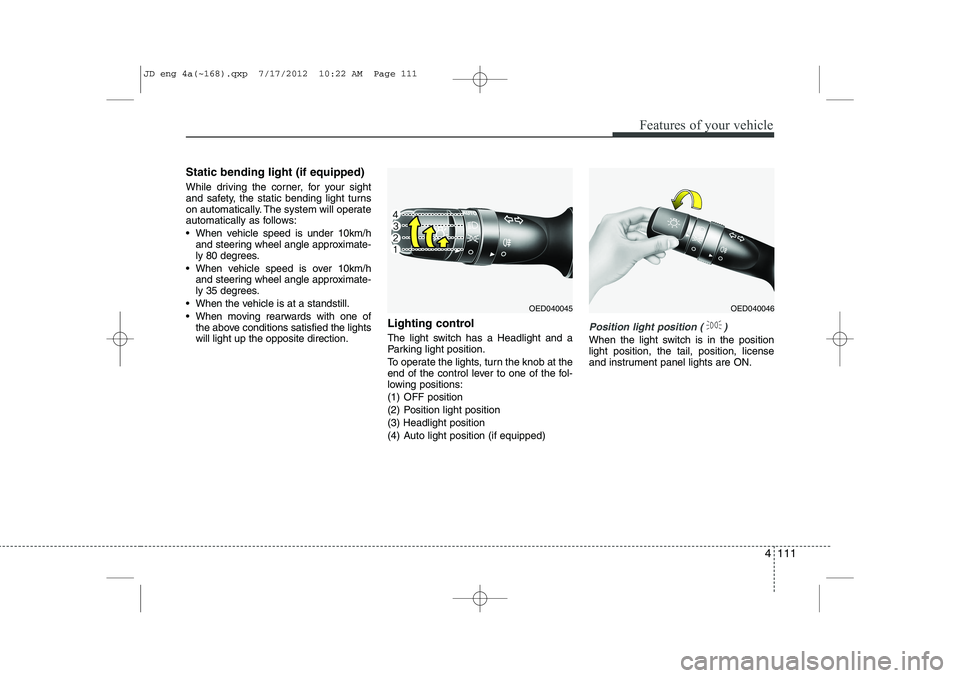
When moving rearwards with one of the above conditions satisfied the lights will light up the opposite direction. Lighting control
The light switch has a Headlight and a
Parking light position.
To operate the lights, turn the knob at the
end of the control lever to one of the fol-
lowing positions:
(1) OFF position
(2) Position light position(3) Headlight position
(4) Auto light position (if equipped)
Position light position ( )
When the light switch is in the position light position, the tail, position, license
and instrument panel lights are ON.
OED040045OED040046
JD eng 4a(~168).qxp 7/17/2012 10:22 AM Page 111
Page 191 of 1168
Features of your vehicle
112
4
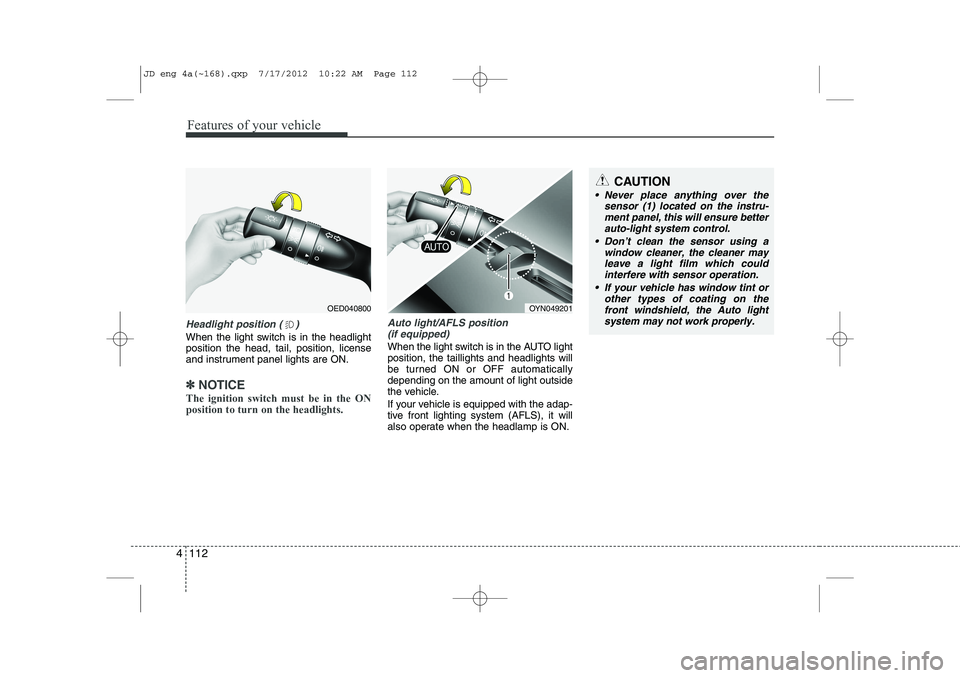
Headlight position ( )
When the light switch is in the headlight position the head, tail, position, license
and instrument panel lights are ON.
✽✽
NOTICE
The ignition switch must be in the ON position to turn on the headlights.
Auto light/AFLS position (if equipped)
When the light switch is in the AUTO light position, the taillights and headlights will
be turned ON or OFF automaticallydepending on the amount of light outside
the vehicle.
If your vehicle is equipped with the adap-
tive front lighting system (AFLS), it will
also operate when the headlamp is ON.
OYN049201
CAUTION
Never place anything over the sensor (1) located on the instru-
ment panel, this will ensure betterauto-light system control.
Don’t clean the sensor using a window cleaner, the cleaner may
leave a light film which couldinterfere with sensor operation.
If your vehicle has window tint or other types of coating on thefront windshield, the Auto light
system may not work properly.
OED040800
JD eng 4a(~168).qxp 7/17/2012 10:22 AM Page 112
Page 209 of 1168
Features of your vehicle
130
4
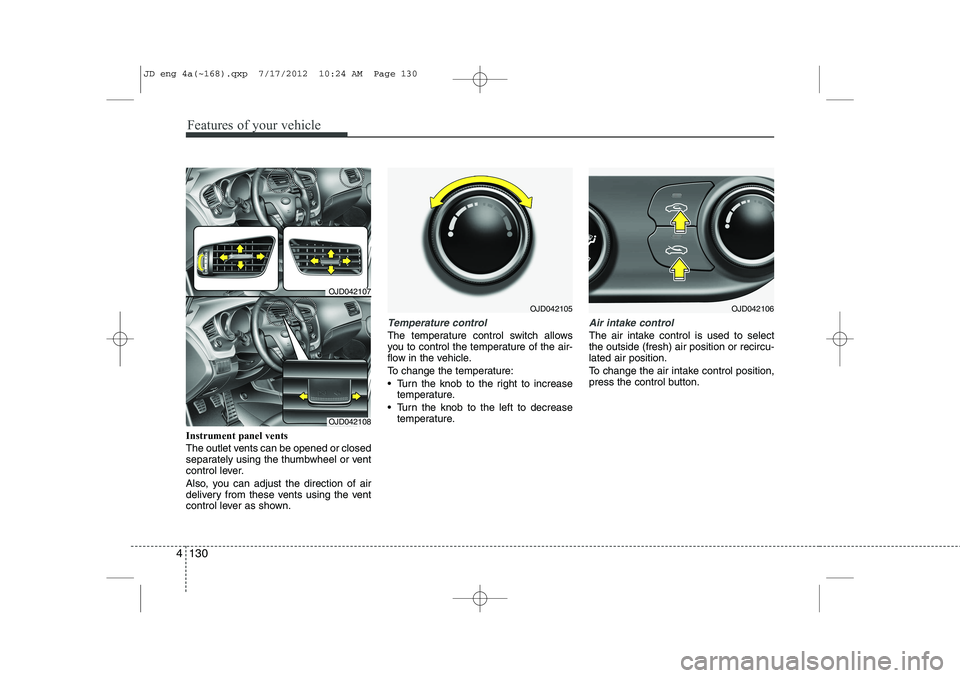
Instrument panel vents
The outlet vents can be opened or closed
separately using the thumbwheel or vent
control lever.
Also, you can adjust the direction of air
delivery from these vents using the vent
control lever as shown.
Temperature control
The temperature control switch allows
you to control the temperature of the air-
flow in the vehicle.
To change the temperature:
Turn the knob to the right to increase
temperature.
Turn the knob to the left to decrease temperature.
Air intake control
The air intake control is used to select the outside (fresh) air position or recircu-lated air position.
To change the air intake control position,
press the control button.
OJD042105
OJD042107
OJD042108
OJD042106
JD eng 4a(~168).qxp 7/17/2012 10:24 AM Page 130
Page 220 of 1168
4 141
Features of your vehicle
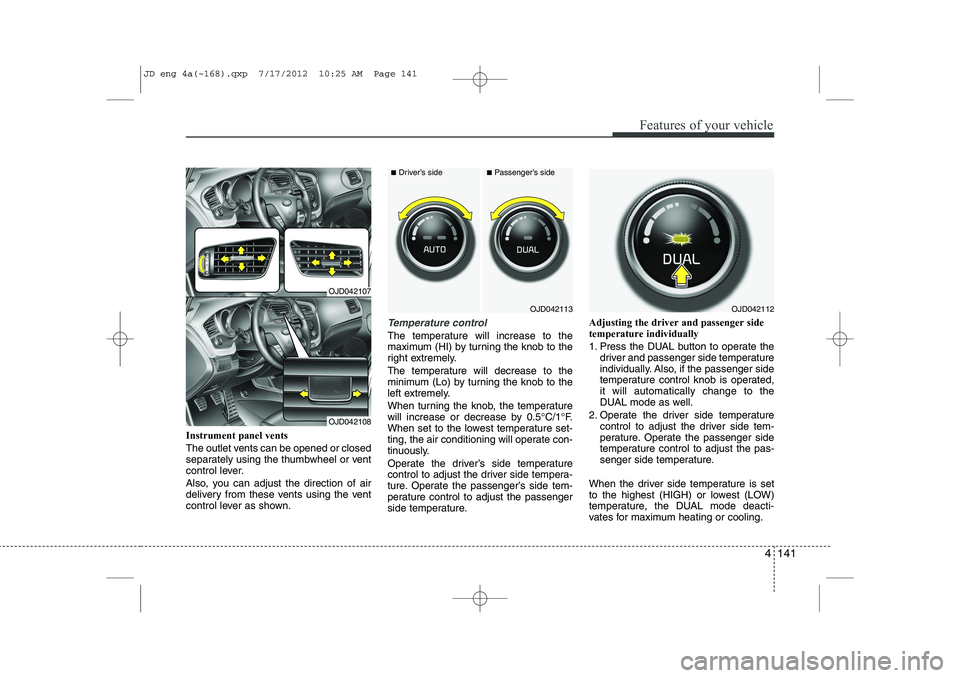
Instrument panel vents
The outlet vents can be opened or closed
separately using the thumbwheel or vent
control lever.
Also, you can adjust the direction of air
delivery from these vents using the vent
control lever as shown.
Temperature control
The temperature will increase to the
maximum (HI) by turning the knob to the
right extremely.
The temperature will decrease to the
minimum (Lo) by turning the knob to the
left extremely.
When turning the knob, the temperature
will increase or decrease by 0.5°C/1°F.
When set to the lowest temperature set-
ting, the air conditioning will operate con-
tinuously.
Operate the driver’s side temperature
control to adjust the driver side tempera-
ture. Operate the passenger’s side tem-
perature control to adjust the passenger
side temperature.Adjusting the driver and passenger sidetemperature individually
1. Press the DUAL button to operate the
driver and passenger side temperature
individually. Also, if the passenger side
temperature control knob is operated,it will automatically change to the
DUAL mode as well.
2. Operate the driver side temperature control to adjust the driver side tem-
perature. Operate the passenger side
temperature control to adjust the pas-
senger side temperature.
When the driver side temperature is set
to the highest (HIGH) or lowest (LOW)
temperature, the DUAL mode deacti-
vates for maximum heating or cooling.
OJD042113
■ Driver’s side■Passenger’s side
OJD042112
OJD042107
OJD042108
JD eng 4a(~168).qxp 7/17/2012 10:25 AM Page 141
Page 415 of 1168
Driving your vehicle
74
5
Turn signals when towing a trailer
When you tow a trailer, your vehicle has
to have a different turn signal flasher and
extra wiring. The green arrows on your
instrument panel will flash whenever you
signal a turn or lane change. Properly
connected, the trailer lights will also flash
to alert other drivers you’re about to turn,
change lanes, or stop.
When towing a trailer, the green arrows
on your instrument panel will flash for
turns even if the bulbs on the trailer are
burned out. Thus, you may think drivers
behind you are seeing your signals
when, in fact, they are not. It is important
to check occasionally to be sure the trail-
er bulbs are still working. You must also
check the lights every time you discon-
nect and then reconnect the wires.
Do not connect a trailer lighting system
directly to your vehicle’s lighting system.
Use only an approved trailer wiring har-
ness.
An authorized Kia dealer can assist you
in installing the wiring harness.
Driving on grades
Reduce speed and shift to a lower gear
before you start down a long or steep
downgrade. If you don’t shift down, you
might have to use your brakes so much
that they would get hot and no longer
operate efficiently.
On a long uphill grade, shift down and
reduce your speed to around 70 km/h (45mph) to reduce the possibility of engine
and transaxle overheating.
If your trailer weighs more than the max-
imum trailer weight without trailer brakes
and you have an automatic transaxle,
you should drive in D (Drive) when tow-
ing a trailer.
Operating your vehicle in D (Drive) when
towing a trailer will minimize heat build up
and extend the life of your transaxle.
WARNING
Failure to use an approved trailer wiring harness could result in dam-
age to the vehicle electrical system
and/or personal injury.
CAUTION
When towing a trailer on steep grades (in excess of 6%) pay
close attention to the engine coolant temperature gauge toensure the engine does not over-heat.
If the needle of the coolant tem-perature gauge moves across thedial towards “130/H (HOT)”, pull over and stop as soon as it is safe
to do so, and allow the engine to idle until it cools down. You mayproceed once the engine has cooled sufficiently.
You must decide driving speed depending on trailer weight anduphill grade to reduce the possi-bility of engine and transaxle
overheating.
JD eng 5.qxp 7/17/2012 10:44 AM Page 74
Page 444 of 1168
623
What to do in an emergency
TIRE PRESSURE MONITORING SYSTEM (TPMS) (IF EQUIPPED)
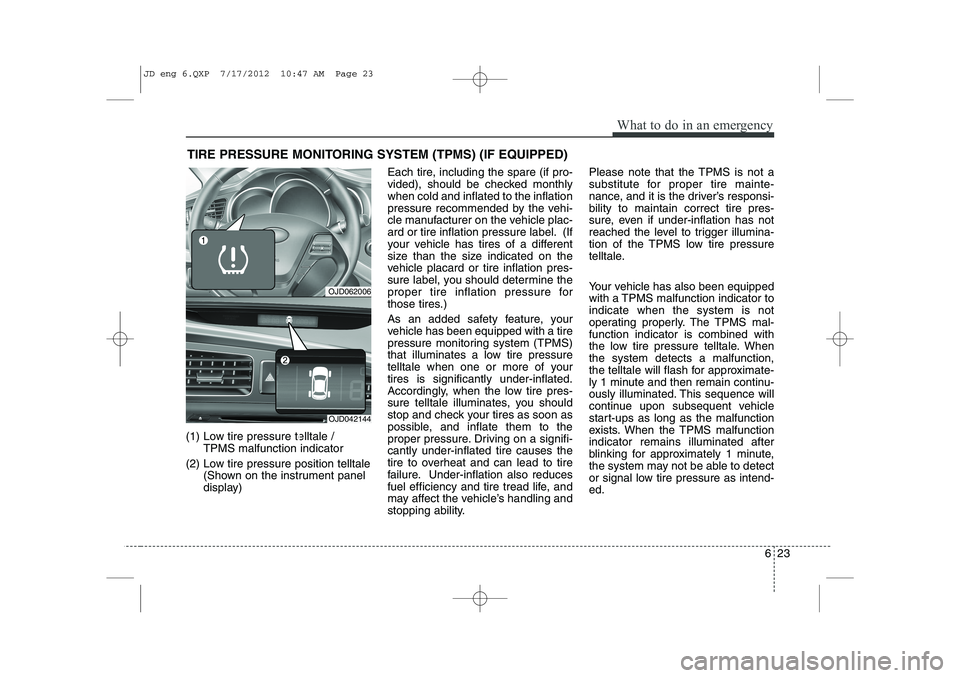
(1) Low tire pressure telltale / TPMS malfunction indicator
(2) Low tire pressure position telltale (Shown on the instrument panel
display) Each tire, including the spare (if pro-
vided), should be checked monthlywhen cold and inflated to the inflation
pressure recommended by the vehi-
cle manufacturer on the vehicle plac-
ard or tire inflation pressure label. (If
your vehicle has tires of a different
size than the size indicated on the
vehicle placard or tire inflation pres-
sure label, you should determine the
proper tire inflation pressure for
those tires.)
As an added safety feature, your
vehicle has been equipped with a tire
pressure monitoring system (TPMS)
that illuminates a low tire pressure
telltale when one or more of yourtires is significantly under-inflated.
Accordingly, when the low tire pres-
sure telltale illuminates, you should
stop and check your tires as soon as
possible, and inflate them to the
proper pressure. Driving on a signifi-cantly under-inflated tire causes the
tire to overheat and can lead to tire
failure. Under-inflation also reduces
fuel efficiency and tire tread life, and
may affect the vehicle’s handling and
stopping ability. Please note that the TPMS is not a
substitute for proper tire mainte-
nance, and it is the driver’s responsi-bility to maintain correct tire pres-
sure, even if under-inflation has not
reached the level to trigger illumina-
tion of the TPMS low tire pressure
telltale.
Your vehicle has also been equipped
with a TPMS malfunction indicator toindicate when the system is not
operating properly. The TPMS mal-function indicator is combined with
the low tire pressure telltale. Whenthe system detects a malfunction,
the telltale will flash for approximate-
ly 1 minute and then remain continu-
ously illuminated. This sequence will
continue upon subsequent vehicle
start-ups as long as the malfunction
exists. When the TPMS malfunctionindicator remains illuminated after
blinking for approximately 1 minute,
the system may not be able to detect
or signal low tire pressure as intend-ed.
OJD062006
OJD042144
JD eng 6.QXP 7/17/2012 10:47 AM Page 23