Auto KIA CEED 2013 Owners Manual
[x] Cancel search | Manufacturer: KIA, Model Year: 2013, Model line: CEED, Model: KIA CEED 2013Pages: 1168, PDF Size: 48.01 MB
Page 800 of 1168
4 137
Features of your vehicle
Automatic heating and air condi- tioning The automatic climate control system is
controlled by simply setting the desired
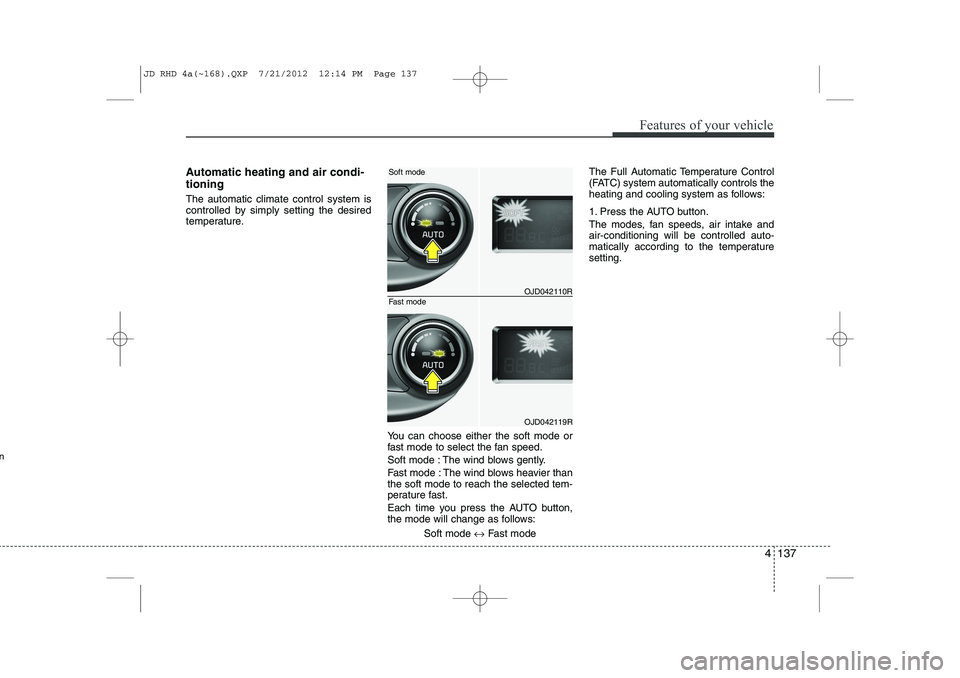
temperature.You can choose either the soft mode or
fast mode to select the fan speed.
Soft mode : The wind blows gently.
Fast mode : The wind blows heavier than the soft mode to reach the selected tem-
perature fast.
Each time you press the AUTO button,
the mode will change as follows:Soft mode ↔Fast mode The Full Automatic Temperature Control
(FATC) system automatically controls the
heating and cooling system as follows:
1. Press the AUTO button.
The modes, fan speeds, air intake and air-conditioning will be controlled auto-
matically according to the temperaturesetting.
OJD042110R
OJD042119R
Soft mode
Fast mode
n
JD RHD 4a(~168).QXP 7/21/2012 12:14 PM Page 137
Page 802 of 1168
4 139
Features of your vehicle
Manual heating and air condition- ing The heating and cooling system can be
controlled manually by pressing buttons
or turning knob(s) other than the AUTO
button. In this case, the system workssequentially according to the order of
buttons or knob(s) selected.
1. Start the engine.
2. Set the mode to the desired position.To improve the effectiveness of heat-ing and cooling:
- Heating:- Cooling:
3. Set the temperature control to the desired position.
4. Set the air intake control to the outside (fresh) air position.
5. Set the fan speed control to the desired speed.
6. If air conditioning is desired, turn the air conditioning system on.
Press the AUTO button in order to con-
vert to full automatic control of the sys-tem.
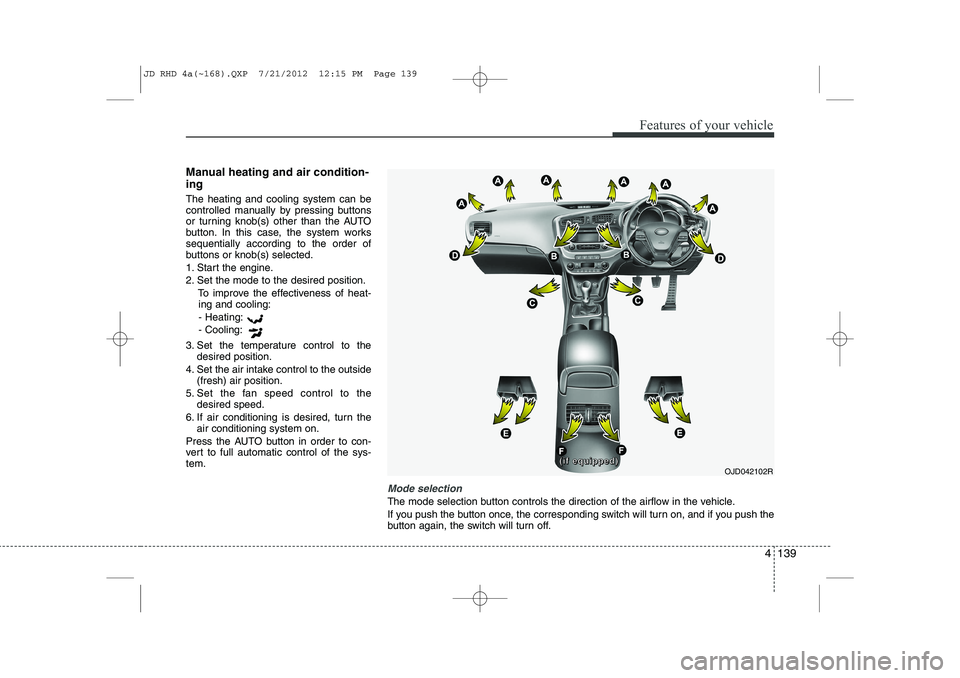
Mode selection
The mode selection button controls the direction of the airflow in the vehicle.
If you push the button once, the corresponding switch will turn on, and if you push the
button again, the switch will turn off.
OJD042102R((((iiiiffff eeeeqqqquuuuiiiippppppppeeeedddd))))
JD RHD 4a(~168).QXP 7/21/2012 12:15 PM Page 139
Page 803 of 1168
Features of your vehicle
140
4
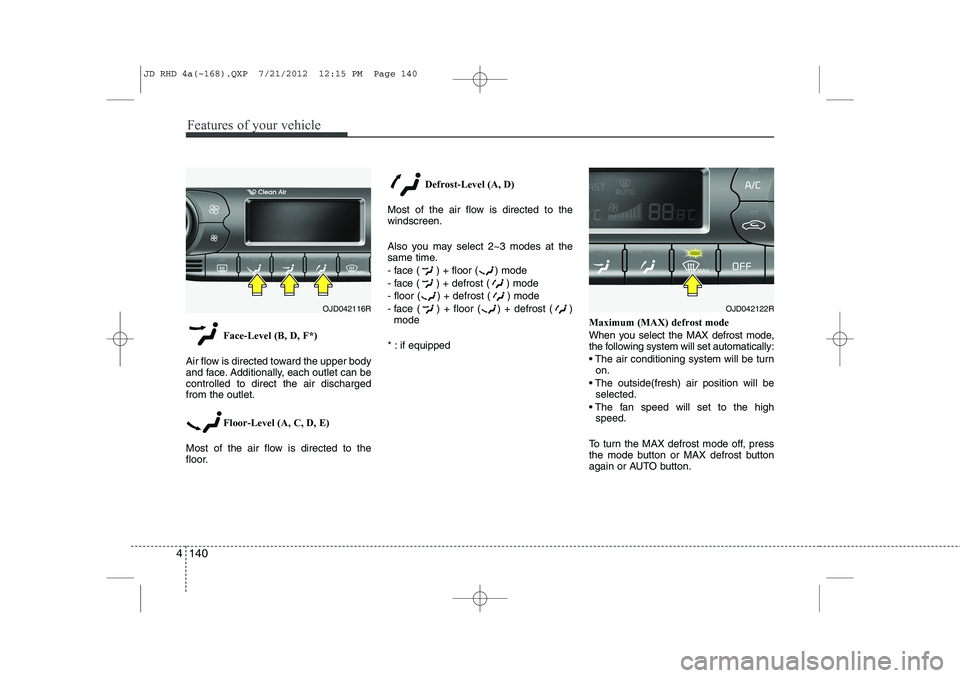
Face-Level (B, D, F*)
Air flow is directed toward the upper body
and face. Additionally, each outlet can becontrolled to direct the air dischargedfrom the outlet.
Floor-Level (A, C, D, E)
Most of the air flow is directed to the
floor. Defrost-Level (A, D)
Most of the air flow is directed to thewindscreen.
Also you may select 2~3 modes at the
same time.
- face ( ) + floor ( ) mode
- face ( ) + defrost ( ) mode
- floor ( ) + defrost ( ) mode
- face ( ) + floor ( ) + defrost ( ) mode
* : if equipped Maximum (MAX) defrost mode
When you select the MAX defrost mode,
the following system will set automatically:
The air conditioning system will be turn
on.
The outside(fresh) air position will be selected.
The fan speed will set to the high speed.
To turn the MAX defrost mode off, press
the mode button or MAX defrost button
again or AUTO button.
OJD042116ROJD042122R
JD RHD 4a(~168).QXP 7/21/2012 12:15 PM Page 140
Page 804 of 1168
4 141
Features of your vehicle
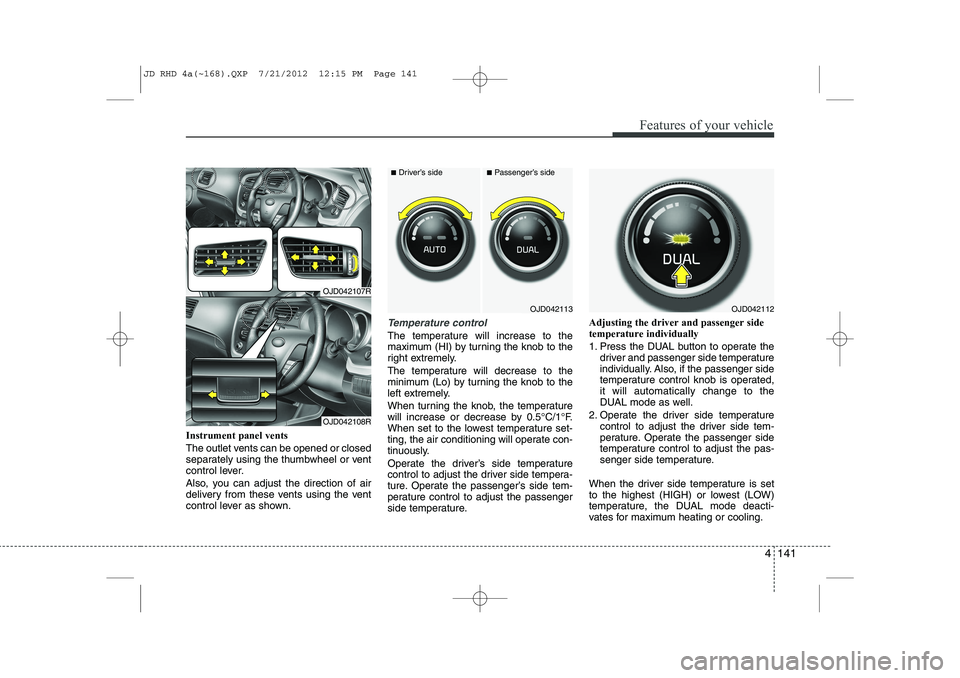
Instrument panel vents
The outlet vents can be opened or closed
separately using the thumbwheel or vent
control lever.
Also, you can adjust the direction of air
delivery from these vents using the vent
control lever as shown.
Temperature control
The temperature will increase to the
maximum (HI) by turning the knob to the
right extremely.
The temperature will decrease to the
minimum (Lo) by turning the knob to the
left extremely.
When turning the knob, the temperature
will increase or decrease by 0.5°C/1°F.
When set to the lowest temperature set-
ting, the air conditioning will operate con-
tinuously.
Operate the driver’s side temperature
control to adjust the driver side tempera-
ture. Operate the passenger’s side tem-
perature control to adjust the passenger
side temperature.Adjusting the driver and passenger sidetemperature individually
1. Press the DUAL button to operate the
driver and passenger side temperature
individually. Also, if the passenger side
temperature control knob is operated,it will automatically change to the
DUAL mode as well.
2. Operate the driver side temperature control to adjust the driver side tem-
perature. Operate the passenger side
temperature control to adjust the pas-
senger side temperature.
When the driver side temperature is set
to the highest (HIGH) or lowest (LOW)
temperature, the DUAL mode deacti-
vates for maximum heating or cooling.
OJD042113
■ Driver’s side■Passenger’s side
OJD042112
OJD042107R
OJD042108R
JD RHD 4a(~168).QXP 7/21/2012 12:15 PM Page 141
Page 811 of 1168
Features of your vehicle
148
4
For maximum defrosting, set the tem-
perature control to the hottest position
and the fan speed control to the high-est speed.
If warm air to the floor is desired whilst defrosting or defogging, set the modeto the floor-defrost position.
Before driving, clear all snow and ice from the windscreen, rear window, out-
side rear view mirrors, and all side win-
dows.
Clear all snow and ice from the bonnet and air inlet in the cowl grill to improveheater and defroster efficiency and to
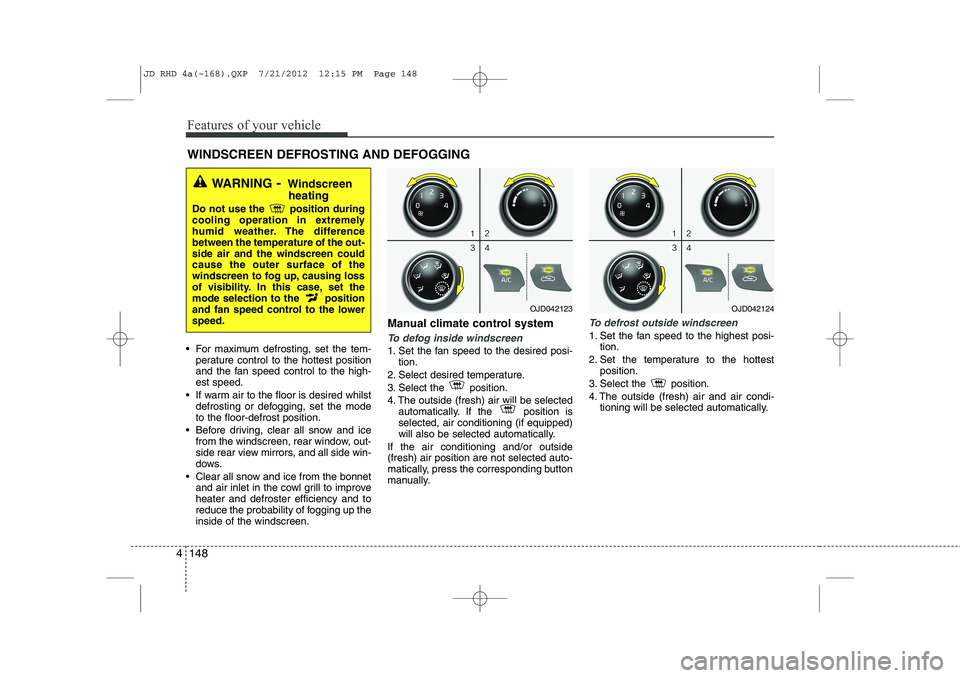
reduce the probability of fogging up theinside of the windscreen. Manual climate control systemTo defog inside windscreen
1. Set the fan speed to the desired posi-
tion.
2. Select desired temperature.
3. Select the position.
4. The outside (fresh) air will be selected automatically. If the position is selected, air conditioning (if equipped)
will also be selected automatically.
If the air conditioning and/or outside(fresh) air position are not selected auto-
matically, press the corresponding button
manually.
To defrost outside windscreen
1. Set the fan speed to the highest posi- tion.
2. Set the temperature to the hottest position.
3. Select the position.
4. The outside (fresh) air and air condi- tioning will be selected automatically.
WINDSCREEN DEFROSTING AND DEFOGGING
WARNING - Windscreen
heating
Do not use the position during
cooling operation in extremely
humid weather. The differencebetween the temperature of the out-side air and the windscreen couldcause the outer surface of the
windscreen to fog up, causing loss
of visibility. In this case, set the
mode selection to the position
and fan speed control to the lowerspeed.
OJD042123OJD042124
JD RHD 4a(~168).QXP 7/21/2012 12:15 PM Page 148
Page 812 of 1168
4 149
Features of your vehicle
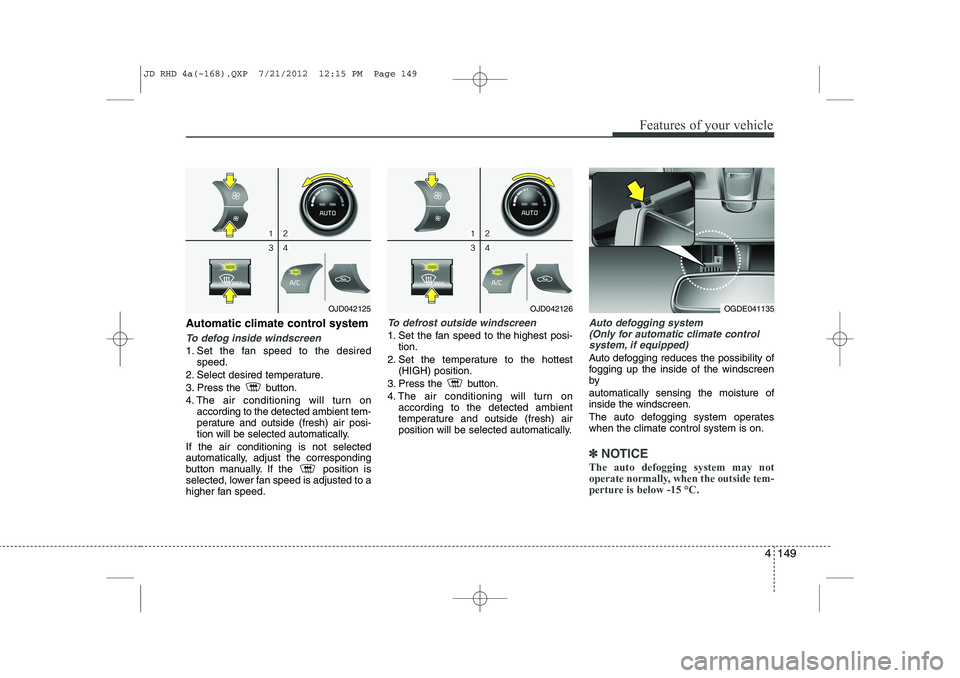
Automatic climate control system
To defog inside windscreen
1. Set the fan speed to the desiredspeed.
2. Select desired temperature.
3. Press the button.
4. The air conditioning will turn on according to the detected ambient tem-
perature and outside (fresh) air posi-
tion will be selected automatically.
If the air conditioning is not selected
automatically, adjust the corresponding
button manually. If the position is
selected, lower fan speed is adjusted to a
higher fan speed.
To defrost outside windscreen
1. Set the fan speed to the highest posi- tion.
2. Set the temperature to the hottest (HIGH) position.
3. Press the button.
4. The air conditioning will turn on according to the detected ambient
temperature and outside (fresh) air
position will be selected automatically.
Auto defogging system
(Only for automatic climate control
system, if equipped)
Auto defogging reduces the possibility of
fogging up the inside of the windscreenby automatically sensing the moisture of inside the windscreen.
The auto defogging system operates when the climate control system is on.
✽✽ NOTICE
The auto defogging system may not
operate normally, when the outside tem-
perture is below -15 °C.
OJD042125OJD042126OGDE041135
JD RHD 4a(~168).QXP 7/21/2012 12:15 PM Page 149
Page 813 of 1168
Features of your vehicle
150
4
This indicator illuminates
when the auto defoggingsystem senses the moistureof inside the windscreen and
operates.
If more moisture is in the vehicle, higher
steps operate as follow.
Step 1 : Operating the air conditioning
Step 2 : Outside air position
Step 3 : Blowing air flow toward the wind- screen
Step 4 : Increasing air flow toward the windscreen
If your vehicle is equipped with the auto
defogging system, it is automatically acti-
vated when the conditions are met.
However, if you would like to cancel the
auto defogging system, press the front
defroster button 4 times within 2 seconds
whilst pressing the AUTO button. The
indicator will blink 3 times to notify you
that the system is cancelled. To use the
auto defogging system again, follow the
procedures mentioned above.
If the battery has been disconnected or
discharged, it resets to the auto defog-
ging status.✽✽ NOTICE
If the A/C off is manually selected whilst the auto defogging system is on, the auto
defogging indicator will blink 3 times to
give notice that the A/C off can not beselected.
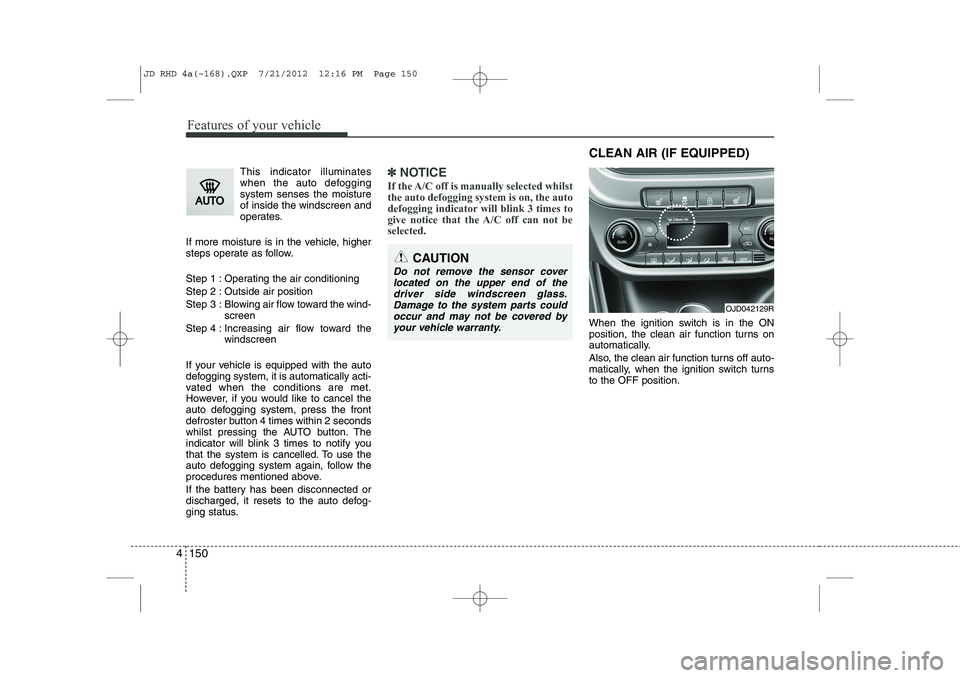
When the ignition switch is in the ON
position, the clean air function turns on
automatically.
Also, the clean air function turns off auto-
matically, when the ignition switch turnsto the OFF position.
CAUTION
Do not remove the sensor cover located on the upper end of thedriver side windscreen glass.Damage to the system parts could occur and may not be covered by
your vehicle warranty.
OJD042129R
CLEAN AIR (IF EQUIPPED)
JD RHD 4a(~168).QXP 7/21/2012 12:16 PM Page 150
Page 815 of 1168
Features of your vehicle
152
4
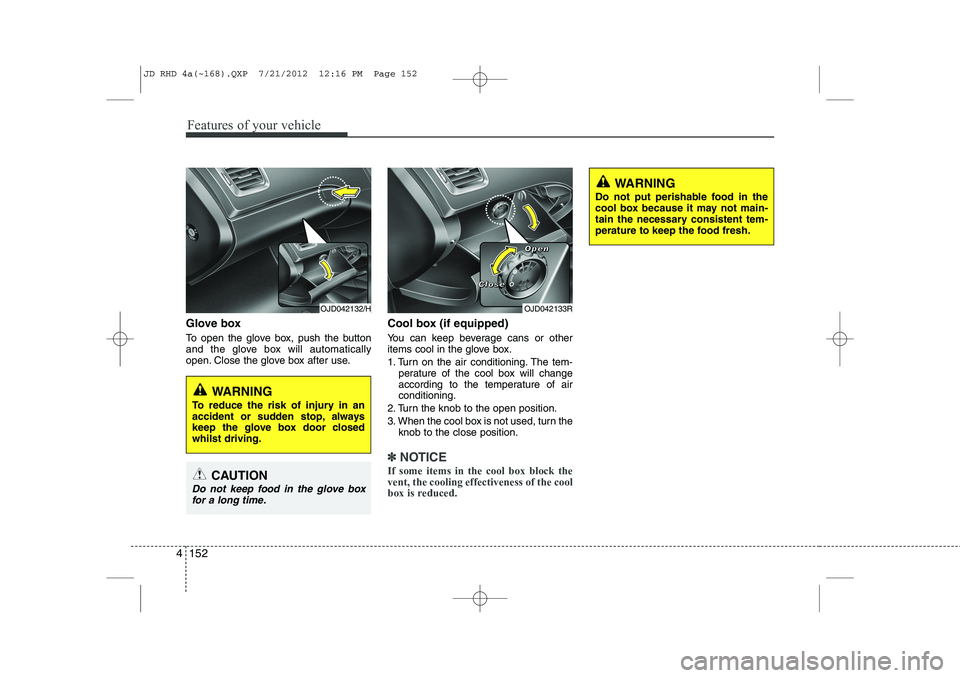
Glove box
To open the glove box, push the button
and the glove box will automatically
open. Close the glove box after use. Cool box (if equipped)
You can keep beverage cans or other
items cool in the glove box.
1. Turn on the air conditioning. The tem-
perature of the cool box will change
according to the temperature of airconditioning.
2. Turn the knob to the open position.
3. When the cool box is not used, turn the knob to the close position.
✽✽ NOTICE
If some items in the cool box block the vent, the cooling effectiveness of the cool
box is reduced.
OJD042133R
WARNING
Do not put perishable food in the
cool box because it may not main-
tain the necessary consistent tem-
perature to keep the food fresh.
OJD042132/H
WARNING
To reduce the risk of injury in an
accident or sudden stop, always
keep the glove box door closedwhilst driving.
CAUTION
Do not keep food in the glove box for a long time.
CCCClllloooosssseeee
OOOOppppeeeennnn
JD RHD 4a(~168).QXP 7/21/2012 12:16 PM Page 152
Page 826 of 1168
4 163
Features of your vehicle
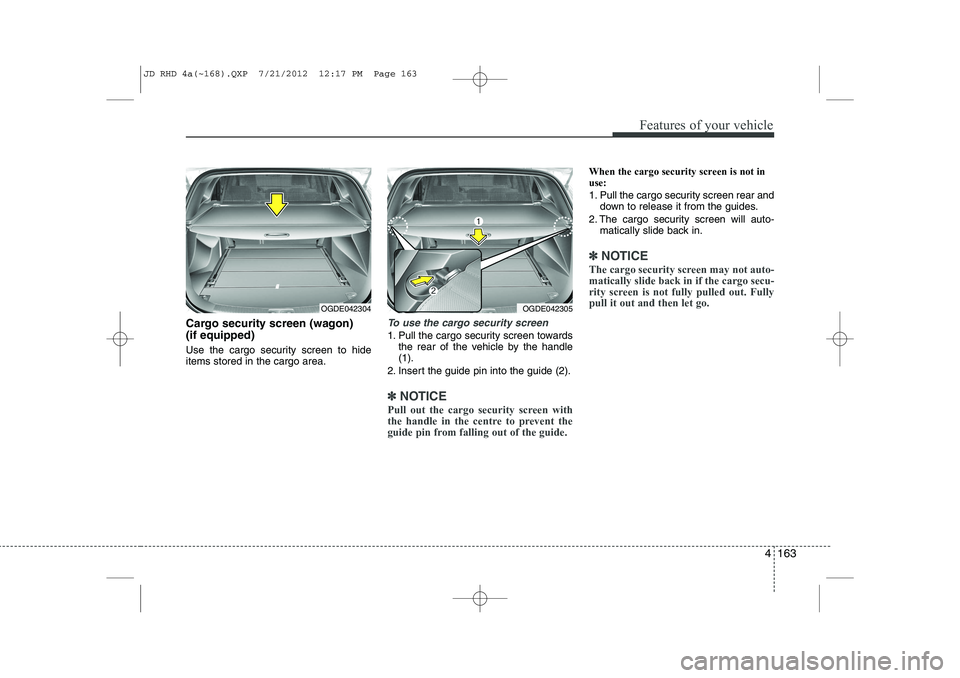
Cargo security screen (wagon) (if equipped)
Use the cargo security screen to hide items stored in the cargo area.To use the cargo security screen
1. Pull the cargo security screen towardsthe rear of the vehicle by the handle (1).
2. Insert the guide pin into the guide (2).
✽✽ NOTICE
Pull out the cargo security screen with
the handle in the centre to prevent the
guide pin from falling out of the guide.
When the cargo security screen is not in use:
1. Pull the cargo security screen rear and down to release it from the guides.
2. The cargo security screen will auto- matically slide back in.
✽✽ NOTICE
The cargo security screen may not auto- matically slide back in if the cargo secu-
rity screen is not fully pulled out. Fullypull it out and then let go.
OGDE042304OGDE042305
JD RHD 4a(~168).QXP 7/21/2012 12:17 PM Page 163
Page 833 of 1168
Features of your vehicle
170
4
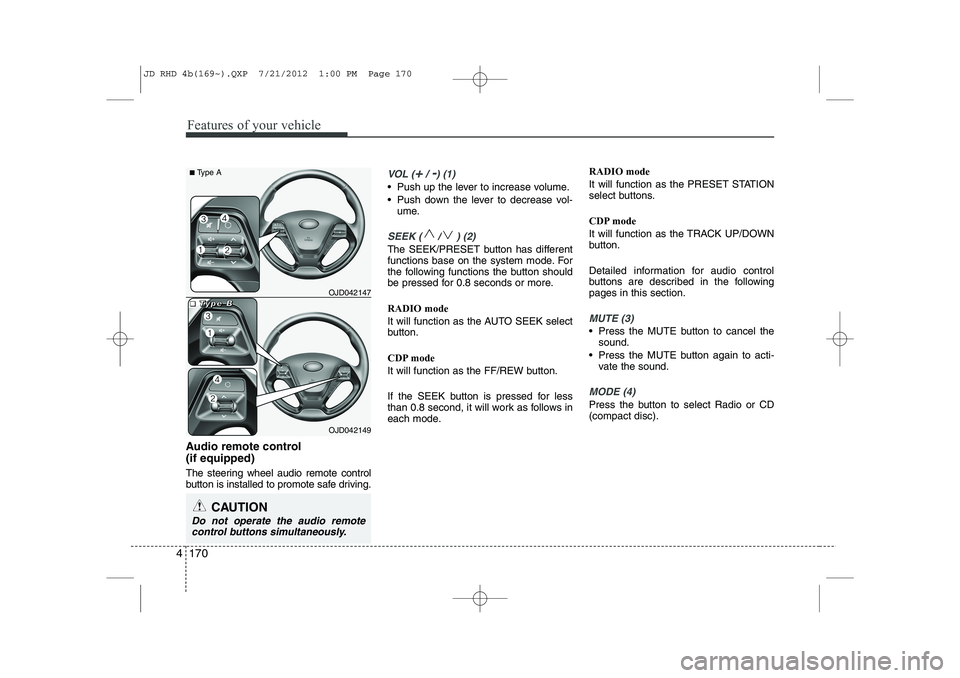
Audio remote control (if equipped)
The steering wheel audio remote control
button is installed to promote safe driving.
VOL (+/ -) (1)
• Push up the lever to increase volume.
Push down the lever to decrease vol-
ume.
SEEK ( / ) (2)
The SEEK/PRESET button has different
functions base on the system mode. For
the following functions the button should
be pressed for 0.8 seconds or more. RADIO mode
It will function as the AUTO SEEK select
button.
CDP mode
It will function as the FF/REW button.
If the SEEK button is pressed for less
than 0.8 second, it will work as follows in
each mode. RADIO mode
It will function as the PRESET STATION
select buttons.
CDP mode
It will function as the TRACK UP/DOWN
button.
Detailed information for audio control
buttons are described in the followingpages in this section.
MUTE (3)
Press the MUTE button to cancel the
sound.
Press the MUTE button again to acti- vate the sound.
MODE (4)
Press the button to select Radio or CD (compact disc).
CAUTION
Do not operate the audio remote
control buttons simultaneously.
OJD042149
■
■■■TTTTyyyyppppeeee BBBBOJD042147
■
Type A
JD RHD 4b(169~).QXP 7/21/2012 1:00 PM Page 170