ESP KIA CEED 2013 Owner's Manual
[x] Cancel search | Manufacturer: KIA, Model Year: 2013, Model line: CEED, Model: KIA CEED 2013Pages: 1168, PDF Size: 48.01 MB
Page 188 of 1168
4 109
Features of your vehicle
REARVIEW CAMERA (IF EQUIPPED)
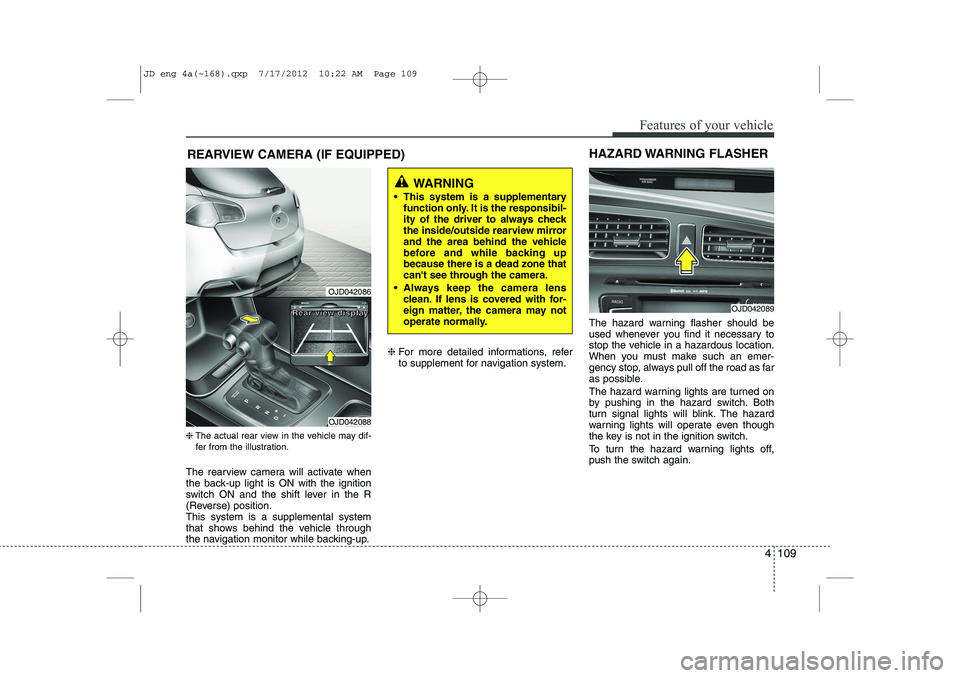
❈ The actual rear view in the vehicle may dif-
fer from the illustration.
The rearview camera will activate when
the back-up light is ON with the ignition
switch ON and the shift lever in the R
(Reverse) position.This system is a supplemental system
that shows behind the vehicle through
the navigation monitor while backing-up. ❈
For more detailed informations, refer
to supplement for navigation system. The hazard warning flasher should be
used whenever you find it necessary to
stop the vehicle in a hazardous location.
When you must make such an emer-
gency stop, always pull off the road as far
as possible.
The hazard warning lights are turned on
by pushing in the hazard switch. Both
turn signal lights will blink. The hazard
warning lights will operate even though
the key is not in the ignition switch.
To turn the hazard warning lights off,
push the switch again.
OJD042089
HAZARD WARNING FLASHER
WARNING
This system is a supplementary function only. It is the responsibil-
ity of the driver to always check
the inside/outside rearview mirror
and the area behind the vehicle
before and while backing upbecause there is a dead zone that
can't see through the camera.
Always keep the camera lens clean. If lens is covered with for-
eign matter, the camera may not
operate normally.
OJD042086
OJD042088
RRRReeeeaaaarrrr vvvviiiieeeewwww ddddiiiissssppppllllaaaayyyy
JD eng 4a(~168).qxp 7/17/2012 10:22 AM Page 109
Page 194 of 1168
4 115
Features of your vehicle
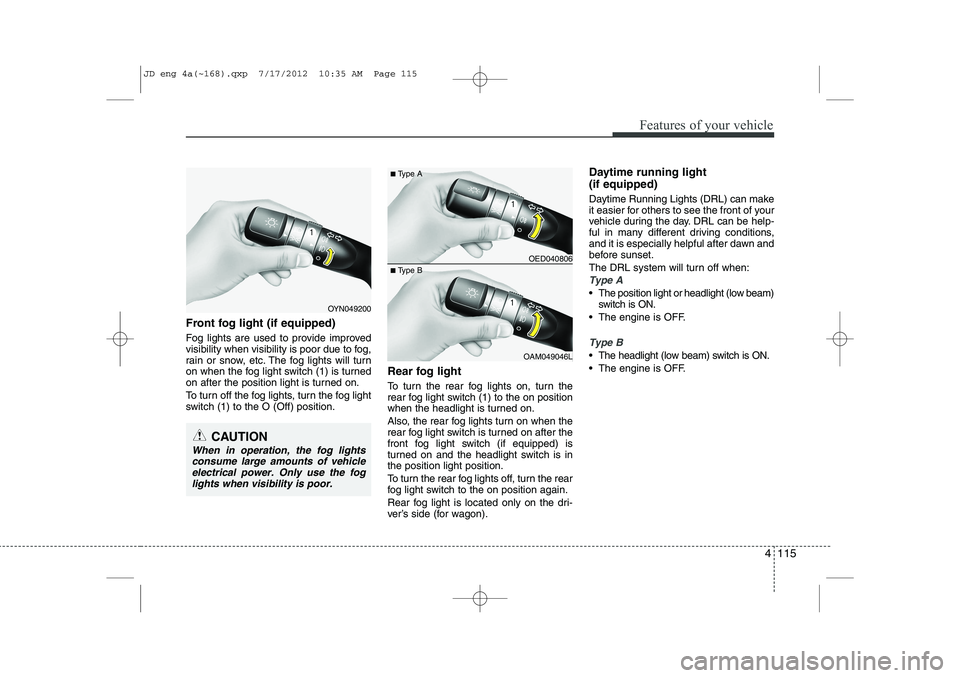
Front fog light (if equipped)
Fog lights are used to provide improved
visibility when visibility is poor due to fog,
rain or snow, etc. The fog lights will turn
on when the fog light switch (1) is turned
on after the position light is turned on.
To turn off the fog lights, turn the fog light
switch (1) to the O (Off) position.Rear fog light
To turn the rear fog lights on, turn the
rear fog light switch (1) to the on position
when the headlight is turned on.
Also, the rear fog lights turn on when the
rear fog light switch is turned on after the
front fog light switch (if equipped) is
turned on and the headlight switch is inthe position light position.
To turn the rear fog lights off, turn the rear
fog light switch to the on position again.
Rear fog light is located only on the dri-
ver’s side (for wagon).Daytime running light (if equipped)
Daytime Running Lights (DRL) can make
it easier for others to see the front of your
vehicle during the day. DRL can be help-
ful in many different driving conditions,
and it is especially helpful after dawn and
before sunset.
The DRL system will turn off when:
Type A
The position light or headlight (low beam)
switch is ON.
The engine is OFF.
Type B
The headlight (low beam) switch is ON.
The engine is OFF.
OED040806
OAM049046L
■
Type A
■ Type B
OYN049200
CAUTION
When in operation, the fog lights
consume large amounts of vehicleelectrical power. Only use the fog lights when visibility is poor.
JD eng 4a(~168).qxp 7/17/2012 10:35 AM Page 115
Page 218 of 1168
4 139
Features of your vehicle
Manual heating and air condition- ing The heating and cooling system can be
controlled manually by pressing buttons
or turning knob(s) other than the AUTO
button. In this case, the system workssequentially according to the order of
buttons or knob(s) selected.
1. Start the engine.
2. Set the mode to the desired position.To improve the effectiveness of heat-ing and cooling:
- Heating:- Cooling:
3. Set the temperature control to the desired position.
4. Set the air intake control to the outside (fresh) air position.
5. Set the fan speed control to the desired speed.
6. If air conditioning is desired, turn the air conditioning system on.
Press the AUTO button in order to con-
vert to full automatic control of the sys-tem.
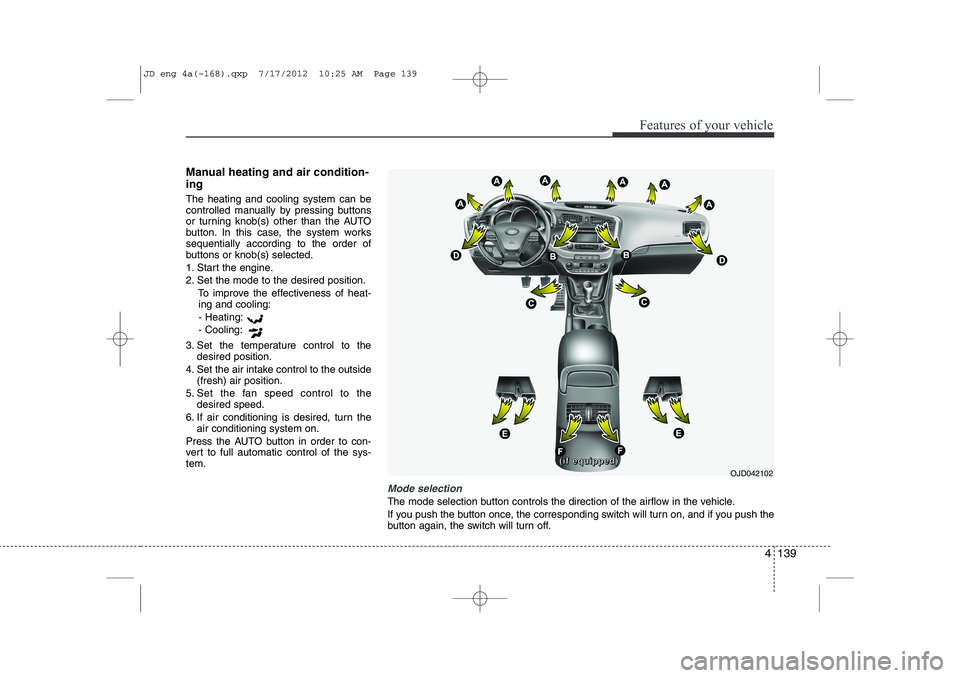
Mode selection
The mode selection button controls the direction of the airflow in the vehicle.
If you push the button once, the corresponding switch will turn on, and if you push the
button again, the switch will turn off.
OJD042102
((((iiiiffff eeeeqqqquuuuiiiippppppppeeeedddd))))
JD eng 4a(~168).qxp 7/17/2012 10:25 AM Page 139
Page 227 of 1168
Features of your vehicle
148
4
For maximum defrosting, set the tem-
perature control to the hottest position
and the fan speed control to the high-est speed.
If warm air to the floor is desired while defrosting or defogging, set the modeto the floor-defrost position.
Before driving, clear all snow and ice from the windshield, rear window, out-
side rear view mirrors, and all side win-
dows.
Clear all snow and ice from the hood and air inlet in the cowl grill to improveheater and defroster efficiency and to
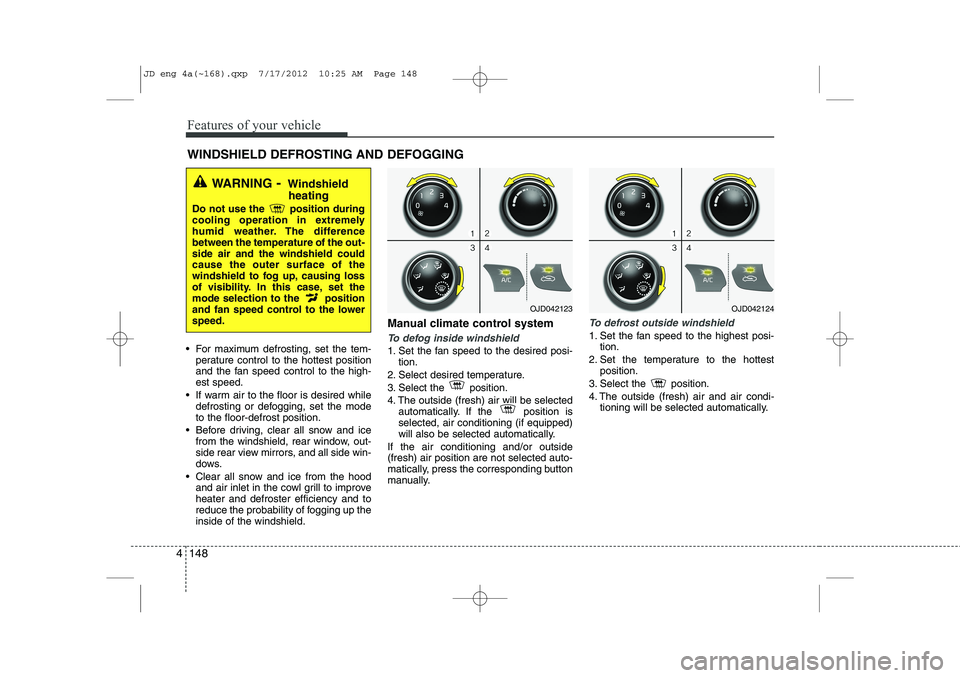
reduce the probability of fogging up theinside of the windshield. Manual climate control systemTo defog inside windshield
1. Set the fan speed to the desired posi-
tion.
2. Select desired temperature.
3. Select the position.
4. The outside (fresh) air will be selected automatically. If the position is selected, air conditioning (if equipped)
will also be selected automatically.
If the air conditioning and/or outside(fresh) air position are not selected auto-
matically, press the corresponding button
manually.
To defrost outside windshield
1. Set the fan speed to the highest posi- tion.
2. Set the temperature to the hottest position.
3. Select the position.
4. The outside (fresh) air and air condi- tioning will be selected automatically.
WINDSHIELD DEFROSTING AND DEFOGGING
WARNING - Windshield
heating
Do not use the position during
cooling operation in extremely
humid weather. The differencebetween the temperature of the out-side air and the windshield couldcause the outer surface of the
windshield to fog up, causing loss
of visibility. In this case, set the
mode selection to the position
and fan speed control to the lowerspeed.
OJD042123OJD042124
JD eng 4a(~168).qxp 7/17/2012 10:25 AM Page 148
Page 228 of 1168
4 149
Features of your vehicle
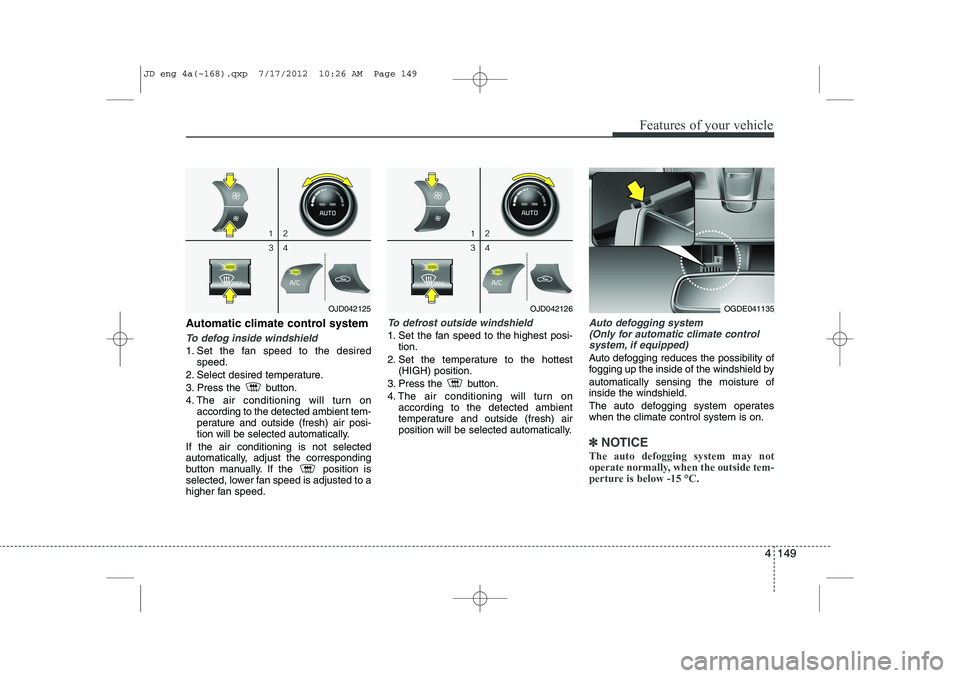
Automatic climate control system
To defog inside windshield
1. Set the fan speed to the desiredspeed.
2. Select desired temperature.
3. Press the button.
4. The air conditioning will turn on according to the detected ambient tem-
perature and outside (fresh) air posi-
tion will be selected automatically.
If the air conditioning is not selected
automatically, adjust the corresponding
button manually. If the position is
selected, lower fan speed is adjusted to a
higher fan speed.
To defrost outside windshield
1. Set the fan speed to the highest posi- tion.
2. Set the temperature to the hottest (HIGH) position.
3. Press the button.
4. The air conditioning will turn on according to the detected ambient
temperature and outside (fresh) air
position will be selected automatically.
Auto defogging system
(Only for automatic climate control
system, if equipped)
Auto defogging reduces the possibility of
fogging up the inside of the windshield by automatically sensing the moisture of inside the windshield.
The auto defogging system operates when the climate control system is on.
✽✽ NOTICE
The auto defogging system may not
operate normally, when the outside tem-
perture is below -15 °C.
OJD042125OJD042126OGDE041135
JD eng 4a(~168).qxp 7/17/2012 10:26 AM Page 149
Page 247 of 1168
Features of your vehicle
168
4
(Continued)
Always drive slowly and turn cor-
ners carefully when carrying
items on the roof rack. Severe
wind updrafts, caused by passing
vehicles or natural causes, can
cause sudden upward pressure
on items loaded on the roof rack.
This is especially true when car-
rying large, flat items such as
wood panels or mattresses. Thiscould cause the items to fall off
the roof rack and cause damage
to your vehicle or others around
you.
To prevent damage or loss of cargo while driving, check fre-
quently before or while driving to
make sure the items on the roof
rack are securely fastened.WARNING
The following specification is the maximum weight that can be
loaded onto the roof rack.
Distribute the load as evenly as
possible across the crossbars (if
equipped) and roof rack and
secure the load firmly.
Loading cargo or luggage in
excess of the specified weight
limit on the roof rack may dam-
age your vehicle.
The vehicle center of gravity will be higher when items are loaded
onto the roof rack. Avoid sudden
starts, braking, sharp turns,
abrupt maneuvers or high speeds
that may result in loss of vehicle
control or rollover resulting in anaccident.
(Continued)
ROOF 100 kg (220 lbs.)
RACK EVENLY DISTRIBUTED
JD eng 4a(~168).qxp 7/17/2012 10:28 AM Page 168
Page 268 of 1168
![KIA CEED 2013 Owners Manual 4 189
Features of your vehicle
RADIO Changing RADIO mode Press the
(, )key
to change the mode in order
: FM1➟FM2 ➟ FMA ➟AM ➟AMA
: FM1
➟FM2 ➟FMA
: AM
➟AMA
[Mode Pop up] On state : Dis](/img/2/57944/w960_57944-267.png "KIA CEED 2013 Owners Manual 4 189
Features of your vehicle
RADIO Changing RADIO mode Press the
(, )key
to change the mode in order
: FM1➟FM2 ➟ FMA ➟AM ➟AMA
: FM1
➟FM2 ➟FMA
: AM
➟AMA
[Mode Pop up] On state : Dis")
4 189
Features of your vehicle
RADIO Changing RADIO mode Press the
(, )key
to change the mode in order
: FM1➟FM2 ➟ FMA ➟AM ➟AMA
: FM1
➟FM2 ➟FMA
: AM
➟AMA
[Mode Pop up] On state : Displays the
change radio mode pop up screen.
While the pop up screen is displayed, you
can change the radio modethrough the
tune knob or ~ keys.
Adjust Volume
Turn the VOL knob left/right to adjust
the volume. SEEK
Press the ( , )key
,
Shortly pressing the key (under 0.8 seconds): Changes the frequency.
Pressing and holding the key (over 0.8 seconds): Automatically searches for
the next frequency.
Preset SEEK
Press the ( , ) key
~
Shortly pressing the key (under 0.8 seconds): Plays the frequency saved in
the corresponding key.
Pressing and holding the key (over 0.8 seconds): Pressing and holding thedesired key from ~ will
save the currently playing broadcast to
the selected key and sound a BEEP. SCAN
Press the ( , ) key
Pressing and holding the key (over 0.8
seconds): The broadcast frequency
increases and previews each broadcast
for 5 seconds each. After scanning all
frequencies, returns and plays the cur-
rent broadcast frequency.
Selecting through manual search
Turn the TUNE knob left/right to adjust
the frequency. - FM : Changes by 50KHz
- AM : Changes by 9khz
TA/SCAN
AMFMRADIO
61
61
AMFMRADIO
TRACKSEEK
AMFMRADIO
51
AM
FM
RADIO
AMFMRADIO
JD eng 4b(169~).qxp 7/19/2012 3:45 PM Page 189
Page 286 of 1168
4 207
Features of your vehicle
System?activated
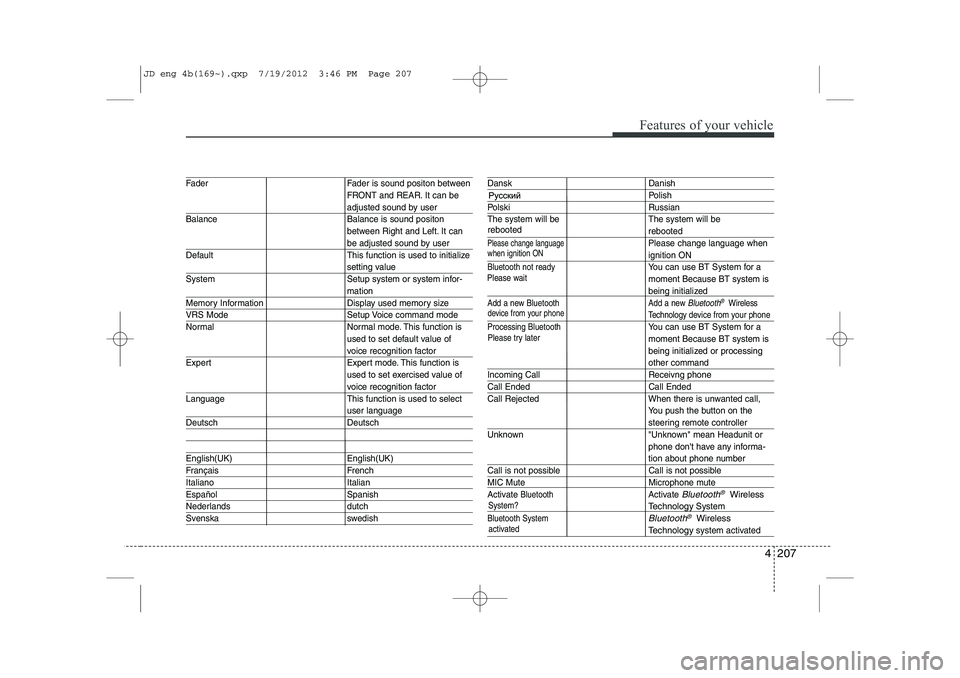
Fader Fader is sound positon between FRONT and REAR. It can be
adjusted sound by user
Balance Balance is sound positon between Right and Left. It can
be adjusted sound by user
Default This function is used to initialize
setting value
System Setup system or system infor-
mation
Memory Information Display used memory size
VRS Mode Setup Voice command mode
Normal Normal mode. This function is used to set default value of
voice recognition factor
Expert Expert mode. This function is used to set exercised value of
voice recognition factor
Language This function is used to select
user language
Deutsch Deutsch
English(UK) English(UK)
Français French
Italiano Italian
Español Spanish
Nederlands dutch
Svenska swedish
Dansk Danish
Polish
Polski Russian
The system will be The system will be
rebooted
Please change languagePlease change language when
ignition ON
Bluetooth not readyYou can use BT System for a moment Because BT system is
being initialized
Add a new Bluetooth Add a new Bluetooth®Wireless
Technology de vice from your phone
Processing Bluetooth
You can use BT System for a moment Because BT system is
being initialized or processing
other command
Incoming Call Receivng phone
Call Ended Call Ended
Call Rejected When there is unwanted call, You push the button on the
steering remote controller
Unknown "Unknown" mean Headunit or phone don't have any informa-
tion about phone number
Call is not possible Call is not possible
MIC Mute Microphone mute
Activate
BluetoothActivate Bluetooth®Wireless
TechnologySystem
Bluetooth SystemBluetooth®Wireless
Technologysystem activated
when ignition ON
device from your phone
Please try later
Please wait
rebooted
JD eng 4b(169~).qxp 7/19/2012 3:46 PM Page 207
Page 291 of 1168
Features of your vehicle
212
4
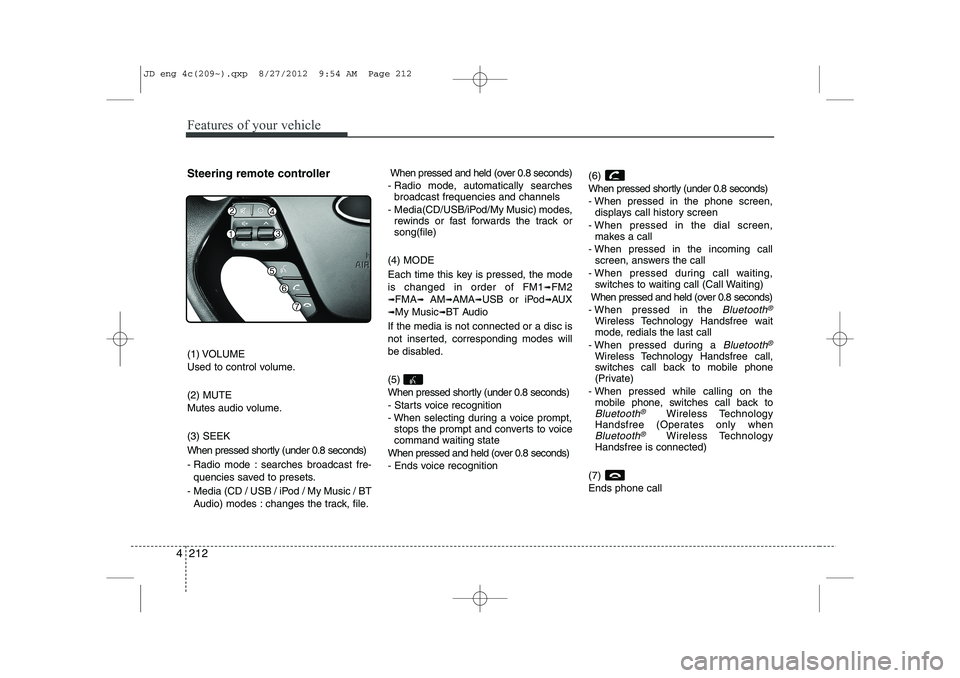
Steering remote controller
(1) VOLUME
Used to control volume. (2) MUTE
Mutes audio volume. (3) SEEK
When pressed shortly (under 0.8 seconds)
- Radio mode : searches broadcast fre-
quencies saved to presets.
- Media (CD / USB / iPod / My Music / BT Audio) modes : changes the track, file. When pressed and held (over 0.8 seconds)
- Radio mode, automatically searches broadcast frequencies and channels
- Media(CD/USB/iPod/My Music) modes, rewinds or fast forwards the track or song(file)
(4) MODE
Each time this key is pressed, the mode is changed in order of FM1
➟FM2
➟FMA➟AM➟AMA➟USB or iPod➟AUX
➟My Music➟BT Audio
If the media is not connected or a disc is
not inserted, corresponding modes will
be disabled. (5)
When pressed shortly (under 0.8 seconds)
- Starts voice recognition
- When selecting during a voice prompt, stops the prompt and converts to voice
command waiting state
When pressed and held (over 0.8 seconds)
- Ends voice recognition (6)
When pressed shortly (under 0.8 seconds)
- When pressed in the phone screen,
displays call history screen
- When pressed in the dial screen, makes a call
- When pressed in the incoming call screen, answers the call
- When pressed during call waiting, switches to waiting call (Call Waiting)
When pressed and held (over 0.8 seconds)
- When pressed in the Bluetooth®
Wireless Technology Handsfree wait
mode, redials the last call
- When pressed during a
Bluetooth®
Wireless Technology Handsfree call,
switches call back to mobile phone
(Private)
- When pressed while calling on the mobile phone, switches call back to
Bluetooth®Wireless Technology
Handsfree (Operates only when
Bluetooth®Wireless Technology
Handsfree is connected)
(7) Ends phone call
JD eng 4c(209~).qxp 8/27/2012 9:54 AM Page 212
Page 295 of 1168
![KIA CEED 2013 Owners Manual Features of your vehicle
216
4
MEDIA MODE
Switching to Media Mode
Pressing the key will change
the operating mode in order ofCD
➟USB(iPod)➟AUX➟My Music ➟
BT Audio.
If [Pop-up Mode] is tur](/img/2/57944/w960_57944-294.png "KIA CEED 2013 Owners Manual Features of your vehicle
216
4
MEDIA MODE
Switching to Media Mode
Pressing the key will change
the operating mode in order ofCD
➟USB(iPod)➟AUX➟My Music ➟
BT Audio.
If [Pop-up Mode] is tur")
Features of your vehicle
216
4
MEDIA MODE
Switching to Media Mode
Pressing the key will change
the operating mode in order ofCD
➟USB(iPod)➟AUX➟My Music ➟
BT Audio.
If [Pop-up Mode] is turned on within
[Display], then pressing the
key will display the Media
Pop-up Mode screen.
Turn the TUNE knob to move the
focus. Press the knob to select.
✽✽ NOTICE
The media mode pop up screen can be
displayed only when there are two or
more media modes turned on.
Title Icon When a
Bluetooth®Wireless
Technology, iPod, USB, or AUX
device is connected or a CD is
inserted, the corresponding mode
icon will be displayed.
Icon Title
Bluetooth®Wireless Technology
CD
iPod
USB
AUX
MEDIA
SETUP
MEDIA
JD eng 4c(209~).qxp 8/27/2012 9:55 AM Page 216