heater KIA CEED 2013 Owner's Manual
[x] Cancel search | Manufacturer: KIA, Model Year: 2013, Model line: CEED, Model: KIA CEED 2013Pages: 1168, PDF Size: 48.01 MB
Page 811 of 1168
Features of your vehicle
148
4
For maximum defrosting, set the tem-
perature control to the hottest position
and the fan speed control to the high-est speed.
If warm air to the floor is desired whilst defrosting or defogging, set the modeto the floor-defrost position.
Before driving, clear all snow and ice from the windscreen, rear window, out-
side rear view mirrors, and all side win-
dows.
Clear all snow and ice from the bonnet and air inlet in the cowl grill to improveheater and defroster efficiency and to
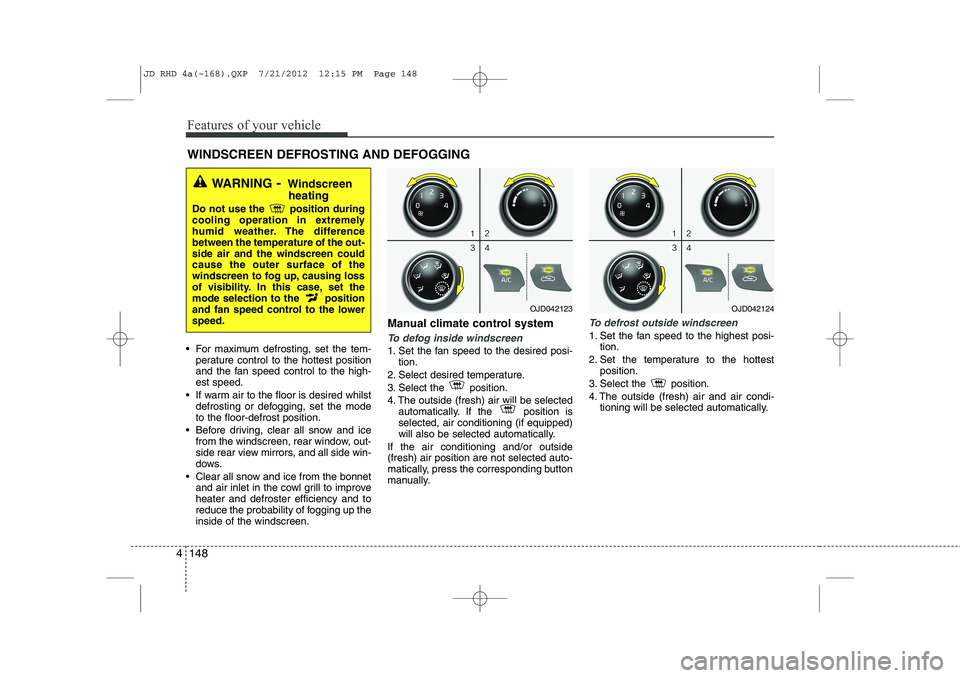
reduce the probability of fogging up theinside of the windscreen. Manual climate control systemTo defog inside windscreen
1. Set the fan speed to the desired posi-
tion.
2. Select desired temperature.
3. Select the position.
4. The outside (fresh) air will be selected automatically. If the position is selected, air conditioning (if equipped)
will also be selected automatically.
If the air conditioning and/or outside(fresh) air position are not selected auto-
matically, press the corresponding button
manually.
To defrost outside windscreen
1. Set the fan speed to the highest posi- tion.
2. Set the temperature to the hottest position.
3. Select the position.
4. The outside (fresh) air and air condi- tioning will be selected automatically.
WINDSCREEN DEFROSTING AND DEFOGGING
WARNING - Windscreen
heating
Do not use the position during
cooling operation in extremely
humid weather. The differencebetween the temperature of the out-side air and the windscreen couldcause the outer surface of the
windscreen to fog up, causing loss
of visibility. In this case, set the
mode selection to the position
and fan speed control to the lowerspeed.
OJD042123OJD042124
JD RHD 4a(~168).QXP 7/21/2012 12:15 PM Page 148
Page 821 of 1168
Features of your vehicle
158
4
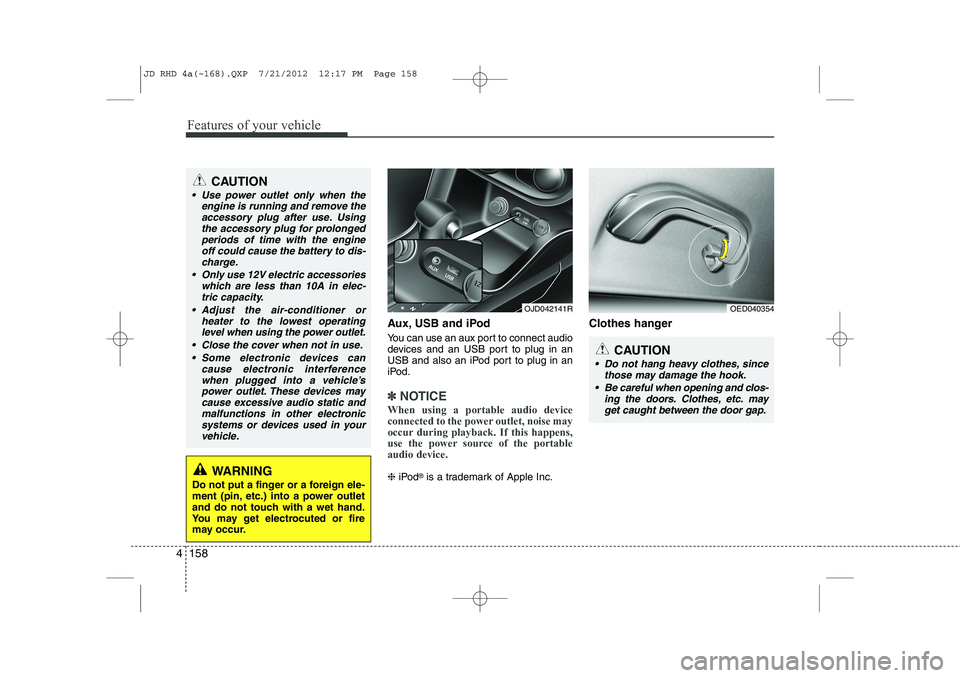
Aux, USB and iPod
You can use an aux port to connect audio
devices and an USB port to plug in an
USB and also an iPod port to plug in an
iPod.
✽✽
NOTICE
When using a portable audio device
connected to the power outlet, noise may
occur during playback. If this happens,
use the power source of the portableaudio device.
❈ iPod ®
is a trademark of Apple Inc. Clothes hanger
OED040354
CAUTION
Do not hang heavy clothes, since
those may damage the hook.
Be careful when opening and clos- ing the doors. Clothes, etc. mayget caught between the door gap.
OJD042141R
WARNING
Do not put a finger or a foreign ele-
ment (pin, etc.) into a power outlet
and do not touch with a wet hand.
You may get electrocuted or fire
may occur.
CAUTION
Use power outlet only when the engine is running and remove the
accessory plug after use. Usingthe accessory plug for prolongedperiods of time with the engine off could cause the battery to dis-
charge.
Only use 12V electric accessories which are less than 10A in elec-tric capacity.
Adjust the air-conditioner or heater to the lowest operatinglevel when using the power outlet.
Close the cover when not in use. Some electronic devices can cause electronic interference
when plugged into a vehicle’spower outlet. These devices maycause excessive audio static and malfunctions in other electronic
systems or devices used in yourvehicle.
JD RHD 4a(~168).QXP 7/21/2012 12:17 PM Page 158
Page 839 of 1168

Features of your vehicle
176
4
USING YOUR USB DEVICE
To use an external USB device,
make sure the device is not connect-
ed when starting up the vehicle.
Connect the device after starting up.
If you start the engine when the USB device is connected, it may damage
the USB device. (USB flashdrives
are very sensitive to electric shock.)
If the engine is started up or turned off whilst the external USB device is
connected, the external USB device
may not work.
It may not play inauthentic MP3 or WMA files.
1) It can only play MP3 files with the compression rate between
8Kbps~320Kbps.
2) It can only play WMA music files with the compression rate
between 8Kbps~320Kbps.
Take precautions for static electricity when connecting or disconnecting the
external USB device.
An encrypted MP3 PLAYER is not recognizable. Depending on the condition of the
external USB device, the connected
external USB device can be unrec-
ognizable.
When the formatted byte/sector set- ting of External USB device is noteither 512BYTE or 2048BYTE, then
the device will not be recognized.
Use only a USB device formatted to FAT 12/16/32.
USB devices without USB I/F authentica-
tion may not be recognizable.
Make sure the USB connection termi- nal does not come in contact with the
human body or other objects.
If you repeatedly connect or discon- nect the USB device in a short peri-
od of time, it may break the device.
You may hear a strange noise when connecting or disconnecting a USB
device.
If you disconnect the external USB device during playback in USB mode,
the external USB device can be dam-
aged or may malfunction. Therefore,
disconnect the external USB device
when the audio is turned off or in
another mode. (e.g, Radio, CD)
Depending on the type and capacity ofthe external USB device or the type of
the files stored in the device, there is a
difference in the time taken for recogni-
tion of the device.
Do not use the USB device for purposes other than playing music files.
Playing videos through the USB is not supported.
Use of USB accessories such as rechargers or heaters using USB I/F
may lower performance or cause
trouble.
If you use devices such as a USB hub purchased separately, the vehi-
cle’s audio system may not recog-
nize the USB device. In that case,
connect the USB device directly to
the multimedia terminal of the vehi-
cle.
If the USB device is divided by logi- cal drives, only the music files on the
highest-priority drive are recognized
by car audio.
Devices such as MP3 Player/ Cellular phone/Digital camera can be
unrecognizable by standard USB I/F
can be unrecognizable.
(Continued)
JD RHD 4b(169~).QXP 7/21/2012 1:00 PM Page 176
Page 930 of 1168
55
Driving your vehicle
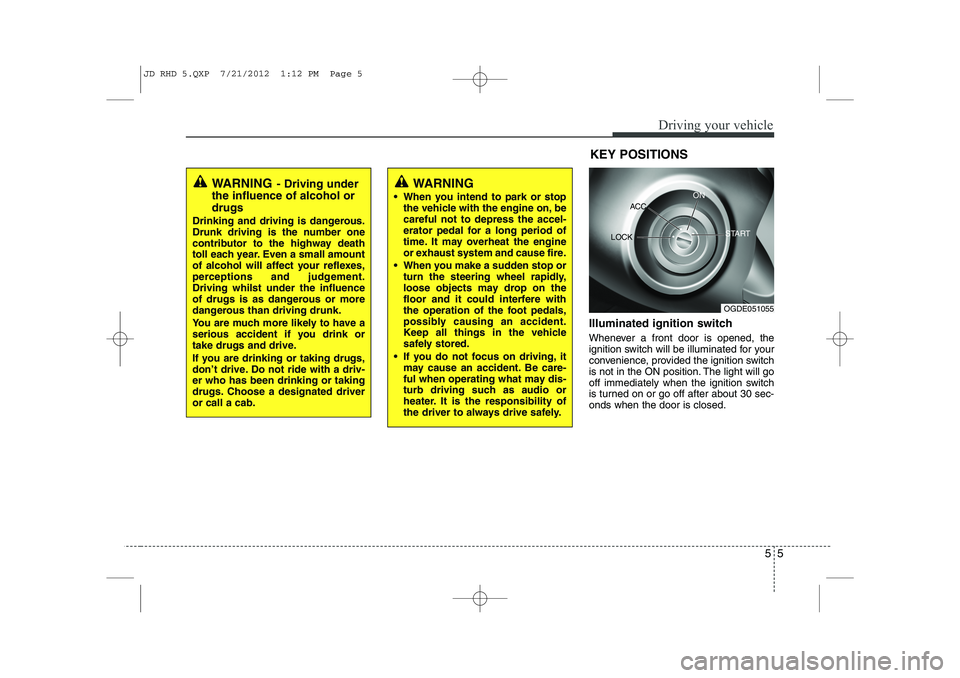
Illuminated ignition switch
Whenever a front door is opened, the
ignition switch will be illuminated for your
convenience, provided the ignition switch
is not in the ON position. The light will go
off immediately when the ignition switch
is turned on or go off after about 30 sec-onds when the door is closed.KEY POSITIONS
WARNING
- Driving under
the influence of alcohol or drugs
Drinking and driving is dangerous.
Drunk driving is the number one
contributor to the highway death
toll each year. Even a small amount
of alcohol will affect your reflexes,
perceptions and judgement.Driving whilst under the influence
of drugs is as dangerous or more
dangerous than driving drunk.
You are much more likely to have a
serious accident if you drink or
take drugs and drive.
If you are drinking or taking drugs,
don’t drive. Do not ride with a driv-er who has been drinking or taking
drugs. Choose a designated driveror call a cab.WARNING
When you intend to park or stop the vehicle with the engine on, be careful not to depress the accel-
erator pedal for a long period of
time. It may overheat the engine
or exhaust system and cause fire.
When you make a sudden stop or turn the steering wheel rapidly,
loose objects may drop on the
floor and it could interfere with
the operation of the foot pedals,
possibly causing an accident.
Keep all things in the vehicle
safely stored.
If you do not focus on driving, it may cause an accident. Be care-
ful when operating what may dis-
turb driving such as audio or
heater. It is the responsibility of
the driver to always drive safely.
OGDE051055
ACC
ON
START
LOCK
JD RHD 5.QXP 7/21/2012 1:12 PM Page 5
Page 1045 of 1168
Maintenance
8
7
At least monthly:
Check coolant level in the engine
coolant reservoir.
Check the operation of all exterior lights, including the stoplights, turn sig-
nals and hazard warning flashers.
Check the inflation pressures of all tyres including the spare.
At least twice a year
(i.e., every Spring and Fall) :
Check radiator, heater and air condi- tioning hoses for leaks or damage.
Check windscreen washer spray and wiper operation. Clean wiper blades
with clean cloth dampened with wash-er fluid.
Check headlight alignment.
Check muffler, exhaust pipes, shields and clamps.
Check the lap/shoulder belts for wear and function.
Check for worn tyres and loose wheel lug nuts.
At least once a year :
Clean body and door drain holes.
Lubricate door hinges and checks, andbonnet hinges.
Lubricate door and bonnet locks and latches.
Lubricate door rubber weatherstrips.
Check the air conditioning system.
Inspect and lubricate automatic transaxle linkage and controls.
Clean battery and terminals.
Check the brake (and clutch) fluid level.
JD RHD 7.QXP 7/21/2012 12:46 PM Page 8
Page 1075 of 1168
Maintenance
38
7
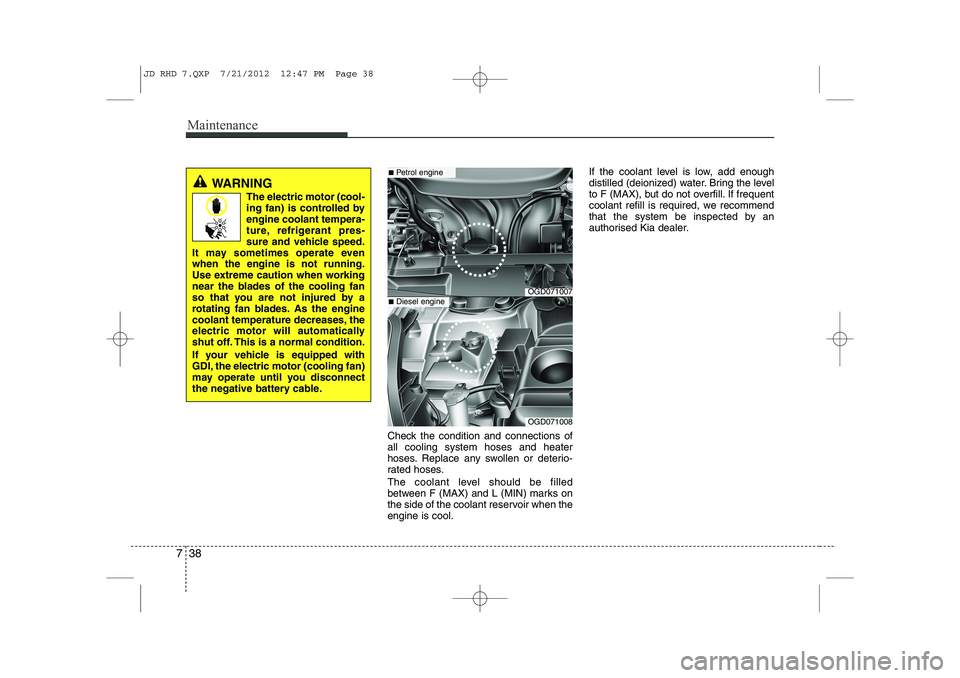
Check the condition and connections of all cooling system hoses and heater
hoses. Replace any swollen or deterio-
rated hoses.
The coolant level should be filled
between F (MAX) and L (MIN) marks on
the side of the coolant reservoir when theengine is cool. If the coolant level is low, add enough
distilled (deionized) water. Bring the level
to F (MAX), but do not overfill. If frequent
coolant refill is required, we recommend
that the system be inspected by an
authorised Kia dealer.
WARNING
The electric motor (cool-
ing fan) is controlled byengine coolant tempera-
ture, refrigerant pres-
sure and vehicle speed.
It may sometimes operate evenwhen the engine is not running.
Use extreme caution when working
near the blades of the cooling fan
so that you are not injured by a
rotating fan blades. As the engine
coolant temperature decreases, the
electric motor will automatically
shut off. This is a normal condition.
If your vehicle is equipped with
GDI, the electric motor (cooling fan)
may operate until you disconnect
the negative battery cable.
OGD071007
■ Petrol engine
OGD071008
■Diesel engine
JD RHD 7.QXP 7/21/2012 12:47 PM Page 38
Page 1105 of 1168
Maintenance
68
7
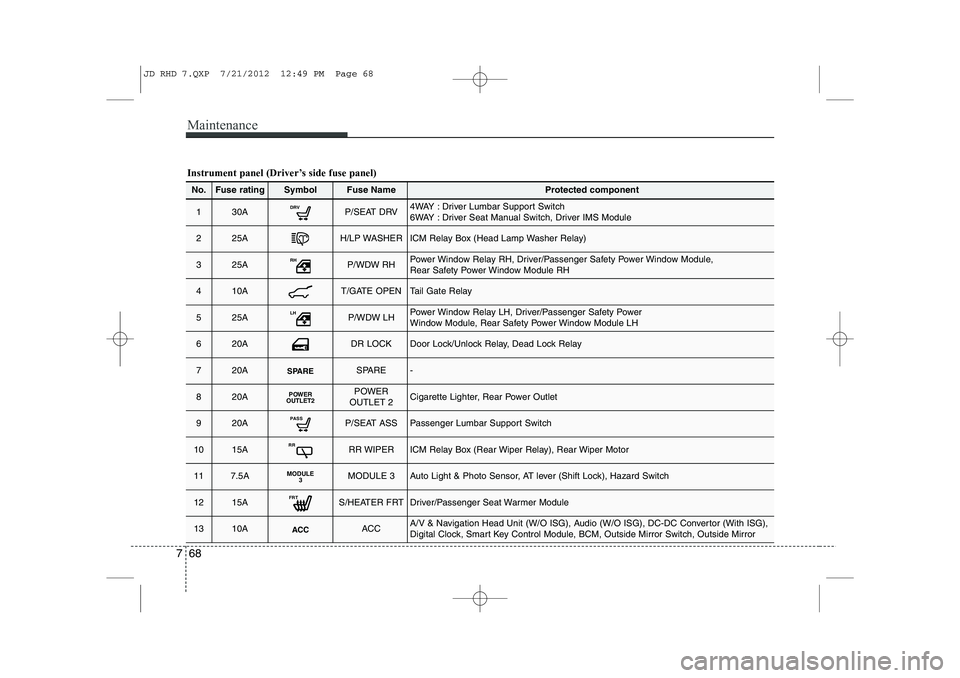
Instrument panel (Driver’s side fuse panel)
No.Fuse ratingSymbolFuse NameProtected component
130ADRVP/SEAT DRV4WAY : Driver Lumbar Support Switch
6WAY : Driver Seat Manual Switch, Driver IMS Module
225AH/LP WASHERICM Relay Box (Head Lamp Washer Relay)
325ARHP/WDW RHPower Window Relay RH, Driver/Passenger Safety Power Window Module,
Rear Safety Power Window Module RH
410AT/GATE OPENTail Gate Relay
525ALHP/WDW LHPower Window Relay LH, Driver/Passenger Safety Power
Window Module, Rear Safety Power Window Module LH
620ADR LOCKDoor Lock/Unlock Relay, Dead Lock Relay
720ASPARESPARE-
820APOWER
OUTLET2POWER
OUTLET 2Cigarette Lighter, Rear Power Outlet
920APASSP/SEAT ASSPassenger Lumbar Support Switch
1015ARRRR WIPERICM Relay Box (Rear Wiper Relay), Rear Wiper Motor
117.5AMODULE 3MODULE 3Auto Light & Photo Sensor, AT lever (Shift Lock), Hazard Switch
1215AFRTS/HEATER FRTDriver/Passenger Seat Warmer Module
1310AACCACCA/V & Navigation Head Unit (W/O ISG), Audio (W/O ISG), DC-DC Convertor (With ISG),
Digital Clock, Smart Key Control Module, BCM, Outside Mirror Switch, Outside Mirror
JD RHD 7.QXP 7/21/2012 12:49 PM Page 68
Page 1106 of 1168
769
Maintenance
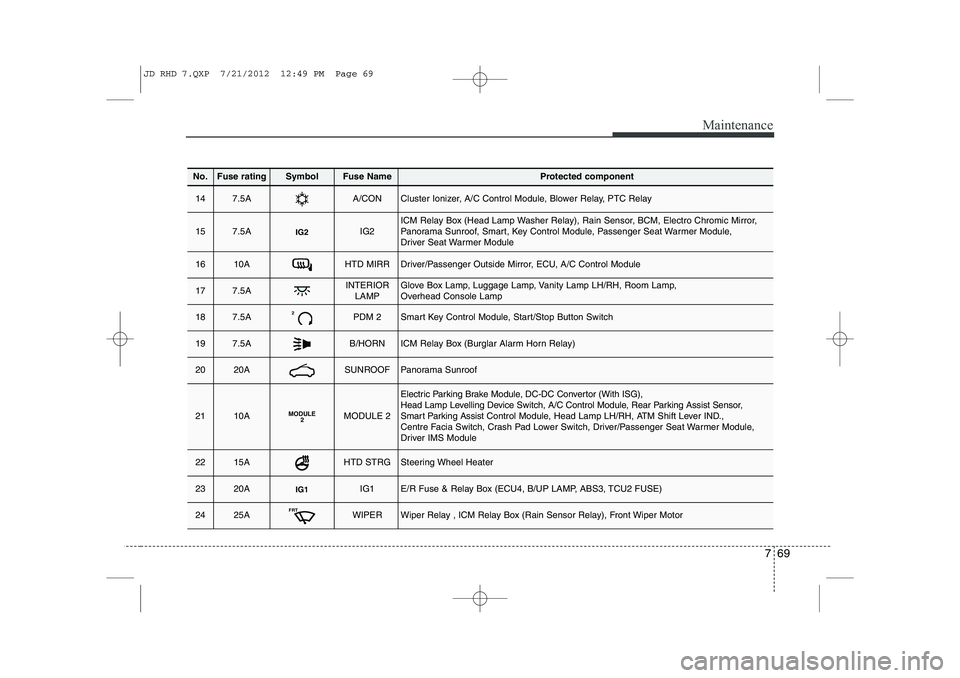
No.Fuse ratingSymbolFuse NameProtected component
147.5AA/CONCluster Ionizer, A/C Control Module, Blower Relay, PTC Relay
157.5AIG2IG2ICM Relay Box (Head Lamp Washer Relay), Rain Sensor, BCM, Electro Chromic Mirror,
Panorama Sunroof, Smart, Key Control Module, Passenger Seat Warmer Module,
Driver Seat Warmer Module
1610AHTD MIRRDriver/Passenger Outside Mirror, ECU, A/C Control Module
177.5AINTERIORLAMPGlove Box Lamp, Luggage Lamp, Vanity Lamp LH/RH, Room Lamp,
Overhead Console Lamp
187.5A2PDM 2Smart Key Control Module, Start/Stop Button Switch
197.5AB/HORNICM Relay Box (Burglar Alarm Horn Relay)
2020ASUNROOFPanorama Sunroof
2110AMODULE 2MODULE 2
Electric Parking Brake Module, DC-DC Convertor (With ISG),
Head Lamp Levelling Device Switch, A/C Control Module, Rear Parking Assist Sensor,
Smart Parking Assist Control Module, Head Lamp LH/RH, ATM Shift Lever IND.,
Centre Facia Switch, Crash Pad Lower Switch, Driver/Passenger Seat Warmer Module,
Driver IMS Module
2215AHTD STRGSteering Wheel Heater
2320AIG1IG1E/R Fuse & Relay Box (ECU4, B/UP LAMP, ABS3, TCU2 FUSE)
2425AFRTWIPERWiper Relay , ICM Relay Box (Rain Sensor Relay), Front Wiper Motor
JD RHD 7.QXP 7/21/2012 12:49 PM Page 69
Page 1115 of 1168
Maintenance
78
7
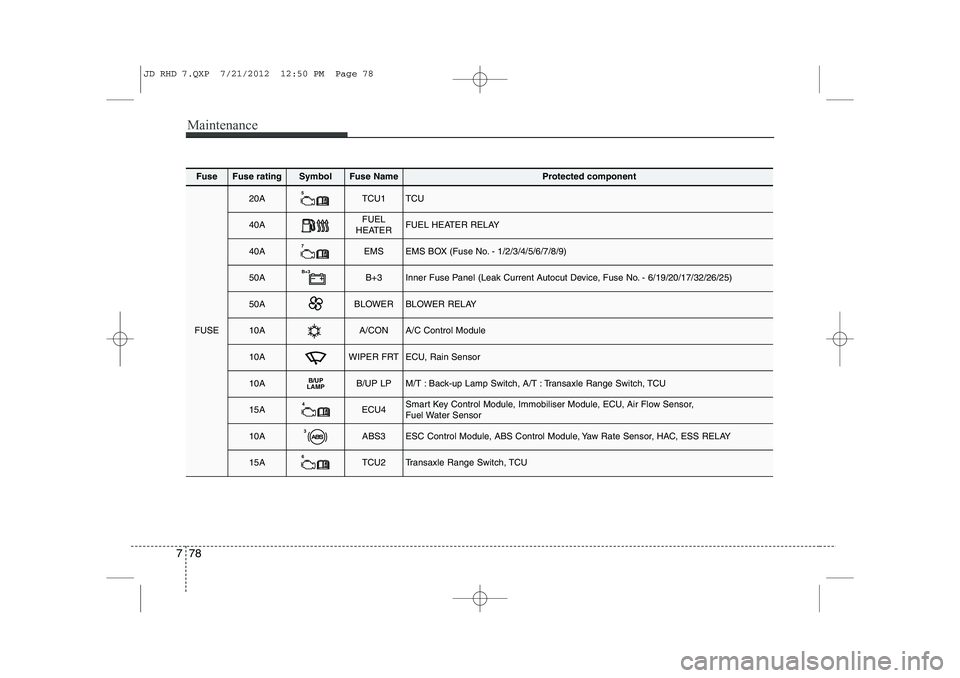
FuseFuse ratingSymbolFuse NameProtected component
FUSE
20A5TCU1TCU
40AFUEL
HEATERFUEL HEATER RELAY
40A7EMSEMS BOX (Fuse No. - 1/2/3/4/5/6/7/8/9)
50AB+3B+3Inner Fuse Panel (Leak Current Autocut Device, Fuse No. - 6/19/20/17/32/26/25)
50ABLOWERBLOWER RELAY
10AA/CONA/C Control Module
10AWIPER FRTECU, Rain Sensor
10AB/UP
LAMPB/UP LPM/T : Back-up Lamp Switch, A/T : Transaxle Range Switch, TCU
15A4ECU4Smart Key Control Module, Immobiliser Module, ECU, Air Flow Sensor,
Fuel Water Sensor
10A3ABS3ESC Control Module, ABS Control Module, Yaw Rate Sensor, HAC, ESS RELAY
15A6TCU2Transaxle Range Switch, TCU
JD RHD 7.QXP 7/21/2012 12:50 PM Page 78
Page 1116 of 1168
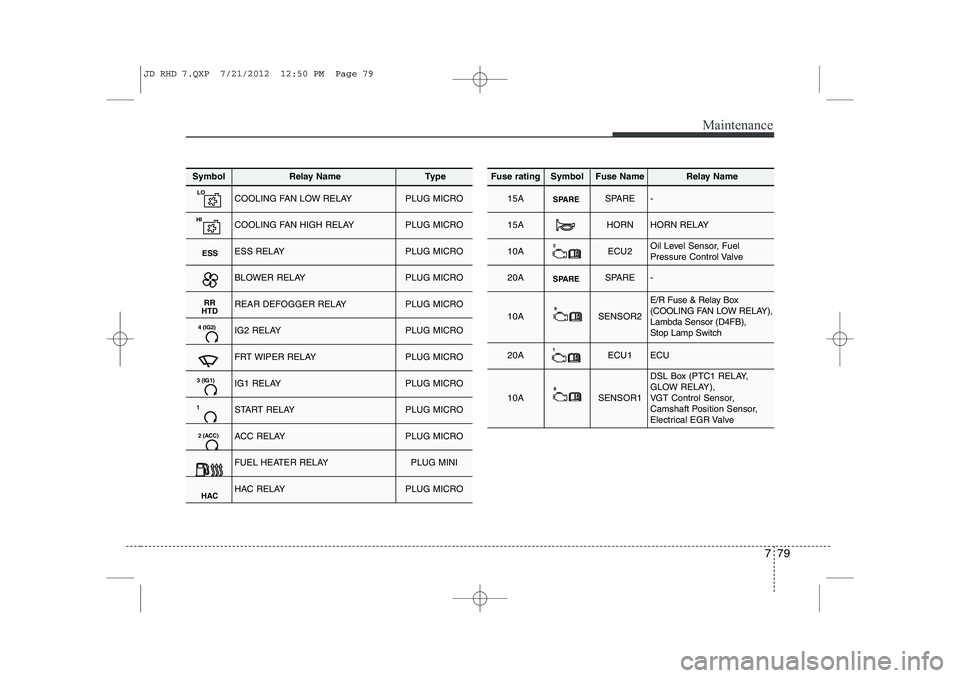
779
Maintenance
SymbolRelay NameType
LOCOOLING FAN LOW RELAYPLUG MICRO
HICOOLING FAN HIGH RELAYPLUG MICRO
ESSESS RELAYPLUG MICRO
BLOWER RELAYPLUG MICRO
RR
HTDREAR DEFOGGER RELAYPLUG MICRO
4 (IG2)IG2 RELAYPLUG MICRO
FRT WIPER RELAYPLUG MICRO
3 (IG1)IG1 RELAYPLUG MICRO
1START RELAYPLUG MICRO
2 (ACC)ACC RELAYPLUG MICRO
FUEL HEATER RELAYPLUG MINI
HACHAC RELAYPLUG MICRO
Fuse ratingSymbolFuse NameRelay Name
15ASPARESPARE-
15AHORNHORN RELAY
10A2ECU2Oil Level Sensor, Fuel
Pressure Control Valve
20ASPARESPARE-
10A9SENSOR2
E/R Fuse & Relay Box
(COOLING FAN LOW RELAY),Lambda Sensor (D4FB), Stop Lamp Switch
20A1ECU1ECU
10A8SENSOR1
DSL Box (PTC1 RELAY,
GLOW RELAY),
VGT Control Sensor,
Camshaft Position Sensor,
Electrical EGR Valve
JD RHD 7.QXP 7/21/2012 12:50 PM Page 79