turn signal KIA CEED 2013 Owner's Manual
[x] Cancel search | Manufacturer: KIA, Model Year: 2013, Model line: CEED, Model: KIA CEED 2013Pages: 1168, PDF Size: 48.01 MB
Page 579 of 1168
Index
8
I
Label
Air bag warning label . . . . . . . . . . . . . . . . . . . . . . . 3-63
Air conditioner compressor label . . . . . . . . . . . . . . 8-11
Refrigerant label . . . . . . . . . . . . . . . . . . . . . . . . . . . . 8-11
Tire sidewall labeling . . . . . . . . . . . . . . . . . . . . . . . . 7-59
Tire specification and pressure label . . . . . . . . . . . 8-10
Vehicle certification label . . . . . . . . . . . . . . . . . . . . . . 8-9
Lane Departure Warning System . . . . . . . . . . . . . . . 5-59
Lane Departure Warning System Mode. . . . . . . . . . 4-67
Lap/shoulder belt . . . . . . . . . . . . . . . . . . . . . . . . . . . . 3-21
LCD display information . . . . . . . . . . . . . . . . . . . . . . 4-71LCD display warnings and indicators (instrument panel display) . . . . . . . . . . . . . . . . . . . . 4-88
Calender . . . . . . . . . . . . . . . . . . . . . . . . . . . . . . . . . . 4-88
Clock . . . . . . . . . . . . . . . . . . . . . . . . . . . . . . . . . . . . . 4-88
Icy road warning . . . . . . . . . . . . . . . . . . . . . . . . . . . 4-89
Outside ambient Temperature . . . . . . . . . . . . . . . . 4-88
LDWS (Lane Departure Warning System) . . . . . . . 5-59
Light bulbs. . . . . . . . . . . . . . . . . . . . . . . . . . . . . . . . . . 7-81
Lighting . . . . . . . . . . . . . . . . . . . . . . . . . . . . . . . . . . . 4-110 AFLS (Adaptive Front Lighting System) . . . . . . . 4-117
Auto light/AFLS position . . . . . . . . . . . . . . . . . . . . 4-112
Battery saver function . . . . . . . . . . . . . . . . . . . . . . 4-110
Daytime running light (DRL) . . . . . . . . . . . . . . . . 4-115
Front fog light . . . . . . . . . . . . . . . . . . . . . . . . . . . . . 4-115 Headlamp delay function . . . . . . . . . . . . . . . . . . . . 4-110
Headlight (Headlamp) welcome function . . . . . . . 4-110
Headlight leveling device . . . . . . . . . . . . . . . . . . . . 4-116
Headlight position . . . . . . . . . . . . . . . . . . . . . . . . . . 4-112
High - beam operation . . . . . . . . . . . . . . . . . . . . . . 4-113
Position light position . . . . . . . . . . . . . . . . . . . . . . . 4-111
Rear fog light. . . . . . . . . . . . . . . . . . . . . . . . . . . . . . 4-115
Static bending light . . . . . . . . . . . . . . . . . . . . . . . . . 4-111
Turn signals . . . . . . . . . . . . . . . . . . . . . . . . . . . . . . . 4-114
Lubricants and capacities . . . . . . . . . . . . . . . . . . . . . . 8-6
Luggage net (holder) . . . . . . . . . . . . . . . . . . . . . . . . 4-159
Luggage rail system . . . . . . . . . . . . . . . . . . . . . . . . . 4-164
Luggage room lamp . . . . . . . . . . . . . . . . . . . . . . . . . 4-124
Luggage side tray . . . . . . . . . . . . . . . . . . . . . . . . . . . 4-153
Luggage tray . . . . . . . . . . . . . . . . . . . . . . . . . . . . . . . 4-153
Lumbar support (Automatic Seat) . . . . . . . . . . . . . . . 3-7
Lumbar support (Manual seat) . . . . . . . . . . . . . . . . . . 3-5
Main fuse . . . . . . . . . . . . . . . . . . . . . . . . . . . . . . . . . . . 7-66 Maintenance
Explanation of scheduled maintenance items . . . . 7-32
Maintenance services . . . . . . . . . . . . . . . . . . . . . . . . . 7-5
Maintenance under severe usage conditions (except Europe, for Russia) . . . . . . . . . . . . . . . . . . 7-30
Maintenance under severe usage conditions (for Europe, except Russia) . . . . . . . . . . . . . . . . . . 7-19
M
L
JD eng Index.qxp 7/21/2012 11:45 AM Page 8
Page 583 of 1168
Index
12
I
Tachometer (Normal vision) . . . . . . . . . . . . . . . . . . . 4-47
Tachometer (Super vision) . . . . . . . . . . . . . . . . . . . . . 4-60
Tailgate . . . . . . . . . . . . . . . . . . . . . . . . . . . . . . . . . . . . . 4-22
Tether anchor system . . . . . . . . . . . . . . . . . . . . . . . . . 3-34
Theft-alarm system . . . . . . . . . . . . . . . . . . . . . . . . . . . 4-14
Tilt & telescopic steering . . . . . . . . . . . . . . . . . . . . . . 4-38
Tire chains . . . . . . . . . . . . . . . . . . . . . . . . . . . . . . . . . . 5-68
Tire pressure monitoring system (TPMS) . . . . . . . . 6-23
Tire rotation . . . . . . . . . . . . . . . . . . . . . . . . . . . . . . . . 7-56
Tire specification and pressure label . . . . . . . . . . . . 8-10
Tires and wheels . . . . . . . . . . . . . . . . . . . . . . . . . 7-53, 8-5
Checking tire inflation pressure . . . . . . . . . . . . . . . 7-55
Compact spare tire replacement . . . . . . . . . . . . . . . 7-58
Recommended cold tire inflation pressures . . . . . . 7-53
Tire care. . . . . . . . . . . . . . . . . . . . . . . . . . . . . . . . . . . 7-53
Tire maintenance . . . . . . . . . . . . . . . . . . . . . . . . . . . 7-59
Tire replacement . . . . . . . . . . . . . . . . . . . . . . . . . . . . 7-57
Tire rotation . . . . . . . . . . . . . . . . . . . . . . . . . . . . . . . 7-56
Tire sidewall labeling . . . . . . . . . . . . . . . . . . . . . . . . 7-59
Tire traction . . . . . . . . . . . . . . . . . . . . . . . . . . . . . . . 7-59
Wheel alignment and tire balance . . . . . . . . . . . . . 7-57
Wheel replacement . . . . . . . . . . . . . . . . . . . . . . . . . . 7-58
Towing . . . . . . . . . . . . . . . . . . . . . . . . . . . . . . . . . . . . . 6-28
Trailer towing . . . . . . . . . . . . . . . . . . . . . . . . . . . . . . . 5-71 Transaxle
Automatic transaxle/DCT . . . . . . . . . . . . . . . . . . . . 5-23
Double clutch transmission . . . . . . . . . . . . . . . . . . . 5-23
Manual transaxle . . . . . . . . . . . . . . . . . . . . . . . . . . . 5-20
Trip computer (Normal vision) . . . . . . . . . . . . . . . . . 4-51
Service mode . . . . . . . . . . . . . . . . . . . . . . . . . . . . . . . 4-55
User Settings . . . . . . . . . . . . . . . . . . . . . . . . . . . . . . . 4-56
Trip computer (Super vision) . . . . . . . . . . . . . . . . . . 4-64
Driving information mode . . . . . . . . . . . . . . . . . . . . 4-65
Lane Departure Warning System Mode . . . . . . . . 4-67
Service mode . . . . . . . . . . . . . . . . . . . . . . . . . . . . . . . 4-68
User Settings . . . . . . . . . . . . . . . . . . . . . . . . . . . . . . . 4-69
Turn signals . . . . . . . . . . . . . . . . . . . . . . . . . . . . . . . . 4-114
User Settings (Normal vision) . . . . . . . . . . . . . . . . . . 4-56
User Settings (Super vision) . . . . . . . . . . . . . . . . . . . . 4-69
Vanity mirror lamp . . . . . . . . . . . . . . . . . . . . . . . . . . 4-123
Vehicle break-in process . . . . . . . . . . . . . . . . . . . . . . . . 1-5
Vehicle certification label . . . . . . . . . . . . . . . . . . . . . . . 8-9
Vehicle identification number (VIN). . . . . . . . . . . . . . 8-9
Vehicle stability management . . . . . . . . . . . . . . . . . . 5-47
Vehicle weight . . . . . . . . . . . . . . . . . . . . . . . . . . . . . . . 5-80
U
V
T
JD eng Index.qxp 7/21/2012 11:45 AM Page 12
Page 593 of 1168
Introduction
6
1
* : if equipped ❈ For more detailed explanations, refer
to section 4, “Instrument cluster”.
Charging system warning light
Glow indicator (Diesel only)
Fuel filter warning light (Diesel only)Engine coolant temperature
warning light
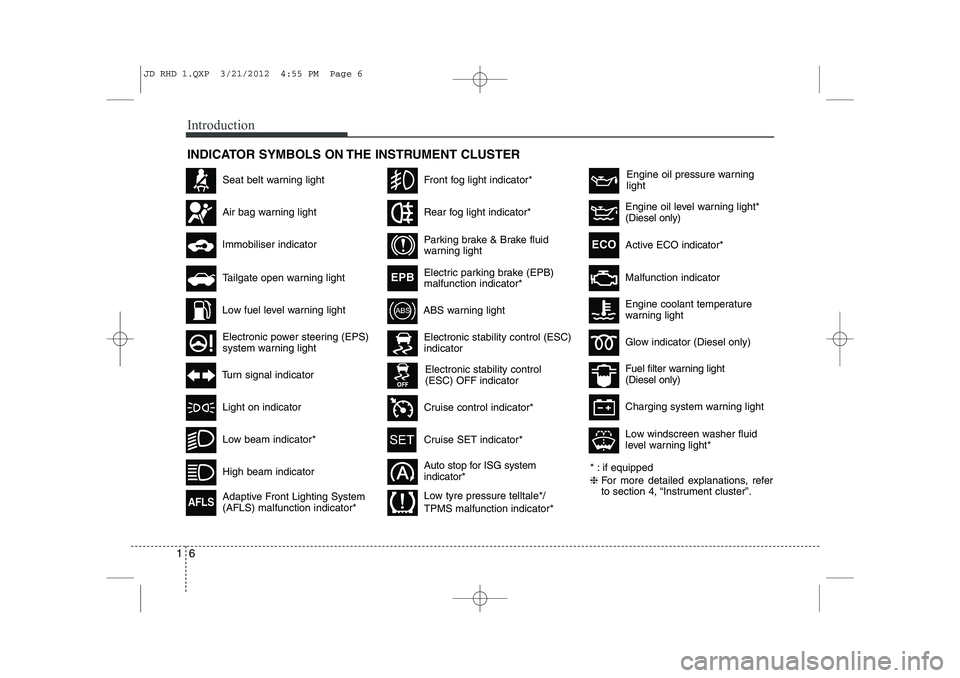
INDICATOR SYMBOLS ON THE INSTRUMENT CLUSTER
Seat belt warning light
High beam indicator
Light on indicator
Turn signal indicator
ABS warning light
Air bag warning light
Low fuel level warning light
Electronic stability control (ESC) indicator
Electronic stability control (ESC) OFF indicator
Immobiliser indicator
Low beam indicator*
Tailgate open warning light
Electronic power steering (EPS)
system warning light
Adaptive Front Lighting System (AFLS) malfunction indicator*
AFLS
Front fog light indicator*
Rear fog light indicator*
Parking brake & Brake fluid
warning light
Electric parking brake (EPB) malfunction indicator*
EPB
Active ECO
indicator*ECO
Auto stop for ISG system indicator*
Cruise control indicator*
Cruise SET indicator*
Engine oil pressure warning light
Malfunction indicator
Engine oil level warning light* (Diesel only)
Low tyre pressure telltale*/ TPMS malfunction indicator* Low windscreen washer fluid
level warning light*
JD RHD 1.QXP 3/21/2012 4:55 PM Page 6
Page 597 of 1168
Your vehicle at a glance
4
2
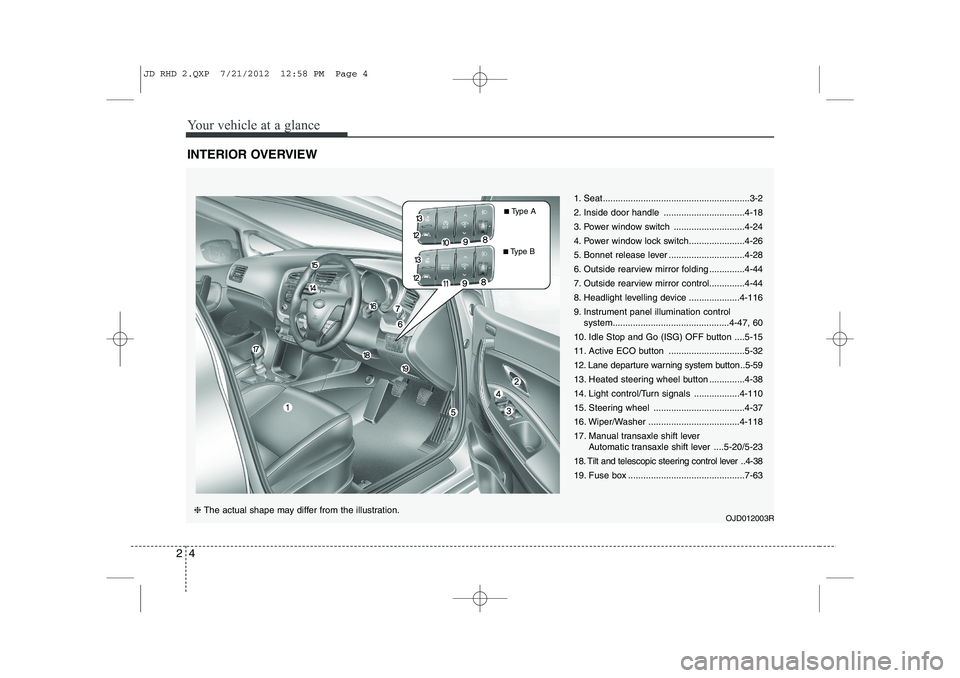
INTERIOR OVERVIEW
1. Seat..........................................................3-2
2. Inside door handle ................................4-18
3. Power window switch ............................4-24
4. Power window lock switch......................4-26
5. Bonnet release lever ..............................4-28
6. Outside rearview mirror folding ..............4-44
7. Outside rearview mirror control..............4-44
8. Headlight levelling device ....................4-116
9. Instrument panel illumination control
system..............................................4-47, 60
10. Idle Stop and Go (ISG) OFF button ....5-15
11. Active ECO button ..............................5-32
12. Lane departure warning system button ..5-59
13. Heated steering wheel button ..............4-38
14. Light control/Turn signals ..................4-110
15. Steering wheel ....................................4-37
16. Wiper/Washer ....................................4-118
17. Manual transaxle shift lever Automatic transaxle shift lever ....5-20/5-23
18. Tilt and telescopic steering control lever ..4-38
19. Fuse box ..............................................7-63
OJD012003R
❈ The actual shape may differ from the illustration. ■
Type A
■ Type B
JD RHD 2.QXP 7/21/2012 12:58 PM Page 4
Page 641 of 1168
341
Safety system of your vehicle
How does the air bag system operate
Air bags are activated (able to inflate ifnecessary) only when the ignition
switch is turned to the ON or STARTposition.
Air bags inflate instantly in the event of serious frontal or side collision (ifequipped with side impact air bag or
curtain air bag) in order to help protect
the occupants from serious physical
injury.
There is no single speed at which the air bags will inflate.
Generally, air bags are designed to
inflate based upon the severity of a col-
lision and its direction. These two fac-
tors determine whether the sensors
produce an electronic deployment/inflation signal.
Air bag deployment depends on a number of factors including vehiclespeed, angles of impact and the densi-
ty and stiffness of the vehicles or
objects which your vehicle hits in the
collision. The determining, factors are
not limited to those mentioned above.
The front air bags will completely inflate and deflate in an instant. It is virtually impossible for you to see
the air bags inflate during an accident.
It is much more likely that you will sim-ply see the deflated air bags hanging
out of their storage compartments afterthe collision.
In order to help provide protection in a severe collision, the air bags must
inflate rapidly. The speed of air bag
inflation is a consequence of extremely
short time in which a collision occursand the need to get the air bag
between the occupant and the vehicle
structures before the occupant impacts
those structures. This speed of inflation
reduces the risk of serious or life-
threatening injuries in a severe collision
and is thus a necessary part of air bagdesign.
However, air bag inflation can also
cause injuries which can include facial
abrasions, bruises and broken bonesbecause the inflation speed also caus-
es the air bags to expand with a great
deal of force.
There are even circumstances under which contact with the steer-
ing wheel air bag can cause fatal
injuries, especially if the occupant
is positioned excessively close tothe steering wheel.
WARNING
To avoid severe personal injury or death caused by deploying air
bags in a collision, the driver
should sit as far back from the
steering wheel air bag as possible
(at least 250 mm (10 inches)
away). The front passenger should
always move their seat as far
back as possible and sit back intheir seat.
Air bag inflates instantly in an event of a collision, passengers
may be injured by the air bag
expansion force if they are not in
a proper position.
Air bag inflation may cause injuries including facial or bodily
abrasions, injuries from broken
glasses or burns.
JD RHD 3.QXP 7/21/2012 1:07 PM Page 41
Page 709 of 1168
Features of your vehicle
46
4
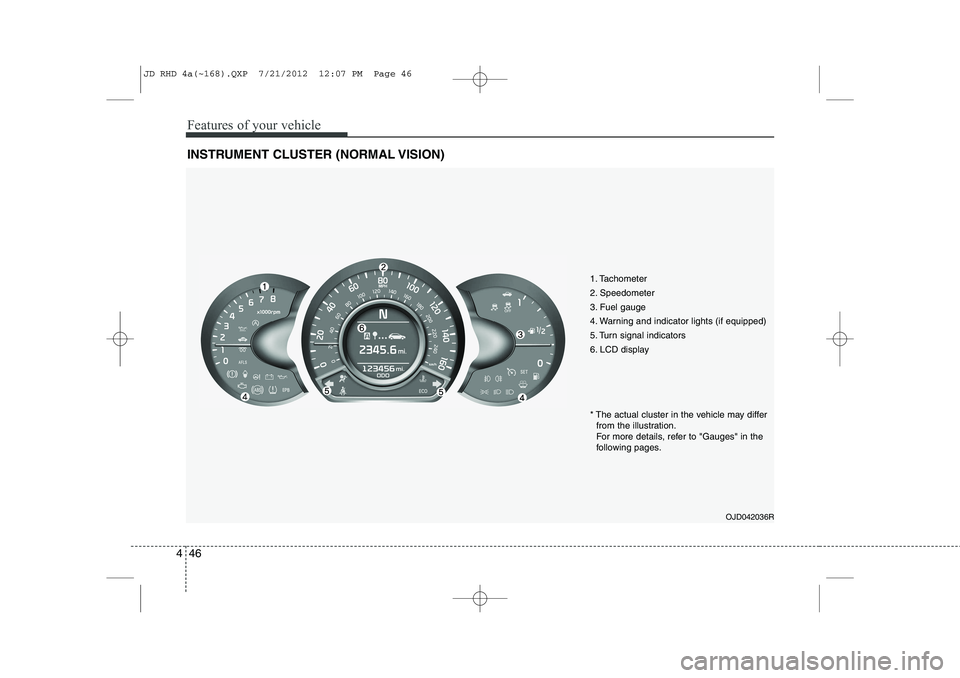
INSTRUMENT CLUSTER (NORMAL VISION)
1. Tachometer
2. Speedometer
3. Fuel gauge
4. Warning and indicator lights (if equipped)
5. Turn signal indicators
6. LCD display
OJD042036R
* The actual cluster in the vehicle may differ
from the illustration.
For more details, refer to "Gauges" in the
following pages.
JD RHD 4a(~168).QXP 7/21/2012 12:07 PM Page 46
Page 722 of 1168
459
Features of your vehicle
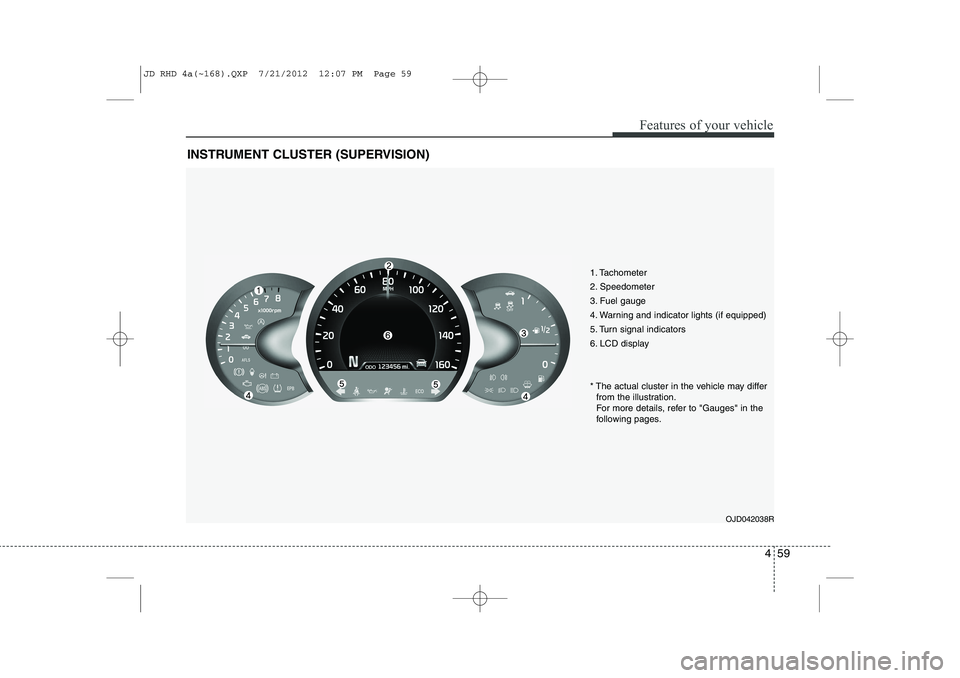
INSTRUMENT CLUSTER (SUPERVISION)
1. Tachometer
2. Speedometer
3. Fuel gauge
4. Warning and indicator lights (if equipped)
5. Turn signal indicators
6. LCD displayOJD042038R
* The actual cluster in the vehicle may differ
from the illustration.
For more details, refer to "Gauges" in the
following pages.
JD RHD 4a(~168).QXP 7/21/2012 12:07 PM Page 59
Page 742 of 1168
479
Features of your vehicle
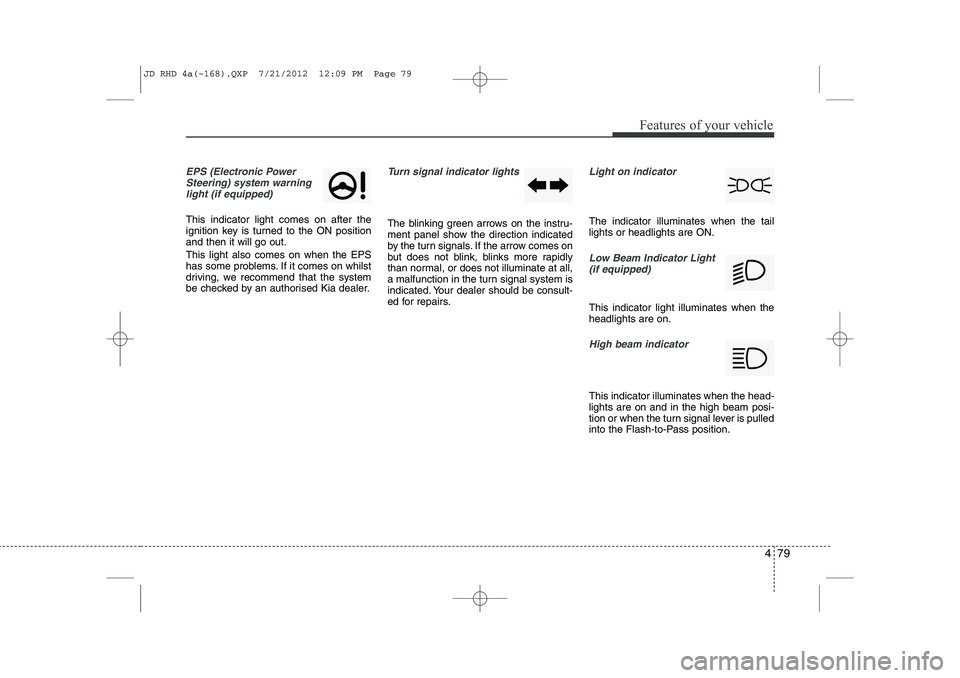
EPS (Electronic PowerSteering) system warninglight (if equipped)
This indicator light comes on after the
ignition key is turned to the ON positionand then it will go out. This light also comes on when the EPS
has some problems. If it comes on whilst
driving, we recommend that the system
be checked by an authorised Kia dealer.
Turn signal indicator lights
The blinking green arrows on the instru-
ment panel show the direction indicated
by the turn signals. If the arrow comes on
but does not blink, blinks more rapidly
than normal, or does not illuminate at all,
a malfunction in the turn signal system is
indicated. Your dealer should be consult-
ed for repairs.
Light on indicator
The indicator illuminates when the tail lights or headlights are ON.
Low Beam Indicator Light
(if equipped)
This indicator light illuminates when the headlights are on.
High beam indicator
This indicator illuminates when the head- lights are on and in the high beam posi-
tion or when the turn signal lever is pulled
into the Flash-to-Pass position.
JD RHD 4a(~168).QXP 7/21/2012 12:09 PM Page 79
Page 772 of 1168
4 109
Features of your vehicle
REARVIEW CAMERA (IF EQUIPPED)
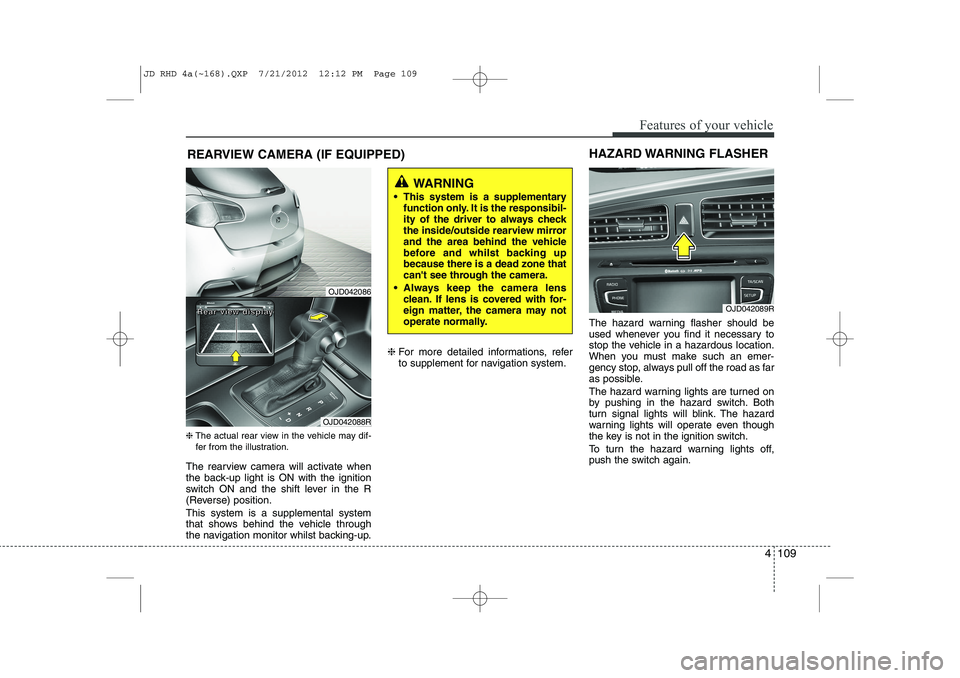
❈ The actual rear view in the vehicle may dif-
fer from the illustration.
The rearview camera will activate when
the back-up light is ON with the ignition
switch ON and the shift lever in the R
(Reverse) position. This system is a supplemental system
that shows behind the vehicle through
the navigation monitor whilst backing-up. ❈
For more detailed informations, refer
to supplement for navigation system. The hazard warning flasher should be
used whenever you find it necessary to
stop the vehicle in a hazardous location.
When you must make such an emer-
gency stop, always pull off the road as far
as possible.
The hazard warning lights are turned on
by pushing in the hazard switch. Both
turn signal lights will blink. The hazard
warning lights will operate even though
the key is not in the ignition switch.
To turn the hazard warning lights off,
push the switch again.
OJD042089R
HAZARD WARNING FLASHER
WARNING
This system is a supplementary function only. It is the responsibil-
ity of the driver to always check
the inside/outside rearview mirror
and the area behind the vehicle
before and whilst backing upbecause there is a dead zone that
can't see through the camera.
Always keep the camera lens clean. If lens is covered with for-
eign matter, the camera may not
operate normally.
OJD042086
OJD042088R
RRRReeeeaaaarrrr vvvviiiieeeewwww ddddiiiissssppppllllaaaayyyy
JD RHD 4a(~168).QXP 7/21/2012 12:12 PM Page 109
Page 777 of 1168
Features of your vehicle
114
4
Turn signals and lane change sig- nals
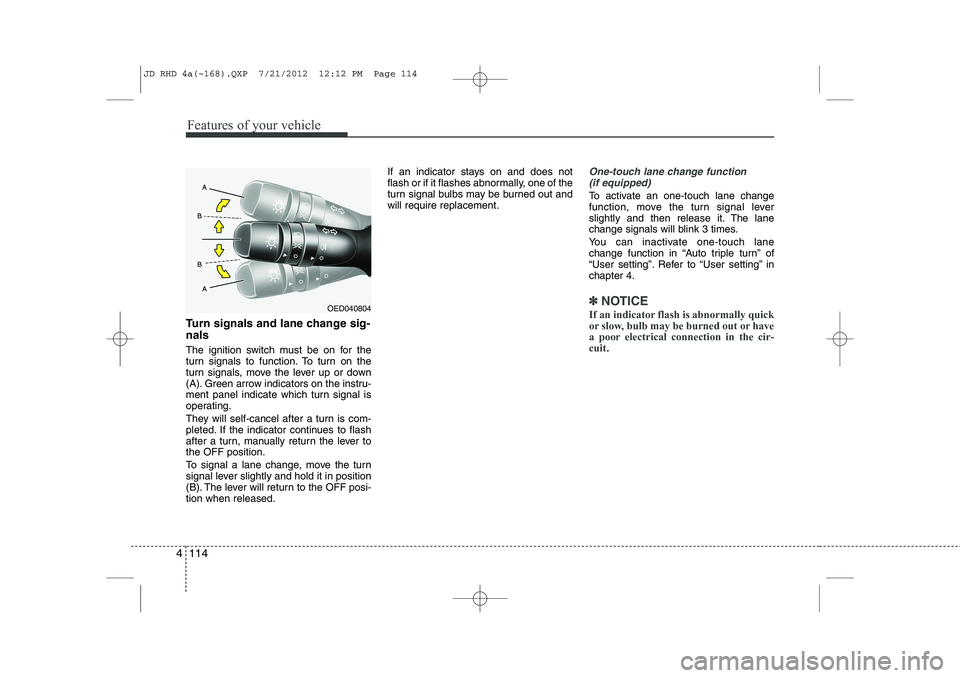
The ignition switch must be on for the
turn signals to function. To turn on the
turn signals, move the lever up or down
(A). Green arrow indicators on the instru-
ment panel indicate which turn signal is
operating.
They will self-cancel after a turn is com-
pleted. If the indicator continues to flash
after a turn, manually return the lever tothe OFF position.
To signal a lane change, move the turn
signal lever slightly and hold it in position
(B). The lever will return to the OFF posi-tion when released. If an indicator stays on and does not
flash or if it flashes abnormally, one of the
turn signal bulbs may be burned out andwill require replacement.
One-touch lane change function
(if equipped)
To activate an one-touch lane change
function, move the turn signal lever
slightly and then release it. The lane
change signals will blink 3 times.
You can inactivate one-touch lane
change function in “Auto triple turn” of
“User setting”. Refer to “User setting” inchapter 4.
✽✽ NOTICE
If an indicator flash is abnormally quick
or slow, bulb may be burned out or have
a poor electrical connection in the cir-cuit.OED040804
JD RHD 4a(~168).QXP 7/21/2012 12:12 PM Page 114