Auto KIA CEED 2013 Repair Manual
[x] Cancel search | Manufacturer: KIA, Model Year: 2013, Model line: CEED, Model: KIA CEED 2013Pages: 1168, PDF Size: 48.01 MB
Page 227 of 1168
Features of your vehicle
148
4
For maximum defrosting, set the tem-
perature control to the hottest position
and the fan speed control to the high-est speed.
If warm air to the floor is desired while defrosting or defogging, set the modeto the floor-defrost position.
Before driving, clear all snow and ice from the windshield, rear window, out-
side rear view mirrors, and all side win-
dows.
Clear all snow and ice from the hood and air inlet in the cowl grill to improveheater and defroster efficiency and to
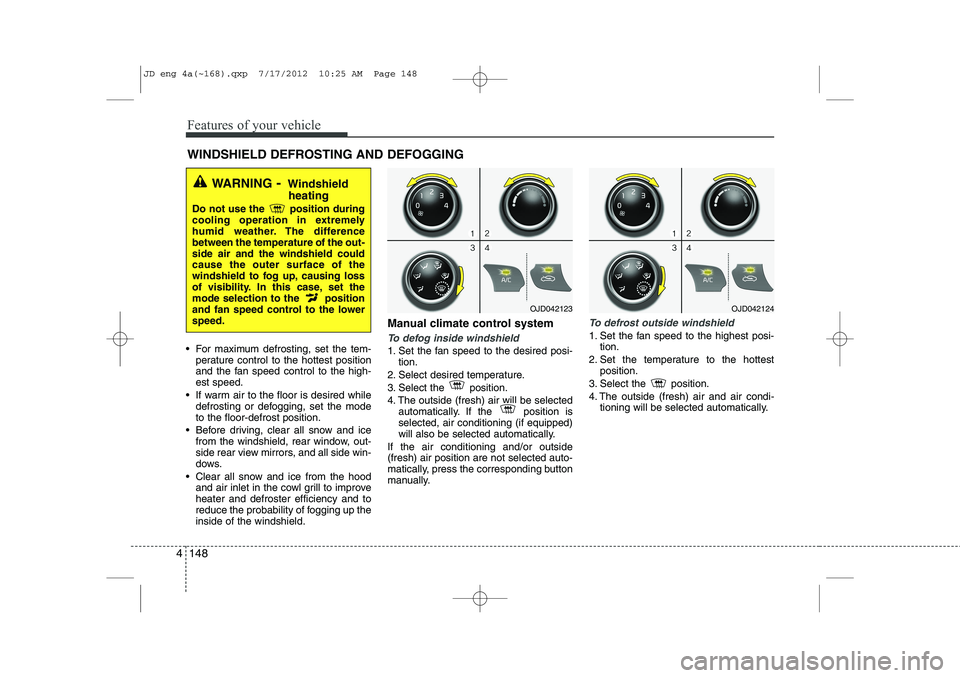
reduce the probability of fogging up theinside of the windshield. Manual climate control systemTo defog inside windshield
1. Set the fan speed to the desired posi-
tion.
2. Select desired temperature.
3. Select the position.
4. The outside (fresh) air will be selected automatically. If the position is selected, air conditioning (if equipped)
will also be selected automatically.
If the air conditioning and/or outside(fresh) air position are not selected auto-
matically, press the corresponding button
manually.
To defrost outside windshield
1. Set the fan speed to the highest posi- tion.
2. Set the temperature to the hottest position.
3. Select the position.
4. The outside (fresh) air and air condi- tioning will be selected automatically.
WINDSHIELD DEFROSTING AND DEFOGGING
WARNING - Windshield
heating
Do not use the position during
cooling operation in extremely
humid weather. The differencebetween the temperature of the out-side air and the windshield couldcause the outer surface of the
windshield to fog up, causing loss
of visibility. In this case, set the
mode selection to the position
and fan speed control to the lowerspeed.
OJD042123OJD042124
JD eng 4a(~168).qxp 7/17/2012 10:25 AM Page 148
Page 228 of 1168
4 149
Features of your vehicle
Automatic climate control system
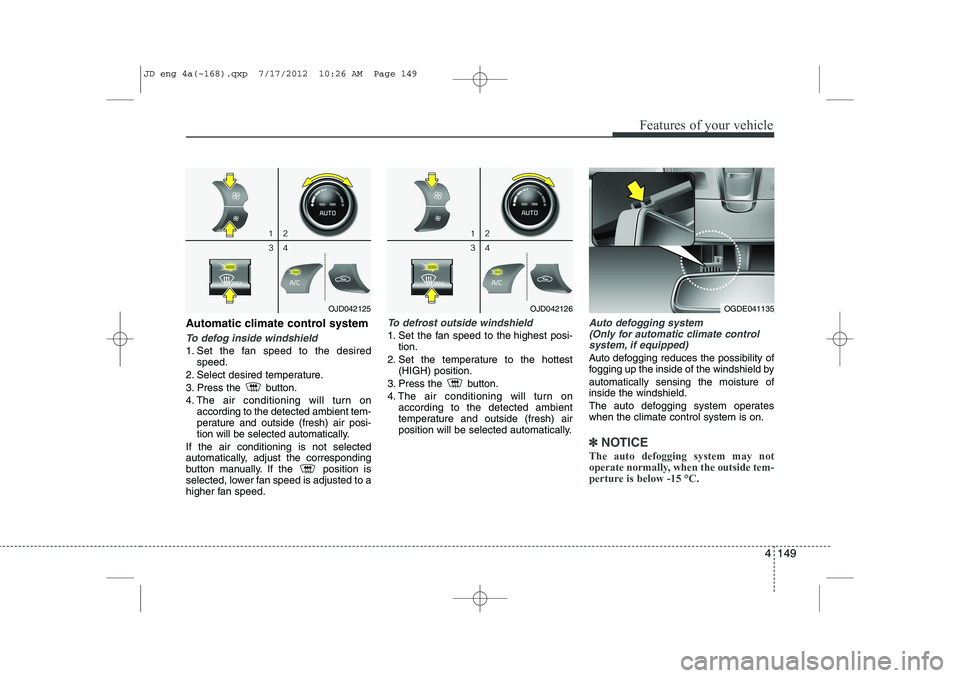
To defog inside windshield
1. Set the fan speed to the desiredspeed.
2. Select desired temperature.
3. Press the button.
4. The air conditioning will turn on according to the detected ambient tem-
perature and outside (fresh) air posi-
tion will be selected automatically.
If the air conditioning is not selected
automatically, adjust the corresponding
button manually. If the position is
selected, lower fan speed is adjusted to a
higher fan speed.
To defrost outside windshield
1. Set the fan speed to the highest posi- tion.
2. Set the temperature to the hottest (HIGH) position.
3. Press the button.
4. The air conditioning will turn on according to the detected ambient
temperature and outside (fresh) air
position will be selected automatically.
Auto defogging system
(Only for automatic climate control
system, if equipped)
Auto defogging reduces the possibility of
fogging up the inside of the windshield by automatically sensing the moisture of inside the windshield.
The auto defogging system operates when the climate control system is on.
✽✽ NOTICE
The auto defogging system may not
operate normally, when the outside tem-
perture is below -15 °C.
OJD042125OJD042126OGDE041135
JD eng 4a(~168).qxp 7/17/2012 10:26 AM Page 149
Page 229 of 1168
Features of your vehicle
150
4
This indicator illuminates
when the auto defoggingsystem senses the moistureof inside the windshield and
operates.
If more moisture is in the vehicle, higher
steps operate as follow.
Step 1 : Operating the air conditioning
Step 2 : Outside air position
Step 3 : Blowing air flow toward the wind- shield
Step 4 : Increasing air flow toward the windshield
If your vehicle is equipped with the auto
defogging system, it is automatically acti-
vated when the conditions are met.
However, if you would like to cancel the
auto defogging system, press the front
defroster button 4 times within 2 seconds
while pressing the AUTO button. The
indicator will blink 3 times to notify you
that the system is cancelled. To use the
auto defogging system again, follow the
procedures mentioned above.
If the battery has been disconnected or
discharged, it resets to the auto defog-
ging status.✽✽ NOTICE
If the A/C off is manually selected while the auto defogging system is on, the auto
defogging indicator will blink 3 times to
give notice that the A/C off can not beselected.
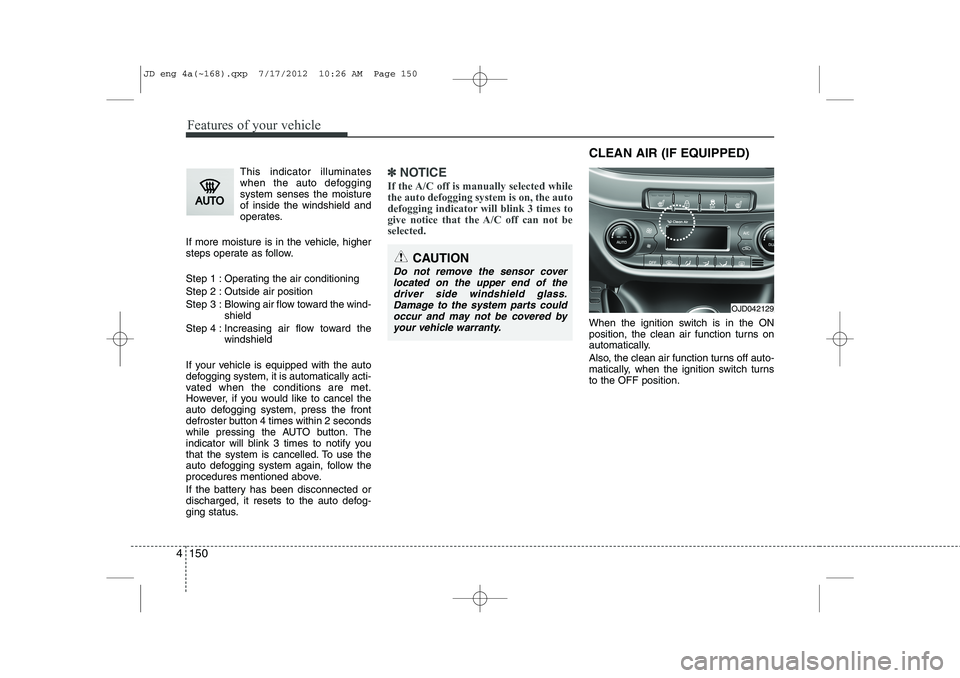
When the ignition switch is in the ON
position, the clean air function turns on
automatically.
Also, the clean air function turns off auto-
matically, when the ignition switch turnsto the OFF position.
CAUTION
Do not remove the sensor cover located on the upper end of thedriver side windshield glass.Damage to the system parts could occur and may not be covered by
your vehicle warranty.
OJD042129
CLEAN AIR (IF EQUIPPED)
JD eng 4a(~168).qxp 7/17/2012 10:26 AM Page 150
Page 231 of 1168
Features of your vehicle
152
4
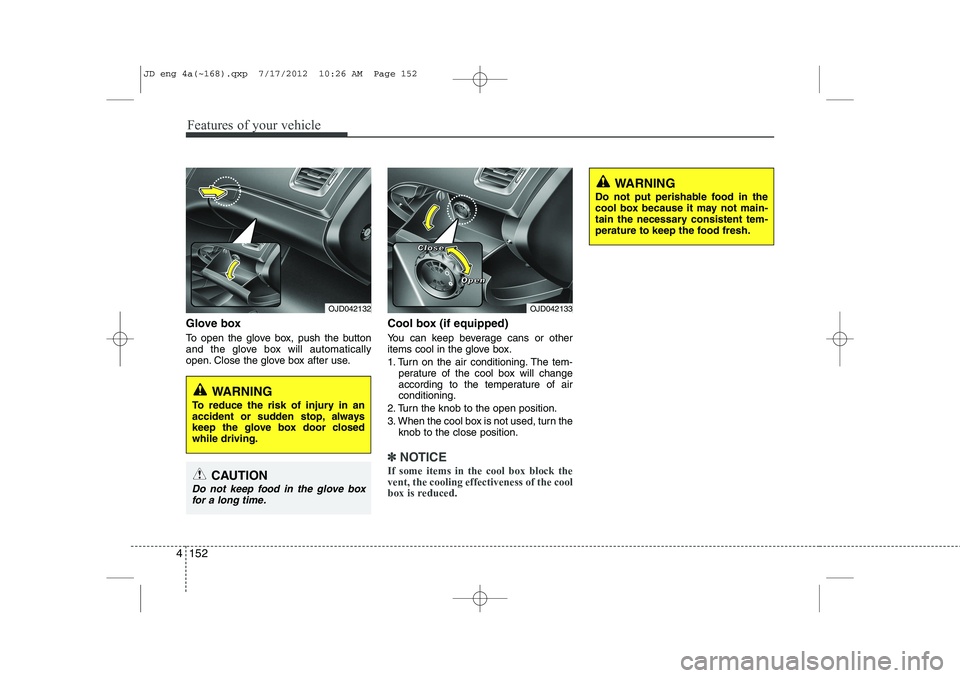
Glove box
To open the glove box, push the button
and the glove box will automatically
open. Close the glove box after use. Cool box (if equipped)
You can keep beverage cans or other
items cool in the glove box.
1. Turn on the air conditioning. The tem-
perature of the cool box will change
according to the temperature of airconditioning.
2. Turn the knob to the open position.
3. When the cool box is not used, turn the knob to the close position.
✽✽ NOTICE
If some items in the cool box block the vent, the cooling effectiveness of the cool
box is reduced.
OJD042133
WARNING
Do not put perishable food in the
cool box because it may not main-
tain the necessary consistent tem-
perature to keep the food fresh.
OJD042132
WARNING
To reduce the risk of injury in an
accident or sudden stop, always
keep the glove box door closedwhile driving.
CAUTION
Do not keep food in the glove box for a long time.
CCCClllloooosssseeee
OOOOppppeeeennnn
JD eng 4a(~168).qxp 7/17/2012 10:26 AM Page 152
Page 242 of 1168
4 163
Features of your vehicle
Cargo security screen (wagon) (if equipped)
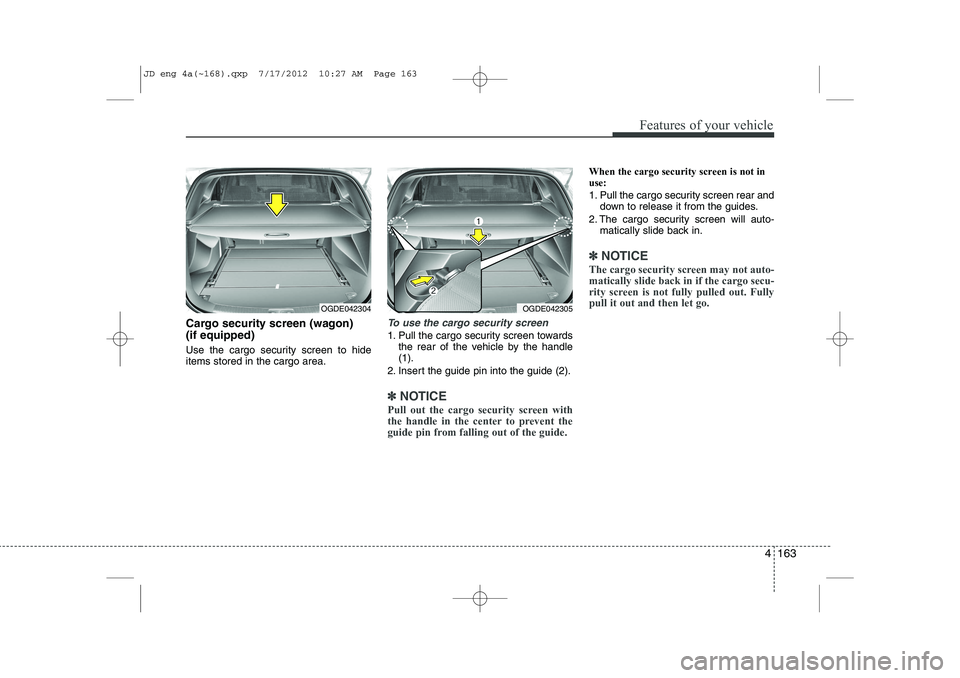
Use the cargo security screen to hide items stored in the cargo area.To use the cargo security screen
1. Pull the cargo security screen towardsthe rear of the vehicle by the handle (1).
2. Insert the guide pin into the guide (2).
✽✽ NOTICE
Pull out the cargo security screen with
the handle in the center to prevent the
guide pin from falling out of the guide.
When the cargo security screen is not in use:
1. Pull the cargo security screen rear and down to release it from the guides.
2. The cargo security screen will auto- matically slide back in.
✽✽ NOTICE
The cargo security screen may not auto- matically slide back in if the cargo secu-
rity screen is not fully pulled out. Fullypull it out and then let go.
OGDE042304OGDE042305
JD eng 4a(~168).qxp 7/17/2012 10:27 AM Page 163
Page 249 of 1168
Features of your vehicle
170
4
Audio remote control (if equipped)
The steering wheel audio remote control
button is installed to promote safe driving.
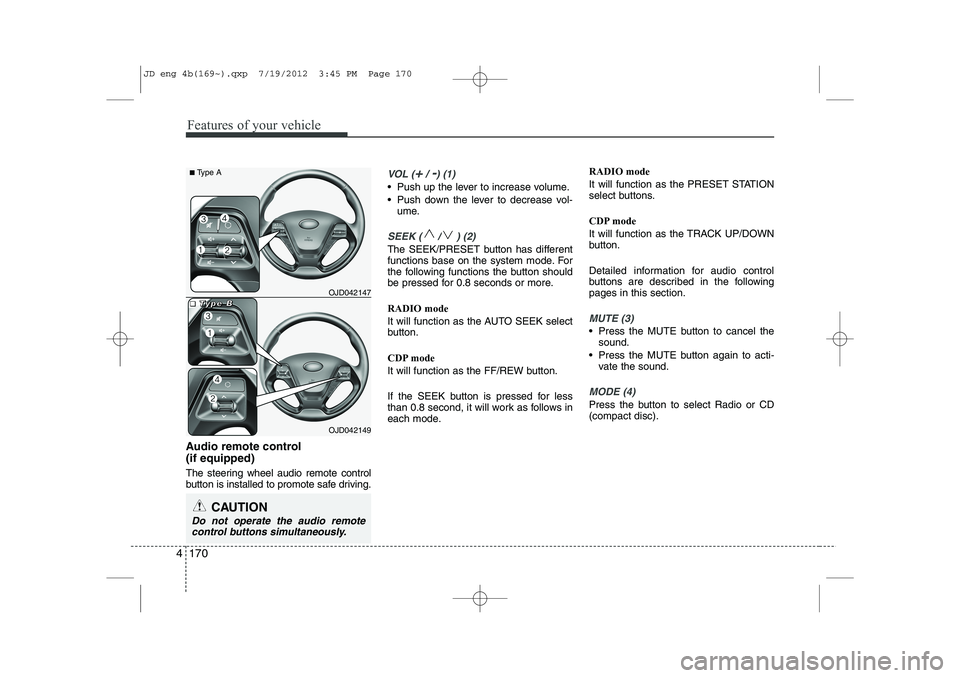
VOL (+/ -) (1)
• Push up the lever to increase volume.
Push down the lever to decrease vol-
ume.
SEEK ( / ) (2)
The SEEK/PRESET button has different
functions base on the system mode. For
the following functions the button should
be pressed for 0.8 seconds or more. RADIO mode
It will function as the AUTO SEEK select
button.
CDP mode
It will function as the FF/REW button.
If the SEEK button is pressed for less
than 0.8 second, it will work as follows in
each mode. RADIO mode
It will function as the PRESET STATION
select buttons.
CDP mode
It will function as the TRACK UP/DOWN
button.
Detailed information for audio control
buttons are described in the followingpages in this section.
MUTE (3)
Press the MUTE button to cancel the
sound.
Press the MUTE button again to acti- vate the sound.
MODE (4)
Press the button to select Radio or CD (compact disc).
CAUTION
Do not operate the audio remote
control buttons simultaneously.
OJD042149
■
■■■TTTTyyyyppppeeee BBBBOJD042147
■
Type A
JD eng 4b(169~).qxp 7/19/2012 3:45 PM Page 170
Page 258 of 1168
4 179
Features of your vehicle
SYSTEM CONTROLLERS AND FUNCTIONS ❈ Display and settings may differ
depending on the selected audio.
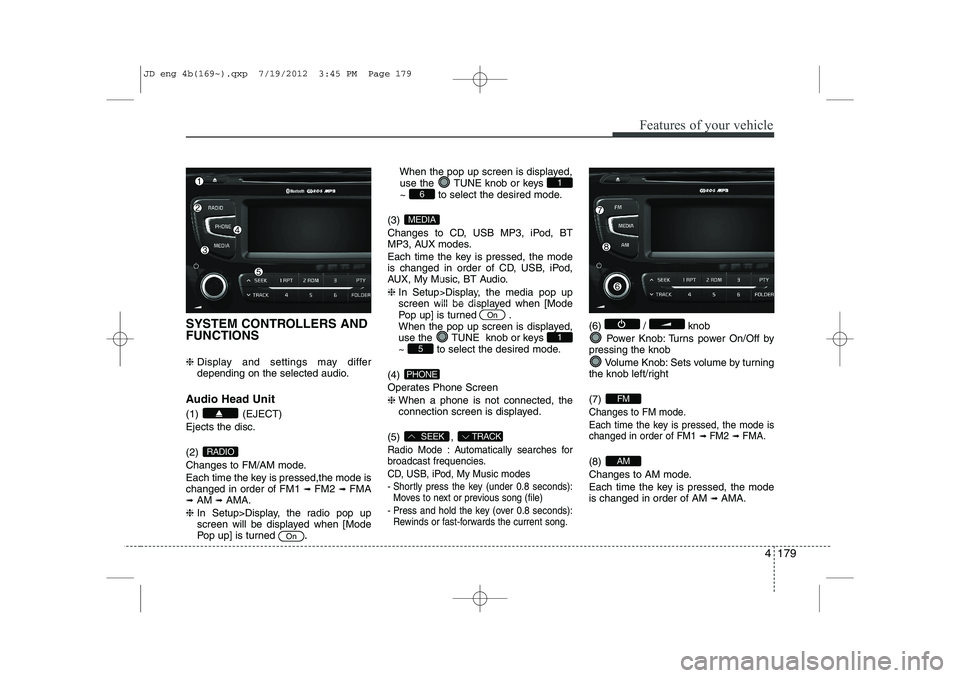
Audio Head Unit (1) (EJECT) Ejects the disc. (2)
Changes to FM/AM mode.
Each time the key is pressed,the mode is changed in order of FM1 ➟
FM2 ➟FMA
➟ AM ➟AMA.
❈ In Setup>Display, the radio pop up
screen will be displayed when [Mode
Pop up] is turned .When the pop up screen is displayed,
use the TUNE knob or keys
~ to select the desired mode.
(3)
Changes to CD, USB MP3, iPod, BT
MP3, AUX modes.
Each time the key is pressed, the mode
is changed in order of CD, USB, iPod,
AUX, My Music, BT Audio. ❈ In Setup>Display, the media pop up
screen will be displayed when [Mode
Pop up] is turned .
When the pop up screen is displayed,
use the TUNE knob or keys
~ to select the desired mode.
(4)
Operates Phone Screen❈ When a phone is not connected, the
connection screen is displayed.
(5) ,
Radio Mode : Automatically searches for
broadcast frequencies.
CD, USB, iPod, My Music modes
- Shortly press the key (under 0.8 seconds): Moves to next or previous song (file)
- Press and hold the key (over 0.8 seconds): Rewinds or fast-forwards the current song.
(6) / knob
Power Knob: Turns power On/Off by
pressing the knob
Volume Knob: Sets volume by turning
the knob left/right (7)
Changes to FM mode.
Each time the key is pressed, the mode is changed in order of FM1
➟ FM2➟ FMA.
(8)
Changes to AM mode.
Each time the key is pressed, the mode is changed in order of AM ➟
AMA.AM
FM
TRACKSEEK
PHONE
51
On
MEDIA
61
On
RADIO
JD eng 4b(169~).qxp 7/19/2012 3:45 PM Page 179
Page 261 of 1168
![KIA CEED 2013 Repair Manual Features of your vehicle
182
4
Audio Settings
This menu allows you to set the ‘Bass,
Middle, Treble’ and the Sound Fader and
Balance.
Select [Audio Settings] Select menu through
TUNE knobTu r](/img/2/57944/w960_57944-260.png "KIA CEED 2013 Repair Manual Features of your vehicle
182
4
Audio Settings
This menu allows you to set the ‘Bass,
Middle, Treble’ and the Sound Fader and
Balance.
Select [Audio Settings] Select menu through
TUNE knobTu r")
Features of your vehicle
182
4
Audio Settings
This menu allows you to set the ‘Bass,
Middle, Treble’ and the Sound Fader and
Balance.
Select [Audio Settings] Select menu through
TUNE knobTu r n
TUNE knobleft/right to set
Bass, Middle, Treble : Selects the sound tone.
Fader, Balance : Moves the sound fader and balance.
Default : Restores default settings. ❈ Return : While adjusting values, re-
pressing the TUNE knob will
restore the parent menu. Power Bass
This is a sound system feature that pro-
vides live bass.
Select [Power Bass] Set
/
through TUNE knob
Speed Dependent Volume Control
This feature is used to automatically con-
trol the volume level according to the
speed of the vehicle.
Select [SDVC] Set in 4 levels [Off/
Low/Mid/High] of
TUNEknob Volume Dialogue
Adjusts voice recognition volume.
Select [Volume Dialogue] Set vol- ume of
TUNEknobOffOn
JD eng 4b(169~).qxp 7/19/2012 3:45 PM Page 182
Page 262 of 1168
![KIA CEED 2013 Repair Manual 4 183
Features of your vehicle
PHONE SETUP (if equipped)
Press the key Select [Phone]
through TUNE knob or key
Select menu through TUNE knob
Pair Phone
To pair a
Bluetooth®Wireless Technology](/img/2/57944/w960_57944-261.png "KIA CEED 2013 Repair Manual 4 183
Features of your vehicle
PHONE SETUP (if equipped)
Press the key Select [Phone]
through TUNE knob or key
Select menu through TUNE knob
Pair Phone
To pair a
Bluetooth®Wireless Technology")
4 183
Features of your vehicle
PHONE SETUP (if equipped)
Press the key Select [Phone]
through TUNE knob or key
Select menu through TUNE knob
Pair Phone
To pair a
Bluetooth®Wireless Technology
enabled mobile phone, authentication and connection processes are first
required. As a result, you cannot pair
your mobile phone while driving the vehi-
cle. First park your vehicle before use.
Select [Pair Phone] Set through TUNE knob
➀ Search for device names as displayed
on your mobile phone and connect.
➁ Input the passkey displayed on the
screen. (Passkey : 0000)
❈ The device name and passkey will be
displayed on the screen for up to 3
minutes. If pairing is not completed
within the 3 minutes, the mobile phone
pairing process will automatically becanceled.
➂ Pairing completion is displayed.
❈ In some mobile phones, pairing will
automatically be followed by connection. ❈
It is possible to pair up to five
Bluetooth®Wireless Technology
enabled mobile phones.
3
SETUP
JD eng 4b(169~).qxp 7/19/2012 3:45 PM Page 183
Page 263 of 1168
![KIA CEED 2013 Repair Manual Features of your vehicle
184
4
Phone List The names of up to 5 paired phones will
be displayed.
A [ ] is displayed in front of the currently
connected phone. Select the desired name to setup the
s](/img/2/57944/w960_57944-262.png "KIA CEED 2013 Repair Manual Features of your vehicle
184
4
Phone List The names of up to 5 paired phones will
be displayed.
A [ ] is displayed in front of the currently
connected phone. Select the desired name to setup the
s")
Features of your vehicle
184
4
Phone List The names of up to 5 paired phones will
be displayed.
A [ ] is displayed in front of the currently
connected phone. Select the desired name to setup the
selected phone.
Connecting a phone
Select [Phone List] Select mobile
phone through TUNE knob Select[Connect Phone]
➀ Select a mobile phone that is not cur- rently connected.
➁ Connect the selected mobile phone. ➂
Connection completion is displayed.
❈ If a phone is already connected, dis-connect the currently connected
phone and select a new phone to con-nect.
Disconnecting a connected phone
Select [Phone List] Select mobile
phone through TUNE knob Select[Disconnect Phone]
➀ Select the currently connected mobile
phone.
➁ Disconnect the selected mobile
phone.
➂ Disconnection completion is dis-
played.
Changing connection sequence
(Priority)
This is used to change the order (priori-
ty) of automatic connection for the paired
mobile phones.
Select [Phone List] Select mobile
phone through TUNE knob Select
[Priority]
➀ Select [ Phone] in the [Setup]
➁ Select [Phone List]
➂ From the paired phones, select the
phone desired for No.1 priority.
Select [ Priority]
❈ Once the connection sequence (priori-
ty) is changed, the new no. 1 prioritymobile phone will be connected.
- when the no. 1 priority cannot be con- nected: Automatically attempts to con-nect the most recently connected
phone.
- Cases when the most recently con- nected phone cannot be connected:Attempts to connect in the order inwhich paired phones are listed.
JD eng 4b(169~).qxp 7/19/2012 3:45 PM Page 184