battery KIA CEED 2013 Manual Online
[x] Cancel search | Manufacturer: KIA, Model Year: 2013, Model line: CEED, Model: KIA CEED 2013Pages: 1168, PDF Size: 48.01 MB
Page 672 of 1168
49
Features of your vehicle
Battery replacement
A battery should last for several years,
but if the transmitter or smart key is not
working properly, try replacing the bat-
tery with a new one. If you are unsure
how to use or replace the battery, we rec-
ommend that you contact an authorised
Kia dealer.
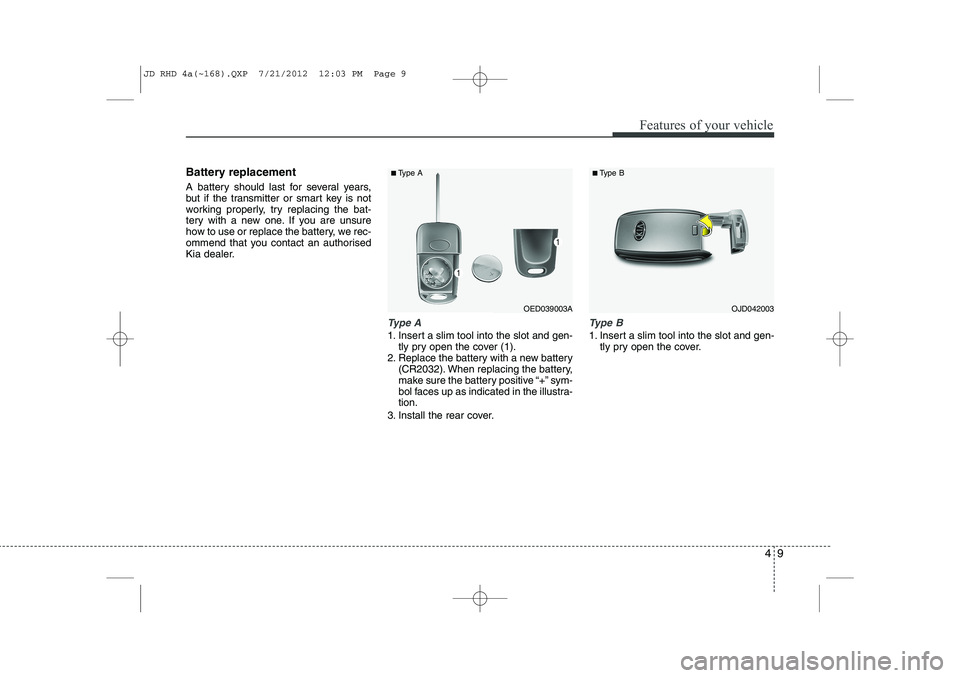
Type A
1. Insert a slim tool into the slot and gen-tly pry open the cover (1).
2. Replace the battery with a new battery (CR2032). When replacing the battery,
make sure the battery positive “+” sym-
bol faces up as indicated in the illustra-tion.
3. Install the rear cover.
Type B
1. Insert a slim tool into the slot and gen- tly pry open the cover.
OJD042003OED039003A
■
Type A ■Type B
JD RHD 4a(~168).QXP 7/21/2012 12:03 PM Page 9
Page 673 of 1168
Features of your vehicle
10
4
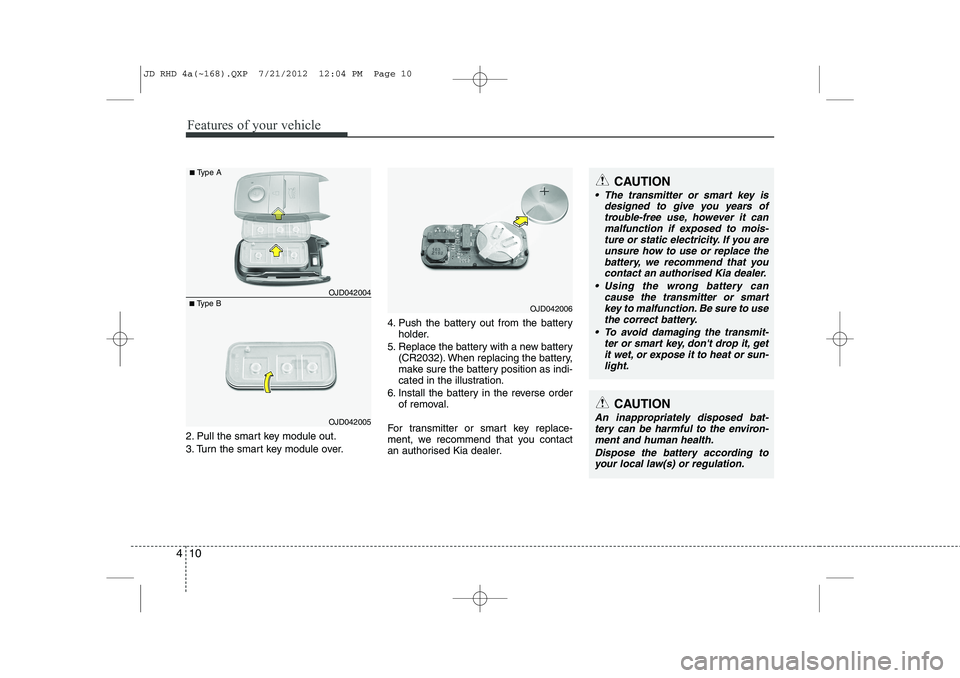
2. Pull the smart key module out.
3. Turn the smart key module over. 4. Push the battery out from the battery
holder.
5. Replace the battery with a new battery (CR2032). When replacing the battery,
make sure the battery position as indi-
cated in the illustration.
6. Install the battery in the reverse order of removal.
For transmitter or smart key replace-
ment, we recommend that you contact
an authorised Kia dealer.
CAUTION
The transmitter or smart key is designed to give you years of
trouble-free use, however it canmalfunction if exposed to mois-ture or static electricity. If you are unsure how to use or replace the
battery, we recommend that you contact an authorised Kia dealer.
Using the wrong battery can cause the transmitter or smart
key to malfunction. Be sure to usethe correct battery.
To avoid damaging the transmit- ter or smart key, don't drop it, get
it wet, or expose it to heat or sun- light.
CAUTION
An inappropriately disposed bat-tery can be harmful to the environ- ment and human health.
Dispose the battery according toyour local law(s) or regulation.
■ Type B OJD042004
■
Type A
OJD042005
OJD042006
JD RHD 4a(~168).QXP 7/21/2012 12:04 PM Page 10
Page 699 of 1168
Features of your vehicle
36
4
Resetting the sunroof
Whenever the vehicle battery is discon- nected or discharged, or related fuse is
blown, you must reset your sunroof sys-
tem as follows:
1. Turn the engine on and close the sun-
roof glass and sunshade completely.
2. Release the control lever.
3. Push the sunroof control lever forward in the direction of close (about 10 seconds)
until the sunroof operates as follows; SUNSHADE OPEN →TILT OPEN
Then, release the control lever.
4. Push the sunroof control lever forward in the direction of close until the sun-
roof operates as follows; SUNSHADE & SLIDE OPEN SIMUL-
TANEOUSLY → SLIDE CLOSE →
SUNSHADE CLOSE
Then, release the control lever.
When this is complete, the sunroof system is reset.
For more detailed information, we recom-
mend that you contact an authorised Kia
dealer.✽✽ NOTICE
If you do not reset the sunroof, it may
not work properly.
JD RHD 4a(~168).QXP 7/21/2012 12:06 PM Page 36
Page 708 of 1168
445
Features of your vehicle
Electric type
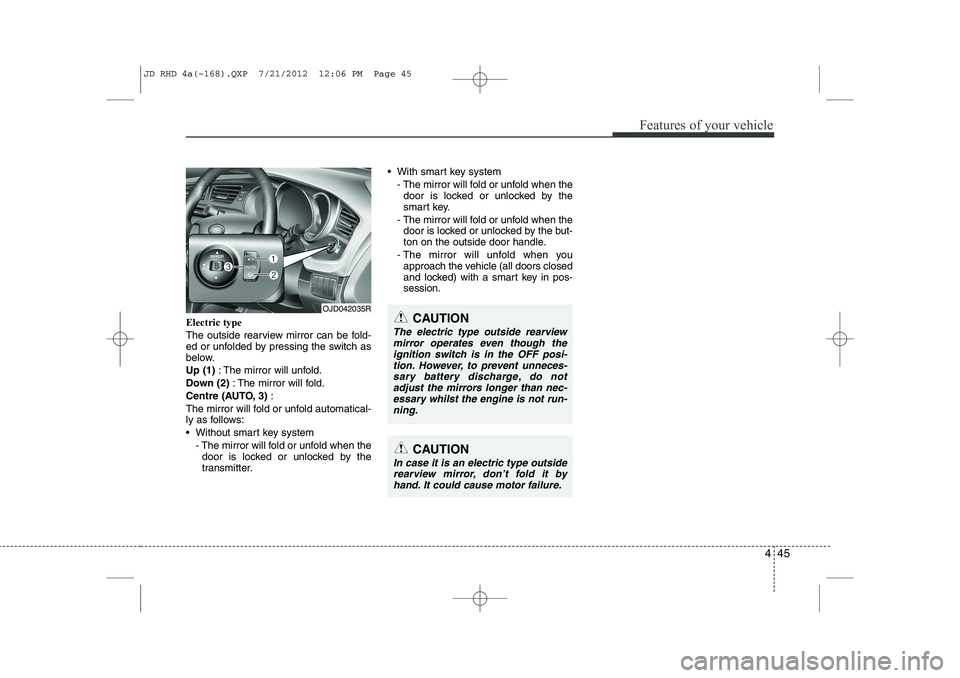
The outside rearview mirror can be fold-
ed or unfolded by pressing the switch as
below. Up (1): The mirror will unfold.
Down (2) : The mirror will fold.
Centre (AUTO, 3) :
The mirror will fold or unfold automatical-
ly as follows:
Without smart key system - The mirror will fold or unfold when thedoor is locked or unlocked by the
transmitter. With smart key system
- The mirror will fold or unfold when thedoor is locked or unlocked by the
smart key.
- The mirror will fold or unfold when the door is locked or unlocked by the but-
ton on the outside door handle.
- The mirror will unfold when you approach the vehicle (all doors closed
and locked) with a smart key in pos-session.
OJD042035R
CAUTION
In case it is an electric type outside
rearview mirror, don’t fold it byhand. It could cause motor failure.
CAUTION
The electric type outside rearviewmirror operates even though the
ignition switch is in the OFF posi-tion. However, to prevent unneces- sary battery discharge, do notadjust the mirrors longer than nec-
essary whilst the engine is not run-ning.
JD RHD 4a(~168).QXP 7/21/2012 12:06 PM Page 45
Page 714 of 1168
451
Features of your vehicle
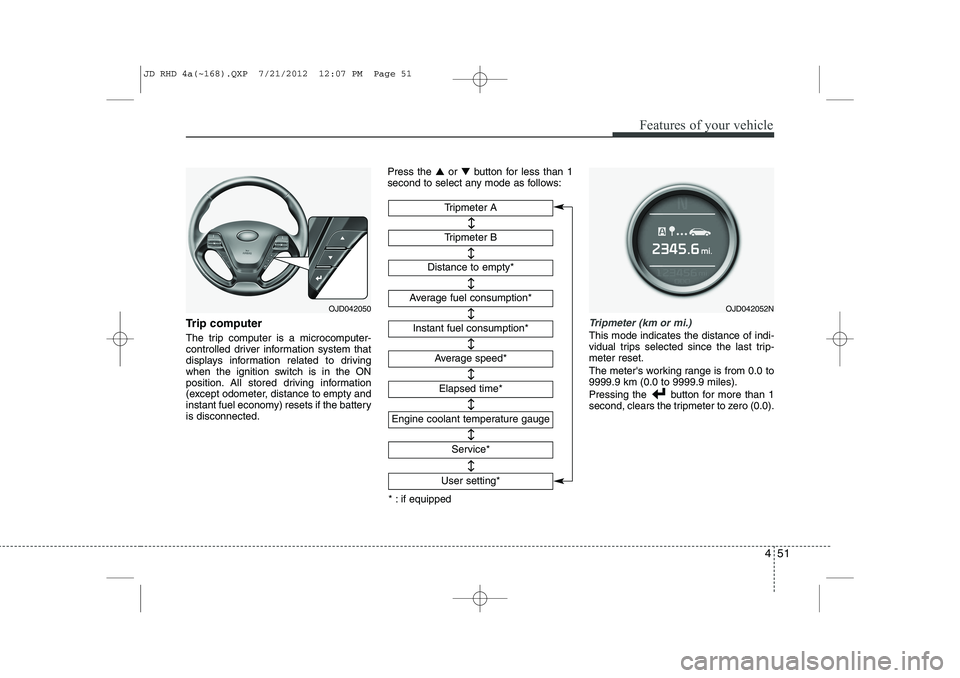
Trip computer
The trip computer is a microcomputer-
controlled driver information system that
displays information related to driving
when the ignition switch is in the ON
position. All stored driving information
(except odometer, distance to empty and
instant fuel economy) resets if the batteryis disconnected.Press the
▲or ▼ button for less than 1
second to select any mode as follows:Tripmeter (km or mi.)
This mode indicates the distance of indi-
vidual trips selected since the last trip-meter reset.
The meter's working range is from 0.0 to 9999.9 km (0.0 to 9999.9 miles).
Pressing the button for more than 1
second, clears the tripmeter to zero (0.0).
Tripmeter B
Instant fuel consumption*
Tripmeter A
Distance to empty*
Average fuel consumption*
Engine coolant temperature gauge
* : if equipped Elapsed time*
Average speed*
↔↔
↔
↔
↔
↔
↔
↔
Service*
↔
User setting*
↔
OJD042050OJD042052N
JD RHD 4a(~168).QXP 7/21/2012 12:07 PM Page 51
Page 728 of 1168
465
Features of your vehicle
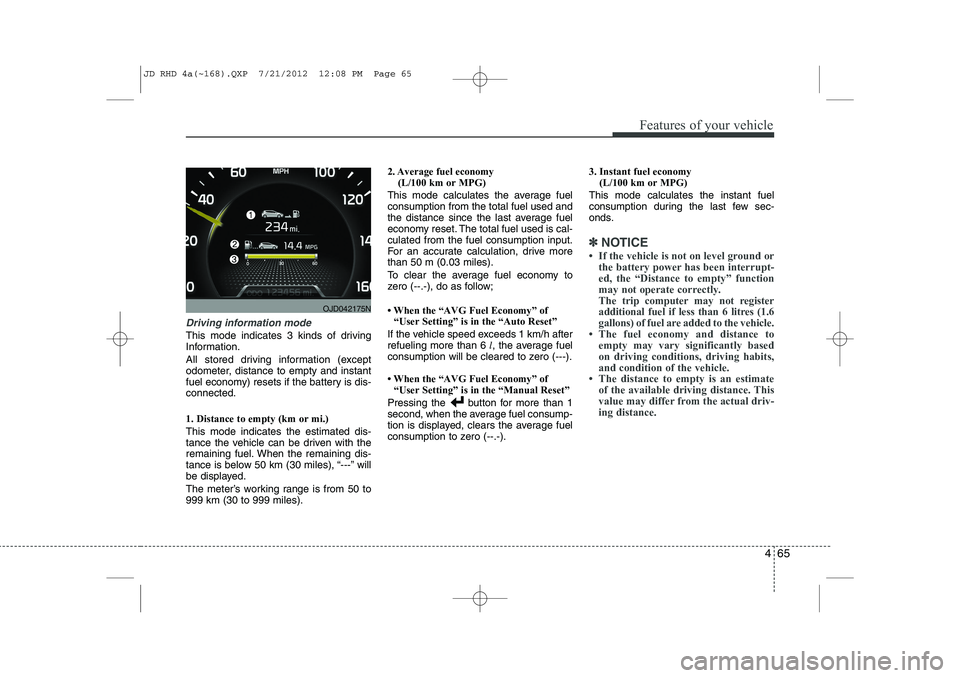
Driving information mode
This mode indicates 3 kinds of driving
Information.
All stored driving information (except
odometer, distance to empty and instant
fuel economy) resets if the battery is dis-connected. 1. Distance to empty (km or mi.) This mode indicates the estimated dis-
tance the vehicle can be driven with the
remaining fuel. When the remaining dis-
tance is below 50 km (30 miles), “---” will
be displayed.
The meter’s working range is from 50 to 999 km (30 to 999 miles).2. Average fuel economy
(L/100 km or MPG)
This mode calculates the average fuelconsumption from the total fuel used and
the distance since the last average fuel
economy reset. The total fuel used is cal-culated from the fuel consumption input.
For an accurate calculation, drive morethan 50 m (0.03 miles).
To clear the average fuel economy to
zero (--.-), do as follow;
Page 729 of 1168
Features of your vehicle
66
4
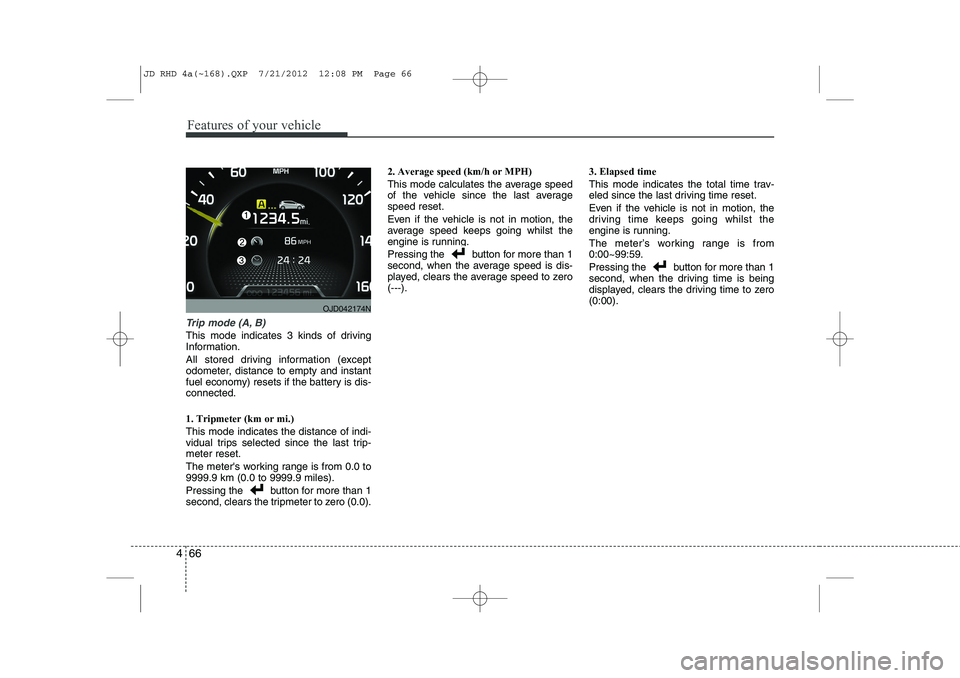
Trip mode (A, B)
This mode indicates 3 kinds of driving
Information.
All stored driving information (except
odometer, distance to empty and instant
fuel economy) resets if the battery is dis-connected. 1. Tripmeter (km or mi.) This mode indicates the distance of indi-
vidual trips selected since the last trip-meter reset.
The meter's working range is from 0.0 to 9999.9 km (0.0 to 9999.9 miles).
Pressing the button for more than 1
second, clears the tripmeter to zero (0.0). 2. Average speed (km/h or MPH)
This mode calculates the average speed
of the vehicle since the last averagespeed reset.
Even if the vehicle is not in motion, the
average speed keeps going whilst the
engine is running.
Pressing the button for more than 1
second, when the average speed is dis-
played, clears the average speed to zero(---).
3. Elapsed time
This mode indicates the total time trav-
eled since the last driving time reset.
Even if the vehicle is not in motion, the
driving time keeps going whilst the
engine is running.
The meter’s working range is from 0:00~99:59.
Pressing the button for more than 1
second, when the driving time is being
displayed, clears the driving time to zero(0:00).
OJD042174N
JD RHD 4a(~168).QXP 7/21/2012 12:08 PM Page 66
Page 736 of 1168
473
Features of your vehicle
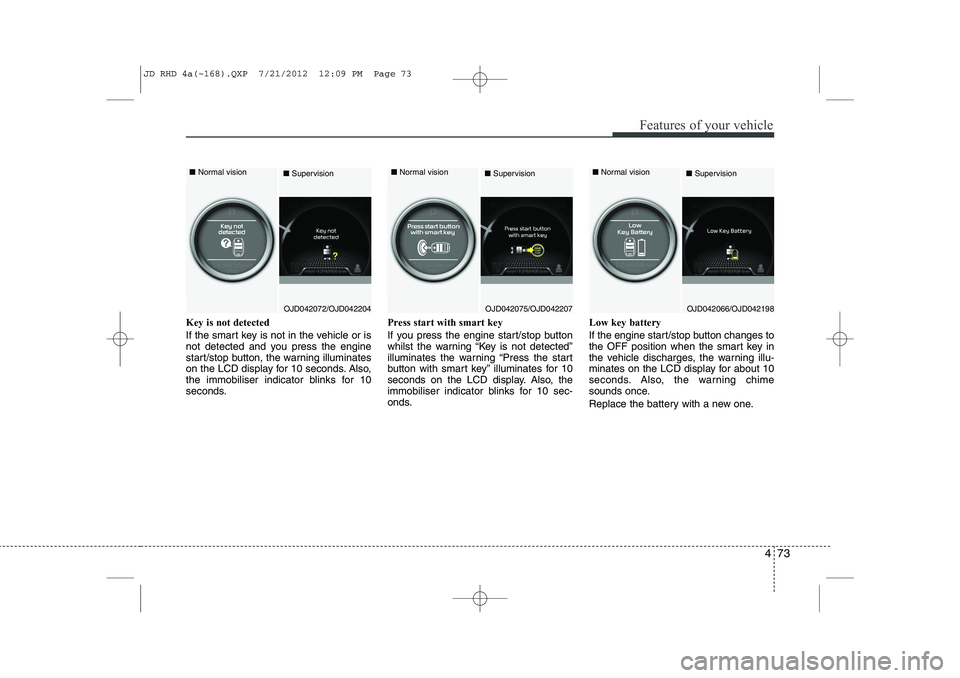
Key is not detected
If the smart key is not in the vehicle or is
not detected and you press the engine
start/stop button, the warning illuminates
on the LCD display for 10 seconds. Also,
the immobiliser indicator blinks for 10
seconds.Press start with smart key
If you press the engine start/stop button
whilst the warning “Key is not detected”
illuminates the warning “Press the start
button with smart key” illuminates for 10
seconds on the LCD display. Also, the
immobiliser indicator blinks for 10 sec-
onds.Low key battery
If the engine start/stop button changes to
the OFF position when the smart key in
the vehicle discharges, the warning illu-
minates on the LCD display for about 10
seconds. Also, the warning chime
sounds once.
Replace the battery with a new one.
OJD042072/OJD042204
■
Normal vision
■SupervisionOJD042075/OJD042207
■
Normal vision
■SupervisionOJD042066/OJD042198
■
Normal vision
■Supervision
JD RHD 4a(~168).QXP 7/21/2012 12:09 PM Page 73
Page 741 of 1168
Features of your vehicle
78
4
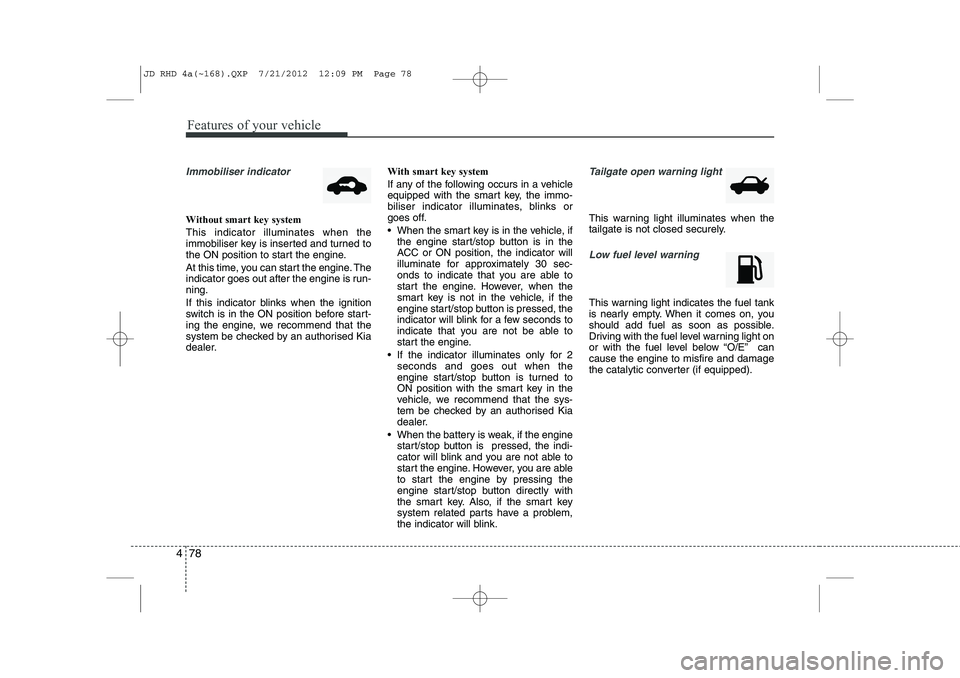
Immobiliser indicator
Without smart key system This indicator illuminates when the
immobiliser key is inserted and turned to
the ON position to start the engine.
At this time, you can start the engine. The
indicator goes out after the engine is run-ning.
If this indicator blinks when the ignition
switch is in the ON position before start-
ing the engine, we recommend that the
system be checked by an authorised Kia
dealer. With smart key system
If any of the following occurs in a vehicle
equipped with the smart key, the immo-
biliser indicator illuminates, blinks or
goes off.
When the smart key is in the vehicle, if
the engine start/stop button is in the
ACC or ON position, the indicator will
illuminate for approximately 30 sec-
onds to indicate that you are able to
start the engine. However, when the
smart key is not in the vehicle, if the
engine start/stop button is pressed, the
indicator will blink for a few seconds to
indicate that you are not be able to
start the engine.
If the indicator illuminates only for 2 seconds and goes out when the
engine start/stop button is turned to
ON position with the smart key in the
vehicle, we recommend that the sys-
tem be checked by an authorised Kia
dealer.
When the battery is weak, if the engine start/stop button is pressed, the indi-
cator will blink and you are not able to
start the engine. However, you are able
to start the engine by pressing the
engine start/stop button directly with
the smart key. Also, if the smart key
system related parts have a problem,
the indicator will blink.
Tailgate open warning light
This warning light illuminates when the
tailgate is not closed securely.
Low fuel level warning
This warning light indicates the fuel tank
is nearly empty. When it comes on, you
should add fuel as soon as possible.
Driving with the fuel level warning light on
or with the fuel level below “O/E” cancause the engine to misfire and damage
the catalytic converter (if equipped).
JD RHD 4a(~168).QXP 7/21/2012 12:09 PM Page 78
Page 746 of 1168
483
Features of your vehicle
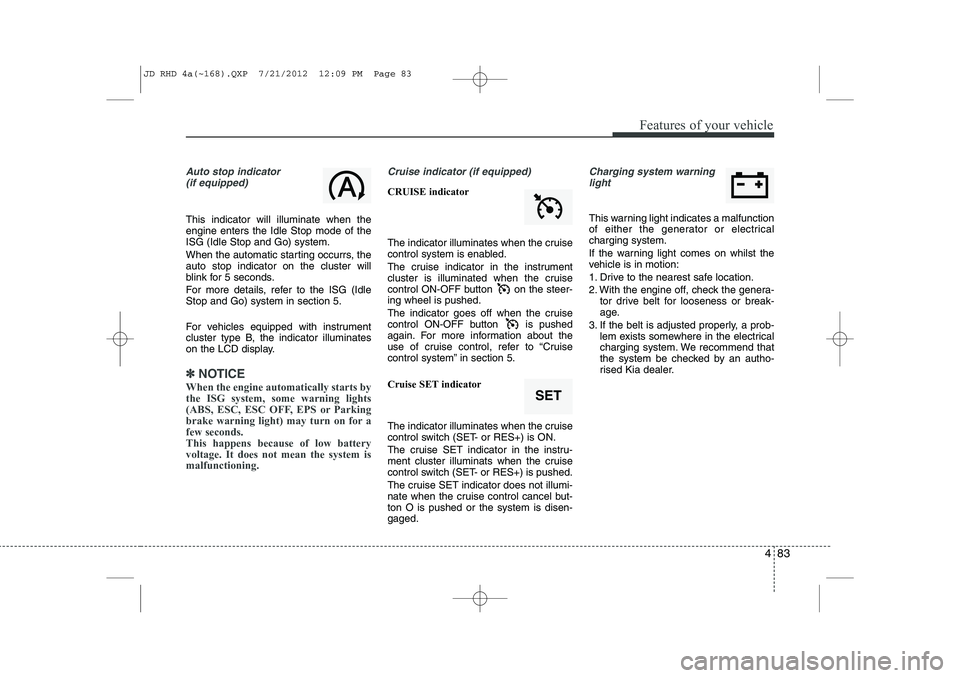
Auto stop indicator(if equipped)
This indicator will illuminate when the engine enters the Idle Stop mode of theISG (Idle Stop and Go) system.
When the automatic starting occurrs, the auto stop indicator on the cluster will
blink for 5 seconds.
For more details, refer to the ISG (Idle Stop and Go) system in section 5.
For vehicles equipped with instrument
cluster type B, the indicator illuminates
on the LCD display.
✽✽ NOTICE
When the engine automatically starts by
the ISG system, some warning lights
(ABS, ESC, ESC OFF, EPS or Parking
brake warning light) may turn on for afew seconds. This happens because of low batteryvoltage. It does not mean the system ismalfunctioning.
Cruise indicator (if equipped)
CRUISE indicator
The indicator illuminates when the cruise
control system is enabled.
The cruise indicator in the instrument
cluster is illuminated when the cruise
control ON-OFF button on the steer-ing wheel is pushed.
The indicator goes off when the cruise
control ON-OFF button is pushed
again. For more information about the
use of cruise control, refer to “Cruise
control system” in section 5. Cruise SET indicator
The indicator illuminates when the cruise
control switch (SET- or RES+) is ON.
The cruise SET indicator in the instru-
ment cluster illuminats when the cruise
control switch (SET- or RES+) is pushed.
The cruise SET indicator does not illumi-
nate when the cruise control cancel but-ton O is pushed or the system is disen-gaged.
Charging system warning light
This warning light indicates a malfunction
of either the generator or electricalcharging system.
If the warning light comes on whilst the
vehicle is in motion:
1. Drive to the nearest safe location.
2. With the engine off, check the genera- tor drive belt for looseness or break-
age.
3. If the belt is adjusted properly, a prob- lem exists somewhere in the electrical
charging system. We recommend that
the system be checked by an autho-
rised Kia dealer.
SET
JD RHD 4a(~168).QXP 7/21/2012 12:09 PM Page 83