belt KIA CEED 2014 Owners Manual
[x] Cancel search | Manufacturer: KIA, Model Year: 2014, Model line: CEED, Model: KIA CEED 2014Pages: 1206, PDF Size: 50.15 MB
Page 683 of 1206
Safety system of your vehicle
64
3
Additional safety precautions Never let passengers ride in the
cargo area or on top of a folded-
down back seat. All occupants should
sit upright, fully back in their seats with
their seat belts on and their feet on the
floor.
Passengers should not move out of
or change seats whilst the vehicle is
moving. A passenger who is not wear-
ing a seat belt during a crash or emer-
gency stop can be thrown against the
inside of the vehicle, against other
occupants, or out of the vehicle.
Each seat belt is designed torestrain one occupant. If more than
one person uses the same seat belt,
they could be seriously injured or killedin a collision.
Do not use any accessories on seatbelts. Devices claiming to improve
occupant comfort or reposition the seat
belt can reduce the protection provided
by the seat belt and increase the
chance of serious injury in a crash.
Passengers should not place hardor sharp objects between them-
selves and the air bags. Carrying
hard or sharp objects on your lap or in
your mouth can result in injuries if an
air bag inflates.
Keep occupants away from the air
bag covers. All occupants should sit
upright, fully back in their seats with
their seat belts on and their feet on the
floor. If occupants are too close to the
air bag covers, they could be injured if
the air bags inflate.
Do not attach or place objects on or
near the air bag covers. Any object
attached to or placed on the front or
side impact air bag covers could inter-
fere with the proper operation of the air
bags.
Do not modify the front seats.Modification of the front seats could
interfere with the operation of the sup-
plemental restraint system sensing
components or side air bags.
Do not place items under the frontseats. Placing items under the front
seats could interfere with the operation
of the supplemental restraint system
sensing components and wiring har-
nesses.
Never hold an infant or child on yourlap. The infant or child could be seri-
ously injured or killed in the event of a
crash. All infants and children should
be properly restrained in appropriate
child safety seats or seat belts in therear seat.
WARNING
Sitting improperly or out of posi- tion can cause occupants to be
shifted too close to a deploying
air bag, strike the interior struc-
ture or be thrown from the vehicle
resulting in serious injury ordeath.
Always sit upright with the seat- back in an upright position, cen-tred on the seat cushion with
your seat belt on, legs comfort-
ably extended and your feet on
the floor.
JD RHD 3.QXP 4/29/2013 11:23 AM Page 64
Page 719 of 1206
435
Features of your vehicle
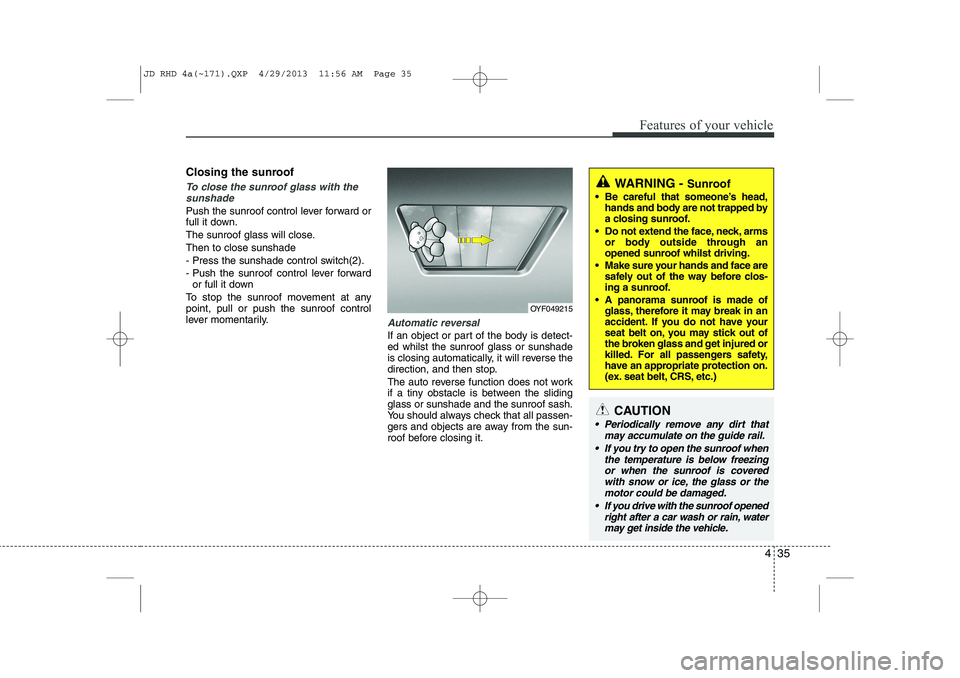
Closing the sunroof
To close the sunroof glass with thesunshade
Push the sunroof control lever forward or
full it down.
The sunroof glass will close.Then to close sunshade
- Press the sunshade control switch(2).
- Push the sunroof control lever forward or full it down
To stop the sunroof movement at any point, pull or push the sunroof control
lever momentarily.
Automatic reversal
If an object or part of the body is detect- ed whilst the sunroof glass or sunshade
is closing automatically, it will reverse the
direction, and then stop.
The auto reverse function does not work
if a tiny obstacle is between the slidingglass or sunshade and the sunroof sash.
You should always check that all passen-
gers and objects are away from the sun-
roof before closing it.
OYF049215
WARNING - Sunroof
Be careful that someone’s head, hands and body are not trapped by
a closing sunroof.
Do not extend the face, neck, arms or body outside through an
opened sunroof whilst driving.
Make sure your hands and face are safely out of the way before clos-
ing a sunroof.
A panorama sunroof is made of glass, therefore it may break in an
accident. If you do not have your
seat belt on, you may stick out of
the broken glass and get injured or
killed. For all passengers safety,
have an appropriate protection on.
(ex. seat belt, CRS, etc.)
CAUTION
Periodically remove any dirt that
may accumulate on the guide rail.
If you try to open the sunroof when the temperature is below freezingor when the sunroof is coveredwith snow or ice, the glass or the motor could be damaged.
If you drive with the sunroof opened right after a car wash or rain, watermay get inside the vehicle.
JD RHD 4a(~171).QXP 4/29/2013 11:56 AM Page 35
Page 763 of 1206

479
Features of your vehicle
Warnings and indicators
(Instrument cluster)
All warning lights are checked by turning
the ignition switch ON (do not start the
engine). If any light that does not illumi-
nate, we recommend that the system be
checked by an authorised Kia dealer.
After starting the engine, check to make
sure that all warning lights are off. If anyare still on, this indicates a situation thatneeds attention.
The following warning and indicators are
introduced in the previous pages.
Automatic transaxle/Double clutch trans-mission shift lever indicator
Manual transaxle shift indicator
Parking assist warning (LCD display)Active ECO indicator (if equipped)
When the active ECO is operating the
ECO indicator illuminates green. For
more detailed information, refer to
"Active ECO" in chapter 5.
Seat belt warning andchime light
As a reminder to the driver, the seat belt
warning light will blink or illuminate for
approximately 6 seconds each time you
turn the ignition switch ON regardless of
belt fastening.
For more details, refer to the “Seat belt” in section 3.
Air bag warning light
This warning light will illuminate for
approximately 6 seconds each time you
turn the ignition switch to the ON posi-tion. This light also comes on when the SRS
is not working properly. If the air bag
warning light does not come on, or con-
tinuously remains on after operating for
about 6 seconds when you turn the igni-
tion switch to the ON position or started
the engine, or if it comes on whilst driv-
ing, we recommend that the system be
inspected by an authorised Kia dealer.
ECO
JD RHD 4a(~171).QXP 4/29/2013 12:00 PM Page 79
Page 769 of 1206

485
Features of your vehicle
Auto stop indicator(if equipped)
This indicator will illuminate when the engine enters the Idle Stop mode of theISG (Idle Stop and Go) system.
When the automatic starting occurrs, the auto stop indicator on the cluster will
blink for 5 seconds.
For more details, refer to the ISG (Idle Stop and Go) system in section 5.
For vehicles equipped with instrument
cluster type B, the indicator illuminates
on the LCD display.
✽✽ NOTICE
When the engine automatically starts by
the ISG system, some warning lights
(ABS, ESC, ESC OFF, EPS or Parking
brake warning light) may turn on for afew seconds. This happens because of low batteryvoltage. It does not mean the system ismalfunctioning.
Cruise indicator (if equipped)
CRUISE indicator
The indicator illuminates when the cruise
control system is enabled.
The cruise indicator in the instrument
cluster is illuminated when the cruise
control ON-OFF button on the steer-ing wheel is pushed.
The indicator goes off when the cruise
control ON-OFF button is pushed
again. For more information about the
use of cruise control, refer to “Cruise
control system” in section 5. Cruise SET indicator
The indicator illuminates when the cruise
control switch (SET- or RES+) is ON.
The cruise SET indicator in the instru-
ment cluster illuminats when the cruise
control switch (SET- or RES+) is pushed.
The cruise SET indicator does not illumi-
nate when the cruise control cancel but-ton O is pushed or the system is disen-gaged.
Charging system warning light
This warning light indicates a malfunction
of either the generator or electricalcharging system.
If the warning light comes on whilst the
vehicle is in motion:
1. Drive to the nearest safe location.
2. With the engine off, check the genera- tor drive belt for looseness or break-
age.
3. If the belt is adjusted properly, a prob- lem exists somewhere in the electrical
charging system. We recommend that
the system be checked by an autho-
rised Kia dealer.
SET
JD RHD 4a(~171).QXP 4/29/2013 12:00 PM Page 85
Page 849 of 1206
4 165
Features of your vehicle
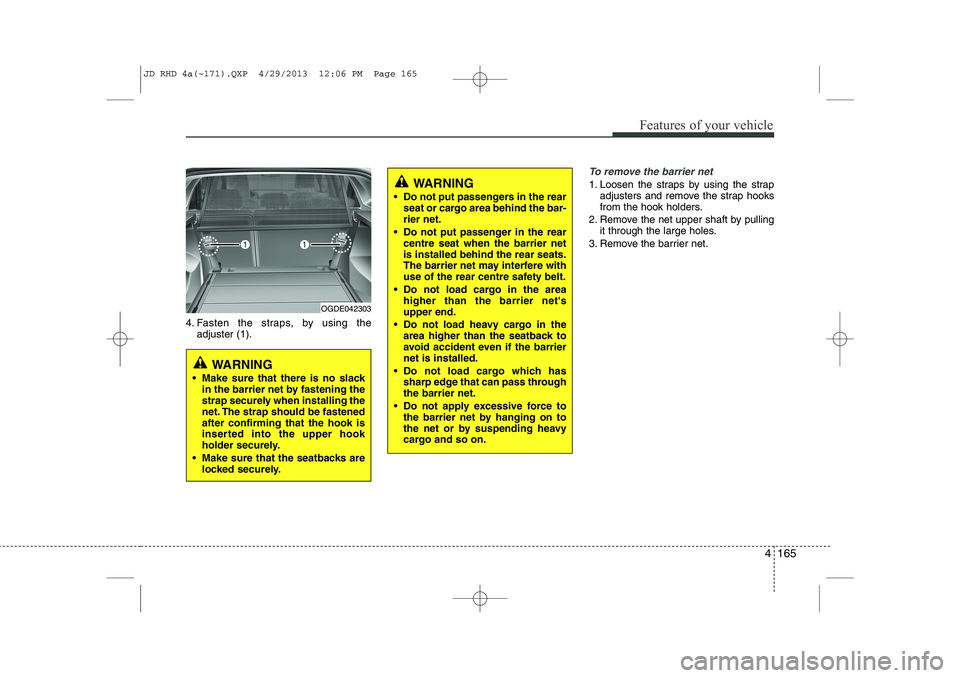
4. Fasten the straps, by using theadjuster (1).
To remove the barrier net
1. Loosen the straps by using the strap adjusters and remove the strap hooks
from the hook holders.
2. Remove the net upper shaft by pulling it through the large holes.
3. Remove the barrier net.
OGDE042303
WARNING
Make sure that there is no slack in the barrier net by fastening the
strap securely when installing the
net. The strap should be fastenedafter confirming that the hook is
inserted into the upper hook
holder securely.
Make sure that the seatbacks are locked securely.
WARNING
Do not put passengers in the rear seat or cargo area behind the bar- rier net.
Do not put passenger in the rear centre seat when the barrier netis installed behind the rear seats.
The barrier net may interfere with
use of the rear centre safety belt.
Do not load cargo in the area higher than the barrier net'supper end.
Do not load heavy cargo in the area higher than the seatback to
avoid accident even if the barriernet is installed.
Do not load cargo which has sharp edge that can pass throughthe barrier net.
Do not apply excessive force to the barrier net by hanging on to
the net or by suspending heavy
cargo and so on.
JD RHD 4a(~171).QXP 4/29/2013 12:06 PM Page 165
Page 852 of 1206
Features of your vehicle
168
4
Build in segmentation bar
Put both pillars (A) from the segmenta-
tion bar in the openings from the rail.
To move the segmentation bar, put your hand on the side of the pillar and
push down the lever arm (B).
Make sure the pillars click into place.
To release the belt, turn the upper ele- ment (C) to the left or right until it
clicks.
Now you can pull the belt (D) and secure your luggage by putting the beltaround the luggage and put the hook(E) into the middle of the segmentationbar (F).
For bulky luggage, you can hook both hooks into each other.
To make sure the belt locks, put the upper element (C) back into the lockposition (1).
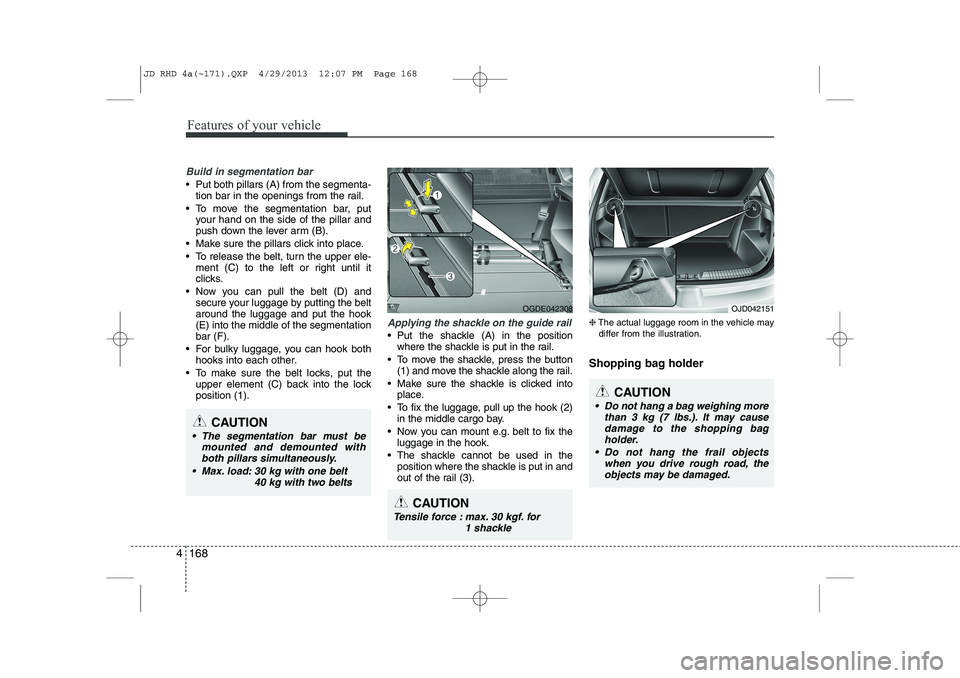
Applying the shackle on the guide rail
Put the shackle (A) in the positionwhere the shackle is put in the rail.
To move the shackle, press the button (1) and move the shackle along the rail.
Make sure the shackle is clicked into place.
To fix the luggage, pull up the hook (2) in the middle cargo bay.
Now you can mount e.g. belt to fix the luggage in the hook.
The shackle cannot be used in the position where the shackle is put in and
out of the rail (3). ❈
The actual luggage room in the vehicle may
differ from the illustration.
Shopping bag holder
CAUTION
The segmentation bar must be mounted and demounted withboth pillars simultaneously.
Max. load: 30 kg with one belt 40 kg with two belts
OGDE042308
CAUTION
Do not hang a bag weighing morethan 3 kg (7 lbs.). It may causedamage to the shopping bag
holder.
Do not hang the frail objects when you drive rough road, theobjects may be damaged.
OJD042151
CAUTION
Tensile force : max. 30 kgf. for 1 shackle
JD RHD 4a(~171).QXP 4/29/2013 12:07 PM Page 168
Page 953 of 1206

Driving your vehicle
4
5
Before entering vehicle
• Be sure that all windows, outside mir-
ror(s), and outside lights are clean.
Check the condition of the tyres.
Check under the vehicle for any sign of leaks.
Be sure there are no obstacles behind you if you intend to back up. Necessary inspections
Fluid levels, such as engine oil, engine
coolant, brake fluid, and washer fluid
should be checked on a regular basis,
with the exact interval depending on the
fluid. Further details are provided in sec-
tion 7, “Maintenance”.
Before starting
Close and lock all doors.
Position the seat so that all controls are
easily reached.
Adjust the inside and outside rearview mirrors.
Be sure that all lights work.
Check all gauges.
Check the operation of warning lights when the ignition switch is turned to the ON position.
Release the parking brake and make sure the brake warning light goes out.
For safe operation, be sure you are famil-
iar with your vehicle and its equipment.
BEFORE DRIVING
WARNING
All passengers must be properly
belted whenever the vehicle is mov-
ing. Refer to “Seat belts” in section
3 for more information on their
proper use.
WARNING
Always check the surrounding areas
near your vehicle for people, espe-
cially children, before putting a vehi-
cle into “D (Drive)” or “R (Reverse)”.
WARNING
Driving whilst distracted can result
in a loss of vehicle control, that
may lead to an accident, severe
personal injury, and death. The dri-
ver’s primary responsibility is in
the safe and legal operation of a
vehicle, and use of any handheld
devices, other equipment, or vehi-
cle systems which take the driver’s
eyes, attention and focus away
from the safe operation of a vehicle
or which are not permissible by law
should never be used during oper-
ation of the vehicle.
JD RHD 5.QXP 4/29/2013 11:25 AM Page 4
Page 965 of 1206
Driving your vehicle
16
5
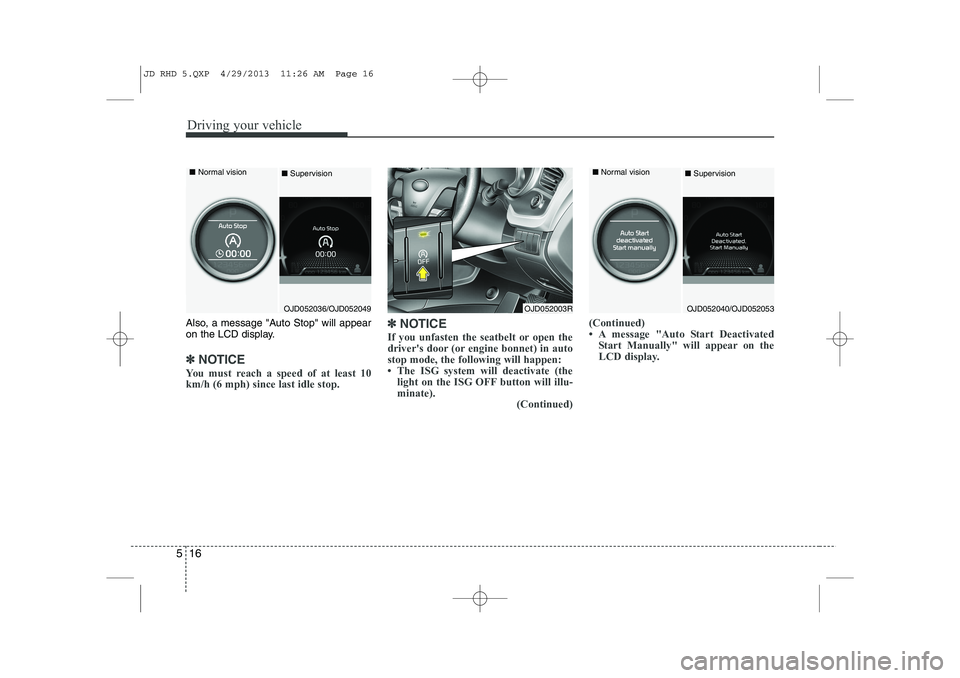
Also, a message "Auto Stop" will appear
on the LCD display.
✽✽
NOTICE
You must reach a speed of at least 10 km/h (6 mph) since last idle stop. ✽
✽
NOTICE
If you unfasten the seatbelt or open the
driver's door (or engine bonnet) in autostop mode, the following will happen:
Page 967 of 1206
Driving your vehicle
18
5
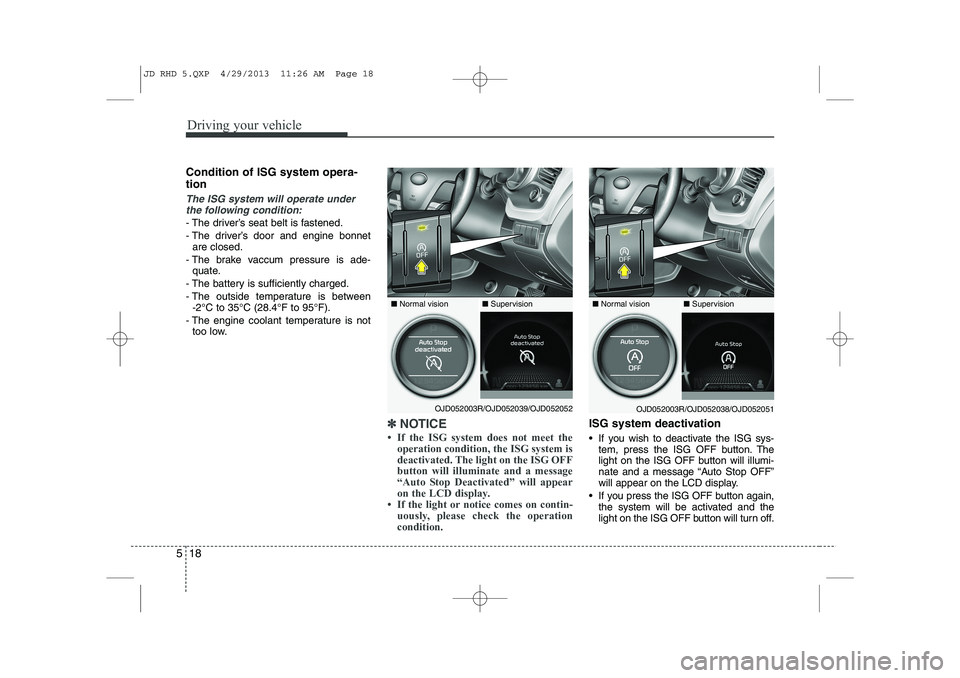
Condition of ISG system opera- tion
The ISG system will operate under
the following condition:
- The driver’s seat belt is fastened.
- The driver’s door and engine bonnet are closed.
- The brake vaccum pressure is ade- quate.
- The battery is sufficiently charged.
- The outside temperature is between -2°C to 35°C (28.4°F to 95°F).
- The engine coolant temperature is not too low.
✽✽ NOTICE
Page 971 of 1206
Driving your vehicle
22
5
Downshifting
When you must slow down in heavy traf-
fic or whilst driving up steep hills, down-
shift before the engine starts to labour.
Downshifting reduces the chance of
stalling and gives better acceleration
when you again need to increase your
speed. When the vehicle is travelling
down steep hills, downshifting helps
maintain safe speed and prolongs brake
life. Good driving practices
Never take the vehicle out of gear and
coast down a hill. This is extremely
hazardous. Always leave the vehicle in
gear.
Don't "ride" the brakes. This can cause them to overheat and malfunction.
Instead, when you are driving down a
long hill, slow down and shift to a lower
gear. When you do this, engine braking
will help slow down the vehicle.
Slow down before shifting to a lower gear. This will help avoid over-revving
the engine, which can cause damage.
Slow down when you encounter cross winds. This gives you much better con-
trol of your vehicle.
Be sure the vehicle is completely stopped before you attempt to shift into
R (Reverse). The transaxle can be
damaged if you do not. To shift into R
(Reverse), depress the clutch, move
the shift lever to neutral, wait three sec-
onds, then shift to the R (Reverse)position.
Exercise extreme caution when driving on a slippery surface. Be especially
careful when braking, accelerating or
shifting gears. On a slippery surface,
an abrupt change in vehicle speed can
cause the drive wheels to lose traction
and the vehicle to go out of control.WARNING
Always buckle-up! In a collision, an unbelted occupant is signifi-
cantly more likely to be seriously
injured or killed than a properlybelted occupant.
Avoid high speeds when corner- ing or turning.
Do not make quick steering wheel movements, such as sharp
lane changes or fast, sharp turns.
The risk of rollover is greatly increased if you lose control of
your vehicle at highway speeds.
Loss of control often occurs if two or more wheels drop off the
roadway and the driver over-
steers to reenter the roadway.
In the event your vehicle leaves the roadway, do not steer sharply.
Instead, slow down before pulling
back into the travel lanes.
Never exceed posted speed lim- its.
JD RHD 5.QXP 4/29/2013 11:26 AM Page 22