instrument cluster KIA CEED 2014 Owner's Manual
[x] Cancel search | Manufacturer: KIA, Model Year: 2014, Model line: CEED, Model: KIA CEED 2014Pages: 1206, PDF Size: 50.15 MB
Page 597 of 1206

I7
Index
Tachometer . . . . . . . . . . . . . . . . . . . . . . . . . . . . . . . . 4-47
Trip computer . . . . . . . . . . . . . . . . . . . . . . . . . . . . . . 4-51
User Settings . . . . . . . . . . . . . . . . . . . . . . . . . . . . . . . 4-56
Instrument cluster (Super vision) . . . . . . . . . . . . . . . 4-59 Automatic transaxle shift position indicator . . . . . 4-65
Cluster display mode conversion . . . . . . . . . . . . . . 4-61
Double clutch transmission shift indicator . . . . . . 4-65
Engine torque gauge. . . . . . . . . . . . . . . . . . . . . . . . . 4-63
Fuel gauge . . . . . . . . . . . . . . . . . . . . . . . . . . . . . . . . . 4-62
Instrument panel illumination . . . . . . . . . . . . . . . . 4-61
Manual transaxle shift indicator. . . . . . . . . . . . . . . 4-64
Odometer . . . . . . . . . . . . . . . . . . . . . . . . . . . . . . . . . . 4-66
Speed limiter indicator. . . . . . . . . . . . . . . . . . . . . . . 4-66
Speedometer . . . . . . . . . . . . . . . . . . . . . . . . . . . . . . . 4-62
Tachometer . . . . . . . . . . . . . . . . . . . . . . . . . . . . . . . . 4-61
Trip computer . . . . . . . . . . . . . . . . . . . . . . . . . . . . . . 4-66
Turbo boost pressure gauge. . . . . . . . . . . . . . . . . . . 4-63
Inner panel fuse. . . . . . . . . . . . . . . . . . . . . . . . . . . . . . 7-67
Instrument panel illumination (Normal vision). . . . 4-46
Instrument panel illumination (Super vision) . . . . . 4-59
Instrument panel overview . . . . . . . . . . . . . . . . . . . . . 2-5
Interior care . . . . . . . . . . . . . . . . . . . . . . . . . . . . . . . . 7-115
Interior features . . . . . . . . . . . . . . . . . . . . . . . . . . . . 4-156 Ashtray . . . . . . . . . . . . . . . . . . . . . . . . . . . . . . . . . . 4-156
Aux, USB and iPod . . . . . . . . . . . . . . . . . . . . . . . . . 4-160
Barrier net . . . . . . . . . . . . . . . . . . . . . . . . . . . . . . . . 4-163 Bottle holder . . . . . . . . . . . . . . . . . . . . . . . . . . . . . . 4-158
Cargo area cover . . . . . . . . . . . . . . . . . . . . . . . . . . 4-162
Cargo security screen . . . . . . . . . . . . . . . . . . . . . . . 4-166
Cigarette lighter . . . . . . . . . . . . . . . . . . . . . . . . . . . 4-156
Clothes hanger . . . . . . . . . . . . . . . . . . . . . . . . . . . . 4-161
Cup holder. . . . . . . . . . . . . . . . . . . . . . . . . . . . . . . . 4-157
Floor mat anchor(s) . . . . . . . . . . . . . . . . . . . . . . . . 4-161
Luggage net (holder) . . . . . . . . . . . . . . . . . . . . . . . 4-162
Luggage rail system . . . . . . . . . . . . . . . . . . . . . . . . 4-167
Power outlet . . . . . . . . . . . . . . . . . . . . . . . . . . . . . . 4-159
Shopping bag holder . . . . . . . . . . . . . . . . . . . . . . . 4-168
Sunvisor . . . . . . . . . . . . . . . . . . . . . . . . . . . . . . . . . . 4-158
Interior light . . . . . . . . . . . . . . . . . . . . . . . . . . . . . . . 4-123
Glove box lamp . . . . . . . . . . . . . . . . . . . . . . . . . . . . 4-125
Luggage room lamp . . . . . . . . . . . . . . . . . . . . . . . . 4-125
Map lamp . . . . . . . . . . . . . . . . . . . . . . . . . . . . . . . . 4-123
Room lamp . . . . . . . . . . . . . . . . . . . . . . . . . . . . . . . 4-124
Vanity mirror lamp . . . . . . . . . . . . . . . . . . . . . . . . 4-124
Interior overview. . . . . . . . . . . . . . . . . . . . . . . . . . . . . . 2-4
ISG (Idle stop and go) system . . . . . . . . . . . . . . . . . . 5-15
ISOFIX system . . . . . . . . . . . . . . . . . . . . . . . . . . . . . . 3-35
Jack and tools . . . . . . . . . . . . . . . . . . . . . . . . . . . . . . . . 6-9
Jump starting . . . . . . . . . . . . . . . . . . . . . . . . . . . . . . . . 6-5
J
JD eng Index.QXP 5/6/2013 10:37 AM Page 7
Page 616 of 1206
25
Your vehicle at a glance
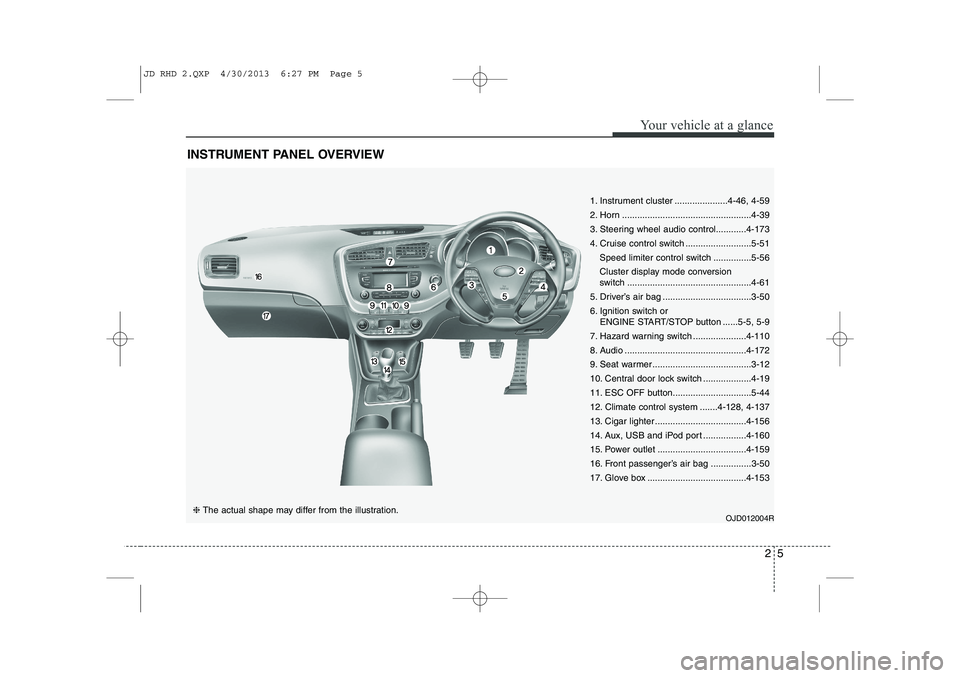
INSTRUMENT PANEL OVERVIEW
OJD012004R❈ The actual shape may differ from the illustration. 1. Instrument cluster .....................4-46, 4-59
2. Horn ...................................................4-39
3. Steering wheel audio control............4-173
4. Cruise control switch ..........................5-51
Speed limiter control switch ...............5-56
Cluster display mode conversion
switch .................................................4-61
5. Driver’s air bag ...................................3-50
6. Ignition switch or ENGINE START/STOP button ......5-5, 5-9
7. Hazard warning switch .....................4-110
8. Audio ................................................4-172
9. Seat warmer .......................................3-12
10. Central door lock switch ...................4-19
11. ESC OFF button...............................5-44
12. Climate control system .......4-128, 4-137
13. Cigar lighter ....................................4-156
14. Aux, USB and iPod port .................4-160
15. Power outlet ...................................4-159
16. Front passenger’s air bag ................3-50
17. Glove box .......................................4-153
JD RHD 2.QXP 4/30/2013 6:27 PM Page 5
Page 668 of 1206

349
Safety system of your vehicle
WARNING
If an air bag deploys, there may be a loud noise followed by a fine
dust released in the vehicle.These conditions are normal and
are not hazardous - the air bags
are packed in this fine powder.
The dust generated during air
bag deployment may cause skin
or eye irritation as well as aggra-
vate asthma for some persons.
Always wash all exposed skin
areas thoroughly with lukewarmwater and a mild soap after an
accident in which the air bags
were deployed.
(Continued)(Continued)
The SRS can function only whenthe ignition key is in the ON posi-
tion. If the SRS air bag warning
light does not illuminate, or con-
tinuously remains on after illumi-
nating for about 6 seconds when
the ignition key is turned to the
ON position, or after the engine is
started, comes on whilst driving,
the SRS is not working properly.
If this occurs, we recommend
that the system be inspected by
an authorised Kia dealer.
Before you replace a fuse or dis- connect a battery terminal, turn
the ignition switch to the LOCK
position and remove the ignition
key. Never remove or replace the
air bag related fuse(s) when the
ignition switch is in the ON posi-
tion. Failure to heed this warning
will cause the SRS air bag warn-
ing light to illuminate.
WARNING
Do not install or place any acces- sories (drink holder, cassette
holder, sticker, etc.) on the front
passenger's panel above the
glove box in a vehicle with a pas-
senger's air bag. Such objects
may become dangerous projec-
tiles and cause injury if the pas-
senger's air bag inflates.
When installing a container of liq- uid air freshener inside the vehi-
cle, do not place it near the
instrument cluster nor on the
instrument panel surface.
It may become dangerous projec-
tiles and cause injury if the pas-
senger's air bag inflates.
B240B05L/H
Passenger’s front air bag
JD RHD 3.QXP 4/29/2013 11:22 AM Page 49
Page 730 of 1206
Features of your vehicle
46
4
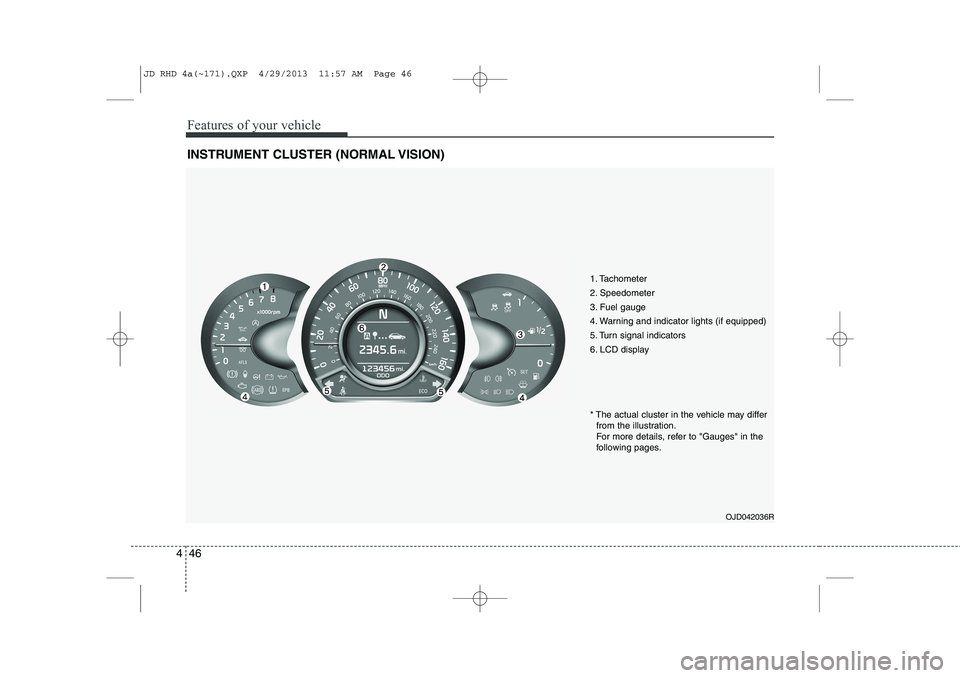
INSTRUMENT CLUSTER (NORMAL VISION)
1. Tachometer
2. Speedometer
3. Fuel gauge
4. Warning and indicator lights (if equipped)
5. Turn signal indicators
6. LCD display
OJD042036R
* The actual cluster in the vehicle may differ
from the illustration.
For more details, refer to "Gauges" in the
following pages.
JD RHD 4a(~171).QXP 4/29/2013 11:57 AM Page 46
Page 731 of 1206
447
Features of your vehicle
CAUTION
Do not operate the engine withinthe tachometer's RED ZONE. This may cause severe engine damage.
Instrument panel illumination
The instrument panel illumination intensity
can be adjusted as follows:
Ignition switch in the ON position
Pressing the upper or lower part of the switch
The illumination intensity is shown on the
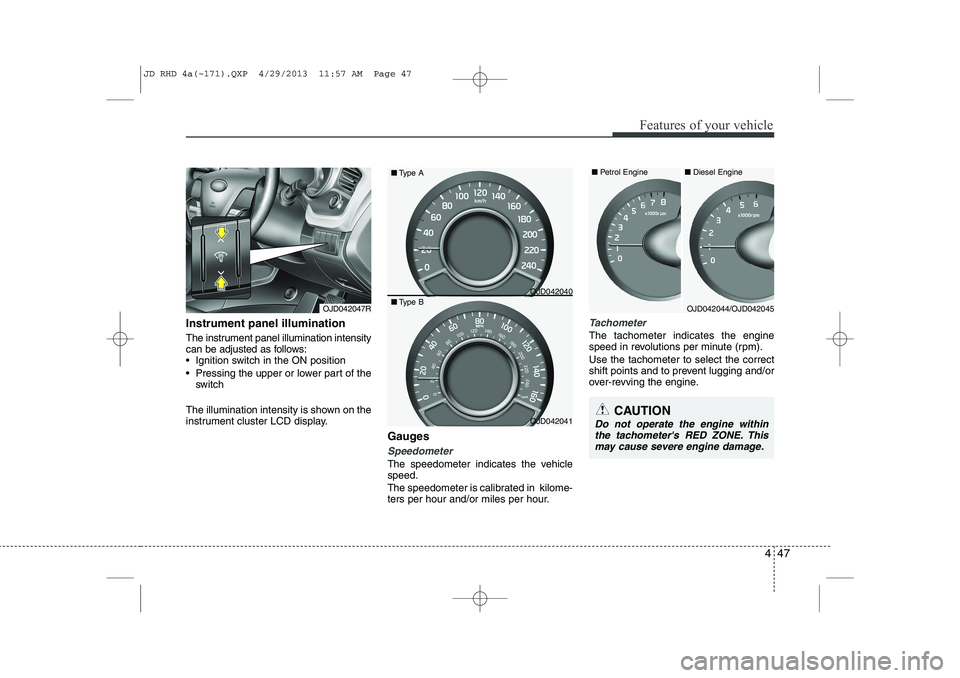
instrument cluster LCD display. Gauges
Speedometer
The speedometer indicates the vehicle speed.
The speedometer is calibrated in kilome-
ters per hour and/or miles per hour.
Tachometer
The tachometer indicates the engine
speed in revolutions per minute (rpm). Use the tachometer to select the correct
shift points and to prevent lugging and/or
over-revving the engine.
OJD042047ROJD042044/OJD042045
OJD042040
OJD042041■
Diesel Engine
■ Petrol Engine
■ Type A
■ Type B
JD RHD 4a(~171).QXP 4/29/2013 11:57 AM Page 47
Page 743 of 1206
459
Features of your vehicle
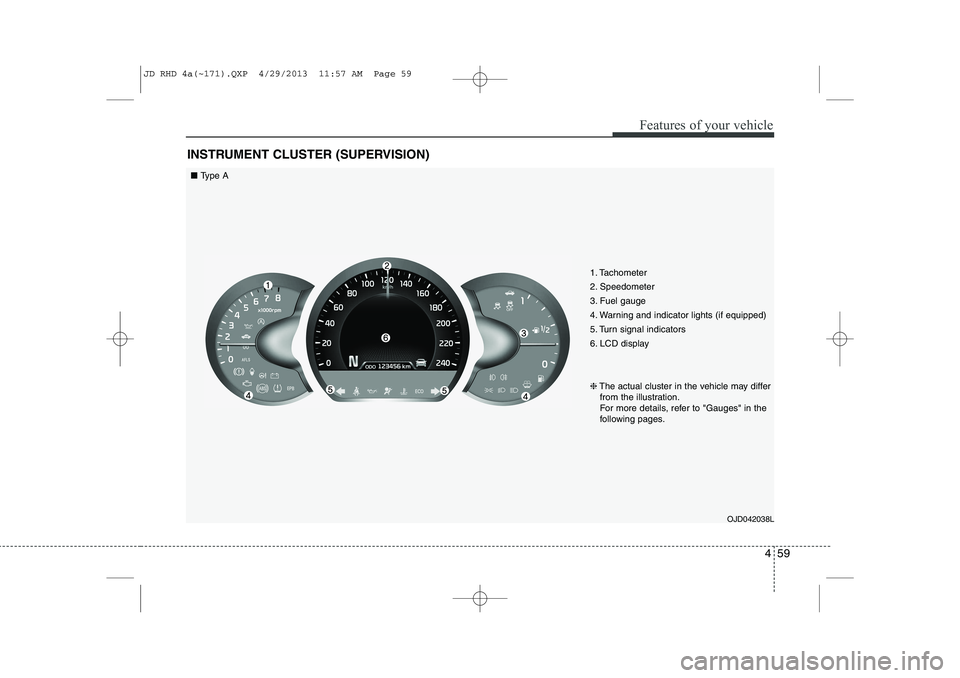
INSTRUMENT CLUSTER (SUPERVISION)
1. Tachometer
2. Speedometer
3. Fuel gauge
4. Warning and indicator lights (if equipped)
5. Turn signal indicators
6. LCD displayOJD042038L
❈
The actual cluster in the vehicle may differ
from the illustration.
For more details, refer to "Gauges" in the
following pages.
■ Type A
JD RHD 4a(~171).QXP 4/29/2013 11:57 AM Page 59
Page 745 of 1206
461
Features of your vehicle
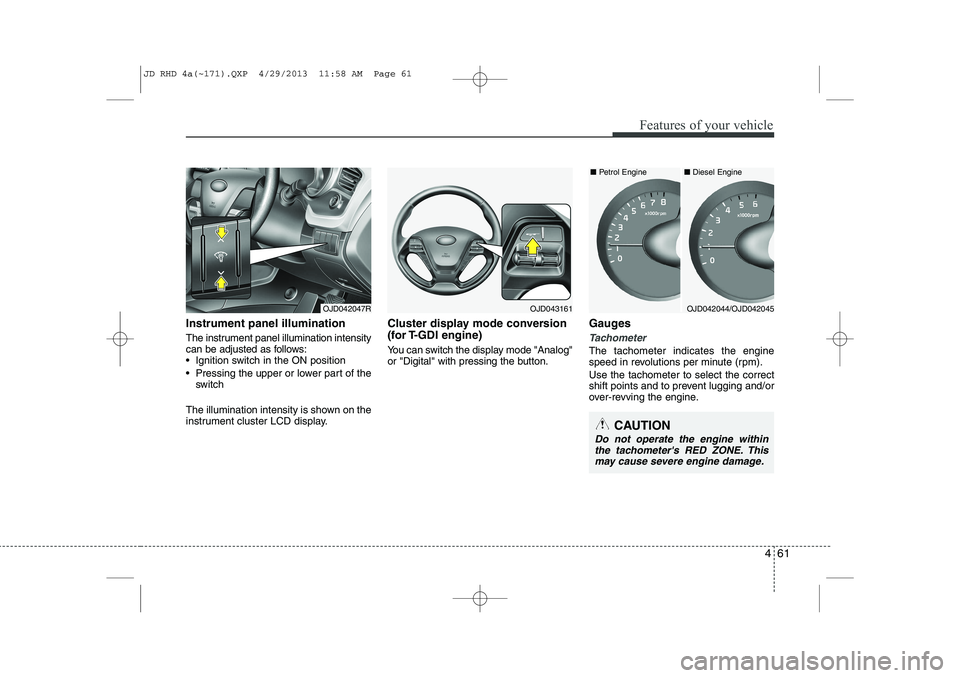
Instrument panel illumination
The instrument panel illumination intensity
can be adjusted as follows:
Ignition switch in the ON position
Pressing the upper or lower part of theswitch
The illumination intensity is shown on the
instrument cluster LCD display. Cluster display mode conversion
(for T-GDI engine)
You can switch the display mode "Analog"
or "Digital" with pressing the button.
Gauges
Tachometer
The tachometer indicates the engine
speed in revolutions per minute (rpm). Use the tachometer to select the correct
shift points and to prevent lugging and/or
over-revving the engine.
OJD042047R
CAUTION
Do not operate the engine within
the tachometer's RED ZONE. This may cause severe engine damage.
OJD042044/OJD042045
■
Diesel Engine
■ Petrol EngineOJD043161
JD RHD 4a(~171).QXP 4/29/2013 11:58 AM Page 61
Page 763 of 1206

479
Features of your vehicle
Warnings and indicators
(Instrument cluster)
All warning lights are checked by turning
the ignition switch ON (do not start the
engine). If any light that does not illumi-
nate, we recommend that the system be
checked by an authorised Kia dealer.
After starting the engine, check to make
sure that all warning lights are off. If anyare still on, this indicates a situation thatneeds attention.
The following warning and indicators are
introduced in the previous pages.
Automatic transaxle/Double clutch trans-mission shift lever indicator
Manual transaxle shift indicator
Parking assist warning (LCD display)Active ECO indicator (if equipped)
When the active ECO is operating the
ECO indicator illuminates green. For
more detailed information, refer to
"Active ECO" in chapter 5.
Seat belt warning andchime light
As a reminder to the driver, the seat belt
warning light will blink or illuminate for
approximately 6 seconds each time you
turn the ignition switch ON regardless of
belt fastening.
For more details, refer to the “Seat belt” in section 3.
Air bag warning light
This warning light will illuminate for
approximately 6 seconds each time you
turn the ignition switch to the ON posi-tion. This light also comes on when the SRS
is not working properly. If the air bag
warning light does not come on, or con-
tinuously remains on after operating for
about 6 seconds when you turn the igni-
tion switch to the ON position or started
the engine, or if it comes on whilst driv-
ing, we recommend that the system be
inspected by an authorised Kia dealer.
ECO
JD RHD 4a(~171).QXP 4/29/2013 12:00 PM Page 79
Page 769 of 1206

485
Features of your vehicle
Auto stop indicator(if equipped)
This indicator will illuminate when the engine enters the Idle Stop mode of theISG (Idle Stop and Go) system.
When the automatic starting occurrs, the auto stop indicator on the cluster will
blink for 5 seconds.
For more details, refer to the ISG (Idle Stop and Go) system in section 5.
For vehicles equipped with instrument
cluster type B, the indicator illuminates
on the LCD display.
✽✽ NOTICE
When the engine automatically starts by
the ISG system, some warning lights
(ABS, ESC, ESC OFF, EPS or Parking
brake warning light) may turn on for afew seconds. This happens because of low batteryvoltage. It does not mean the system ismalfunctioning.
Cruise indicator (if equipped)
CRUISE indicator
The indicator illuminates when the cruise
control system is enabled.
The cruise indicator in the instrument
cluster is illuminated when the cruise
control ON-OFF button on the steer-ing wheel is pushed.
The indicator goes off when the cruise
control ON-OFF button is pushed
again. For more information about the
use of cruise control, refer to “Cruise
control system” in section 5. Cruise SET indicator
The indicator illuminates when the cruise
control switch (SET- or RES+) is ON.
The cruise SET indicator in the instru-
ment cluster illuminats when the cruise
control switch (SET- or RES+) is pushed.
The cruise SET indicator does not illumi-
nate when the cruise control cancel but-ton O is pushed or the system is disen-gaged.
Charging system warning light
This warning light indicates a malfunction
of either the generator or electricalcharging system.
If the warning light comes on whilst the
vehicle is in motion:
1. Drive to the nearest safe location.
2. With the engine off, check the genera- tor drive belt for looseness or break-
age.
3. If the belt is adjusted properly, a prob- lem exists somewhere in the electrical
charging system. We recommend that
the system be checked by an autho-
rised Kia dealer.
SET
JD RHD 4a(~171).QXP 4/29/2013 12:00 PM Page 85
Page 780 of 1206

Features of your vehicle
96
4
The parking assist system assists the
driver during movement of the vehicle by
chiming or displaying the area an obsta-
cle is detected on the instrument cluster
if any object is sensed within the distanceof 100 cm (39.4 in.) in front and 120 cm
(47 in.) behind the vehicle. This system is a supplemental system and it is not intended to nor does it
replace the need for extreme care and
attention of the driver.
The sensing range and objects
detectable by the sensors are limited.
Whenever moving pay as much attention
to what is in front and behind of you as
you would in a vehicle without a parkingassist system. Operation of the parking assist system
Operating condition
This system activates when the park-
ing assist system button is pressed
with the ignition switch ON.
Type A
The indicator of the parking assist sys-
tem button turns on automatically and
activates the parking assist system
when you shift the gear to the
R(Reverse) position or press the SPAS
button. It will turn off automatically
when you drive above 40 km/h(24.8
mph) except in the case when the
parking assist system button is
pressed with the ignition switch ON.
PARKING ASSIST SYSTEM (IF EQUIPPED)
WARNING
The parking assist system should
only be considered as a supple-
mentary function. The driver must
check the front and rear view. Theoperational function of the parking
assist system can be affected by
many factors and conditions of the
surroundings, so the responsibility
rests always with the driver.
OJD042081R
OJD042085
OJD042084
OJD042242
■ Front
■Rear (Wagon)
SSSSeeeennnnssssoooorrrrssss
SSSSeeeennnnssssoooorrrrssss
SSSSeeeennnnssssoooorrrrssss
OJD043243
■Rear (3 Door)
SSSSeeeennnnssssoooorrrrssss
■Rear (5 Door)
JD RHD 4a(~171).QXP 4/29/2013 12:00 PM Page 96