phone KIA CEED 2014 Owner's Guide
[x] Cancel search | Manufacturer: KIA, Model Year: 2014, Model line: CEED, Model: KIA CEED 2014Pages: 1206, PDF Size: 50.15 MB
Page 326 of 1206
4 245
Features of your vehicle
Changing Priority
What is Priority?
It is possible to pair up to five
Bluetooth®Wireless Technology
devices with the car audio system.
As a result, the “Change Priority’ fea-
ture is used to set the connection pri-
ority of paired phones. However, themost recently connected phone will
always be set as the highest priority.
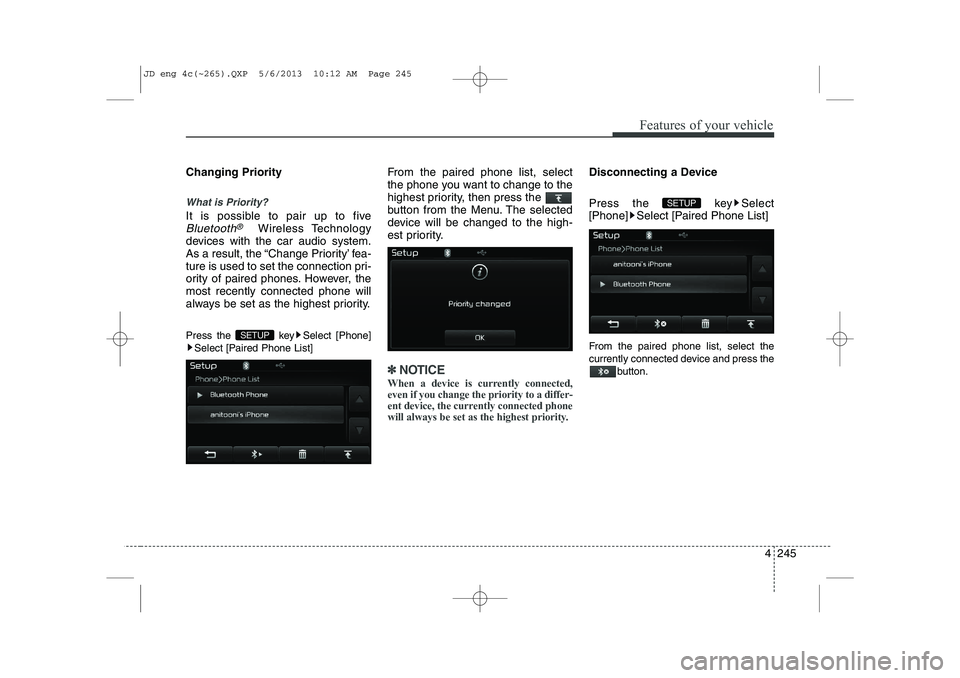
Press the key Select [Phone] Select [Paired Phone List] From the paired phone list, select
the phone you want to change to the
highest priority, then press the
button from the Menu. The selected
device will be changed to the high-
est priority.
✽✽
NOTICE
When a device is currently connected, even if you change the priority to a differ-
ent device, the currently connected phone
will always be set as the highest priority.
Disconnecting a Device
Press the key Select
[Phone] Select [Paired Phone List]
From the paired phone list, select the
currently connected device and press the button.
SETUP
SETUP
JD eng 4c(~265).QXP 5/6/2013 10:12 AM Page 245
Page 327 of 1206
![KIA CEED 2014 Owners Guide Features of your vehicle
246
4
Deleting a Device
Press the key Select
[Phone] Select [Paired Phone List]
From the paired phone list, select the
device you want to delete and press the
button.
✽](/img/2/57942/w960_57942-326.png "KIA CEED 2014 Owners Guide Features of your vehicle
246
4
Deleting a Device
Press the key Select
[Phone] Select [Paired Phone List]
From the paired phone list, select the
device you want to delete and press the
button.
✽")
Features of your vehicle
246
4
Deleting a Device
Press the key Select
[Phone] Select [Paired Phone List]
From the paired phone list, select the
device you want to delete and press the
button.
✽✽NOTICE
Page 328 of 1206
![KIA CEED 2014 Owners Guide 4 247
Features of your vehicle
Calling by Dialing a Number
Press the key Select [Dial Number]
(1) Dial Pad : Used to enter phone num-ber
(2) Call : If a number has been entered, calls the number If](/img/2/57942/w960_57942-327.png "KIA CEED 2014 Owners Guide 4 247
Features of your vehicle
Calling by Dialing a Number
Press the key Select [Dial Number]
(1) Dial Pad : Used to enter phone num-ber
(2) Call : If a number has been entered, calls the number If")
4 247
Features of your vehicle
Calling by Dialing a Number
Press the key Select [Dial Number]
(1) Dial Pad : Used to enter phone num-ber
(2) Call : If a number has been entered, calls the number If no number has
been entered, switches to call historyscreen
(3) End : Deletes the entered phone number
(4) Delete : Deletes entered numbers one digit at a time Answering Calls
Answering a Call
Answering a call with a Bluetooth®
Wireless Technology device connect-
ed will display the following screen. (1)
Caller : Displays the other part’s name when the incoming caller is
saved within your phone book
(2) Incoming Number : Displays the
incoming number
(3) Accept : Accept the incoming call
(4) Reject : Reject the incoming call
✽✽ NOTICE
Page 329 of 1206
Features of your vehicle
248
4
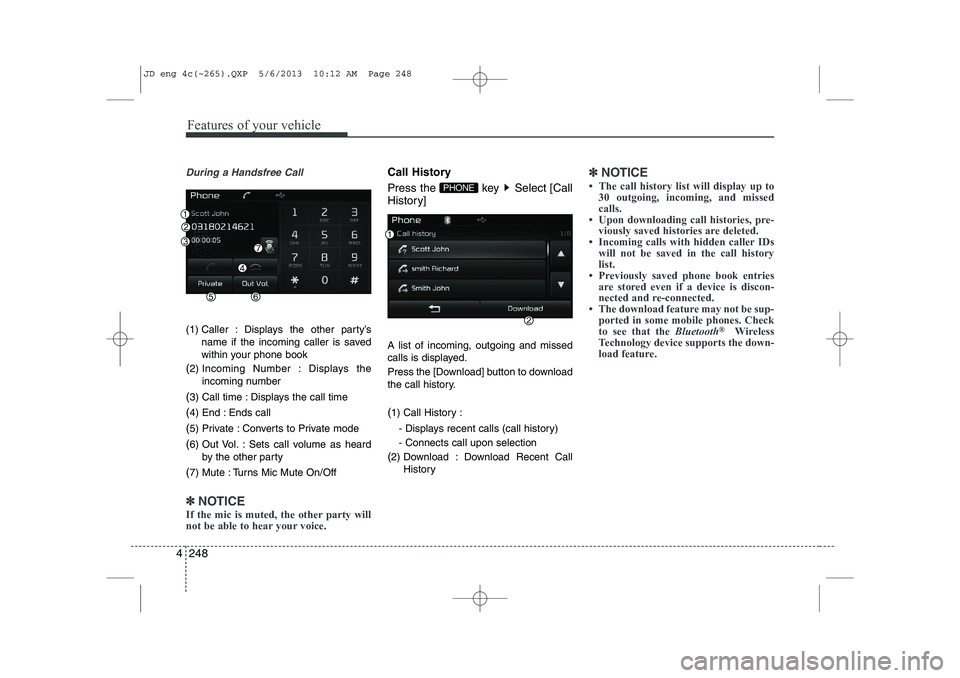
During a Handsfree Call
(1) Caller : Displays the other party’s
name if the incoming caller is saved
within your phone book
( 2) Incoming Number : Displays the
incoming number
( 3) Call time : Displays the call time
( 4) End : Ends call
( 5) Private : Converts to Private mode
( 6) Out Vol. : Sets call volume as heard
by the other party
( 7) Mute : Turns Mic Mute On/Off
✽✽
NOTICE
If the mic is muted, the other party will
not be able to hear your voice.
Call History
Press the key Select [Call
History] A list of incoming, outgoing and missed
calls is displayed.
Press the [Download] button to download
the call history. ( 1) Call History :
- Displays recent calls (call history) - Connects call upon selection
( 2) Download : Download Recent Call
History✽✽NOTICE
Page 330 of 1206
![KIA CEED 2014 Owners Guide 4 249
Features of your vehicle
Phone Book
Press the key Select [Phone book]
The list of saved phone book entries is
displayed. Press the [Download] button
to download the call history. (1) Contact](/img/2/57942/w960_57942-329.png "KIA CEED 2014 Owners Guide 4 249
Features of your vehicle
Phone Book
Press the key Select [Phone book]
The list of saved phone book entries is
displayed. Press the [Download] button
to download the call history. (1) Contact")
4 249
Features of your vehicle
Phone Book
Press the key Select [Phone book]
The list of saved phone book entries is
displayed. Press the [Download] button
to download the call history. (1) Contact List :
- Displays downloaded phone bookentries
- Connects call upon selection
( 2) Download : Download phone book
entries✽✽NOTICE
Page 334 of 1206
![KIA CEED 2014 Owners Guide 4 253
Features of your vehicle
SETUP
Starting Mode
Press the key to display the Setup screen.
You can select and control options relat-
ed to [Display], [Sound], [Phone] and[System].Display Setti](/img/2/57942/w960_57942-333.png "KIA CEED 2014 Owners Guide 4 253
Features of your vehicle
SETUP
Starting Mode
Press the key to display the Setup screen.
You can select and control options relat-
ed to [Display], [Sound], [Phone] and[System].Display Setti")
4 253
Features of your vehicle
SETUP
Starting Mode
Press the key to display the Setup screen.
You can select and control options relat-
ed to [Display], [Sound], [Phone] and[System].Display Settings
Adjusting the Brightness
Press the key Select
[Display] Select [Brightness]
Use the , buttons to adjust the
screen brightness or set the Brightness
on Automatic, Day, or Night mode.
Press the button to reset. (
1) Automatic : Adjusts the brightness
automatically
( 2) Day : Always maintains the bright-
ness on high
( 3) Night : Always maintains the bright-
ness on low
Pop-up Mode
Press the key Select
[Display] Select [Pop-up Mode]
This feature is used to display the Pop-up
Mode screen when entering radio and
media modes.
When this feature is turned on, pressing
the or key will display
the Pop-up Mode screen.
✽✽NOTICE
The media Pop-up Mode screen can be
displayed only when two or more mediamodes have been connected.
MEDIA RADIO
SETUP
Default
SETUP SETUP
JD eng 4c(~265).QXP 5/6/2013 10:12 AM Page 253
Page 337 of 1206
![KIA CEED 2014 Owners Guide Features of your vehicle
256
4
Bluetooth®Wireless Technology
Setting
Pairing a New Device
Press the key Select
[Phone] Select [Pair Phone]
Bluetooth®Wireless Technology devices
can be paired with](/img/2/57942/w960_57942-336.png "KIA CEED 2014 Owners Guide Features of your vehicle
256
4
Bluetooth®Wireless Technology
Setting
Pairing a New Device
Press the key Select
[Phone] Select [Pair Phone]
Bluetooth®Wireless Technology devices
can be paired with")
Features of your vehicle
256
4
Bluetooth®Wireless Technology
Setting
Pairing a New Device
Press the key Select
[Phone] Select [Pair Phone]
Bluetooth®Wireless Technology devices
can be paired with the audio system.
For more information, refer to the “Pairing
through Phone Setup” section within
Bluetooth®Wireless Technology.
Viewing Paired Phone List
Press the key Select
[Phone] Select [Paired Phone List]
This feature is used to view mobile
phones that have been paired with the
audio system. Upon selecting a paired
phone, the setup menu is displayed.
For more information, refer to the “Setting
Bluetooth®Wireless Technology
Connection” section within
Bluetooth®
Wireless Technology. ( 1) : Moves to the previous screen
( 2) Connect/Disconnect Phone :
Connect/ disconnects currently selected phone
( 3) Delete : Deletes the currently select-
ed phone (
4) Change Priority : Sets currently select-
ed phone to highest connection priority
✽✽NOTICE BEFORE DOWN-
LOADING PHONE BOOKS
Page 338 of 1206
![KIA CEED 2014 Owners Guide 4 257
Features of your vehicle
Downloading Phone books
Press the key Select
[Phone] Select [Phone book
Download]
The Phone book is downloaded from the
mobile phone and the download
progress is dis](/img/2/57942/w960_57942-337.png "KIA CEED 2014 Owners Guide 4 257
Features of your vehicle
Downloading Phone books
Press the key Select
[Phone] Select [Phone book
Download]
The Phone book is downloaded from the
mobile phone and the download
progress is dis")
4 257
Features of your vehicle
Downloading Phone books
Press the key Select
[Phone] Select [Phone book
Download]
The Phone book is downloaded from the
mobile phone and the download
progress is displayed.
✽✽NOTICE
Page 339 of 1206
![KIA CEED 2014 Owners Guide Features of your vehicle
258
4
Outgoing Volume
Press the key Select
[Phone] Select [Outgoing Volume]
Use the , buttons to adjust the
outgoing volume level.
Turning Bluetooth System Off
Press the](/img/2/57942/w960_57942-338.png "KIA CEED 2014 Owners Guide Features of your vehicle
258
4
Outgoing Volume
Press the key Select
[Phone] Select [Outgoing Volume]
Use the , buttons to adjust the
outgoing volume level.
Turning Bluetooth System Off
Press the")
Features of your vehicle
258
4
Outgoing Volume
Press the key Select
[Phone] Select [Outgoing Volume]
Use the , buttons to adjust the
outgoing volume level.
Turning Bluetooth System Off
Press the key Select
[Phone] Select [Bluetooth SystemOff] Once
Bluetooth®Wireless Technology is
turned off,
Bluetooth®Wireless
Technology related features will not be
supported within the audio system.
✽✽ NOTICE
To turn Bluetooth ®
Wireless Technology
back on, go to [Phone] and
press “Yes”.
SETUP SETUP SETUP
CAUTION
Bluetooth®Wireless Technologyaudio streaming may not be sup-
ported in some Bluetooth®
Wireless Technologyphones.
JD eng 4c(~265).QXP 5/6/2013 10:12 AM Page 258
Page 341 of 1206
Features of your vehicle
260
4
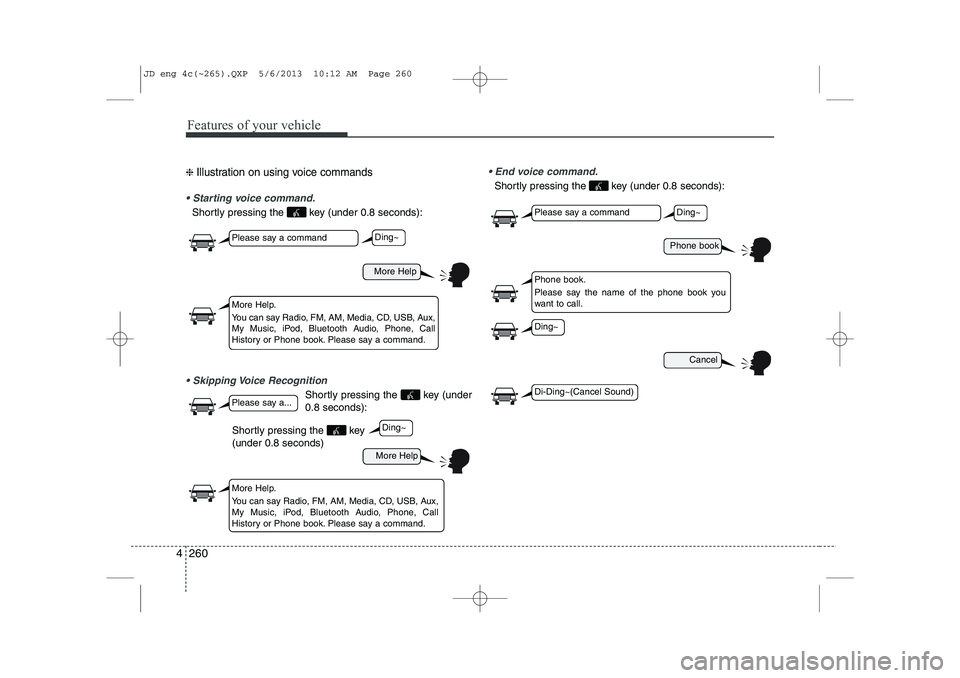
❈ Illustration on using voice commands
Starting voice command.
Shortly pressing the key (under 0.8 seconds):
Skipping Voice Recognition
Shortly pressing the key (under 0.8 seconds):
End voice command.
Shortly pressing the key (under 0.8 seconds):
More Help
Phone book
Cancel
More Help
Please say a command
Please say a command
Please say a...
More Help.
You can say Radio, FM, AM, Media, CD, USB, Aux,
My Music, iPod, Bluetooth Audio, Phone, Call
History or Phone book. Please say a command.
Phone book.
Please say the name of the phone book you
want to call.
More Help.
You can say Radio, FM, AM, Media, CD, USB, Aux,
My Music, iPod, Bluetooth Audio, Phone, Call
History or Phone book. Please say a command.
Ding~
Ding~
Ding~
Di-Ding~(Cancel Sound)
Ding~
Shortly pressing the key (under 0.8 seconds)
JD eng 4c(~265).QXP 5/6/2013 10:12 AM Page 260