tow KIA CEED 2014 Workshop Manual
[x] Cancel search | Manufacturer: KIA, Model Year: 2014, Model line: CEED, Model: KIA CEED 2014Pages: 1206, PDF Size: 50.15 MB
Page 614 of 1206
23
Your vehicle at a glance
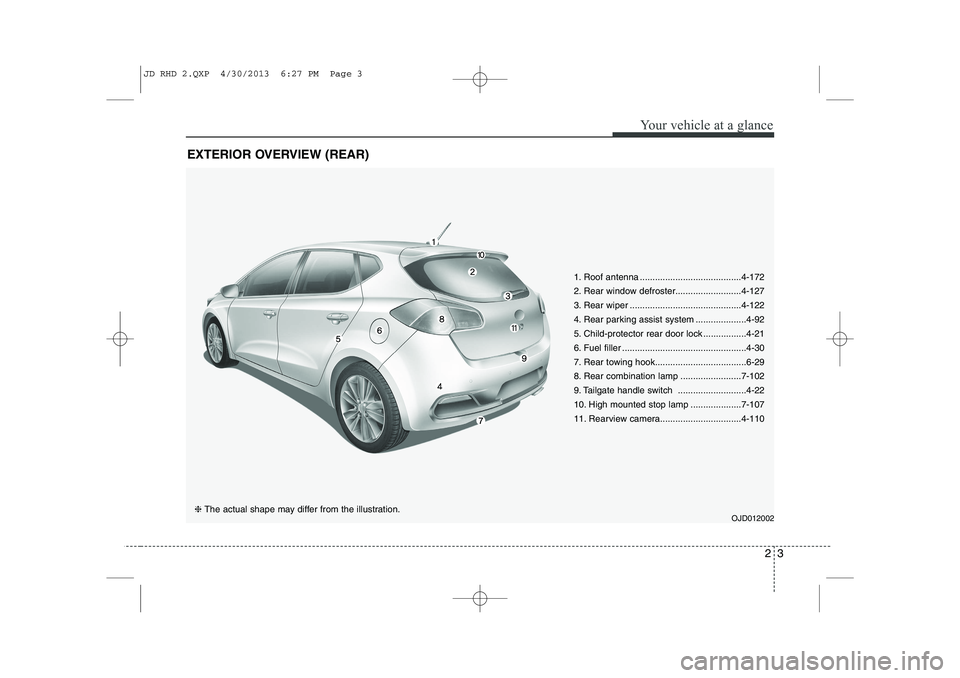
EXTERIOR OVERVIEW (REAR)
1. Roof antenna ........................................4-172
2. Rear window defroster..........................4-127
3. Rear wiper ............................................4-122
4. Rear parking assist system ....................4-92
5. Child-protector rear door lock .................4-21
6. Fuel filler .................................................4-30
7. Rear towing hook....................................6-29
8. Rear combination lamp ........................7-102
9. Tailgate handle switch ...........................4-22
10. High mounted stop lamp ....................7-107
11. Rearview camera................................4-110OJD012002
❈ The actual shape may differ from the illustration.
JD RHD 2.QXP 4/30/2013 6:27 PM Page 3
Page 636 of 1206
317
Safety system of your vehicle
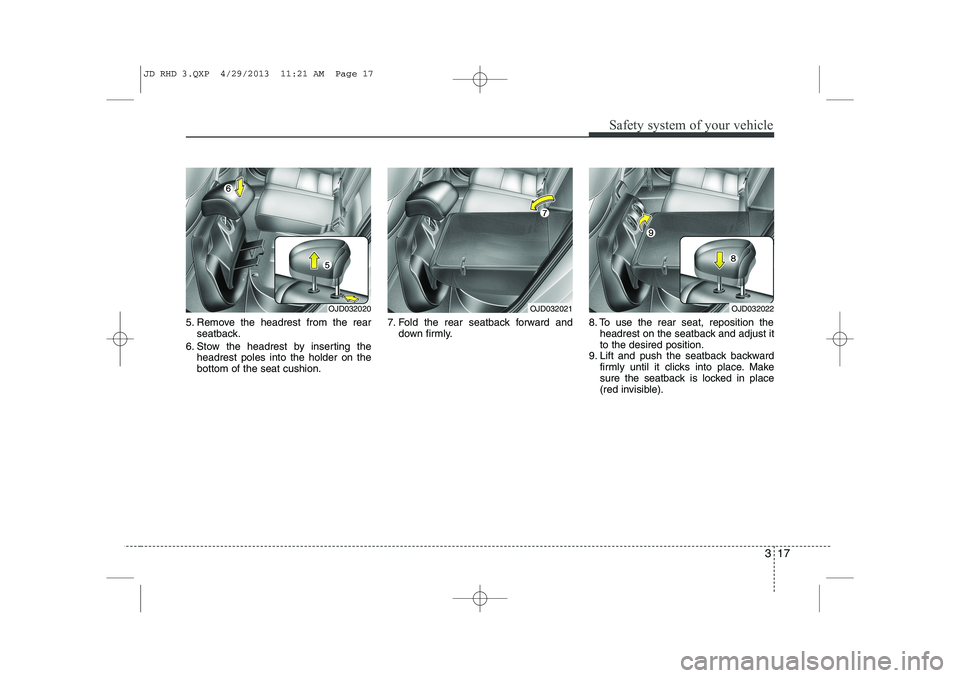
5. Remove the headrest from the rearseatback.
6. Stow the headrest by inserting the headrest poles into the holder on the bottom of the seat cushion. 7. Fold the rear seatback forward and
down firmly. 8. To use the rear seat, reposition the
headrest on the seatback and adjust itto the desired position.
9. Lift and push the seatback backward firmly until it clicks into place. Make
sure the seatback is locked in place
(red invisible).
OJD032020OJD032021OJD032022
JD RHD 3.QXP 4/29/2013 11:21 AM Page 17
Page 653 of 1206
Safety system of your vehicle
34
3
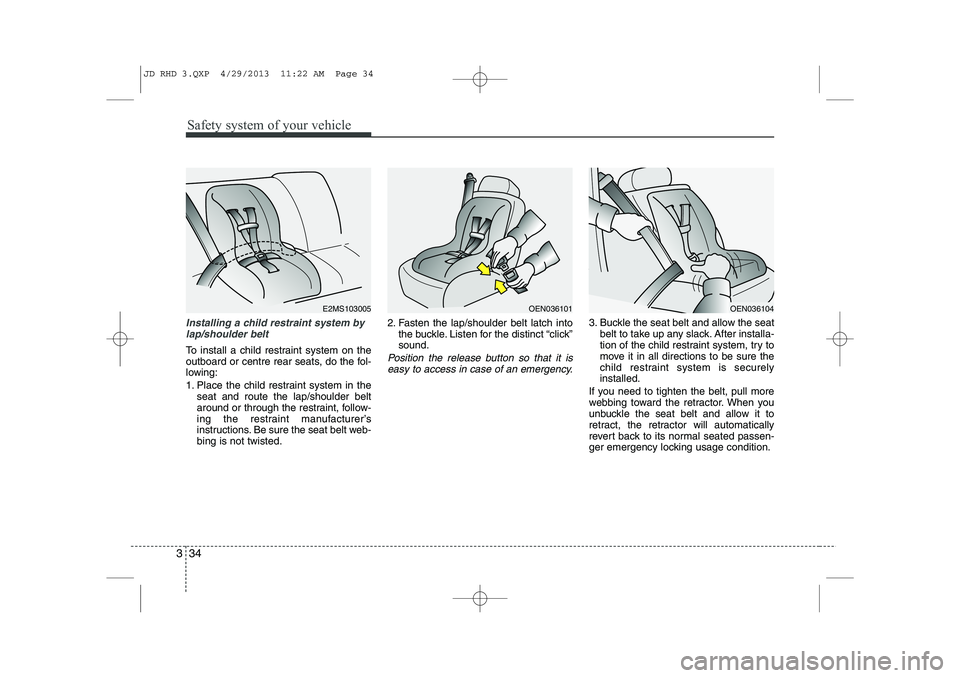
Installing a child restraint system by
lap/shoulder belt
To install a child restraint system on the
outboard or centre rear seats, do the fol-
lowing:
1. Place the child restraint system in the seat and route the lap/shoulder belt
around or through the restraint, follow-
ing the restraint manufacturer’s
instructions. Be sure the seat belt web-bing is not twisted. 2. Fasten the lap/shoulder belt latch into
the buckle. Listen for the distinct “click”sound.Position the release button so that it is
easy to access in case of an emergency.
3. Buckle the seat belt and allow the seat belt to take up any slack. After installa-
tion of the child restraint system, try to
move it in all directions to be sure the
child restraint system is securelyinstalled.
If you need to tighten the belt, pull more
webbing toward the retractor. When you
unbuckle the seat belt and allow it to
retract, the retractor will automatically
revert back to its normal seated passen-
ger emergency locking usage condition.
OEN036101OEN036104E2MS103005
JD RHD 3.QXP 4/29/2013 11:22 AM Page 34
Page 701 of 1206
417
Features of your vehicle
Operating door locks from out-
side the vehicle
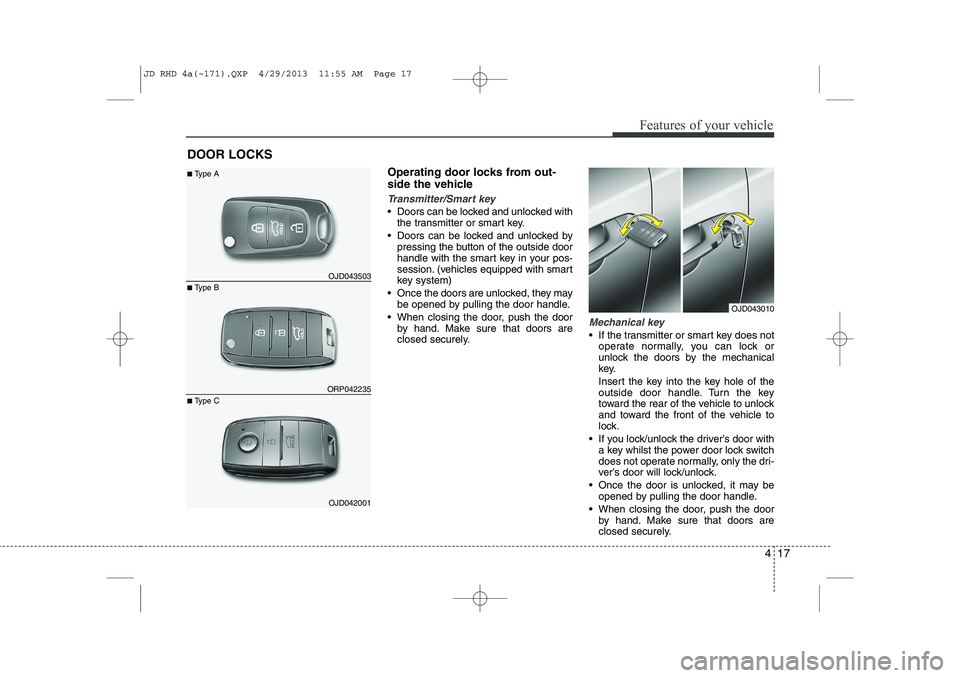
Transmitter/Smart key
Doors can be locked and unlocked withthe transmitter or smart key.
Doors can be locked and unlocked by pressing the button of the outside door
handle with the smart key in your pos-
session. (vehicles equipped with smart
key system)
Once the doors are unlocked, they may be opened by pulling the door handle.
When closing the door, push the door by hand. Make sure that doors are
closed securely.
Mechanical key
If the transmitter or smart key does not
operate normally, you can lock or
unlock the doors by the mechanical
key.
Insert the key into the key hole of the
outside door handle. Turn the key
toward the rear of the vehicle to unlock
and toward the front of the vehicle to
lock.
If you lock/unlock the driver’s door with a key whilst the power door lock switch
does not operate normally, only the dri-
ver’s door will lock/unlock.
Once the door is unlocked, it may be opened by pulling the door handle.
When closing the door, push the door by hand. Make sure that doors are
closed securely.
DOOR LOCKS
OJD043010
ORP042235
OJD043503
■ Type B
■
Type A
OJD042001
■
Type C
JD RHD 4a(~171).QXP 4/29/2013 11:55 AM Page 17
Page 725 of 1206
441
Features of your vehicle
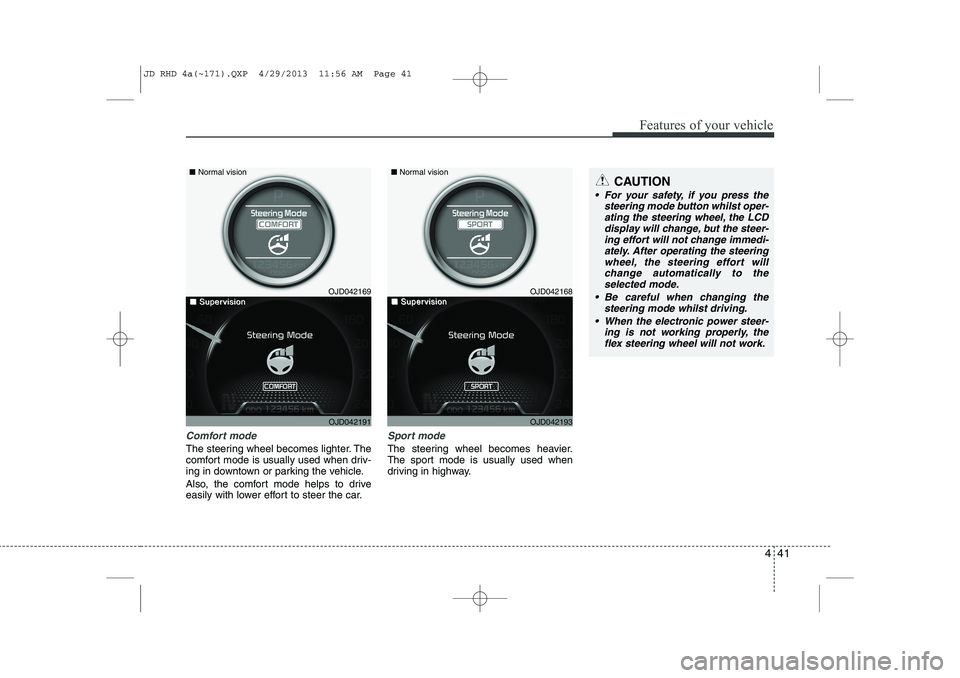
Comfort mode
The steering wheel becomes lighter. The
comfort mode is usually used when driv-
ing in downtown or parking the vehicle.
Also, the comfort mode helps to drive
easily with lower effort to steer the car.
Sport mode
The steering wheel becomes heavier.
The sport mode is usually used when
driving in highway.
CAUTION
For your safety, if you press thesteering mode button whilst oper-
ating the steering wheel, the LCDdisplay will change, but the steer-ing effort will not change immedi- ately. After operating the steering
wheel, the steering effort will change automatically to theselected mode.
Be careful when changing the steering mode whilst driving.
When the electronic power steer- ing is not working properly, theflex steering wheel will not work.
OJD042169
OJD042191
■
Normal vision
■■SuperSupervisionvisionOJD042168
OJD042193
■Normal vision
■■SuperSupervisionvision
JD RHD 4a(~171).QXP 4/29/2013 11:56 AM Page 41
Page 726 of 1206

Features of your vehicle
42
4
Inside rearview mirror
Adjust the rearview mirror so that the
centre view through the rear window is
seen. Make this adjustment before you
start driving.
Day/night rearview mirror
(if equipped)
Make this adjustment before you start
driving and whilst the day/night lever is in
the day position.
Pull the day/night lever toward you to
reduce glare from the headlights of vehi-
cles behind you during night driving.
Remember that you lose some rearviewclarity in the night position.
Electric chromic mirror (ECM)
(if equipped)
The electric rearview mirror automatical- ly controls the glare from the headlights
of the car behind you in nighttime or low
light driving conditions. The sensormounted in the mirror senses the light
level around the vehicle, and automati-cally controls the headlight glare from
vehicles behind you.
When the engine is running, the glare is
automatically controlled by the sensor
mounted in the rearview mirror.
Whenever the shift lever is shifted into R
(Reverse), the mirror will automatically
go to the brightest setting in order to
improve the drivers view behind the vehi-
cle.
MIRRORS
WARNING -
Rear visibility
Do not place objects in the rear
seat or cargo area which would
interfere with your vision out the
rear window.
CAUTION
When cleaning the mirror, use a paper towel or similar materialdampened with glass cleaner. Do not spray glass cleaner directly on
the mirror as that may cause the liq- uid cleaner to enter the mirror hous-ing.
WARNING
Do not adjust the rearview mirror
whilst the vehicle is moving. This
could result in loss of control, and
an accident which could cause
death, serious injury or property
damage.
WARNING
Do not modify the inside mirror and
do not install a wide mirror. It could
result in injury, during an accident
or deployment of the air bag.
OMD040031
D
DDDaaaayyyy
NNNNiiiigggghhhhtttt
JD RHD 4a(~171).QXP 4/29/2013 11:56 AM Page 42
Page 728 of 1206
Features of your vehicle
44
4
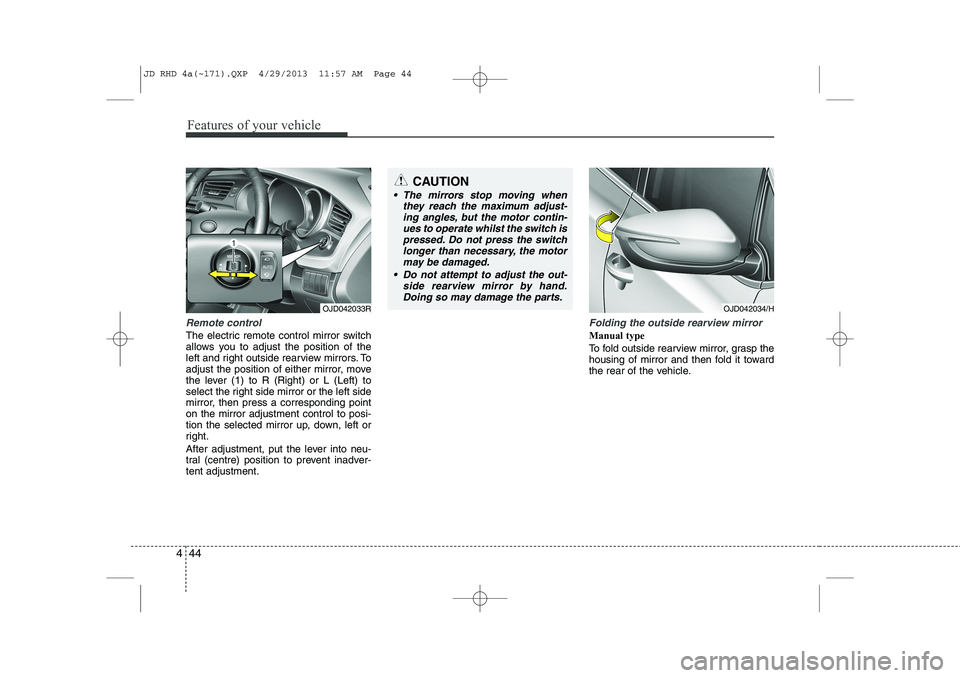
Remote control
The electric remote control mirror switch
allows you to adjust the position of the
left and right outside rearview mirrors. To
adjust the position of either mirror, move
the lever (1) to R (Right) or L (Left) to
select the right side mirror or the left side
mirror, then press a corresponding pointon the mirror adjustment control to posi-
tion the selected mirror up, down, left or
right.
After adjustment, put the lever into neu-
tral (centre) position to prevent inadver-tent adjustment.
Folding the outside rearview mirror
Manual type
To fold outside rearview mirror, grasp the
housing of mirror and then fold it toward
the rear of the vehicle.
CAUTION
The mirrors stop moving when
they reach the maximum adjust-
ing angles, but the motor contin-ues to operate whilst the switch ispressed. Do not press the switchlonger than necessary, the motor
may be damaged.
Do not attempt to adjust the out- side rearview mirror by hand.Doing so may damage the parts.
OJD042033ROJD042034/H
JD RHD 4a(~171).QXP 4/29/2013 11:57 AM Page 44
Page 733 of 1206
449
Features of your vehicle
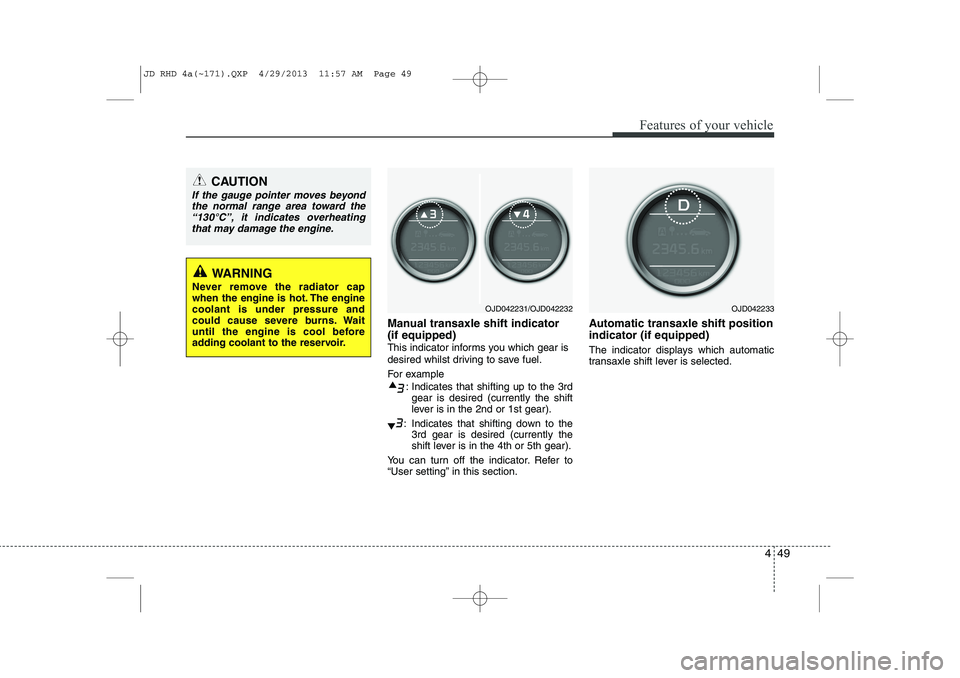
Manual transaxle shift indicator (if equipped)
This indicator informs you which gear is
desired whilst driving to save fuel.
For example: Indicates that shifting up to the 3rdgear is desired (currently the shift
lever is in the 2nd or 1st gear).
: Indicates that shifting down to the 3rd gear is desired (currently the
shift lever is in the 4th or 5th gear).
You can turn off the indicator. Refer to
“User setting” in this section. Automatic transaxle shift position indicator (if equipped)
The indicator displays which automatic
transaxle shift lever is selected.
OJD042233OJD042231/OJD042232
CAUTION
If the gauge pointer moves beyond
the normal range area toward the
“130°C”, it indicates overheatingthat may damage the engine.
WARNING
Never remove the radiator cap
when the engine is hot. The enginecoolant is under pressure and
could cause severe burns. Wait
until the engine is cool before
adding coolant to the reservoir.
JD RHD 4a(~171).QXP 4/29/2013 11:57 AM Page 49
Page 748 of 1206
Features of your vehicle
64
4
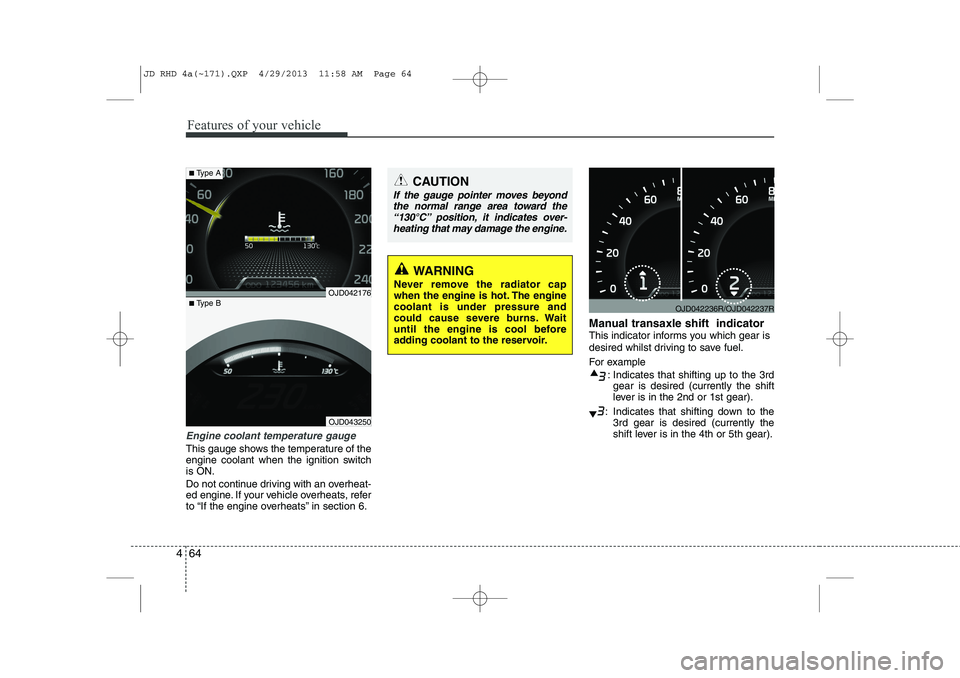
Engine coolant temperature gauge
This gauge shows the temperature of the
engine coolant when the ignition switchis ON.
Do not continue driving with an overheat-
ed engine. If your vehicle overheats, refer
to “If the engine overheats” in section 6. Manual transaxle shift indicator
This indicator informs you which gear is
desired whilst driving to save fuel.
For example
: Indicates that shifting up to the 3rdgear is desired (currently the shift
lever is in the 2nd or 1st gear).
: Indicates that shifting down to the 3rd gear is desired (currently the
shift lever is in the 4th or 5th gear).
OJD042236R/OJD042237R
CAUTION
If the gauge pointer moves beyond
the normal range area toward the
“130°C” position, it indicates over-heating that may damage the engine.
WARNING
Never remove the radiator cap
when the engine is hot. The enginecoolant is under pressure and
could cause severe burns. Wait
until the engine is cool before
adding coolant to the reservoir.
OJD043250
■ Type B
■Type A
OJD042176
JD RHD 4a(~171).QXP 4/29/2013 11:58 AM Page 64
Page 778 of 1206
Features of your vehicle
94
4
Non-operational conditions of rear parking assist system
The rear parking assist system may
not operate properly when:
1. Moisture is frozen to the sensor. (It will
operate normally when the moisture has been cleared.)
2. The sensor is covered with foreign matter, such as snow or water, or the
sensor cover is blocked. (It will operate
normally when the material is removed
or the sensor is no longer blocked.)
3. Driving on uneven road surfaces (unpaved roads, gravel, bumps, gradi-ent).
4. Objects generating excessive noise (vehicle horns, loud motorcycle
engines, or truck air brakes) are within
range of the sensor.
5. Heavy rain or water spray exists.
6. Wireless transmitters or mobile phones are within range of the sensor.
7. Trailer towing. The detecting range may decrease when:
1. The sensor is stained with foreign mat-
ter such as snow or water. (The sens-
ing range will return to normal when
removed.)
2. Outside air temperature is extremely hot or cold.
The following objects may not be rec-
ognized by the sensor:
1. Sharp or slim objects such as ropes, chains or small poles.
2. Objects which tend to absorb the sen- sor frequency such as clothes, spongy
material or snow.
3. Undetectable objects smaller than 1 m (40 in.) and narrower than 14 cm (6 in.)
in diameter. Rear parking assist system pre- cautions
The rear parking assist system may
not sound sequentially depending on the speed and shapes of the objectsdetected.
The rear parking assist system may malfunction if the vehicle bumperheight or sensor installation has been
modified or damaged. Any non-factory
installed equipment or accessories
may also interfere with the sensor per-
formance.
The sensor may not recognize objects less than 30 cm (11.8 in.) from the sen-
sor, or it may sense an incorrect dis-
tance. Use caution.
When the sensor is frozen or stained with snow, dirt, or water, the sensor
may be inoperative until the stains are
removed using a soft cloth.
Do not push, scratch or strike the sen- sor. Sensor damage could occur.
JD RHD 4a(~171).QXP 4/29/2013 12:00 PM Page 94