instrument panel KIA CEED 2017 User Guide
[x] Cancel search | Manufacturer: KIA, Model Year: 2017, Model line: CEED, Model: KIA CEED 2017Pages: 653, PDF Size: 54.59 MB
Page 72 of 653
355
Safety features of your vehicle
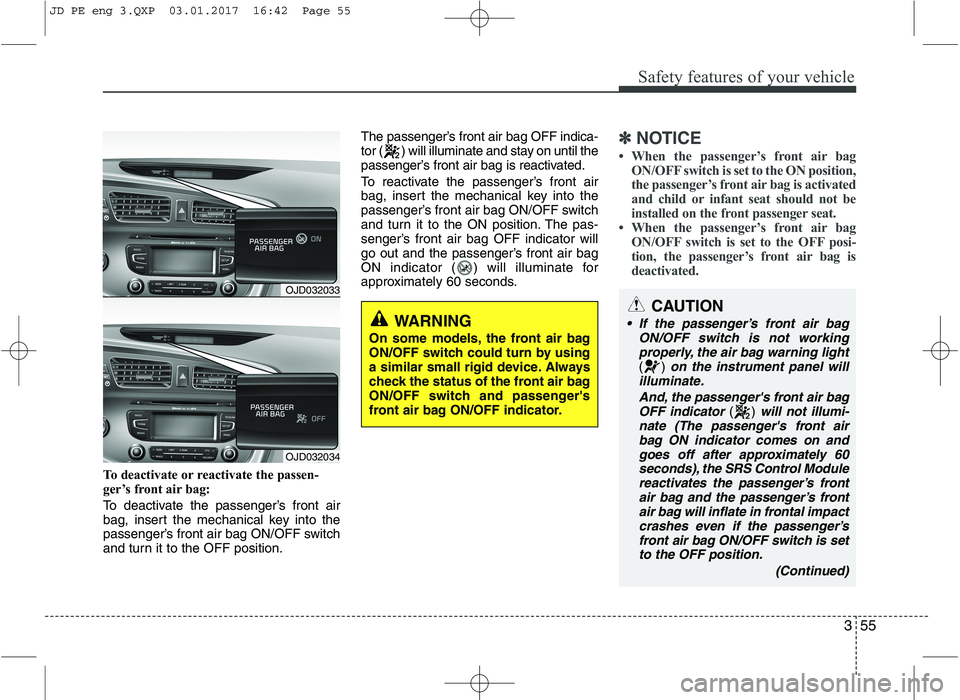
To deactivate or reactivate the passen-
ger’s front air bag:
To deactivate the passenger’s front air
bag, insert the mechanical key into the
passenger’s front air bag ON/OFF switch
and turn it to the OFF position.The passenger’s front air bag OFF indica-
tor ( ) will illuminate and stay on until the
passenger’s front air bag is reactivated.
To reactivate the passenger’s front air
bag, insert the mechanical key into the
passenger’s front air bag ON/OFF switch
and turn it to the ON position. The pas-
senger’s front air bag OFF indicator will
go out and the passenger’s front air bag
ON indicator ( ) will illuminate for
approximately 60 seconds.
✽✽
NOTICE
When the passenger’s front air bag
ON/OFF switch is set to the ON position,
the passenger’s front air bag is activated
and child or infant seat should not be
installed on the front passenger seat.
When the passenger’s front air bag
ON/OFF switch is set to the OFF posi-
tion, the passenger’s front air bag is
deactivated.
CAUTION
If the passenger’s front air bag
ON/OFF switch is not workingproperly, the air bag warning light
() on the instrument panel will
illuminate.
And, the passenger's front air bagOFF indicator
() will not illumi-
nate (The passenger's front air bag ON indicator comes on and
goes off after approximately 60 seconds), the SRS Control Modulereactivates the passenger’s front air bag and the passenger’s front
air bag will inflate in frontal impact crashes even if the passenger’sfront air bag ON/OFF switch is setto the OFF position.
(Continued)
WARNING
On some models, the front air bag
ON/OFF switch could turn by using
a similar small rigid device. Always
check the status of the front air bag
ON/OFF switch and passenger's
front air bag ON/OFF indicator.
OJD032033
OJD032034
JD PE eng 3.QXP 03.01.2017 16:42 Page 55
Page 73 of 653
Safety features of your vehicle
56
3
(Continued)
Never install a rearward facing
child seat on the front passen-
ger's seat unless the passenger's
front air bag has been deactivat-
ed. The infant or child could be
severely injured or killed by an air
bag deployment in case of anaccident.
Even though your vehicle is equipped with the passenger's
front air bag ON/OFF switch, do
not install a child restraint sys-
tem in the front passenger's seat.
A child restraint system must
never be placed in the front seat.
Children who are too large for
child restraint systems should
always occupy the rear seat and
use the available lap/shoulder
belts. Children are afforded the
most safety in the event of an
accident when they are
restrained by a proper restraintsystem in the rear seat.
As soon as the child seat is no longer needed on the front pas-
senger's seat, reactivate the front
passenger's air bag.
(Continued)
WARNING
The driver is responsible for the proper position of the passen-
ger’s front air bag ON/OFF switch.
Deactivate the passenger's front air bag only when the ignition
switch is switched off, or the mal-
function may occur in the SRS
Control Module.
And there may be a danger that
the driver's and/or front passen-
ger’s and/or side and curtain air
bag may fail to trigger, or not trig-
ger correctly during a collision. (Continued)
(Continued)
Never place or insert any objectinto any small opening near side
airbag labels attached to the
vehicle seats. When the air bag
deploys, the object may affect the
deployment and result in unex-
pected accident or bodily harm.(Continued)
If this occurs, we recommend thatthe system be inspected by an
authorized Kia dealer.
If the SRS air bag warning light blinks or does not illuminatewhen the ignition switch is turnedto the ON position, or if it illumi-
nates while the vehicle is beingdriven, we recommend that the system be inspected by an
authorized Kia dealer.
WARNING - No attaching objects
No objects (such as crash pad
cover, cellular phone holder, cup
holder, perfume or stickers) should
be placed over or near the air bagmodules on the steering wheel,
instrument panel, windshield glass,
and the front passenger's panel
above the glove box. Such objects
could cause harm if the vehicle is in
a crash severe enough to cause the
air bags to deploy. Do not place any
objects over the air bag or between
the air bag and yourself.
JD PE eng 3.QXP 03.01.2017 16:42 Page 56
Page 82 of 653

365
Safety features of your vehicle
SRS Care
The SRS is virtually maintenance-free
and so there are no parts you can safely
service by yourself. If the SRS air bag
warning light does not illuminate, or con-
tinuously remains on, we recommend
that the system be inspected by an
authorized Kia dealer.
WARNING
Modification to SRS components or wiring, including the addition
of any kind of badges to the pad
covers or modifications to the
body structure, can adversely
affect SRS performance and lead
to possible injury.
For cleaning the air bag pad cov- ers, use only a soft, dry cloth or
one which has been moistened
with plain water. Solvents or
cleaners could adversely affect
the air bag covers and proper
deployment of the system.
No objects should be placed over or near the air bag modules on
the steering wheel, instrument
panel, and the front passenger's
panel above the glove box,
because any such object could
cause harm if the vehicle is in a
crash severe enough to cause
the air bags to inflate.
(Continued)(Continued)
If the air bags inflate, we recom-mend that the system be replaced
by an authorized Kia dealer.
Do not tamper with or disconnect SRS wiring, or other components
of the SRS system. Doing so
could result in injury, due to acci-
dental inflation of the air bags or
by rendering the SRS inopera-
tive.
If components of the air bag sys- tem must be discarded, or if the
vehicle must be scrapped, certain
safety precautions must be
observed. An authorized Kia
dealer knows these precautions
and can give you the necessary
information. Failure to follow
these precautions and proce-dures could increase the risk of
personal injury.
If your car was flooded and has soaked carpeting or water on floor-
ing, you shouldn't try to start the
engine; we recommend that you
contact an authorized Kia dealer.
JD PE eng 3.QXP 03.01.2017 16:42 Page 65
Page 85 of 653

Features of your vehicle
Keys . . . . . . . . . . . . . . . . . . . . . . . . . . . . . . . . . . . . . . 4-4 Record your key number . . . . . . . . . . . . . . . . . . . . . . . 4-4
Key operations . . . . . . . . . . . . . . . . . . . . . . . . . . . . . . . . 4-4
Immobilizer system . . . . . . . . . . . . . . . . . . . . . . . . . . . . 4-4
Remote keyless entry . . . . . . . . . . . . . . . . . . . . . . . . 4-6 Remote keyless entry system operations . . . . . . . . . . . 4-6
Transmitter precautions . . . . . . . . . . . . . . . . . . . . . . . . 4-8
Battery replacement . . . . . . . . . . . . . . . . . . . . . . . . . . . 4-9
Smart key . . . . . . . . . . . . . . . . . . . . . . . . . . . . . . . . 4-11 Smart key function . . . . . . . . . . . . . . . . . . . . . . . . . . . 4-11
Smart key precautions . . . . . . . . . . . . . . . . . . . . . . . . 4-13
Door lock/unlock in an emergency situation . . . . . . 4-13
Theft-alarm system . . . . . . . . . . . . . . . . . . . . . . . . 4-14 Armed stage . . . . . . . . . . . . . . . . . . . . . . . . . . . . . . . . . 4-14
Theft-alarm stage . . . . . . . . . . . . . . . . . . . . . . . . . . . . 4-15
Disarmed stage. . . . . . . . . . . . . . . . . . . . . . . . . . . . . . . 4-16
Door locks . . . . . . . . . . . . . . . . . . . . . . . . . . . . . . . . 4-17 From outside . . . . . . . . . . . . . . . . . . . . . . . . . . . . . . . . 4-17
From inside . . . . . . . . . . . . . . . . . . . . . . . . . . . . . . . . . 4-18
Deadlocks . . . . . . . . . . . . . . . . . . . . . . . . . . . . . . . . . . . 4-20
Door lock/unlock features. . . . . . . . . . . . . . . . . . . . . . 4-20
Child-protector rear door lock. . . . . . . . . . . . . . . . . . 4-21
Tailgate . . . . . . . . . . . . . . . . . . . . . . . . . . . . . . . . . . 4-22 Opening the tailgate . . . . . . . . . . . . . . . . . . . . . . . . . . 4-22
Closing the tailgate . . . . . . . . . . . . . . . . . . . . . . . . . . . 4-22
Emergency tailgate safety release . . . . . . . . . . . . . . . 4-23
Windows . . . . . . . . . . . . . . . . . . . . . . . . . . . . . . . . . 4-24 Power windows . . . . . . . . . . . . . . . . . . . . . . . . . . . . . . 4-25 Manual windows . . . . . . . . . . . . . . . . . . . . . . . . . . . . . 4-28
Hood. . . . . . . . . . . . . . . . . . . . . . . . . . . . . . . . . . . . . 4-29 Opening the hood . . . . . . . . . . . . . . . . . . . . . . . . . . . . 4-29
Closing the hood . . . . . . . . . . . . . . . . . . . . . . . . . . . . . 4-30
Fuel filler lid . . . . . . . . . . . . . . . . . . . . . . . . . . . . . . 4-31 Opening the fuel filler lid . . . . . . . . . . . . . . . . . . . . . . 4-31
Closing the fuel filler lid . . . . . . . . . . . . . . . . . . . . . . . 4-31
Panorama sunroof . . . . . . . . . . . . . . . . . . . . . . . . . 4-34 Sunroof open warning. . . . . . . . . . . . . . . . . . . . . . . . . 4-35
Sunshade . . . . . . . . . . . . . . . . . . . . . . . . . . . . . . . . . . . 4-35
Sliding the sunroof . . . . . . . . . . . . . . . . . . . . . . . . . . . 4-35
Tilting the sunroof . . . . . . . . . . . . . . . . . . . . . . . . . . . . 4-36
Closing the sunroof . . . . . . . . . . . . . . . . . . . . . . . . . . . 4-36
Resetting the sunroof . . . . . . . . . . . . . . . . . . . . . . . . . 4-37
Steering wheel . . . . . . . . . . . . . . . . . . . . . . . . . . . . . 4-39 Electronic power steering . . . . . . . . . . . . . . . . . . . . . . 4-39
Tilt and telescopic steering . . . . . . . . . . . . . . . . . . . . . 4-40
Heated steering wheel . . . . . . . . . . . . . . . . . . . . . . . . . 4-40
Horn . . . . . . . . . . . . . . . . . . . . . . . . . . . . . . . . . . . . . . . 4-41
Flex steering wheel . . . . . . . . . . . . . . . . . . . . . . . . . . . 4-42
Mirrors . . . . . . . . . . . . . . . . . . . . . . . . . . . . . . . . . . 4-44 Inside rearview mirror . . . . . . . . . . . . . . . . . . . . . . . . 4-44
Outside rearview mirror. . . . . . . . . . . . . . . . . . . . . . . 4-45
Instrument cluster (Normal vision) . . . . . . . . . . . 4-48 Instrument panel illumination . . . . . . . . . . . . . . . . . . 4-49
Gauges . . . . . . . . . . . . . . . . . . . . . . . . . . . . . . . . . . . . . 4-49
Manual transaxle shift indicator . . . . . . . . . . . . . . . . 4-51
Automatic transaxle shift position indicator . . . . . . 4-51
4
Page 86 of 653
Dual clutch transmission shift indicator . . . . . . . . . . 4-52
Speed limiter indicator . . . . . . . . . . . . . . . . . . . . . . . . 4-53
Odometer . . . . . . . . . . . . . . . . . . . . . . . . . . . . . . . . . . . 4-53
Trip computer . . . . . . . . . . . . . . . . . . . . . . . . . . . . . . . 4-53
Instrument cluster (Super vision) . . . . . . . . . . . . . 4-61 Instrument panel illumination . . . . . . . . . . . . . . . . . . 4-63
Gauges . . . . . . . . . . . . . . . . . . . . . . . . . . . . . . . . . . . . . 4-63
Manual transaxle shift indicator . . . . . . . . . . . . . . . . 4-66
Automatic transaxle shift position indicator . . . . . . 4-67
Dual clutch transmission shift indicator . . . . . . . . . . 4-67
Speed limiter indicator . . . . . . . . . . . . . . . . . . . . . . . 4-68
Odometer . . . . . . . . . . . . . . . . . . . . . . . . . . . . . . . . . . . 4-68
Trip computer . . . . . . . . . . . . . . . . . . . . . . . . . . . . . . . 4-69
LCD display information . . . . . . . . . . . . . . . . . . . . . . 4-76
Warnings and indicators. . . . . . . . . . . . . . . . . . . . . . . 4-82
LCD display warnings and indicators (instrument panel display) . . . . . . . . . . . . . . . . . 4-93
Rear parking assist system . . . . . . . . . . . . . . . . . . 4-95 Operation . . . . . . . . . . . . . . . . . . . . . . . . . . . . . . . . . . . 4-95
Non-operational conditions . . . . . . . . . . . . . . . . . . . . 4-97
Precautions . . . . . . . . . . . . . . . . . . . . . . . . . . . . . . . . . . 4-97
Self-diagnosis . . . . . . . . . . . . . . . . . . . . . . . . . . . . . . . . 4-98
Parking assist system . . . . . . . . . . . . . . . . . . . . . . . 4-99 Operation . . . . . . . . . . . . . . . . . . . . . . . . . . . . . . . . . . 4-100
Non-operational conditions . . . . . . . . . . . . . . . . . . . 4-102
Self-diagnosis . . . . . . . . . . . . . . . . . . . . . . . . . . . . . . . 4-103
Smart Parking Assist System (SPAS) . . . . . . . . . 4-104 Operating condition . . . . . . . . . . . . . . . . . . . . . . . . . 4-105
Non-operating condition . . . . . . . . . . . . . . . . . . . . . . 4-106 How the system works (Parking mode) . . . . . . . . . 4-109
How the system works (Exit mode) . . . . . . . . . . . . . 4-115
Additional instructions (messages). . . . . . . . . . . . . . 4-118
System malfunction . . . . . . . . . . . . . . . . . . . . . . . . . . 4-119
Rearview camera . . . . . . . . . . . . . . . . . . . . . . . . . 4-120
Hazard warning flasher . . . . . . . . . . . . . . . . . . . . 4-120
Lighting . . . . . . . . . . . . . . . . . . . . . . . . . . . . . . . . . 4-121 Battery saver function. . . . . . . . . . . . . . . . . . . . . . . . 4-121
Headlamp delay function . . . . . . . . . . . . . . . . . . . . . 4-121
Headlight (Headlamp) welcome function . . . . . . . . 4-121
Static bending light . . . . . . . . . . . . . . . . . . . . . . . . . . 4-122
Lighting control . . . . . . . . . . . . . . . . . . . . . . . . . . . . . 4-122
High - beam operation . . . . . . . . . . . . . . . . . . . . . . . 4-124
High beam assist (HBA) . . . . . . . . . . . . . . . . . . . . . . 4-125
Turn signals and lane change signals . . . . . . . . . . . 4-126
Front fog light . . . . . . . . . . . . . . . . . . . . . . . . . . . . . . 4-127
Rear fog light . . . . . . . . . . . . . . . . . . . . . . . . . . . . . . . 4-128
Daytime running light . . . . . . . . . . . . . . . . . . . . . . . . 4-128
Headlight leveling device . . . . . . . . . . . . . . . . . . . . . 4-128
Adaptive Front Lighting System (AFLS) . . . . . . . . 4-129
Wipers and washers . . . . . . . . . . . . . . . . . . . . . . . 4-131 Windshield wipers (front) . . . . . . . . . . . . . . . . . . . . . 4-131
Windshield washers (front) . . . . . . . . . . . . . . . . . . . 4-133
Rear window wiper and washer switch. . . . . . . . . . 4-134
Interior light . . . . . . . . . . . . . . . . . . . . . . . . . . . . . 4-135 Interior lamp AUTO cut . . . . . . . . . . . . . . . . . . . . . . 4-135
Map lamp . . . . . . . . . . . . . . . . . . . . . . . . . . . . . . . . . . 4-135
Room lamp . . . . . . . . . . . . . . . . . . . . . . . . . . . . . . . . . 4-136
Vanity mirror lamp . . . . . . . . . . . . . . . . . . . . . . . . . . 4-136
4
Page 133 of 653

449
Features of your vehicle
Instrument panel illumination
The instrument panel illumination intensity
can be adjusted as follows:
Ignition switch in the ON position
Pressing the upper or lower part of theswitch
The illumination intensity is shown on the
instrument cluster LCD display. Gauges
Speedometer
The speedometer indicates the vehicle speed.
The speedometer is calibrated in kilome-
ters per hour and/or miles per hour.
Tachometer
The tachometer indicates the engine
speed in revolutions per minute (rpm). Use the tachometer to select the correct
shift points and to prevent lugging and/or
over-revving the engine.
OJD042047OJD042044/OJD042045OJD042040■
Diesel Engine
■ Gasoline Engine
CAUTION
Do not operate the engine within
the tachometer's RED ZONE. Thismay cause severe engine damage.
Page 147 of 653

463
Features of your vehicle
Instrument panel illumination
The instrument panel illumination intensity
can be adjusted as follows:
Ignition switch in the ON position
Pressing the upper or lower part of theswitch
The illumination intensity is shown on the
instrument cluster LCD display. Gauges
Tachometer
The tachometer indicates the engine
speed in revolutions per minute (rpm). Use the tachometer to select the correct
shift points and to prevent lugging and/or
over-revving the engine.
OJD042047
CAUTION
Do not operate the engine within
the tachometer's RED ZONE. This
may cause severe engine damage.
OJD042044/OJD042045
■
Diesel Engine
■ Gasoline Engine
Page 160 of 653

Features of your vehicle
76
4
LCD display information
Sunroof open
If driver removes the ignition key (Smart
key : turns off the engine) and opens the
driver-side door when the sunroof is not
fully closed, warning message will appear
on the LCD display. Also, the warning
chime sounds for approximately 7 sec-
onds.
Illumination intensity
The illumination intensity of the instru-
ment panel is shown when adjusting it
with the illumination control switch.
For more details, refer to “Instrument
panel illumination” in chapter 4.
Turn on "FUSE SWITCH" (mode switch)
The notice appears to inform the driver to
turn on the fuse switch in the instrument
panel under the steering wheel.
For more details, refer to “Fuses” in chap- ter 7.
■ Normal vision
■Supervision■ Normal vision
■Supervision■ Normal vision
■Supervision
OJD042240/OUM044265LOJD042079/OJD045523LOJD042078/OJD045215
Page 177 of 653
493
Features of your vehicle
LCD DISPLAY WARNINGS AND INDICATORS (INSTRUMENT PANEL DISPLAY)Calendar / Clock / Outside ambi-
ent Temperature (if equipped)
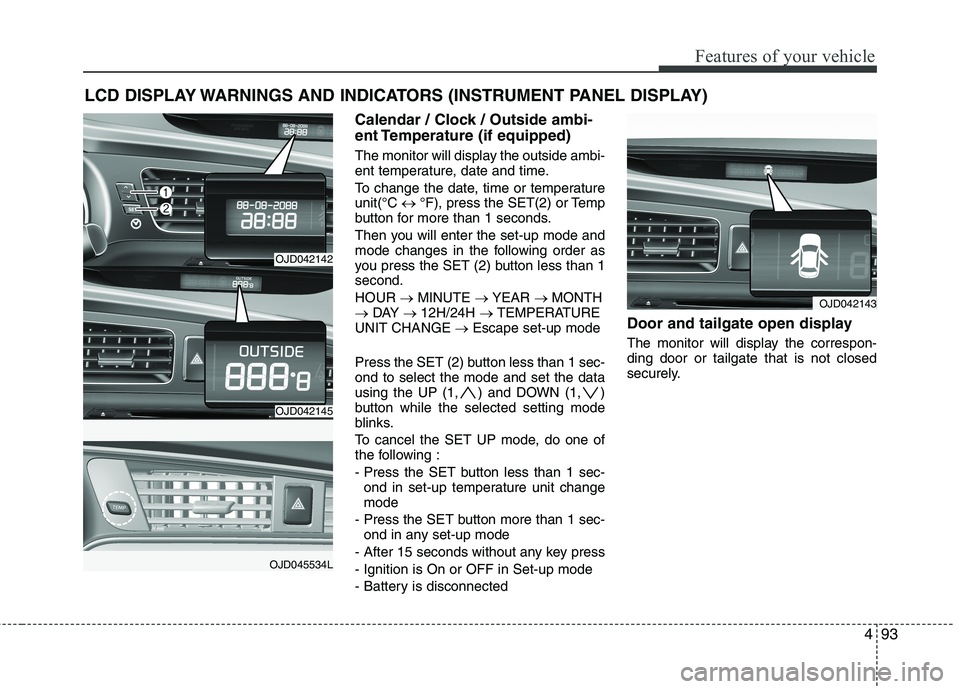
The monitor will display the outside ambi-
ent temperature, date and time.
To change the date, time or temperature unit(°C °F), press the SET(2) or Temp
button for more than 1 seconds.
Then you will enter the set-up mode and
mode changes in the following order as
you press the SET (2) button less than 1second. HOUR MINUTE YEAR MONTH
DAY 12H/24H TEMPERATURE
UNIT CHANGE Escape set-up mode
Press the SET (2) button less than 1 sec- ond to select the mode and set the data
using the UP (1, ) and DOWN (1, )
button while the selected setting mode
blinks.
To cancel the SET UP mode, do one of
the following :
- Press the SET button less than 1 sec- ond in set-up temperature unit change mode
- Press the SET button more than 1 sec- ond in any set-up mode
- After 15 seconds without any key press
- Ignition is On or OFF in Set-up mode
- Battery is disconnected Door and tailgate open display
The monitor will display the correspon- ding door or tailgate that is not closed
securely.
OJD042143
OJD042142
OJD042145
OJD045534L
Page 206 of 653
Features of your vehicle
122
4
Static bending light (if equipped)
While driving the corner, for your sight
and safety, the static bending light turns
on automatically. The system will operate
automatically as follows:
When vehicle speed is under 10km/h
and steering wheel angle approximate-
ly 80 degrees.
When vehicle speed is over 10km/h and steering wheel angle approximate-
ly 35 degrees.
When the vehicle is at a standstill.
When moving rearwards with one of the above conditions satisfied the lights will light up the opposite direction. Lighting control
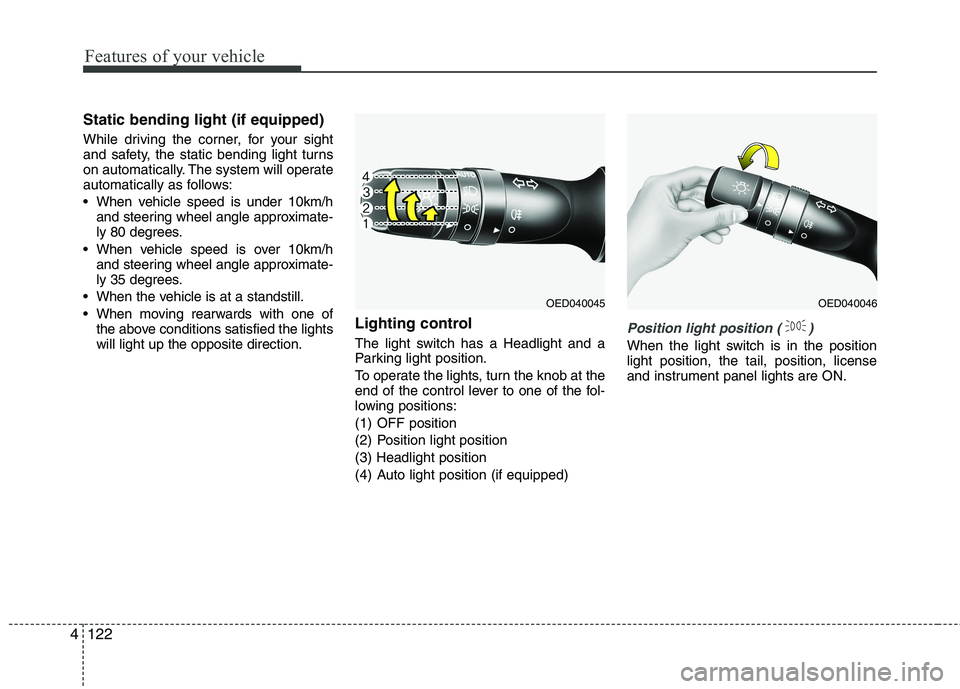
The light switch has a Headlight and a
Parking light position.
To operate the lights, turn the knob at the
end of the control lever to one of the fol-
lowing positions:
(1) OFF position
(2) Position light position(3) Headlight position
(4) Auto light position (if equipped)
Position light position ( )
When the light switch is in the position light position, the tail, position, license
and instrument panel lights are ON.
OED040045OED040046