parking brake KIA CEED 2017 User Guide
[x] Cancel search | Manufacturer: KIA, Model Year: 2017, Model line: CEED, Model: KIA CEED 2017Pages: 653, PDF Size: 54.59 MB
Page 192 of 653

Features of your vehicle
108
4
(Continued)
5. Parking in uneven road
Parking in uneven roads, the driver
needs to properly apply the pedal
(clutch, accelerator or brake). If not,
the system may cancel when the
vehicle slips or an accident may
occur.
(Continued)(Continued)
6. Parking behind a truck
An accident may occur when park-
ing behind a vehicle higher than
yours. For example, bus, truck, etc.(Continued)
OJD042159OJD042160
(Continued)
7. Obstacle in parking space
The system may search for a park-
ing space even though an obstacle
is in the parking space. An accident
may occur if you continue to park
the vehicle with the system.
Do not solely rely on the Smart
Parking Assist System.
(Continued)
OLM041272
Page 193 of 653

4109
Features of your vehicle
How the system works
(Parking mode)
1. Activate the Smart Parking AssistSystem
The shift lever should be placed in D
(Drive) or N(Neutral).
2. Select parking assist mode
3. Search for parking space (slowly move forward.)
4. Search complete (automatic search by sensor.)
5. Steering wheel control (1) Shift according to the instruction on the LCD display.
(2) Drive slowly with the brake pedal applied.
6. Smart Parking Assist System complete
7. If necessary, manually adjust position of vehicle.
✽✽ NOTICE
Before activating the system check if the conditions are possible to use the
system.
For your safety, always apply the
brake pedal except for when driving.
1. Activate Smart Parking Assist
System
Press the Smart Parking AssistSystem button (the button indicator will illuminate).
The Parking Assist System will be acti- vated (the button indicator will illumi-nate).
A warning sound will be heard if an obstacle is detected.
Press the Smart Parking Assist System button again for more than 2
seconds to turn off the system.
The Smart Parking Assist System defaults to the OFF position whenever
the ignition switch is turned on.
OJD042082
(Continued)
8. Leaving a parking space near a wall
When leaving a parking space that
is narrow and near a wall, the sys-
tem may not work properly. When
leaving a parking space similar to
the above picture, the driver must
watch out for obstacles while leav-ing.
OJD045533
Page 194 of 653

Features of your vehicle
110
4
2. Select parking assist mode
Select the parking assist mode by press-
ing the Smart Parking Assist System
button with the shift lever in N (Neutral)
or D(Drive) and the brake pedal
depressed. If the speed of the vehicle
has not exceeded 5km/h with the IGN in
ON, move the shift lever to N(Neutral) to
select the parallel exit mode.
The right side parallel mode is select- ed automatically when the Smart
Parking Assist System is activated.
To select the left side parallel mode press the Smart Parking Assist System
button once more.
If the button is pressed again, the sys- tem will turn off.
The mode changes from parallel mode (right →left) to reverse mode (right →
left) whenever the Smart Parking Assist
System button is pressed. (for LHD)
The mode changes from parallel mode (left →right) to reverse mode (left →
right) whenever the Smart Parking
Assist System button is pressed. (forRHD)
3. Search for parking space (optional)
Slowly drive forward maintaining the
distance of approximately 50cm ~ 150cm (19.6in.~59.0in.) with the
parked vehicles. The side sensors will
search for a parking space.
■Right side
- parallel mode ■
Left side
-parallel mode
■ Right side
- reverse mode ■
Left side
- reverse mode
OJD045306L/OJD045307L
OUM044308L/OUM044309L
■Right side
- parallel mode ■
Left side
-parallel mode
■ Right side
- reverse mode ■
Left side
- reverse mode
OJD045536L/OJD045537L
OJD045304L/OJD045305L
Page 196 of 653

Features of your vehicle
112
4
4. Search complete
While driving forward to search for a
parking space, the above message willappear with a beep sound if the search is
complete. Stop the vehicle and shift to
the R (Reverse) position.
5. Steering wheel control
The above message will appear if the
shift lever is in R (Reverse). The steering
wheel will be controlled automatically.
The system will be cancelled if you firmly hold the steering wheel while it is
controlled automatically.
The system will be cancelled if vehicle speed is over 7km/h(4.3mph).
CAUTION
Always drive slowly with the
brake pedal applied.
If the parking space is to small the system may be cancelled atthe Steering wheel control stage.Do not park your vehicle if the
space is too small.
OUM044315L
WARNING
Do not put your hands between the steering wheel while it is being
automatically controlled.
■ Right side
- parallel mode ■
Left side
-parallel mode
■ Right side
- reverse mode ■
Left side
- reverse mode
OJD045302L/OJD045303L
OUM044304L/OUM044305L
Page 197 of 653

4113
Features of your vehicle
✽✽NOTICE
If you do not follow the instructions pro- vided, you may fail to park your vehicle.
However, if the Parking Assist System
warning sound (distance from object
is within 30cm: continuous beep)
occurs, slowly drive the vehicle to the
reverse direction of the detected
object after checking the surrounding.
Always check the surrounding before
driving your vehicle if the Parking
Assist System warning sound (dis-
tance from object is within 30cm: con-
tinuous beep) is heard for the object is
close to your vehicle.
To cancel the system while parking
Press the Smart Parking Assist System
button or turn the steering wheel to the
left or right.
Gear shift while steering wheel control
When the above message appears with a
beep sound, shift the gear and drive the
vehicle with the brake pedal depressed.■Manual transaxle
■ Automatic transaxle
OUM044316L/OUM044317L
OUM044318L/OUM044317L
CAUTION
Always drive slowly with the
brake pedal applied.
Always check for objects around your vehicle before driving.
If the vehicle does not move even though the brake pedal is notdepressed, check the surround-
ing before depressing the accel-erator pedal. Be sure not to speedover 7km/h(4.3mph).
Page 198 of 653
Features of your vehicle
114
4
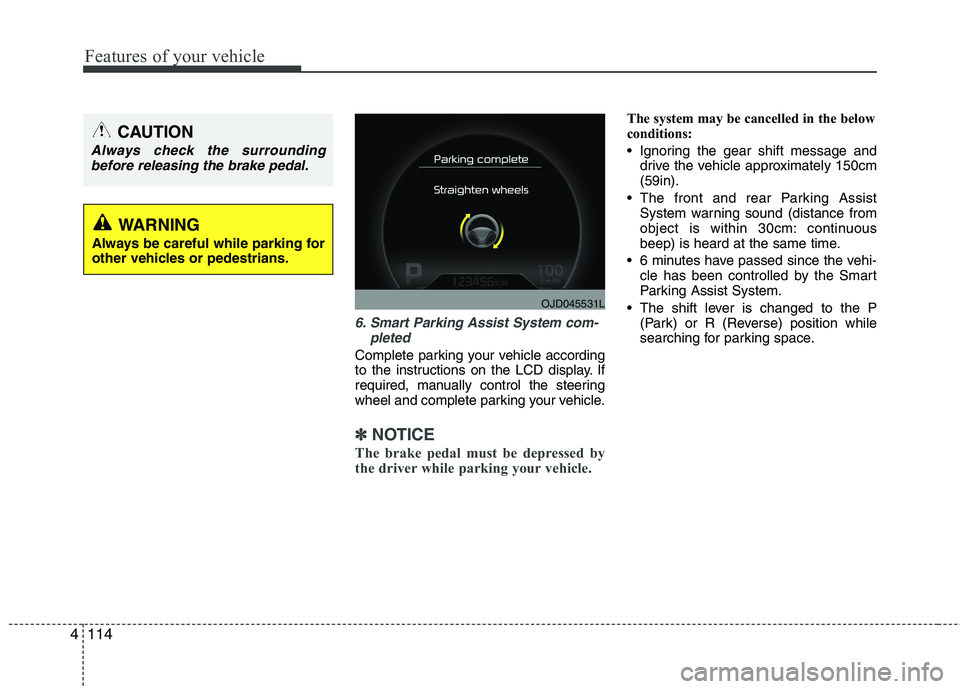
6. Smart Parking Assist System com-
pleted
Complete parking your vehicle according
to the instructions on the LCD display. If
required, manually control the steering
wheel and complete parking your vehicle.
✽✽NOTICE
The brake pedal must be depressed by
the driver while parking your vehicle.
The system may be cancelled in the below
conditions:
Ignoring the gear shift message and drive the vehicle approximately 150cm (59in).
The front and rear Parking Assist System warning sound (distance from
object is within 30cm: continuous
beep) is heard at the same time.
6 minutes have passed since the vehi- cle has been controlled by the Smart
Parking Assist System.
The shift lever is changed to the P (Park) or R (Reverse) position while
searching for parking space.
OJD045531L
WARNING
Always be careful while parking for
other vehicles or pedestrians.
CAUTION
Always check the surrounding before releasing the brake pedal.
Page 199 of 653

4115
Features of your vehicle
How the system works (Exit mode)
The Exit Mode operates in the below condition:
When vehicle speed is below 5 km/hthe first time after the engine has been
started.
After parallel parking is completed with the Smart Parking Assist System.
1. Activate the Smart Parking Assist System
The shift lever should be placed in P (Park) or N (Neutral).
2. Select Exit Mode
3. Check surroundings
4. Steering wheel control (1) Shift according to the instruction on the LCD display.
(2) Drive slowly with the brake pedal applied.
5. Exiting complete If necessary, manually adjust position
of vehicle.✽✽NOTICE
Before activating the system check if the conditions are possible to use the
system.
For your safety, always apply the
brake pedal except for when driving.
1. Activate Smart Parking Assist
System
Press the Smart Parking Assist
System button (the button indicator will illuminate).
The Parking Assist System will be acti- vated (the button indicator will illumi- nate).
A warning sound will be heard if an obstacle is detected.
Press the Smart Parking Assist System button again for more than 2
seconds to turn off the system.
The Smart Parking Assist System defaults to the OFF position whenever
the ignition switch is turned on.
OJD042082
Page 200 of 653

Features of your vehicle
116
4
2. Select Exit Mode
Select the mode by pressing the Smart
Parking Assist System button with the
shift lever in P (Park) or N (Neutral)
and the brake pedal depressed.
The left side parallel mode is selected automatically when the Smart Parking
Assist System is activated.
To select the right side parallel mode press the Smart Parking Assist System
button once more.
If the button is pressed again, the sys- tem will turn off.
3. Check surroundings
The Smart Parking Assist System checks
the front and rear space to exit the vehicle
from the parking space.
✽✽ NOTICE
When checking surroundings, if the front or rear vehicle (or object) is too
near, the system may not work prop-
erly.
The system may not operate normally in the following conditions:
(1) When the sensors are frozen
(2) When the sensors are dirty
(3) When it snows or rains heavily
(4) When a pillar or object is near
When exiting the parking space if an obstacle is detected that may cause an
accident, the system may cancel.
If the space is too small to exit the sys-
tem may cancel.
OUM044326LOUM044325L
■Left side
- Parallel exit■ Right side
- Parallel exit
CAUTION
If searching surroundings is com-
pleted, continue using the system
after checking the surroundingarea.
The Exit mode may be activated unintentionally, when the shift
lever is in P (Park) or N (Neutral) if the Smart parking assist systembutton is pressed.
OUM044324LOUM044323L
■ Left side
- Parallel exit■Right side
- Parallel exit
Page 201 of 653

4117
Features of your vehicle
4. Steering wheel control
The above message will appear if theshift lever is in D (Drive) or R (Reverse) according to the distance of the front
and rear object from the sensor.
The steering wheel will be controlled
automatically.
The system will be cancelled if you firmly hold the steering wheel while it is
controlled automatically.
The system will be cancelled if vehicle speed is over 7km/h (4.3mph). To cancel the system while exiting
Press the Parking Assist System or
Smart Parking Assist System button.
WARNING
Do not put your hands between the steering wheel while it is being
automatically controlled.
CAUTION
Always drive slowly with the brake pedal applied.
OUM044318L
OUM044317L
OUM045315L
Page 382 of 653

Driving your vehicle
4
5
Before entering vehicle
• Be sure that all windows, outside mir-
ror(s), and outside lights are clean.
Check the condition of the tires.
Check under the vehicle for any sign of leaks.
Be sure there are no obstacles behind you if you intend to back up. Necessary inspections
Fluid levels, such as engine oil, engine
coolant, brake fluid, and washer fluid
should be checked on a regular basis,
with the exact interval depending on the
fluid. Further details are provided in
chapter 7, “Maintenance”.
Before starting
Close and lock all doors.
Position the seat so that all controls are
easily reached.
Adjust the inside and outside rearview mirrors.
Be sure that all lights work.
Check all gauges.
Check the operation of warning lights when the ignition switch is turned to the ON position.
Release the parking brake and make sure the brake warning light goes out.
For safe operation, be sure you are famil-
iar with your vehicle and its equipment.
BEFORE DRIVING
WARNING
All passengers must be properly
belted whenever the vehicle is mov-
ing. Refer to “Seat belts” in chapter
3 for more information on their
proper use.
WARNING
Always check the surrounding areas
near your vehicle for people, espe-
cially children, before putting a vehi-
cle into “D (Drive)” or “R (Reverse)”.
WARNING
Driving while distracted can result
in a loss of vehicle control, that
may lead to an accident, severe
personal injury, and death. The dri-
ver’s primary responsibility is in
the safe and legal operation of a
vehicle, and use of any handheld
devices, other equipment, or vehi-
cle systems which take the driver’s
eyes, attention and focus away
from the safe operation of a vehicle
or which are not permissible by law
should never be used during oper-
ation of the vehicle.