park assist KIA CEED 2017 Owner's Manual
[x] Cancel search | Manufacturer: KIA, Model Year: 2017, Model line: CEED, Model: KIA CEED 2017Pages: 653, PDF Size: 54.59 MB
Page 197 of 653

4113
Features of your vehicle
✽✽NOTICE
If you do not follow the instructions pro- vided, you may fail to park your vehicle.
However, if the Parking Assist System
warning sound (distance from object
is within 30cm: continuous beep)
occurs, slowly drive the vehicle to the
reverse direction of the detected
object after checking the surrounding.
Always check the surrounding before
driving your vehicle if the Parking
Assist System warning sound (dis-
tance from object is within 30cm: con-
tinuous beep) is heard for the object is
close to your vehicle.
To cancel the system while parking
Press the Smart Parking Assist System
button or turn the steering wheel to the
left or right.
Gear shift while steering wheel control
When the above message appears with a
beep sound, shift the gear and drive the
vehicle with the brake pedal depressed.■Manual transaxle
■ Automatic transaxle
OUM044316L/OUM044317L
OUM044318L/OUM044317L
CAUTION
Always drive slowly with the
brake pedal applied.
Always check for objects around your vehicle before driving.
If the vehicle does not move even though the brake pedal is notdepressed, check the surround-
ing before depressing the accel-erator pedal. Be sure not to speedover 7km/h(4.3mph).
Page 198 of 653
Features of your vehicle
114
4
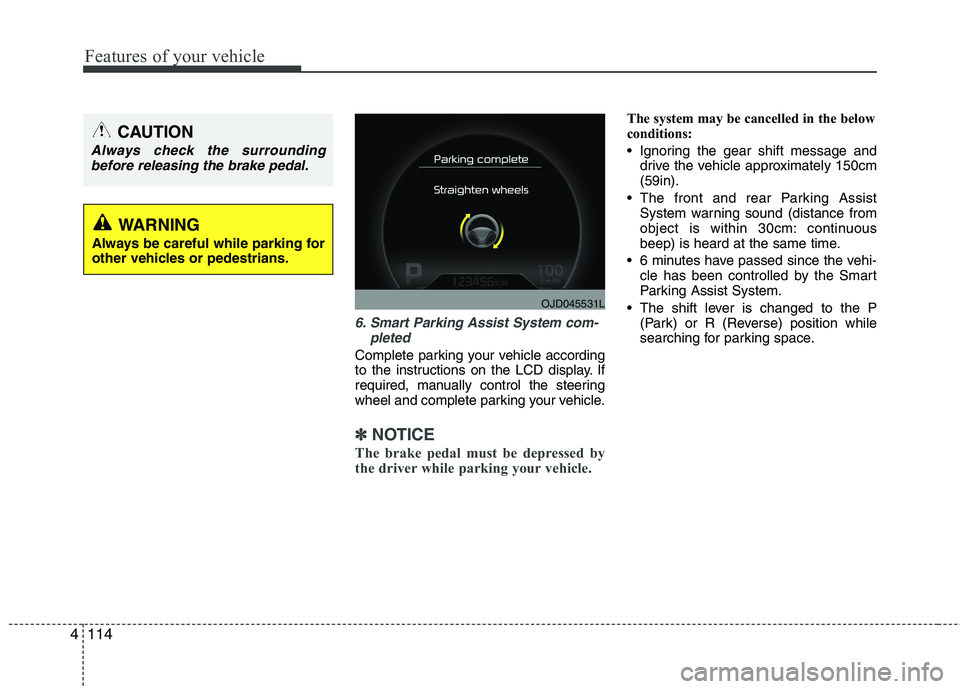
6. Smart Parking Assist System com-
pleted
Complete parking your vehicle according
to the instructions on the LCD display. If
required, manually control the steering
wheel and complete parking your vehicle.
✽✽NOTICE
The brake pedal must be depressed by
the driver while parking your vehicle.
The system may be cancelled in the below
conditions:
Ignoring the gear shift message and drive the vehicle approximately 150cm (59in).
The front and rear Parking Assist System warning sound (distance from
object is within 30cm: continuous
beep) is heard at the same time.
6 minutes have passed since the vehi- cle has been controlled by the Smart
Parking Assist System.
The shift lever is changed to the P (Park) or R (Reverse) position while
searching for parking space.
OJD045531L
WARNING
Always be careful while parking for
other vehicles or pedestrians.
CAUTION
Always check the surrounding before releasing the brake pedal.
Page 199 of 653

4115
Features of your vehicle
How the system works (Exit mode)
The Exit Mode operates in the below condition:
When vehicle speed is below 5 km/hthe first time after the engine has been
started.
After parallel parking is completed with the Smart Parking Assist System.
1. Activate the Smart Parking Assist System
The shift lever should be placed in P (Park) or N (Neutral).
2. Select Exit Mode
3. Check surroundings
4. Steering wheel control (1) Shift according to the instruction on the LCD display.
(2) Drive slowly with the brake pedal applied.
5. Exiting complete If necessary, manually adjust position
of vehicle.✽✽NOTICE
Before activating the system check if the conditions are possible to use the
system.
For your safety, always apply the
brake pedal except for when driving.
1. Activate Smart Parking Assist
System
Press the Smart Parking Assist
System button (the button indicator will illuminate).
The Parking Assist System will be acti- vated (the button indicator will illumi- nate).
A warning sound will be heard if an obstacle is detected.
Press the Smart Parking Assist System button again for more than 2
seconds to turn off the system.
The Smart Parking Assist System defaults to the OFF position whenever
the ignition switch is turned on.
OJD042082
Page 200 of 653

Features of your vehicle
116
4
2. Select Exit Mode
Select the mode by pressing the Smart
Parking Assist System button with the
shift lever in P (Park) or N (Neutral)
and the brake pedal depressed.
The left side parallel mode is selected automatically when the Smart Parking
Assist System is activated.
To select the right side parallel mode press the Smart Parking Assist System
button once more.
If the button is pressed again, the sys- tem will turn off.
3. Check surroundings
The Smart Parking Assist System checks
the front and rear space to exit the vehicle
from the parking space.
✽✽ NOTICE
When checking surroundings, if the front or rear vehicle (or object) is too
near, the system may not work prop-
erly.
The system may not operate normally in the following conditions:
(1) When the sensors are frozen
(2) When the sensors are dirty
(3) When it snows or rains heavily
(4) When a pillar or object is near
When exiting the parking space if an obstacle is detected that may cause an
accident, the system may cancel.
If the space is too small to exit the sys-
tem may cancel.
OUM044326LOUM044325L
■Left side
- Parallel exit■ Right side
- Parallel exit
CAUTION
If searching surroundings is com-
pleted, continue using the system
after checking the surroundingarea.
The Exit mode may be activated unintentionally, when the shift
lever is in P (Park) or N (Neutral) if the Smart parking assist systembutton is pressed.
OUM044324LOUM044323L
■ Left side
- Parallel exit■Right side
- Parallel exit
Page 201 of 653

4117
Features of your vehicle
4. Steering wheel control
The above message will appear if theshift lever is in D (Drive) or R (Reverse) according to the distance of the front
and rear object from the sensor.
The steering wheel will be controlled
automatically.
The system will be cancelled if you firmly hold the steering wheel while it is
controlled automatically.
The system will be cancelled if vehicle speed is over 7km/h (4.3mph). To cancel the system while exiting
Press the Parking Assist System or
Smart Parking Assist System button.
WARNING
Do not put your hands between the steering wheel while it is being
automatically controlled.
CAUTION
Always drive slowly with the brake pedal applied.
OUM044318L
OUM044317L
OUM045315L
Page 202 of 653

Features of your vehicle
118
4
5. Exiting Complete
When assisting the driver exit the parking
space is completed the above message
will appear.
Turn the steering wheel to the direction
you are leaving and manually control the
steering wheel while leaving the parking
space.
Additional instructions(messages)
CAUTION
When leaving the parking spaceturn the steering wheel as much
as you can to the direction youare leaving, and then drive thevehicle slowly by depressing the vehicle.
Always check the surrounding before driving your vehicle if theParking Assist System warningsound is continuously heard.
The system will be cancelled for safety reasons if the vehicle isparked at a small space near awall.
OUM044328L
OUM044319L
OUM044320L
OUM044321L
Page 203 of 653

4119
Features of your vehicle
When the Smart Parking Assist System
is operating, a message may appear
regardless of the parking order. The messages will appear according to
the circumstances. Follow the instruc-
tions provided while parking your vehicle
with the Smart Parking Assist System.✽✽NOTICE
In the below conditions the system will be cancelled. Park your vehicle manually.
1. Search for parking space
- When the ABS/ESC is activated
- When the vehicle speed is over30km/h(18.6mph)
- When you press the Smart Parking Assist System button (the front and
rear Parking Assist System operates)
- When you shift the shift lever to R
(Reverse)
2. Steering wheel control
- When the ABS/ESC is activated
- When the vehicle speed is over7km/h (4.3 mph)
- When you press the Smart Parking
Assist System button (the front and
rear Parking Assist System operates)
- When you shift the shift lever to D (Drive) before entering the parking
space
- When you hold the steering wheel
firmly
System malfunction
If there is a problem with the system, when the system is turned on, the
above message will appear. Also, the
indicator on the button will not light up
and a beep sound will be heard 3 times.
If there is a problem with only the Smart Parking Assist System, the
Parking Assist System will operate
after 2 seconds.
If you notice any problem, have your
vehicle checked by an authorized Kia
dealer as soon as possible.
OJD045532L
Page 433 of 653

555
Driving your vehicle
VSM operation off
If you press the ESC OFF button to turn
off the ESC, the VSM will also cancel and
the ESC OFF indicator light ( ) illumi-
nates.
To turn on the VSM, press the button again. The ESC OFF indicator light goes out.
Malfunction indicator
The VSM can be deactivated even if you
don’t cancel the VSM operation by press-
ing the ESC OFF button. It indicates thata malfunction has been detected some-
where in the EPS (Electronic Power
Steering) system or VSM system. If the
ESC indicator light ( ) or EPS warning
light remains on, we recommend that the
system be checked by an authorized Kia
dealer.
✽✽NOTICE
The VSM is designed to function above approximately 15 km/h (9 mph)
on curves.
The VSM is designed to function above approximately 30 km/h (18
mph) when a vehicle is braking on a
split-mu road. The split-mu road is
made of surfaces which have different
friction forces.
Hill-start assist control (HAC) (if equipped)
A vehicle has the tendency to slip back
on a steep hill when it starts to go after
stopping. The Hill-start Assist Control
(HAC) prevents the vehicle from slipping
back by operating the brakes automati-
cally for about 1~2 seconds. The brakes
are released when the accelerator pedal
is depressed or after about 1~2 seconds.
✽✽ NOTICE
The HAC does not operate when the transaxle shift lever is in the P (Park)
or N (Neutral) position.
The HAC activates even though the ESC is off but it does not activate
when the ESC has malfunctioned.
WARNING
The HAC is activated only for about
1~2 seconds, so when the vehicle
is starting off always depress theaccelerator pedal.
WARNING
The Vehicle Stability Management system is not a substitute for
safe driving practices but a sup-
plementary function only. It is theresponsibility of the driver to
always check the speed and the
distance to the vehicle ahead.
Always hold the steering wheel
firmly while driving.
Your vehicle is designed to acti- vate according to the driver’s
intention, even with the VSM
installed. Always follow all the
normal precautions for driving at
safe speeds for the conditions –
including driving in inclement
weather and on a slippery road.
Driving with varying tire or wheel sizes may cause the VSM system
to malfunction. When replacing
tires, make sure they are the
same size as your original tires.
Page 457 of 653

579
Driving your vehicle
Operating conditions
Select RCTA (Rear Cross Traffic Alert)in "User Settings" under "Driving Assist"
on the instrument cluster. The system
will turn on and stand by to be activated.
Select RCTA again, to turn the system off.
If the vehicle is turned off and on again, the RCTA system will return to
the state right before the vehicle was
turned off. Turn the RCTA system off
when not in use.
The system is operated when the vehi- cle speed is below 10km/h (6.2mph)
with the shift lever in R (Reverse).
✽✽ NOTICE
The Rear Cross Traffic Alert (RCTA)
detecting range is approximately
0.5 m ~ 20 m (1 ft ~ 65 ft). An approach-
ing vehicle will be detected if their vehi-
cle speed is within 4 km/h ~ 36 km/h (2.5
~ 22.5 mph ).
Note that the detecting range may vary
under certain conditions. As always, use
caution and pay close attention to your
surroundings when backing up your
vehicle.
Warning type
If the vehicle detected by the sensors approaches your vehicle, the warning
chime will sound, the warning light on
the outside rearview mirror will blink.
If the detected vehicle is out of detec- tion range, moving away in the oppo-
site direction or moving slow, the warn-ing is cancelled.
The system may not operate properly due to other factors or circumstances.
Always pay attention to your surround-ing.
If the sensing area near the rear bumper is blocked by either a wall or
barrier or by a parked vehicle, the sys-
tem sensing area may be reduced.
OYP054027KOJD055124L
Page 483 of 653

65
What to do in an emergency
EMERGENCY STARTING
Connect cables in numerical order and
disconnect in reverse order. Jump starting
Jump starting can be dangerous if done
incorrectly. Therefore, to avoid harm to
yourself or damage to your vehicle or
battery, follow the jump starting proce-
dures. If in doubt, we strongly recom-
mend that you have a competent techni-
cian or towing service jump start your
vehicle.
CAUTION
Use only a 12-volt jumper system.
You can damage a 12-volt starting motor, ignition system, and otherelectrical parts beyond repair byuse of a 24-volt power supply (either
two 12-volt batteries in series or a24-volt motor generator set).
WARNING - Battery
• Keep all flames or sparks away from the battery. The battery pro-
duces hydrogen gas which may
explode if exposed to flame orsparks.
If these instructions are not fol-
lowed exactly, serious personal
injury and damage to the vehicle
may occur! If you are not sure how
to follow this procedure, seek
qualified assistance. Automobilebatteries contain sulfuric acid.
This is poisonous and highly cor-
rosive. When jump starting, wear
protective glasses and be careful
not to get acid on yourself, your
clothing or on the vehicle.
Do not attempt to jump start the vehicle if the discharged battery
is frozen or if the electrolyte level
is low; the battery may rupture or
explode.
Do not allow the (+) and (-) jumper cables to touch. It maycause sparks.
The battery may rupture or explode when you jump start with
a low or frozen battery.
WARNING - Battery
Never attempt to check the elec-
trolyte level of the battery as this
may cause the battery to rupture or
explode causing serious injury.
1VQA4001
Discharged battery
Jumper Cables
■
Engine compartment
Booster battery(-)
(+)
(+)(-)